door lock MERCEDES-BENZ E-CLASS CABRIOLET 2010 Owner's Manual
[x] Cancel search | Manufacturer: MERCEDES-BENZ, Model Year: 2010, Model line: E-CLASS CABRIOLET, Model: MERCEDES-BENZ E-CLASS CABRIOLET 2010Pages: 333, PDF Size: 7.64 MB
Page 100 of 333
:
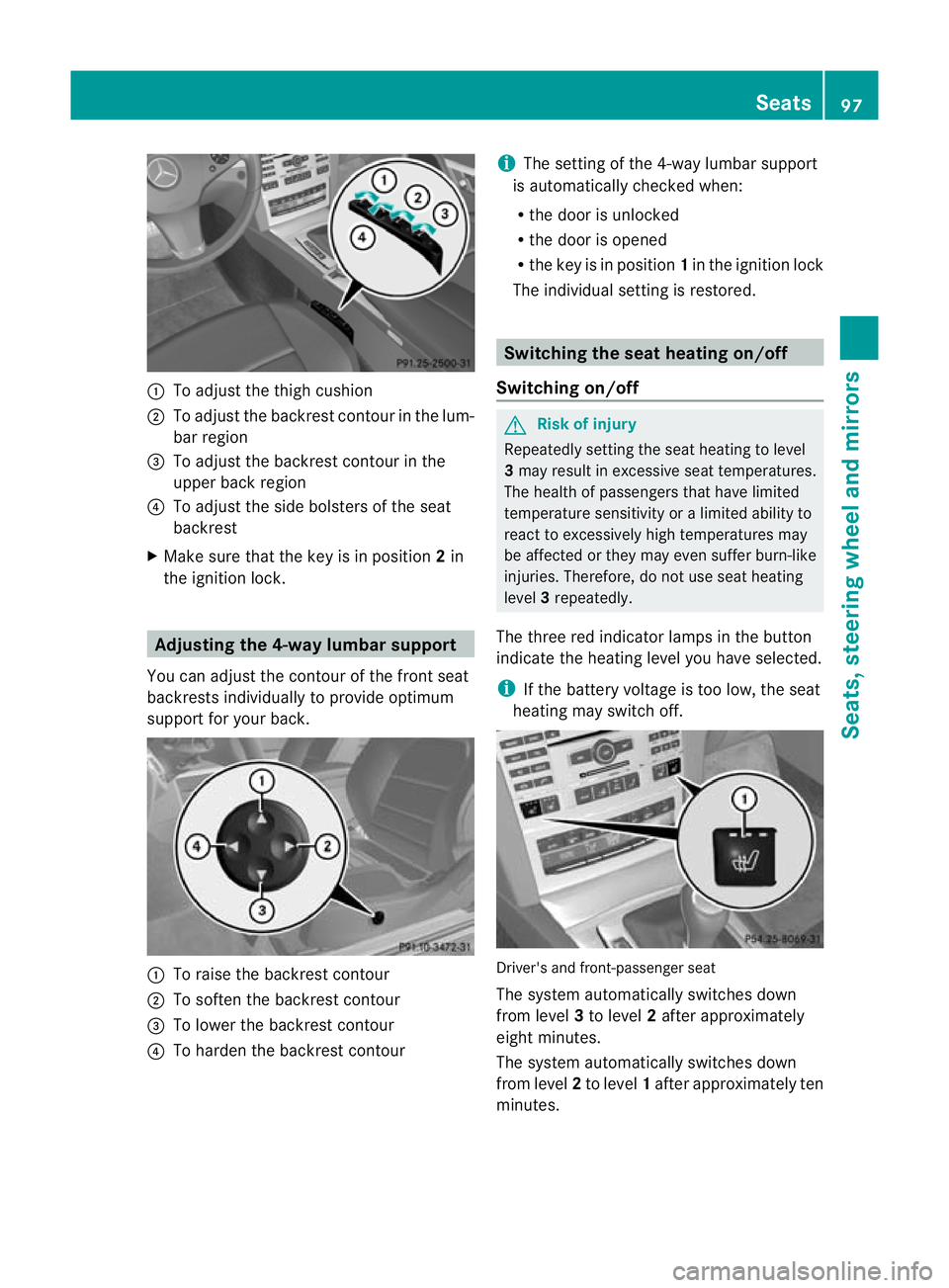
To adjust the thigh cushion
; To adjust the backrest contour in the lum-
bar region
= To adjust the backrest contour in the
upper back region
? To adjust the side bolster softhe seat
backrest
X Make sur ethat the key is in position 2in
the ignition lock. Adjusting th
e4-way lumbar support
Yo uc an adjust the contour of the fron tseat
backrest sindividually to provide optimum
support for your back. :
To raise the backres tcontour
; To soften the backrest con tour
= To lower the backrest contour
? To harden the backrest contour i
The setting of the 4-way lumbar support
is automatically checked when:
R the door is unlocked
R the door is opened
R the key is in position 1in the ignition lock
The individual setting is restored. Switching the seat heating on/off
Switching on/off G
Risk of injury
Repeatedl ysetting the seat heating to level
3 may result in excessiv eseat temperatures.
The health of passengers that have limited
temperatur esensitivit yoralimited ability to
react to excessively high temperatures may
be affected or they may even suffer burn-like
injuries. Therefore, do not use seat heating
level 3repeatedly.
The three red indicator lamps in the button
indicat ethe heating level you hav eselected.
i If the batter yvoltage is too low, the seat
heatin gmay switch off. Driver's and front-passenger seat
The system automatically switches down
from level
3to level 2after approximately
eigh tminutes.
The system automatically switches down
from level 2to level 1after approximately ten
minutes. Seats
97Seats, steerin gwhee land mirrors
BA 20 7ECE ÄJ 2010/1a; 1; 2, en-GB
mkalafa Version: 3.0.2.11 2010-01-26T13:03:22+01:00-Seite 97 Z
Page 103 of 333
Adjusting th
esteering wheel electri-
cally :
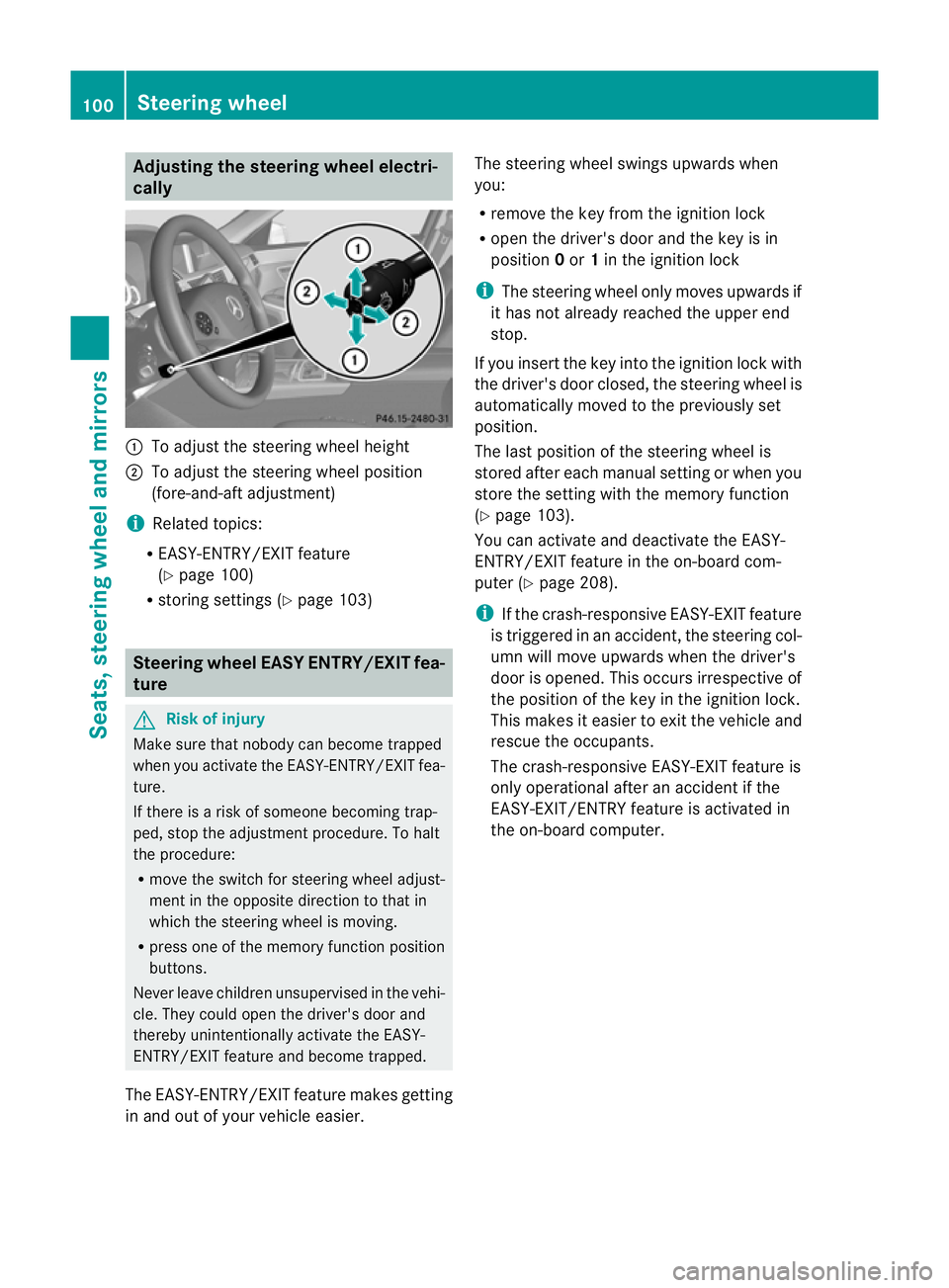
To adjust th esteering whee lheight
; To adjust th esteering whee lposi tion
(fore-and-af tadjustment)
i Related topics:
R EASY-ENTRY/EXIT feature
(Y page 100)
R storing setting s(Ypage 103) Steering whee
lEASY ENTRY/EXIT fea-
ture G
Ris
kofi njury
Mak esuret hat nob ody can become trapped
when you activa tethe EASY-ENTRY/EXIT fea-
ture.
If there is arisk of someon ebecoming trap-
ped, stop th eadjustmen tprocedure. To ha lt
the procedure:
R move the switch for steering whee ladjust-
ment in the opposite direction to that in
which the steerin gwheel is moving.
R press one of the memory function position
buttons.
Never leave children unsu pervis edin the vehi-
cle. They could open the driver's door and
thereby unintentionally activate the EASY-
ENTRY/EXIT featur eand become trapped.
The EASY-ENTRY/EXIT feature makes getting
in and out of you rvehicle easier. The steering wheel swings upwards when
you:
R
remove the key from the ignition lock
R open the driver' sdoor and the key is in
position 0or 1in the ignition lock
i The steering wheel only moves upwards if
it has not already reached the upper end
stop.
If you inser tthe key int othe ignition lock with
the driver's door closed ,the steering wheel is
automatically moved to the previously set
position.
The last position of the steering wheel is
stored after eac hmanual setting or when you
store the setting with the memory function
(Y page 103).
You can activate and deactivat ethe EASY-
ENTRY/ EXIT feature in th eon-board com-
puter (Y page208).
i If the crash-responsive EASY-EXIT feature
is trigge redinana ccident,the steering col-
um nw ill move upwards when the driver's
door is opened. This occur sirrespective of
th ep osition of the key in the ignition lock.
This makes it easier to exit the vehicle and
rescue the occupants.
The crash-responsive EASY- EXIT feature is
only operational afte ranaccidentif the
EASY-EXIT/ENTRY featur eisactivate din
the on-board computer. 100
Steerin
gwheelSeats, steering wheel an dmirrors
BA 207ECE ÄJ 2010 /1a;1;2,e n-GB
mkalafa Version: 3.0.2.11 2010-01-26T13:03:22+01:00-Seite 100
Page 105 of 333
i
Make sur ethat the exterior mirrors are
always folded out fully while the vehicle is
in motion as they ma yotherwis evibrate.
Resetting the exterior mirrors If the battery has been disconnected or com-
pletely discharged, the exterior mirrors must
be reset. The exterior mirrors will otherwise
not fold in when you select the "Fold in mir-
rors when locking" func tion in the on-board
computer (Y page 209).
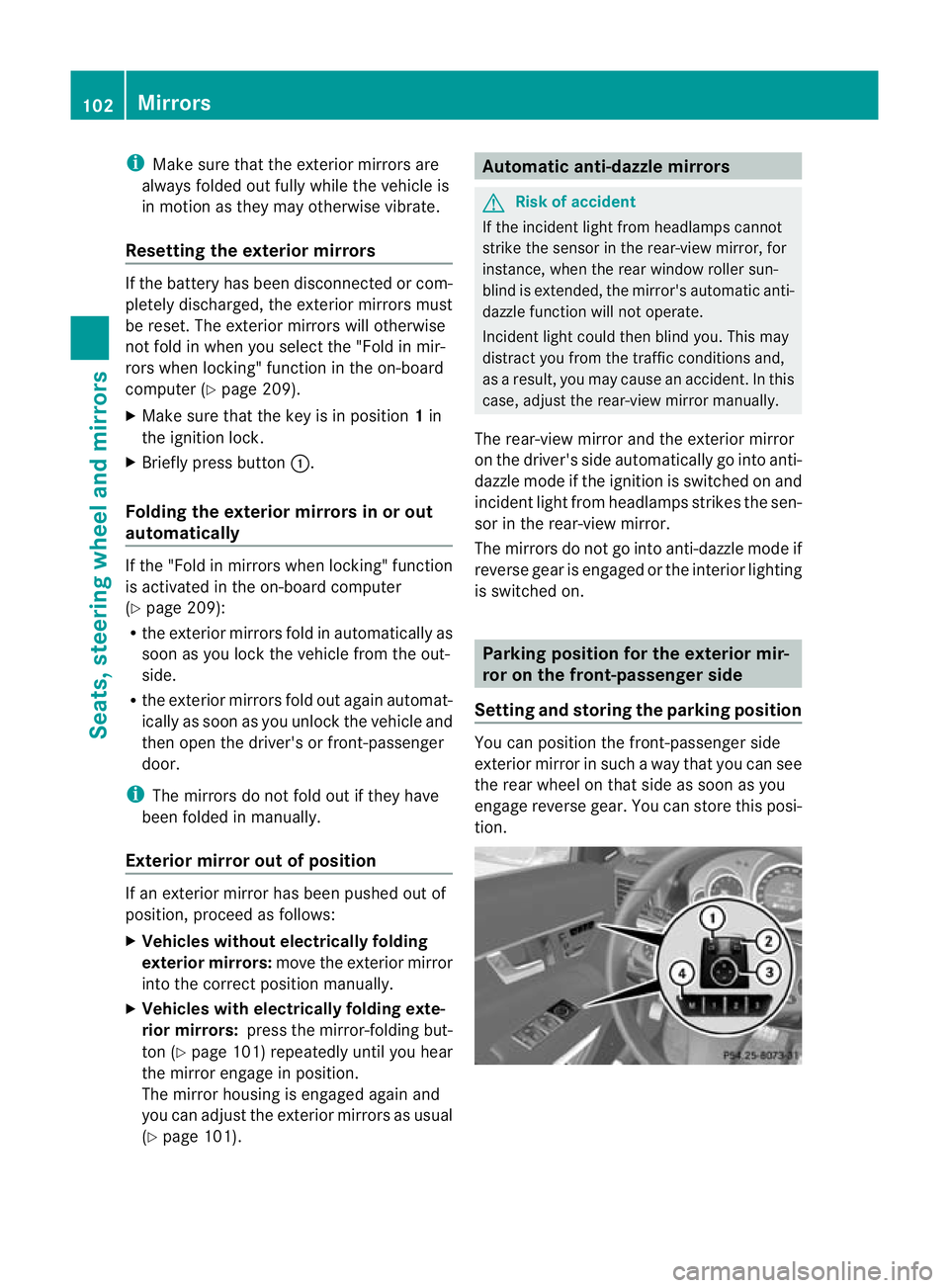
X Make sure that the key is in position 1in
the ignition lock.
X Briefl ypres sbutton :.
Folding the exterior mirrors in or out
automatically If the "Fold in mirrors when locking" function
is activated in the on-board computer
(Y page 209):
R the exterior mirrors fold in automatically as
soo nasyou lock the vehicle from the out-
side.
R the exterior mirror sfold out again automat-
ically as soon as you unloc kthe vehicle and
then open the driver's or front-passenger
door.
i The mirrors do not fol dout if they have
been folded in manually.
Exterior mirror out of position If an exterior mirror has been pushed out of
position, proceed as follows:
X Vehicles without electrically folding
exterior mirrors: move the exterior mirror
into the correct position manually.
X Vehicles with electrically folding exte-
rior mirrors: press the mirror-folding but-
ton (Y page 101 )repeatedly until you hear
the mirror engage in position.
The mirror housing is engaged again and
you can adjust the exterior mirror sasusual
(Y page 101). Automatic anti-dazzle mir
rors G
Risk of accident
If the incident ligh tfrom headl ampscannot
strike the senso rinthe rear-vie wmirror ,for
instance, when the rea rwindow roller sun-
blind is extended, the mirror' sautomatic anti-
dazzle function will not operate.
Incident light could then blind you. This may
distract you from the traffic conditions and,
as aresult, you may cause an accident. In this
case, adjust the rear-view mirror manually.
The rear-view mirror and the exterior mirror
on the driver' sside automatically go into anti-
dazzle mode if the ignition is switched on and
incident light from headlamps strikes the sen-
sor in the rear-view mirror.
The mirrors do not go into anti-daz zlem ode if
reverse gear is engaged or the interior lighting
is switched on. Parking position for th
eexterior mir-
ror on th efront-passenger side
Settin gand storing th eparking position Yo
uc an position the front-passenger side
exterior mirror in such away that you can see
the rear wheel on that side as soon as you
engage reverse gear. You can store this posi-
tion. 102
MirrorsSeats
,steering whee land mirrors
BA 20 7ECE ÄJ 2010 /1a;1;2,e n-GB
mkalafa Version: 3.0.2.11 2010-01-26T13:03:22+01:00-Seite 102
Page 109 of 333
Vehicl
eequipment
i Thismanua ldesc ribe sallthe standard
and optional equipment of your vehicle
which wa savailable at th etime of pur-
chase. Countr y-specif ic differences are
possible. Bear in mind tha tyour vehicle
ma ynot featur eall function sdescribed
here. Exterio
rlighting Important safet
ynotes
For reasons of safety, Mercedes-Ben zrecom-
mends that you driv ewith the lights switched
on even during the daytime. In some coun-
tries, operation of the headlamps varies due
to legal requirement sand self-imposed obli-
gations. In these countries, the daytime driv-
ing lights are automatically switche donwhen
the engin eisstarted. Notes on driving abroad
Converting to symmetrical dipped beam
when drivin gabroad: switch the headlamps
to symmetrical dipped beam in countries in
which traffic drives on the opposite side of the
road to the countr ywhere the vehicle is reg-
istered. This prevents oncomi ngtraffic from
being dazzled .Symmetrical lights do not illu-
minate as large an area of the edg eofthe
carriageway.
Convert the headlamps as close to the border
as possible before drivin ginthese countries
(Y page 206).
Converting to asymmetrica ldipped beam
after retu rning: conver tthe headlamps back
to asymmetrical dipped beam as soon as pos-
sible after crossing the border when returning
(Y page 206).
Vehicle swith Intelligent Light System: if
the headlamps are converted to symmetrical
dipped beam, not all light functions are avail- able. "Motorway mode" and the "extended
range foglamps" are deactivated. Light switch
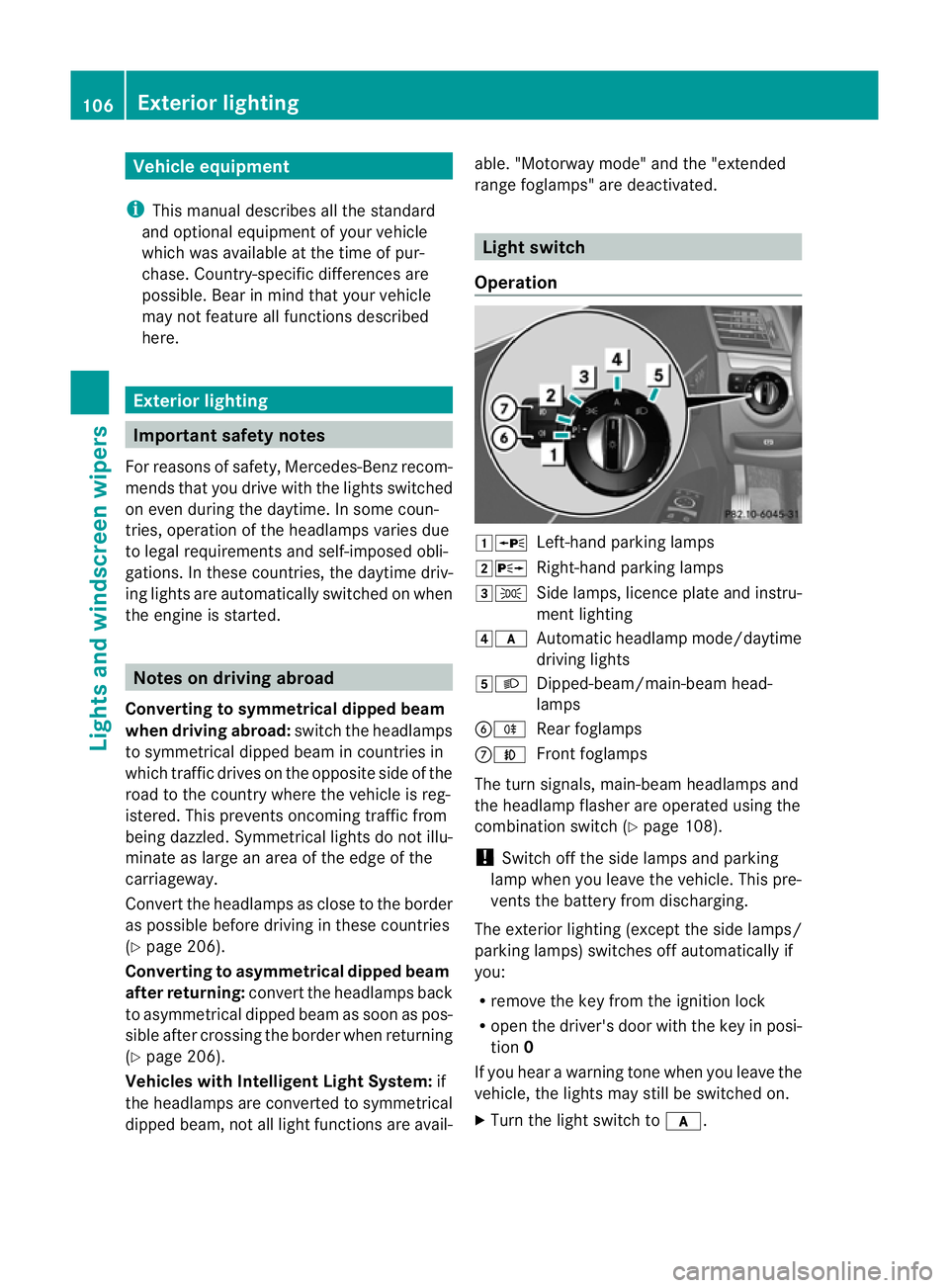
Opera tion 1W
Left-hand parking lamps
2X Right-hand parking lamps
3T Side lamps, licence plate and instru-
ment lighting
4c Automatic headlamp mode/daytime
driving lights
5L Dipped-beam/main-beam head-
lamps
BR Rear foglamps
CN Front foglamps
The turn signals ,main-beam headlamps and
the headlamp flasher are operated using the
combination switch (Y page 108).
! Switch off the side lamps and parking
lamp when you leave the vehicle. This pre-
vent sthe battery from discharging.
The exterior lighting (except the side lamps/
parkin glamps) switches off automatically if
you:
R remove the key from the ignition lock
R open the driver' sdoor with the key in posi-
tion 0
If you hear awarning tone when you leave the
vehicle, the lights may still be switched on.
X Turn the light switch to c.106
Exterior lightingLights and windscree
nwipers
BA 207ECE ÄJ 2010 /1a;1;2,e n-GB
mkalafa Version: 3.0.2.11 2010-01-26T13:03:22+01:00-Seite 106
Page 115 of 333
Active:
if you are driving at speeds below
70 km/h and you switc honthe rear foglamp.
No tactive: if you are driving at speeds above
10 0k m/h or yo uswitch off the rear foglamp
following activat ion. Interior lighting
Overv
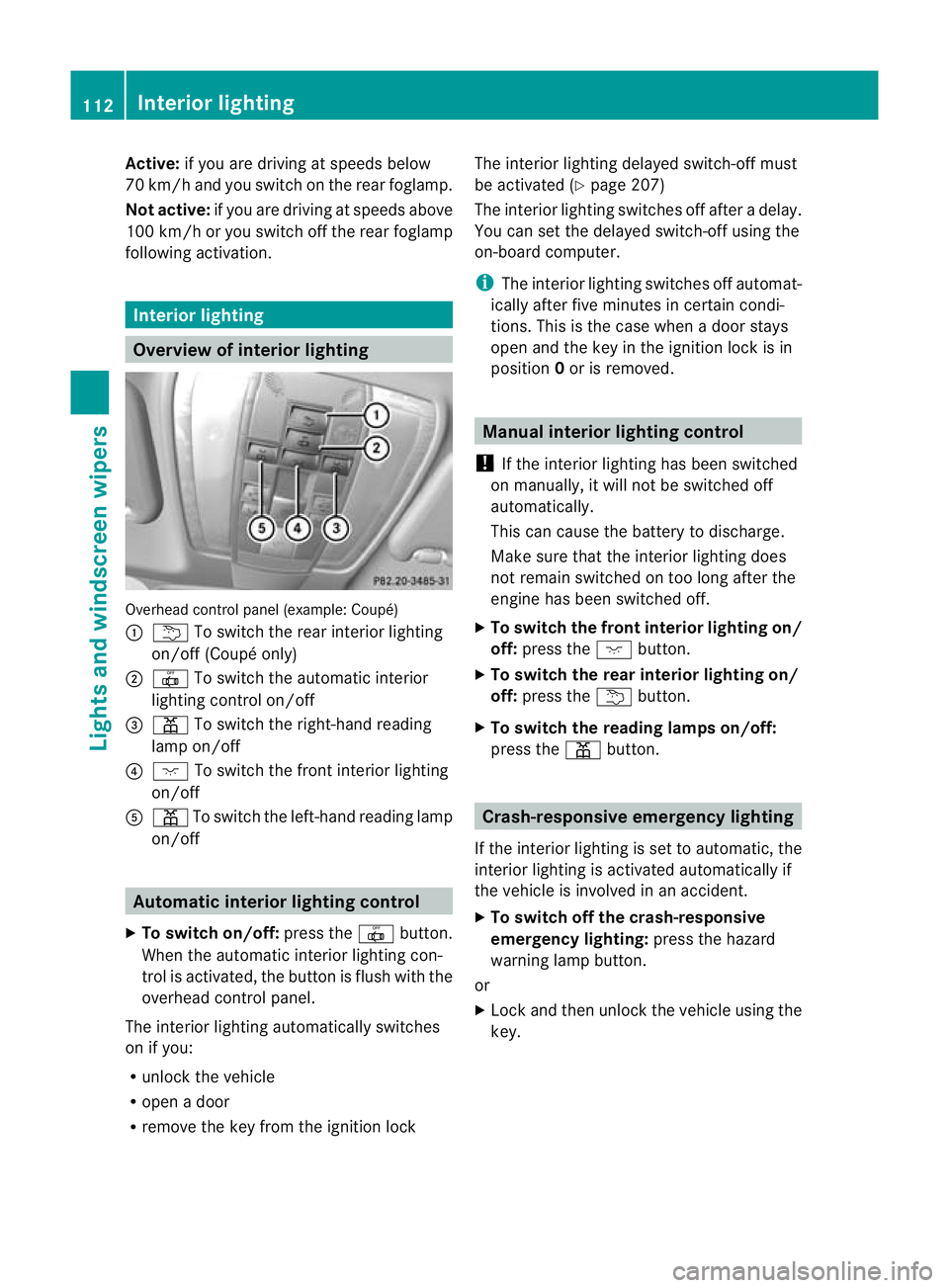
iewofi nterio rlighting Overhead control panel (example: Coupé)
:
u To switc hthe rea rinterior lighting
on/off (Coupé only)
; | To switc hthe automa tici nterior
lighting control on/off
= p To switc hthe right-han dreading
lam pon/off
? c To switch the fron tinterior lighting
on/off
A p To switch the left-hand reading lamp
on/off Automatic interior lighting control
X To switch on/off: pressthe | button.
When the automatic interior lighting con-
trol is activa ted, the button is flush with the
overhead control panel.
The interior lighting automatically switches
on if you:
R unloc kthe vehicle
R open adoor
R remove the key from the ignition lock The interior lightin
gdelayed switch-off must
be activated (Y page 207)
The interior lightin gswitches off after adelay.
You can set the delayed switch-off using the
on-board computer.
i The interior lighting switches off automat-
icall yafter five minutes in certain condi-
tions. This is th ecase when adoor stays
open and the key in the ignition lock is in
position 0or is removed. Manua
linterior lighting control
! If the interior lightin ghas been switched
on manually, it will not be switched off
automatically.
This can cause the batter ytodischarge.
Make sure that the interior lighting does
not remain switched on too long after the
engine has been switched off.
X To switch the front interior lighting on/
off: press the cbutton.
X To switch the rear interior lighting on/
off: press the ubutton.
X To switch the reading lamp son/off:
press the pbutton. Crash-responsive emergency lighting
If the interior lightin gisset to automatic ,the
interior lighting is activated automatically if
the vehicle is involved in an accident.
X To switch of fthe crash-responsive
emergenc ylighting: press the hazard
warning lamp button.
or
X Lock and then unlock the vehicle using the
key. 112
Interior lightingLights and windscreen wipers
BA 20
7ECE ÄJ 2010 /1a; 1; 2, en-GB
mkalafa Version: 3.0.2.11 2010-01-26T13:03:22+01:00 -Seite 112
Page 132 of 333

Convenience opening/closing with
th
ea ir recirculation button G
Ris
kofi njury
Mak esure that nobody can become trapped
between the side window and the door frame
as the side windows are opened and closed.
Do not place objec tsor lean against the side
window swhen the yare being opened or
closed. Yo uorthe object scould be drawn in
or becom etrapped between th eside window
and the door frame as the window moves. If
there is arisk of entrapment, press the
g button again. Press the switch for stop-
ping, opening or closing the side windows in
the opposite direction as appropriate.
Coupé: make sure that nobody can become
trapped as the panoram asliding sunroof is
opened and closed. If there is arisk of entrap-
ment ,pres sthe g button again .Pres sthe
switc hfor stopping, openin gorclosing the
panoram asliding sunroof in the opposite
direction as appropriate.
X Convenience closing feature: press and
hold the gbutton until the side win-
dows and the sliding sunroof/panorama
sliding sunroof 28
are closed.
The indicator lamp above the gbutton
lights up. Air-recirculation mode is activa-
ted.
X Convenience opening feature: press and
hold the gbutton until the side win-
dows and the panoram asliding sunroof 28
have reached their original position.
The indicator lamp above the gbutton
goes out. Air-recirculation mode is deacti-
vated.
i If you open the side windows or the pan-
orama sliding sunroof 28
manually after
closing with the convenienc eclosing fea-
ture, they will remain in this position when
opened using the convenienc eopening fea-
ture. Switching the residu
alheat on/off
Th e" residua lheat" function is only available
with THERMOTRONI Cluxury 3-zone auto-
matic climate control.
It is possible to make use of the residual heat
of the engine to continue heating the station-
ary vehicle for up to 30 minutes after the
engine has been switched off. The heating
time depends on the temperature that has
been set.
Coupé: the "residua lheat" function only
work soptimally when the side windows and
panorama sliding sunroof are closed.
Cabriolet: the "residual heat" function only
work soptimally when the soft top is closed.
i The blower will run at alow speed regard-
less of the airflow setting.
i If you activate the "residual heat" func tion
at high temperatures, only the ven tilation
will be activated. The blower runs at
medium speed.
i It is possible that the "residual heat" func-
tion may be activated automatically an hour
after the key is removed. The vehicle is then
ventilated for 30 minutes to dry the air-
conditioning system.
X Turn the key to position 0in the ignition
lock or remov eit.
X To switch on: press theÌbutton.
The indicato rlamp above the Ìbutton
lights up.
X To switch off: press theÌbutton.
The indicator lamp above button Ìgoes
out.
i Residua lheat is deactivated automati-
cally:
R after about 30 minutes
R when the ignition is switched on
R if the batter yvoltage drops
R if the coolant temperatur eist oo low
28 Coup éonly. Operating climate control systems
129Climatecontrol
BA 20 7ECE ÄJ 2010 /1a; 1; 2, en-GB
mkalafa Version: 3.0.2.11 2010-01-26T13:03:22+01:00 -Seite 129 Z
Page 138 of 333

Key positions
Key g
To remove th ekey
1 Powe rsupply for some consumers, such
as the windscreen wipers.
2 Ignition (power supply for all consumers)
and drive position
3 To start the engine
i The key can be turned in the ignition lock
even if it is not the correc tkey for the vehi-
cle. The ignition is then not switched on.
The engin ecannot be started.
KEYLESS-GO Pressing the Start/Stop button several times
in succession corresponds to the different
key positions in the ignition lock. This is only
the case if you are not depressing the brake
pedal.
If you depress the brake pedal and press the
Start/Stop button ,the engin estart simmedi-
ately. X
Position 0:ifStart/Sto pbutton :has not
yet been pressed, this corresponds to the
key being removed from the ignition.
X Position 1:pressStart/Sto pbutton :.
You can now activat ethe windscreen wip-
ers, for example.
i If you then open the driver's door when in
this position ,the power supply is deactiva-
ted.
X Position 2(ignition): press Start/Stop but-
ton :twice.
i If you press Start/Stop button :once
when in this position and the driver's door
is open, the power supply is deactivated
again.
Removing th eStart/Stop button
You can remove the Start/Stop butto nfrom
th ei gnition lock and star tthe vehicle as nor-
ma lusing the key.
i You do not hav etoremov ethe Start/Stop
button from the ignition lock when you
leav ethe vehicle. X
Remove Start/Stop button :from ignition
lock ;.
i When you inser tthe Start/Stop button
int ot he ignition lock ,the system needs
2s econds recognition tim ebefor eyou can
use the Start/Stop button. Driving
135Driving and parking
BA 207ECE ÄJ 2010/1a; 1; 2, en-GB
mkalafa Version:3.0.2.11
2010-01-26T13:03:22+01:0
0-Seite 135 Z
Page 140 of 333

!
Change gear in good time and avoid spin-
ning the wheels. Otherwise, you could dam-
age the vehicle.
i Follow the shift recommendations in the
multifunction displa yfor an economical
drivin gstyle.
i The vehicle locks centrally once you have
pulled away. The locking knobs in the doors
drop down.
You can ope nthe doors from the insid eat
any time.
You can also deactivate the automatic lock-
ing feature (Y page 208).
Automatic transmission i
It is only possibl etoshift the transmission
from position Pto the desired position if
you depress the brake pedal. Onl ythen is
the select or lever lock released.
X Depress th ebrake peda land keep it
depressed.
X Shift the transmissio ntoposition Dor R.
X Release the parkin gbrake (Y page 153).
X Releas ethe brake pedal.
X Carefully depress the accelerator pedal.
i The vehicle lock scentrally onc eyou have
pulled away .The lockin gknobs in the doors
drop down.
You can open the doors from the inside at
any time.
You can also deactivat ethe automatic lock-
ing featur e(Ypage 20 8).
i Upshif tstake place at higher engine
speeds after acold star t.This helps the
catalytic converter to reach its operating
temperature mor equickly.
Hill star tassist G
Risk of accident
Never leav ethe vehicle when it is held by hill
star tassist. Af tera pproximately one second, hill start assist will no longer brak
eyour vehi-
cle and it coul droll away.
Hill star tassist helps you when pulling away
forwards or in reverse on an uphil lgradient.
It hold sthe vehicle for ashort tim eafter you
have removed you rfoot from the brake pedal.
This gives you enough tim etomove your foot
from the brake pedal to the accelerator pedal
and depress it befor ethe vehicle begin sto
roll.
X Take your foo toff th ebrake pedal.
i Once yo uhave taken your foot off the
brake pedal, the vehicle is held for around
one second.
X Pull away.
Hill start assis twill not function if:
R you are pulling away on alevel road or a
downhill gradient.
R on vehicles with automatic transmission,
the transmission is in position N
R the vehicle is secured with the parking
brake.
R ESP ®
is malfunctioning. Switching off the engine
Important safety instructions G
Risk of accident
If the engin eisn ot run ning, there is no power
assistance for the steerin gand brakes. Steer-
ing and braking will then require significantly
greate reffort.
As aresult, yo umight lose contr olof the vehi-
cle, cause an acc identand injure yoursel fand
others.
Therefore, do not switch off the engine while
yo ua re driving. Dri
ving
137Driving and parking
BA 207 ECE ÄJ 2010/1a ;1;2,en-GB
mkalafa Version: 3.0.2.11 2010-01-26T13:03:22+01:00-Seite 137 Z
Page 168 of 333
If yo
uwish to leave the vehicle or park it,
deactivate DISTRONIC PLU Sand secure the
vehicl eagainst rolling away.
If DISTRONIC PLU Sdetect sthat the vehicle
in front is stopping, it brakes your vehicle until
it is stationary.
Onc eyour vehicle is stationary, it remains
stationar yand you do not need to depress the
brake.
i Depe nding on the specified minimum dis-
tance, your vehicle will come to astandstill
at as ufficien tdistanc ebehin dthe vehi cle
in fron t.The specifie dminimum distance is
set using the thumbwheel on the cruise-
control lever.
When DISTRONIC PLU Sisa ctivate dand the
vehicl eisatas tandstill, the following warning
message appe arsint he multifunction display
if:
R the driver's door is open and the driver's
seat belt is unfastened
R the engin eisswitched off, unless it is auto-
matically switched off by the ECO start/
stop func tion
R the bonnet is opened
Select Park (P)
X Move the selector leve rtoPto prevent the
vehicle from rolling away.
DISTRONIC PLUS is deactivated .The warn-
ing message in the multifunction display
disappears.
The horn will also sound at regular intervals if
DI ST RONIC PLUS is activated and you:
R switch the engine off, open the driver's
doo rand take off your sea tbelt
R open the bonnet
The soundin gofthe horn alerts you to the fact
that the vehicle has been parked while DI S-
TRONIC PLU Siss till activated. The sound
becomes louder if you attempt to lock the
vehicle .The vehicle is not locked until DI S-
TRONIC PLU Sisd eactivated. i
If the ignition has been switched off ,the
engin ecannot be started again until DIS-
TRONIC PLUS has been deactivated.
If DISTRONIC PLUS is activated and afault
occurs in the system or there is adisruption
in the power supply while the vehicle is sta-
tionary ,the Brak eimmediately message is
show ninthe multifunction display. Immedi-
atel ydepress the brak efirmly until the warn-
ing message in the multifunction displa ygoes
out or mov ethe selector lever to P.DIS-
TRONIC PLUS is then deactivated.
Setting aspeed X
Press the cruise control lever to the pres-
sure point, up :for ahigher speed or
down Afora lower speed.
X Keep the cruise contro llever pressed until
the desired speed is reached.
X Release the cruise control lever.
The new speed is stored. DI STRONIC PLUS
is activated and adjusts the vehicle's speed
to the new speed stored.
Making adjustments in 1km/h incre-
ments X
Briefly press the cruise contro llever to the
pressur epoint ,up :for ahigher speed or
down Afor alower speed.
The last speed stored is inc reased or
reduced.
Making adjustments in 10 km/h incre-
ments X
Briefly press the cruise contro llever
beyond the pressur epoint ,up :for a
higher spee dordownAfor alower speed.
The last speed stored is inc reased or
reduced. Driving systems
165Driving and parking
BA 207 ECE ÄJ 2010/1a; 1; 2, en-GB
mkalafa Version: 3.0.2.11 2010-01-26T13:03:22+01:00-Seite 165 Z
Page 177 of 333
You will see the followin
gwarnin gmessage in
the multifunction display if the HOL Dfunction
is activated and:
R the driver' sdoor is open and th edriver's
seat belt is unfastened
R the engi neis switched off ,unless it is auto-
matically swi tchedoff by the ECO start/
stop function
R the bo nnetis opened
Vehicles wit hmanual transmission: Brake
immediately
X Immediately depress the brake pedal firmly
until the warning message in the multifunc-
tion displ ay goes out. This deactivates the
HOL Dfunction.
In vehicles with automatic transmission:
Select Park (P)
X Move the selector lever to Pto prevent the
vehicle from rolling away.
The HOLD function is deactivated. The
warning messag eint he multifunction dis-
play disappears.
Ah orn will also sound at regular intervals if
the HOL Dfunction is activated and you:
R switch the engine off, open the driver's
door and take off your seat belt
R open the bonnet
The sounding of the horn alerts you to the fact
that the vehicle has been parked while the
HOLD function is still activated. The tone
becomes louder if you attempt to lock the
vehicle. The vehicle is not locked until the
HOLD function is deactivated.
i If the ignition has been switched off, the
engine cannot be started again until the
HOLD function has been deactivated.
If there is afault in the system or power supply
while the HOLD function is activated, the
Brak eimmediately message is show nin
the multifunction display .Immed iately
depress the brake firmly until the warning
message in the multifunction dis play goes
out. On vehicles with automatic transmission, you
can als oshift int oposition P.This deactivates
the HOL Dfunction. PARKTRONIC
Important safety notes G
Risk of accident
PARKTRONIC is only an aid and may not
detect all obstacles .This system does not
reliev eyou of the need to pay attention.
You are always responsible for safet yand
must continue to pay attention to your imme-
diate surroundings whe nparking and
manoeuvring. You could otherwise endanger
yourself and others. G
Risk of injury
Make sure that no persons or animals are in
the manoeuvring range. Otherwise ,they
coul dbei njured.
PARKTRONIC is an electronic parking aid with
ultrasonic sensors. It indicates visual lyand
audibly the distance between your vehicle
and an object.
PARKTRONIC is activated automatically when
you:
R switch on the ignition
R release the parking brake
PARKTRONIC is deactivated at speeds above
18 km/h. It is reactivated at lower speeds.
PARKTRONIC monitors the area around your
vehicle using six sensors in the front bumper
and four sensors in the rear bumper. 174
Driving systemsDriving and parking
BA 207 ECE ÄJ 2010/1a; 1; 2, en-GB
mkalafa
Version:3.0.2.11
2010-01-26T13:03:22+01:00
-Seite 174