mirror MERCEDES-BENZ E-CLASS CABRIOLET 2010 Owner's Manual
[x] Cancel search | Manufacturer: MERCEDES-BENZ, Model Year: 2010, Model line: E-CLASS CABRIOLET, Model: MERCEDES-BENZ E-CLASS CABRIOLET 2010Pages: 333, PDF Size: 7.64 MB
Page 105 of 333
i
Make sur ethat the exterior mirrors are
always folded out fully while the vehicle is
in motion as they ma yotherwis evibrate.
Resetting the exterior mirrors If the battery has been disconnected or com-
pletely discharged, the exterior mirrors must
be reset. The exterior mirrors will otherwise
not fold in when you select the "Fold in mir-
rors when locking" func tion in the on-board
computer (Y page 209).
X Make sure that the key is in position 1in
the ignition lock.
X Briefl ypres sbutton :.
Folding the exterior mirrors in or out
automatically If the "Fold in mirrors when locking" function
is activated in the on-board computer
(Y page 209):
R the exterior mirrors fold in automatically as
soo nasyou lock the vehicle from the out-
side.
R the exterior mirror sfold out again automat-
ically as soon as you unloc kthe vehicle and
then open the driver's or front-passenger
door.
i The mirrors do not fol dout if they have
been folded in manually.
Exterior mirror out of position If an exterior mirror has been pushed out of
position, proceed as follows:
X Vehicles without electrically folding
exterior mirrors: move the exterior mirror
into the correct position manually.
X Vehicles with electrically folding exte-
rior mirrors: press the mirror-folding but-
ton (Y page 101 )repeatedly until you hear
the mirror engage in position.
The mirror housing is engaged again and
you can adjust the exterior mirror sasusual
(Y page 101). Automatic anti-dazzle mir
rors G
Risk of accident
If the incident ligh tfrom headl ampscannot
strike the senso rinthe rear-vie wmirror ,for
instance, when the rea rwindow roller sun-
blind is extended, the mirror' sautomatic anti-
dazzle function will not operate.
Incident light could then blind you. This may
distract you from the traffic conditions and,
as aresult, you may cause an accident. In this
case, adjust the rear-view mirror manually.
The rear-view mirror and the exterior mirror
on the driver' sside automatically go into anti-
dazzle mode if the ignition is switched on and
incident light from headlamps strikes the sen-
sor in the rear-view mirror.
The mirrors do not go into anti-daz zlem ode if
reverse gear is engaged or the interior lighting
is switched on. Parking position for th
eexterior mir-
ror on th efront-passenger side
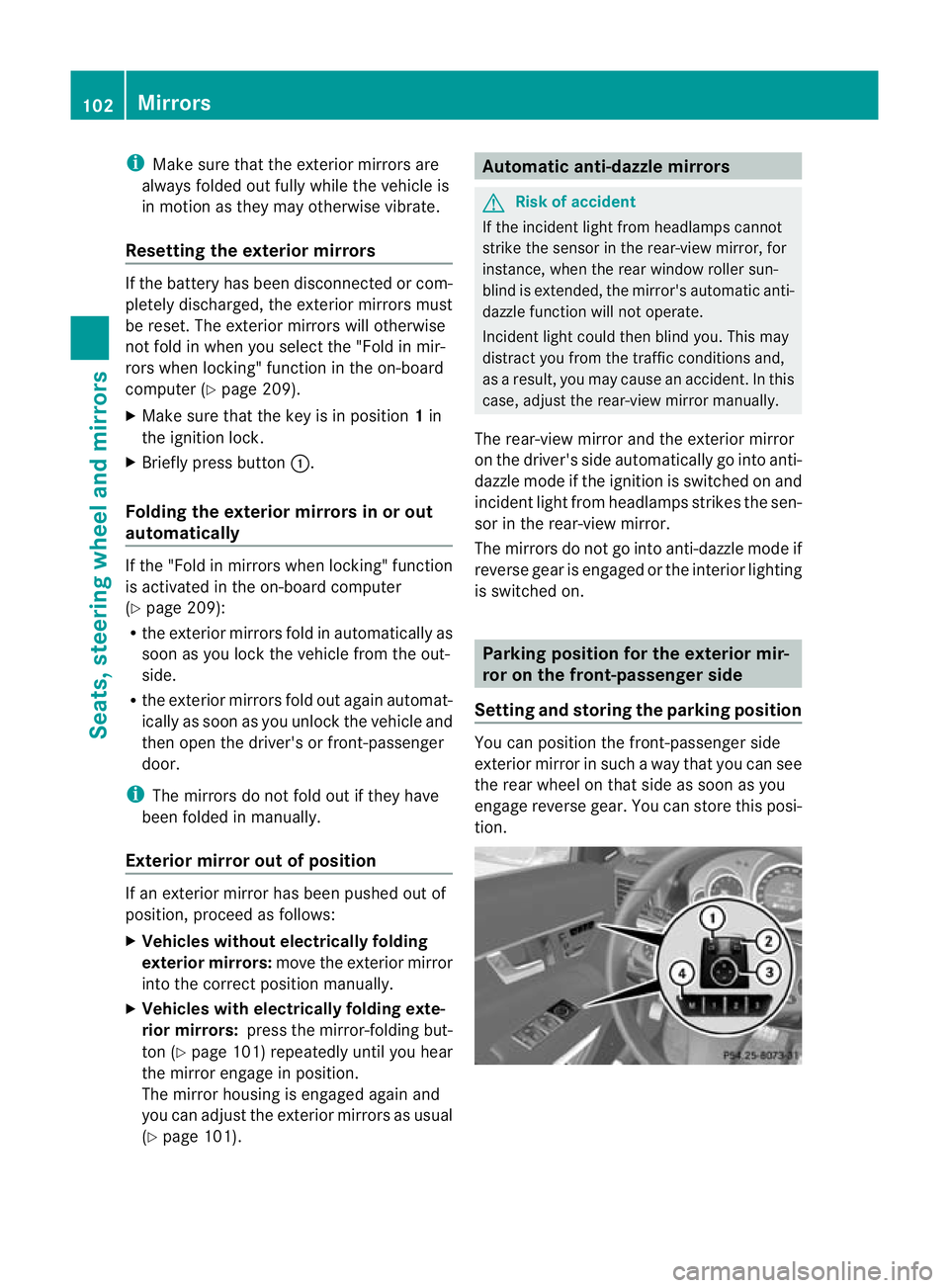
Settin gand storing th eparking position Yo
uc an position the front-passenger side
exterior mirror in such away that you can see
the rear wheel on that side as soon as you
engage reverse gear. You can store this posi-
tion. 102
MirrorsSeats
,steering whee land mirrors
BA 20 7ECE ÄJ 2010 /1a;1;2,e n-GB
mkalafa Version: 3.0.2.11 2010-01-26T13:03:22+01:00-Seite 102
Page 106 of 333
X
Make sur ethat the vehicle is stationary and
that the key is in position 2in the ignition
lock.
X Press button ;for the exterior mirror on
the front-passenger side.
X Engage reverse gear.
The exterior mirror on the front-passenger
side moves to the preset parkin gposition.
X Use adjustment button =to adjust the
exterior mirror to aposition which allows
you to see the rea rwheel and the kerb.
The parkin gposition is stored.
i If you shift the transmission to another
position ,the exterior mirror on the front-
passenger side returns to the drivin gposi-
tion.
i You can also stor ethe parkin gposition
using memory button M?.
X With the key in position 2in the igni-
tion lock and with the exterior mirror
on the front-passenger side activated,
use adjustment button =to set the
exterior mirror such that the rear
wheel and ker bare visible.
X Press memory button M? and one of
th ea rrow sona djustment button =
within three seconds.
The parking position is stored if the
exterior mirror does not move.
If the mirror moves out of position, repeat
the steps.
Calling up astore dparkin gposition set-
ting X
With the key in position 2in the ignition
lock and the exterior mirror on the front-
passenge rside activated, engage reverse
gear.
The exterior mir roront he front-passenger
side moves to the store dparking posi tion. The exterior mir
roront he front-passenger
side moves bac ktoits original position:
R as soo nasyou exceed aspeed of
10 km/h
R about ten seconds after you have disen-
gaged rev ersegear
R if you press button :for the exterior mir-
ror on the driv er'sside Me
mo ry functions Storing settings
With the memory function ,you can store up
to three differen tsettings, e.g. for three dif-
ferent people.
The followi ngsettings ar estore dasa single
mem orypreset:
R position of the seat ,backrest and head
restraint
R driver's side: steerin gwheel position
R driver' sside: position of the exterior mir-
ror so nthe driver' sand front-passenger
sides G
Risk of injury
The memor yfunction can still be used when
the key has been removed. For this reason,
children should never be left unsupervised in
the vehicle. They could otherwise become
trapped when adjusting the seat or the steer-
ing wheel. G
Risk of accident
Only use the memory function on the driver's
side when the vehicle is stationary. Other-
wise, you could be distracted fro mthe traffic
conditions by the steering wheel and seat
moving of their own accord, and as aresult
cause an accident. Memory functions
103Seats, steering wheel and mirrors
BA 207ECE ÄJ 2010 /1a;1;2,e n-GB
mkalafa Version: 3.0.2.11 2010-01-26T13:03:22+01:00-Seite 103 Z
Page 107 of 333
X
Adjust the sea t(Ypage 94).
X On the driver' sside, adjust the steering
wheel (Y page 100 )and the exterio rmirrors
(Y page 101).
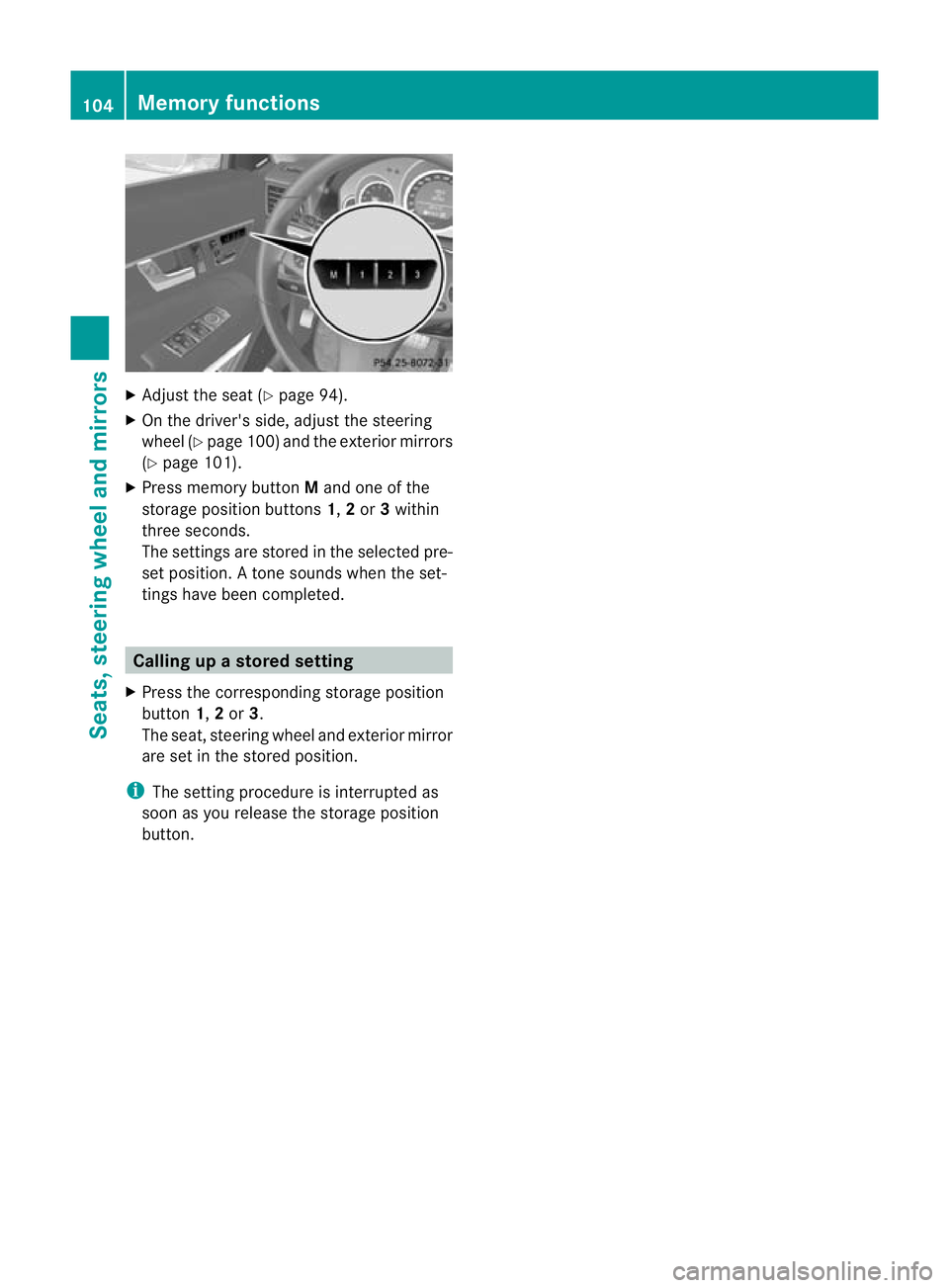
X Press memory button Mand one of the
storage position buttons 1,2or 3within
three seconds.
The settings are stored in the selected pre-
set position .Atone sounds when the set-
tings have been completed. Calling up
astore dsetting
X Pres sthe co rresponding storage position
button 1,2or 3.
The seat ,steerin gwheel and exteri or mirror
are set in the store dposition.
i The settin gprocedure is interrup tedas
soon as you release the storage position
but ton. 104
Memory functionsSeats, steering wheel and mirrors
BA 207 ECE ÄJ 2010/1a; 1; 2, en-GB
mkalafa
Version: 3.0.2.11 2010-01-26T13:03:22+01:00-Seite1 04
Page 183 of 333
Cancelling Parking Guidance
X
Press th ePARKT RONIC butto nonthe
cen treconsole (Y page176).
Parking Gui dance is cancelle dimmediately
and PARKTRONIC is deactivated.
Parkin gGuidance is cancelled automatically
if it is no longer possible to guide you into the
parking space, or if amalfunction occurs.
The parking space symbol disapp ears and the
Parking Guidance cancelled message
appe arsint he multifunction display.
Trailer towing For vehicles with
atrailer to whitch, the min-
imum length for parkin gspaces is slightly
increased.
If you have attached atrailer to your vehicle,
yo us hould not use Parkin gGuidance. When
the electrical connection is established
betwee nyour vehicle and the trailer ,Parking
Guidance ceases to be available. PARK-
TRONIC is deactivated for the rear area. Reversin
gcamera
Important safety guidelines Th
er eversing camera is an optica lparking
aid. It shows the area behind your vehicle in
the COMAND APS displ ay.G
Risk of injury
Make sure that no persons or animal sare in
th em anoeuvring range. Otherwise ,they
coul dbei njured.
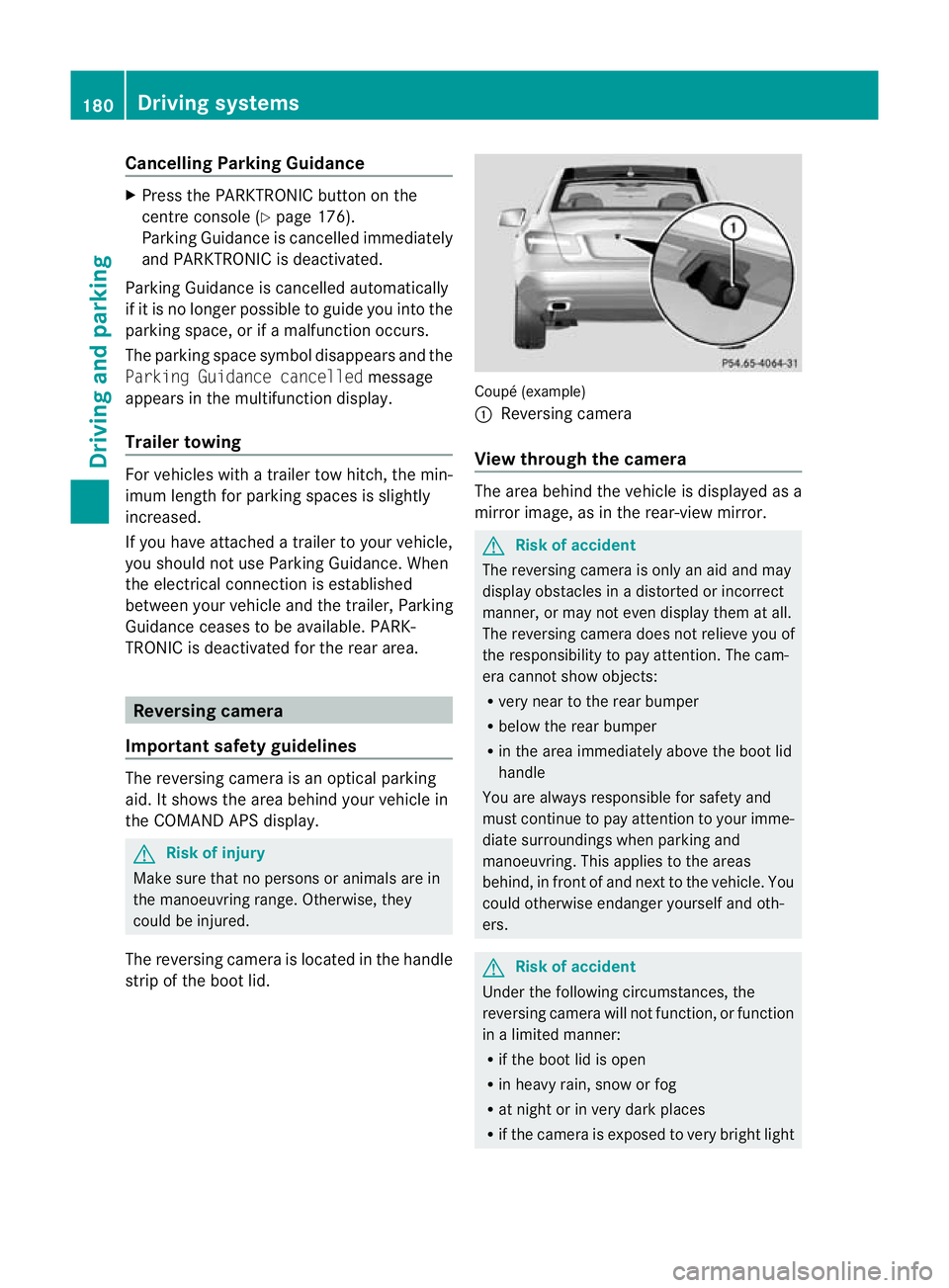
The reversin gcamera is located in the handle
strip of the boot lid. Coupé (example)
:
Reversing camera
View through the camera The area behind the vehicle is displ
ayedas a
mirror image, as in the rear-view mirror. G
Risk of accident
The reversing camera is only an aid and may
display obstacles in adistorted or incorrect
manner, or may not even display them at all.
The reversing camer adoes not relieve you of
the responsibilit ytopay attention. The cam-
era cannot show objects:
R very near to the rear bumper
R below the rear bumper
R in the area immediately above the boot lid
handle
You are always responsible for safety and
must continue to pay attention to your imme-
diate surroundings when parking and
manoeuvring. This applies to the areas
behind, in front of and next to the vehicle. You
could otherwise endanger yourself and oth-
ers. G
Risk of accident
Under the following circumstances, the
reversing camera will not function, or function
in alimited manner:
R if the boot lid is open
R in heavy rain, snow or fog
R at night or in very dark places
R if the camer aisexposed to very brigh tlight 180
Drivin
gsystemsDrivin gand pa rking
BA 20 7ECE ÄJ 2010 /1a;1;2,e n-GB
mkalafa Version: 3.0.2.11 2010-01-26T13:03:22+01:00-Seite 180
Page 187 of 333
R
the roa dtypec hanges (e.g. mot orway,
country road).
R yo uh avet ravelle dacertainminimum
distanc ewithou tthe roa dsign being
repeated or detec teda gain. Blind Spot Assist
Important safety guidelines Blin
dSpot Assist uses aradar sensor system
to monitor the areas on both sides of your
vehicle. Blin dSpot Assist provides assistance
at speeds higher than 30 km/h. Awarning
display in the exterior mirrors draws your
attention to vehicles in the monitored area. If
you then indicat eaturn toward sthat side
before changing lane, you will also receive
visual and audible collision warnings. For this
purpose, Blind Spot Assist uses sensor sinthe
rea rbumper. G
Risk of accident
Blind Spot Assis tiso nly an aid designe dto
assis tdriving. It may fail to detec tsome vehi-
cles and is no substitute for attentiv edriving.
Blind Spo tAssist can notd etect road and traf-
fic conditions. It may fail to detect narrow
vehicles, such as motor cycles or bicycles ,or
only detec tthem too late.
Monitoring ma ybeaffected by dirty sensors,
stro ngspra yorp oor visibility caused by snow,
rai norm ist, for example. In this case, vehicles
are detected late or not at all.
Always pay attention to traffic conditions and
your surroundings. Otherwise, you may fail to
recognise dangers in time, cause an accident
and injur eyoursel fand others.
The radar senso rsystem is automatically
deactivated near radio telescope facilities
(Y page 324).
For Blind Spot Assist to assist you when driv-
ing, the radar sensor syste mmust be activa-
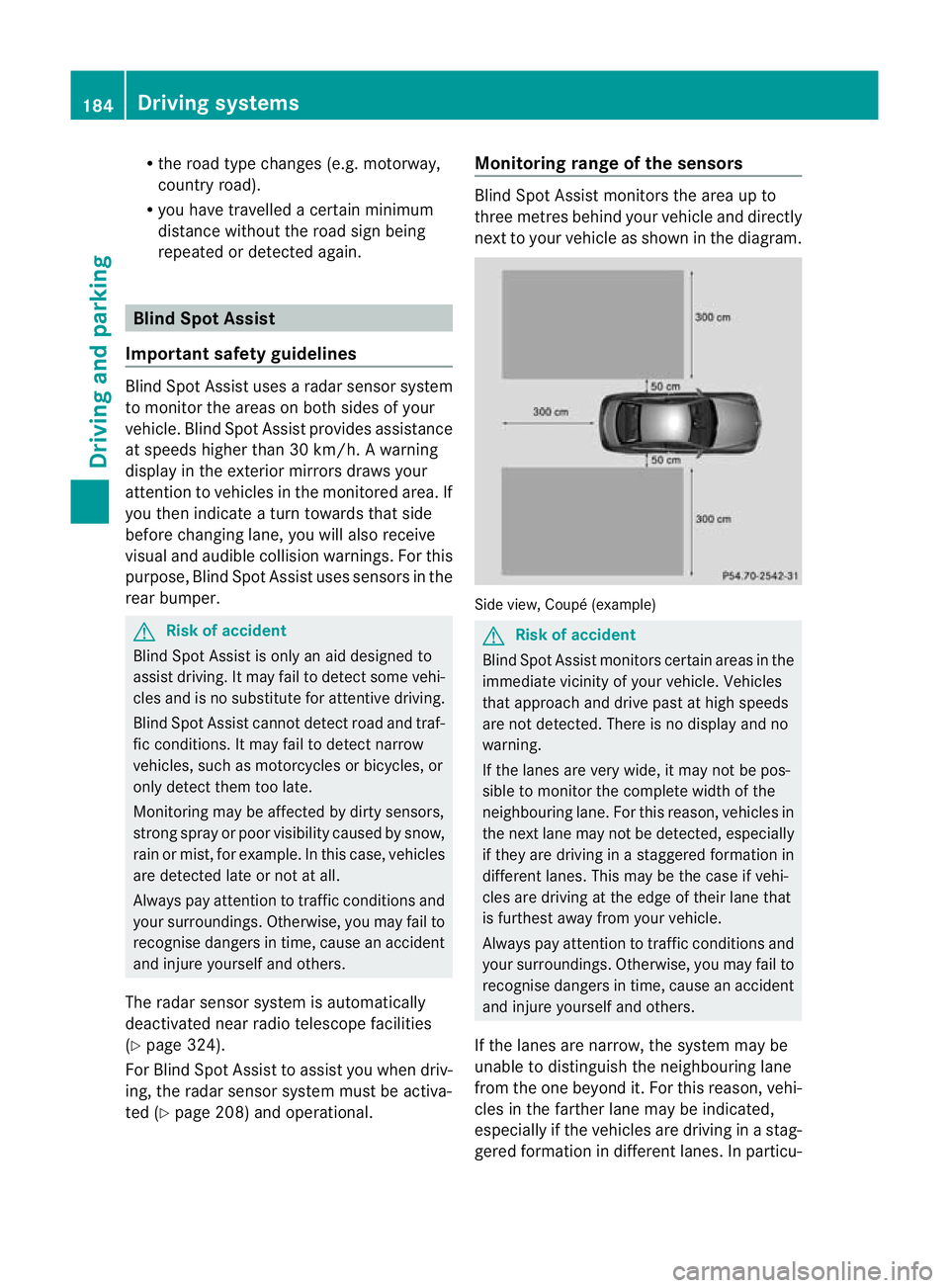
ted (Y page 208 )and operational. Monitoring range of the sensors Blind Spot Assist monitors the area up to
three metres behind your vehicl
eand directly
next to your vehicl easshown in the diagram. Sid
eview, Coupé (example) G
Risk of accident
Blind Spot Assist monitors certain areas in the
immediate vicinit yofyour vehicle. Vehicles
that approach and driv epast at high speeds
are not detected. There is no display and no
warning.
If the lanes are very wide, it may not be pos-
sible to monitor the complete width of the
neighbouring lane. For this reason, vehicles in
the next lane may not be detected, especially
if they are driving in astaggered formation in
different lanes .This ma ybethe case if vehi-
cles ar edrivin gatt he edge of their lan ethat
is furthest away from your vehicle.
Always pay attention to traffic conditions and
your surroundings. Otherwise, you ma yfail to
recognise dangers in time, cause an accident
and injure yourself and others.
If the lanes are narrow, the system may be
unable to distinguish the neighbouring lane
from the one beyond it. For this reason, vehi-
cles in the farther lane may be indicated,
especially if the vehicles are driving in astag-
gered formation in different lanes .Inparticu- 184
Driving systemsDriving and parking
BA 207 ECE ÄJ 2010/1a; 1; 2, en-GB
mkalafa
Version:3.0.2.11
2010-01-26T13:03:22+01:00
-Seite 184
Page 188 of 333
lar, this may be the case if the vehicles are
drivin gatthe edge of their lan enearest your
vehicle. Due to the nature of the system,
warnings may be issued in err or when driving
clos etoc rashb arriers or similar solid lane
borders.
The two sensors for Blind Spot Assis tare
integrate dinto the sides of the rear bumper.
Make sure that the bumpe risfree from dirt,
ice or slus haround th esensors. For example,
the rada rsensors must not be covered by
cycle racks or overhanging loads. Followin ga
severe impac torinthe even tofdamage to
the bumpers, have the function of the radar
sensors checked at aqualified specialist
workshop, e.g. aMercedes-Ben zService
Cent re.B lind Spot Assist may otherwise not
work properly.
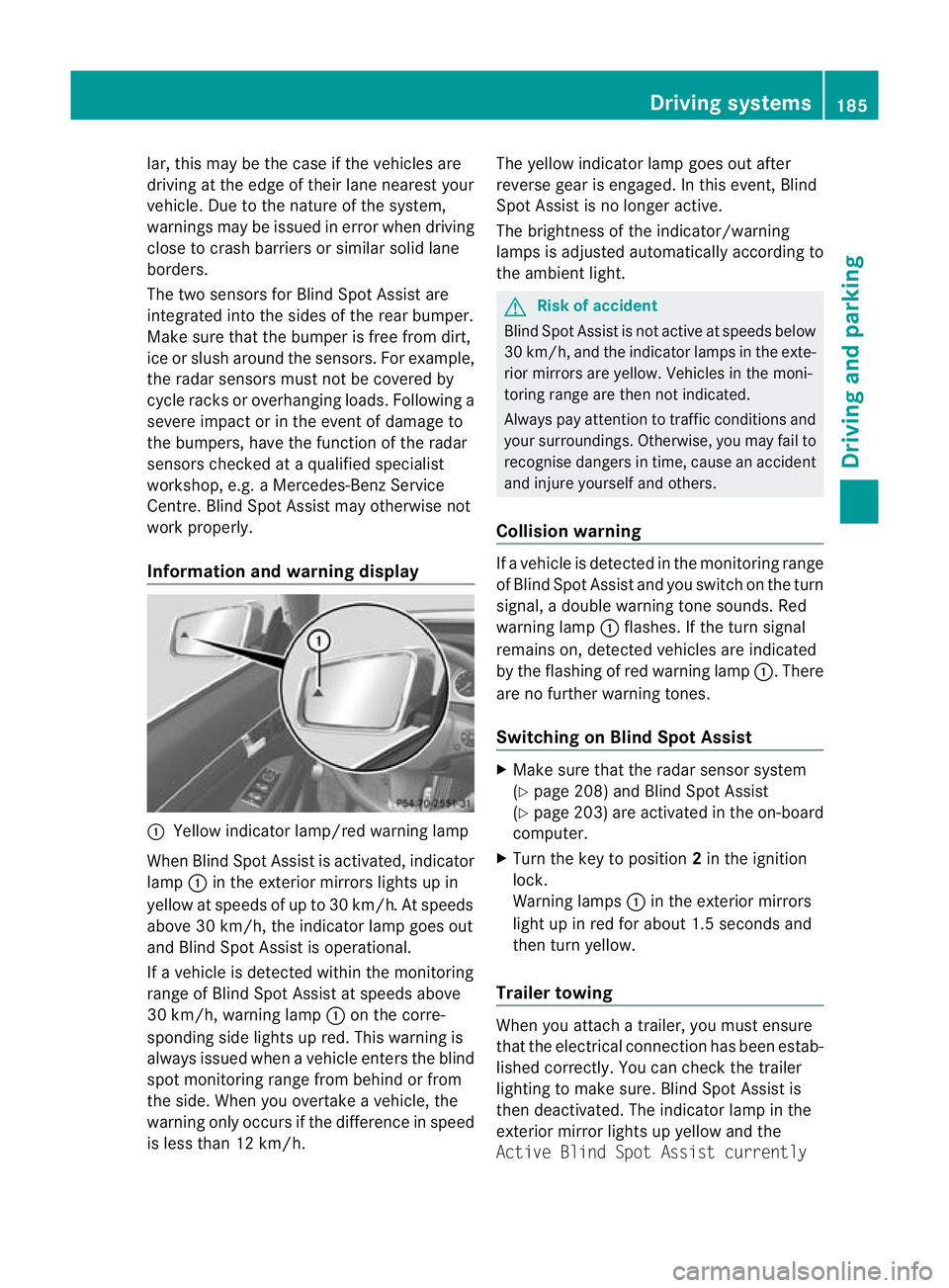
Information and warning display :
Yellow indicator lamp/red warnin glamp
When Blind Spot Assis tisa ctivated, indicator
lamp :in the exterior mirrors lights up in
yellow at speed sofupto30km/ h.At speeds
above 30 km/h, the indicator lamp goe sout
and Blind Spo tAssist is operational.
If av ehicle is detected within the monitoring
range of Blin dSpot Assist at speeds above
30 km/h, warning lamp :on the corre-
sponding side lights up red. This warning is
always issued when avehicle enter sthe blind
spot monitoring range from behind or from
the side. When you overtak eavehicle, the
warning only occurs if the difference in speed
is less than 12 km/h. The yellow indicator lam
pgoes out after
reverse gear is engaged. In this event, Blind
Spot Assist is no longer active.
The brightness of the indicator/warning
lamps is adjusted automatically according to
the ambient light. G
Risk of accident
Blind Spot Assist is not active at speeds below
30 km/h, and the indicator lamps in the exte-
rio rm irror sare yel low.Vehicles in the moni-
toring range are then not indicated.
Alway spay attention to traffic conditions and
your surroundings. Otherwise ,you may fai lto
recognise dangers in time ,cause an accident
and injure yoursel fand others.
Collisio nwarning If
av ehicle is detected in the mon itoring range
of Blind Spot Assis tand you switch on the turn
signal, adouble warnin gtone sounds. Red
warnin glamp :flashes .Ifthe tur nsignal
remains on, detected vehicles are indicated
by the flashing of red warnin glamp :.T here
ar enof urther warning tones.
Switching on Blind Spot Assist X
Make sure that the radar senso rsystem
(Y page 208) and Blind Spot Assist
(Y page 203) are activated in the on-board
computer.
X Turn the key to position 2in the ignition
lock.
Warning lamps :in the exterior mirrors
ligh tupinr ed for about 1. 5seconds and
then tur nyellow.
Trailer towing When you attach
atrailer, yo umust ensure
that the electrical connection has been estab-
lished correctly. You can check the trailer
lighting to make sure. Blind Spot Assis tis
then deactivated .The indicator lam pint he
exterior mirror lights up yellow and the
Active Blin dSpot Assist currently Drivin
gsystems
185Drivingand pa rking
BA 20 7ECE ÄJ 2010 /1a;1;2,e n-GB
mkalafa Version: 3.0.2.11 2010-01-26T13:03:22+01:00-Seite 185 Z
Page 212 of 333

vating th
eEASY-ENTRY/EXIT feature, make
sure that nobody can become trapped.
Do not leave children unsupervise dinthe
vehicle, even if they ar esecur edinac hild
restraint system .The chil dren could open the
driver's door and thereby unintentionally acti-
vat ethe EASY-ENTRY/EXIT feature and
becom etrapp ed.
X Press the =or; button on the steer-
ing whee ltoselect the Settings menu.
X Press the :or9 button to select the
Convenience submenu.
X Press the abutton to confirm.
X Press the :or9 button to select the
Easy Entry/Exit feature.
You will see the selected setting: onor
off.
X Press the abutton to save the setting.
Switching th ebelta djustmen ton/off
Fur ther information on belt adjust ment
(Y pag e42).
X Press the =or; button on the steer-
ing whee ltoselect the Settings menu.
X Press the :or9 button to select the
Convenience submenu.
X Press the abutton to confirm.
X Press the :or9 button to select the
Belt adjustment: function.
You will see the selected setting: onor
off.
X Press the abutton to save the setting.
Switching the fold in mirrors when lock-
ing function on/off
If you switch on the Fold mirrorsinwhen
locking: function, th eexterior mirror sfold
in when you lock the vehicle. When you
unloc kthe vehicle and then open adoor, the
exterior mirror sfold out again.
If you have switched the function on and you
fold the exterior mirror sinusing the button
on the door (Y page 101), they will not fold
out automatically. The exterior mirrors can then only be folded out usin
gthe button on
the door.
X Press the =or; button on the steer-
ing wheel to selec tthe Settings menu.
X Press the :or9 button to selec tthe
Convenience submenu.
X Press the abutton to confirm.
X Press the :or9 button to selec tthe
Fold mirror sinwhen locking: func-
tion.
Yo uw ill see the selected setting: onor
off.
X Press the abutton to save the setting.
Resetting to factory settings For safety reasons, not all function
sare reset:
the Limit speed (winter tyres): func-
tio ninp ermanen tSPEEDTRONIC can only be
set in the Vehiclesubmenu. If you want to
reset the Daytimedriving lamps: in the
Light submenu, yo umust turn the key in the
ignition lock to position 1.
X Press the =or; button on the steer-
ing wheel to select the Settingsmenu.
X Press the :or9 button to select the
Factor ysetting submenu.
X Press the abuttontoc onfirm.
The Rese tall settings? message
appe ars.
X Pres sthe : or9 button to select
No orYes.
X Press the abutton to confir mthe selec-
tion.
If you hav eselected Yes,the multifunction
display shows aconfirmation message. Menu
sand submenus
209On-board computer and displays
BA 207ECE ÄJ 2010/1a; 1; 2, en-GB
mkalafa Version: 3.0.2.11 2010-01-26T13:03:22+01:00-Seite 209 Z
Page 228 of 333
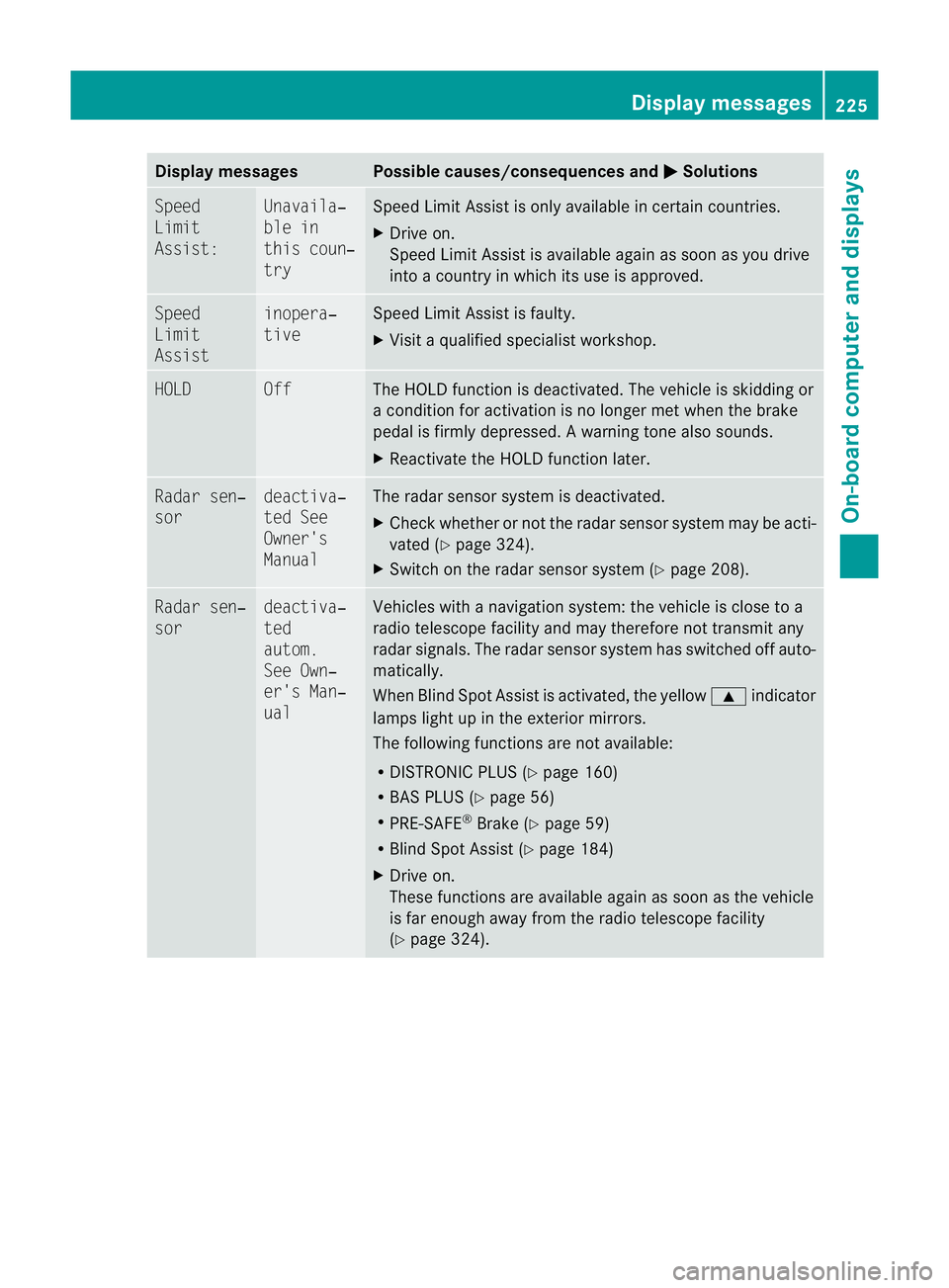
Displa
ymessages Possible causes/consequences and
M Solutions
Sp
eed
Limit
Assist: Unavaila‐
ble in
thi
sc oun‐
try Spee
dLimit Assist is onl yavailable in certain countries.
X Drive on.
Speed Limit Assist is avai lable again as soon as you drive
into acountry in which its use is approved. Speed
Limit
Assist inopera‐
tive Speed Limit Assist is faulty.
X
Visit aqualified special istworkshop. HOLD Off The HOLD function is deactivated. The vehicle is skidding or
ac
ondition for activation is no longer met when the brake
pedal is firmly depressed. Awarning ton ealso sounds.
X Reactivat ethe HOL Dfunction later. Ra
dars en‐
sor deactiva‐
ted See
Owner's
Manual Th
er adar sensor system is deactivated.
X Check whether or not the radar sensor system ma ybeacti-
vated (Y page324).
X Switch on the rada rsensor system (Y page 208). Rada
rsen‐
sor deactiva‐
ted
autom.
See Own‐
er's Man‐
ual Vehicles with
anavigation system: the vehicle is close to a
radio telescop efacility and may therefore not transmit any
radar signals .The radar sensor system has switched off auto-
matically.
When Blind Spot Assist is activated, the yellow 9indicator
lamps light up in the exterior mirrors.
The followin gfunctions are not available:
R DISTRONIC PLUS (Y page 160)
R BAS PLUS (Y page 56)
R PRE-SAFE ®
Brake (Y page 59)
R Blind Spot Assis t(Ypage 184)
X Drive on.
These functions are available again as soon as the vehicle
is far enough away from the radio telescope facility
(Y page 324). Display messages
225On-board computer and displays
BA 207ECE ÄJ 2010 /1a;1;2,e n-GB
mkalafa Version: 3.0.2.11 2010-01-26T13:03:22+01:00-Seite 225 Z
Page 229 of 333
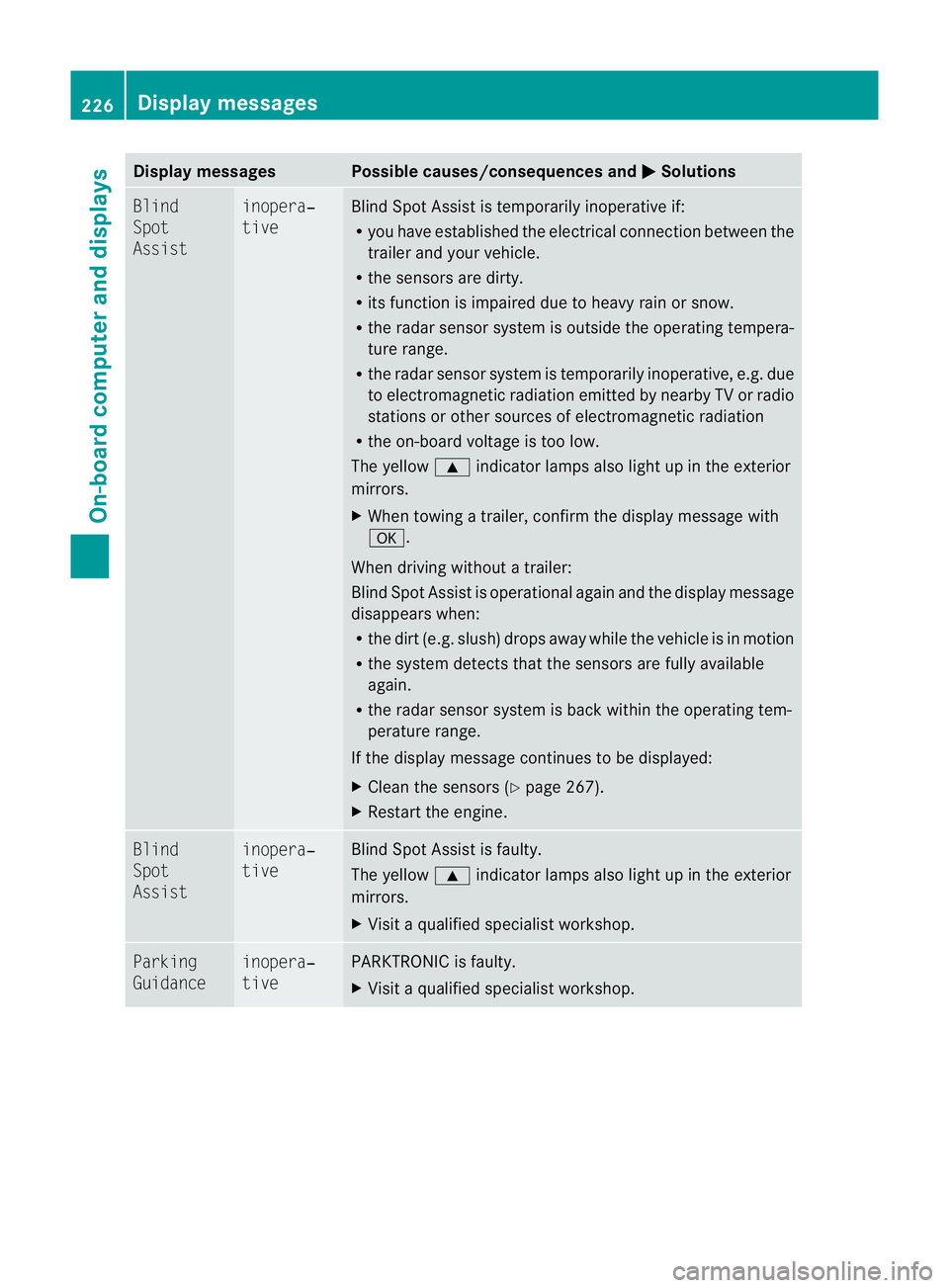
Displa
ymessages Possible causes/consequences and
M Solutions
Bl
ind
Spot
Assist inopera‐
tive Blind Spot Assist is temporarily inoperative if:
R
you have established the electrical connection between the
trailer and your vehicle.
R the sensors are dirty.
R its function is impaired due to heavy rain or snow.
R the radar sensor syste misoutside the operating tempera-
ture range.
R the radar senso rsystem is temporarily inoperative, e.g. due
to electromagnetic radiation emitted by nearby TV or radio
stations or othe rsources of electromagnetic radiation
R the on-boar dvoltage is too low.
The yellow 9indicator lamps also light up in the exterior
mirrors.
X When towin gatrailer, confirm th edispla ymessage with
a.
When driving without atrailer:
Blind Spo tAssist is operational again and th edisplay message
disappears when:
R thed irt( e.g. slush) drops away whil ethe vehicle is in mot ion
R the system detects tha tthe sensor sare full yavail able
again.
R the radar sensor system is back within the operating tem-
peratur erange.
If the displ aymessage continues to be displayed:
X Cle anthe sensor s(Ypage 267).
X Restar tthe engine. Blind
Spot
Assist inopera‐
tive Blind Spot Assist is faulty.
The yellow
9indicator lamps also light up in the exterior
mirrors.
X Visit aqualified specialist workshop. Parking
Guidance inopera‐
tive PARKTRONIC is faulty.
X
Visit aqualified specialist workshop. 226
Display messagesOn-board computer and displays
BA 207 ECE ÄJ 2010/1a; 1; 2, en-GB
mkalaf
aV ersion: 3.0.2.11
2010-01-26T13:03:22+01:0
0-Seite 226
Page 253 of 333
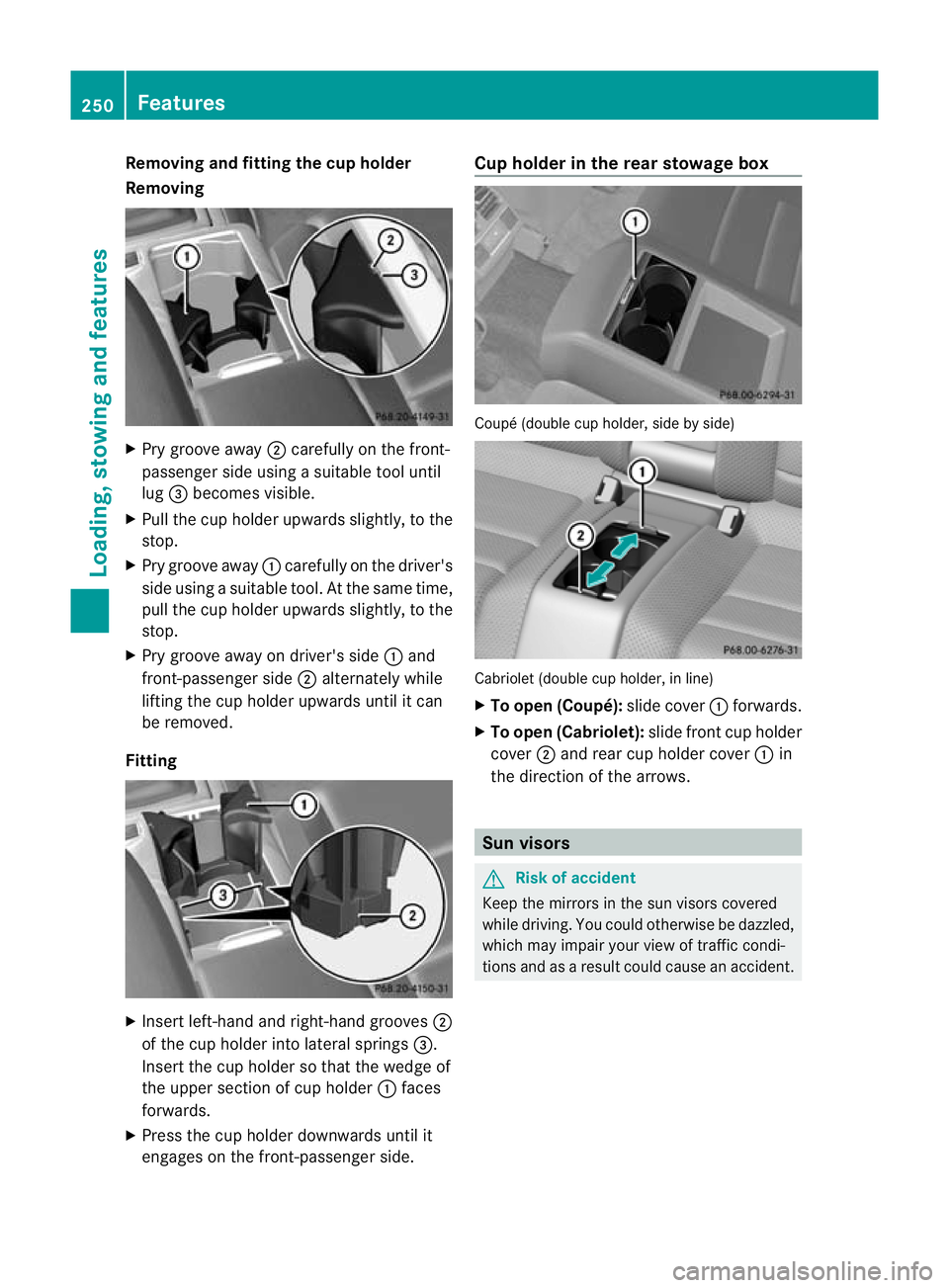
Removi
ngand fitting the cup holder
Removi ng X
Pry groove away ;carefully on the front-
passenger sid eusing asuitable tool until
lug =becomes visible.
X Pull the cup holder upwards slightly, to the
stop.
X Pry groove away :carefully on the driver's
sid eusing asuitable tool.Att he sam etime,
pull the cup holder upwards slightly, to the
stop.
X Pry groove away on driver's side :and
front-passenger side ;alternately while
lifting the cup holder upwards until it can
be removed.
Fitting X
Insert left-han dand right-hand grooves ;
of the cup holder into lateral springs =.
Insert the cup holder so that the wedg eof
the uppe rsection of cup holder :faces
forwards.
X Press the cup holder downwards until it
engages on the front-passenger side. Cup holder in the rea
rstowage box Coupé (double cup holder, side by side)
Cabriolet (double cup holder, in line)
X
To open (Coupé): slide cover:forwards.
X To open (Cabriolet): slide front cup holder
cover ;and rear cup holder cover :in
the directio nofthe arrows. Sun visors
G
Risk of accident
Kee pthe mirror sinthe sun visor scovered
while driving. You coul dotherwis ebedazzled,
which may impair your view of traffic condi-
tions and as aresult could cause an accident. 250
FeaturesLoading, stowing and features
BA 20
7ECE ÄJ 2010 /1a;1;2,e n-GB
mkalafa Version: 3.0.2.11 2010-01-26T13:03:22+01:00-Seite 250