steering MERCEDES-BENZ E-CLASS CABRIOLET 2010 Owner's Manual
[x] Cancel search | Manufacturer: MERCEDES-BENZ, Model Year: 2010, Model line: E-CLASS CABRIOLET, Model: MERCEDES-BENZ E-CLASS CABRIOLET 2010Pages: 333, PDF Size: 7.64 MB
Page 149 of 333

i
In order to preven tthe engin efrom over-
revving, th eautomatic transmission does
not shift down when the engine spee dis
too high.
i If the maximum engine speed for the shift
range is reached and you continue to accel-
erate, the automatic transmission shifts up
in order to prevent the engine from over-
revving, even if the shift range is restricted.
Derestricting the shift range X
Briefly press the selector lever to the right
towards D+.
or
X Pul lright-hand steering whee lgearshift
paddle.
The shift range is derestric ted.
Clearing the shif trang erestriction X
Press and hold the selector lever towards
D+ until Dis shown onc emore in the mul-
tifunction display.
or
X Pull and hold the right -hand steering wheel
gearshift paddle until Dis shown again in
the multifunction display.
The automatic transmissio nshift sfrom the
curre ntshif trange directly to D.
Selectin gthe ideal shift range X
Press th eselector lever to the left towards
D– and hold it in position.
or
X Pull the left -hand steering wheel gearshift
paddle and hold it in position.
The automatic transmissio nshift stot he
gear whic hallows ideal acceleration and
deceleration .Todothis, the automatic
transmission shift sdown one or more
gears. Manua
ldrive program
Switchin gonthe man ualdrive program Manual drive program
Mcan be selected
using the program selector button. You can
change gears using the steerin gwheel gear-
shift paddle sorthe selector lever in manual
drive program Mif the transmission is in posi-
tion D.The gear selected is shown in the mul-
tifunc tion display.
X Press the program selector button
(Y page 144) repeatedly until Mappears in
the multifunction display.
Upshifting X
Briefl ypres sthe selector lever to the right
towards D+.
or
X Pull the right-hand steering wheel gearshift
paddle (Y page 145).
The automatic transmission shift suptothe
nex tgear.
Downshifting X
Briefly press the selector lever to the left
towards D–.
or
X Pull the left-hand steerin gwheel gearshift
paddle (Y page 145).
The automatic transmission shift sdown to
the next gear.
i If you desire maximum acceleration ,push
the selector lever to the left or pull and hold
the left-hand steering wheel gearshift pad-
dle until the transmission shifts to the opti-
mal gear for the current speed. 146
Automatic transmissionDrivin
gand pa rking
BA 20 7ECE ÄJ 2010 /1a;1;2,e n-GB
mkalafa Version: 3.0.2.11 2010-01-26T13:03:22+01:00-Seite 146
Page 157 of 333

Parking up th
evehicle Problem Possible causes/consequences and
M Solutions
The vehicle is to be left
parked up for longer
than four weeks. The battery may be damaged by heavy discharging.
X
Disconnect the battery (Y page 286)orconnect it to abattery
trickle charger.
i You can obtain more information about battery trickle charg-
ers at aqualified specialist workshop, e.g. aMercedes-Benz
Servic eCentre. The vehicle is to be left
parked up for longer
than six weeks. Damage resulting from non-use may occu
rifthe vehicle is parked
up for long periods.
X Visit aqualified specialist worksho pand see kadvice. Driving tips
General driving tips
Rolling with the engine switched off G
Risk of accident
Never switc hthe engin eoff while the vehicle
is in motion.
There is no powe rassistanc efor the steering
and the service brake when the engin eisnot
running.
You will require considerably mor eeffort to
steer and brak eand you could therefore lose
control of the vehicl eand cause an accident. Engine oil
! Vehicle swithadiesel particle filter:
If the vehicle is mostly driven for short dis-
tances, it is possible that malfunctions may
occur durin gthe automa ticc leaning of the
diesel particle filter. This can lead to engine
damage. Therefore, if you frequently drive
short distances, make sure to drive on
motorways or countr yroads for 20 minutes
at least ever y500 km. Appl
ying th ebrakes
Important safet ynotes G
Risk of accident
Do not change down for additional engine
brakin gona slipper yroad surface. This could
cause the driv ewheels to lose their grip and
the vehi clec ould skid. G
Risk of accident
Make sure that other road users are not
endangered by your braking.
Downhill gradients On long and steep downhill gradients, espe-
cially if the vehicle is laden or towin gatrailer,
you must shift to alower gear in good tim eor,
on vehicles wit hautomatic transmission,
select shift range 1,2or 3.
i This also applie sifyou have activated
cruise control, SPEEDTRONIC or DIS-
TRONIC PLU S.
This will use the brakin geffect of th eengine,
so les sbraki ngwill be required to maintain
the speed .This relieves the load on the brake
syste mand prevent sthe brake sfrom ove r-
heati ngand wearing too quickly. If you need
additional braking, depress the brake pedal
repeatedly rather than continuously. 154
Driving tipsDriving and parking
BA 207 ECE ÄJ 2010/1a; 1; 2, en-GB
mkala
fa Version: 3.0.2.11
2010-01-26T13:03:22+01:00
-Seite 154
Page 160 of 333

characteristics cause
dbythe differ enttyres.
You shoul dtherefor eadapt your drivin gstyle
and drive carefully.
Have the spare whee lreplaced at the nearest
qualified specialist workshop which has the
necessar yspecialist knowledge and tools to
carry out the work required. Mercedes- Benz
recommends that you use aMercedes-Benz
Ser vice Centre for thi spurpose. In particular,
work relevant to safety or on safety-related
systems must be carried out at aqualified
specialist workshop.
Snow chains For safety reasons
,Mercedes-Benz recom-
mends that you only use snow chain swhich
hav ebeen speciall yapproved for your vehicle
by Mercedes-Benz ,ora re of acorresponding
standar dofquality.
If you intend to fit snow chains, pleas ebear
the following point sinmind:
R you may not attac hsnow chains to all
wheel-tyre combinations ;see the "Tyres
and wheels" section in the "Techni caldata"
chapter.
R snow chains must not be fitted to emer-
gency spare wheels ,e.g. a"Minispare"
emergency spar ewheel.
R fit snow chains only in pair sand only to the
rear wheels .Observ ethe manufacturer's
installation instructions.
Do not exceed the maximum permissible
speed of 50 km /h.
i You may wish to deactivat eESP®
when
pulling away with snow chains fitted
(Y page 57). This way you can allow the
wheels to spin in acontrolled manner, ach-
ieving an inc reased driving forc e(cutting
actio n).
Slipper yroad surfaces G
Risk of accident
Do not shift down for additional engine brak-
ing on aslippery road surface. This could cause the drive wheels to lose their grip and
the vehicle could skid.
You should drive particularly carefully on slip-
pery road surfaces. Avoid sudden accelera-
tion ,steering and braking manoeuvres.
If the vehicle threatens to skid or cannot be
stopped when movin gatlow speed:
X Vehicles with manua ltransmission: engage
neutral.
X Vehicles wit hautomatic transmission: shift
the transmission to position N.
X Try to bring the vehicle under control using
corrective steering.
i For more information on driving with
snow chains, see (Y page 157). Drivin
gabroad
General notes An extensiv
eMercedes–Benz Ser vice net-
work is als oavailable in othe rcountries. The
Ser vice Hotline's current telephone numbers
for use whe nyou ar eabroad are to be found
in the "Service24h" section of the Ser vice
Boo klet.
Only low-oc tane fuel is available in certain
countries.
You can find further information about fuel
grade son(Ypage 14 8).
Sym metrical dipped-beam headlamps If your journey takes you to countries where
vehicle
sare driven on th eopposite side of the
road to the country in which the vehicle is
registered, your headlamps must be switched
to symmetrical dipped beam. This prevents
oncomin gtraffic from being dazzled.
Have th eheadlamps conver tedasc lose as
possible to the border before drivin ginthese
countries. When usin gsymmetrical lights, the
edg eoft he carriageway is not lit as widely
and as fa rahead as nor mal. Drivin
gtips
157Driving and parking
BA 207ECE ÄJ 2010/1a; 1; 2, en-GB
mkalafa Version:3.0.2.11
2010-01-26T13:03:22+01:0
0-Seite 157 Z
Page 175 of 333
Permanen
tSPEEDTRONI Cremains active,
even if variable SPEEDTRONI Cisdeactiva ted.
You can note xceed the stored limit speed,
even if you depress the accelerator pedal
beyond the pressure point (kickdown). Dynamic handlin
gpackage with
sports mode
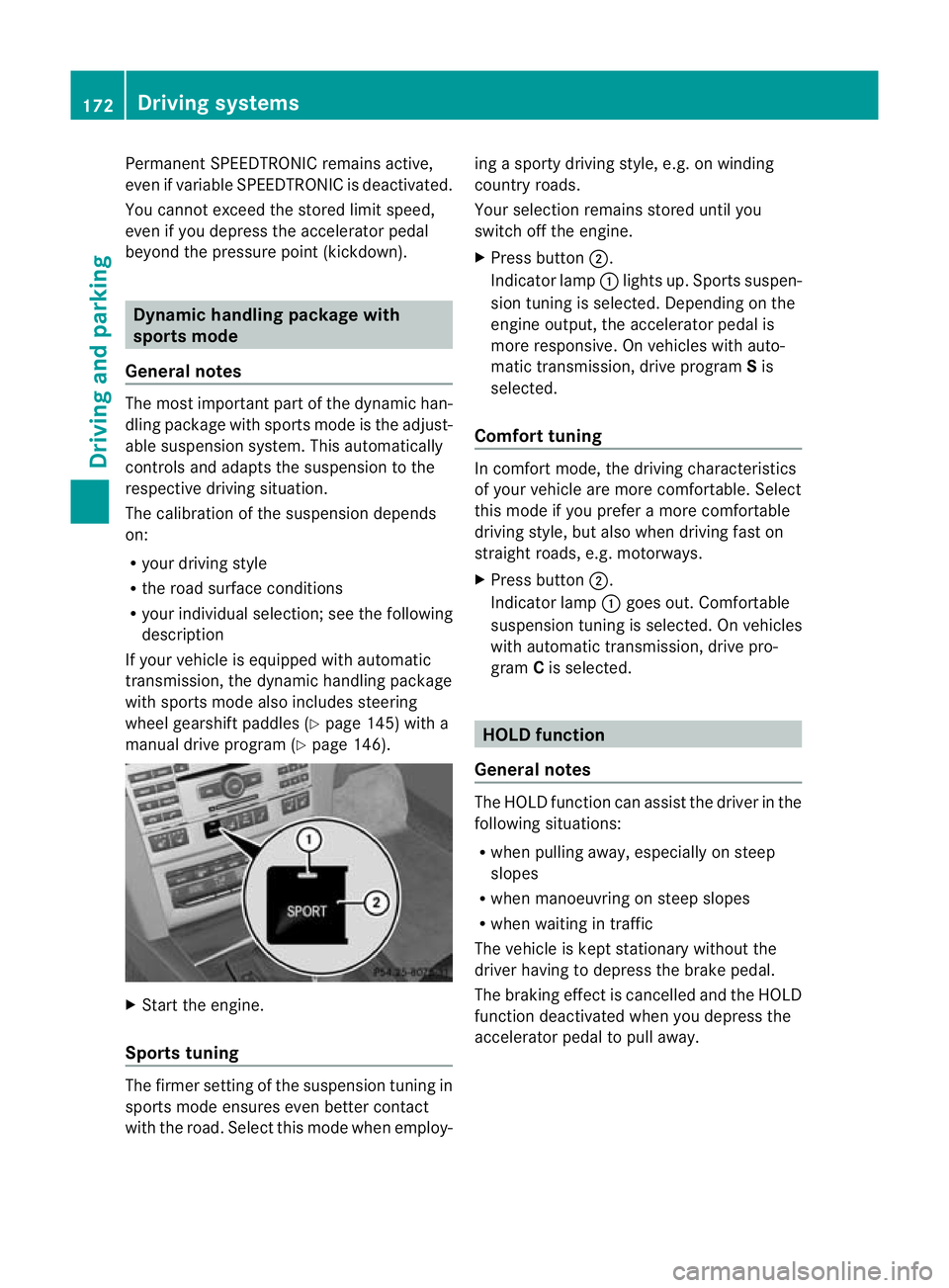
General notes Th
em ost importan tpart of the dynamic han-
dling package with sport smodeist he adjust-
able suspension system. This aut omatically
control sand adap tsthe suspension to the
respectiv edriving si tuation.
The calibration of the suspension depends
on:
R your driving style
R the road surface conditions
R your individual selection ;see th efollowing
descrip tion
If your vehicle is equippe dwitha utomatic
transmission ,the dynamic handlin gpackage
with sport smodea lso includes steering
wheel gearshif tpaddles (Y page 145) with a
manual driv eprogram (Y page 146). X
Start the engine.
Sports tuning Th
ef irmer settin gofthe suspension tuning in
sports mod eensure seven better contact
with the road. Select this mode whe nemploy- ing
asport ydriving style ,e.g. on winding
country roads.
You rselection remains stored until you
switc hoff th eengine.
X Pres sbutton ;.
Indicator lamp :lights up. Sport ssuspen-
sion tunin gisselected. Depending on the
engin eoutput, the accelerator pedal is
more responsive. On vehicles with auto-
matic transmission, drive program Sis
selected.
Comfort tuning In comfort mode, the driving characteristics
of your vehicle are more comfortable. Select
this mode if you prefer
amore com fortable
driving style ,but also when driving fast on
straight roads, e.g. motorways.
X Press button ;.
Indicator lamp :goes out. Comfortable
suspensio ntunin giss elected. On vehicles
with automatic transmission ,drive pro-
gram Cis selected. HOL
Dfunction
Gen eral notes Th
eH OLD function ca nassist the driver in the
foll owing situations:
R when pulling away, especially on steep
slopes
R when manoeuvrin gonsteep slopes
R when waiting in traffic
The vehicle is kept stationary without the
driver having to depress the brake pedal.
The braking effect is cancelled and the HOLD
function deactivated when you depress the
accelerator peda ltop ull away. 172
Driving systemsDrivin
gand pa rking
BA 20 7ECE ÄJ 2010 /1a;1;2,e n-GB
mkalafa Version: 3.0.2.11 2010-01-26T13:03:22+01:00-Seite 172
Page 180 of 333
Problems wit
hPARKTRONIC Problem Possible causes/consequences and
M Solutions
Only the red segments
in the PARKTRONIC
warning display
sare lit.
Yo ua lso hear awarning
tone for approximately
two seconds.
PARKTRONIC is deacti-
vated after approx-
imately 20 seconds and
the indicator lamp in
the PARKTRONIC but-
ton lights up. PARKTRONIC has malfunctioned and has switched itself off.
X
If problems persist, have PARKTRONIC checked at aqualified
specialist workshop. Only the red segments
in the PARKTRONIC
warning display
sare lit.
PARKTRONIC is deacti-
vate dafter approx-
imatel y20seconds. The PARKTRONI
Csensors are dirt yorthere is interference.
X Clean the PARKTRONI Csensors (Y page 267).
X Switch the ignition back on. The problem may be caused by an exter
nalsource of radio or
ultrasoun dwaves.
X See if PARKTRONIC functions in adifferent location. Parking Guidance
Important safet ynotes Parking Guidance is an electronic parking aid
with ultrasound. Ultrasound is used to meas-
ure the road on both sides of the vehicle. A
suitable parking space is indicated by the
parking symbol. You receiv esteering instruc-
tions when parking. You may also use PARK-
TRONIC (Y page 174). G
Risk of accident
Parking Guidance is merely an aid and may
recommen dparking spaces that are not suit-
able for parking. For example, these might be
spaces where parking is prohibited ,drive-
ways, unsuitabl esurfaces, etc.
Parking Guidance measures the parking
space as you drive past it. Any later changes
to the parking space are not taken into
account. For instance, this may be the case when the vehicle parked in front of or behind
the space changes its position or when an
obstacle is moved into the parking space.
Parking Guidance does not relieve you of the
responsibility for paying attention. If you rely
solely on Parking Guidance, you could cause
an accident and injure yourself and others.
You are always responsible for safety and
must continue to pay attention to your imme-
diate surroundings when parking and
manoeuvring.
G
Risk of accident
Objects located above the height range of
Parking Guidance will not be detected when
the parking space is measured. Thes eare not
take ninto account whe nthe parkin gproce-
dure is calculated, e.g .overhanging loads ,tail
sections or loading ramps of good svehicles.
In some circumstances, Parking Guidance Driving systems
177Drivingand pa rking
BA 20 7ECE ÄJ 2010 /1a;1;2,e n-GB
mkalafa Version: 3.0.2.11 2010-01-26T13:03:22+01:00-Seite 177 Z
Page 181 of 333
might therefore issu
esteering instructions
too soon. Thi smay lea dtoac ollision. For this
reason, you should avoid using Parking Guid-
anc eins uch situations. G
Risk of injury
Make sure that no persons or animals are in
the manoeuvring range. Otherwise, they
could be injured.
Whe nPARKTRONIC is deactivated, Parking
Guidance is als ounavailable.
Use Parking Guidance for parking spaces:
R that are paralle ltothe direction of travel
R that ar eonstraight roads, not bends
R that are on the same leve lasthe road, i.e.
not on the pav ement
Parking tips:
R On narrow roads, driv easclose to the park-
ing space as possible.
R Parking spaces which are littered, over-
grown or partially occupied by trailer draw-
bars might be identified incorrectly or not
at all.
R Snowfa ll or heav yrain may lea dtoaparking
space being measured inaccurately.
R Pay attention to the PARKTRONIC warning
messages during the parking procedure
(Y pag e175).
R When transporting aload which protru des
from you rvehicle, you must not use Parking
Guidance.
R Never use Parkin gGuidance with snow
chains or an emergenc yspare wheel fit ted.
R The way your vehicle is positioned in the
parkin gspace after parkin gisdependent
on various factors. These include the posi-
tion and shape of the vehicles parked in
front and behind it and the conditions of the
location. In some cases, Parking Guidance
may guide you too far or not far enough into
ap arking space. In some cases, it may also
lead you across or onto the kerb. If neces-
sary, cancel the parking procedure with
Parking Guidance. !
If unavoidable, you should drive over
obstacles such as kerbs slowly and not at
as har pangle .Otherwise, you may damage
the wheels or tyres.
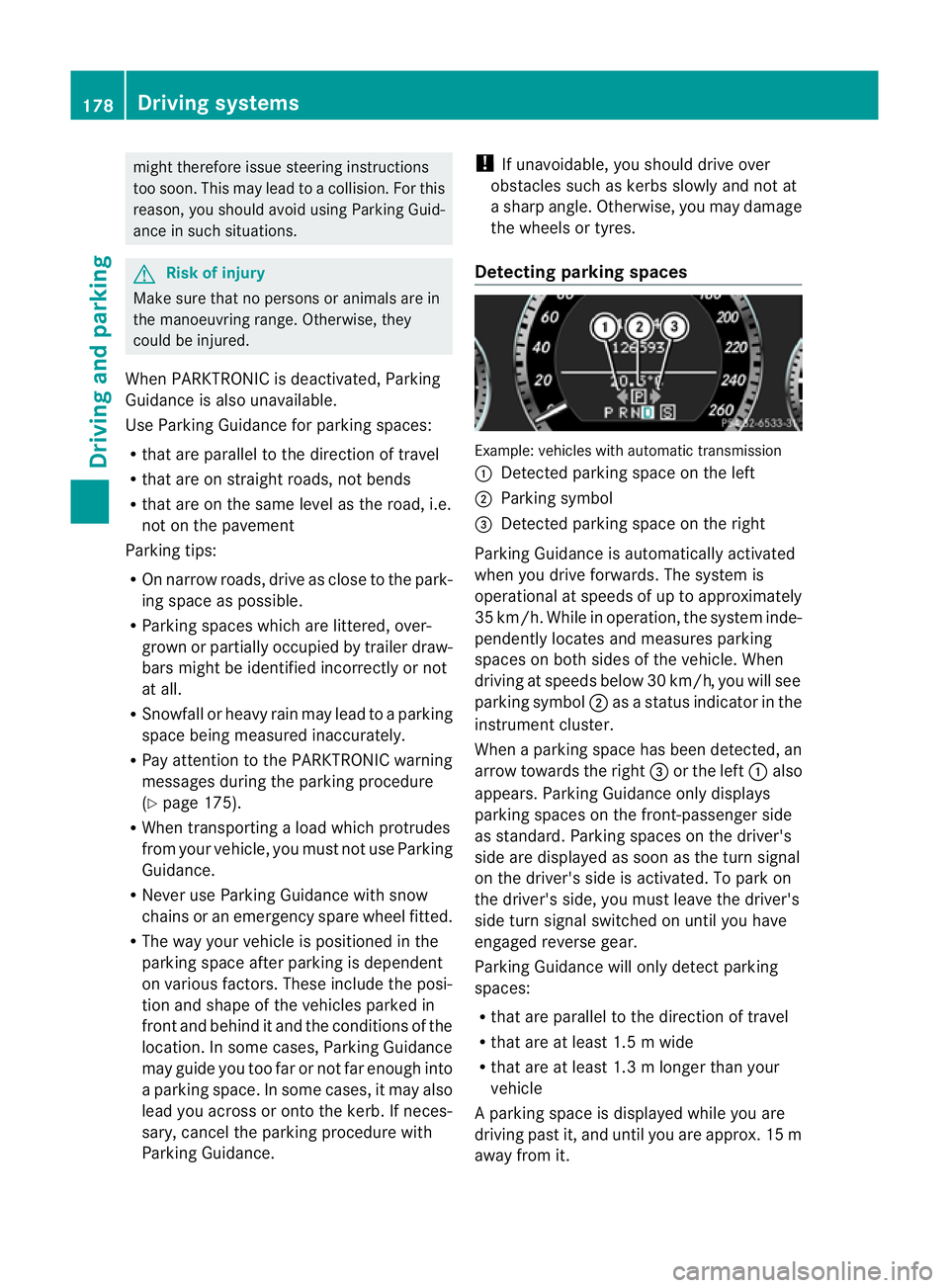
Detecting parking spaces Example: vehicles with automatic transmission
:
Detected parking space on the left
; Parking symbol
= Detected parking space on the right
Parking Guidance is automaticall yactivated
whe nyou drive forwards. The system is
operational at speeds of up to approximately
35 km/h. While in operation ,the system inde-
pendently locates and measures parking
spaces on both sides of the vehicle. When
drivin gatspeeds below 30 km/ h,you will see
parking symbol ;asastatus indicato rinthe
instrumen tcluster.
When aparking space has been detected, an
arrow towards the right =or the left :also
appears. Parking Guidance only displ ays
parking spaces on the front-passenger side
as standard. Parking spaces on the driver's
side are displayed as soon as the tur nsignal
on the driver's side is activated. To park on
the driver's side, you must leave the driver's
side turn signal switched on until you have
engaged reverse gear.
Parking Guidance will only detect parking
spaces:
R that are parallel to the direction of travel
R that are at least 1.5 mwide
R that are at least 1.3 mlonger than your
vehicle
Ap arking space is displayed while you are
driving past it, and until you are approx .15m
away from it. 178
Driving systemsDrivin
gand parking
BA 20 7ECE ÄJ 2010/1a; 1; 2, en-GB
mkalafa Version:3.0.2.11
2010-01-26T13:03:22+01:00
-Seite 178
Page 182 of 333
Parking
G
Ris
kofa ccident
PARKTRONIC and Parking Guidance are
merely parking aids and may not detect all
obstacles .They do not reliev eyou of the
responsibilit yofpaying attention.
You are always responsible for safety and
must continue to pay attention to your imme-
diate surroundings when parking and
manoeuvring. You could otherwise endanger
yourself and others.
X Stop the vehicle when the parking space
symbol shows the desired parking space in
the instrumen tcluster.
X Vehicles with manual transmission: shift to
reverse gear.
Vehicles with automatic transmission: shift
into position R.
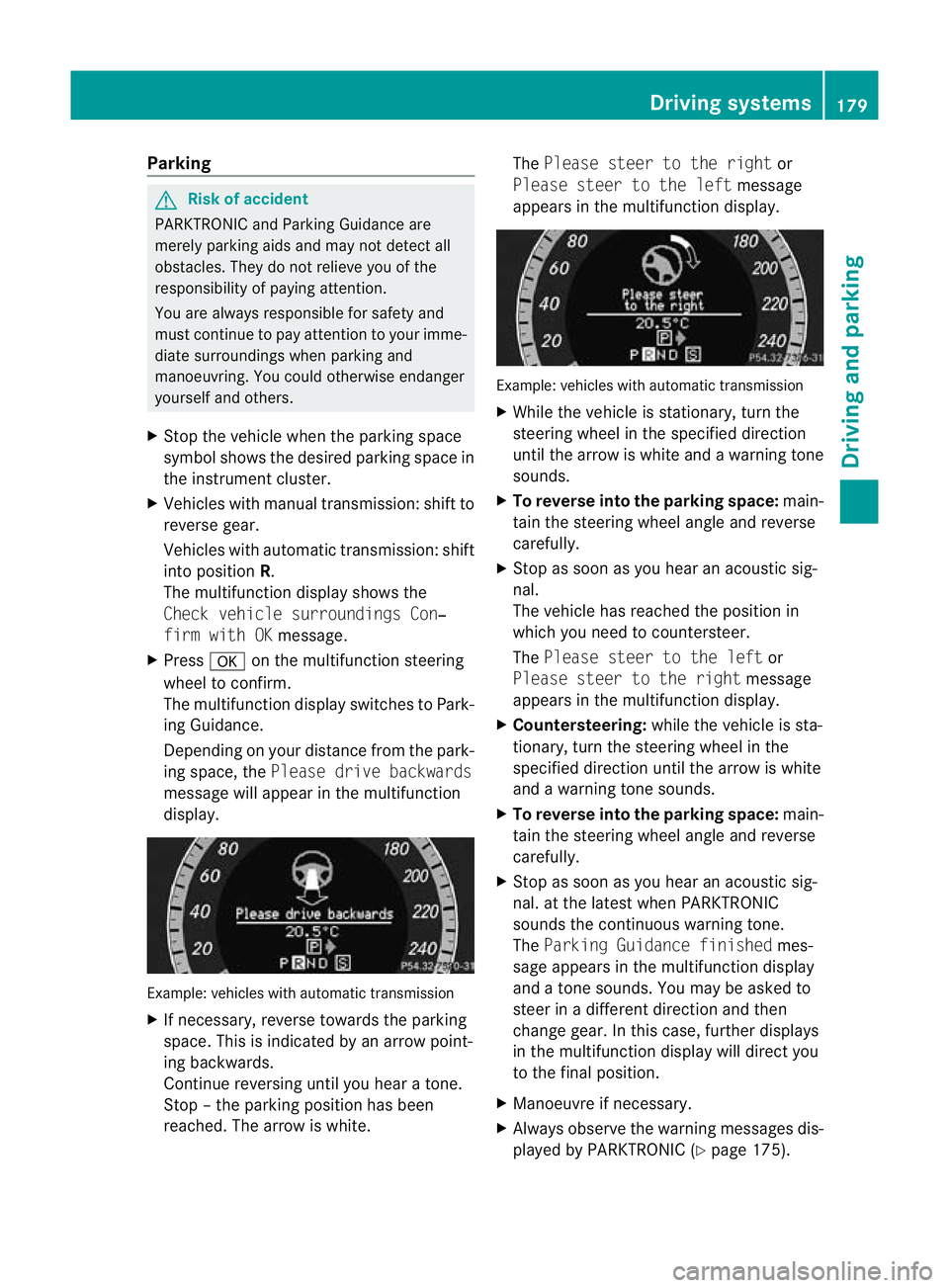
The multifunction display shows the
Chec kvehicle surroundings Con‐
firm with OK message.
X Press aon themultifunction steering
wheel to confirm.
The multifunction display switches to Park-
ing Guidance.
Depending on your distance from the park-
ing space, the Please drivebackwards
message will appear in th emultifunction
display. Example: vehicles with automatic transmission
X
If necessary, reverse towards the parking
space. This is indicated by an arrow point-
ing backwards.
Continue reversing until you hear atone.
Stop –the parkin gposition has been
reached. The arrow is white. The
Please stee rtothe right or
Please steer to the left message
appe arsint he multifunction display. Example: vehicles wit
hautomatic transmission
X Whil ethe vehicle is stationary ,turn the
steering wheel in the specified direction
until the arrow is white and awarning tone
sounds.
X To reverse into the parking space: main-
tain the steering wheel angle and reverse
carefully.
X Stop as soon as you hear an acoustic sig-
nal.
The vehicle has reached the position in
which you need to countersteer.
The Please stee rtothe left or
Please steer to the right message
appe arsint he multifunction display.
X Countersteering: while the vehicle is sta-
tionary, tur nthe steering wheel in the
specifie ddirection until the arrow is white
and awarning tone sounds.
X To reverse into the parking space: main-
tain the steering wheel angle and reverse
carefully.
X Stop as soon as you hear an acoustic sig-
nal. at the latest when PARKTRONIC
sounds the continuous warning tone.
The Parkin gGuidance finished mes-
sage appe arsint he multifunction display
and atone sounds. You ma ybeasked to
steer in adifferent direction and then
change gear. In this case, further displays
in the multifunction displa ywill direct you
to the final position.
X Manoeuvr eifnecessary.
X Alway sobserv ethe warnin gmessages dis-
played by PARKTRONI C(Ypage 175). Driving systems
179Driving and parking
BA 207ECE ÄJ 2010 /1a;1;2,e n-GB
mkalafa Version: 3.0.2.11 2010-01-26T13:03:22+01:00-Seite 179 Z
Page 185 of 333
ognise danger
sintime, cause an accident and
injur eyoursel fand others.
ATTE NTION ASSIST assesses your level of
fatigu eorlapses in concentration by taking
the following criteria into account:
R your personal driving style, e.g. steering
characteristics
R journey conditions, e.g. time of day and
length of journey
The functionality of ATTENTION ASSIST is
restricted and warnings may be delayed or
not occur at all:
R if the road condition is poor, e.g. the sur-
face is uneven or there are potholes
R if there is astron gside wind
R if you have adopted asporty driving style
with high cor nering speeds or hig hrates of
acceleration
R if you are predominantly driving slower
than 80 km/ horfaster than 180 km/h
R if you are currently using COMAND APS or
making atelephone call with it
R if the tim ehas been set incorrectly
R in active driving situations, such as when
you change lanes or change your speed
Warning and display messages in the
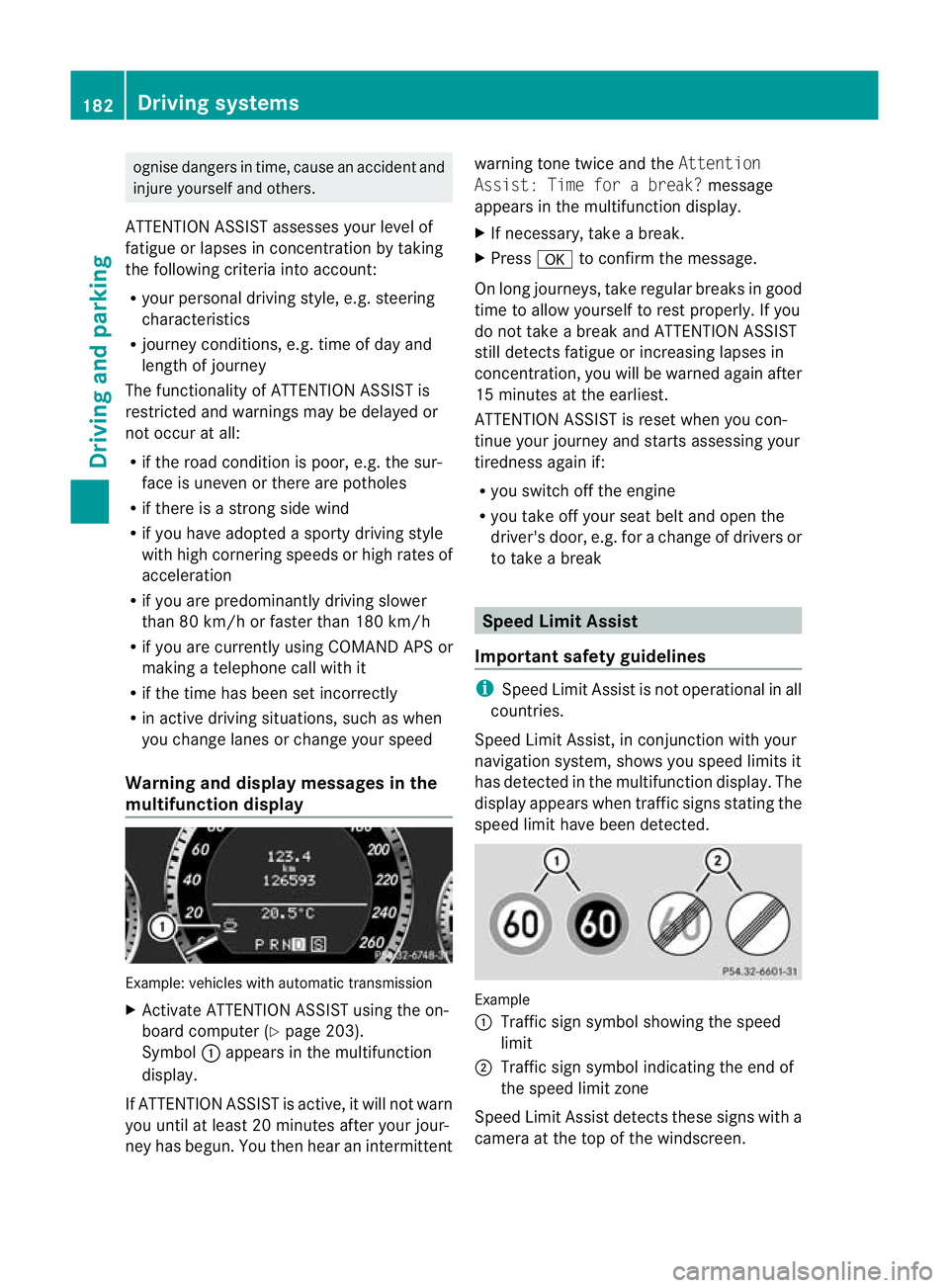
multifunction display Example: vehicles with automatic transmission
X Activate ATTENTION ASSIST using the on-
board computer (Y page 203).
Symbol :appears in the multifunc tion
display.
If ATTENTION ASSIS Tisactive, it wil lnot warn
you until at least 20 minutes after your jour-
ney has begun. You then hear an intermittent warnin
gtonet wice and the Attention
Assist :Time for abreak? message
appears in th emultifunction display.
X If necessary, take abreak.
X Press ato con firm th emessage.
On long journeys, take regula rbreaks in good
time to allow yoursel ftorest properly. If you
do not take abrea kand ATTENTION ASSIST
stil ldetect sfatigue or increasing lapses in
concentration, you will be warned again after
15 minutes at the earliest.
ATTENTION ASSIST is reset when you con-
tinue your journey and start sassessing your
tiredness agai nif:
R you switch off th eengine
R you take off your sea tbelt and open the
driver' sdoor, e.g. for achange of driver sor
to take abreak Spee
dLimit Assist
Impor tant safety guidelines i
Speed Limit Assist is not operational in all
coun tries.
Speed Limit Assist ,inconjunc tion with your
navigation system ,shows you speed limits it
has detec tedint he multifunc tion display. The
display appears when traffic signs stating the
speed limit hav ebeen detected. Example
:
Traffic sign symbol showing the speed
limit
; Traffic sign symbol indicatin gthe end of
the speed limit zone
Speed Limi tAssist detec ts these signs with a
camera at the top of the windscreen. 182
Driving systemsDriving and parking
BA 20
7ECE ÄJ 2010 /1a;1;2,e n-GB
mkalafa Version: 3.0.2.11 2010-01-26T13:03:22+01:00-Seite 182
Page 191 of 333
Gen
eral information i
When towing atrail er,s et the tyr epres-
sure on th erear axle of the towing vehicle
for am aximum load; se ethe tyr epressure
table in th efuel filler flap.
You will find installatio ndimensions and loads
in the "Technical data” section
(Y page 322).
The maximum permissible trailer drawbar
noseweight on the ball coupling is 75 kg.
However ,the actual noseweight must not
exceed the value given on the trailer tow hitch
and trailer identification plates. The lowest
weight applies.
! Use anoseweight as close as possible to
the maximum permissible noseweight .Do
not use anoseweight of less than 50 kg,
otherwise the trailer ma ycome loose.
Bear in min dthat the payload and the rear
axl eload ar ereduced by the actual nose-
weight.
Please not ethat when towing atrailer, PARK-
TRONIC (Y page 174) and parkin gguidance
(Y page 177 )are onl yavail ablew ith limita-
tions, or not at all.
i The height of the ball coupling changes
with the load of the vehicle. If necessary,
use atrailer wit haheight-adjustable draw-
bar.
Driving tips i
Observ ethe notes on ESP ®
trailer stabi-
lisation (Y page 58).
In Germany, the maximum permissible speed
for vehicle/ trailer combinations depends on
the type of trailer and is either 80 km/ hor
100 km/h. In some countries ,higher maxi-
mum speeds are permissible for vehicle/
trailer combinations. Befor ebeginnin gthe
journey ,check the trailer's documen tsto see
what the maximum permitted speed is.
For certain Mercedes-Benz vehicles, the max-
imum permissible rear axle load is increased
when towing atrailer. Refer to th e"Technical data
"section to fin dout whether this applies
to your vehicle. If you utilise any of the added
maximum rear axle load when towing atrailer,
th ev ehicle/ trailer combination may not
exceed amaximum spee dof100 km/h for
reasons concerning the operating permit.
This als oapplies in countries in which the
permissible maximum speed for vehicle/
trailer combinations is above 10 0km/h.
When towing atrailer, your vehicle's handling
characteristics wil lbedifferent in comparison
to when drivin gwithout atrailer.
Th ev ehicle/ trailer combination:
R is heavier
R is restricted in its acceleration and gradi-
ent-climbin gcapability
R has an increased braking distance
R is affected more by stron gcrosswinds
R demand smore sensitive steering
R consume smore fuel
On long and steep downhil lgradients ,you
must shift to alower gear in good time, or on
vehicles with automatic transmission ,select
the shift range 1,2or 3.
i This also applies if you have activated
cruise control, SPEEDTRONIC or DI S-
TRONIC PLUS.
This will use the brakin geffect of th eengine,
so les sbraking wil lberequired to maintain
the speed. This relieves the load on the brake
system and prevent sthe brakes from over-
heating and wearing too quickly .Ifyou need
additional braking, depress the brake pedal
repeatedly rather than con tinuously.
Driving tips R
Maintain agreater distance from th evehi-
cle in front than when driving without a
trailer.
R Avoid braking abruptly. If possible, brake
gently at first to allow the trailer to run on.
Then increase the braking force rapidly.
R The values given for gradient-climbing
capabilities from astandstill refer to sea 188
Trailer towingDrivin
gand pa rking
BA 20 7ECE ÄJ 2010 /1a; 1; 2, en-GB
mkalafa Version: 3.0.2.11 2010-01-26T13:03:22+01:00 -Seite 188
Page 196 of 333
Outsid
etemperature display
The outside temperature display is in the mul-
tifunction display. G
Risk of accident
At temperatures just above freezing point ,the
str eetm ay be icy, especially in woode dareas
or on bridges .Ifyou do not adapt your driving
style to the conditions, th evehicle could skid.
For this reason ,adapt your driving style and
speed to the weather conditions.
Changes in the outside temperatur eare dis-
played afte rashort delay. Speedomete
rwith segments
The segments in the speedometer indicate
which speed range is available.
Cruise control mode:
The segments light up from the stored speed
to the maximum speed.
Variable SPEEDTRONI Cmode:
The segments light up from the star tofthe
scal etot he selected limit speed.
DI ST RONIC PLUS mode:
One or two segments around the stored
speed ligh tup. Opera
ting th eon-board computer
The on-board computer is activated as soon
as you tur nthe key to position 1in the ignition
lock.
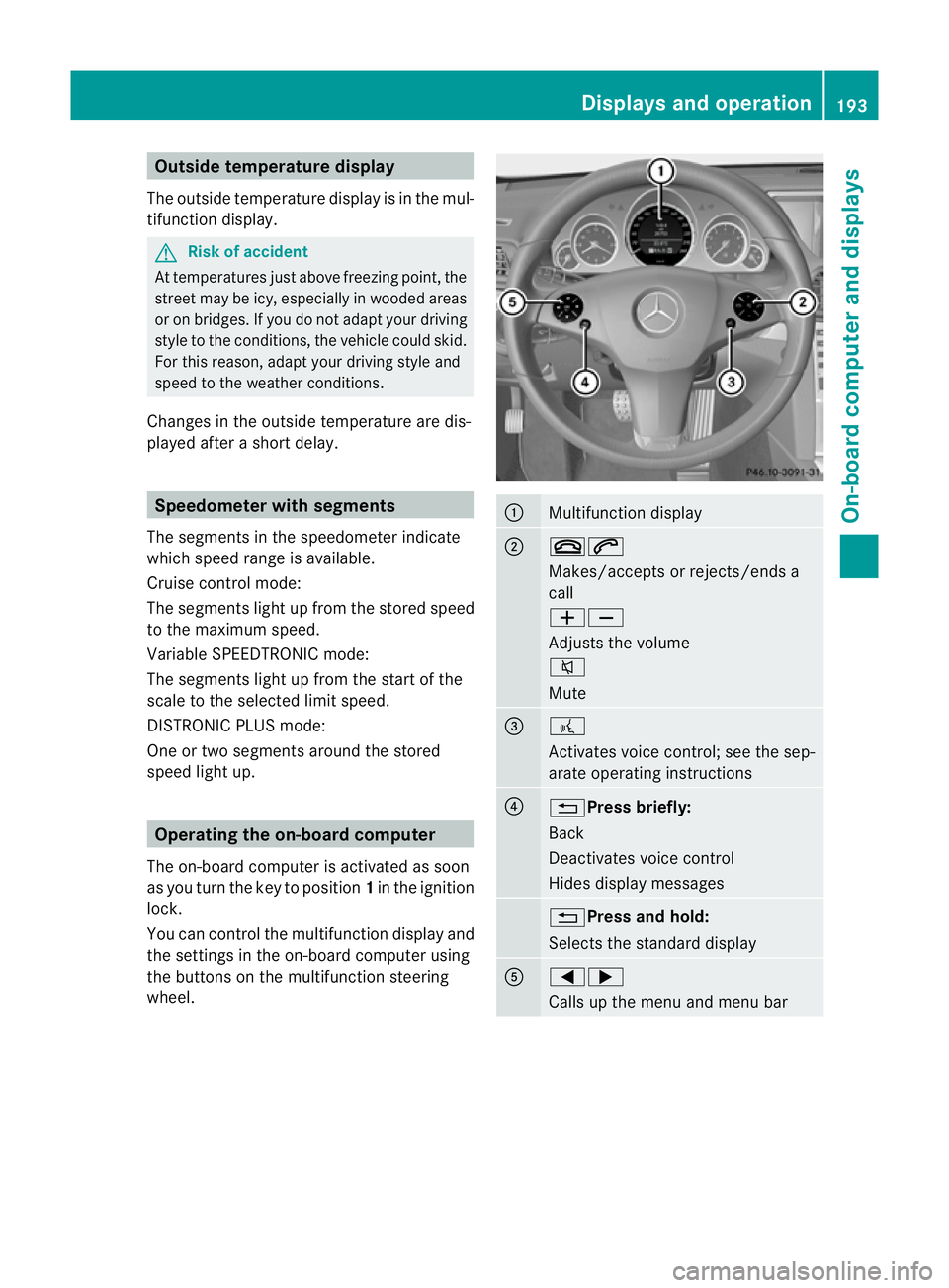
You can con trolthe multifunction display and
the setti ngsint he on-boar dcomputer using
the buttons on the multifunction steering
wheel. :
Multifunction display
;
~6
Makes/accepts or rejects/ends a
call
WX
Adjusts the volume
8
Mute
=
?
Activates voic
econtrol; see the sep-
arate operatin ginstructions ?
%Press briefly:
Back
Deactivate
svoice con trol
Hide sdispla ymessages %Press and hold:
Selects the standard display
A
=;
Calls up the men
uand menu bar Displays and operation
193On-board computer and displays
BA 207 ECE ÄJ 2010/1a; 1; 2, en-GB
mkalafa Version: 3.0.2.11 2010-01-26T13:03:22+01:00 -Seite 193 Z