tow MERCEDES-BENZ E-CLASS CABRIOLET 2010 Owner's Manual
[x] Cancel search | Manufacturer: MERCEDES-BENZ, Model Year: 2010, Model line: E-CLASS CABRIOLET, Model: MERCEDES-BENZ E-CLASS CABRIOLET 2010Pages: 333, PDF Size: 7.64 MB
Page 146 of 333

Transmission position and driv
epro-
gram display :
Transmission positio ndisplay
; Drive program display (E/S)or(E/S/M)
The cur rent transmissio nposition and drive
program appear in the multifunction display. Transmission positions
B
Par
kposition
Prevent sthe ve hicle fr om rolling
away when stopped. Do not shift
the transmission int oposition P
unless the vehicle is stationary.
The key can only be removed if the
transmission is in position P.Ifthe
key is removed from the ignition
lock ,the selector lever is locked. C
Reverse
Only shift the transmission to
R
when the vehicle is stationary. A
Neu
tral
Do not shift the transmission to N
whil edriving. Otherwise, th eauto-
matic transmissio ncould be dam-
aged.
Releasing the brakes will allow you
to mov ethe vehicle freely, e.g. to
push it or tow it.
If ESP ®
is deactivated or faulty:
only shift the transmission to posi-
tion Nif the vehicle is in danger of
skidding, e.g. on icy roads. 7
Drive
The automatic transmission
changes gear automatically
.All
forward gears are available. Gearshifting
The automatic transmission shifts to the indi-
vidual gears automatically when it is in trans-
mission position D.This automatic gearshift-
ing behaviour is determined by:
R as hift range restric tion, if selected
R the selected drive program
E/S, E/S/M orM(Y page 144)
R the position of the accelerator pedal
R the roa dspeed Driving tips
Accelerator peda lposition Your style of drivin
ginfluences how the auto-
matic transmissio nshift sgear:
R littl ethrot tle: earl yupshifts
R mor ethrot tle: late upshifts
Double-clutch function E3
50 and E500 only: when shiftin gdown,
the double-clutch function is active regard-
less of the currently selected drive program.
The double-clutch function reduces load Automatic transmission
143Driving and parking
BA 20 7ECE ÄJ 2010/1a; 1; 2, en-GB
mkalafa Version: 3.0.2.11 2010-01-26T13:03:22+01:00-Seite 143 Z
Page 147 of 333

change reactions and is cond
ucive to asporty
driving style. The sound generat edby the
double-clutch function depends on the drive
progra mselected.
Kickdown Use kickdown for maximu
macceleration.
X Depress the accelerator pedal beyond the
pressure point.
Th et ransmission shifts to alower gear
depending on the engin espeed.
X Ease off the accelerator pedal onc ethe
desired speed is reached.
The automatic transmission shift sback up.
Trailer towing X
Driv eint he middle of the engin espeed
range on uphill gradien ts.
X Shift dow ntoshift range 3or
2(Y page 14 5)depending on the uphill or
downhill gradien t,even if cruise control,
DI ST RONIC PLUS or SPEE DTRONIC is acti-
vated. Program selecto
rbutton
Th ep rogram selector butto nallows you to
choose between differen tdriving character-
istics. Progra
mselector button Program selecto
rbutton on vehicle swithout the
"dynamic handlin gpackage with sport smode" Program selecto
rbutton on vehicle swith the
"dynamic handlin gpackage with sport smode" E
Economy Comfortable, economical
driving
S
Sport Sport
ydriving style M
Manual Manual gearshi
fting i
For further informatio non"Drive pro-
gram "(Ypage 145).
X Pres sprogram sele ctor button :repeat-
edly until th elette rfor the desire dgearshift
program appear sint he multifunc tion dis-
play.
i The automatic transmission switches to
automatic drive program Eeach tim ethe
engin eisstarted. 144
Automatic transmissionDrivin
gand pa rking
BA 20 7ECE ÄJ 2010 /1a; 1; 2, en-GB
mkalafa Version: 3.0.2.11 2010-01-26T13:03:22+01:00 -Seite 144
Page 148 of 333

Steering wheel gearshif
tpaddles :
Left-hand steerin gwheel gearshift paddle
; Right-han dsteering whee lgearshif tpad-
dle
In the automatic drive program, you can
restric torderestrict the shift range by using
the steerin gwheel gearshift paddles or the
selector lever (Y page 145).
In the manua ldrive program, yo ucan change
gear using the steering wheel gearshift pad-
dles or the selector lever (Y page 145).
i You can only change gear with the steer-
ing wheel gearshift paddle swhen the trans-
mission is in position D.Automatic drive program
Drive program Eis characterised by the fol-
lowing:
R optimal fuel consumption resultin gfrom
th ea utomatic transmission shifting up
sooner
R the vehicle pulling away more gently in
forward and reverse gears, unless the
accelerator pedal is depressed fully
R increased sensitivity; this improves driving
stability on slippery road surfaces, for
example.
R the automatic transmission shifting up
sooner, which results in the vehicle being
driven at lower engine speeds and the
wheel sbeing less likely to spin Drive program
Sis characterised by the fol-
lowing:
R sporty engine and suspension configura-
tion
R the vehicle pulling away in first gear
R the automatic transmission shiftin gup
later
R the fuel consumption possibly being higher
as aresult of the later automatic transmis-
sion shift points Shif
tranges
Introduction When the automatic trans
mission is in posi-
tion D,itisp ossible to restric torderestrict
the shift range (Y page 145).
The shift range selected is shown in the mul-
tifunction display .The automatic transmis-
sion shift sonly as far as the selected gear. Driving situations
=
You can use the engi
ne'sbraking
effect. 5
To use the brakin
geffect of the
engine on do wnhill gradients and
for driving:
R on steep mounta inroads
R in mountainou sterrain
R in arduous conditions 4
To use the braking effect of the
engine on extremely steep downhill
gradients and long downhill
stretches
Restricting th
eshift range X
Press th eselector lever to the left towards
D– .
or
X Pull left -hand steering wheel gearshift pad-
dle.
The shift range is restricted. Automatic transmission
145Driving and parking
BA 207 ECE ÄJ 2010/1a; 1; 2, en-GB
mkalafa Version:3.0.2.11
2010-01-26T13:03:22+01:00
-Seite 145 Z
Page 149 of 333

i
In order to preven tthe engin efrom over-
revving, th eautomatic transmission does
not shift down when the engine spee dis
too high.
i If the maximum engine speed for the shift
range is reached and you continue to accel-
erate, the automatic transmission shifts up
in order to prevent the engine from over-
revving, even if the shift range is restricted.
Derestricting the shift range X
Briefly press the selector lever to the right
towards D+.
or
X Pul lright-hand steering whee lgearshift
paddle.
The shift range is derestric ted.
Clearing the shif trang erestriction X
Press and hold the selector lever towards
D+ until Dis shown onc emore in the mul-
tifunction display.
or
X Pull and hold the right -hand steering wheel
gearshift paddle until Dis shown again in
the multifunction display.
The automatic transmissio nshift sfrom the
curre ntshif trange directly to D.
Selectin gthe ideal shift range X
Press th eselector lever to the left towards
D– and hold it in position.
or
X Pull the left -hand steering wheel gearshift
paddle and hold it in position.
The automatic transmissio nshift stot he
gear whic hallows ideal acceleration and
deceleration .Todothis, the automatic
transmission shift sdown one or more
gears. Manua
ldrive program
Switchin gonthe man ualdrive program Manual drive program
Mcan be selected
using the program selector button. You can
change gears using the steerin gwheel gear-
shift paddle sorthe selector lever in manual
drive program Mif the transmission is in posi-
tion D.The gear selected is shown in the mul-
tifunc tion display.
X Press the program selector button
(Y page 144) repeatedly until Mappears in
the multifunction display.
Upshifting X
Briefl ypres sthe selector lever to the right
towards D+.
or
X Pull the right-hand steering wheel gearshift
paddle (Y page 145).
The automatic transmission shift suptothe
nex tgear.
Downshifting X
Briefly press the selector lever to the left
towards D–.
or
X Pull the left-hand steerin gwheel gearshift
paddle (Y page 145).
The automatic transmission shift sdown to
the next gear.
i If you desire maximum acceleration ,push
the selector lever to the left or pull and hold
the left-hand steering wheel gearshift pad-
dle until the transmission shifts to the opti-
mal gear for the current speed. 146
Automatic transmissionDrivin
gand pa rking
BA 20 7ECE ÄJ 2010 /1a;1;2,e n-GB
mkalafa Version: 3.0.2.11 2010-01-26T13:03:22+01:00-Seite 146
Page 151 of 333

Problems wit
hthe transmission Problem Possible causes/consequences and
M Solutions
Th
et rans mission has
problem sshifting gear. The transmission is losing oil.
X
Hav ethe transmission chec kedataq ualified specialist work-
sho pimmediately. Th
ea cceleratio nability
is deteriorating.
The transmission no
longer changes gear. The transmission is in emergency mode.
It is only possible to shift into
2ndgear and reverse gear.
X Stop the vehicle.
X Shift the transmission to position P.
X Turn the key to position 0in the ignition lock or press the Star t/
Stop butto nrepeatedly until all indicator lamps in the instru-
men tcluster go out.
X Wait at least 10 seconds before restarting the engine.
X Shift the transmission to position Dor R.
If D is selected, the transmission shifts into 2ndgear; if Ris
selected, the transmission shifts into reverse gear.
X Hav ethe transmission chec kedataq ualified specialist work-
sho pimmediately. Releasin
gthe parking lock manually
In th eevent of an electrica lfault, it is possible
to release the selector lever lock manually to
move it out of position P,e.g. if you wis hto
tow the vehicle away. X
Depres sthe parkin gbrake firmly.
X Prise ou tselector lever gaiter :with aflat,
blunt object ,(e.g. ascrewdriver wrappe dinclot
h)from th eright-hand edge, pulling it
up and out.
X Pres sreleas ebutton ;dow nand simul-
taneousl ymove the select or lever ou tof
position P.
The selector lever can now be moved freely
unti litisr eturnedtop osition P. Refuelling
Important safet
ynotes G
Risk of explosion
Fuel is highly flammable. Fire, naked flames
and smoking are therefore prohibited when
handling fuels.
Switc hoff the engine before refuelling. G
Ris
kofi njury
Do not com einto contact with fuels. 148
RefuellingDriving and parking
BA 207 ECE ÄJ 2010/1a; 1; 2, en-GB
mkalafa
Version: 3.0.2.11 2010-01-26T13:03:22+01:00-Seite 148
Page 156 of 333

Problem Possible causes/consequences and
M Solutions
X
Consult aqualified specialist workshop. Parking
Important safety notes
G
Risk of accident
Only remove the key from the ignition lock
when the vehicle is stationary, as you cannot
steer the vehicle when the key is removed.
Never leave children unsupervised in the vehi-
cle. They could release the parking brake. This
could lead to aserious or fatal accident. G
Risk of fire
Make sure that the exhaust system does not
under any circumstances com einto contact
with easily ignitable material such as dry grass
or petrol .Otherwise, the flammable material
may ignite and set the vehicle on fire.
To ensure that the vehicle is secured against
rolling away unintentionally:
R the parking brake must be appl ied.
R on vehicles wit hmanual transmission,
engage first gear or reverse gear.
R on vehicles with automatic transmission,
the transmissio nmust be in position Pand
the key must be removed from the ignition
lock.
R on steep uphill or downhill gradients, turn
the front wheel stowards the kerb. Parking brake
X
To ap ply:depress parking brake ;firmly.
The J indicator lamp in the instrument
cluster lights up if the engine is running.
X To release: depress the brak epedal and
keep it depressed.
X Pull release handle :.
The J indicator lam pint he instrument
cluster goes out. Parking
153Driving and pa rking
BA 20 7ECE ÄJ 2010 /1a;1;2,e n-GB
mkalafa Version: 3.0.2.11 2010-01-26T13:03:22+01:00-Seite 153 Z
Page 157 of 333

Parking up th
evehicle Problem Possible causes/consequences and
M Solutions
The vehicle is to be left
parked up for longer
than four weeks. The battery may be damaged by heavy discharging.
X
Disconnect the battery (Y page 286)orconnect it to abattery
trickle charger.
i You can obtain more information about battery trickle charg-
ers at aqualified specialist workshop, e.g. aMercedes-Benz
Servic eCentre. The vehicle is to be left
parked up for longer
than six weeks. Damage resulting from non-use may occu
rifthe vehicle is parked
up for long periods.
X Visit aqualified specialist worksho pand see kadvice. Driving tips
General driving tips
Rolling with the engine switched off G
Risk of accident
Never switc hthe engin eoff while the vehicle
is in motion.
There is no powe rassistanc efor the steering
and the service brake when the engin eisnot
running.
You will require considerably mor eeffort to
steer and brak eand you could therefore lose
control of the vehicl eand cause an accident. Engine oil
! Vehicle swithadiesel particle filter:
If the vehicle is mostly driven for short dis-
tances, it is possible that malfunctions may
occur durin gthe automa ticc leaning of the
diesel particle filter. This can lead to engine
damage. Therefore, if you frequently drive
short distances, make sure to drive on
motorways or countr yroads for 20 minutes
at least ever y500 km. Appl
ying th ebrakes
Important safet ynotes G
Risk of accident
Do not change down for additional engine
brakin gona slipper yroad surface. This could
cause the driv ewheels to lose their grip and
the vehi clec ould skid. G
Risk of accident
Make sure that other road users are not
endangered by your braking.
Downhill gradients On long and steep downhill gradients, espe-
cially if the vehicle is laden or towin gatrailer,
you must shift to alower gear in good tim eor,
on vehicles wit hautomatic transmission,
select shift range 1,2or 3.
i This also applie sifyou have activated
cruise control, SPEEDTRONIC or DIS-
TRONIC PLU S.
This will use the brakin geffect of th eengine,
so les sbraki ngwill be required to maintain
the speed .This relieves the load on the brake
syste mand prevent sthe brake sfrom ove r-
heati ngand wearing too quickly. If you need
additional braking, depress the brake pedal
repeatedly rather than continuously. 154
Driving tipsDriving and parking
BA 207 ECE ÄJ 2010/1a; 1; 2, en-GB
mkala
fa Version: 3.0.2.11
2010-01-26T13:03:22+01:00
-Seite 154
Page 161 of 333

On vehicle
swith Intelligent Light System the
headlamps can be conver tedint he on-board
compute r(Ypage 206).
Switching over dipped-beam headlamps
on vehicles with halogen headlamps :
Protec tive cap
; Switchover lever
X Turn protectiv ecap : anti-clockwise and
remove it.
X Push switchover lever ;down.
X Insert protective cap :and turn it clock-
wise.
When you are driving back on the same side
of the road as the country where the vehicle
is registered, have the headlamps changed
back to asymmetrical dippe dbeam as soon
as possibl eafter crossing th eborder. Driving systems
Cruise control
Import ants afety notes Cruise control maintain
saconstant road
speed for you. It brakes automatically in order
to avoid exceeding the set speed. On long and
steep downhil lgradients ,especially if the
vehicle is laden or towing atrailer, yo umust
shift to alower gear in good tim eorselect
shift range 1,2or 3on vehicles with auto-
matic transmission. By doing so, you will
mak euse of the brakin geffect of th eengine,
which relieves the load on the brake system and prevents the brakes from overheating
and wearing too quickly. G
Risk of accident
Do not change down for additional engine
braking on aslippery road surface. This could
cause the drive wheels to lose their grip and
the vehicle could skid.
Use cruise control only if road and traffic con-
ditions make it appropriate to maintain a
steady speed for aprolonged period. Yo ucan
store any road spee dabove 30 km/h. G
Risk of accident
Cruise control cannot take account of road
and traffic conditions.
Always pay atten tion to traffic conditions
even when cruise control is activated.
Cruise control is only an aid designed to assist
driving. You are responsible for the vehicle's
speed and for brakin gingood time. G
Risk of accident
Do not use cruise control:
R in road and traffic condition swhich do not
allow you to maintain aconstant speed (e.g.
heavy traffic or winding roads). You could
otherwise cause an accident.
R on slippery roads. Brakin goraccelerating
coul dcause the drive wheels to lose trac-
tion and the vehicle could then skid.
R when there is poor visibility, e.g. due to fog,
heavy rain or snow
Cruise control lever You can operate cruise control and variable
SPEEDTRONIC with the cruise control lever.
The LIM indicator lamp on the cruise control
lever indicates which system you have selec-
ted:
R
LIM indicator lamp off: cruise control is
selected.
R LIM indicator lamp on: variableSPEED-
TRONI Cisselected. 158
Driving systemsDriving and parking
BA 20
7ECE ÄJ 2010/1a; 1; 2, en-GB
mkalafa Version: 3.0.2.11
2010-01-26T13:03:22+01:00
-Seite 158
Page 162 of 333
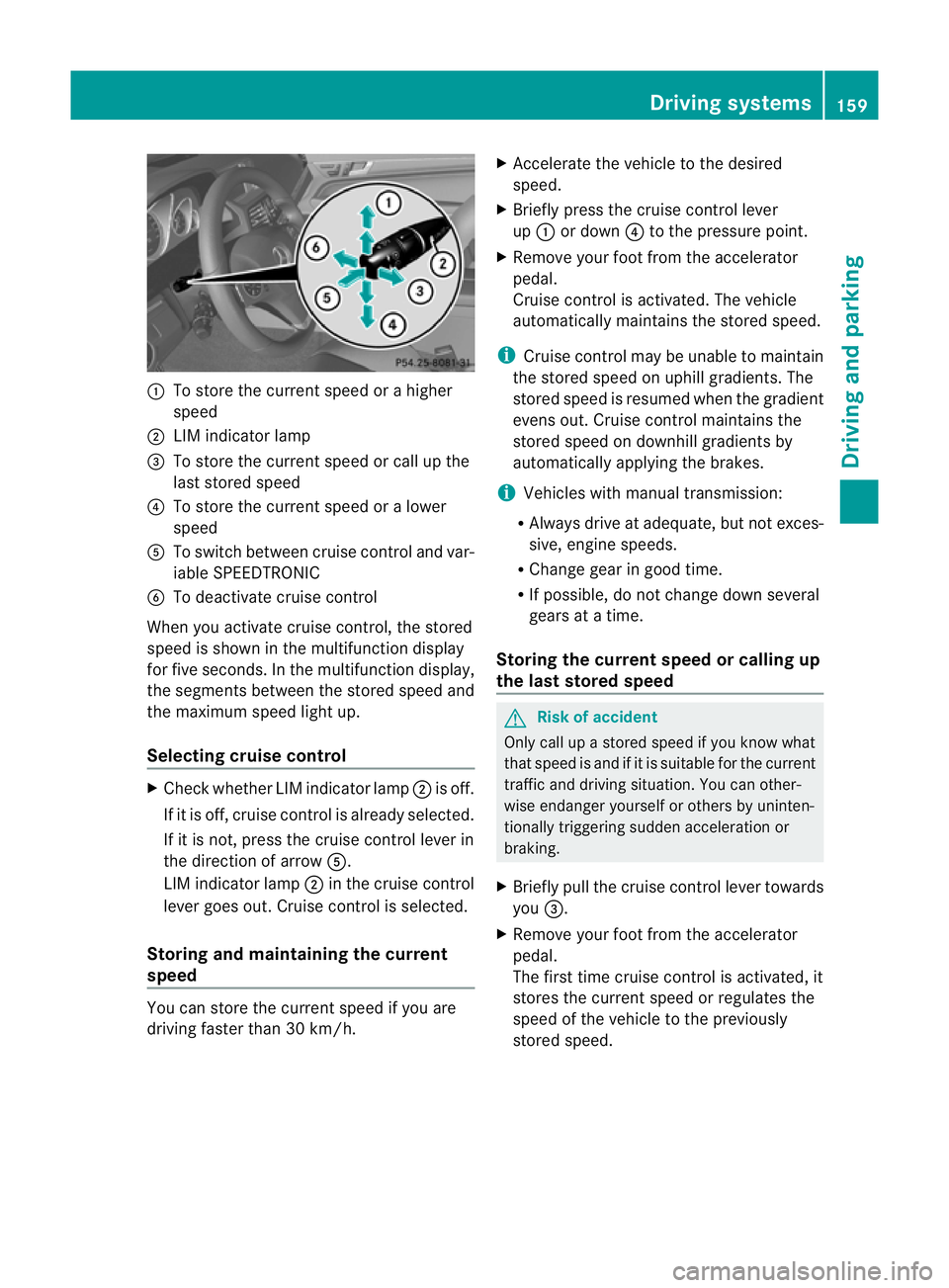
:
To store the curren tspeed or ahigher
speed
; LIMi ndicator lamp
= To sto rethe curren tspeed or call up the
last stored speed
? To stor ethe curren tspeed or alower
speed
A To switc hbetween cruise control and var-
iable SPEEDTRONIC
B To deactivate cruise control
When you activate cruise control ,the stored
speed is shown in the multifunction display
for fiv eseconds. In the multifunction display,
the segments between the stored speed and
the maximu mspeed light up.
Selecting cruise control X
Check whether LI Mindicator lamp ;is off.
If it is off, cruise contro lisalready selected.
If it is not ,pres sthe cruise contr ol leverin
the direction of arrow A.
LIM indicator lamp ;in the cruise control
lever goe sout. Cruise contro lisselected.
Storing and maintaining the cur rent
speed You can stor
ethe curren tspeed if you are
drivin gfaster than 30 km/h. X
Accelerat ethe vehicle to the desired
speed.
X Briefly press the cruise contr ol lever
up : or down ?to the pressure point.
X Remove your foot from the accelerator
pedal.
Cruise contr ol is activated. The vehicle
automatically maintains the stored speed.
i Cruise contr ol maybeu nable to maintain
the sto reds peed on uphill gradien ts.T he
stored speed is resumed when the gradient
even sout. Cruise contro lmaintains the
stored speed on downhill gradients by
automatically applying the brakes.
i Vehicles with manual transmission:
R Always driv eatadequate, but no texces-
sive, engine speeds.
R Chang egearing oodt ime.
R If possible, do not change down several
gears at atime.
Storin gthe curre nt speedorc allingup
the last stored speed G
Risk of accident
Only call up astored spe ed ifyou know what
that spee disand if it is suitable for the current
traffic and driving situation. You can other-
wise endanger yourself or others by uninten-
tionally triggering sudden acceleration or
braking.
X Briefly pull the cruise control lever towards
you =.
X Remove your foot from the accelerator
pedal.
Th ef irst time cruise control is activated, it
stores the current speed or regulates the
speed of the vehicle to the previously
stored speed. Drivin
gsystems
159Drivingand pa rking
BA 20 7ECE ÄJ 2010 /1a; 1; 2, en-GB
mkalafa Version: 3.0.2.11 2010-01-26T13:03:22+01:00 -Seite 159 Z
Page 163 of 333

Setting
aspeed X
Press the cruise control lever to the pres-
sure point, up :for ahigher speed or
down ?fora lower speed.
X Keep the cruise contro llever pressed until
the desired speed is reached.
X Release the cruise control lever.
The new speed is stored.
i Cruise control is not deactivated if you
depress the accelerator pedal. For exam-
ple, if you accelerate briefly to over take,
cruise control adjusts the vehicle's speed
to the last speed stored after you have fin-
ished overtaking.
Making adjustments in 1km/h incre-
ments X
Briefly press the cruise contro llever to the
pressur epoint ,up :for ahigher speed or
down ?for alower speed.
The last speed stored is inc reased or
reduced.
Making adjustments in 10 km/h incre-
ments X
Briefly press the cruise contro llever
beyond the pressur epoint ,up :for a
higher spee dordown?for alower speed.
The last speed stored is inc reased or
reduced.
Deactivating cruise control There are several ways to deactivate cruise
control:
X Briefly press the cruise contro llever for-
wards B.
or
X Brake. or
X
Briefly press the cruise control lever in the
direc tion of arrow A.
Variable SPEEDTRONIC is selected. LIM
indicator lamp ;in the cruise contr ol lever
li ghts up.
Cruise control is automatically deactivated if:
R you depress the parkin gbrake
R yo ua re driving at less than 30 km/h
R ESP ®
intervenes or yo udeactiva teESP ®
R you change into neutral in avehicle with
manual transmission while driving or if the
clut chis depressed for longer than 6sec-
onds
R on vehicles with manual transmission ,you
shift to agear that is too high and as aresult
the engin espeed is too low
R on vehicles with automatic tra nsmission,
you shif tinto position Nwhil edriving
If cruise contro lisd eactiva ted, you will hear
aw arning tone. You will see the Cruise
contro loffmessage in th emultifunction
display for approximately five seconds.
i The last spee dstored is cleared when you
switch off the engine. DISTRONIC PLUS
Important safet ynotes i
DISTRONIC PLU Sisn ot available in all
coun tries.
DISTRONIC PLU Sregulates the speed and
automatically helps you maintain the dis-
tanc etot he vehicle detected in front. It
brakes automatically in orde rtoavoid
exceeding th eset speed.
On long and steep downhill gradien ts,e spe-
cially if the vehicle is laden or towing atrailer,
yo um ust select shift range 1,2or 3in good
time. By doing so, you will make use of the
brakin geffect of the engine ,which relieves
the load on the brake system and prevents 160
Driving systemsDriving and pa
rking
BA 20 7ECE ÄJ 2010 /1a;1;2,e n-GB
mkalafa Version: 3.0.2.11 2010-01-26T13:03:22+01:00-Seite 160