belt MERCEDES-BENZ E-CLASS CABRIOLET 2010 Owner's Guide
[x] Cancel search | Manufacturer: MERCEDES-BENZ, Model Year: 2010, Model line: E-CLASS CABRIOLET, Model: MERCEDES-BENZ E-CLASS CABRIOLET 2010Pages: 333, PDF Size: 7.64 MB
Page 165 of 333
mus
talsoa pply the brakes yourself if this
braking powe risnot sufficient.
If DISTRONIC PLU Sdetect sarisk of collision
with avehicle in front, an intermit tent warning
tone sounds. In addition, the ·distance
warning lamp in the instrument cluste rlights
up. Brak etoavoidac ollision.
Cruise control lever With the cruise control lever you can operate
DI ST RONIC PLUS and variable SPEE D-
TRONIC.
The LI Mindicator lamp on the cruise control
lever indicates which system you have selec-
ted:
R LIM indicator lamp off: DISTRONIC PLUS
is selected
R LIM indicator lamp on: variable SPEED-
TRONIC is selected. :
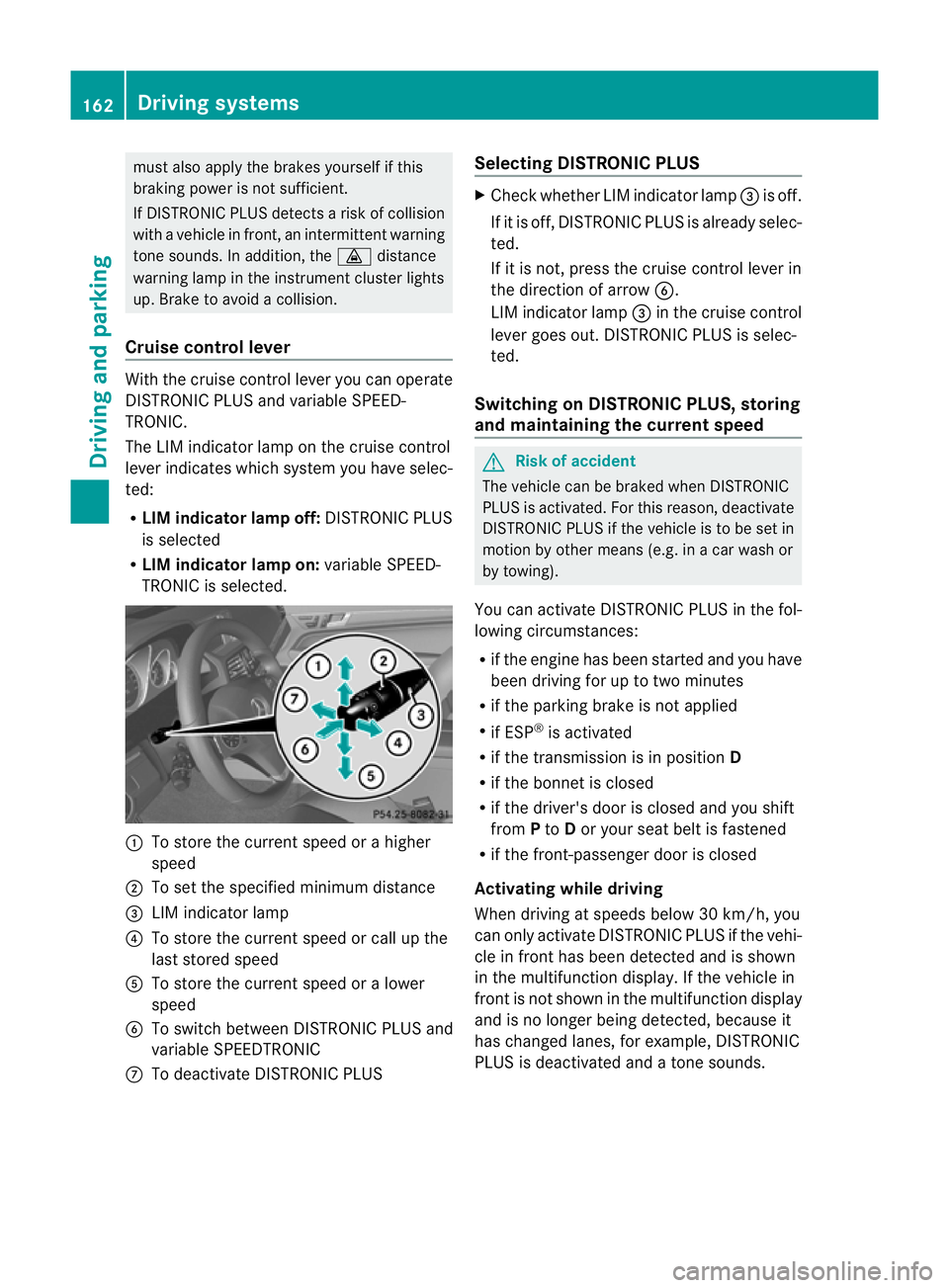
To sto rethe curren tspeed or ahigher
speed
; To set the specified minimum distance
= LIMi ndicator lamp
? To sto rethe curren tspeed or call up the
last stored speed
A To stor ethe curren tspeed or alower
speed
B To switc hbetween DI STRONIC PLUS and
variable SPEEDTRONIC
C To deactivate DISTRONIC PLUS Selecting DISTRONIC PLUS X
Check whether LIM indicator lamp =is off.
If it is off, DISTRONIC PLUS is already selec-
ted.
If it is not ,pres sthe cruise contr ol leverin
the direction of arrow B.
LIM indicator lamp =in the cruise control
lever goe sout. DISTRONIC PLUS is selec-
ted.
Switching on DISTRONIC PLUS ,storing
and maintaining the current speed G
Risk of accident
The vehicle can be braked when DISTRONIC
PLUS is activated. For this reason, deactivate
DISTRONIC PLUS if the vehicle is to be set in
motion by othe rmeans (e.g. in acar wash or
by towing).
You can activate DISTRONIC PLUS in the fol-
lowing circumstances:
R if the engine has been started and you have
been drivin gfor up to two minutes
R if the parkin gbrake is not applied
R if ESP ®
is acti vated
R if the transmission is in position D
R if the bonnet is closed
R if the driver' sdoor is closed and you shift
from Pto Dor your seat belt is fastened
R if the front-passenger door is closed
Activating while driving
When drivin gatspeeds below 30 km/h, you
can only acti vate DISTRONIC PLUS if the vehi-
cle in fron thas been detected and is shown
in the multifunction display. If the vehicle in
front is not shown in the multifunction display
and is no longe rbeing detected, because it
has changed lanes, for example, DISTRONIC
PLU Sisd eactivated and atone sounds. 162
Driving systemsDriving and pa
rking
BA 20 7ECE ÄJ 2010 /1a; 1; 2, en-GB
mkalafa Version: 3.0.2.11 2010-01-26T13:03:22+01:00 -Seite 162
Page 168 of 333
If yo
uwish to leave the vehicle or park it,
deactivate DISTRONIC PLU Sand secure the
vehicl eagainst rolling away.
If DISTRONIC PLU Sdetect sthat the vehicle
in front is stopping, it brakes your vehicle until
it is stationary.
Onc eyour vehicle is stationary, it remains
stationar yand you do not need to depress the
brake.
i Depe nding on the specified minimum dis-
tance, your vehicle will come to astandstill
at as ufficien tdistanc ebehin dthe vehi cle
in fron t.The specifie dminimum distance is
set using the thumbwheel on the cruise-
control lever.
When DISTRONIC PLU Sisa ctivate dand the
vehicl eisatas tandstill, the following warning
message appe arsint he multifunction display
if:
R the driver's door is open and the driver's
seat belt is unfastened
R the engin eisswitched off, unless it is auto-
matically switched off by the ECO start/
stop func tion
R the bonnet is opened
Select Park (P)
X Move the selector leve rtoPto prevent the
vehicle from rolling away.
DISTRONIC PLUS is deactivated .The warn-
ing message in the multifunction display
disappears.
The horn will also sound at regular intervals if
DI ST RONIC PLUS is activated and you:
R switch the engine off, open the driver's
doo rand take off your sea tbelt
R open the bonnet
The soundin gofthe horn alerts you to the fact
that the vehicle has been parked while DI S-
TRONIC PLU Siss till activated. The sound
becomes louder if you attempt to lock the
vehicle .The vehicle is not locked until DI S-
TRONIC PLU Sisd eactivated. i
If the ignition has been switched off ,the
engin ecannot be started again until DIS-
TRONIC PLUS has been deactivated.
If DISTRONIC PLUS is activated and afault
occurs in the system or there is adisruption
in the power supply while the vehicle is sta-
tionary ,the Brak eimmediately message is
show ninthe multifunction display. Immedi-
atel ydepress the brak efirmly until the warn-
ing message in the multifunction displa ygoes
out or mov ethe selector lever to P.DIS-
TRONIC PLUS is then deactivated.
Setting aspeed X
Press the cruise control lever to the pres-
sure point, up :for ahigher speed or
down Afora lower speed.
X Keep the cruise contro llever pressed until
the desired speed is reached.
X Release the cruise control lever.
The new speed is stored. DI STRONIC PLUS
is activated and adjusts the vehicle's speed
to the new speed stored.
Making adjustments in 1km/h incre-
ments X
Briefly press the cruise contro llever to the
pressur epoint ,up :for ahigher speed or
down Afor alower speed.
The last speed stored is inc reased or
reduced.
Making adjustments in 10 km/h incre-
ments X
Briefly press the cruise contro llever
beyond the pressur epoint ,up :for a
higher spee dordownAfor alower speed.
The last speed stored is inc reased or
reduced. Driving systems
165Driving and parking
BA 207 ECE ÄJ 2010/1a; 1; 2, en-GB
mkalafa Version: 3.0.2.11 2010-01-26T13:03:22+01:00-Seite 165 Z
Page 176 of 333
Activation conditions
You can activat
ethe HOL Dfunction if:
R the vehicl eisstationary
R the engin eisrunnin gorhas been automat-
ically switched off by th eECO star t/stop
function
R the dri ver'sd oor is closed or your seat belt
is fastened
R thep arking brak eisnot applied
R theb onnet is closed
R the selector leve risinp osition D,Ror Non
vehicles with automatic transmission
R DIST RONIC PLUS is deactivated
Activating the HOLD function X
Make sure that the activation conditions
are met.
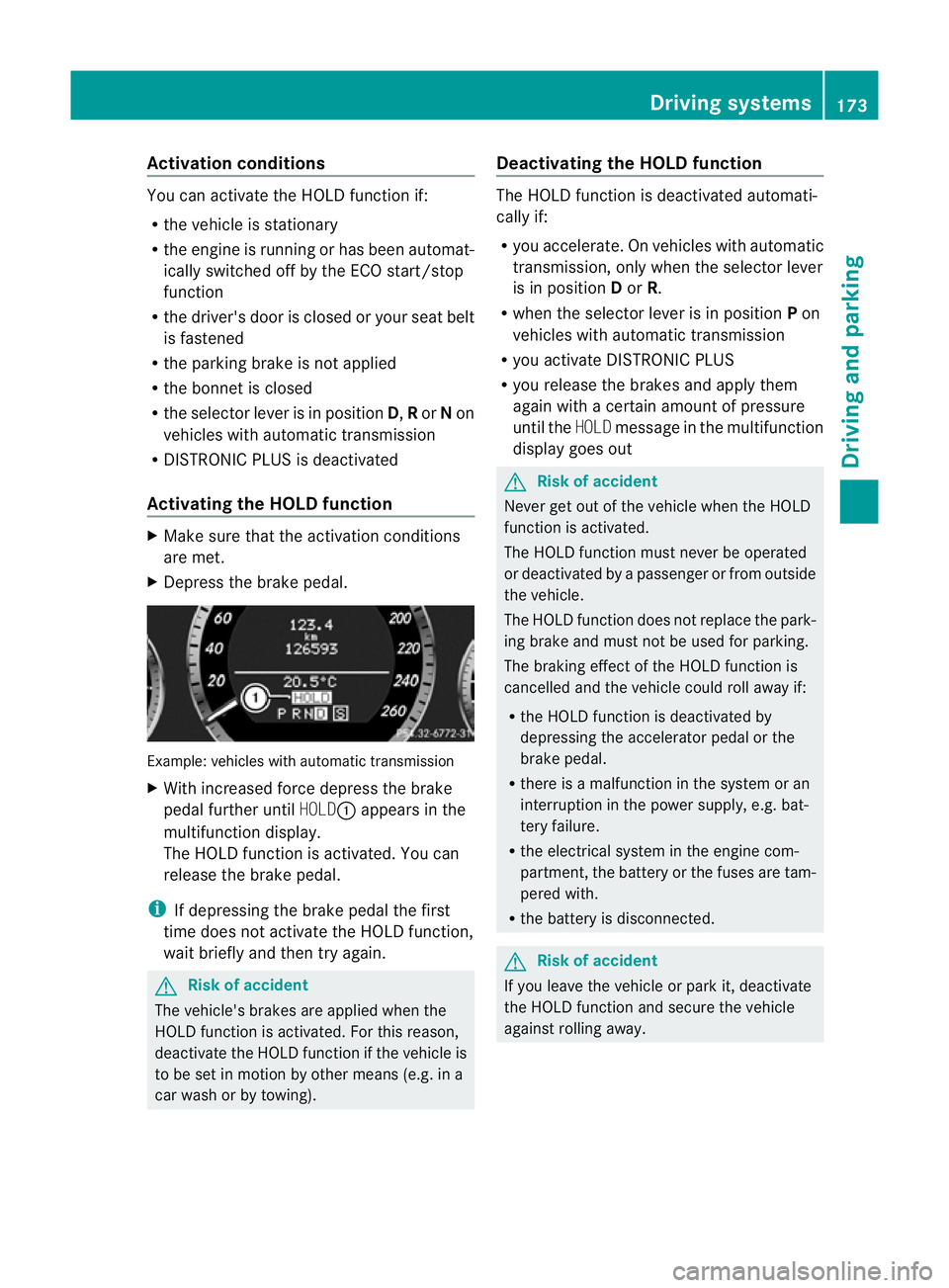
X Depress the brake pedal. Example: vehicles with automatic transmission
X
With increase dforc edepress the brake
pedal fur ther until HOLD:appear sinthe
multifunction display.
The HOL Dfunction is activated. You can
release the brake pedal.
i If depressing the brake pedal the first
time does not activate the HOLD function,
wait briefly and then try again. G
Risk of accident
The vehicle's brakes are applied when the
HOLD function is activated. For this reason,
deactivate the HOLD function if the vehicle is
to be set in motion by other means (e.g. in a
car wash or by towing). Deactivating the HOLD function The HOLD function is deactivated automati-
cally if:
R
you accelerate. On vehicles with automatic
transmission ,only whe nthe selec torlever
is in position Dor R.
R when the selector lever is in position Pon
vehicles with automatic transmission
R you activate DI STRONIC PLUS
R you release the brakes and apply them
again with acertain amount of pressure
until the HOLDmessage in the multifunction
display goes out G
Risk of accident
Never get out of the vehicle when the HOLD
fun ction is activated.
The HOLD function must never be operated
or deactivated by apassenger or from outside
the vehicle.
The HOLD function does not replace the park-
ing brake and must not be used for parking.
The brakin geffect of the HOLD function is
cancelled and the vehicl ecould roll away if:
R the HOL Dfunction is deactivated by
depressin gthe accelerator pedal or the
brake pedal.
R ther eisam alfunction in the system or an
interruption in the power supply, e.g. bat-
tery failure.
R the electrical system in the engine com-
partment ,the battery or the fuses ar etam-
pered with.
R the battery is disconnected. G
Risk of accident
If you leave the vehicle or park it, deactivate
the HOLD function and secure the vehicle
against rolling away. Driving systems
173Drivingand parking
BA 20 7ECE ÄJ 2010/1a; 1; 2, en-GB
mkalafa Version:3.0.2.11
2010-01-26T13:03:22+01:0
0-Seite 173 Z
Page 177 of 333
You will see the followin
gwarnin gmessage in
the multifunction display if the HOL Dfunction
is activated and:
R the driver' sdoor is open and th edriver's
seat belt is unfastened
R the engi neis switched off ,unless it is auto-
matically swi tchedoff by the ECO start/
stop function
R the bo nnetis opened
Vehicles wit hmanual transmission: Brake
immediately
X Immediately depress the brake pedal firmly
until the warning message in the multifunc-
tion displ ay goes out. This deactivates the
HOL Dfunction.
In vehicles with automatic transmission:
Select Park (P)
X Move the selector lever to Pto prevent the
vehicle from rolling away.
The HOLD function is deactivated. The
warning messag eint he multifunction dis-
play disappears.
Ah orn will also sound at regular intervals if
the HOL Dfunction is activated and you:
R switch the engine off, open the driver's
door and take off your seat belt
R open the bonnet
The sounding of the horn alerts you to the fact
that the vehicle has been parked while the
HOLD function is still activated. The tone
becomes louder if you attempt to lock the
vehicle. The vehicle is not locked until the
HOLD function is deactivated.
i If the ignition has been switched off, the
engine cannot be started again until the
HOLD function has been deactivated.
If there is afault in the system or power supply
while the HOLD function is activated, the
Brak eimmediately message is show nin
the multifunction display .Immed iately
depress the brake firmly until the warning
message in the multifunction dis play goes
out. On vehicles with automatic transmission, you
can als oshift int oposition P.This deactivates
the HOL Dfunction. PARKTRONIC
Important safety notes G
Risk of accident
PARKTRONIC is only an aid and may not
detect all obstacles .This system does not
reliev eyou of the need to pay attention.
You are always responsible for safet yand
must continue to pay attention to your imme-
diate surroundings whe nparking and
manoeuvring. You could otherwise endanger
yourself and others. G
Risk of injury
Make sure that no persons or animals are in
the manoeuvring range. Otherwise ,they
coul dbei njured.
PARKTRONIC is an electronic parking aid with
ultrasonic sensors. It indicates visual lyand
audibly the distance between your vehicle
and an object.
PARKTRONIC is activated automatically when
you:
R switch on the ignition
R release the parking brake
PARKTRONIC is deactivated at speeds above
18 km/h. It is reactivated at lower speeds.
PARKTRONIC monitors the area around your
vehicle using six sensors in the front bumper
and four sensors in the rear bumper. 174
Driving systemsDriving and parking
BA 207 ECE ÄJ 2010/1a; 1; 2, en-GB
mkalafa
Version:3.0.2.11
2010-01-26T13:03:22+01:00
-Seite 174
Page 185 of 333
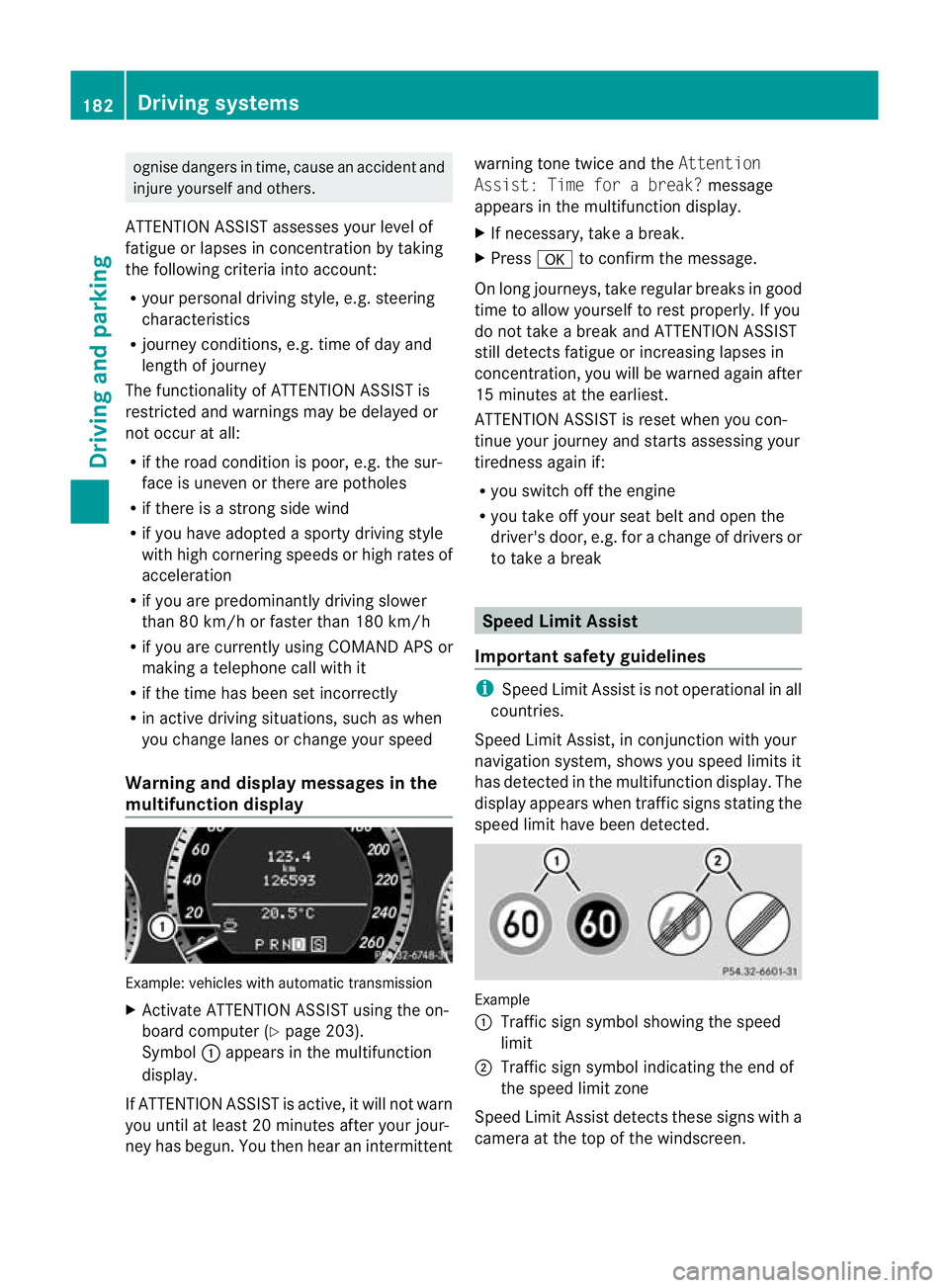
ognise danger
sintime, cause an accident and
injur eyoursel fand others.
ATTE NTION ASSIST assesses your level of
fatigu eorlapses in concentration by taking
the following criteria into account:
R your personal driving style, e.g. steering
characteristics
R journey conditions, e.g. time of day and
length of journey
The functionality of ATTENTION ASSIST is
restricted and warnings may be delayed or
not occur at all:
R if the road condition is poor, e.g. the sur-
face is uneven or there are potholes
R if there is astron gside wind
R if you have adopted asporty driving style
with high cor nering speeds or hig hrates of
acceleration
R if you are predominantly driving slower
than 80 km/ horfaster than 180 km/h
R if you are currently using COMAND APS or
making atelephone call with it
R if the tim ehas been set incorrectly
R in active driving situations, such as when
you change lanes or change your speed
Warning and display messages in the
multifunction display Example: vehicles with automatic transmission
X Activate ATTENTION ASSIST using the on-
board computer (Y page 203).
Symbol :appears in the multifunc tion
display.
If ATTENTION ASSIS Tisactive, it wil lnot warn
you until at least 20 minutes after your jour-
ney has begun. You then hear an intermittent warnin
gtonet wice and the Attention
Assist :Time for abreak? message
appears in th emultifunction display.
X If necessary, take abreak.
X Press ato con firm th emessage.
On long journeys, take regula rbreaks in good
time to allow yoursel ftorest properly. If you
do not take abrea kand ATTENTION ASSIST
stil ldetect sfatigue or increasing lapses in
concentration, you will be warned again after
15 minutes at the earliest.
ATTENTION ASSIST is reset when you con-
tinue your journey and start sassessing your
tiredness agai nif:
R you switch off th eengine
R you take off your sea tbelt and open the
driver' sdoor, e.g. for achange of driver sor
to take abreak Spee
dLimit Assist
Impor tant safety guidelines i
Speed Limit Assist is not operational in all
coun tries.
Speed Limit Assist ,inconjunc tion with your
navigation system ,shows you speed limits it
has detec tedint he multifunc tion display. The
display appears when traffic signs stating the
speed limit hav ebeen detected. Example
:
Traffic sign symbol showing the speed
limit
; Traffic sign symbol indicatin gthe end of
the speed limit zone
Speed Limi tAssist detec ts these signs with a
camera at the top of the windscreen. 182
Driving systemsDriving and parking
BA 20
7ECE ÄJ 2010 /1a;1;2,e n-GB
mkalafa Version: 3.0.2.11 2010-01-26T13:03:22+01:00-Seite 182
Page 212 of 333

vating th
eEASY-ENTRY/EXIT feature, make
sure that nobody can become trapped.
Do not leave children unsupervise dinthe
vehicle, even if they ar esecur edinac hild
restraint system .The chil dren could open the
driver's door and thereby unintentionally acti-
vat ethe EASY-ENTRY/EXIT feature and
becom etrapp ed.
X Press the =or; button on the steer-
ing whee ltoselect the Settings menu.
X Press the :or9 button to select the
Convenience submenu.
X Press the abutton to confirm.
X Press the :or9 button to select the
Easy Entry/Exit feature.
You will see the selected setting: onor
off.
X Press the abutton to save the setting.
Switching th ebelta djustmen ton/off
Fur ther information on belt adjust ment
(Y pag e42).
X Press the =or; button on the steer-
ing whee ltoselect the Settings menu.
X Press the :or9 button to select the
Convenience submenu.
X Press the abutton to confirm.
X Press the :or9 button to select the
Belt adjustment: function.
You will see the selected setting: onor
off.
X Press the abutton to save the setting.
Switching the fold in mirrors when lock-
ing function on/off
If you switch on the Fold mirrorsinwhen
locking: function, th eexterior mirror sfold
in when you lock the vehicle. When you
unloc kthe vehicle and then open adoor, the
exterior mirror sfold out again.
If you have switched the function on and you
fold the exterior mirror sinusing the button
on the door (Y page 101), they will not fold
out automatically. The exterior mirrors can then only be folded out usin
gthe button on
the door.
X Press the =or; button on the steer-
ing wheel to selec tthe Settings menu.
X Press the :or9 button to selec tthe
Convenience submenu.
X Press the abutton to confirm.
X Press the :or9 button to selec tthe
Fold mirror sinwhen locking: func-
tion.
Yo uw ill see the selected setting: onor
off.
X Press the abutton to save the setting.
Resetting to factory settings For safety reasons, not all function
sare reset:
the Limit speed (winter tyres): func-
tio ninp ermanen tSPEEDTRONIC can only be
set in the Vehiclesubmenu. If you want to
reset the Daytimedriving lamps: in the
Light submenu, yo umust turn the key in the
ignition lock to position 1.
X Press the =or; button on the steer-
ing wheel to select the Settingsmenu.
X Press the :or9 button to select the
Factor ysetting submenu.
X Press the abuttontoc onfirm.
The Rese tall settings? message
appe ars.
X Pres sthe : or9 button to select
No orYes.
X Press the abutton to confir mthe selec-
tion.
If you hav eselected Yes,the multifunction
display shows aconfirmation message. Menu
sand submenus
209On-board computer and displays
BA 207ECE ÄJ 2010/1a; 1; 2, en-GB
mkalafa Version: 3.0.2.11 2010-01-26T13:03:22+01:00-Seite 209 Z
Page 214 of 333

Safety systems
Display messages Possible causes/consequences and
M Solutions
ü If the symbol appear
sinthe multifunc tion display, aseat belt
tongue has been clipped into arear seat belt buckle.
Further information on the statu sindicato rfor the rea rseat
belts (Y page 43). ý G
Risk of injury
If the symbol appears in the multifunc tion display, aseat belt
tongue has not been clipped into arear seat belt buckle.
X If necessary, ask the occupant sinthe rea rtofasten their
seat belts.
Further information on the status indicator for the rear seat
belts (Y page 43). ÷ ES
Pi nop‐
erative
See Own‐
er's Man‐
ual G
Ris
kofa ccident
ESP ®
,B AS ,PRE-SAFE ®
,t he HOL Dfunction, hill start assist
and ESP ®
trailer stabilisation are not available due to amal-
function. BAS PLUS and PRE-SAFE ®
Brake may also have
failed. In addition, the äandå warning lamps light up
in the instrumen tcluster.
ATTENTION ASSIST is deactivated.
The brake system continues to func tion normally, but without
the func tions listed above.
X Drive on carefully.
X Visit aqualified specialist workshop. PRE-SAFE inopera‐
tive See
Owner's
Manual
G
Risk of injury
Importan tfunctions of PRE-SAFE ®
have failed. All other occu-
pant safety systems, e.g. airbags, remain available.
X Visit aqualified specialist workshop. Display messages
211On-board computer and displays
BA 207 ECE ÄJ 2010/1a; 1; 2, en-GB
mkalafaV ersion: 3.0.2.11
2010-01
-26T13:03:22+01:00 -Seite 211 Z
Page 219 of 333

Displa
ymessages Possible causes/consequences and
M Solutions
J EB
D, ABS
and ESP
inopera‐
tiv eS ee
Owner's
Manual G
Risk of accident
EBD (Electronic Brake-for ceDistribution), ABS, ESP ®
,B AS,
PRE-SAFE ®
,t he HOL Dfunction ,hill start assist and ESP ®
trailer stabilisation are no tavailab ledue to amalfunction. In
addition, the ä,åand! warning lamp sinthe
instrumen tcluster light up and awarning tone sounds.
ATTENTION ASSIST is deactivated.
The brake system continue stofunction normally, but without
the functions listed above. The wheels coul dtherefore lock if
you brake hard, for example.
X Drive on carefully.
X Visit aquali fieds pecialist workshop immediately. J Release
parking
brake You are drivin
gwith the parkin gbrake engaged .Awarning
ton ealso sounds.
X Release th eparking brake. J Br
ake
immedi‐
ately Am
alfunction has occurred while the HOL Dfunction or DIS-
TRONI CPLUSisa ctive.
or
Vehicles with manual transmissio n:with the HOL Dfunction
activated, you have either:
R opened the driver' sdoor and released th eseat belt or
R switched off th eengineor
R opened th ebonnet
At one ma yalso sound at regular intervals. The ton ebecomes
louder if you attempt to lock the vehicle.
You can notstart the engine.
X Paying attention to the traffic situation, immediately
depress the brake peda lfirmly and hold until the display
message disappears.
X Prevent the vehicle from rolling away before you leave it
(Y page 153).
You can restart the engine. 216
Display messagesOn-board computer and displays
BA 20
7ECE ÄJ 2010 /1a; 1; 2, en-GB
mkalafa Version: 3.0.2.11 2010-01-26T13:03:22+01:00 -Seite 216
Page 225 of 333
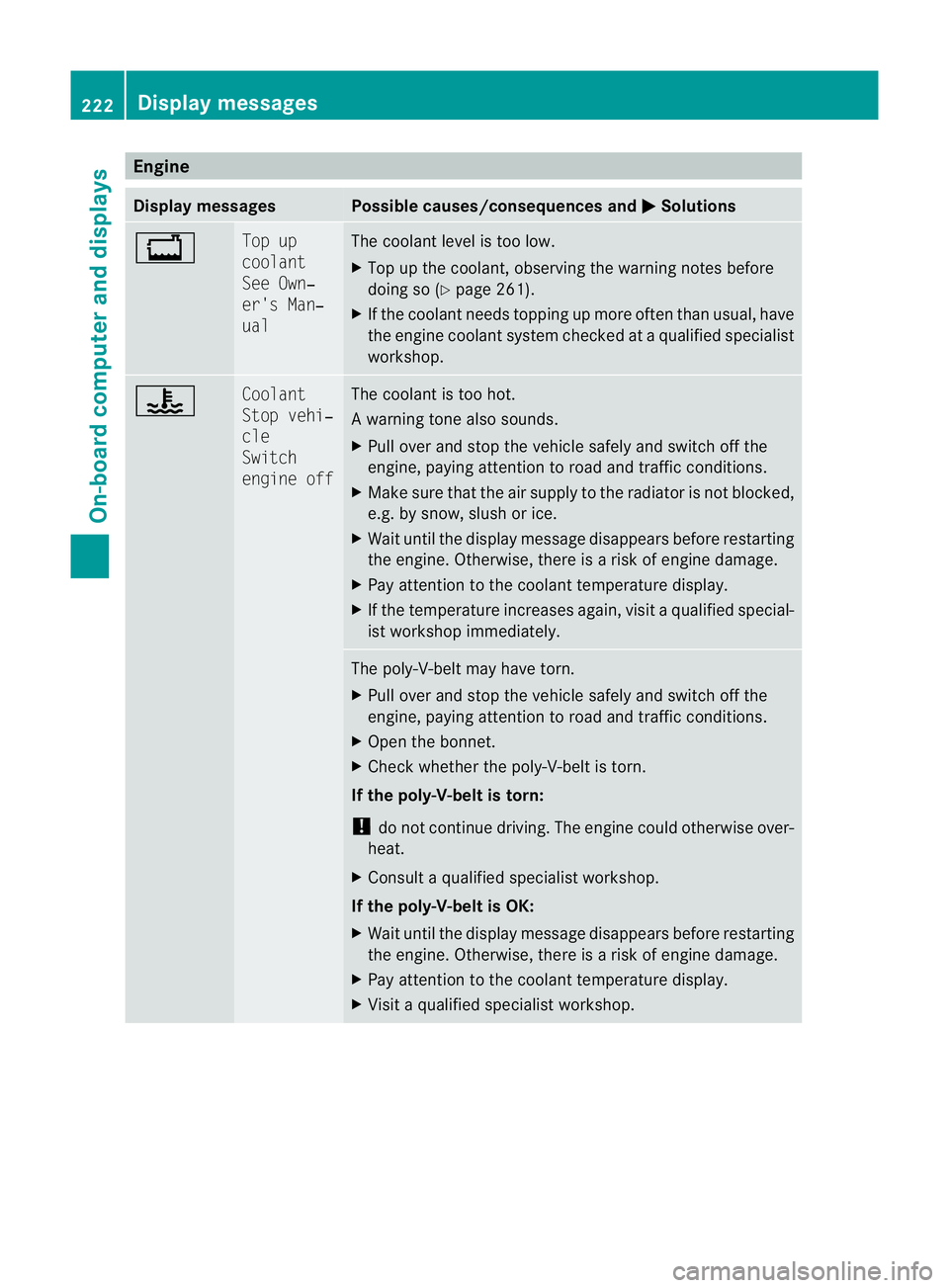
Engine
Display messages Possible causes/consequences and
M Solutions
+ To
pup
coolant
See Own‐
er' sM an‐
ual Th
ec oolant leve listoo low.
X Top up th ecoolant ,obser ving the warning note sbefore
doin gso( Ypage 261).
X If th ecoolant needs toppin gupmoreo ften than usual ,have
the engin ecoolant system checked at aqualified specialist
workshop. ? Co
olant
Sto pv ehi‐
cle
Switch
engine off Th
ec oolant is to ohot.
Aw arning ton ealso sounds.
X Pull ove rand sto pthe vehicle safel yand switch off the
engine ,payin gattentio ntoroad and traffic conditions.
X Make sure that the air supply to the radiator is not blocked,
e.g. by snow, slush or ice.
X Wait until the display message disappears befor erestar ting
the engine. Otherwise, there is arisk of engine damage.
X Pay attention to the coolant tempera turedisplay.
X If the temperature increases again, visit aqualified special-
ist worksho pimmediately. Th
ep oly-V-belt ma yhave torn.
X Pull over and stop the vehicle safely and switch off the
engine, paying attention to road and traffic conditions.
X Open the bonnet.
X Check whethe rthe poly-V-belt is tor n.
If the poly-V -belt is torn:
! do not continue driving. The engine could otherwise over-
heat.
X Consult aqualified specialist workshop.
If the poly-V-belt is OK:
X Wait until the display messag edisappears before restarting
the engine. Otherwise, there is arisk of engine damage.
X Pay attention to the coolant tempera turedisplay.
X Visit aqualified specialist workshop. 222
Display messagesOn-board computer and displays
BA 207 ECE ÄJ 2010/1a; 1; 2, en-GB
mkalaf
aV ersion: 3.0.2.11
2010-01-26T13:03:22+01:00
-Seite 222
Page 226 of 333
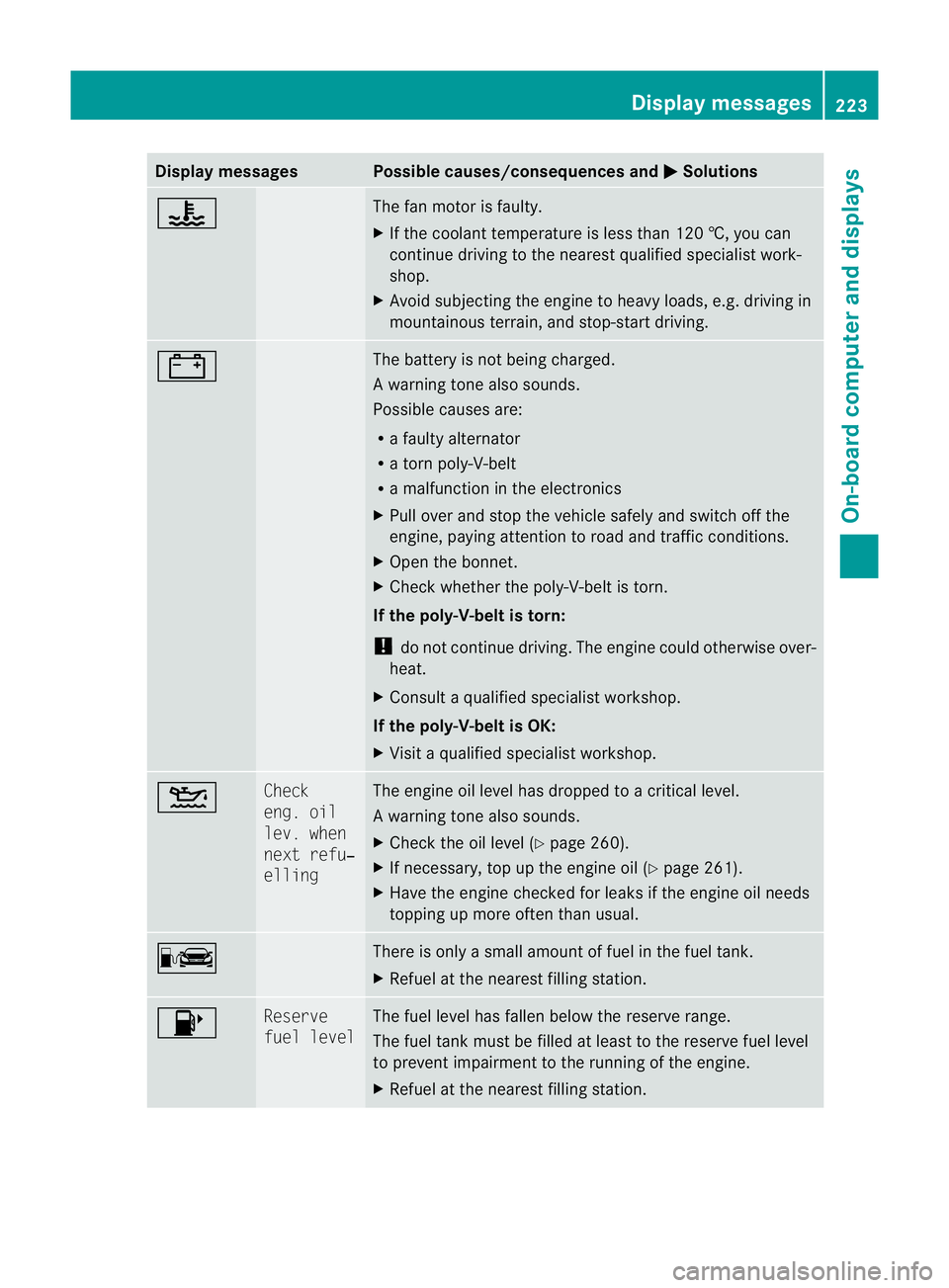
Displa
ymessages Possible causes/consequences and
M Solutions
? The fan motor is faulty.
X
If th ecoolant tem perature is less than 12 0†,you can
continue drivin gtothe nearest qual ified specialist work-
shop.
X Avoid subjecting th eenginetoh eavy loads, e.g. driving in
mountainous terrain, and stop-star tdriving. # Th
eb attery is not being charged.
Aw arning ton ealso sounds.
Possible causes are:
R af ault yalternator
R at orn poly-V-belt
R am alfunction in the elect ronics
X Pul lover and stop the vehicle safel yand switch off the
engine ,payin gattentio ntoroad and traffic conditions.
X Open the bonnet.
X Check whether the poly-V-belt is tor n.
If the poly-V -belt is torn:
! do not continue driving. The engine could otherwise over-
heat.
X Consult aqualified specialist workshop.
If the poly-V-belt is OK:
X Visit aqualified specialist workshop. 4 Check
eng. oil
lev. when
next refu‐
elling The engine oil level has dropped to
acriticallevel.
Aw arning ton ealso sounds.
X Chec kthe oil level (Y page 260).
X If necessary, top up the engin eoil (Y page 261).
X Hav ethe engin echecked for leak sifthe engin eoil needs
topping up more often than usual. C There is only
asmall amount of fue linthe fuel tan k.
X Refuel at the nearest filling station. 8 Reserve
fue
llevel Th
ef uel level has fallen below the reserve range.
The fuel tank must be filled at least to the reserve fuel level
to prevent impairment to the running of the engine.
X Refuel at the nearest filling station. Display messages
223On-board computer and displays
BA 207 ECE ÄJ 2010/1a; 1; 2, en-GB
mkalafaV ersion: 3.0.2.11
2010-01-26T13:03:22+01:0
0-Seite 223 Z