change time MERCEDES-BENZ E-CLASS CABRIOLET 2011 Owner's Manual
[x] Cancel search | Manufacturer: MERCEDES-BENZ, Model Year: 2011, Model line: E-CLASS CABRIOLET, Model: MERCEDES-BENZ E-CLASS CABRIOLET 2011Pages: 353, PDF Size: 8.42 MB
Page 199 of 353
Briefly showing detecte
dtraffi csigns in
the multifunction display
When yo uactivate the Speed Limi tAssist
warning function,at raffic sign indicating the
speed limit or end of speed limit zone :may
appearint he multifunction display. The traffic
sign appears for approximately five seconds
as soon as it is detected. Any other informa-
tion in the multifunction displayish idden for
this period.
X Activate the Speed Limit Assist warning
function using the on-board computer
(Y page 222).
Symbol ;appears.
Permanently showing detected traffic
signs in the multifunction display
If Speed Limit Assist is selected in the on-
board computer, atraffic sign indicating the
speed limit or end of aspeed limit zone :
appears in the multifunction displayass oon
as it is detected.
Traffic sign indicating aspeed limit :is gen-
erally displayed until:
R at raffic sign indicating the end of the speed
limit is detected.
R you make aturn.
R you leave or enter acityort own.
R the road type changes (e.g. motorway,
country road).
R you have travelled acertain minimum dis-
tanc ewithout the traffic sign being repea-
ted or detected again.
X Display Speed Limit Assist using the on-
board computer (Y page 222).Lane Tracking package
Genera lnotes The Lane Tracking package consists of Blind
Spot Assist (Y page 196)and Lane Keeping
Assist (Y page 198). Blind Spot Assist Important safet
ynotes
Blind Spot Assist uses aradar senso rsystem
to monitor th eareas on bot hside sofy our
vehicle. Blind Spot Assis tprovide sassistance
at speeds higher than 30 km/h. Awarning
display in the exterior mirrors draw syour
attention to detected vehicles in the moni-
tored area .Ifyou then switch on the corre-
sponding turn signa ltochange lane, you will
alsor eceive avisual and acoustic collision
warning. The Blind Spot Assist monitoring
system usess ensors in the rear bumper. G
WARNING
Blind Spot Assist is only an aid designed to
assist driving. It may fail to detect some vehi-
cles and is no substitute for attentive driving.
Blind Spot Assist cannot detect road and traf-
fic conditions. It may fail to detect narrow
vehicles, such as motorcycle sorbicycles, or
only detect them too late.
Monitoring may be affected by dirty sensors,
strong spray or poor visibility caused by snow,
rain or mist, for example. In this case, vehicles
are detected late or not at all.
Always pay attention to traffic conditions and
yours urroundings. Otherwise, you may fail to
recognise danger sintime, caus eanaccident
and injure yourself and others.
The radar sensor system is automatically
deactivate dnearradio telescope facilities
(Y page 345).
For Blin dSpotA ssist to assist you when driv-
ing, the radar sensor system must be activa-
ted (Y page 229) and operational.
Monitoring range of the sensors
Blind Spot Assist monitors the area up to
three metres behind your vehicle and directly
next to your vehicle, as shown in the diagram. 196
Driving systemsDriving and parking
Page 202 of 353
R
the lane markings ar eworna way, dark or
covered up ,e.g.byd irtors now.
R the distance to the vehicl einfront is too
small and the lane marking sthu sc anno tbe
detected.
R the lane markings on the road are unclear,
e.g. near roadworks.
R the lane markings chang equickly, e.g.
lanes branc hoff, cros sone another or
merge.
R the road is narro wand winding.
Lane Keeping Assist cannot detec troad and
traffic conditions. It is not asubstitute for
attentive driving .You are responsible for the
vehicle's speed, braking in good time, and
steering correctly. Always adapt your driving
style to suit the prevailing road and weather
conditions. Always pay attention to traffic
conditions and your surroundings. Otherwise,
you may fail to recognise dangers in time,
cause an accident and injure yourself and oth-
ers.
Aw arning may be given if afront wheel
passes over alane marking. It will warn you
by means of intermittentv ibration in the
steering wheel for up to 1.5 seconds.
Activating Lane Keeping Assist
X Symbol :appears in the multifunction
display. Active Driving Assistance package
General notes The Active Drivin
gAssistance package con-
sists of DISTRONIC PLUS (Y page 171), Active
Blind Spot Assist (Y page 199) and Active
Lane Keeping Assist (Y page 202).
Active Blind Spot Assist Important safety notes
Active Blind Spot Assist uses
aradar sensor
system to monitor the side areas of your vehi- cle that are behind the driver.
Awarning dis-
play in th eexteri or mirror sdraws your atten-
tio ntod etected vehicles in the monitored
area. If you then switch on the corresponding
turn signal to change lane, you will also
receive avisual and acoustic collision warn-
ing. If arisk of lateral collision is detected,
corrective braking may help you avoid acol-
lision. To support the course-correcting brake
application, Active Blind Spot Assist also uses
the forward-facin gradar sensor system.
Active Blind Spot Assist provides assistance
at speeds higher than about 30 km/h. G
WARNING
Active Blind Spot Assist is only an aid and may
detect vehicles/obstacles incorrectly or not
at all.
The system may be impaired or may not func-
tion if:
R there is poor visibility, e.g. due to snow,
rain, fog or spray.
R the rear and/or front sensors are dirty.
Active Blind Spot Assist may not detect nar-
row vehicles, such as motorcycles or bicycles,
or only detect them too late. It cannot detect
vehicles which are overtaken at asmall dis-
tancea nd then enter the blind spot area.
Active Blind Spot Assist cannot detect road
and traffic conditions. It is not asubstitute for
attentive driving. You are responsible for the
vehicle's speed, braking in good time, and
steering correctly. Always adapt your driving
style to suit the prevailing road and weather
conditions. Always pay attention to traffic
conditions and your surroundings. Otherwise,
you may fail to recognise dangers in time,
cause an accident and injure yourself and oth-
ers.
The radar sensor system is automatically
deactivated near radio telescope facilities
(Y page 345).
For Active Blind Spot Assist to assist you
when driving, the radar sensor system must
be activated (Y page 229) and operational. Driving systems
199Driving and parking Z
Page 204 of 353
30 km/h, warning lamp
:on the corre-
sponding sid elights up red. Thi swarning is
always emitted whe navehicle enters the
blind spot monitoring range from behind or
from the side .When you overtake avehicle,
the warning only occurs if the difference in
speed is less than 12 km/h.
The yellow indicator lamp goes out if reverse
gear is engaged. Active Blind Spot Assist is
then no longer active.
The brightness of the indicator/warning
lamps is adjusted automatically according to
the ambient light. G
WARNING
Active Blind Spot Assist is not active at speeds
below 30 km/h. The indicator lamps in the
exterior mirrors are yellow.V ehicles in the
monitoring range are then not indicated.
Always pay attention to traffic conditions and
your surroundings. Otherwise, you may fail to
recognise dangers in time, cause an accident
and injure yourself and others.
Visua land acoustic collisio nwarning
If you switch on the appropriate turn signals
to change lanes, and avehicle is detected in
the side monitoring range of Active Blind Spot
Assist ,you will receive avisual and acoustic
collision warning. You will then hear adouble
warning tone, and red warning lamp :
flashes. If the turn signal remains on, detec-
ted vehicles are indicated by the flashing of
red warning lamp :.There are no further
warning tones.
Course-correcting brak eapplication
If Active Blind Spot Assist detects arisk of a
lateral collision in the monitoring range, a
course-correcting brake application is carried
out. This is designed to help you avoid acol-
lision.
The course-correcting brake application is
available in the range between 30 km/ha nd
200 km/h.
If ac ourse-correcting brake application
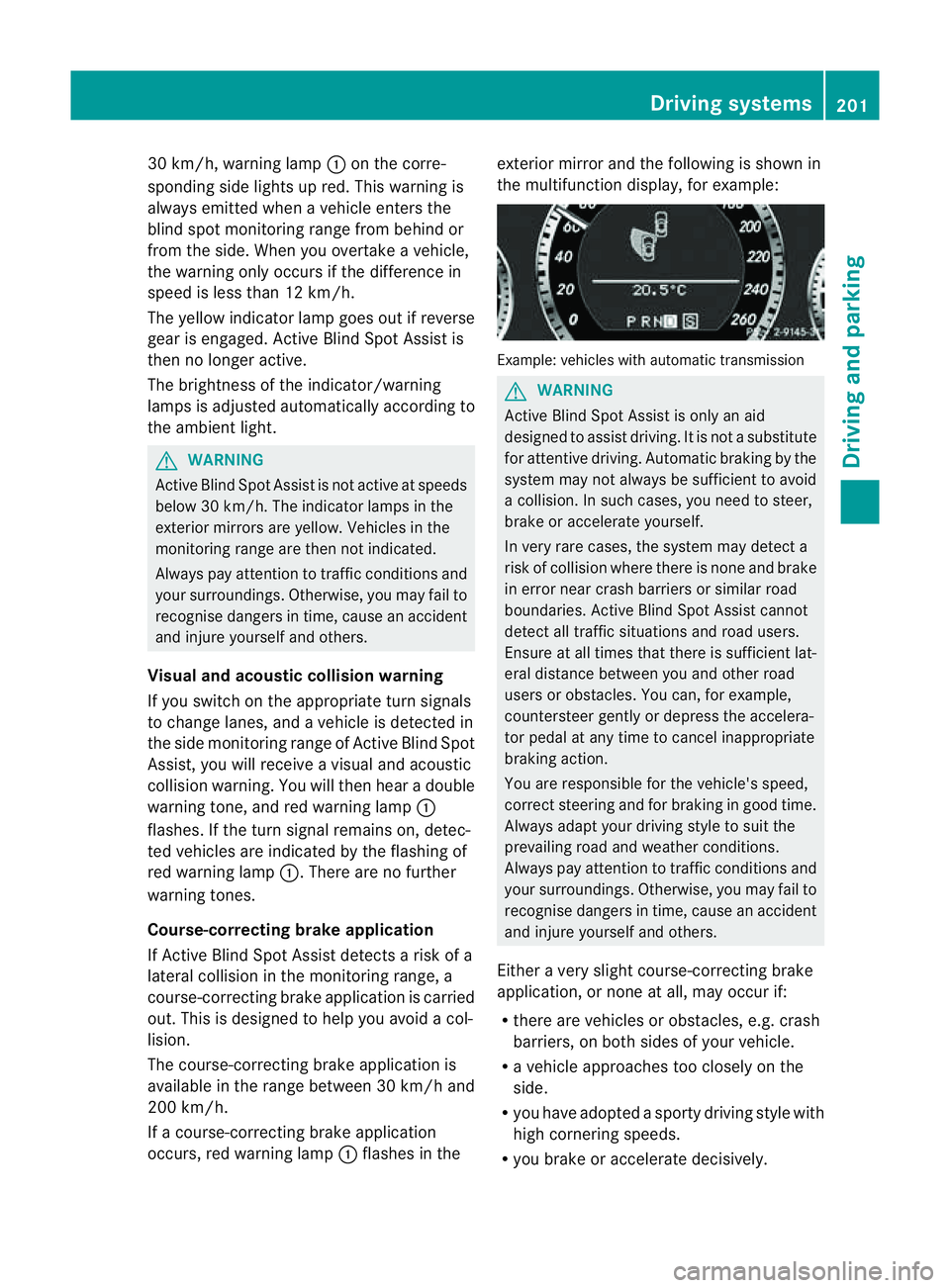
occurs, red warning lamp :flashe sinthe exterio
rmirro rand the following is shown in
the multifunctio ndisplay, for example: Example: vehicles with automatic transmission
G
WARNING
Activ eBlindS pot Assist is only an aid
designed to assist driving. It is not asubstitute
for attentive driving. Automatic braking by the
system may not always be sufficien ttoavoid
ac ollision. In such cases, you need to steer,
brake or accelerate yourself.
In very rare cases, the system may detect a
risk of collision where there is none and brake
in error near crash barriers or similar road
boundaries. Active Blind Spot Assist cannot
detect all traffic situations and road users.
Ensure at all times that there is sufficient lat-
eral distance between you and other road
users or obstacles. You can, for example,
countersteer gently or depress the accelera-
tor pedal at any time to cancel inappropriate
braking action.
You are responsible for the vehicle's speed,
correc tsteerin gand for braking in good time.
Alway sadapt your drivin gstyle to suit the
prevailing road and weather conditions.
Always pay attention to traffic conditions and
your surroundings. Otherwise, you may fail to
recognise dangers in time, cause an accident
and injure yourself and others.
Either avery slight course-correcting brake
application, or none at all, may occur if:
R there are vehicles or obstacles, e.g. crash
barriers, on both sides of your vehicle.
R av ehicle approaches too closely on the
side.
R you have adopted asporty driving style with
high cornering speeds.
R you brake or accelerate decisively. Driving systems
201Driving and parking Z
Page 206 of 353
R
the lane markings change quickly, e.g.
lanes branch off ,cros sone anothe ror
merge.
R the road is narrow and winding.
Active Lane Keeping Assist cannot detect
road and traffic conditions. It is not asubsti-
tute for attentive driving. You are responsible
for the vehicle's speed ,braking in good time,
and steering correctly. Always adapt your
driving style to suitt he prevailing road and
weather conditions.A lways pay attention to
traffic condition sand your surroundings. Oth-
erwise, you may fail to recognise danger sin
time, cause an accident and injure yourself
and others.
Warning vibration in th esteering wheel
Aw arnin gmay be given if afront wheel
passes over alane marking. You will be
warned by way of intermitten tvibrations in
the steerin gwheel for up to 1. 5seconds.
In order that you are warned only when nec-
essary and in good time if you cross the lane
marking, the system recognises certain con-
ditions and warns you accordingly.
The warning vibration occur searlier if:
R you approach the outer lane markin gona
bend.
R the road has very wide lanes, e.g. amotor-
way.
R the system recognises solid lane markings.
The warning vibration occur slater if:
R the road has narrow lanes.
R you cut the corner on abend.
No warning vibration occur sif:
R you clearly and actively steer ,brake, or
accelerate.
R you cut the corner on asharp bend.
R ad riving safety system intervenes, such as
ABS, BASorE SP®
.
R you have switched on the turn signals. In
this event ,the warnings are suppressed for
ac ertain period of time. Lane-correcting brak
eapplication
If you leave your lane under certain circum-
stances, the vehicle will brake briefly on one
side. This is designed to help you bring the
vehicle back intot he original lane.
This function is available in the range between
60 km/ha nd 200 km/h.
Al ane-correctingb rake application can only
be made after driving over asolid, recognis-
able lane marking. Befor ethis, awarning
must be emitted by means of intermittent
vibration in the steering wheel. In addition, a
lane with lane markings on both sides must
be recognised. The brake application also
slightly reduces driving speed.
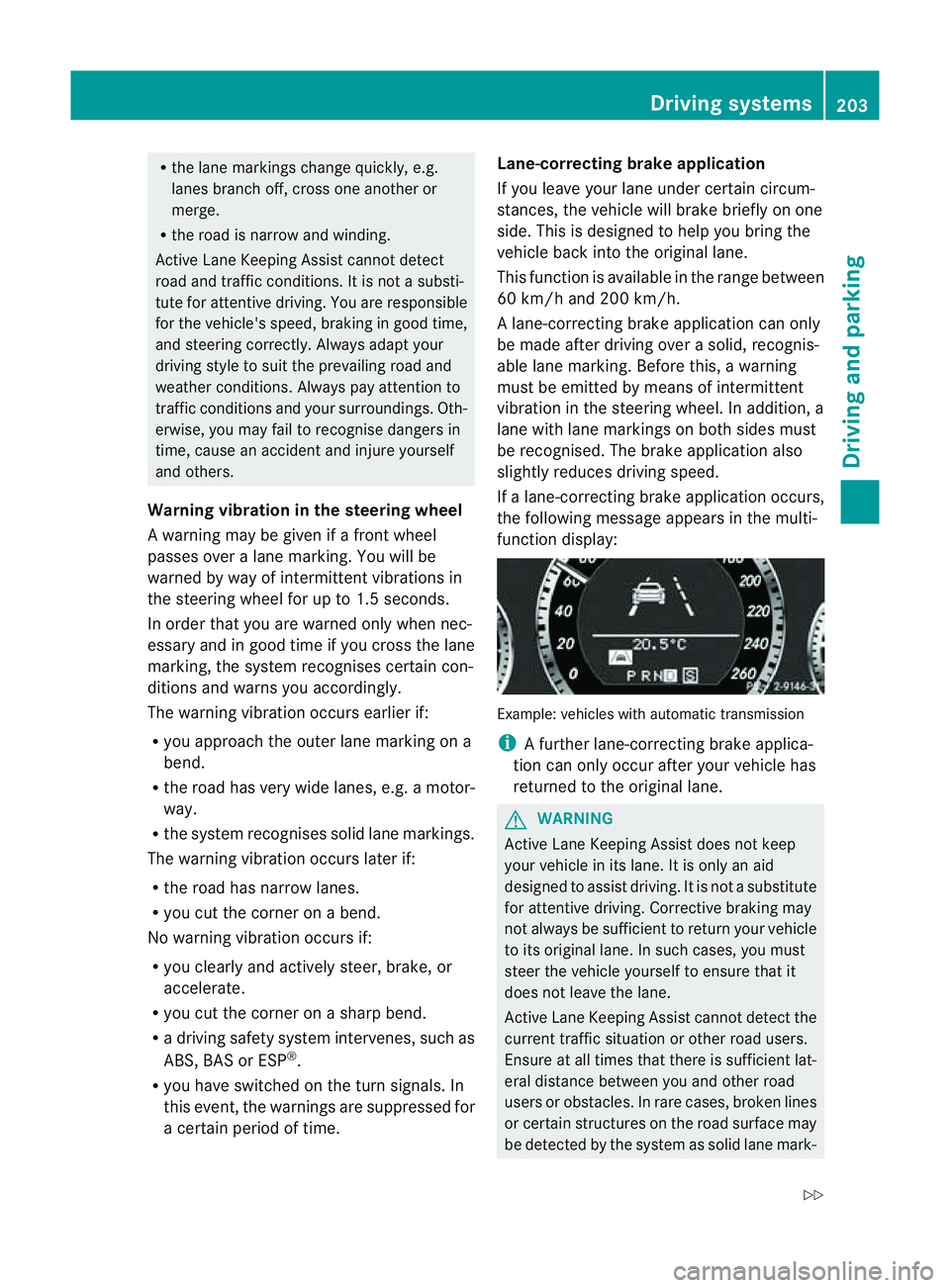
If al ane-correcting brake application occurs,
the following message appears in the multi-
function display: Example: vehicles with automatic transmission
i
Afurther lane-correcting brake applica-
tion can only occur after your vehicle has
returned to the original lane. G
WARNING
Active Lane Keeping Assist does not keep
your vehicle in its lane. It is only an aid
designed to assist driving. It is not asubstitute
for attentive driving. Corrective braking may
not always be sufficient to return your vehicle
to its original lane. In such cases, you must
steer the vehicle yourself to ensure that it
does not leave the lane.
Active Lane Keeping Assist cannot detect the
current traffic situation or other road users.
Ensure at all times that there is sufficient lat-
eral distance between you and other road
users or obstacles. In rare cases, broken lines
or certain structures on the road surface may
be detected by the system as solid lane mark- Driving systems
203Driving and parking
Z
Page 229 of 353
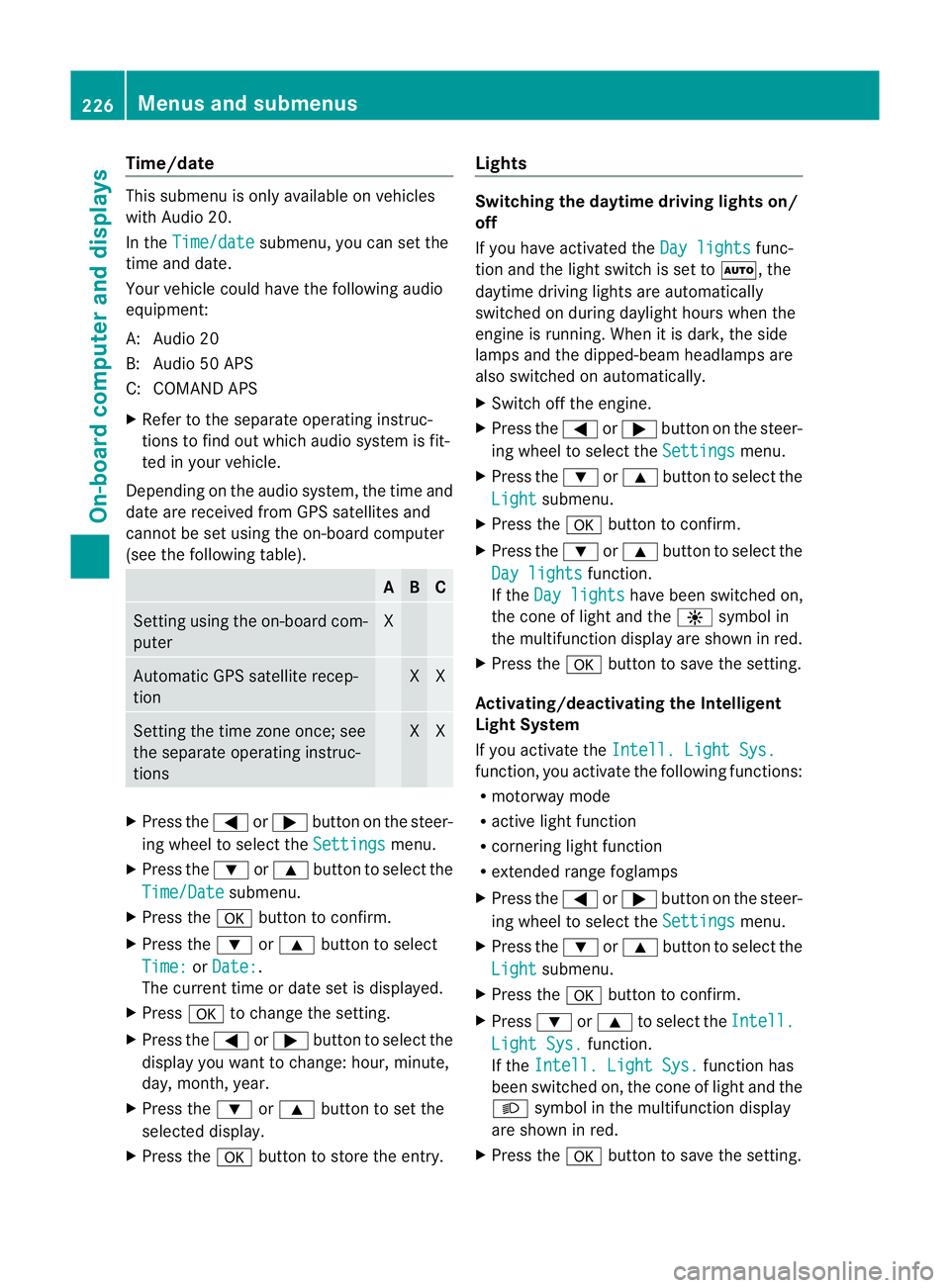
Time/date
Thi
ssubmenu is onl yavailable on vehicles
with Audio 20.
In the Time/date submenu, yo
ucan se tthe
time and date.
Your vehicle could have the following audio
equipment:
A: Audio 20
B: Audio 50 APS
C: COMAND APS
X Refer to the separate operating instruc-
tions to find out which audios ystem is fit-
ted in your vehicle.
Depending on the audios ystem, the time and
date are received from GPS satellites and
cannot be set using the on-board computer
(see the following table). A B C
Setting using the on-board com-
puter X
Automatic GPS satellite recep-
tion X X
Setting the time zone once; see
the separate operating instruc-
tions X X
X
Press the =or; button on the steer-
ing wheel to select the Settings menu.
X Press the :or9 button to select the
Time/Date submenu.
X Press the abutton to confirm.
X Press the :or9 button to select
Time: or
Date: .
The current time or date set is displayed.
X Press ato change the setting.
X Press the =or; button to select the
displayy ou want to change: hour, minute,
day, month, year.
X Press the :or9 button to set the
selected display.
X Press the abutton to store the entry. Lights Switching the daytime driving lights on/
off
If you have activated the
Day lights func-
tion and the light switch is set to Ã,the
daytime driving lights are automatically
switched on during daylight hours when the
engine is running. When it is dark, the side
lamps and the dipped-beamh eadlamps are
also switched on automatically.
X Switc hoff the engine.
X Press the =or; button on the steer-
ing wheel to select the Settings menu.
X Press the :or9 button to select the
Light submenu.
X Press the abutton to confirm.
X Press the :or9 button to select the
Day lights function.
If the Day lights have been switched on,
the coneofl ight and the Wsymbol in
the multifunction display are shown in red.
X Press the abutton to save the setting.
Activating/deactivating the Intelligent
Light System
If you activat ethe Intell. Light Sys. function
,you activat ethe following functions:
R motorway mode
R activ elight function
R cornering light function
R extended range foglamps
X Press the =or; button on the steer-
ing wheel to select the Settings menu.
X Press the :or9 button to select the
Light submenu.
X Press the abutton to confirm.
X Press :or9 to select the Intell. Light Sys. function.
If the Intell. Light Sys. function has
been switched on, the coneofl ight and the
L symbol in the multifunction display
are shown in red.
X Press the abutton to save the setting. 226
Menus and submenusOn-boar
dcomputer and displays
Page 230 of 353
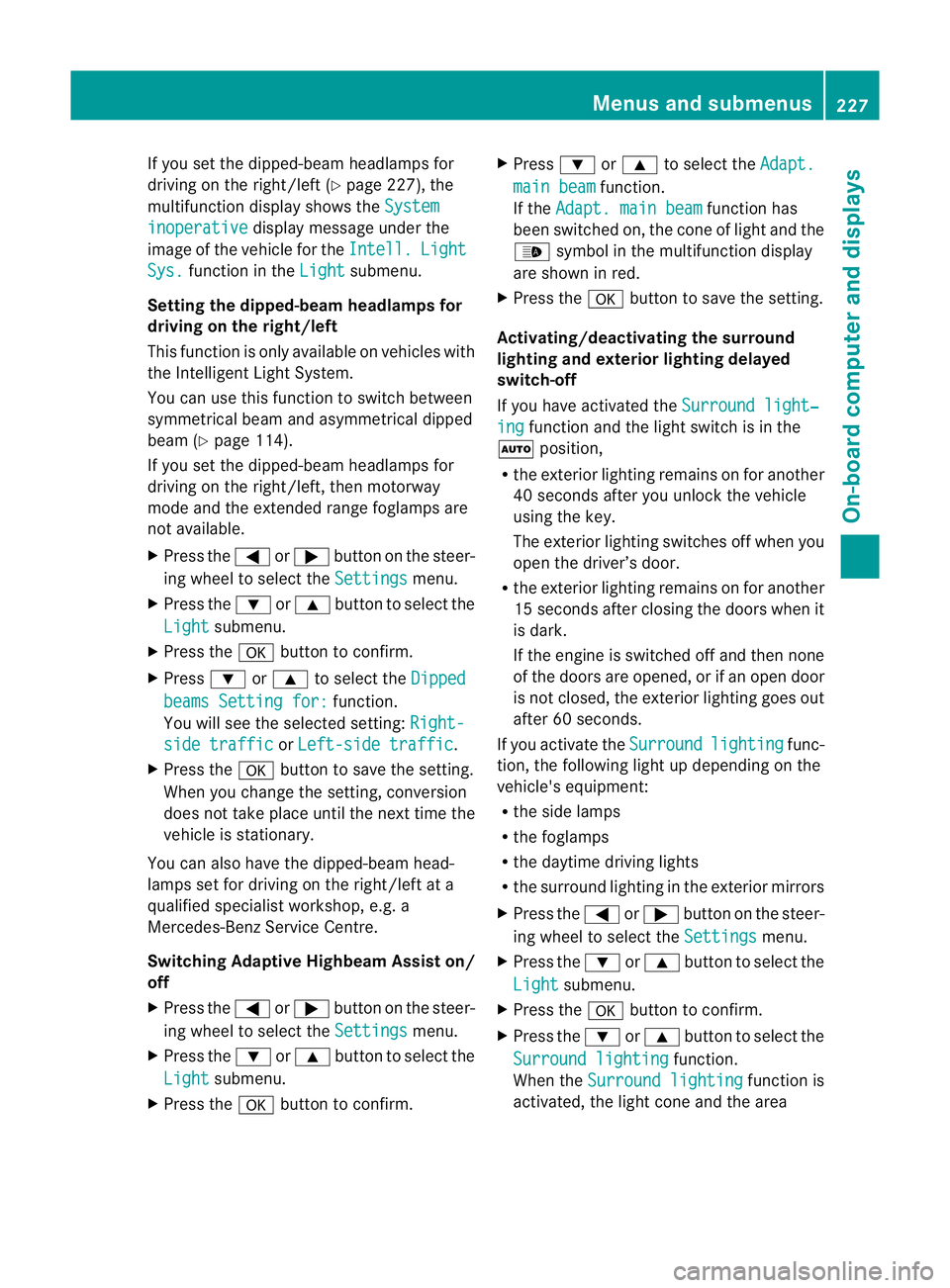
If you set the dipped-bea
mheadlamps for
driving on the right/left (Y page 227), the
multifunction display shows the Systeminoperative display message under the
image of the vehicle for the Intell. Light
Sys. function in the
Light submenu.
Setting the dipped-beam headlampsf or
driving on the right/left
This function is only available on vehicles with
the Intelligent Light System.
You can use this function to switch between
symmetrical beam and asymmetrical dipped
beam (Y page 114).
If you set the dipped-beam headlamps for
driving on the right/left, then motorway
mode and the extended range foglamps are
not available.
X Press the =or; button on the steer-
ing wheel to select the Settings menu.
X Press the :or9 button to select the
Light submenu.
X Press the abutton to confirm.
X Press :or9 to select the Dipped beams Setting for: function.
You will see the selected setting: Right-side traffic or
Left-side traffic .
X Press the abutton to save the setting.
When you change the setting, conversion
does not take place until the nextt ime the
vehicle is stationary.
You can also have the dipped-beam head-
lamps set for drivin gonthe right/lef tata
qualified specialist workshop, e.g. a
Mercedes-Ben zServic eCentre.
Switching Adaptive Highbeam Assist on/
off
X Press the =or; button on the steer-
ing wheel to selec tthe Settings menu.
X Press the :or9 button to select the
Light submenu.
X Press the abutton to confirm. X
Press :or9 to select the Adapt. main beam function.
If the Adapt. main beam function has
been switched on, the cone of light and the
_ symbol in the multifunction display
are shown in red.
X Press the abutton to save the setting.
Activating/deactivating the surround
lighting and exterior lighting delayed
switch-off
If you have activated the Surround light‐ ing function and the light switch is in the
à position,
R the exterior lighting remains on for another
40 seconds after you unlock the vehicle
using the key.
The exterior lighting switches off when you
open the driver’s door.
R the exterior lighting remains on for another
15 seconds after closing the doors when it
is dark.
If the engine is switched off and then none
of the doors are opened, or if an open door
is not closed, the exterior lighting goes out
after 60 seconds.
If you activate the Surround lighting func-
tion, the following light up depending on the
vehicle's equipment:
R the side lamps
R the foglamps
R the daytime driving lights
R the surround lighting in the exterior mirrors
X Press the =or; button on the steer-
ing wheel to select the Settings menu.
X Press the :or9 button to select the
Light submenu.
X Press the abutton to confirm.
X Press the :or9 button to select the
Surround lighting function.
When the Surround lighting function is
activated, the light cone and the area Menus and submenus
227On-board computer and displays Z
Page 232 of 353
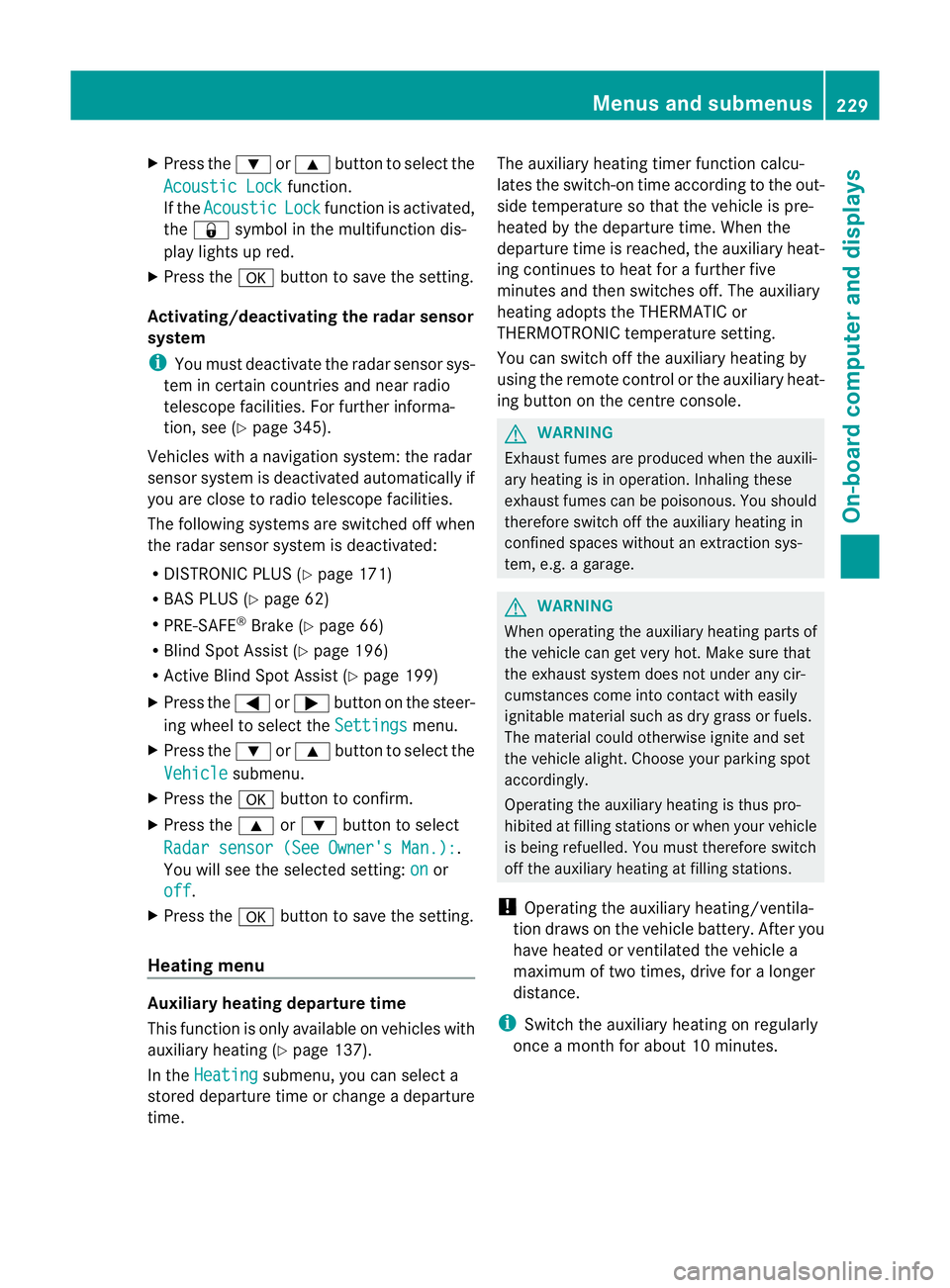
X
Press the :or9 button to select the
Acoustic Lock function.
If the Acoustic Lock function is activated,
the & symbol in the multifunction dis-
play lights up red.
X Press the abutton to save the setting.
Activating/deactivating the radar sensor
system
i You must deactivate the radar sensor sys-
tem in certain countries and near radio
telescope facilities. For further informa-
tion, see (Y page 345).
Vehicles with anavigation system: the radar
sensor system is deactivated automatically if
you are close to radio telescope facilities.
The following systems are switched off when
the radar sensor system is deactivated:
R DISTRONIC PLUS (Y page 171)
R BAS PLUS (Y page 62)
R PRE-SAFE ®
Brake (Y page 66)
R Blind Spot Assist (Y page 196)
R Active Blind Spot Assist (Y page 199)
X Press the =or; button on the steer-
ing wheel to select the Settings menu.
X Press the :or9 button to select the
Vehicle submenu.
X Press the abutton to confirm.
X Press the 9or: button to select
Radar sensor (See Owner's Man.): .
You will see the selected setting: on or
off .
X Press the abutton to save the setting.
Heating menu Auxiliary heating departuret
ime
This function is only availabl eonvehicles with
auxiliary heating (Y page 137).
In the Heating submenu, you can select a
stored departure time or change adeparture
time. The auxiliary heating timer function calcu-
lates the switch-on time accordin
gtothe out-
side temperature so that the vehicle is pre-
heated by the departure time. When the
departure time is reached, the auxiliary heat-
ing continues to heat for afurther five
minutes and then switches off. The auxiliary
heating adopts the THERMATIC or
THERMOTRONIC temperature setting.
You can switch off the auxiliary heating by
using the remot econtrol or the auxiliary heat-
ing button on the centre console. G
WARNING
Exhaust fumes are produced when the auxili-
ary heating is in operation. Inhaling these
exhaust fumes can be poisonous. You should
therefore switch off the auxiliary heating in
confined spaces without an extraction sys-
tem, e.g. agarage. G
WARNING
When operating the auxiliary heating parts of
the vehicle can get very hot. Make sure that
the exhaust system does not under any cir-
cumstances come into contact with easily
ignitable material such as dry grass or fuels.
The material could otherwise ignite and set
the vehicle alight. Choose your parking spot
accordingly.
Operating the auxiliary heating is thus pro-
hibited at filling station sorwhen your vehicle
is being refuelled. You must therefore switch
off the auxiliary heating at filling stations.
! Operating the auxiliary heating/ventila-
tion draws on the vehicle battery. After you
have heated or ventilated the vehicle a
maximum of two times, drive for alonger
distance.
i Switc hthe auxiliary heating on regularly
once amonthfor about 10 minutes. Menus and submenus
229On-board computer and displays Z
Page 233 of 353
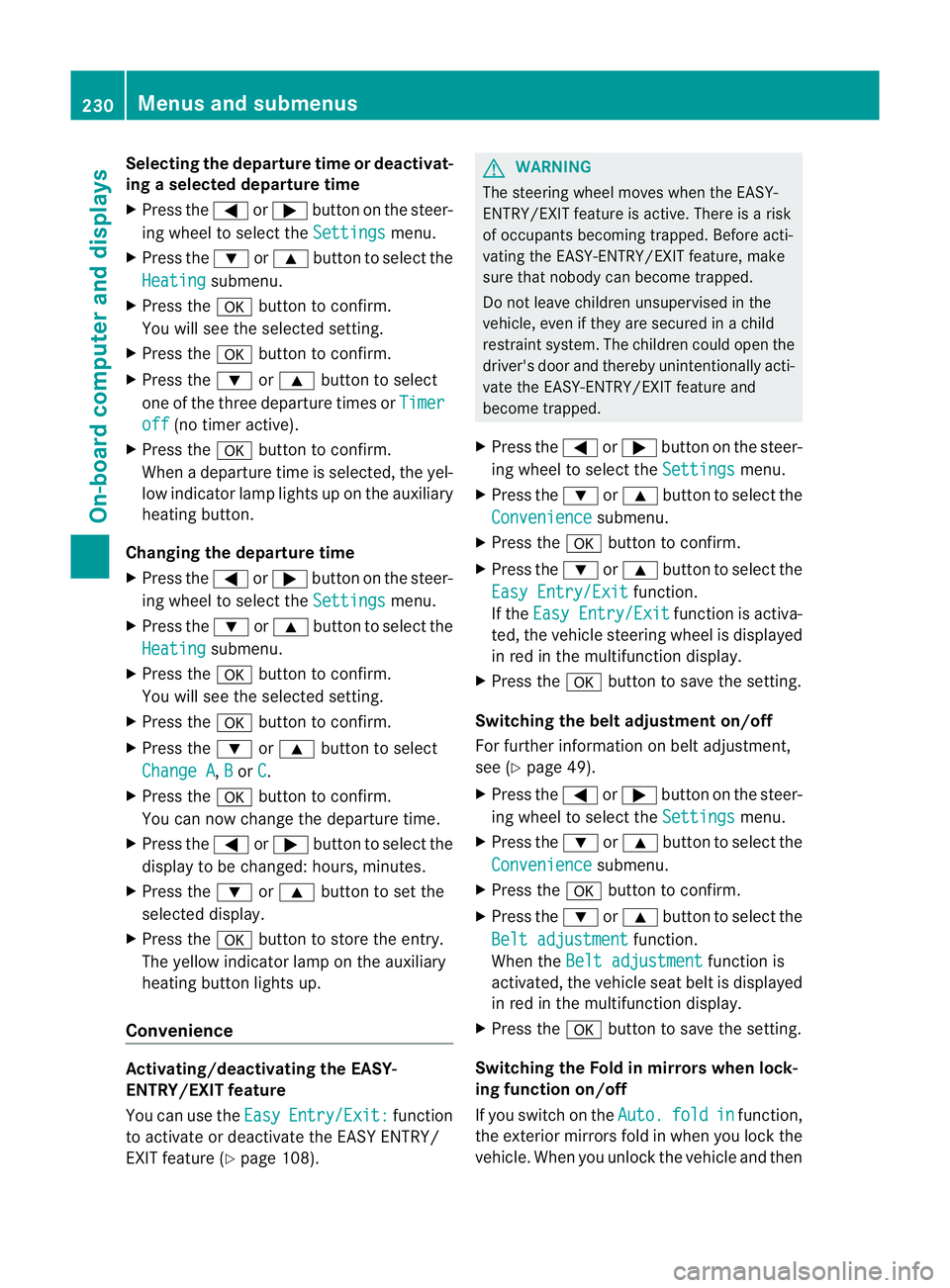
Selecting the departuret
ime or deactivat-
ing aselected departuret ime
X Press the =or; button on the steer-
ing wheel to select the Settings menu.
X Press the :or9 button to select the
Heating submenu.
X Press the abutton to confirm.
You will see the selected setting.
X Press the abutton to confirm.
X Press the :or9 button to select
one of the three departure times or Timeroff (no timer active).
X Press the abutton to confirm.
When adeparture time is selected, the yel-
low indicator lamp lights up on the auxiliary
heating button.
Changing the departuret ime
X Press the =or; button on the steer-
ing wheel to select the Settings menu.
X Press the :or9 button to select the
Heating submenu.
X Press the abutton to confirm.
You will see the selected setting.
X Press the abutton to confirm.
X Press the :or9 button to select
Change A ,
B or
C .
X Press the abutton to confirm.
You can now change the departure time.
X Press the =or; button to select the
display to be changed: hours, minutes.
X Press the :or9 button to set the
selected display.
X Press the abutton to store the entry.
The yellowi ndicator lamp on the auxiliary
heating button lights up.
Convenience Activating/deactivating the EASY-
ENTRY/EXIT feature
You can use the Easy Entry/Exit: function
to activate or deactivate the EASYE NTRY/
EXIT feature (Y page 108). G
WARNING
The steering wheel moves when the EASY-
ENTRY/EXIT feature is active. There is arisk
of occupants becoming trapped. Before acti-
vating the EASY-ENTRY/EXIT feature, make
sure that nobody can become trapped.
Do not leave children unsupervised in the
vehicle, even if they are secured in achild
restraint system. The children could open the
driver's door and thereby unintentionally acti-
vate the EASY-ENTRY/EXIT feature and
become trapped.
X Press the =or; button on the steer-
ing wheel to select the Settings menu.
X Press the :or9 button to select the
Convenience submenu.
X Press the abutton to confirm.
X Press the :or9 button to select the
Easy Entry/Exit function.
If the Easy Entry/Exit function is activa-
ted, the vehicle steering wheel is displayed
in red in the multifunction display.
X Press the abutton to save the setting.
Switching the belt adjustment on/off
For further information on belt adjustment,
see (Y page 49).
X Press the =or; button on the steer-
ing wheel to select the Settings menu.
X Press the :or9 button to select the
Convenience submenu.
X Press the abutton to confirm.
X Press the :or9 button to select the
Belt adjustment function.
When the Belt adjustment function is
activated, the vehicle seat belt is displayed
in red in the multifunction display.
X Press the abutton to save the setting.
Switching the Fold in mirrors when lock-
ing function on/off
If you switch on the Auto. fold in function,
the exterior mirrors fold in when you lock the
vehicle. When you unlock the vehicle and then 230
Menus and submenusOn-board computer and displays
Page 243 of 353
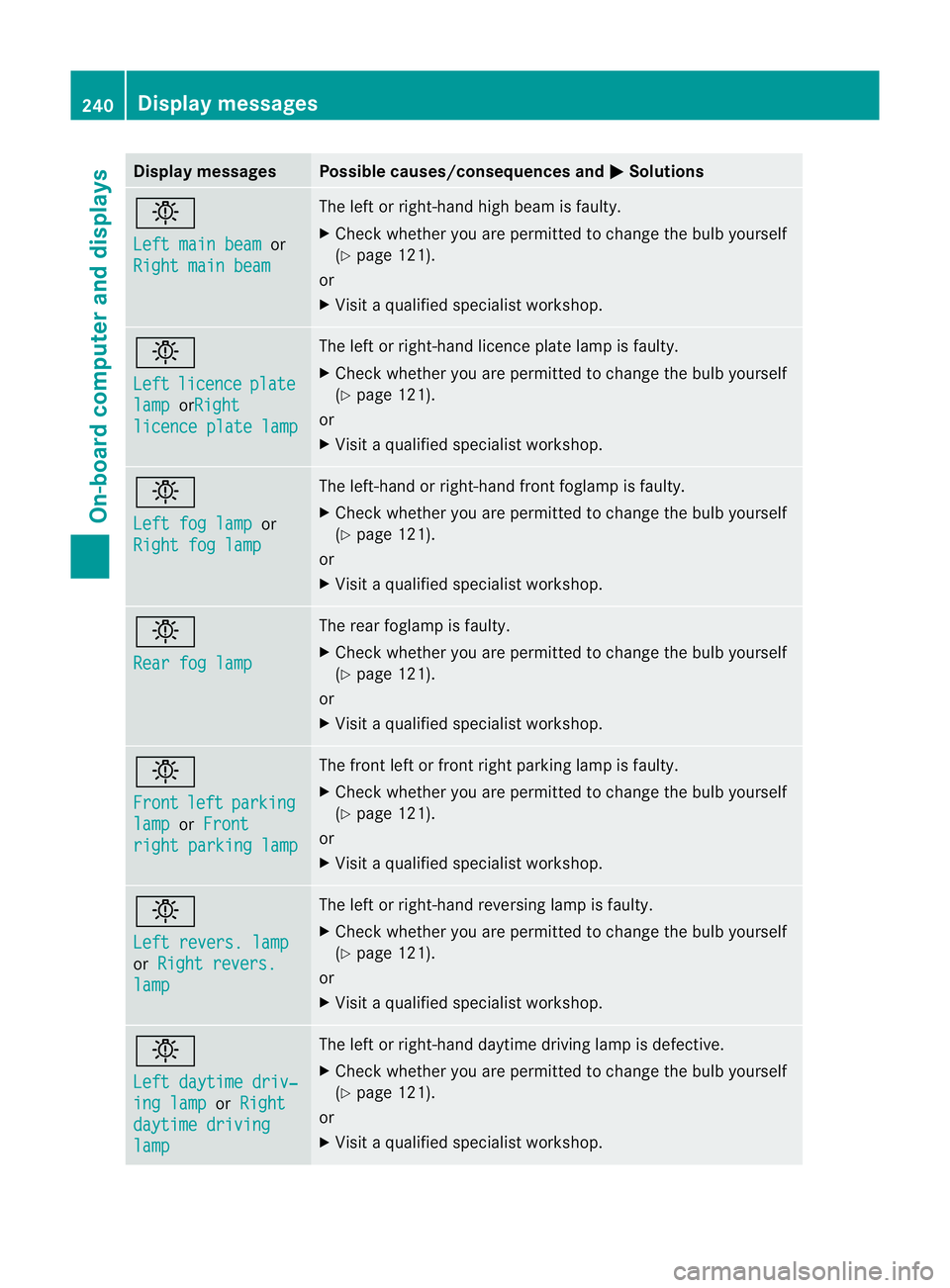
Display messages Possible causes/consequences and
M Solutions
b
Lef
tm ainb eam or
Right mai nbeam The lef
torright-han dhigh beam is faulty.
X Check whether you are permitted to change the bulb yourself
(Y page 121).
or
X Visit aqualified specialist workshop. b
Left
licence plate
lamp orRight
licence plat
elamp The left or right-han
dlicence plate lamp is faulty.
X Check whether you are permitted to change the bulb yourself
(Y page 121).
or
X Visit aqualified specialist workshop. b
Left fog lamp
or
Righ tfog lamp The left-han
dorright-han dfront foglam pisfaulty.
X Check whether you are permitted to change the bulb yourself
(Y page 121).
or
X Visit aqualified specialist workshop. b
Rear fog lamp The rear foglam
pisfaulty.
X Check whether you are permitted to change the bulb yourself
(Y page 121).
or
X Visit aqualified specialist workshop. b
Front
left parking
lamp or
Front righ
tparking lamp The front left or front right parking lamp is faulty.
X
Check whether you are permitted to change the bulb yourself
(Y page 121).
or
X Visit aqualified specialist workshop. b
Left revers. lamp
or
Righ trevers. lamp The left or right-han
dreversin glamp is faulty.
X Check whether you are permitted to change the bulb yourself
(Y page 121).
or
X Visit aqualified specialist workshop. b
Left daytime driv‐
ing lamp or
Right daytime driving
lamp The left or right-han
ddaytime drivin glamp is defective.
X Check whether you are permitted to change the bulb yourself
(Y page 121).
or
X Visit aqualified specialist workshop. 240
Display messagesOn-board computer and displays
Page 256 of 353
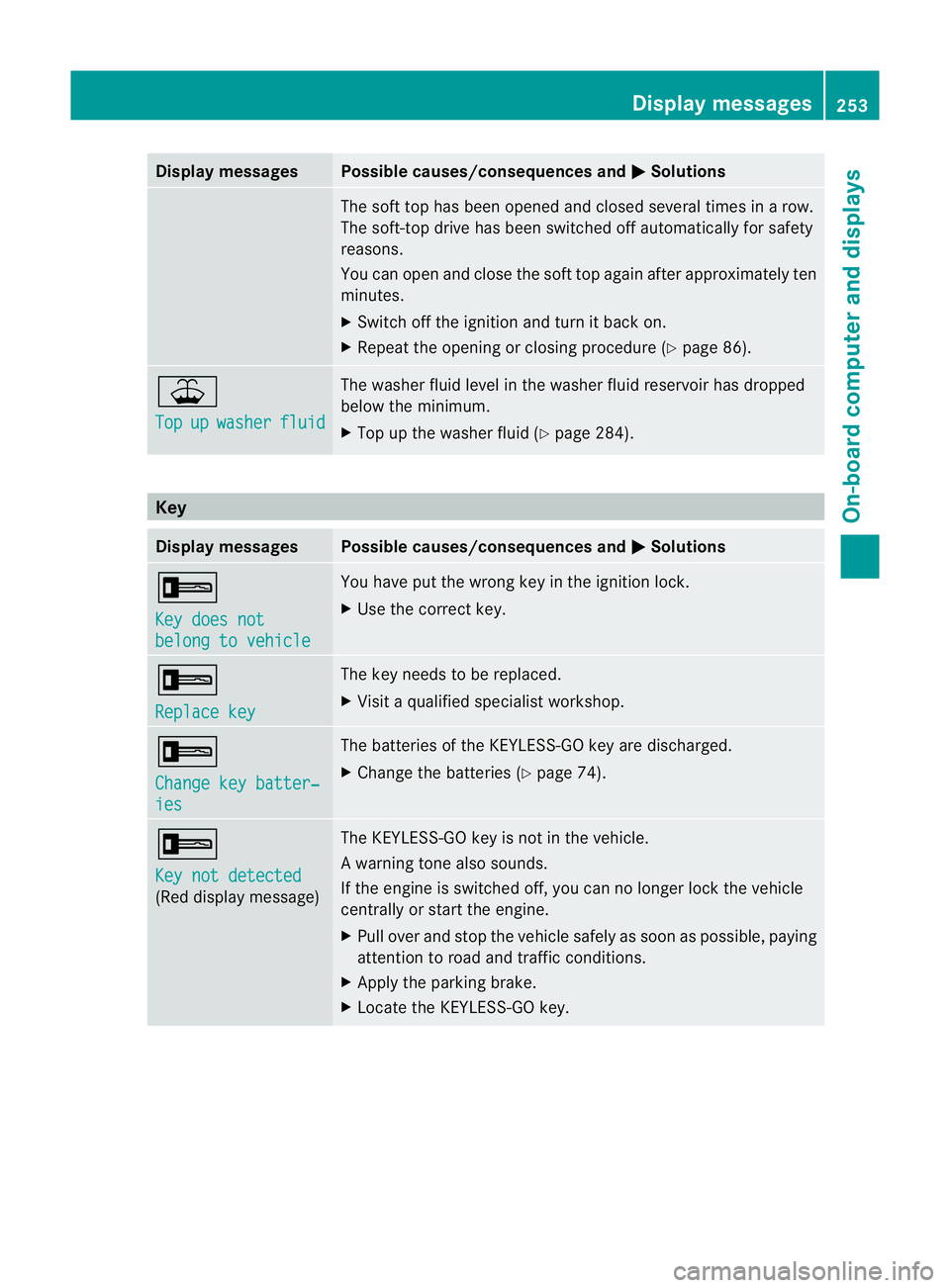
Display messages Possible causes/consequences and
M Solutions
The sof
ttop has been opened and closed several times in arow.
The soft-top drive has been switched off automatically for safety
reasons.
You can open and close the soft top again after approximately ten
minutes.
X Switch off the ignition and turn it back on.
X Repeat the opening or closing procedure (Y page 86).¥
Top
up washer fluid The washer fluid level in the washer fluid reservoir has dropped
below the minimum.
X
Top up the washer fluid (Y page 284).Key
Display messages Possible causes/consequences and
M Solutions
+
Key does not
belong to vehicle You have put the wrong key in the ignition lock.
X
Use the correc tkey. +
Replace key The key needs to be replaced.
X
Visit aqualified specialist workshop. +
Change key batter‐
ies The batteries of the KEYLESS-GO key are discharged.
X
Change the batteries (Y page 74).+
Key not detected
(Red display message) The KEYLESS-GO key is not in the vehicle.
Aw
arning tone also sounds.
If th eengineiss witched off ,you can no longer loc kthe vehicle
centrally or start the engine.
X Pull over and stop the vehicle safely as soon as possible, paying
attention to road and traffic conditions.
X Apply the parking brake.
X Locate the KEYLESS-GO key. Display messages
253On-board computer and displays Z