mirror MERCEDES-BENZ E-CLASS CABRIOLET 2011 Owner's Manual
[x] Cancel search | Manufacturer: MERCEDES-BENZ, Model Year: 2011, Model line: E-CLASS CABRIOLET, Model: MERCEDES-BENZ E-CLASS CABRIOLET 2011Pages: 353, PDF Size: 8.42 MB
Page 113 of 353
X
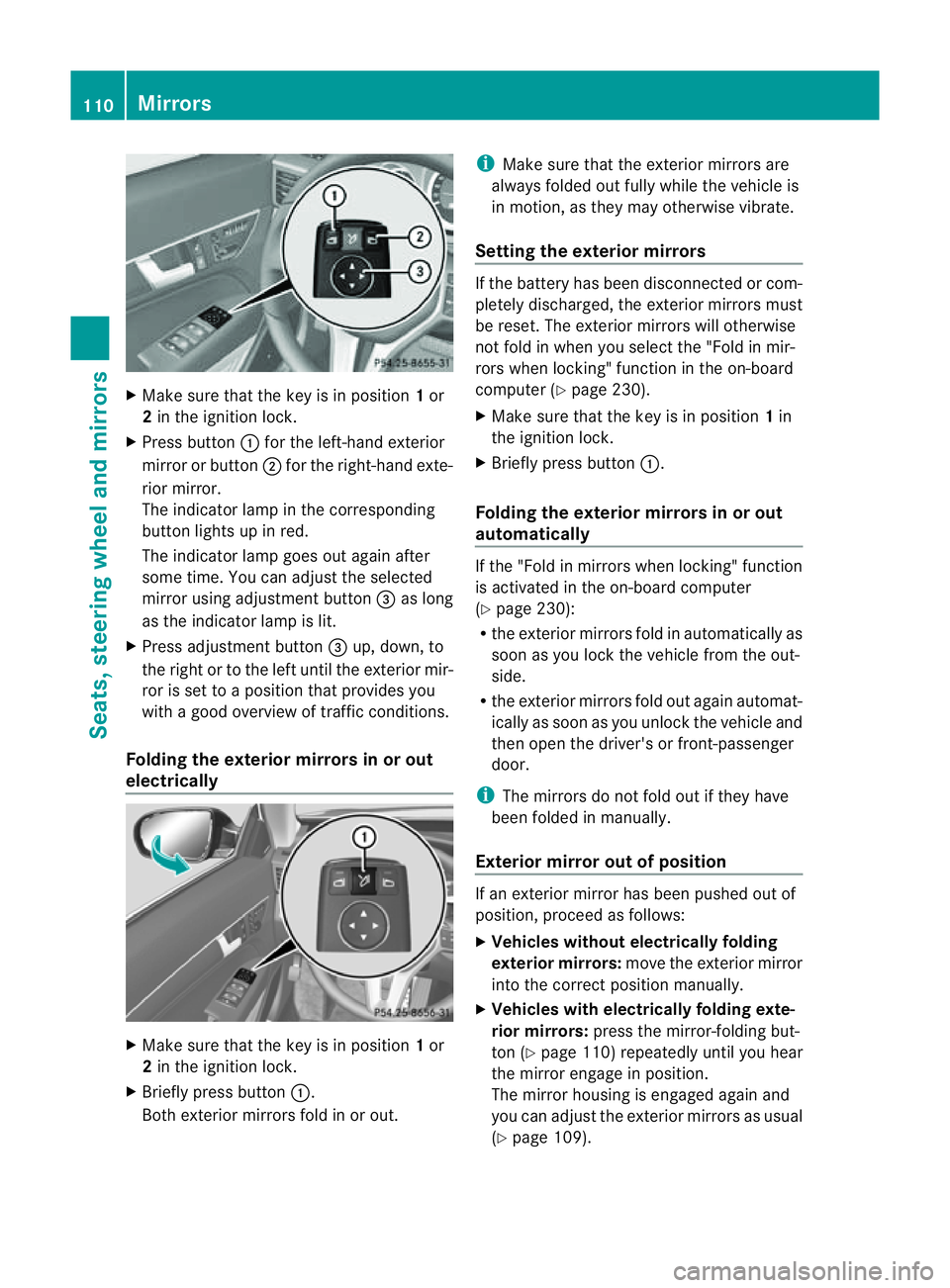
Make sure that the key is in position 1or
2 in the ignition lock.
X Press button :for the left-hand exterior
mirror or button ;for the right-hand exte-
rior mirror.
The indicator lamp in the corresponding
button lights up in red.
The indicator lamp goes out again after
some time. You can adjust the selected
mirror using adjustment button =as long
as the indicator lamp is lit.
X Press adjustment button =up, down, to
the right or to the left until the exterior mir-
ror is set to aposition that provides you
with agood overview of traffic conditions.
Folding the exterior mirrors in or out
electrically X
Make sure that the key is in position 1or
2 in the ignition lock.
X Briefly press button :.
Both exterior mirrors fold in or out. i
Make sure that the exterior mirrors are
always folded out fully while the vehicle is
in motion, as they may otherwise vibrate.
Setting the exterior mirrors If the battery has been disconnected or com-
pletely discharged, the exterior mirrors must
be reset. The exterior mirrors will otherwise
not fold in when you select the "Fold in mir-
rors when locking" function in the on-board
computer (Y
page 230).
X Make sure that the key is in position 1in
the ignition lock.
X Briefly press button :.
Folding the exterior mirrors in or out
automatically If the "Fold in mirrors when locking" function
is activated in the on-board computer
(Y
page 230):
R the exterior mirrors fold in automatically as
soon as you lock the vehicle from the out-
side.
R the exterior mirrors fold out again automat-
ically as soon as you unlock the vehicle and
then open the driver's or front-passenger
door.
i The mirrors do not fold out if they have
been folded in manually.
Exterior mirror out of position If an exterior mirror has been pushed out of
position, proceed as follows:
X
Vehicles without electrically folding
exterior mirrors: move the exterior mirror
into the correct position manually.
X Vehicles with electrically folding exte-
rior mirrors: press the mirror-folding but-
ton (Y page 110) repeatedly until you hear
the mirror engage in position.
The mirror housing is engaged again and
you can adjust the exterior mirrors as usual
(Y page 109). 110
MirrorsSeats, steering wheela
nd mirrors
Page 114 of 353
Automati
canti-dazzle mirrors G
WARNING
If inciden tlight fro mheadlamps is prevented
from striking the sensor in the rear-view mir-
ror, for instance, by luggage piled too high in
the vehicle, the mirror's automatic anti-dazzle
function will not operate.
Incident light could then blind you. This may
distrac tyou from the traffic conditions and,
as aresult, you may cause an accident.
The rear-view mirror and the exterior mirror
on the driver's side automatically go into anti-
dazzle mode if the ignition is switched on and
inciden tlight fro mheadlamps strikes the sen-
sor in the rear-view mirror.
The mirror sdonot go intoa nti-dazzle mode if
revers egear is engaged. Parking position for the exterior mir-
ror on the front-passenger side
Setting and storing the parking position You can position the front-passenger side
exterior mirror in such away that you can see
the rear wheel on that side as soon as you
engage revers egear. You can stor ethis posi-
tion. X
Make sure that the vehicle is stationary and
that the key is in position 2in the ignition
lock.
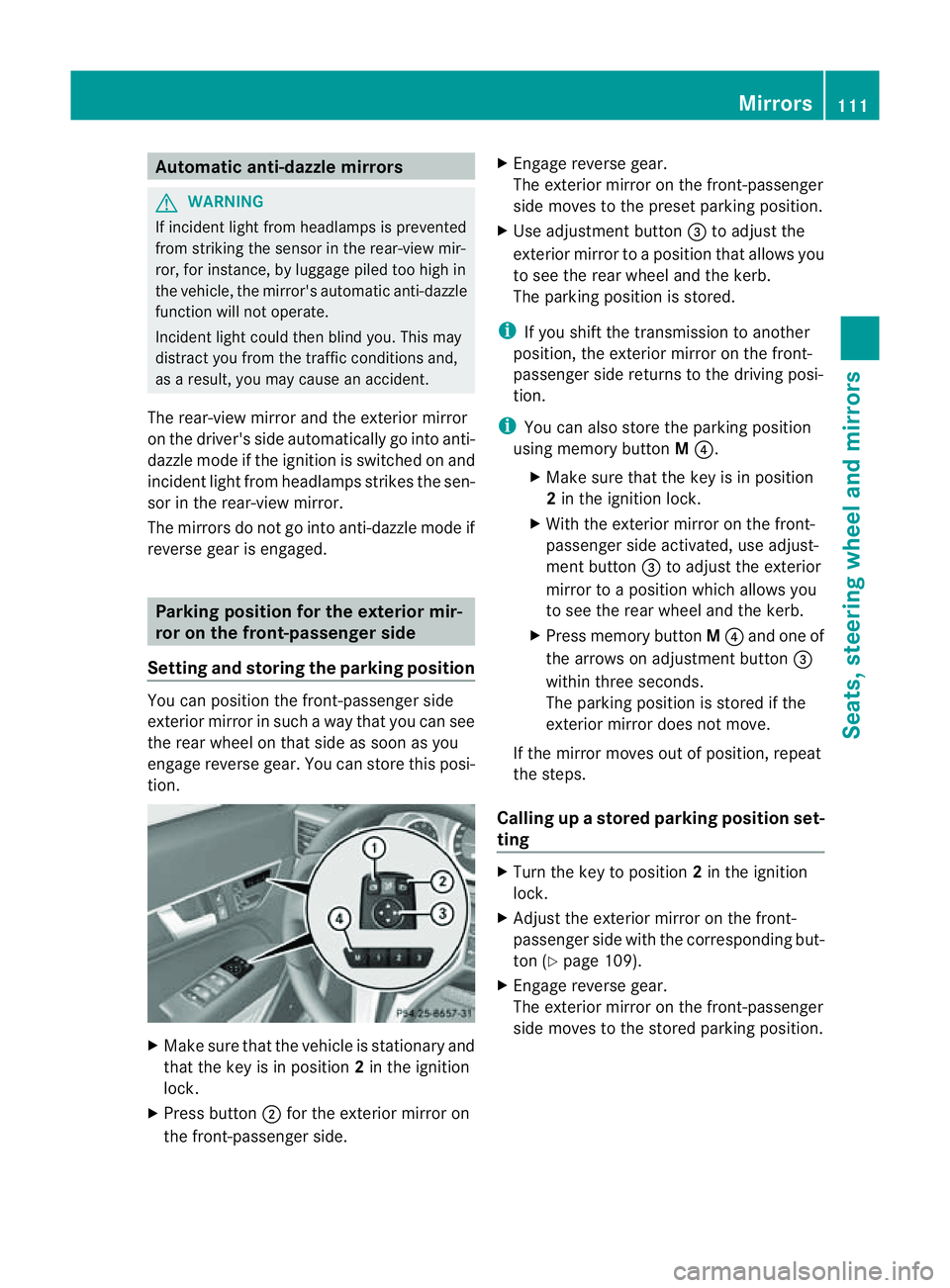
X Press button ;for the exterior mirror on
the front-passenger side. X
Engage revers egear.
The exterior mirror on the front-passenger
side moves to the preset parkin gposition.
X Use adjustment button =to adjust the
exterior mirror to aposition that allows you
to see the rear wheel and the kerb.
The parkin gposition is stored.
i If you shift the transmission to another
position ,the exterior mirror on the front-
passenger side return stothe driving posi-
tion.
i You can also stor ethe parkin gposition
using memory button M?.
X Make sure that the key is in position
2in the ignition lock.
X With the exterior mirror on the front-
passenger side activated, use adjust-
ment button =to adjust the exterior
mirror to aposition which allows you
to see the rear wheel and the kerb.
X Press memory button M? and one of
the arrows on adjustment button =
within three seconds.
The parkin gposition is stored if the
exterior mirror does not move.
If the mirror moves out of position ,repeat
the steps.
Calling up astore dparking position set-
ting X
Tur nthe key to position 2in the ignition
lock.
X Adjust the exterior mirror on the front-
passenger side with the corresponding but-
ton (Y page 109).
X Engage reverse gear.
The exterior mirror on the front-passenger
side moves to the stored parking position. Mirrors
111Seats, steering wheela nd mirrors Z
Page 115 of 353
The exterior mirror on the front-passenger
side moves back to its original position:
R
as soon as you exceed aspeed of
10 km/h
R about ten seconds after you have disen-
gaged reverse gear
R if you press button :for the exterior mir-
ror on the driver's side Memory functions
Storing settings
With the memory function, you can store up
to three different settings, e.g. for three dif-
ferent people.
The following settings are stored as asingle
memory preset:
R position of the seat, backrest and head
restraint
R driver's side: steerin gwheel position
R driver's side: position of the exterior mir-
rors on the driver's and front-passenger
sides G
WARNING
The memory function can still be used when
the key has been removed. For this reason,
children should never be left unsupervised in
the vehicle. They could otherwise become
trapped when adjusting the seat or the steer-
ing wheel. G
WARNING
Only use the memory function on the driver's
side when the vehicle is stationary. Other-
wise, you could be distracted from the traffic
conditions by the steerin gwheel and seat
moving of their own accord, and as aresult
cause an accident. X
Adjust the seat (Y page 102).
X On the driver's side, adjust the steering
wheel (Y page 108) and the exterior mirrors
(Y page 109).
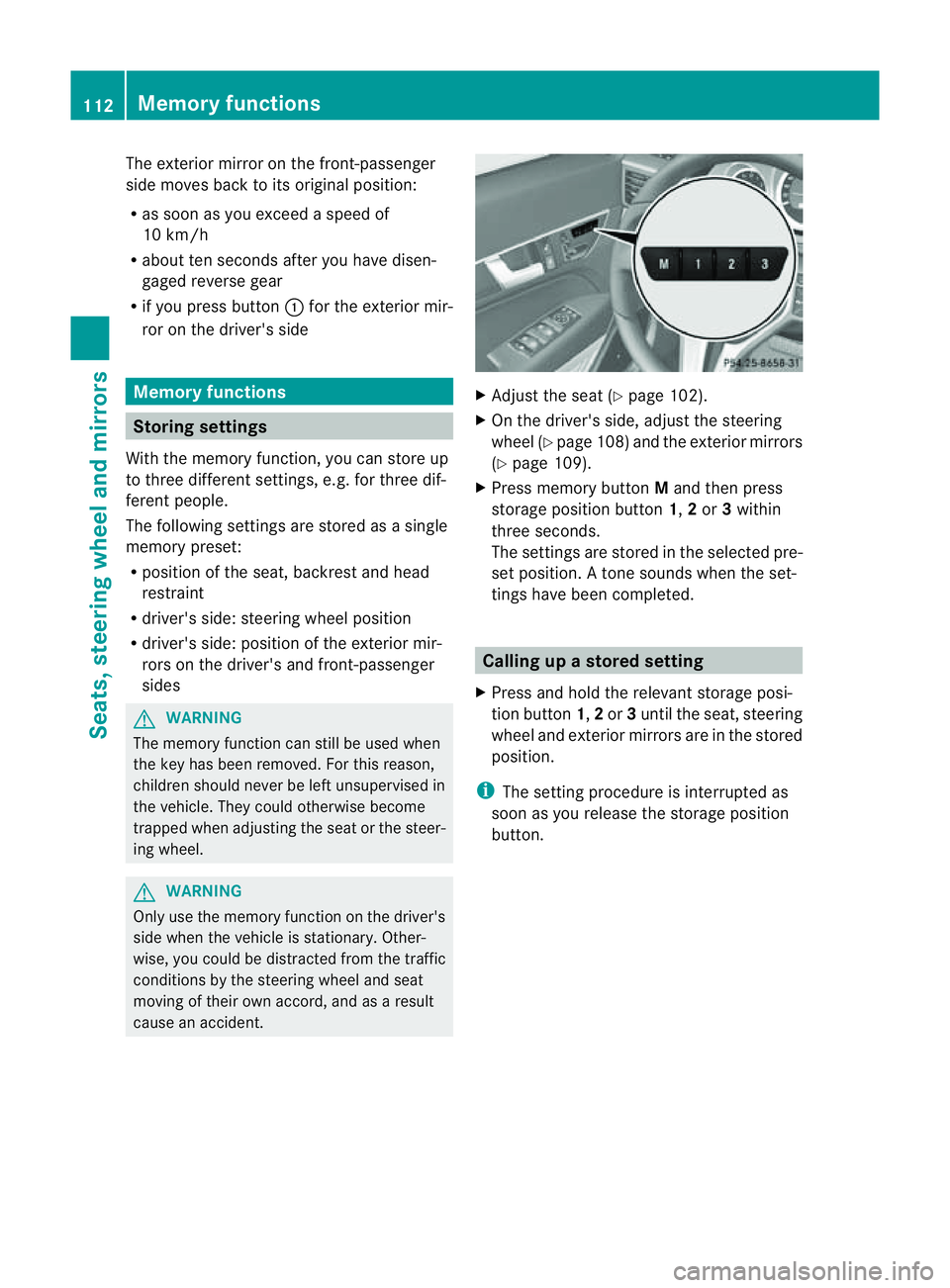
X Press memory button Mand then press
storage position button 1,2or 3within
three seconds.
The settings are stored in the selected pre-
set position. Atone sounds when the set-
tings have been completed. Calling up
astore dsetting
X Pres sand hold th erelevant storage posi-
tio nb utton 1,2or 3until th eseat ,steering
wheel and exterio rmirrors are in the stored
position.
i The settin gprocedure is interrupted as
soon as you release the storage position
button. 112
Memory functionsSeats, steering wheel and mirrors
Page 195 of 353
X
To revers eintot he parking space: main-
tai nt he steering wheel angle and reverse
carefully.
X Stop as soon as you hear awarning tone,
at the latest when PARKTRONIC sounds the
continuous warning tone.
The Parking Guidance finished mes-
sage appears in the multifunction display
and awarning tone sounds. You may be
asked to steer in adifferen tdirection and
the nchange gear. In this case, further dis-
playsint he multifunction displayw ill direct
you to the final position.
X Manoeuvre if necessary.
X Always observe the warning messages dis-
played by PARKTRONIC (Y page 187).
Cancelling Parking Guidance X
Press the PARKTRONIC button on the
centre console (Y page 188).
Parking Guidance is cancelled immediately
and PARKTRONIC is deactivated.
Parking Guidance is cancelled automatically
if it is no longer possible to guide you into the
parking space, or if amalfunction occurs.
The parking space symbol goes out and a
warning tone sounds. The Parking Guid‐ance cancelled message appears in the
multifunction display.
Trailer towing For vehicles with
atrailer tow hitch, the min-
imum length for parking spaces is slightly
increased.
If you have attached atrailer to your vehicle,
you should not use Parking Guidance. When
the electrical connection is established
between your vehicle and the trailer, Parking
Guidance ceases to be available. PARK-
TRONIC is deactivated for the rear area. Reversing camera
Important safety notes The reversing camera is an optical parking
aid. It shows the area behind your vehicle in
the COMAND APS display.
G
WARNING
Make sure that no persons or animals are in
the manoeuvring range. Otherwise, they
could be injured.
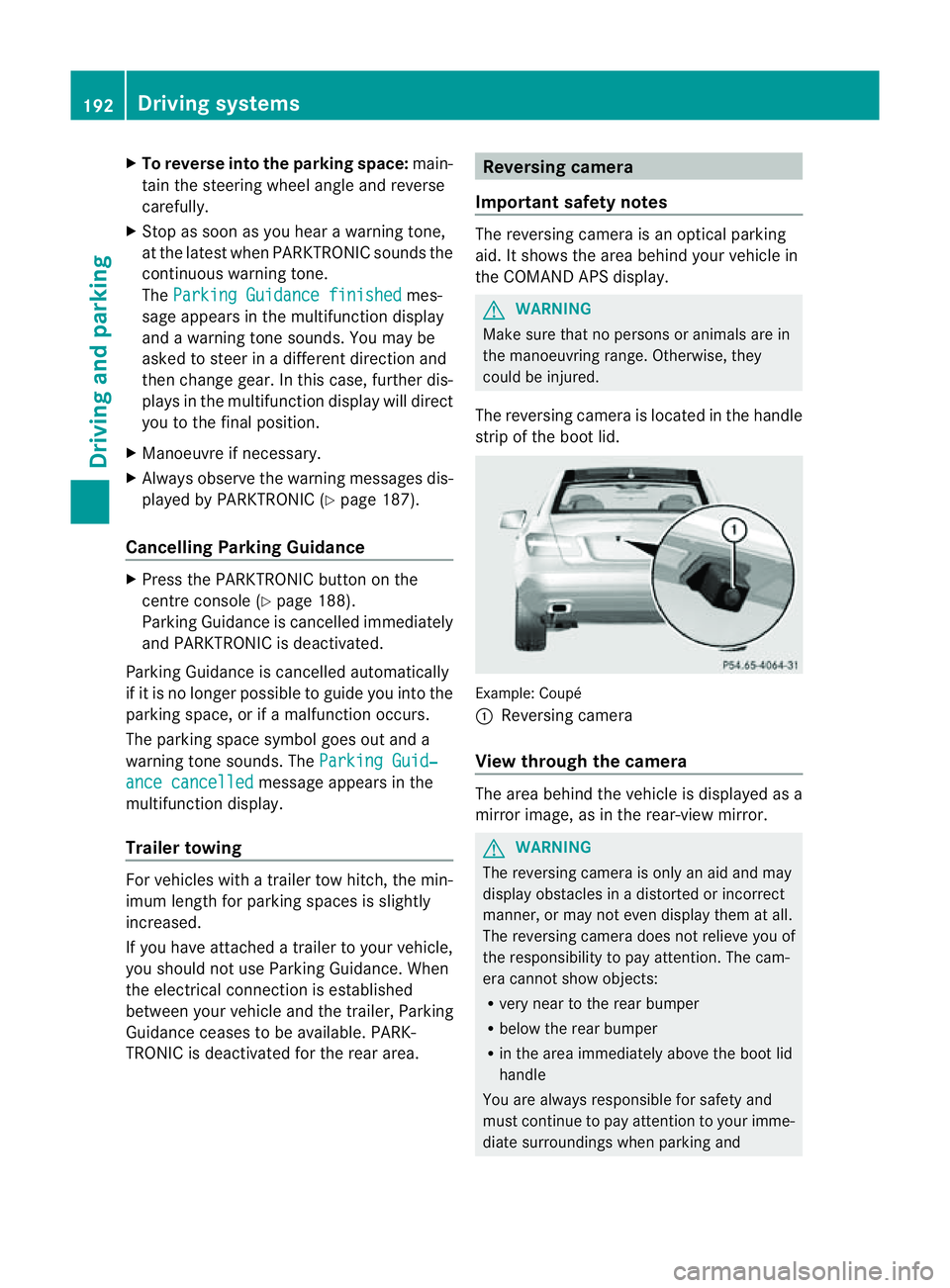
The reversing camera is located in the handle
strip of the boot lid. Example: Coupé
:
Reversing camera
View through the camera The area behind the vehicle is displayed as a
mirror image, as in the rear-view mirror.
G
WARNING
The reversing camera is only an aid and may
display obstacles in adistorted or incorrect
manner, or may not even display them at all.
The reversing camera does not relieve you of
the responsibility to pay attention. The cam-
era cannot show objects:
R very near to the rear bumper
R below the rear bumper
R in the area immediately above the boot lid
handle
You are always responsible for safety and
must continue to pay attention to your imme-
diate surroundings when parking and 192
Driving systemsDriving and parking
Page 199 of 353
Briefly showing detecte
dtraffi csigns in
the multifunction display
When yo uactivate the Speed Limi tAssist
warning function,at raffic sign indicating the
speed limit or end of speed limit zone :may
appearint he multifunction display. The traffic
sign appears for approximately five seconds
as soon as it is detected. Any other informa-
tion in the multifunction displayish idden for
this period.
X Activate the Speed Limit Assist warning
function using the on-board computer
(Y page 222).
Symbol ;appears.
Permanently showing detected traffic
signs in the multifunction display
If Speed Limit Assist is selected in the on-
board computer, atraffic sign indicating the
speed limit or end of aspeed limit zone :
appears in the multifunction displayass oon
as it is detected.
Traffic sign indicating aspeed limit :is gen-
erally displayed until:
R at raffic sign indicating the end of the speed
limit is detected.
R you make aturn.
R you leave or enter acityort own.
R the road type changes (e.g. motorway,
country road).
R you have travelled acertain minimum dis-
tanc ewithout the traffic sign being repea-
ted or detected again.
X Display Speed Limit Assist using the on-
board computer (Y page 222).Lane Tracking package
Genera lnotes The Lane Tracking package consists of Blind
Spot Assist (Y page 196)and Lane Keeping
Assist (Y page 198). Blind Spot Assist Important safet
ynotes
Blind Spot Assist uses aradar senso rsystem
to monitor th eareas on bot hside sofy our
vehicle. Blind Spot Assis tprovide sassistance
at speeds higher than 30 km/h. Awarning
display in the exterior mirrors draw syour
attention to detected vehicles in the moni-
tored area .Ifyou then switch on the corre-
sponding turn signa ltochange lane, you will
alsor eceive avisual and acoustic collision
warning. The Blind Spot Assist monitoring
system usess ensors in the rear bumper. G
WARNING
Blind Spot Assist is only an aid designed to
assist driving. It may fail to detect some vehi-
cles and is no substitute for attentive driving.
Blind Spot Assist cannot detect road and traf-
fic conditions. It may fail to detect narrow
vehicles, such as motorcycle sorbicycles, or
only detect them too late.
Monitoring may be affected by dirty sensors,
strong spray or poor visibility caused by snow,
rain or mist, for example. In this case, vehicles
are detected late or not at all.
Always pay attention to traffic conditions and
yours urroundings. Otherwise, you may fail to
recognise danger sintime, caus eanaccident
and injure yourself and others.
The radar sensor system is automatically
deactivate dnearradio telescope facilities
(Y page 345).
For Blin dSpotA ssist to assist you when driv-
ing, the radar sensor system must be activa-
ted (Y page 229) and operational.
Monitoring range of the sensors
Blind Spot Assist monitors the area up to
three metres behind your vehicle and directly
next to your vehicle, as shown in the diagram. 196
Driving systemsDriving and parking
Page 200 of 353
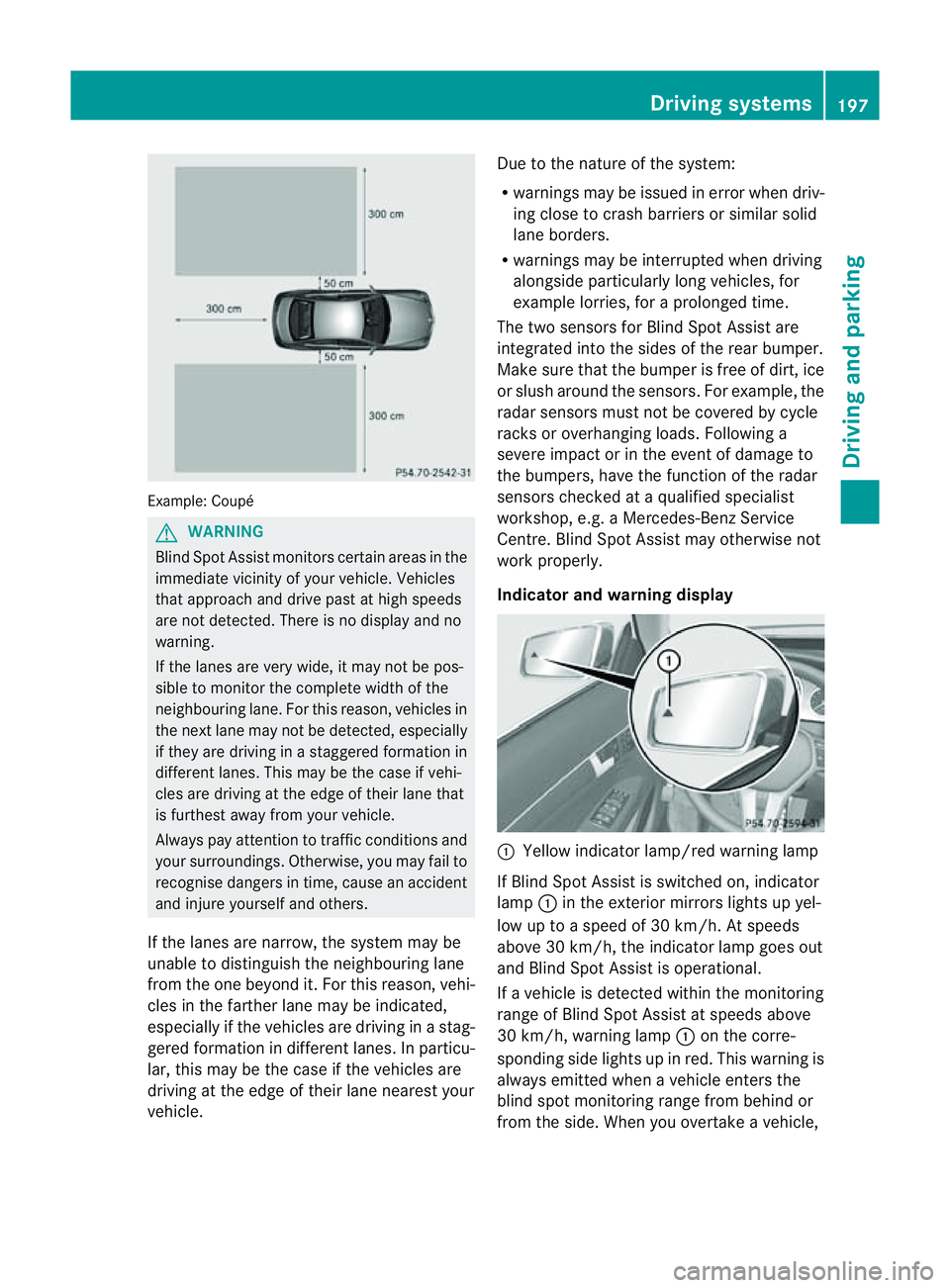
Example: Coupé
G
WARNING
Blind Spo tAssist monitors certain areas in the
immediate vicinity of your vehicle. Vehicles
that approach and drive past at high speeds
are not detected. There is no displaya nd no
warning.
If the lanes are very wide, it may not be pos-
sible to monitor the complete width of the
neighbouring lane. For this reason, vehicles in
the next lane may not be detected, especially
if they are driving in astaggered formation in
different lanes. This may be the case if vehi-
cles are driving at the edge of their lane that
is furthest awayf rom your vehicle.
Always pay attention to traffic conditions and
your surroundings. Otherwise, you may fail to
recognise dangers in time, cause an accident
and injure yourselfa nd others.
If the lanes ar enarrow ,the system may be
unable to distinguish the neighbouring lane
from the one beyond it. For this reason, vehi-
cles in the farther lane may be indicated,
especiallyift he vehicles are driving in astag-
gered formation in different lanes. In particu-
lar, this may be the case if the vehicles are
driving at the edge of their lane nearest your
vehicle. Due to the nature of the system:
R
warnings may be issued in error when driv-
ing close to crash barriers or similar solid
lane borders.
R warnings may be interrupted when driving
alongside particularly long vehicles, for
example lorries, for aprolonged time.
The two sensors for Blind Spot Assist are
integrated into the sides of the rear bumper.
Make sure that the bumper is free of dirt, ice
or slush around the sensors. For example, the
radar sensors must not be covered by cycle
racks or overhanging loads. Following a
severe impact or in the event of damage to
the bumpers, have the function of the radar
sensors checked at aqualified specialist
workshop, e.g. aMercedes-Ben zService
Centre. Blind Spot Assist may otherwise not
work properly.
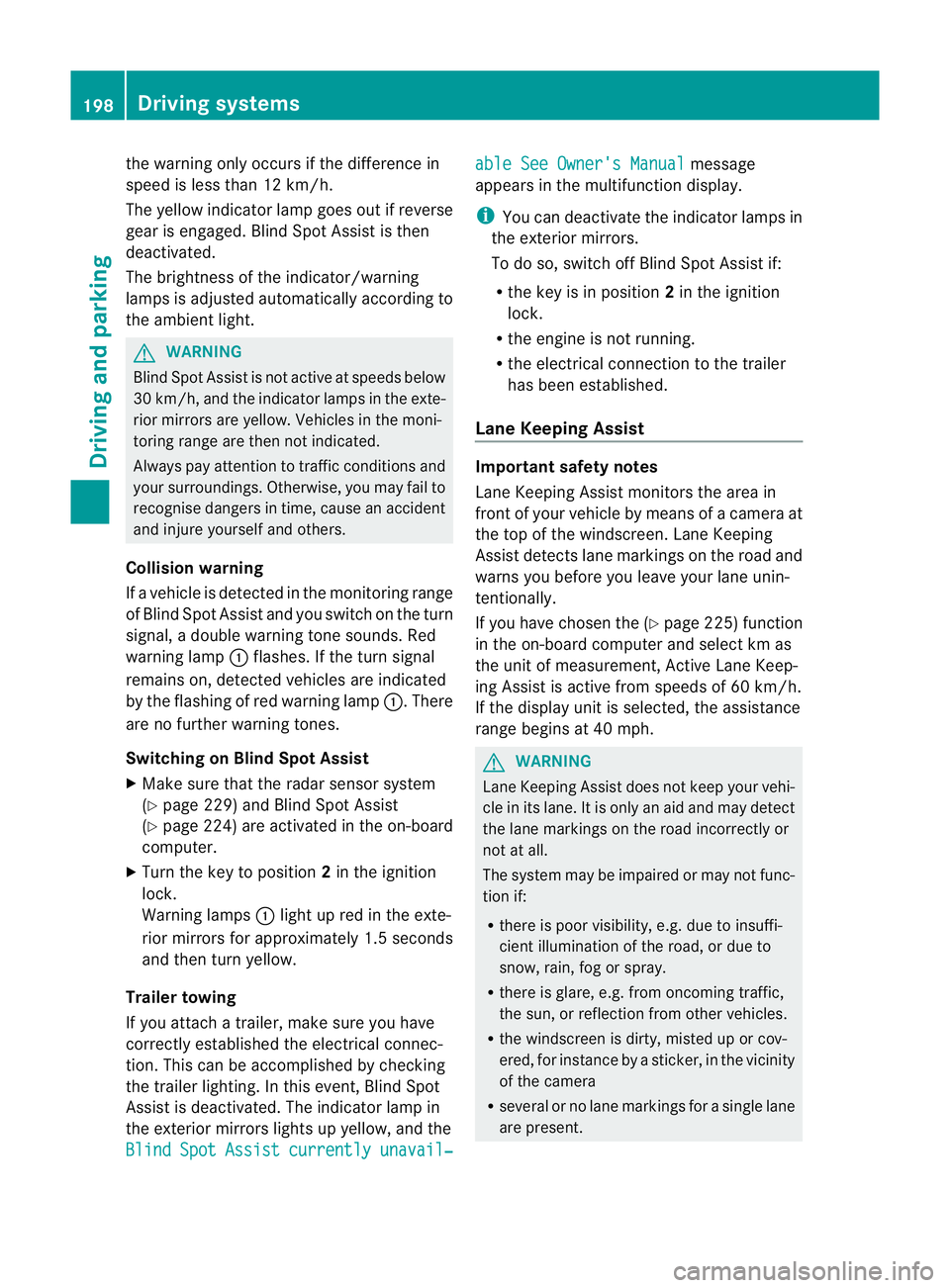
Indicator and warning display :
Yellow indicator lamp/red warning lamp
If Blind Spot Assist is switched on, indicator
lamp :in the exterior mirror slights up yel-
low up to aspeed of 30 km/h. At speeds
above 30 km/h, the indicator lamp goes out
and Blind Spot Assist is operational.
If av ehicle is detected within the monitoring
range of Blind Spot Assist at speeds above
30 km/h, warning lamp :on the corre-
spondin gside lights up in red. This warning is
alway semitted when avehicle enters the
blind spot monitoring range from behind or
from the side. When you overtake avehicle, Driving systems
197Driving and parking Z
Page 201 of 353
the warning onl
yoccurs if the differenc ein
spee dislesst han1 2km/h.
The yellow indicator lamp goes out if reverse
gearise ngaged. Blind Spot Assist is then
deactivated.
The brightness of the indicator/warning
lamps is adjusted automaticallya ccording to
the ambient light. G
WARNING
Blind Spot Assist is not active at speeds below
30 km/h, and the indicator lamps in the exte-
rior mirrors are yellow. Vehicles in the moni-
toring range are then not indicated.
Always pay attention to traffic conditions and
your surroundings. Otherwise, you may fail to
recognise dangers in time, cause an accident
and injure yourselfa nd others.
Collisio nwarning
If av ehicl eisd etected in the monitoring range
of Blind Spo tAssist and you switch on the turn
signal, adoublew arning tone sounds. Red
warning lamp :flashes. If the turn signal
remains on, detected vehicles are indicated
by the flashing of red warning lamp :.There
are no further warning tones.
Switching on Blind Spot Assist
X Make sure that the radar sensor system
(Y page 229) and Blind Spot Assist
(Y page 224) are activated in the on-board
computer.
X Turn the key to position 2in the ignition
lock.
Warning lamps :light up red in the exte-
rior mirrors for approximately 1.5 seconds
and then turn yellow.
Trailer towing
If you attach atrailer, make sure you have
correctly established the electrical connec-
tion. This can be accomplished by checking
the trailer lighting. In this event, Blind Spot
Assist is deactivated. The indicator lamp in
the exterior mirrors lights up yellow, and the
Blind Spot Assist currently unavail‐ able See Owner's Manual message
appears in the multifunction display.
i You can deactivate the indicator lamps in
the exterior mirrors.
To do so, switch off Blind Spot Assist if:
R the key is in position 2in the ignition
lock.
R the engine is not running.
R the electrical connection to the trailer
has been established.
Lane Keeping Assist Important safety notes
Lane Keeping Assist monitors the area in
front of your vehicle by means of
acamera at
the top of the windscreen. Lane Keeping
Assist detectsl ane markings on the road and
warns you before you leave your lane unin-
tentionally.
If you have chosen the (Y page 225) function
in the on-board computer and select km as
the unit of measurement, Active Lane Keep-
ing Assist is active from speeds of 60 km/h.
If the displayu nit is selected, the assistance
range begins at 40 mph. G
WARNING
Lane Keeping Assist does not keep your vehi-
cle in its lane. It is only an aid and may detect
the lane markings on the road incorrectly or
not at all.
The system may be impaired or may not func-
tion if:
R there is poor visibility, e.g. due to insuffi-
cient illumination of the road, or due to
snow, rain, fog or spray.
R there is glare, e.g. from oncomingt raffic,
the sun, or reflection from other vehicles.
R the windscreen is dirty, misted up or cov-
ered, for instancebyas ticker, in the vicinity
of the camera
R several or no lane markings for asingle lane
are present. 198
Driving systemsDriving and parking
Page 202 of 353
R
the lane markings ar eworna way, dark or
covered up ,e.g.byd irtors now.
R the distance to the vehicl einfront is too
small and the lane marking sthu sc anno tbe
detected.
R the lane markings on the road are unclear,
e.g. near roadworks.
R the lane markings chang equickly, e.g.
lanes branc hoff, cros sone another or
merge.
R the road is narro wand winding.
Lane Keeping Assist cannot detec troad and
traffic conditions. It is not asubstitute for
attentive driving .You are responsible for the
vehicle's speed, braking in good time, and
steering correctly. Always adapt your driving
style to suit the prevailing road and weather
conditions. Always pay attention to traffic
conditions and your surroundings. Otherwise,
you may fail to recognise dangers in time,
cause an accident and injure yourself and oth-
ers.
Aw arning may be given if afront wheel
passes over alane marking. It will warn you
by means of intermittentv ibration in the
steering wheel for up to 1.5 seconds.
Activating Lane Keeping Assist
X Symbol :appears in the multifunction
display. Active Driving Assistance package
General notes The Active Drivin
gAssistance package con-
sists of DISTRONIC PLUS (Y page 171), Active
Blind Spot Assist (Y page 199) and Active
Lane Keeping Assist (Y page 202).
Active Blind Spot Assist Important safety notes
Active Blind Spot Assist uses
aradar sensor
system to monitor the side areas of your vehi- cle that are behind the driver.
Awarning dis-
play in th eexteri or mirror sdraws your atten-
tio ntod etected vehicles in the monitored
area. If you then switch on the corresponding
turn signal to change lane, you will also
receive avisual and acoustic collision warn-
ing. If arisk of lateral collision is detected,
corrective braking may help you avoid acol-
lision. To support the course-correcting brake
application, Active Blind Spot Assist also uses
the forward-facin gradar sensor system.
Active Blind Spot Assist provides assistance
at speeds higher than about 30 km/h. G
WARNING
Active Blind Spot Assist is only an aid and may
detect vehicles/obstacles incorrectly or not
at all.
The system may be impaired or may not func-
tion if:
R there is poor visibility, e.g. due to snow,
rain, fog or spray.
R the rear and/or front sensors are dirty.
Active Blind Spot Assist may not detect nar-
row vehicles, such as motorcycles or bicycles,
or only detect them too late. It cannot detect
vehicles which are overtaken at asmall dis-
tancea nd then enter the blind spot area.
Active Blind Spot Assist cannot detect road
and traffic conditions. It is not asubstitute for
attentive driving. You are responsible for the
vehicle's speed, braking in good time, and
steering correctly. Always adapt your driving
style to suit the prevailing road and weather
conditions. Always pay attention to traffic
conditions and your surroundings. Otherwise,
you may fail to recognise dangers in time,
cause an accident and injure yourself and oth-
ers.
The radar sensor system is automatically
deactivated near radio telescope facilities
(Y page 345).
For Active Blind Spot Assist to assist you
when driving, the radar sensor system must
be activated (Y page 229) and operational. Driving systems
199Driving and parking Z
Page 203 of 353
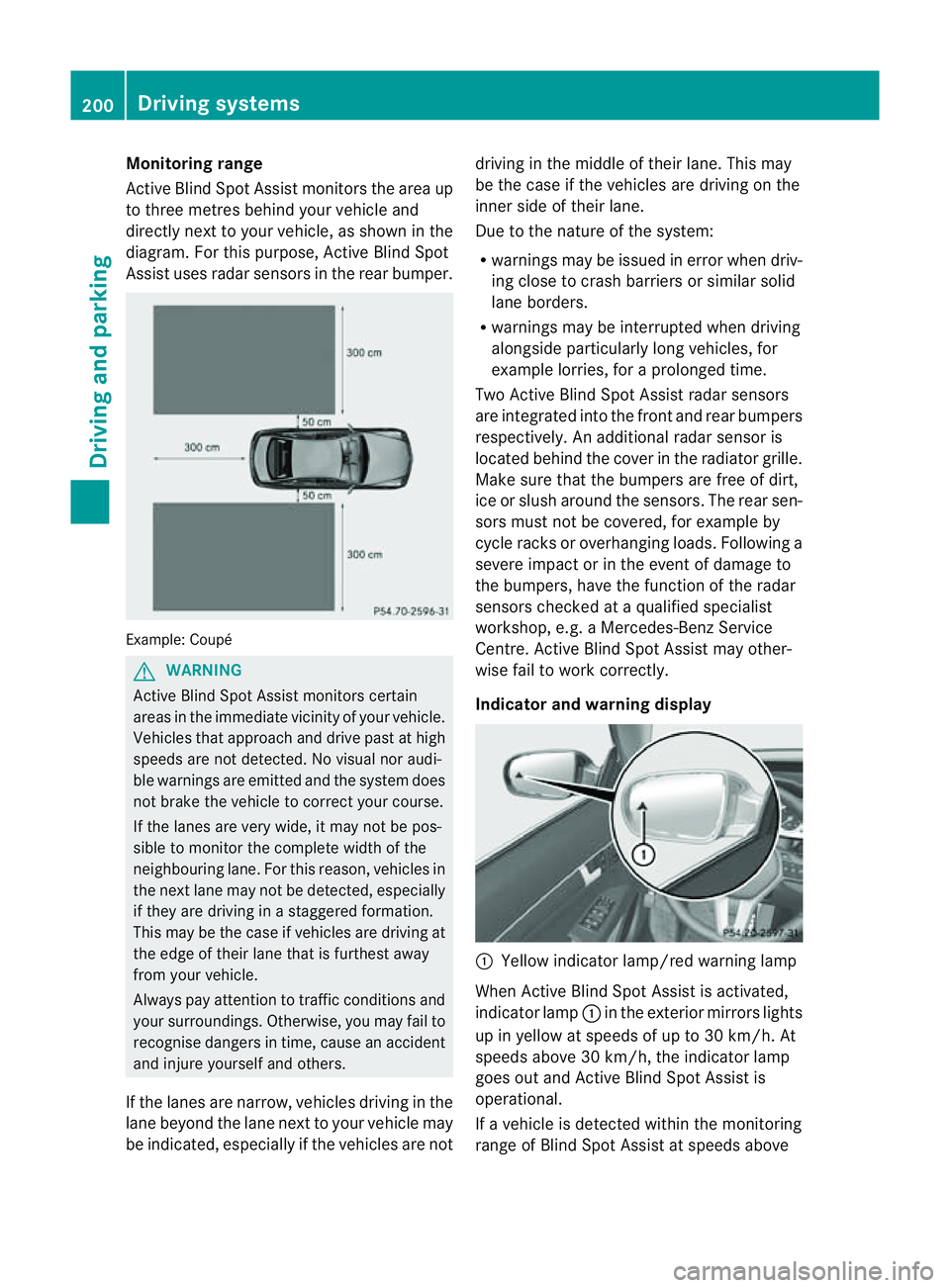
Monitoring range
Active Blind Spot Assist monitors the area up
to three metres behind yourv
ehicle and
directly nexttoy our vehicle, as shown in the
diagram. For this purpose, Active Blind Spot
Assist uses radar sensors in the rear bumper. Example: Coupé
G
WARNING
Active Blind Spot Assist monitors certain
areas in the immediate vicinit yofyour vehicle.
Vehicles that approach and drive past at high
speeds are not detected. No visual nor audi-
ble warnings are emitted and the system does
not brake the vehicle to correc tyour course.
If the lanes are very wide, it may not be pos-
sible to monitor the complete width of the
neighbouring lane. For this reason, vehicles in
the next lane may not be detected, especially
if they are driving in astaggered formation.
This may be the case if vehicles are driving at
the edge of their lane that is furthest away
from your vehicle.
Always pay attention to traffic conditions and
your surroundings. Otherwise, you may fail to
recognise dangers in time, cause an accident
and injure yourself and others.
If the lanes are narrow, vehicles driving in the
lane beyond the lane next to your vehicle may
be indicated, especially if the vehicles are not driving in the middle of their lane. This may
be the case if the vehicles are driving on the
inner side of their lane.
Due to the nature of the system:
R
warnings may be issued in error when driv-
ing close to crash barriers or similar solid
lane borders.
R warnings may be interrupted when driving
alongside particularly long vehicles, for
example lorries, for aprolonged time.
Two Active Blind Spot Assist radar sensors
are integrated into the front and rear bumpers
respectively. An additional radar sensor is
located behind the cover in the radiator grille.
Make sure that the bumpers are free of dirt,
ice or slush around the sensors. The rear sen-
sors must not be covered, for example by
cycle racks or overhanging loads. Following a
severe impact or in the event of damage to
the bumpers, have the function of the radar
sensors checked at aqualified specialist
workshop, e.g. aMercedes-Benz Service
Centre. Active Blind Spot Assist may other-
wise fail to work correctly.
Indicator and warning display :
Yellow indicator lamp/red warning lamp
When Active Blind Spot Assist is activated,
indicator lamp :in the exterior mirrors lights
up in yellow at speeds of up to 30 km/h. At
speeds above 30 km/h, the indicator lamp
goes out and Active Blind Spot Assist is
operational.
If av ehicle is detected within the monitoring
range of Blind Spot Assist at speeds above 200
Driving systemsDriving and parking
Page 204 of 353
30 km/h, warning lamp
:on the corre-
sponding sid elights up red. Thi swarning is
always emitted whe navehicle enters the
blind spot monitoring range from behind or
from the side .When you overtake avehicle,
the warning only occurs if the difference in
speed is less than 12 km/h.
The yellow indicator lamp goes out if reverse
gear is engaged. Active Blind Spot Assist is
then no longer active.
The brightness of the indicator/warning
lamps is adjusted automatically according to
the ambient light. G
WARNING
Active Blind Spot Assist is not active at speeds
below 30 km/h. The indicator lamps in the
exterior mirrors are yellow.V ehicles in the
monitoring range are then not indicated.
Always pay attention to traffic conditions and
your surroundings. Otherwise, you may fail to
recognise dangers in time, cause an accident
and injure yourself and others.
Visua land acoustic collisio nwarning
If you switch on the appropriate turn signals
to change lanes, and avehicle is detected in
the side monitoring range of Active Blind Spot
Assist ,you will receive avisual and acoustic
collision warning. You will then hear adouble
warning tone, and red warning lamp :
flashes. If the turn signal remains on, detec-
ted vehicles are indicated by the flashing of
red warning lamp :.There are no further
warning tones.
Course-correcting brak eapplication
If Active Blind Spot Assist detects arisk of a
lateral collision in the monitoring range, a
course-correcting brake application is carried
out. This is designed to help you avoid acol-
lision.
The course-correcting brake application is
available in the range between 30 km/ha nd
200 km/h.
If ac ourse-correcting brake application
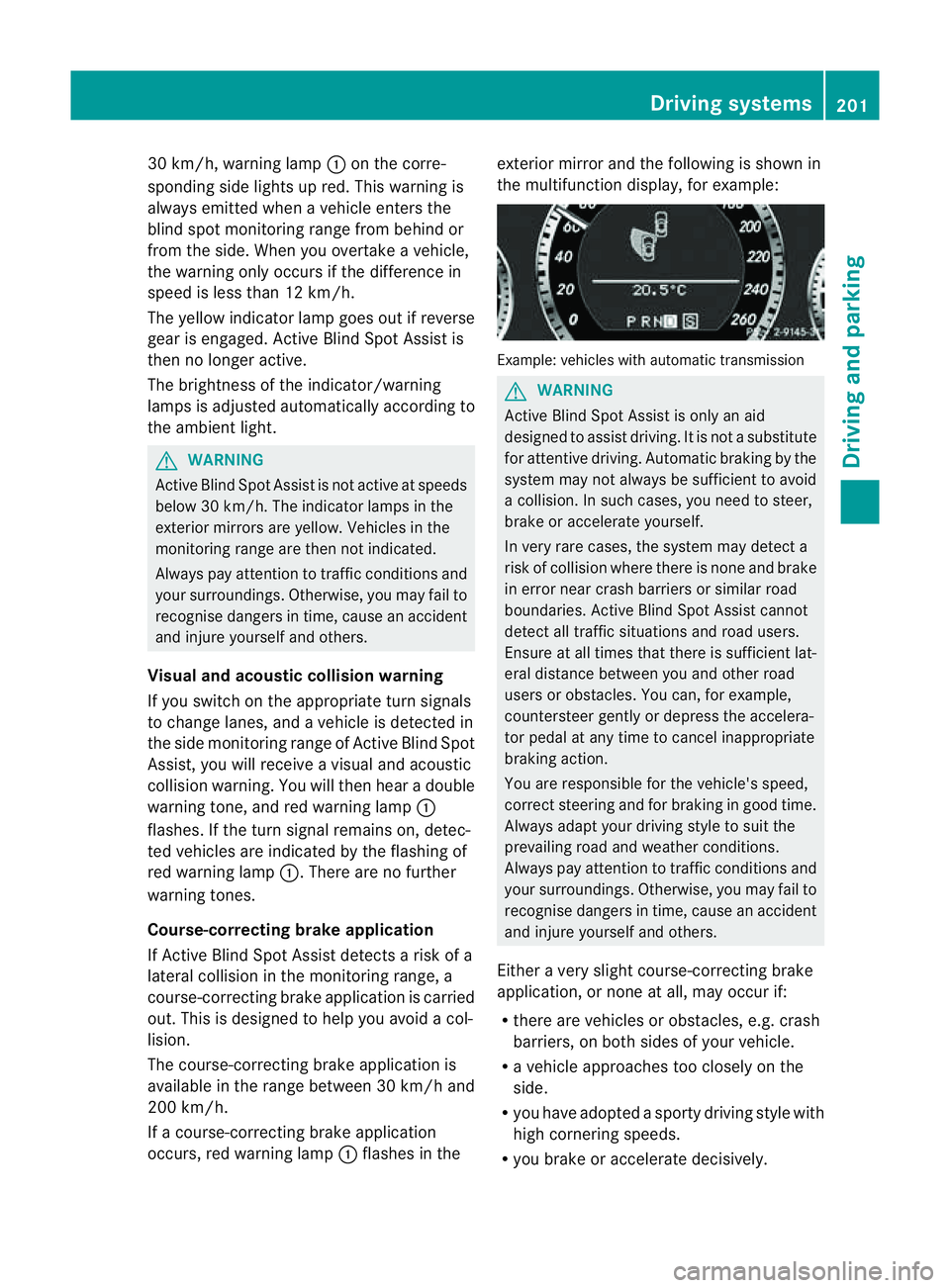
occurs, red warning lamp :flashe sinthe exterio
rmirro rand the following is shown in
the multifunctio ndisplay, for example: Example: vehicles with automatic transmission
G
WARNING
Activ eBlindS pot Assist is only an aid
designed to assist driving. It is not asubstitute
for attentive driving. Automatic braking by the
system may not always be sufficien ttoavoid
ac ollision. In such cases, you need to steer,
brake or accelerate yourself.
In very rare cases, the system may detect a
risk of collision where there is none and brake
in error near crash barriers or similar road
boundaries. Active Blind Spot Assist cannot
detect all traffic situations and road users.
Ensure at all times that there is sufficient lat-
eral distance between you and other road
users or obstacles. You can, for example,
countersteer gently or depress the accelera-
tor pedal at any time to cancel inappropriate
braking action.
You are responsible for the vehicle's speed,
correc tsteerin gand for braking in good time.
Alway sadapt your drivin gstyle to suit the
prevailing road and weather conditions.
Always pay attention to traffic conditions and
your surroundings. Otherwise, you may fail to
recognise dangers in time, cause an accident
and injure yourself and others.
Either avery slight course-correcting brake
application, or none at all, may occur if:
R there are vehicles or obstacles, e.g. crash
barriers, on both sides of your vehicle.
R av ehicle approaches too closely on the
side.
R you have adopted asporty driving style with
high cornering speeds.
R you brake or accelerate decisively. Driving systems
201Driving and parking Z