AUX MERCEDES-BENZ E-CLASS CABRIOLET 2011 Owners Manual
[x] Cancel search | Manufacturer: MERCEDES-BENZ, Model Year: 2011, Model line: E-CLASS CABRIOLET, Model: MERCEDES-BENZ E-CLASS CABRIOLET 2011Pages: 353, PDF Size: 8.42 MB
Page 8 of 353
ASSYS
TPLUS
see ASSYS TPLUS service interval
display
ASSYST PLUS servic einterval dis-
play Displaying service messages .........285
Hiding service messages ...............285
Notes ............................................. 285
Service messages ..........................284
ATA (Anti-Theft Alarm system)
Activating/deactivating ...................68
ATA (Anti-Theft Alarm system) .........68
Function .......................................... .68
Interior motion sensor .....................69
Switching off the alarm ....................68
Tow-awa yprotectio n........................ 68
ATTENTIO NASSIST
Activating/deactivating .................224
Display message ............................ 244
Function/notes ............................. 194
Audio menu (on-board computer) ....219
AUTO lights Display message ............................ 241
see Lights
Automatic engine start (ECO start/
stop function) .................................... 151
Automatic engine switch-off (ECO
start/stop function) ..........................150
Automatic headlamp mode ..............115
Automatic transmission Accelerator pedal position .............155
Automatic drive program ...............157
Changing gea r............................... 155
Display message ............................ 250
Driving tips .................................... 155
Emergency running mode ..............160
Kickdow n....................................... 156
Manual drive program ....................158
Problem (fault) ............................... 160
Progra mselecto rbutton ................ 156
Pulling away ................................... 149
Releasing the parking lock man-
ually ............................................... 160
Selector leve r................................ 154
Shift range s................................... 157
Starting the engine ........................148
Steering wheel gearshift paddle s... 157
Trailer towing ................................. 156Transmissio
nposition display ........155
Transmissio npositions .................. 155
Automatic transmission emer-
gency runnin gmode ......................... 160
Auxiliary heating Activating/deactivating .................138
Activating/deactivating (on the
centre console ).............................. 138
Display message ............................ 252
Important safety notes ..................137
Problem (display message) ............141
Remote control .............................. 138
Setting ........................................... 229
Setting the departur etime ............ .139
Auxiliary ventilation
Activating/deactivating .................138
Activating/deactivating (on the
centre console ).............................. 138
Problem (display message) ............141
Remote control .............................. 138
Axl eload, permissible (traile rtow-
ing) ...................................................... 345 B
Ba gh ook ............................................ 268
Ball coupling Folding in ....................................... 208
Folding out ..................................... 206
BAS (Brake Assist System) .................62
Basic settings see Settings
BAS PLU S(Brake Assist System
PLUS) .................................................... 62
Battery (key) Checking .......................................... 74
Important safety notes ....................74
Replacing ......................................... 75
Battery (vehicle)
Charging ........................................ 308
Connecting .................................... 308
Disconnecting ................................ 307
Display message ............................ 243
Important safety notes ..................305
Jump starting ................................. 309
Location ......................................... 307
Removing/fitting ........................... 308 Index
5
Page 10 of 353
Cell phone
see Mobile phone
Centra llocking
Automatic lockin g(on-board com-
puter) ............................................ .228
Locking/unlocking (key ).................. 72
Centre console ..................................... 32
Changing bulbs Dipped-bea mheadlamps ............... 122
Important safety notes ..................121
Main-beam headlamps ................... 123
Overview of bul btypes .................. 122
Parking lamps (front) .....................123
Standing lamps .............................. 123
Turn signals (front) ......................... 123
Child-proof locks
Child sea tlock ................................. 52
Important safety notes ....................61
Children
In the vehicle ................................... 51
Restraint systems ............................ 51
Child seat
Automatic recognition .....................53
Child sea tlock ................................. 52
Display message ............................ 237
ISOFIX .............................................. 54
On the front-passenger sea t............ 52
Problem (malfunction) .....................57
Recommendations ...........................59
Suitable positions ............................ 57
Cigarette lighter ................................ 272
Cleaning Trailer tow hitch ............................. 291
Climate control
Activating/deactivating rear win-
dow heating ................................... 135
Auxiliary heating/ventilatio n.......... 137
Controlling automatically ...............132
Convenience opening/closing (air
recirculation) ................................. 136
Cooling with aird ehumidification..131
Demisting the windows .................. 135
Demisting the windscree n............. 134
Important safety notes ..................128
Indicator lamp ................................ 132
Notes on using THERMATI Cauto-
matic climate control .....................129Notes on using THERMOTRONIC
automatic climate control
..............131
Overview of systems ......................128
Problems with cooling with air
dehumidification ............................ 132
Problem with the rear window
heating .......................................... 135
Rea rcontrol panel ......................... 130
Setting the aird istribution.............133
Setting the airflow .........................134
Setting the airv ents...................... 141
Setting the climate mode .............. .132
Setting the temperature ................133
Switching air-recirculation mode
on/off ............................................ 135
Switching on/off ........................... 131
Switching residua lheato n/off ......136
Switching the ZONE function on/
off .................................................. 134
THERMATI Cautomatic climate
control (2-zone) ............................. 129
THERMOTRONIC (3-zone) auto-
matic climate control .....................130
Clock( on-board computer) ...............226
Cockpit Overview .......................................... 26
see Instrument cluster
COMAND
see Separate operating instructions
Combination switch ..........................116
Constant headlamp mode see Daytime driving lamps
Consumptio nstatistic s(on -board
computer) .......................................... 217
Convenience closing feature ..............84
Convenience opening/closing (air-
recirculation mode) ........................... 136
Convenience opening feature ............83
Coolan t(engine)
Checkin gthe level ......................... 283
Display message ............................ 242
Notes ............................................. 337
Temperature gauge ........................ 212
Warning lamp ................................. 260
Cooling
see Climate control Index
7
Page 18 of 353
Parking lamps
Changing bulbs .............................. 123
Display message ............................ 240
Switching on/off ........................... 114
Parking lamps (changing bulbs) ......123
PARKTRONIC Deactivating/activating .................188
Driving system ............................... 185
Function/notes ............................. 185
Problem (fault) ............................... 189
Sensor range ................................. 186
Trailer towing ................................. 188
Warning displa y............................. 187
PASSENGE RAIRBAG OFF warning
lamp ...................................................... 53
Petrol .................................................. 161
Plastic trim (cleaning instructions) .291
Power windows see Side windows
PRE-SAFE ®
(preventive occupant
safety system) Display message ............................ 235
Operation ........................................ .45
PRE-SAFE ®
Brake (vehicles with
DISTRONIC PLUS) Display message ............................ 236
Function/notes ................................ 66
PRE-SAFE ®
Brake (vehicles with
DISTRONIC PLUS) Switching on/off ........................... 223
Warning lamp ................................. 262
Preventive occupant safety sys-
tem
see PRE-SAFE ®
(preventive occu-
pant safety system)
Program selector button ..................156
Pulling away Automatic transmission .................149
Manual transmission ..................... .149 Q
Qualifie dspecialis tworkshop ...........22 R
Radar sensor system Activating/deactivating .................229
Country overview ........................... 345
Display message ............................ 245
Radio
Selecting astation ......................... 219
see separate operating instructions
Rain closing feature (panorama
sliding sunroof) ................................... 97
Readin glamp ..................................... 120
Rear compartment Setting the airv ents...................... 142
Setting the temperature ................133
Rear-compartment seat bel tsta-
tus indicator ........................................ 49
Rear foglamp Display message ............................ 240
Switching on/off ........................... 116
Rear seat
Display message ............................ 251
Rear-vie wmirror
Anti-dazzle mode (automatic) ........111
Dipping (manual )........................... 109
Rear window blind ............................271
Rear window heating Problem (fault) ............................... 135
Switching on/off ........................... 135
Refuelling
Fuel gauge ....................................... 28
Important safety notes ..................160
Refuelling proces s......................... 163
see Fuel
Releasin gthe parking loc kman-
ually (automatic transmission) ........160
Remote control Auxiliary heating/ventilatio n.......... 138
Changing the batteries (auxiliary
heating) ......................................... 140
Garage door opener .......................275
Replacing the battery (auxiliary
heatin gremote control) .................... 140
Reserve (fue ltank)
see Fuel
Reserve fuel
Display message ............................ 243
Warning lamp ................................. 260 Index
15
Page 35 of 353
Centre console
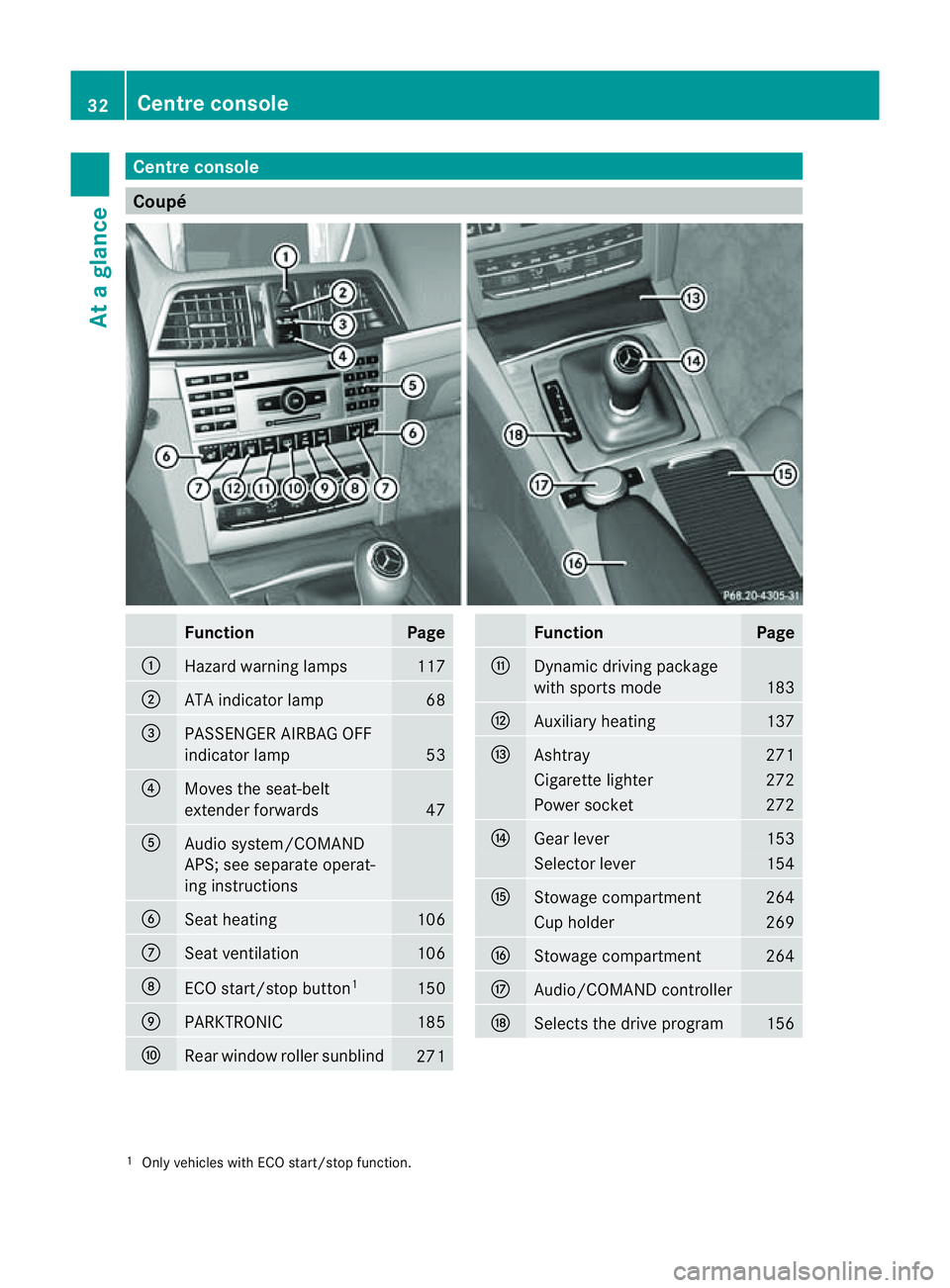
Coupé
Function Page
:
Hazard warning lamps 117
;
AT
Ai ndicator lamp 68
=
PASSENGER AIRBA
GOFF
indicator lamp 53
?
Moves th
eseat-belt
extender forwards 47
A
Audi
osystem/COMAND
APS; see separate operat-
ing instructions B
Seat heating 106
C
Seat ventilation 106
D
ECO start/sto
pbutton 1 150
E
PARKTRONIC 185
F
Rear window roller sunblind
271 Function Page
G
Dynamic driving package
wit
hsports mode 183
H
Auxiliary heating 137
I
Ashtray 271
Cigarett
elighter 272
Power socket 272
J
Gear lever 153
Selector lever 154
K
Stowage compartment 264
Cup holder 269
L
Stowage compartment 264
M
Audio/COMAND controller
N
Select
sthe driv eprogram 156
1
Only vehicle swithE CO start/sto pfunction. 32
Centre consoleAt
ag lance
Page 140 of 353
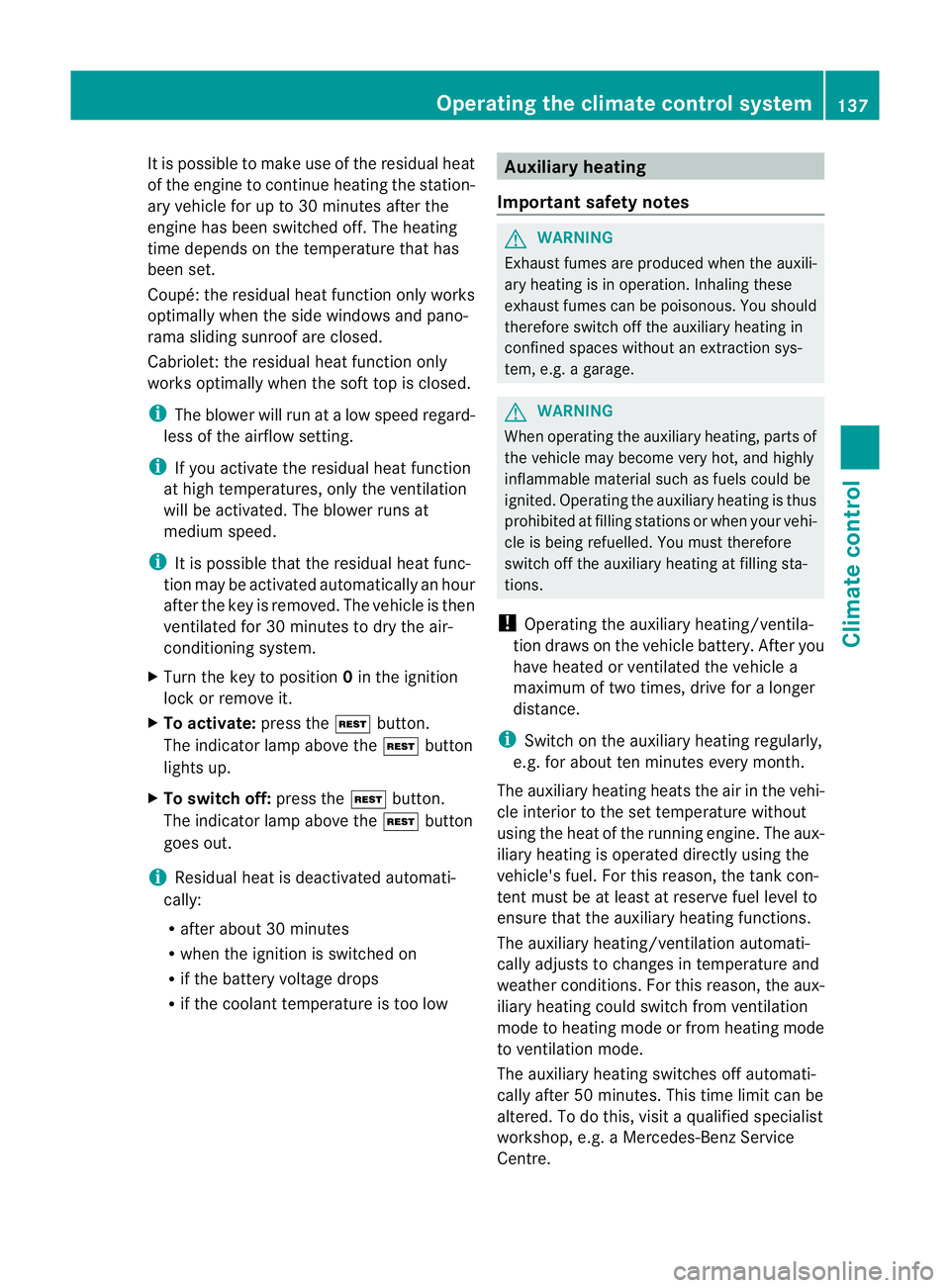
It is possible to make use of the residual heat
of the engine to continue heating the station-
ary vehicle for up to 30 minutes after the
engine has been switched off. The heating
time depends on the temperature that has
been set.
Coupé: the residual heat function only works
optimally when the side window sand pano-
rama sliding sunroo fare closed.
Cabriolet: the residualh eatfunction only
work soptimally when th esoftt op is closed.
i The blower will run at alow speed regard-
less of the airflow setting.
i If you activate the residual heat function
at high temperatures, only the ventilation
will be activated. The blower runs at
medium speed.
i It is possible that the residual heat func-
tion may be activated automatically an hour
after the key is removed. The vehicle is then
ventilated for 30 minutes to dry the air-
conditioning system.
X Turn the key to position 0in the ignition
lock or remove it.
X To activate: press theÌbutton.
The indicator lamp above the Ìbutton
lights up.
X To switch off: press theÌbutton.
The indicator lamp above the Ìbutton
goes out.
i Residua lheat is deactivated automati-
cally:
R after about 30 minutes
R when the ignition is switched on
R if the battery voltage drops
R if the coolant temperature is too low Auxiliary heating
Important safety notes G
WARNING
Exhaust fumes are produced when the auxili-
ary heating is in operation. Inhaling these
exhaust fumes can be poisonous. You should
therefor eswitch off the auxiliary heating in
confined spaces without an extraction sys-
tem, e.g. agarage. G
WARNING
When operating the auxiliary heating, parts of
the vehicle may become very hot, and highly
inflammable material such as fuels could be
ignited. Operating the auxiliary heating is thus
prohibited at filling station sorwhen your vehi-
cle is being refuelled. You must therefore
switch off the auxiliary heating at filling sta-
tions.
! Operating the auxiliary heating/ventila-
tion draws on the vehicle battery. After you
have heated or ventilated the vehicle a
maximum of two times, drive for alonger
distance.
i Switch on the auxiliary heating regularly,
e.g. for about ten minutes every month.
The auxiliary heating heats the air in the vehi-
cle interior to the set temperature without
using the heat of the running engine. The aux-
iliary heating is operated directly using the
vehicle's fuel. For this reason, the tank con-
tent must be at least at reserve fuel level to
ensure that the auxiliary heating functions.
The auxiliary heating/ventilation automati-
cally adjusts to changes in temperature and
weather conditions. For this reason, the aux-
iliary heating could switch from ventilation
mode to heating mode or from heating mode
to ventilation mode.
The auxiliary heating switches off automati-
cally after 50 minutes. This time limit can be
altered. To do this, visit aqualified specialist
workshop, e.g. aMercedes-BenzS ervice
Centre. Operating thec
limatecontrol system
137Climatecontrol Z
Page 141 of 353
You cannot use the auxiliary ventilation to
cool the vehicle interior to atemperature
lower than the outsid etemperature.
Befor eswitchin gon X
Turn the key to position 2in the ignition
lock.
X Set the temperature.
The auxiliary heating/ventilation can be acti-
vated even when the climat econtrol is being
controlled manually. Optimum comfor tcan
be attained when the system is set to auto-
matic mode. Set the temperature to 22 †.
The auxiliary heating/ventilation can be acti-
vated or deactivate dusing the remote control
or the button on the centr econsole.
The on-board computer can be used to spec-
ify up to three departure times, one of which
may be preselected (Y page 229).
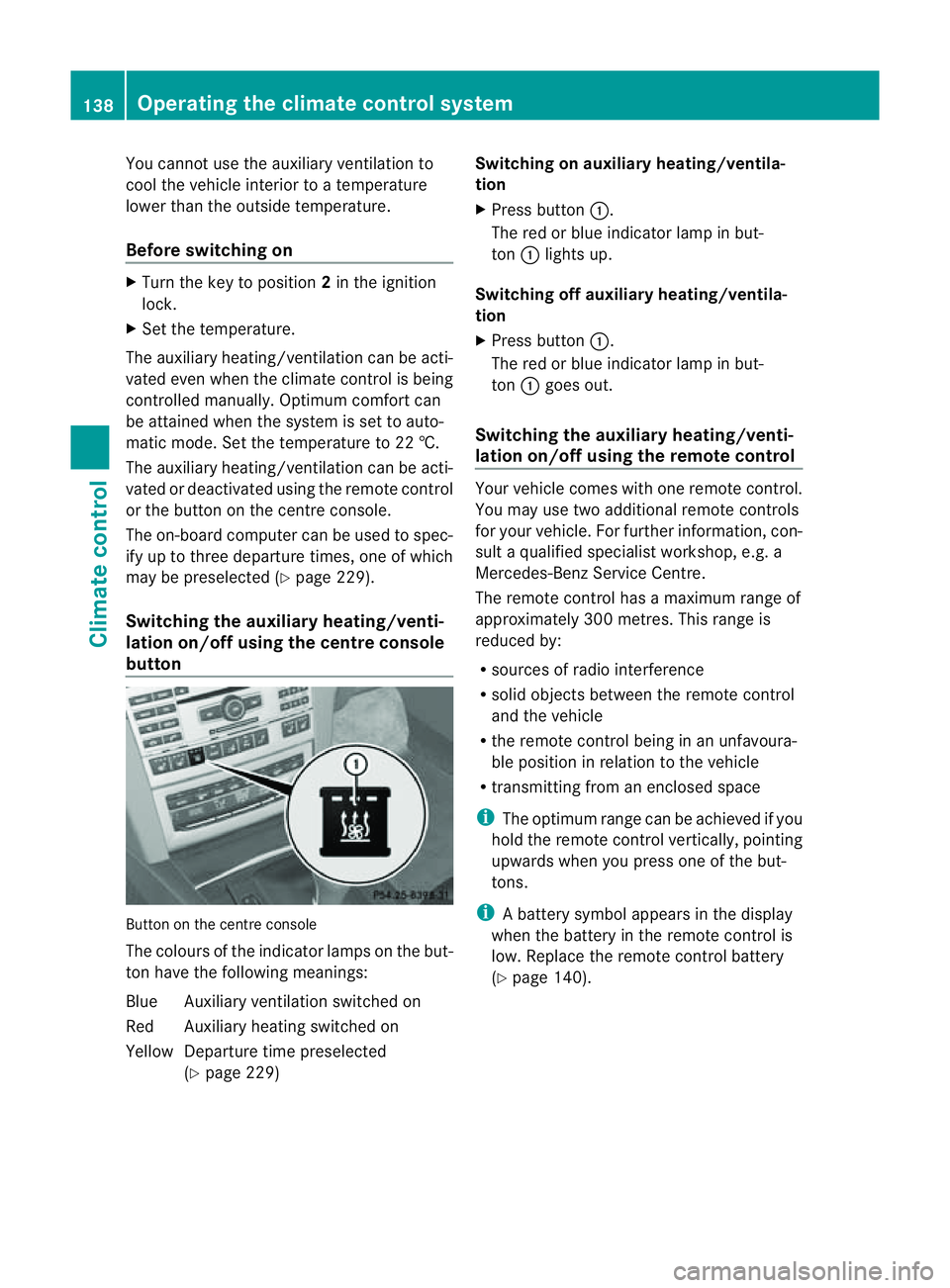
Switchin gthe auxiliar yheating/venti-
lation on/off usin gthe centr econsole
button Butto
nont hecentr econsole
The colours of th eindicator lamps on th ebut-
to nh ave th efollowin gmeanings:
Blue Auxiliary ventilatio nswitched on
Red Auxiliary heating switche don
Yellow Departure tim epreselected
(Y page 229) Switching on auxiliary heating/ventila-
tion
X
Pres sbutton :.
The red or blue indicator lamp in but-
ton :light sup.
Switching off auxiliary heating/ventila-
tion
X Pres sbutton :.
The red or blue indicator lamp in but-
ton :goes out.
Switching th eauxiliary heating/venti-
lation on/off using th eremote control Your vehicle comes with one remot
econtrol.
You may use two additional remot econtrols
for your vehicle. For further information, con-
sult aqualified specialist workshop ,e.g.a
Mercedes-Ben zService Centre.
The remote control has amaximum range of
approximately 300 metres. This range is
reduced by:
R sources of radio interference
R solid objectsb etween the remote control
and the vehicle
R the remote control being in an unfavoura-
ble position in relation to the vehicle
R transmitting from an enclosed space
i The optimum range can be achieved if you
hold the remote control vertically, pointing
upwards when you press one of the but-
tons.
i Abattery symbol appear sinthedisplay
when th ebattery in th eremot econtro lis
low. Replac ethe remot econtro lbattery
(Y page 140). 138
Operatin
gthe climat econtrol systemClimat econtrol
Page 142 of 353
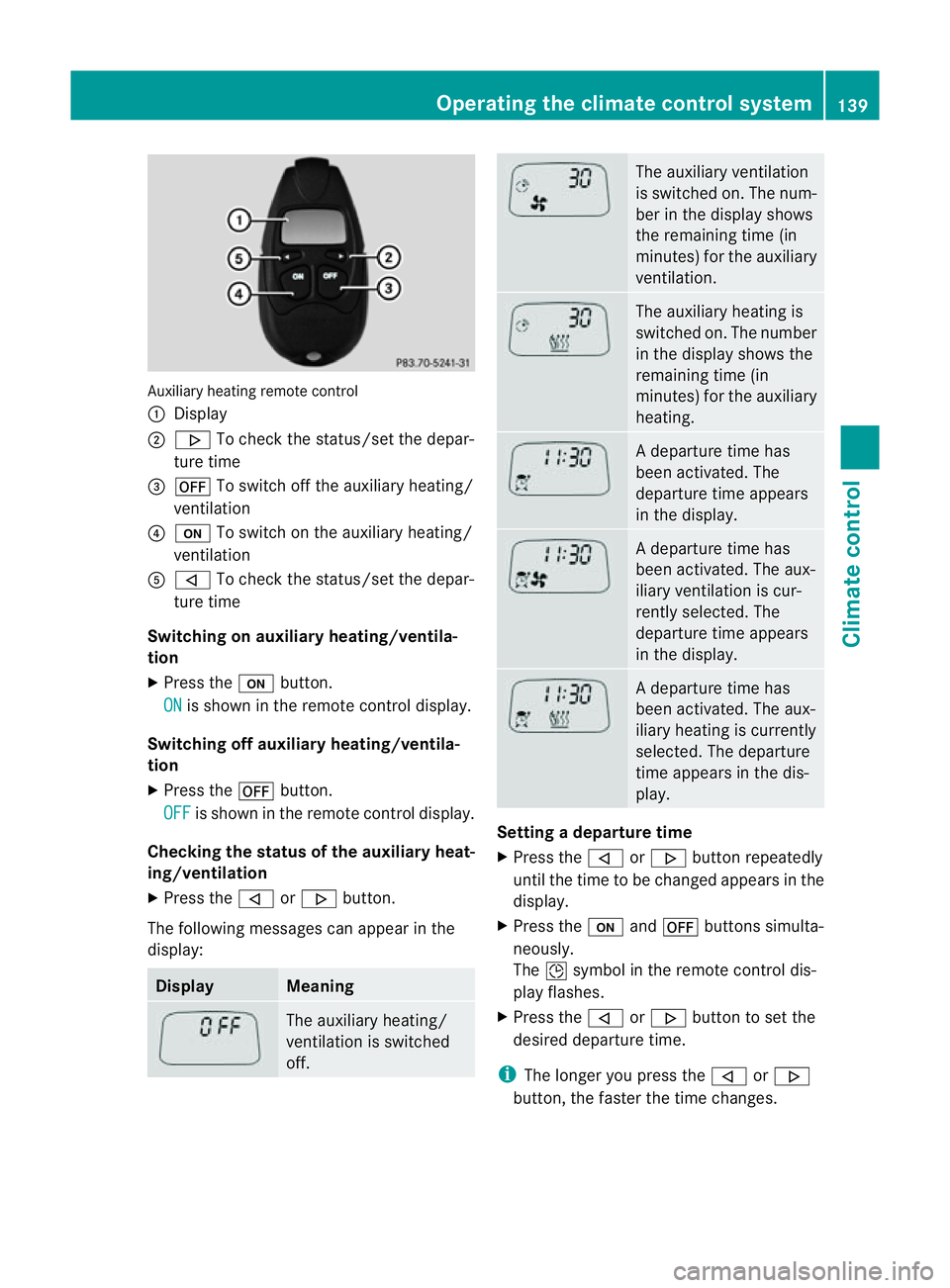
Auxiliary heating remote control
:
Display
; . To chec kthe status/set the depar-
ture time
= ^ To switch off the auxiliary heating/
ventilation
? u To switch on the auxiliary heating/
ventilation
A , To check the status/set the depar-
ture time
Switching on auxiliary heating/ventila-
tion
X Press the ubutton.
ON is shown in the remote control display.
Switching off auxiliary heating/ventila-
tion
X Press the ^button.
OFF is shown in the remote control display.
Checking the status of the auxiliary heat-
ing/ventilation
X Press the ,or. button.
The following messages can appearint he
display: Display Meaning
The auxiliary heating/
ventilation is switched
off. The auxiliary ventilation
is switched on. The num-
ber in the displays
hows
the remaining time (in
minutes) for the auxiliary
ventilation. The auxiliary heating is
switched on. The number
in the displays
hows the
remaining time (in
minutes) for the auxiliary
heating. Ad
eparture time has
been activated. The
departure time appears
in the display. Ad
eparture time has
been activated. The aux-
iliary ventilation is cur-
rently selected. The
departure time appears
in the display. Ad
eparture time has
been activated. The aux-
iliary heating is currently
selected. The departure
time appears in the dis-
play. Setting
adeparture time
X Press the ,or. button repeatedly
until the time to be changed appears in the
display.
X Press the uand^ button ssimulta-
neously.
The Îsymbol in the remot econtrol dis-
play flashes.
X Press the ,or. button to set the
desired departure time.
i The longer you press the ,or.
button ,the faster the time changes. Operating thec
limatecontrol system
139Climatecontrol Z
Page 143 of 353
X
Press the uand^ button ssimulta-
neously.
The new departure time is stored.
Activating aset departuret ime
X Press the ,or. button repeatedly
until the desired departure time appears in
the display.
X Press the ubutton.
The Ísymbol and the departure time
appear in the display.
Deactivating aset departuret ime
X Press the ,or. button.
The status of the auxiliary heating is shown
in the display.
X Press the .button.
The first departure time stored appears in
the display.
X Press the ^button.
The display message OFF appears in the
display.
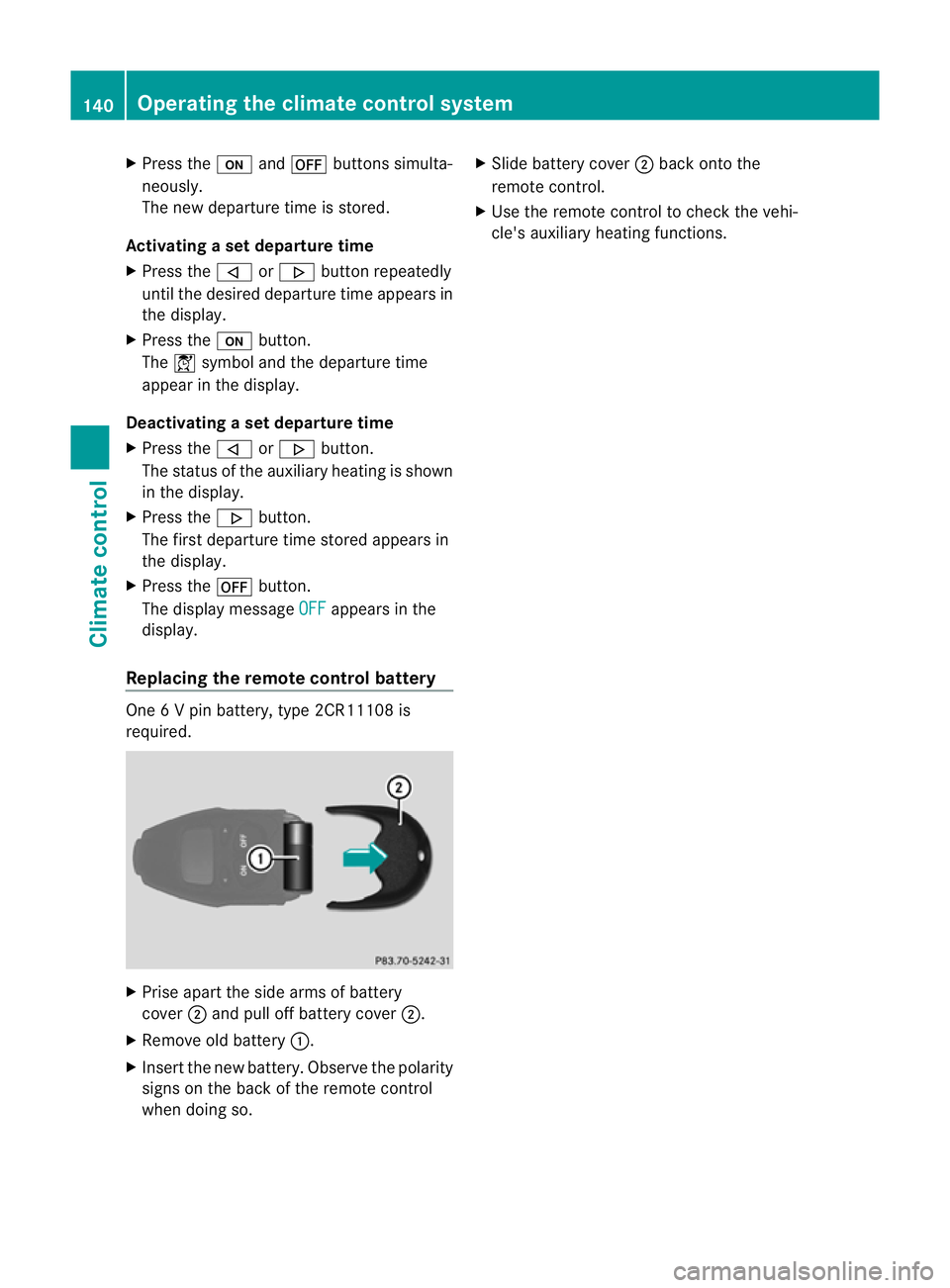
Replacing the remot econtrol battery One
6Vp in battery, type 2CR11108 is
required. X
Prise apart the side arms of battery
cover ;and pull off batter ycover ;.
X Remove old battery :.
X Inser tthe new battery. Observe the polarity
signs on the back of the remote control
when doing so. X
Slide battery cover ;back onto the
remote control.
X Use the remote control to check the vehi-
cle's auxiliary heating functions. 140
Operating the climate control systemClimatec
ontrol
Page 144 of 353
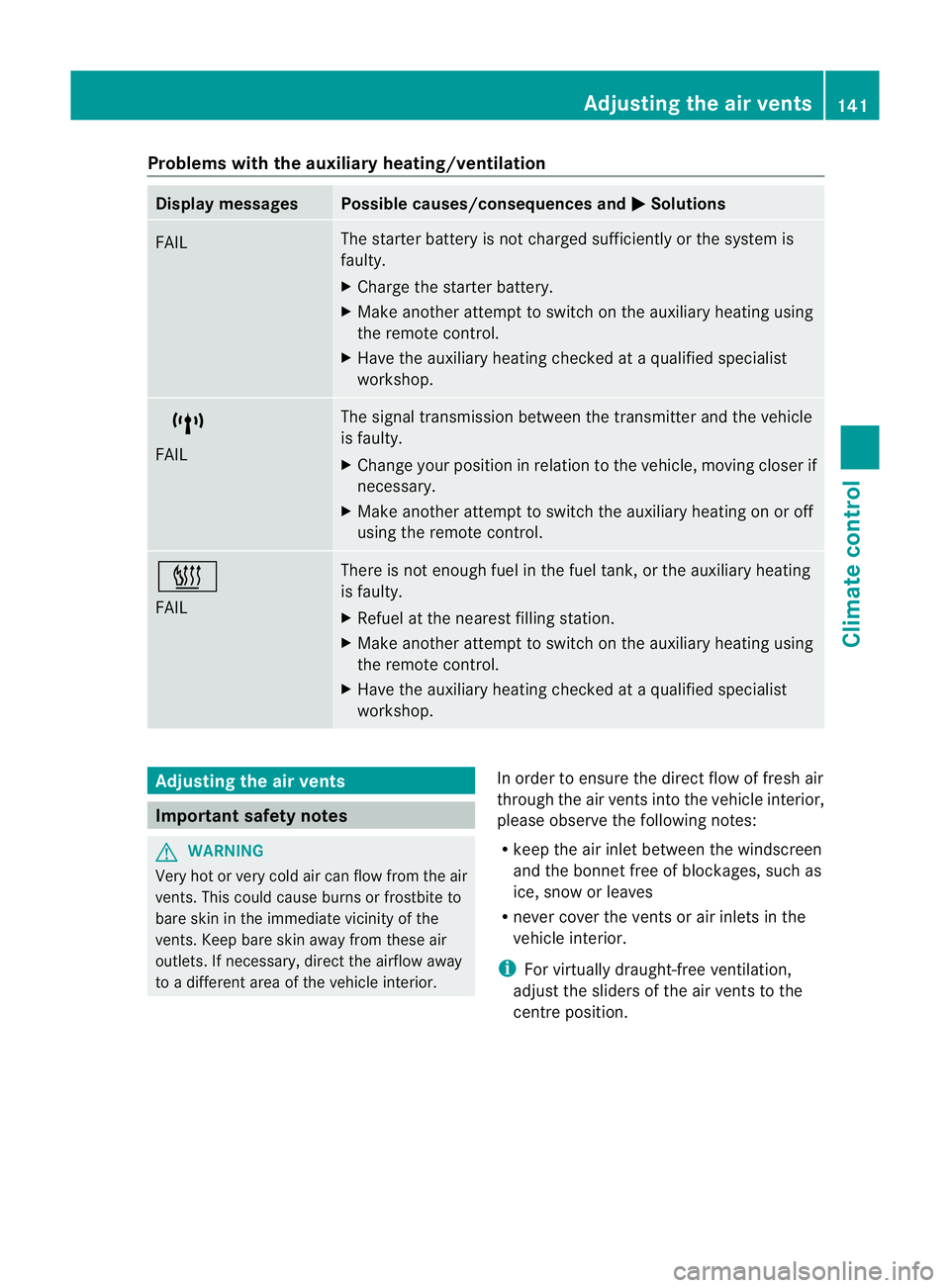
Problems with the auxiliary heating/ventilation
Display messages Possible causes/consequences and
M Solutions
FAIL The starter battery is not charged sufficiently or the system is
faulty.
X
Charge the starter battery.
X Make another attempt to switch on the auxiliary heating using
the remote control.
X Have the auxiliary heating checked at aqualified specialist
workshop. $
FAIL The signal transmission between the transmitter and the vehicle
is faulty.
X
Change your position in relation to the vehicle, moving closer if
necessary.
X Make another attempt to switch the auxiliary heating on or off
using the remote control. ©
FAIL There is not enough fuel in the fuel tank,ort
he auxiliary heating
is faulty.
X Refuel at the nearest filling station.
X Make another attempt to switch on the auxiliary heating using
the remote control.
X Have the auxiliary heating checked at aqualified specialist
workshop. Adjusting the air vents
Important safety notes
G
WARNING
Very hot or very cold air can flow from the air
vents. This could cause burns or frostbit eto
bare skin in the immediate vicinity of the
vents. Keep bare skin away from these air
outlets. If necessary, direct the airflow away
to ad ifferent area of the vehicle interior. In order to ensure the direct flow of fresh air
through the air ventsi
nto the vehicle interior,
please observe the following notes:
R keep the air inlet between the windscreen
and the bonnet free of blockages, such as
ice, snow or leaves
R never cover the ventsora ir inlets in the
vehicle interior.
i For virtually draught-free ventilation,
adjust the sliders of the air ventstot he
centre position. Adjusting the air vents
141Climate control Z
Page 163 of 353
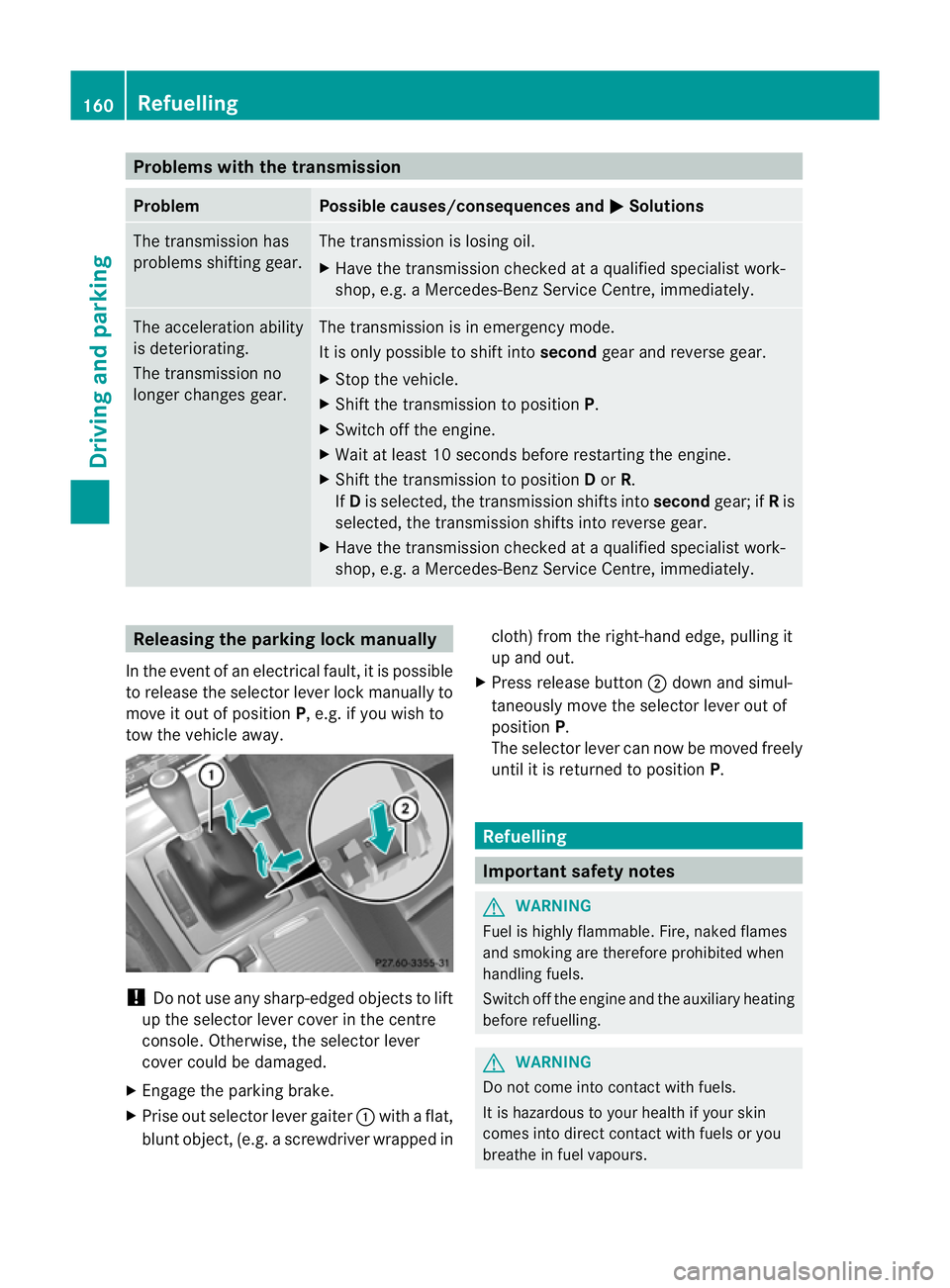
Problems with the transmission
Problem Possible causes/consequences and
M Solutions
The transmission has
problems shifting gear. The transmission is losing oil.
X
Have the transmission checked at aqualified specialist work-
shop, e.g. aMercedes-Benz Service Centre, immediately. The acceleration ability
is deteriorating.
The transmission no
longer changes gear. The transmission is in emergency mode.
It is only possible to shift into
secondgear and reverse gear.
X Stop the vehicle.
X Shift the transmission to position P.
X Switch off the engine.
X Wait at least 10 seconds before restarting the engine.
X Shift the transmission to position Dor R.
If D is selected, the transmission shifts into secondgear; ifRis
selected, the transmission shifts into reverse gear.
X Have the transmission checked at aqualified specialist work-
shop, e.g. aMercedes-Benz Service Centre, immediately. Releasing the parking lock manually
In the event of an electrical fault, it is possible
to release the selector lever lock manually to
move it out of position P,e.g. if you wish to
tow the vehicle away. !
Do not use any sharp-edged objectstol ift
up the selector lever cover in the centre
console. Otherwise, the selector lever
cover could be damaged.
X Engage the parking brake.
X Prise out selector lever gaiter :with aflat,
blunt object,( e.g.ascrewdriver wrappe dincloth
)from the right-hand edge, pulling it
up and out.
X Press release button ;dow nand simul-
taneousl ymovet he selecto rlever out of
position P.
The selector lever can now be moved freely
until it is returned to position P. Refuelling
Important safet
ynotes G
WARNING
Fuel is highly flammable. Fire, naked flames
and smoking are therefore prohibited when
handling fuels.
Switc hoff the engin eand the auxiliary heating
before refuelling. G
WARNING
Do not come into contact with fuels.
It is hazardous to your health if your skin
comes into direct contact with fuels or you
breathe in fuel vapours. 160
RefuellingDriving and parking