comand MERCEDES-BENZ E-CLASS CABRIOLET 2011 Owners Manual
[x] Cancel search | Manufacturer: MERCEDES-BENZ, Model Year: 2011, Model line: E-CLASS CABRIOLET, Model: MERCEDES-BENZ E-CLASS CABRIOLET 2011Pages: 353, PDF Size: 8.42 MB
Page 10 of 353
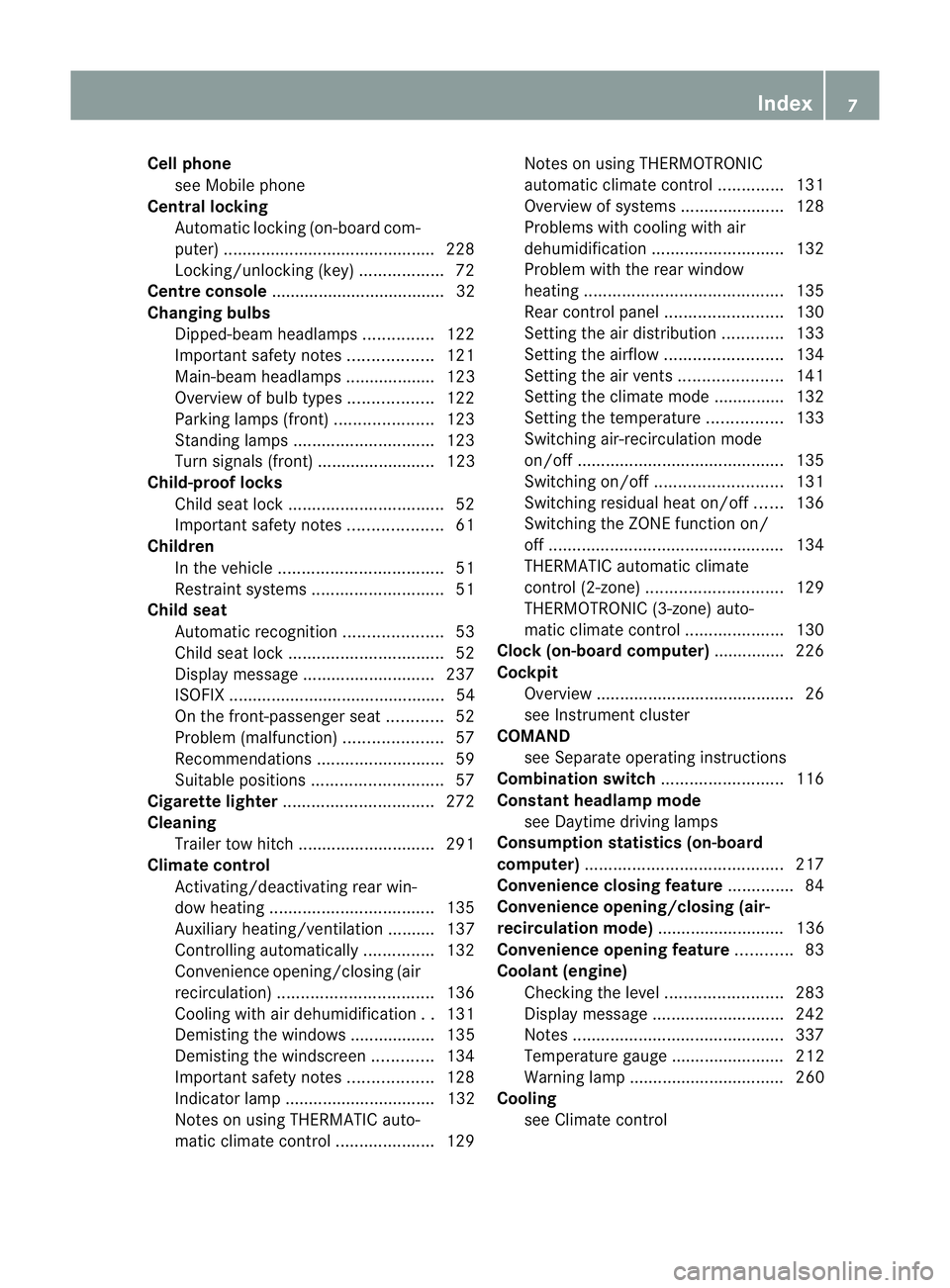
Cell phone
see Mobile phone
Centra llocking
Automatic lockin g(on-board com-
puter) ............................................ .228
Locking/unlocking (key ).................. 72
Centre console ..................................... 32
Changing bulbs Dipped-bea mheadlamps ............... 122
Important safety notes ..................121
Main-beam headlamps ................... 123
Overview of bul btypes .................. 122
Parking lamps (front) .....................123
Standing lamps .............................. 123
Turn signals (front) ......................... 123
Child-proof locks
Child sea tlock ................................. 52
Important safety notes ....................61
Children
In the vehicle ................................... 51
Restraint systems ............................ 51
Child seat
Automatic recognition .....................53
Child sea tlock ................................. 52
Display message ............................ 237
ISOFIX .............................................. 54
On the front-passenger sea t............ 52
Problem (malfunction) .....................57
Recommendations ...........................59
Suitable positions ............................ 57
Cigarette lighter ................................ 272
Cleaning Trailer tow hitch ............................. 291
Climate control
Activating/deactivating rear win-
dow heating ................................... 135
Auxiliary heating/ventilatio n.......... 137
Controlling automatically ...............132
Convenience opening/closing (air
recirculation) ................................. 136
Cooling with aird ehumidification..131
Demisting the windows .................. 135
Demisting the windscree n............. 134
Important safety notes ..................128
Indicator lamp ................................ 132
Notes on using THERMATI Cauto-
matic climate control .....................129Notes on using THERMOTRONIC
automatic climate control
..............131
Overview of systems ......................128
Problems with cooling with air
dehumidification ............................ 132
Problem with the rear window
heating .......................................... 135
Rea rcontrol panel ......................... 130
Setting the aird istribution.............133
Setting the airflow .........................134
Setting the airv ents...................... 141
Setting the climate mode .............. .132
Setting the temperature ................133
Switching air-recirculation mode
on/off ............................................ 135
Switching on/off ........................... 131
Switching residua lheato n/off ......136
Switching the ZONE function on/
off .................................................. 134
THERMATI Cautomatic climate
control (2-zone) ............................. 129
THERMOTRONIC (3-zone) auto-
matic climate control .....................130
Clock( on-board computer) ...............226
Cockpit Overview .......................................... 26
see Instrument cluster
COMAND
see Separate operating instructions
Combination switch ..........................116
Constant headlamp mode see Daytime driving lamps
Consumptio nstatistic s(on -board
computer) .......................................... 217
Convenience closing feature ..............84
Convenience opening/closing (air-
recirculation mode) ........................... 136
Convenience opening feature ............83
Coolan t(engine)
Checkin gthe level ......................... 283
Display message ............................ 242
Notes ............................................. 337
Temperature gauge ........................ 212
Warning lamp ................................. 260
Cooling
see Climate control Index
7
Page 34 of 353
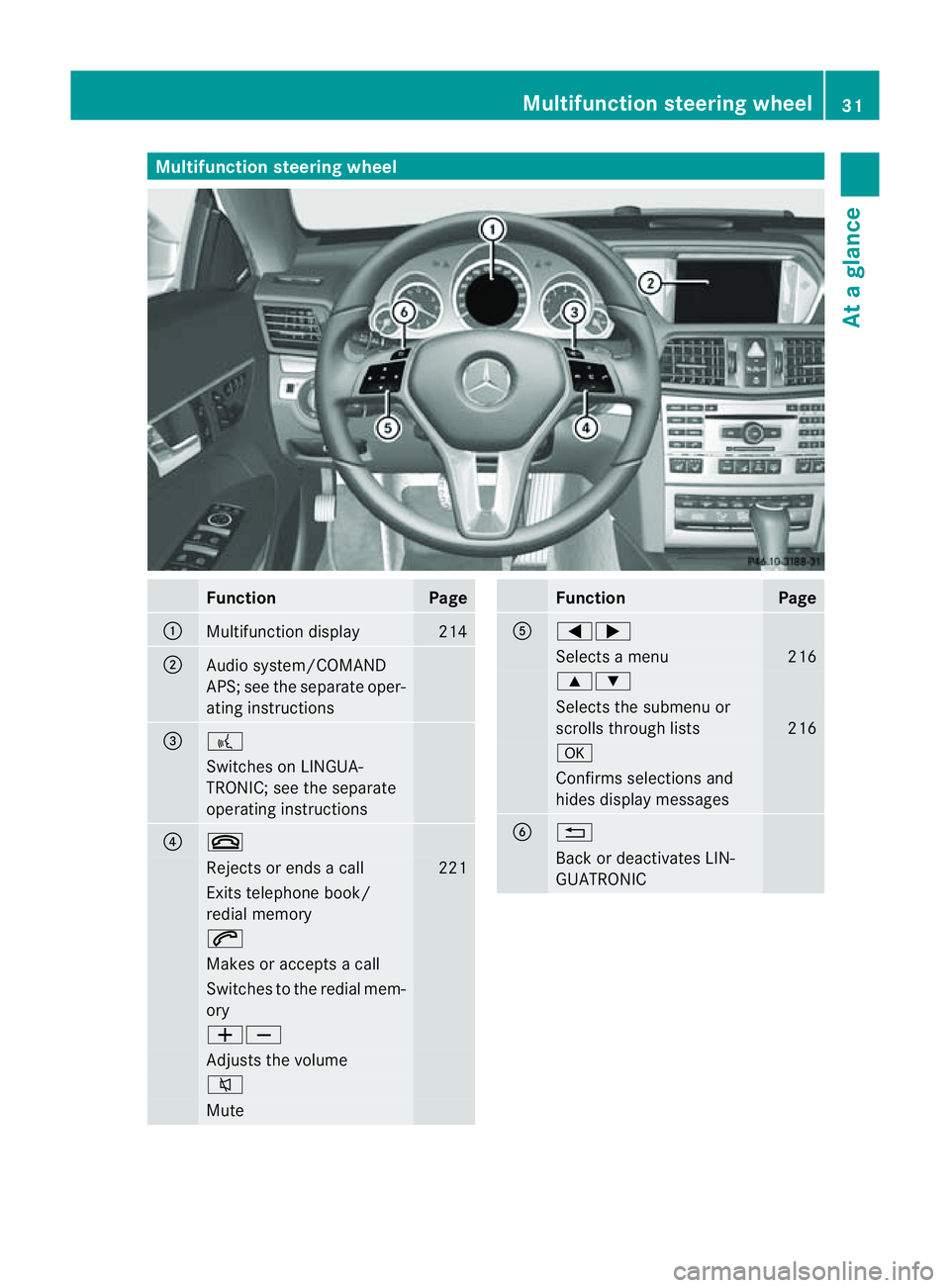
Multifunction steering wheel
Function Page
:
Multifunction display 214
;
Audi
osystem/COMAND
APS; see the separate oper-
ating instructions =
?
Switches on LINGUA-
TRONIC; see the separate
operating instructions
?
~
Rejects or ends
acall 221
Exits telephone book/
redial memory
6
Makes or accepts
acall Switches to the redial mem-
ory
WX
Adjusts the volume
8
Mute Function Page
A
=;
Selects
amenu 216
9:
Selects the submenu or
scroll
sthrough lists 216
a
Confirm
sselections and
hide sdisplay messages B
%
Back or deactivates LIN-
GUATRONICMultifunction steering wheel
31Atag lance
Page 35 of 353
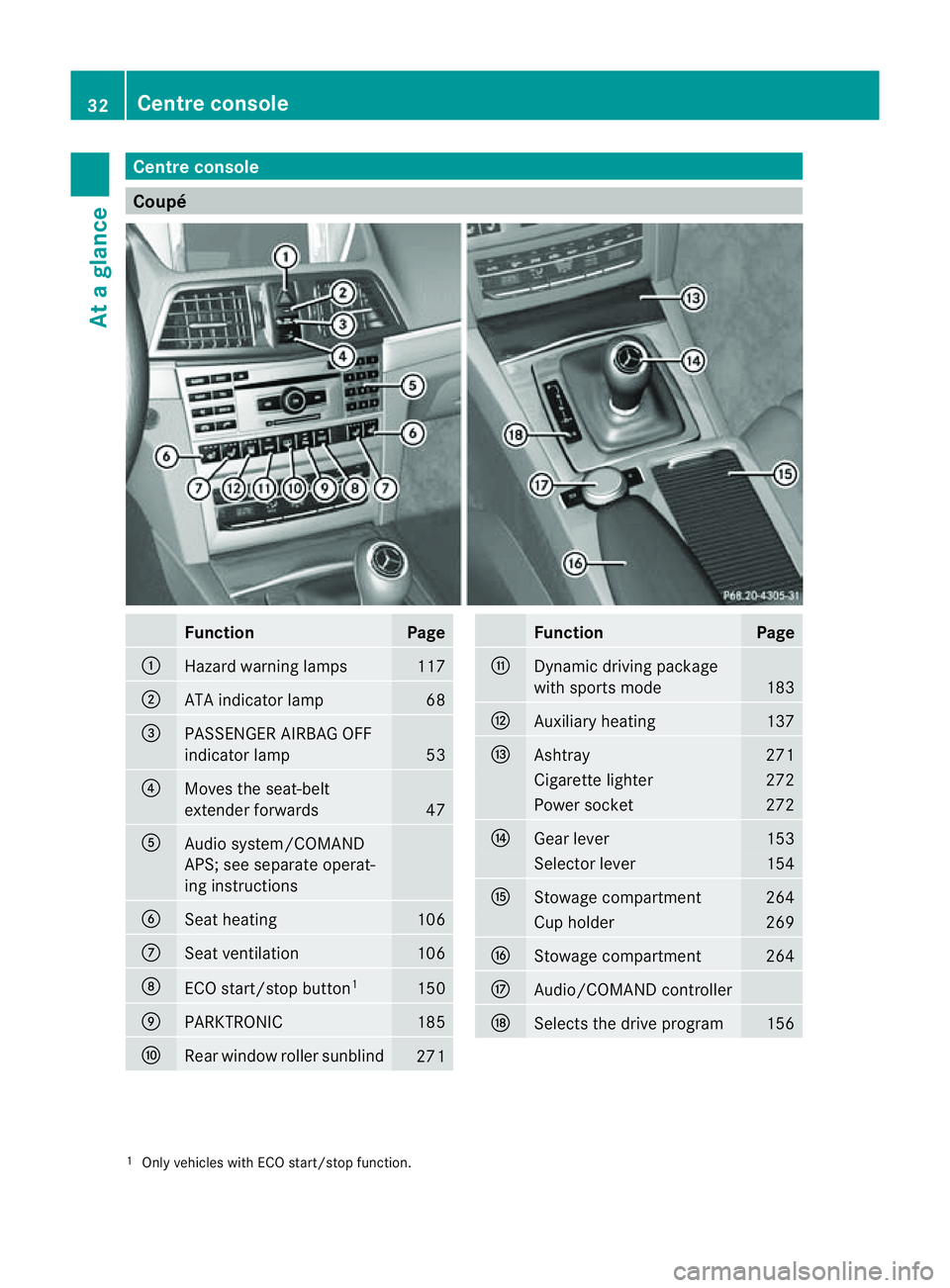
Centre console
Coupé
Function Page
:
Hazard warning lamps 117
;
AT
Ai ndicator lamp 68
=
PASSENGER AIRBA
GOFF
indicator lamp 53
?
Moves th
eseat-belt
extender forwards 47
A
Audi
osystem/COMAND
APS; see separate operat-
ing instructions B
Seat heating 106
C
Seat ventilation 106
D
ECO start/sto
pbutton 1 150
E
PARKTRONIC 185
F
Rear window roller sunblind
271 Function Page
G
Dynamic driving package
wit
hsports mode 183
H
Auxiliary heating 137
I
Ashtray 271
Cigarett
elighter 272
Power socket 272
J
Gear lever 153
Selector lever 154
K
Stowage compartment 264
Cup holder 269
L
Stowage compartment 264
M
Audio/COMAND controller
N
Select
sthe driv eprogram 156
1
Only vehicle swithE CO start/sto pfunction. 32
Centre consoleAt
ag lance
Page 36 of 353
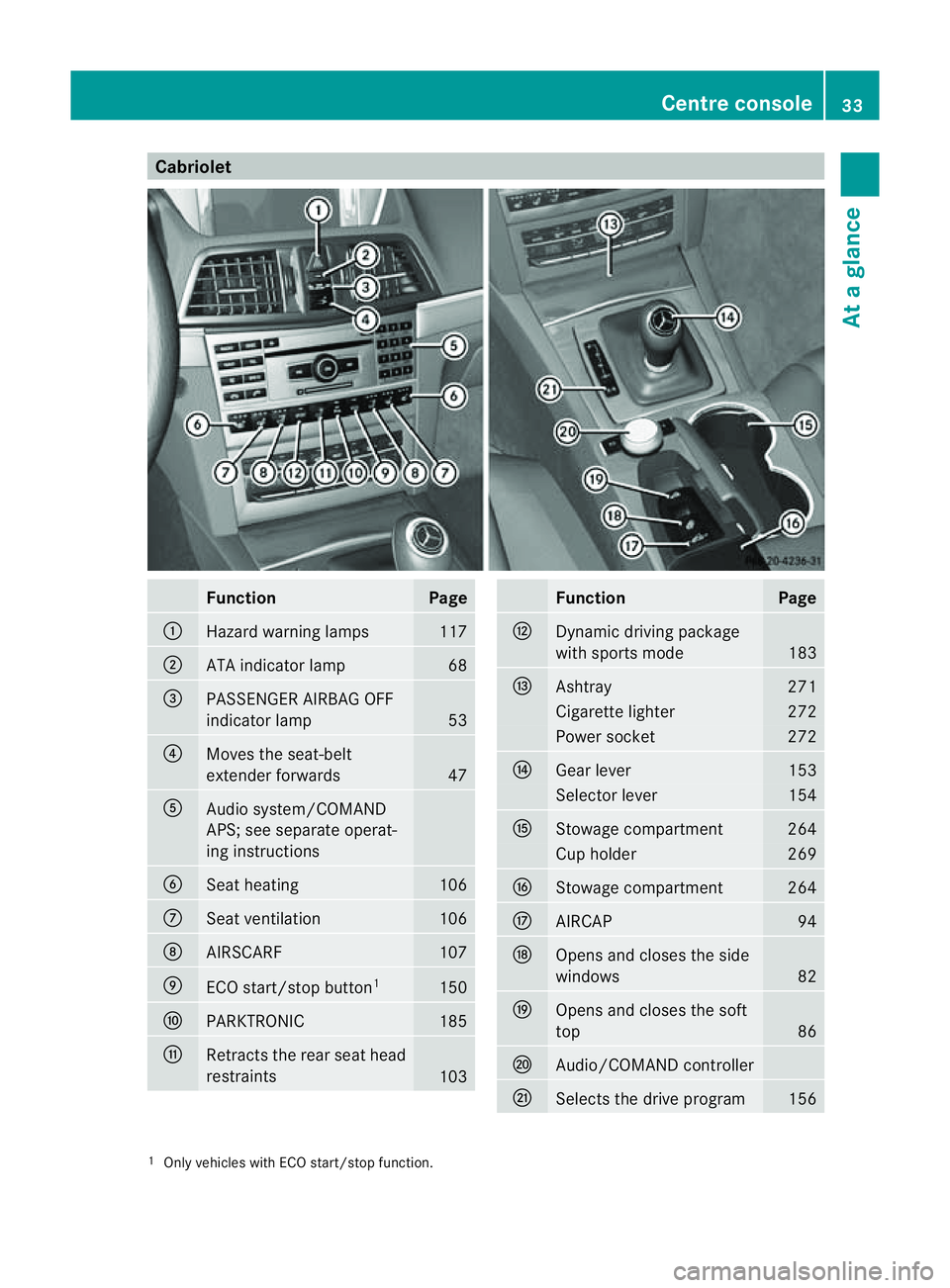
Cabriolet
Function Page
:
Hazard warning lamps 117
;
AT
Ai ndicator lamp 68
=
PASSENGER AIRBA
GOFF
indicator lamp 53
?
Moves th
eseat-belt
extender forwards 47
A
Audi
osystem/COMAND
APS; see separate operat-
ing instructions B
Seat heating 106
C
Seat ventilation 106
D
AIRSCARF 107
E
ECO start/sto
pbutton 1 150
F
PARKTRONIC 185
G
Retracts th
erear seat head
restraints 103 Function Page
H
Dynamic driving package
wit
hsports mode 183
I
Ashtray 271
Cigarett
elighter 272
Power socket 272
J
Gear lever 153
Selector lever 154
K
Stowage compartment 264
Cup holder 269
L
Stowage compartment 264
M
AIRCAP 94
N
Open
sand closes th eside
windows 82
O
Open
sand closes th esoft
top 86
P
Audio/COMAND controller
Q
Select
sthe driv eprogram 156
1
Only vehicle swithE CO start/sto pfunction. Centre console
33Atag lance
Page 66 of 353
With the help of the radar sensor system, BAS
PLUS can detect obstacles that are in the
path of your vehicle for an extended period of
time.
At speeds up to approximately 70 km/h, BAS
PLUS may also detect stationar yobstacles,
for example, stopped or parked vehicles.
Should yo uapproach an obstacl eand BAS
PLUS ha sdetected ariskofc ollision, BAS
PLUS calculates the braking force necessary
to avoid arear-en dcollision. Should you apply
the brakes forcefully,B AS PLUS can auto-
matically increase the braking force to alevel
suitable for the traffic conditions.
If BAS PLUS demands particularly high brak-
ing force, preventative passenger protection
measures (PRE-SAFE ®
)a re activated simul-
taneously.
X Keep the brake pedal depressed until the
emergenc ybraking situation is over.
ABS prevent sthe wheels from locking.
The brakes will work normally again if:
R you release the brake pedal.
R there is no longer any danger of arear-end
collision.
R no obstacle is detected in front of your
vehicle.
BAS PLUS is then deactivated.
The radar sensor system is switched off auto-
matically in the vicinit yofradio telescope
facilities (Y page 345).
Vehicles without COMAND and anavigation
system and vehicles for Australia: the radar
sensor system and on-board computer must
be switched off in the vicinit yofradio tele-
scope facilities (Y page 229).
For BAS PLUS to assist you when driving, the
radar sensor system must be switched on and
operational; see "Radar sensor system" in the
index. G
WARNING
BAS PLUS cannot alwaysc learly identify
object sand complex traffic situations. BAS
PLUS cannot intervene in these cases. There is
arisk of an accident .Always pay
careful attention to the traffic situation and be
ready to brake.
In particular, the detection of obstacles can
be impaired if there is:
R dirt on the sensors or anything else cover-
ing the sensors
R sno worh eavy rain
R interference by other radar sources
R the possibilit yofstrong radar reflections,
for example in multi-storey car parks
R an arrow vehicle travellin ginfront,e.g. a
motorbike
R av ehicle travellin ginfront on adifferent
line G
WARNING
BA SP LUS does not react:
R to people or animals
R to oncomin gvehicles
R to crossin gtraffic
R when cornering
As aresult ,BAS PLUS may not intervene in
critical situations .There is arisk of an acci-
dent. Always pay careful attention to the traf-
fic situation and be ready to brake.
Following damage to the front end of the vehi-
cle, have the configuration and operation of
the radar sensors checked at aqualified spe-
cialist workshop. This also applies to colli-
sions at slow speeds where there is no visible
damage to the front of the vehicle.
If BAS PLUS is not available due to amalfunc-
tion in the radar sensor system, the brake
system remains available with full brake
boosting effect and BAS. Adaptive brake lamps
i Adaptive brake lamps are only available in
certain countries.
If you brake sharply from aspeed of more
than 50 km/h or if braking is assisted by BAS Driving safety systems
63Safety Z
Page 70 of 353
passenger protection measures (PRE-SAFE
®
)
are activated (Y page 45). If the risk of colli-
sion remains and you do not brake, tak eeva-
sive action or accelerate significantly, the
vehicle may perfor mautomatic emergency
braking .Automatic emergenc ybraking is not
performed until immediately prio rtoanacci-
dent that can no longer be avoided. G
WARNING
Even if PRE-SAFE ®
Brake slows the vehicle
before an imminent rear-end collision, the
system cannot avert acollision without the
intervention of the driver. There is arisk of an
accident .Brake according to the situation or
take evasive action. Delayed intervention by
the driver can lead to an accident. G
WARNING
PRE-SAFE ®
Brake cannot alwaysc learly iden-
tify object sand complex traffic conditions.
In these cases, PRE-SAFE ®
Brake may:
R give an unnecessary warning and then
brake the vehicle
R not give awarning or intervene
There is arisk of an accident .Always pay par-
ticular attention to the traffic situation and be
ready to brake, especially if PRE-SAFE ®
Brake
warns you. Terminat ethe intervention in a
non-critical drivin gsituation.
In particular, the detection of obstacles can
be impaired if there is:
R dirt on the sensors or anything else cover-
ing the sensors
R sno worh eavy rain
R interference by other radar sources
R the possibilit yofstrong radar reflections,
for example in multi-storey car parks
R an arrow vehicle travellin ginfront,e.g. a
motorbike
R av ehicle travellin ginfront on adifferent
line G
WARNING
PRE-SAFE ®
Brak edoes not react:
R to people or animals
R to oncomin gvehicles
R to crossin gtraffic
R when cornering
As aresult ,PRE-SAFE ®
Brak emay not give
warnings or intervene in critical situations.
There is arisk of an accident .Always pay
careful attention to the traffic situation and be
ready to brake.
In order to maintain the appropriate distance
to the vehicle in front and thus prevent acol-
lision ,you must apply the brakes yourself.
X To activate/deactivate: activate or deac-
tivate PRE-SAFE ®
Brak eint he on-board
computer (Y page 223).
The Ä symbol appears in the multifunc-
tion display as long as the HOL Dfunction
is no tactivated (Y page 184).
On vehicles wit hparking guidance, the
Ä symbol is displayed when Pis
engaged or you are driving faste rthan
35 km/h.
The radar sensor system is switched off auto-
matically in the vicinity of radio telescope
facilities (Y page 345).
Vehicles without COMAND and anavigation
system and vehicles for Australia: the radar
sensor system and on-board computer must
be switched off in the vicinity of radio tele-
scope facilities (Y page 229).
For PRE-SAFE ®
Brake to assist you when driv-
ing, the radar sensor system must be
switched on (Y page 229) and be opera-
tional.
Following damage to the front end of the vehi-
cle, have the configuration and operation of
the radar sensors checked at aqualified spe-
cialist workshop. This also applies to colli-
sions at slow speeds where there is no visible
damage to the front of the vehicle. Driving safety systems
67Safety Z
Page 178 of 353
G
WARNING
If you depress the brake, DISTRONIC PLUS is
deactivated unless yourv ehicle is stationary.
DISTRONIC PLUS then no longer brakes your
vehicle. In such cases, control the distance
from vehicles travellin ginfrontwith the brake
alone. You could otherwise cause an accident
and thereby injure yourself and others. The
drive rremains fully responsible for the vehi-
cle's distanc efrom other vehicles, the speed
being driven and for braking in good time.
Changing lanes
If you wish to change to the passing lane (in
countries where traffic drives on the right, the
passing lane is the left-hand lane), DIS-
TRONIC PLUS supports you if:
R you are driving faster than 60 km/h.
R DISTRONIC PLUS is maintaining the dis-
tanc etoav ehicle in front.
R you switch on the appropriate turn signals.
R DISTRONIC PLUS does not detec tadanger
of collision.
If these condition sare met, your vehicle is
accelerated. Acceleration will be interrupted
if changing lanes takes too long or if the dis-
tanc ebetween your vehicle and the vehicle in
fron tbecomes too small. G
WARNING
DISTRONIC PLUS and Active Blind Spot Assist
are only an aid designed to assist driving.
They do not relieve you of the responsibility
of paying attention .The driver remains fully
responsible for the vehicle's distance from
other vehicles, the vehicle's speed and for
braking in good time. Always pay attention to
traffic conditions and your surroundings. Oth-
erwise, you may fail to recognise dangers in
time, cause an accident and injure yourself
and others.
Vehicles with COMAND APS/
Audio 50 APS
i The following function is not operational
in all countries. DISTRONIC PLUS uses additional information
from your navigation system so that it can
react appropriately to certain traffic situa-
tions. This is the case if, while following a
vehicle, DISTRONIC PLUS is active and you:
R
approach or drive through aroundabout
R approach aTjunction
R turn off at amotorway exit
Even if the vehicle in front leaves the detec-
tion range, DISTRONIC PLUS temporarily
maintains the current driving speed and does
not accelerate. This is based on the current
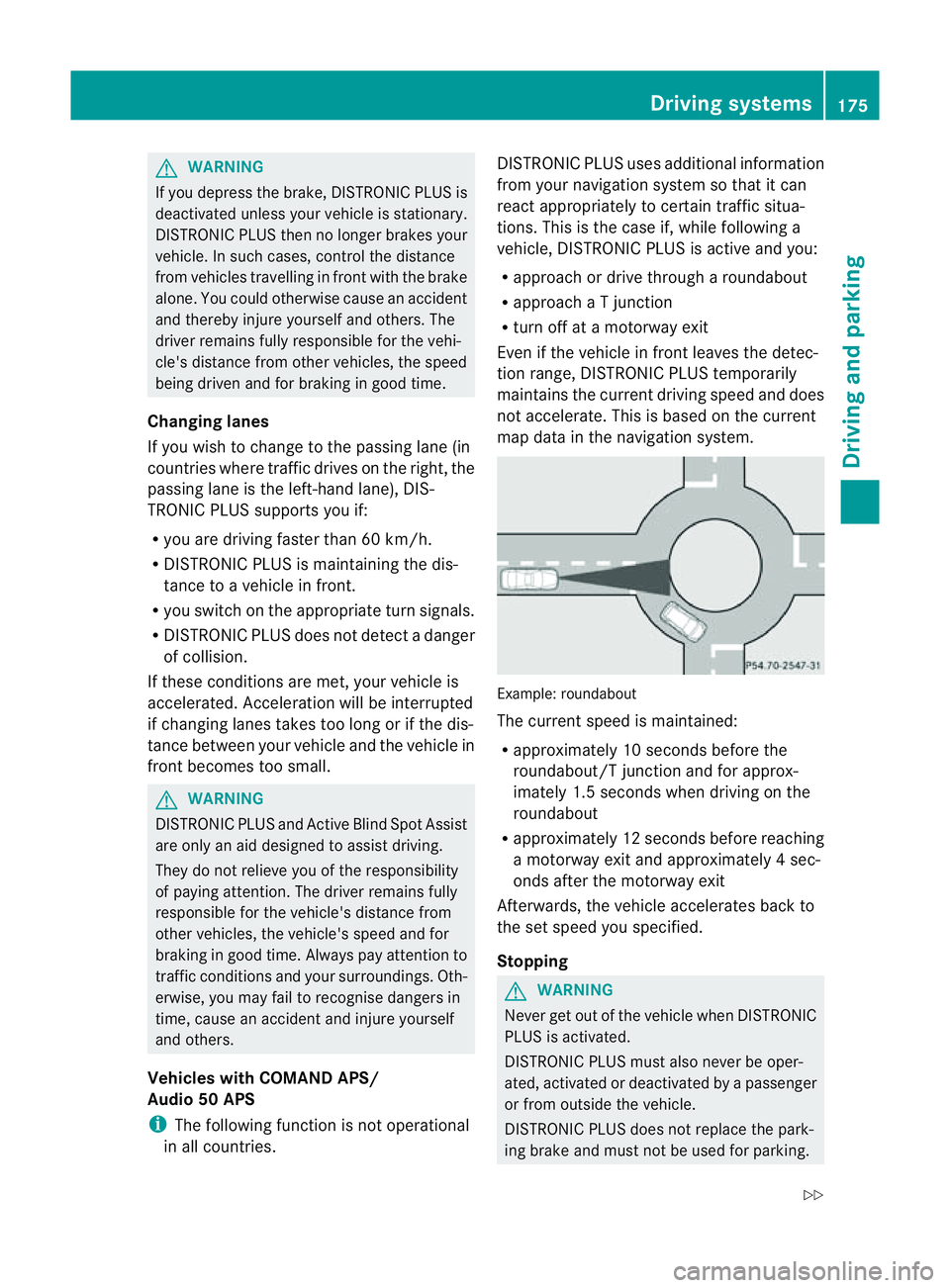
map data in the navigation system. Example: roundabout
The current speed is maintained:
R
approximately 10 seconds before the
roundabout/T junction and for approx-
imately 1.5 seconds when driving on the
roundabout
R approximately 12 seconds before reaching
am otorway exit and approximately 4sec-
onds after the motorway exit
Afterwards, the vehicle accelerates back to
the set speed you specified.
Stopping G
WARNING
Never get out of the vehicle when DISTRONIC
PLUS is activated.
DISTRONIC PLUS must also never be oper-
ated, activated or deactivated by apassenger
or from outside the vehicle.
DISTRONIC PLUS does not replace the park-
ing brake and must not be used for parking. Driving systems
175Driving and parking
Z
Page 195 of 353
X
To revers eintot he parking space: main-
tai nt he steering wheel angle and reverse
carefully.
X Stop as soon as you hear awarning tone,
at the latest when PARKTRONIC sounds the
continuous warning tone.
The Parking Guidance finished mes-
sage appears in the multifunction display
and awarning tone sounds. You may be
asked to steer in adifferen tdirection and
the nchange gear. In this case, further dis-
playsint he multifunction displayw ill direct
you to the final position.
X Manoeuvre if necessary.
X Always observe the warning messages dis-
played by PARKTRONIC (Y page 187).
Cancelling Parking Guidance X
Press the PARKTRONIC button on the
centre console (Y page 188).
Parking Guidance is cancelled immediately
and PARKTRONIC is deactivated.
Parking Guidance is cancelled automatically
if it is no longer possible to guide you into the
parking space, or if amalfunction occurs.
The parking space symbol goes out and a
warning tone sounds. The Parking Guid‐ance cancelled message appears in the
multifunction display.
Trailer towing For vehicles with
atrailer tow hitch, the min-
imum length for parking spaces is slightly
increased.
If you have attached atrailer to your vehicle,
you should not use Parking Guidance. When
the electrical connection is established
between your vehicle and the trailer, Parking
Guidance ceases to be available. PARK-
TRONIC is deactivated for the rear area. Reversing camera
Important safety notes The reversing camera is an optical parking
aid. It shows the area behind your vehicle in
the COMAND APS display.
G
WARNING
Make sure that no persons or animals are in
the manoeuvring range. Otherwise, they
could be injured.
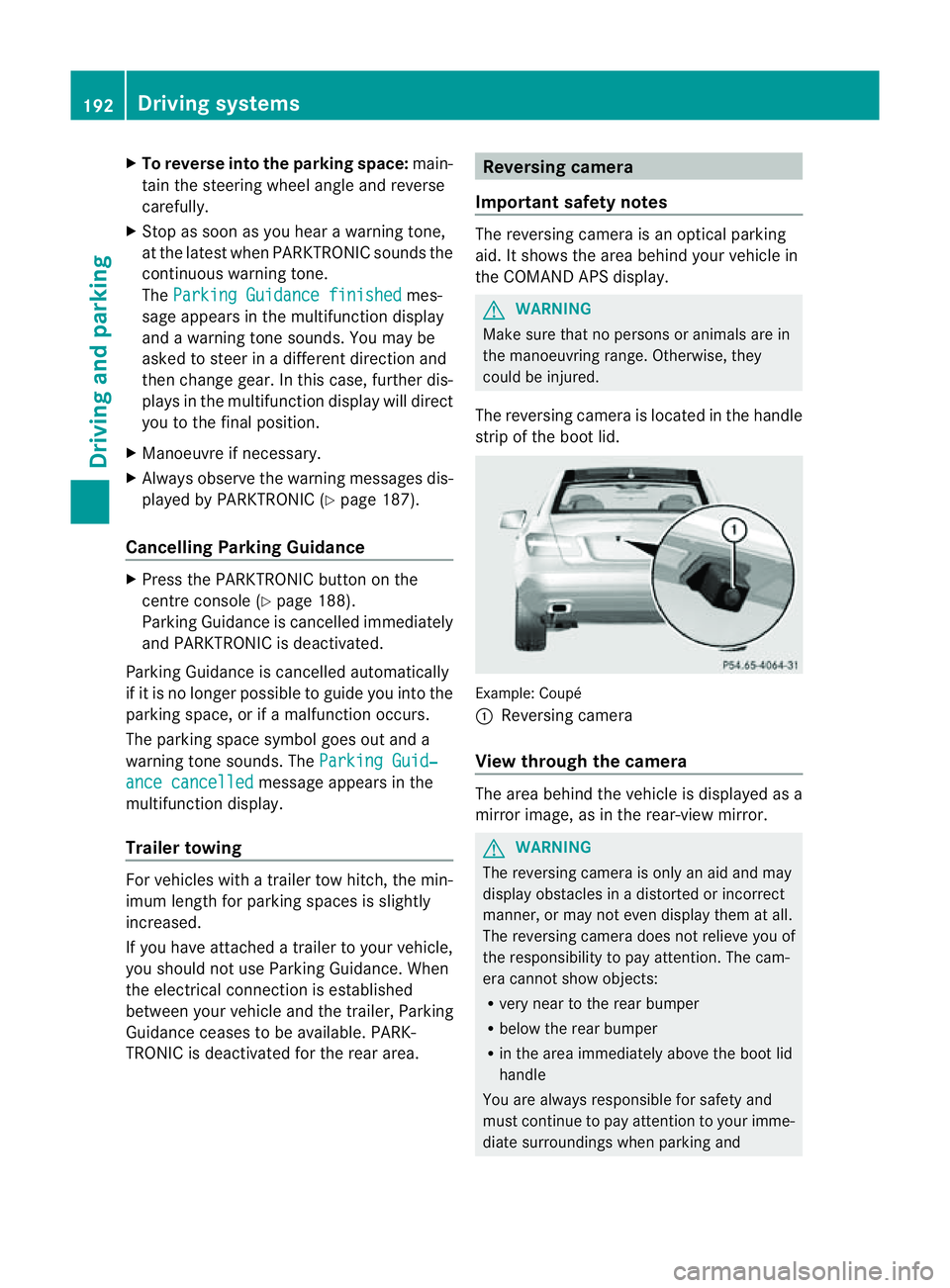
The reversing camera is located in the handle
strip of the boot lid. Example: Coupé
:
Reversing camera
View through the camera The area behind the vehicle is displayed as a
mirror image, as in the rear-view mirror.
G
WARNING
The reversing camera is only an aid and may
display obstacles in adistorted or incorrect
manner, or may not even display them at all.
The reversing camera does not relieve you of
the responsibility to pay attention. The cam-
era cannot show objects:
R very near to the rear bumper
R below the rear bumper
R in the area immediately above the boot lid
handle
You are always responsible for safety and
must continue to pay attention to your imme-
diate surroundings when parking and 192
Driving systemsDriving and parking
Page 196 of 353
manoeuvring. This appliestot
he areas
behind, in front of and next to the vehicle. You
could otherwise endange ryourself and oth-
ers. G
WARNING
Under the following circumstances, the
reversing camera will not function, or will
function in alimited manner:
R if the boot lid is open
R in heavy rain, snow or fog
R at night or in very dark places
R if the camera is exposed to very bright light
R if the area is lit by fluorescent light (the dis-
play may flicker)
R if there is asudden change in temperature,
e.g. when driving into aheated garage in
winter
R if the camera lens is dirty or obstructed
R if the rear of your vehicle is damaged. In this
event,h ave the camera position and setting
checked at aqualified specialist workshop.
Mercedes-Benz recommends that you use
aM ercedes-Benz Service Centre for this
purpose.
Do not use the reversing camera in these
types of situation. You could otherwise injure
others or damage object sand your vehicle
while you are parking.
Activating the reversing camera X
Make sure that the key is in position 2in
the ignition lock.
X Make sure that the "Reversing camera"
function is selected in COMAND APS (see
the separate operating instructions for
COMAND APS).
X Engage reverse gear.
The area behind the vehicle is shown in the
COMAND APS display. Guide lines in the COMAND APS display Depending on the date of manufacture of the
vehicle, the guide lines are shown in the
COMAND APS display.
G
WARNING
Using the reversing camera can be dangerous
if you are colour blind or if your ability to dis-
tinguish colours is impaired.
Only use the reversing camera if you can see
and distinguish between all the coloured
guide lines that are displayed by the reversing
camera in the COMAND APS display. G
WARNING
Please note that object snot at ground level
may appear to be further away than they
actually are. These include:
R the bumper of avehicle that is parked
behind your vehicle
R at railer drawbar
R the ball coupling of atrailer tow hitch
R the tail-end of alorry
R slanted posts
The lines are only guides, not accurate meas-
urements of the distance to an obstacle.
Therefore, you should never pass the red line
when approaching an obstacle. You could oth-
erwise cause an accident and injure yourself
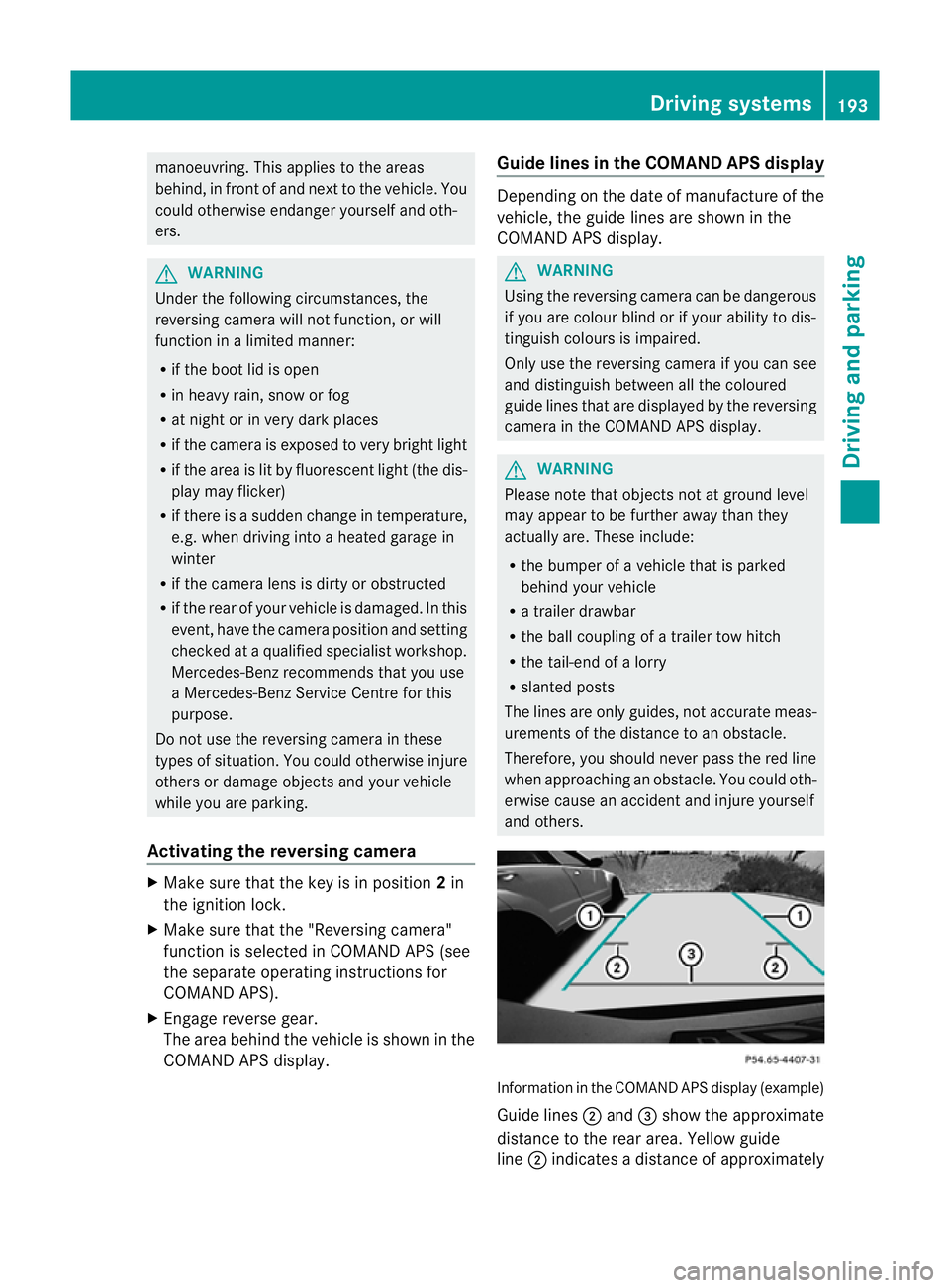
and others. Information in the COMAND APS display (example)
Guide lines
;and =show the approximate
distance to the rear area. Yellow guide
line ;indicates adistance of approximately Driving systems
193Driving and parking Z
Page 197 of 353
1.0
mand red guid eline =indicates adis-
tance of approximatel y0.25 m. The distances
onl yapply to objects tha tare at ground level.
Blue guide lines :depict the width required
for the vehicle. They are usedtoa lign the
vehicl ewith the edge of the carriageway, e.g.
the kerb. ATTENTION ASSIST
Important safety notes ATTENTION ASSIST help
syou during long,
monotonous journey ssuch as on motorways
and trunk roads. It is active in the 80 km/h
to 180 km/h range.
If ATTENTION ASSIST detects typical indica-
tors of fatigu eorincreasing lapses in con-
centration on the part of the driver, it sug-
gests taking abreak. G
WARNING
ATTENTION ASSIST is only an aid and may
detect yourt iredness or lapses in concentra-
tion too late or not at all. It is not asubstitute
for aw ell reste dand attentiv edriver.
Fatigue may caus eyou to recognise hazard-
ous situations to olate ,misjudge asituation
or reac tslower. For this reason ,makes ure
you fee lreste dbefore you begin driving and
durin gyour journey. Always tak ebreaks in
good tim eand regularly, especiall yduring
lon gjou rneys. Otherwise, you may fail to rec-
ognise danger sintime, caus eanacciden tand
injure yoursel fand others.
ATTENTIO NASSIST assesses your level of
fatigu eorlapsesinc oncentration by taking
the following criteria into account:
R your persona ldriving style ,e.g. steering
characteristics
R driving conditions ,e.g. time ,driving time The functionality of ATTENTIO
NASSIST is
restricte dand warning smay be delaye dor
not occu ratall:
R if the roa dcondition is poor, e.g. if the sur-
face is uneven or if there are potholes
R if there is astrong sid ewind
R if you have adopted asport ydrivin gstyle
with high cornering speeds or high rates of
acceleration
R if you are predominantly drivin gslower
than 80 km/h or faster than 180 km/h
R if you are currently using COMAND APS or
making atelephon ecall with it
R if the tim ehas been set incorrectly
R in active drivin gsituations, such as when
you change lanes or change your speed
Warning and display messages in the
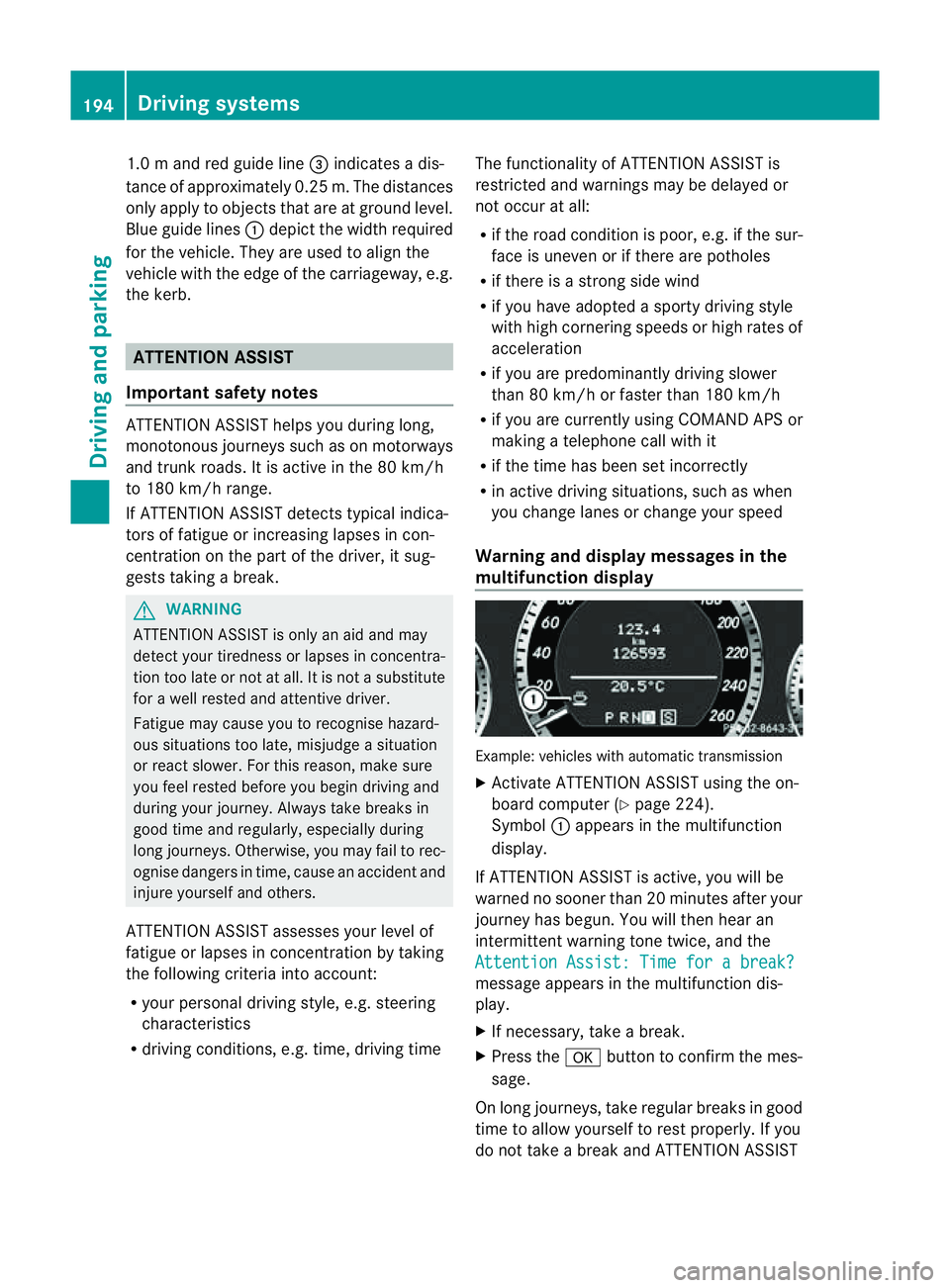
multifunction display Example: vehicles with automatic transmission
X
Activate ATTENTION ASSIS Tusing the on-
board computer (Y page 224).
Symbol :appears in the multifunction
display.
If ATTENTION ASSIS Tisactive, you will be
warne dnosooner than 20 minutes after your
journey has begun. You will the nhear an
intermittentw arning tonetwice, and the
Attention Assist :Timef orab reak? message appears in th
emultifunction dis-
play.
X If necessary, tak eabreak.
X Pres sthe a button to confir mthe mes-
sage.
On long journeys, take regula rbreaks in good
time to allow yourself to rest properly. If you
do not take abreak and ATTENTION ASSIST 194
Driving systemsDriving and parking