tow MERCEDES-BENZ E-CLASS CABRIOLET 2012 Owner's Manual
[x] Cancel search | Manufacturer: MERCEDES-BENZ, Model Year: 2012, Model line: E-CLASS CABRIOLET, Model: MERCEDES-BENZ E-CLASS CABRIOLET 2012Pages: 389, PDF Size: 9.32 MB
Page 87 of 389
If the vehicle has been locked using the lock-
ing button for the central locking, or has been
locked automatically, and
adoor is opened
from the inside:
R the vehicle will be fully unlocked if it had
previously been fully unlocked.
R only the door which has been opened from
the inside is unlocked if only the driver's
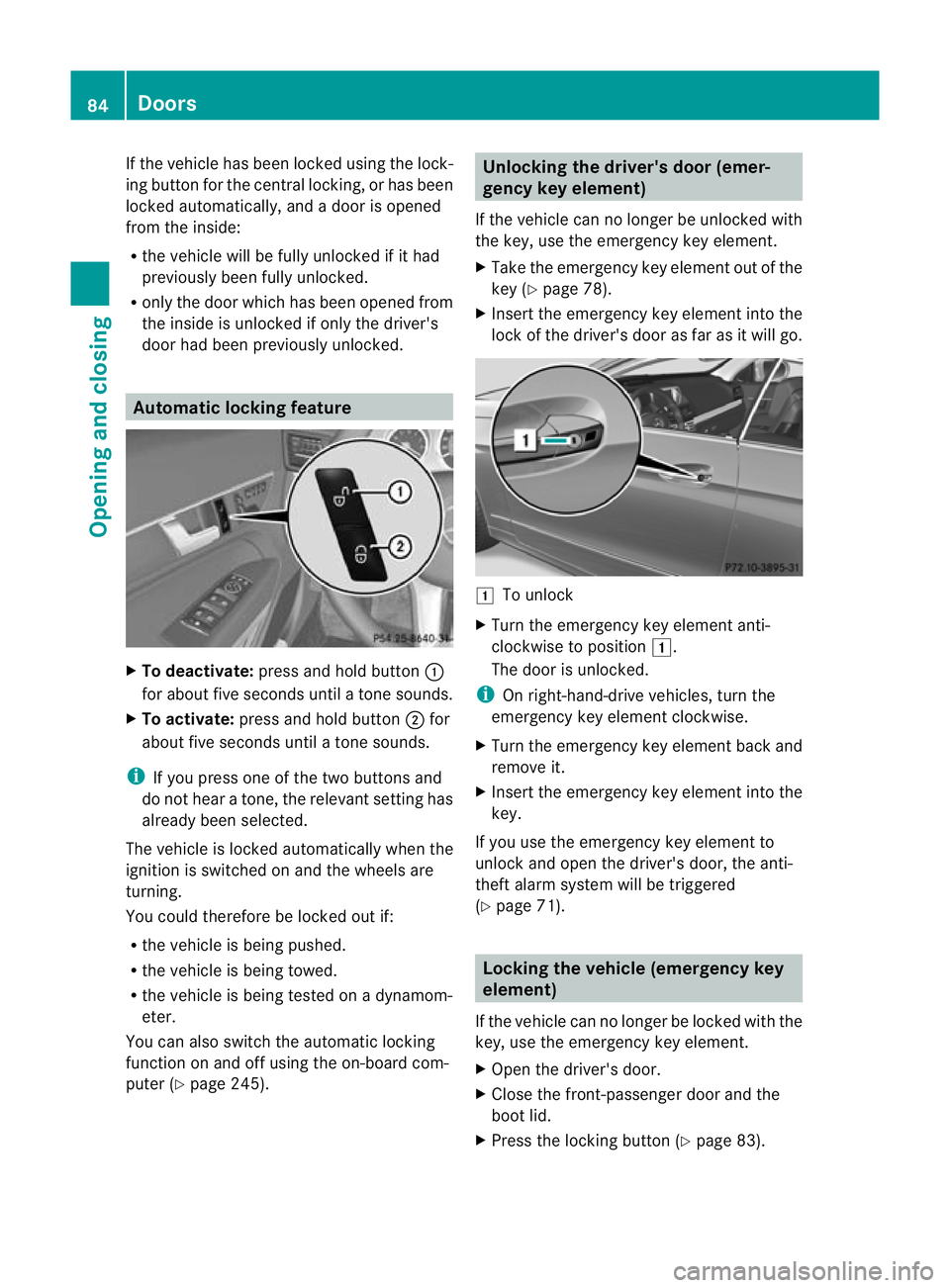
door had been previously unlocked. Automatic locking feature
X
To deactivate: press and hold button :
for about five seconds until a tone sounds.
X To activate: press and hold button ;for
about five seconds until a tone sounds.
i If you press one of the two buttons and
do not hear a tone, the relevant setting has
already been selected.
The vehicle is locked automatically when the
ignition is switched on and the wheels are
turning.
You could therefore be locked out if:
R the vehicle is being pushed.
R the vehicle is being towed.
R the vehicle is being tested on a dynamom-
eter.
You can also switch the automatic locking
function on and off using the on-board com-
puter (Y page 245). Unlocking the driver's door (emer-
gency key element)
If the vehicle can no longer be unlocked with
the key, use the emergency key element.
X Take the emergency key element out of the
key (Y page 78).
X Insert the emergency key element into the
lock of the driver's door as far as it will go. 1
To unlock
X Turn the emergency key element anti-
clockwise to position 1.
The door is unlocked.
i On right-hand-drive vehicles, turn the
emergency key element clockwise.
X Turn the emergency key element back and
remove it.
X Insert the emergency key element into the
key.
If you use the emergenc ykey element to
unlock and open the driver's door, the anti-
thef talarm system will be triggered
(Y page 71). Locking the vehicle (emergency key
element)
If the vehicle can no longer be locked with the
key, use the emergency key element.
X Open the driver's door.
X Close the front-passenger door and the
boot lid.
X Press the locking button (Y page 83).84
DoorsOpening and closing
Page 96 of 389
R
no objects are on the soft-top compart-
ment cover
R the fabric is not dirty, wet or frozen.
You could otherwise damage the sof ttop,
boot and other parts of the vehicle.
i Make sure that the soft top is dry and
clean before closing it. Otherwise, water or
dirt could enter the vehicle interior or boot.
You can open or close the soft top:
R when the vehicle is stationary or
R when driving up to a speed of 40 km/h
If there is a strong head wind, it may not be
possible to close the soft top fully. In this
case, reduce speed or stop in order to close
the soft top fully.
For safety reasons, Mercedes-Benz recom-
mends that you only open or close the soft
top when the vehicle is stationary. Opening and closing with the soft-top
switch
Important safety notes G
WARNING
Make sure nobody can be trapped or injured
by moving parts, such as the soft-top linkage
or soft-top compartment cover, when opening
or closing the soft top.
Release the soft-top switch in the event of
danger. The soft-top mechanism stops imme-
diately. G
WARNING
If the vehicle speed exceeds 40km/h, the soft
top stops the opening or closing movement
and remains in that position. This could impair
your rear view. At high speeds the soft top
may be damaged.
Reduce your speed to below 40km/h or stop
the vehicle in accordanc ewith the traffic con-
ditions. Press the soft-top switch again in
order to open or close the soft top fully. Opening and closing X
Make sure that the boot separator is closed
(Y page 99).
X Close the boot lid.
X Turn the key to position 2in the ignition
lock.
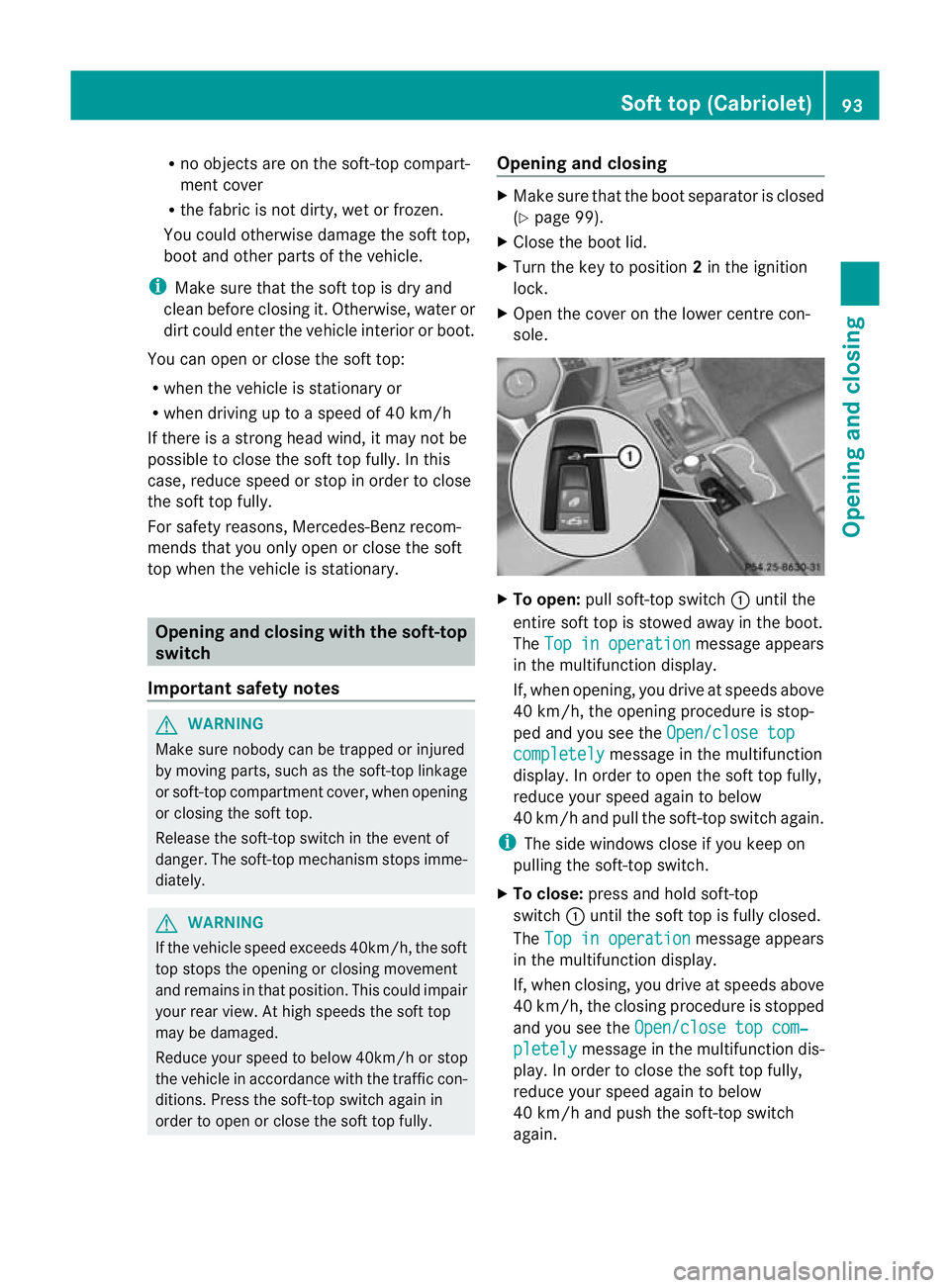
X Open the cover on the lower centre con-
sole. X
To open: pull soft-top switch :until the
entire soft top is stowed away in the boot.
The Top in operation message appears
in the multifunction display.
If, when opening, you drive at speeds above
40 km/h, the opening procedure is stop-
ped and you see the Open/close top completely message in the multifunction
display. In order to open the soft top fully,
reduce your speed again to below
40 km/h and pull the soft-top switch again.
i The side windows close if you keep on
pulling the soft-top switch.
X To close: press and hold soft-top
switch :until the soft top is fully closed.
The Top in operation message appears
in the multifunction display.
If, when closing, you drive at speeds above
40 km/h, the closing procedure is stopped
and you see the Open/close top com‐ pletely message in the multifunction dis-
play. In order to close the soft top fully,
reduce your speed again to below
40 km/h and push the soft-top switch
again. Soft top (Cabriolet)
93Opening and closing Z
Page 129 of 389
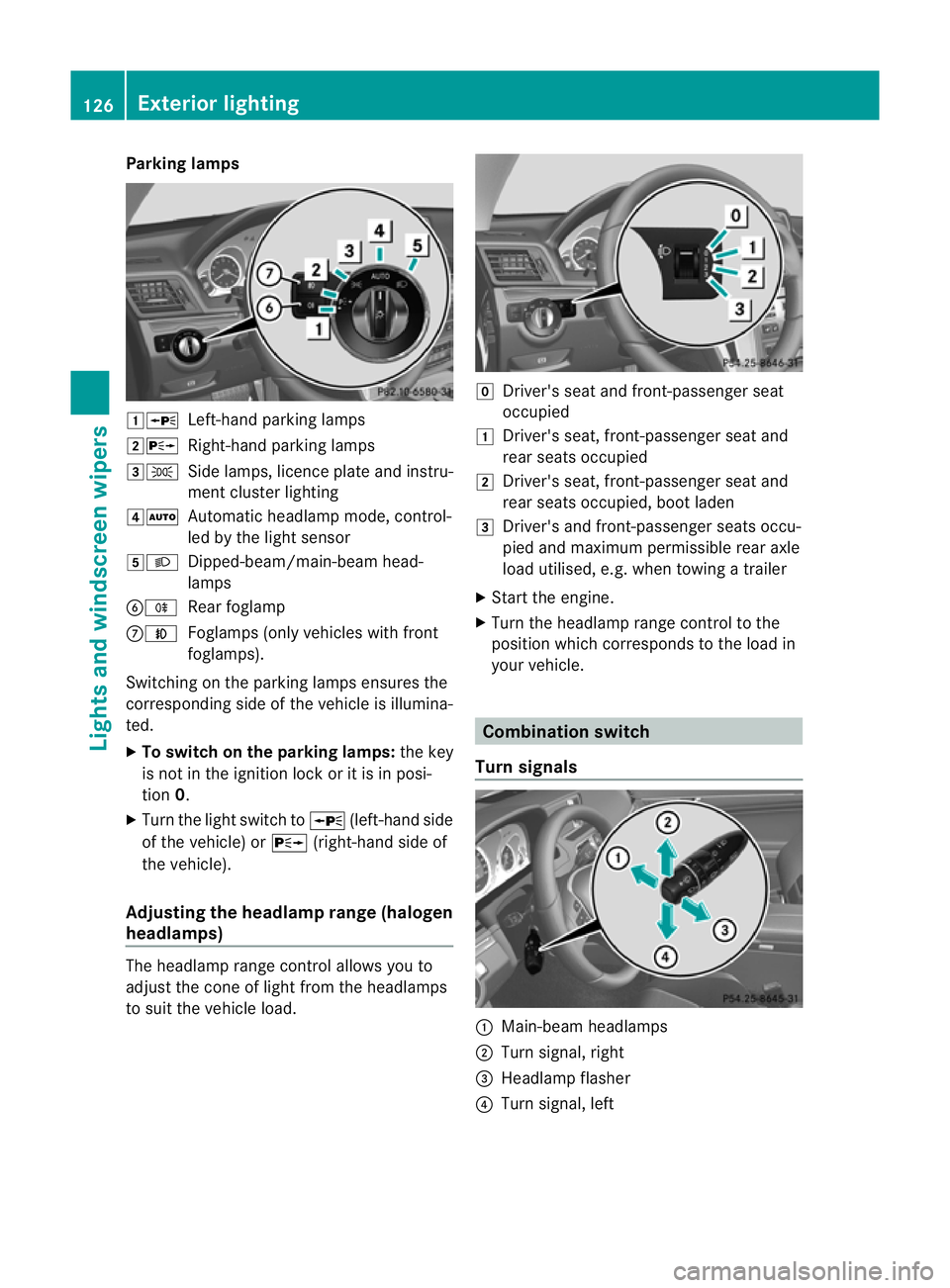
Parking lamps
1W
Left-hand parking lamps
2X Right-hand parking lamps
3T Side lamps, licence plate and instru-
ment cluster lighting
4Ã Automatic headlamp mode, control-
led by the light sensor
5L Dipped-beam/main-beam head-
lamps
BR Rear foglamp
CN Foglamps (only vehicles with front
foglamps).
Switching on the parking lamps ensures the
corresponding side of the vehicle is illumina-
ted.
X To switch on the parking lamps: the key
is not in the ignition lock or it is in posi-
tion 0.
X Turn the light switch to W(left-hand side
of the vehicle) or X(right-hand side of
the vehicle).
Adjusting the headlampr ange (halogen
headlamps) The headlamp range control allows you to
adjust the cone of light from the headlamps
to sui tthe vehicle load. g
Driver's seat and front-passenger seat
occupied
1 Driver's seat, front-passenger seat and
rear seats occupied
2 Driver's seat, front-passenger seat and
rear seats occupied, boot laden
3 Driver's and front-passenger seats occu-
pied and maximum permissible rear axle
load utilised, e.g. when towing a trailer
X Start the engine.
X Turn the headlamp range control to the
position which corresponds to the load in
your vehicle. Combination switch
Turn signals :
Main-beam headlamps
; Turn signal, right
= Headlamp flasher
? Turn signal, left 126
Exterior lightingLights and windscreen wipers
Page 160 of 389
Useful information
............................158
Running-in notes ............................... 158
Driving ............................................... 158
Manual transmission ........................166
Automatic transmission ...................167
Refuelling ........................................... 173
Parking ............................................... 177
Driving tips ........................................ 179
Driving systems ................................ 182
Towing atrailer ................................. 220 157Driving and parking
Page 161 of 389
Useful information
i This Owner's Manual describes all mod-
els, series and optional equipment for your
vehicle that were available at the time of
going to press. National variations are pos-
sible. Note that your vehicle may not be
equipped with all of the functions descri-
bed. This is also the case for systems and
functions relevant to safety.
i Read the information on qualified special-
ist workshops: (Y page 23). Running-in notes
Important safety notes
New and replaced brake pads and discs only
reach their optimum braking effec tafter sev-
eral hundred kilometres of driving. Compen-
sate for this by applying greater force to the
brake pedal. The first 1,500 km
If you treat the engine with sufficient care
from the very start, you will be rewarded with
excellent performance for the remainder of
the engine's life.
R Drive at varying vehicle speeds and engine
speeds for the first 1,500 km.
R Avoid overstraining the vehicle during this
period, e.g. driving at full throttle.
R Change gea ringood time, before the rev
counter needle is Ôof the way to the red
area of the rev counter.
R Do not shift down a gear manually in order
to brake.
Vehicles with automatic transmission:
R Try to avoid depressing the accelerator
pedal beyond the point of resistance (kick-
down).
R The shift ranges 3,2or 1should only be
engaged when driving slowly, e.g. when
driving in mountainous terrain. After 1500 km, you may gradually accelerate
the vehicle to full road and engine speeds.
i
You should also observe these notes on
running in if the engine or parts of the drive
train on your vehicle have been replaced. Driving
Important safety notes
G
WARNING
Objects in the driver's footwell can restric tthe
pedal travel or obstruct adepressed pedal.
The operating and road safety of the vehicle
is jeopardised. There is a risk of an accident.
Make sure that all objects in the vehicle are
stowed correctly, and that they cannot enter
the driver's footwell. Fit the floormats
securely and as specified in order to ensure
sufficien tclearance for the pedals. Do not use
loose floormats. G
WARNING
Unsuitable footwear can hinde rcorrect usage
of the pedals, e.g.:
R shoes with thick soles
R shoes with high heels
R slippers
There is a risk of an accident.
Wear suitable footwear to ensure correct
usage of the pedals. G
WARNING
If you switch off the ignition while driving,
safety-relevant functions are only available
with limitations, or not at all. This could affect,
for example, the power steering and the brake
boosting effect .You will require considerably
more effort to steer and brake. There is a risk
of an accident.
Do not switch off the ignition while driving. 158
DrivingDriving and parking
Page 171 of 389
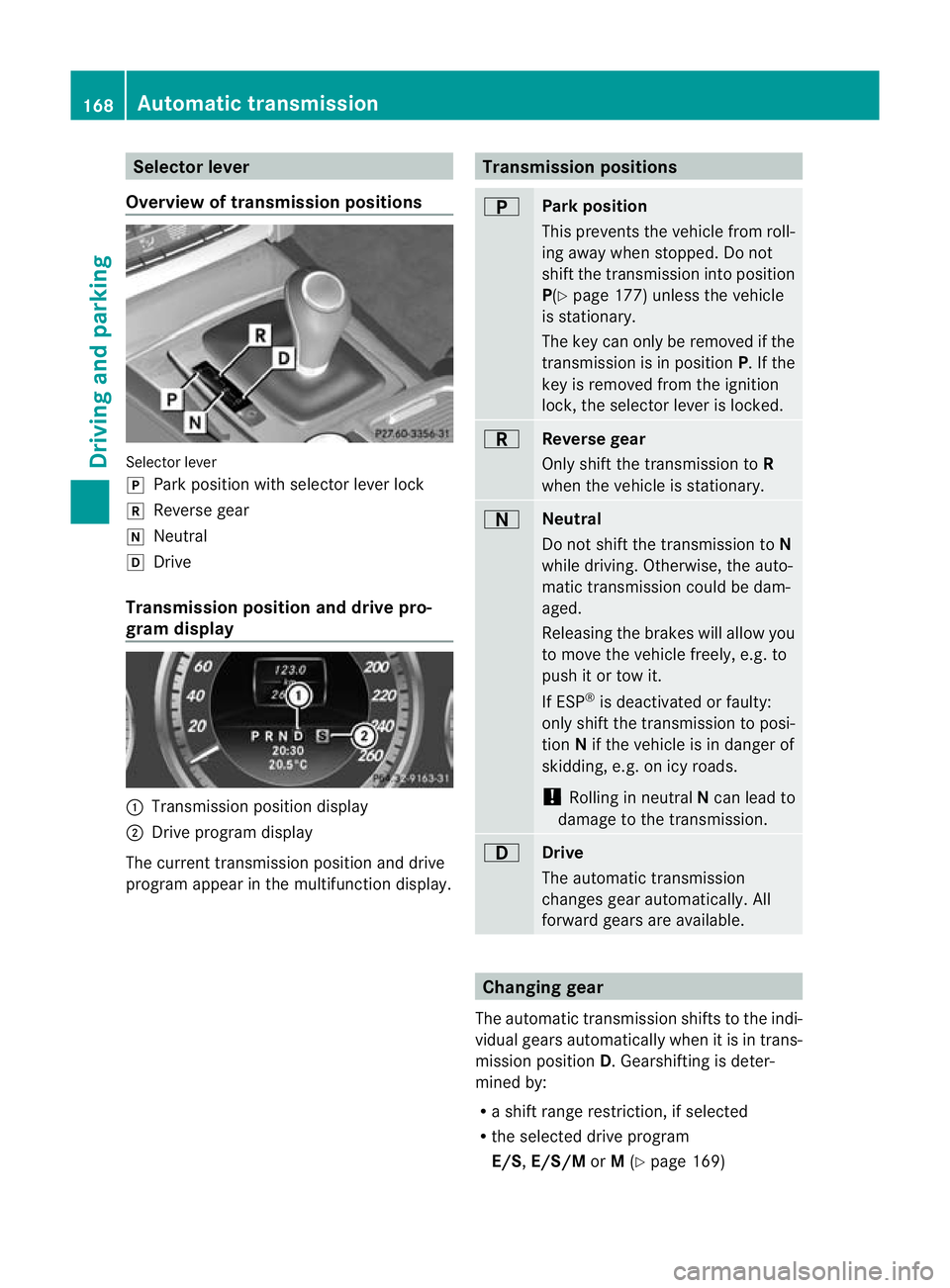
Selector lever
Overview of transmission positions Selector lever
j
Park position with selector lever lock
k Reverse gear
i Neutral
h Drive
Transmission position and drive pro-
gram display :
Transmission position display
; Drive program display
The current transmission position and drive
program appear in the multifunction display. Transmission positions
B
Park position
This prevents the vehicle from roll-
ing away when stopped. Do not
shift the transmission into position
P(Y
page 177) unless the vehicle
is stationary.
The key can only be removed if the
transmission is in position P. If the
key is removed from the ignition
lock, the selector lever is locked. C
Reverse gear
Only shift the transmission to
R
when the vehicle is stationary. A
Neutral
Do not shift the transmission to
N
while driving. Otherwise, the auto-
matic transmission could be dam-
aged.
Releasing the brakes will allow you
to move the vehicle freely, e.g. to
push it or tow it.
If ESP ®
is deactivated or faulty:
only shift the transmission to posi-
tion Nif the vehicle is in danger of
skidding, e.g. on icy roads.
! Rolling in neutral Ncan lead to
damage to the transmission. 7
Drive
The automatic transmission
changes gear automatically. All
forward gears are available.
Changing gear
The automatic transmission shifts to the indi-
vidual gears automatically when it is in trans-
mission position D.Gearshifting is deter-
mined by:
R a shift range restriction, if selected
R the selected drive program
E/S, E/S/M orM(Y page 169) 168
Automatic transmissionDriving and parking
Page 172 of 389
R
the positio nofthe accelerator pedal
R the road speed Driving tips
Accelerator pedal position Your style of driving influences how the auto-
matic transmission shifts gear:
R little throttle: early upshifts
R more throttle: late upshifts
Double-clutch function E 350 BlueEFFICIENCY and E 500 BlueEF-
FICIENCY only:
when shifting down, the dou-
ble-clutch function is active regardless of the
currently selected drive program. The double-
clutch function reduces load change reac-
tions and is conducive to a sporty driving
style. The sound generated by the double-
clutch function depends on the drive program
selected.
Kickdown Use kickdown for maximum acceleration.
X
Depress the accelerator pedal beyond the
pressure point.
The transmission shifts to a lower gear
depending on the engine speed.
X Ease off the accelerator pedal once the
desired speed is reached.
The automatic transmission shifts back up.
Towing atrailer X
Drive in the middle of the engine speed
range on uphill gradients.
X Shift down to shift range 3or
2(Y page 170) depending on the uphill or
downhill gradient, eve nifcruise control,
DISTRONIC PLUS or SPEEDTRONIC is acti-
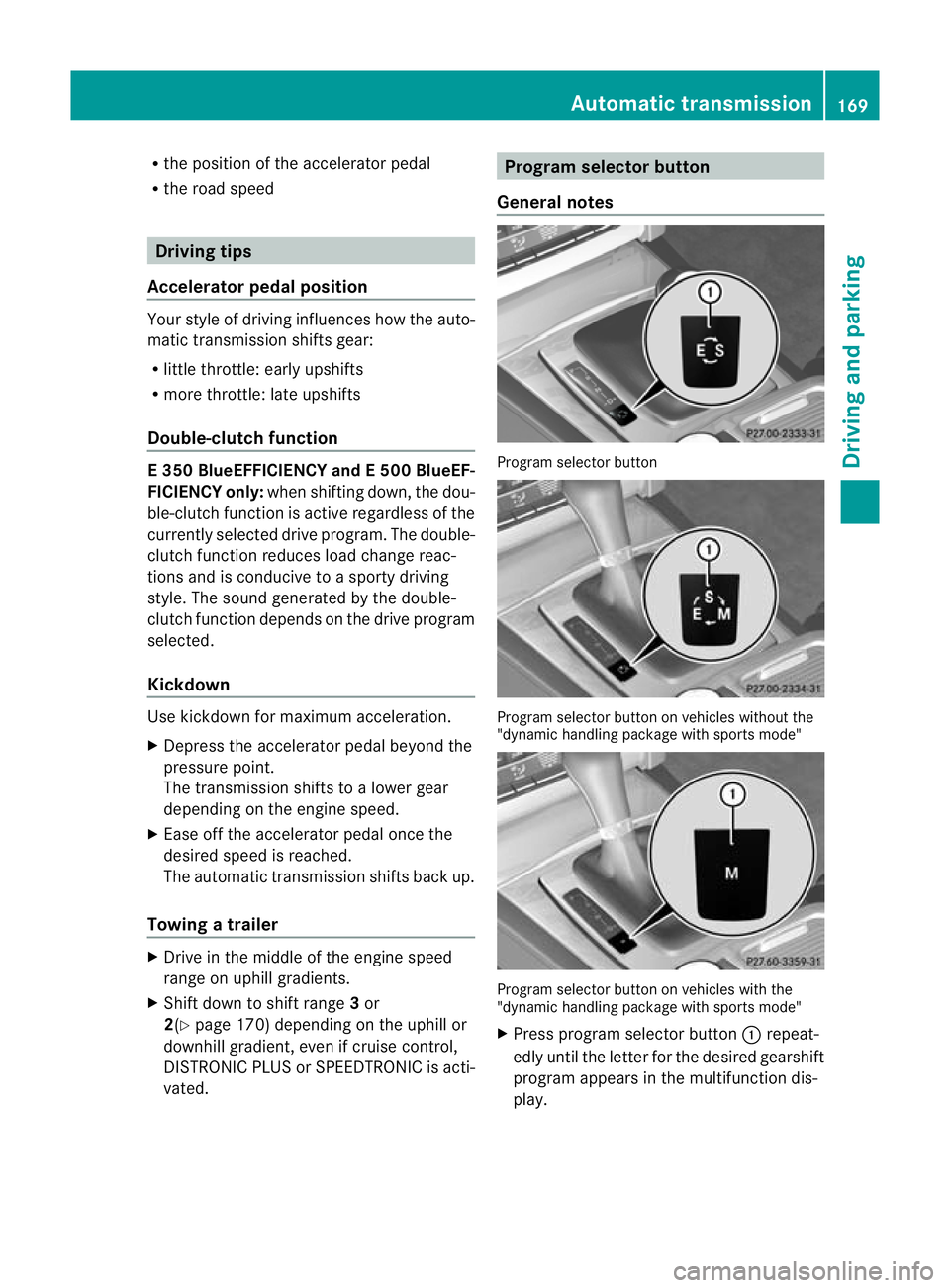
vated. Program selector button
General notes Progra
mselector button Program selecto
rbutton on vehicles without the
"dynamic handling package with sports mode" Program selecto
rbutton on vehicles with the
"dynamic handling package with sports mode"
X Press program selecto rbutton :repeat-
edly until the lette rfor the desired gearshift
program appears in the multifunction dis-
play. Automatic transmission
169Driving and parking Z
Page 174 of 389
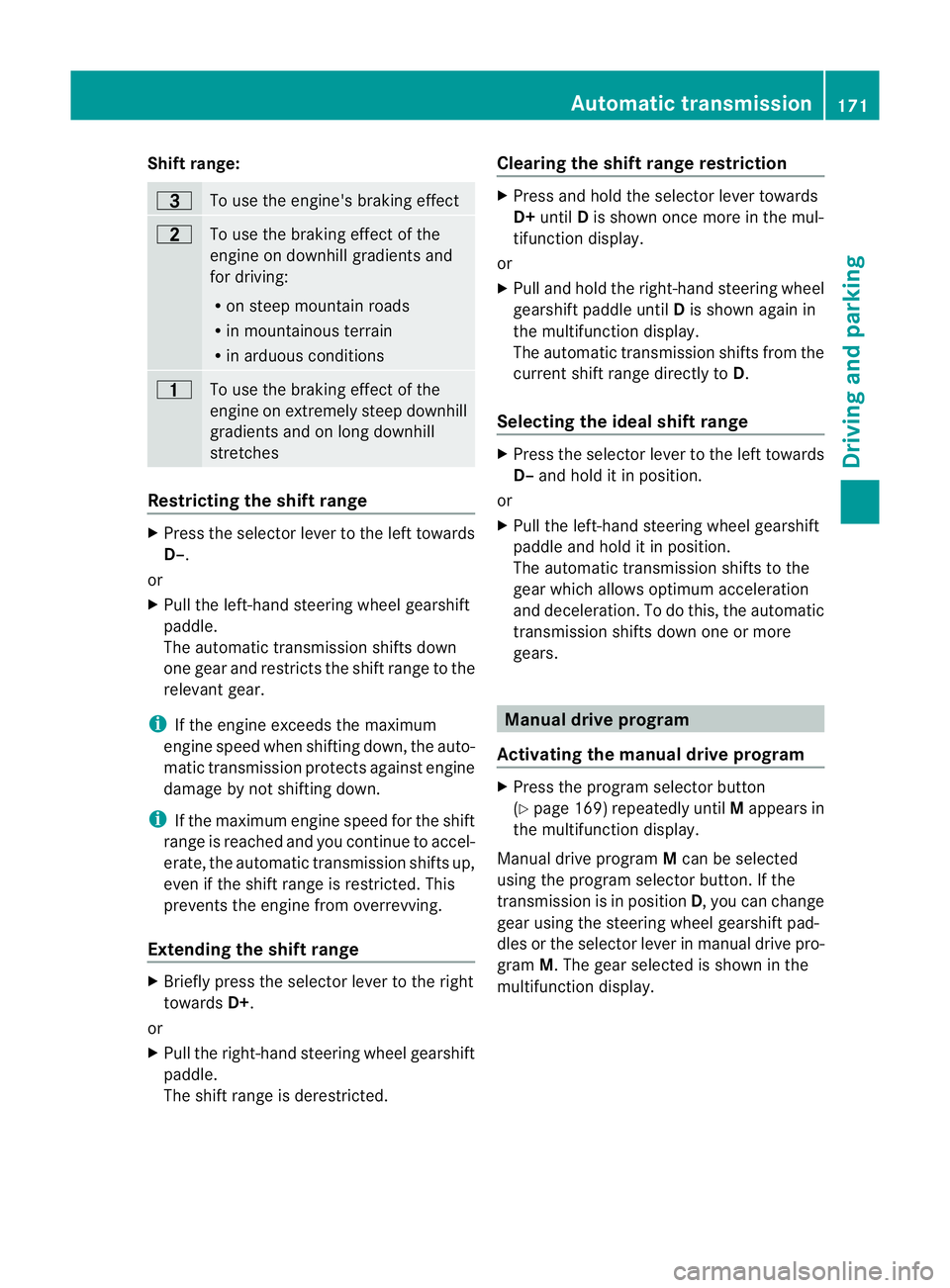
Shift range:
=
To use the engine's braking effect
5
To use the braking effect of the
engine on downhill gradients and
for driving:
R
on steep mountain roads
R in mountainous terrain
R in arduous conditions 4
To use the braking effect of the
engine on extremely steep downhill
gradients and on long downhill
stretches
Restricting the shift range
X
Press the selector lever to the left towards
D–.
or
X Pull the left-hand steering wheel gearshift
paddle.
The automatic transmission shifts down
one gear and restricts the shift range to the
relevant gear.
i If the engine exceeds the maximum
engine speed when shifting down, the auto-
matic transmission protects against engine
damage by not shifting down.
i If the maximum engine speed for the shift
range is reached and you continue to accel-
erate, the automatic transmission shifts up,
even if the shift range is restricted. This
prevents the engine from overrevving.
Extending the shift range X
Briefly press the selector lever to the right
towards D+.
or
X Pull the right-hand steering wheel gearshift
paddle.
The shift range is derestricted. Clearing the shift range restriction X
Press and hold the selector lever towards
D+ until Dis shown once more in the mul-
tifunction display.
or
X Pull and hold the right-hand steering wheel
gearshift paddle until Dis shown again in
the multifunction display.
The automatic transmission shifts from the
current shift range directly to D.
Selecting the ideal shift range X
Press the selector lever to the left towards
D– and hold it in position.
or
X Pull the left-hand steering wheel gearshift
paddle and hold it in position.
The automatic transmission shifts to the
gear which allows optimum acceleration
and deceleration. To do this, the automatic
transmission shifts down one or more
gears. Manual drive program
Activating the manual drive program X
Press the program selector button
(Y page 169) repeatedly until Mappears in
the multifunction display.
Manual drive program Mcan be selected
using the program selector button. If the
transmission is in position D, you can change
gear using the steering wheel gearshift pad-
dles or the selector lever in manual drive pro-
gram M.The gear selected is shown in the
multifunction display. Automatic transmission
171Driving and parking Z
Page 175 of 389
Upshifting
X
Briefly press the selector lever to the right
towards D+.
or
X Pull the right-hand steering wheel gearshift
paddle.
The automatic transmission shifts up to the
next gear.
Downshifting X
Briefly press the selector lever to the left
towards D–.
or
X Pull the left-hand steering wheel gearshift
paddle.
The automatic transmission shifts down to
the next gear.
i If you desire maximum acceleration, push
the selector lever to the left or pull and hold
the left-hand steering wheel gearshift pad-
dle until the transmission shifts to the opti-
mal gear for the current speed.
Kickdown You can also use kickdown for maximum
acceleration in manual drive program M.
X Depress the accelerator pedal beyond the
pressure point.
The transmission shifts to a lower gear
depending on the engine speed.
Switching off the manual drive program X
Vehicles without the dynamic handling
package with sports mode: press the
program selector button (Y page 169)
repeatedly until Eor Sappears in the mul-
tifunction display.
X Vehicles with the dynamic handling
package with sports mode: press the
program selector button (Y page 169).M
is no longer shown in the multifunction dis-
play. 172
Automatic transmissionDriving and parking
Page 176 of 389
Problems with the transmission
Problem Possible causes/consequences and
M Solutions
The transmission has
problems shifting gear. The transmission is losing oil.
X
Have the transmission checked at a qualified specialist work-
shop immediately. The acceleration ability
is deteriorating.
The transmission no
longer changes gear. The transmission is in emergency mode.
It is only possible to shift into secondgear and reverse gear.
X Stop.
X Shift the transmission to position P.
X Switch off the engine.
X Wait at least ten seconds before restarting the engine.
X Shift the transmission to position Dor R.
If D is selected, the transmission shifts into secondgear; ifRis
selected, the transmission shifts into reverse gear.
X Have the transmission checked at a qualified specialist work-
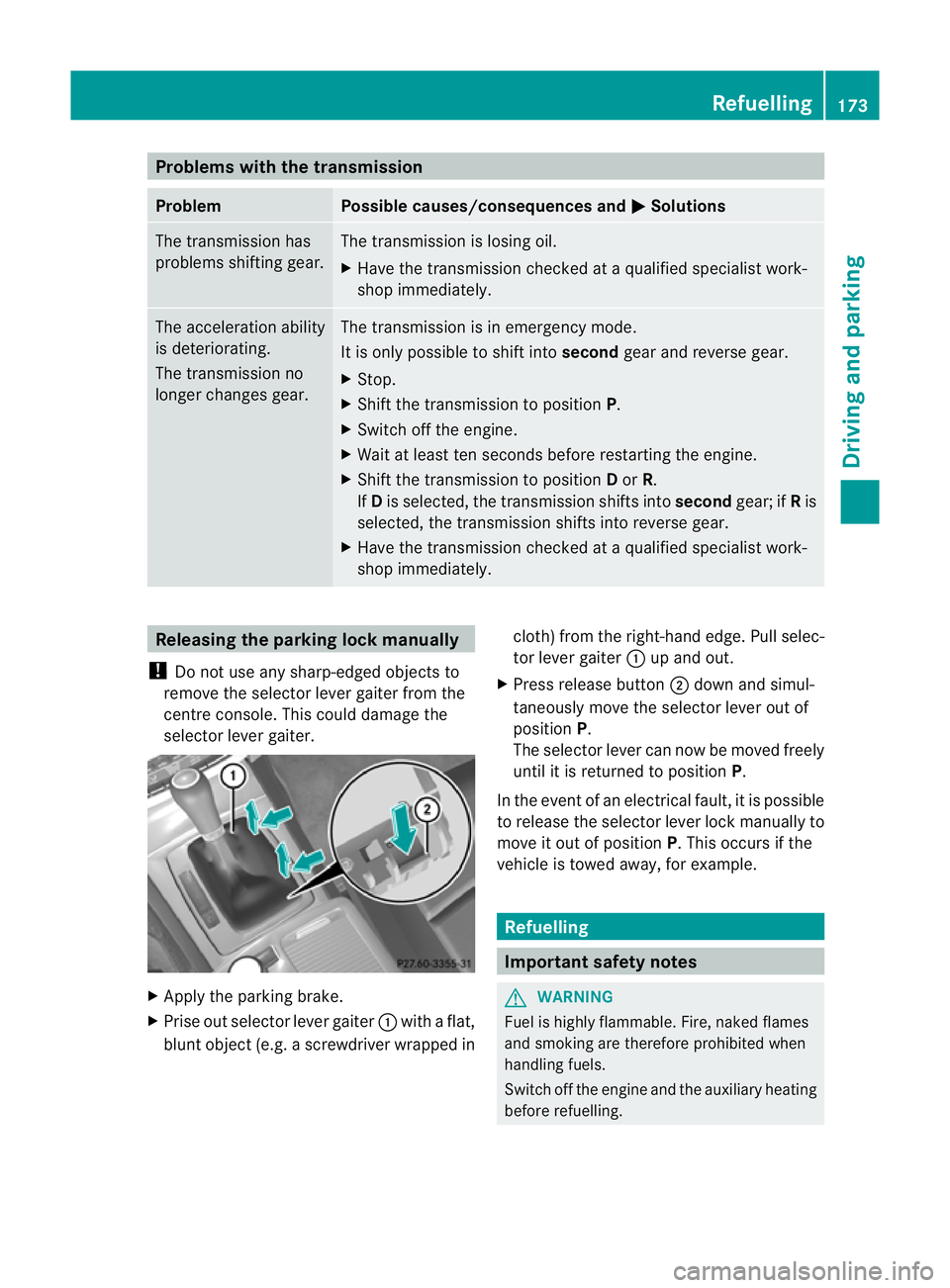
shop immediately. Releasing the parking lock manually
! Do not use any sharp-edged objects to
remove the selector lever gaiter from the
centre console. This could damage the
selector lever gaiter. X
Apply the parking brake.
X Prise out selector lever gaiter :with a flat,
blunt object (e.g. a screwdriver wrapped in cloth) from the right-hand edge. Pull selec-
tor lever gaiter
:up and out.
X Press release button ;down and simul-
taneously move the selector lever out of
position P.
The selector lever can now be moved freely
until it is returned to position P.
In the event of an electrical fault, it is possible
to release the selector lever lock manually to
move it out of position P. This occurs if the
vehicle is towed away, for example. Refuelling
Important safety notes
G
WARNING
Fuel is highly flammable. Fire, naked flames
and smoking are therefore prohibited when
handling fuels.
Switch off the engine and the auxiliary heating
before refuelling. Refuelling
173Driving and parking Z