audio MERCEDES-BENZ E-CLASS CABRIOLET 2012 Owners Manual
[x] Cancel search | Manufacturer: MERCEDES-BENZ, Model Year: 2012, Model line: E-CLASS CABRIOLET, Model: MERCEDES-BENZ E-CLASS CABRIOLET 2012Pages: 389, PDF Size: 9.32 MB
Page 12 of 389
Driving on flooded roads
..................181
Driving safety system BAS PLUS (Brake Assist System
PLUS) .............................................. .65
Electronic Brake-force Distribu-
tio n.................................................. 68
ESP ®
(Electroni cStability Pro-
gram) ............................................... 67
Important safety guidelines .............64
Driving safety systems
ABS (Anti-lock Braking System) .......65
ADAPTIVE BRAKE ............................. 69
Adaptive brake lamps ......................67
BAS (Brake Assist System) ..............65
ETS (Electronic Traction System) .....67
Overview .......................................... 64
PRE-SAFE ®
Brake ............................ .69
Driving system
Active Lane Keeping Assist ............217
Driving systems
Active Driving Assistance pack-
age ................................................. 214
ATTENTION ASSIST ........................208
Blind Spot Assist ............................ 210
Cruise control ................................ 182
Display message ............................ 262
Distronic Plu s................................ 188
Dynami chandling package with
sports mod e.................................. 199
HOLD function ............................... 198
Lane Keeping Assist ......................212
Lane package ................................ 210
Parking Guidance ........................... 203
PARKTRONI C................................. 200
Reversing camera ..........................206
Speed Limi tAssist ......................... 209
SPEEDTRONIC ............................... 185
Driving tips
Aquaplaning ................................... 181
Automatic transmission .................169
Brakes ........................................... 180
Downhill gradient ........................... 180
Driving abroad ............................... 122
Driving in winter ............................ .182
Driving on flooded road s................ 181
Driving on wet road s...................... 181
General .......................................... 179Icy road surfaces
........................... 182
Limited braking efficiency on sal-
ted road s....................................... 181
New brake pads/linings ................181
Running-in tips ............................... 158
Snow chains .................................. 343
Symmetrical dipped bea m............. 122
Towing atrailer .............................. 221
Wet road surface ........................... 181
DVD audio
Operating (on-board computer) .....237
DVD video
Operating (on-board computer) .....237
Dynamic handling package with
sports mode ....................................... 199 E
EASY-ENTRY feature Activating/deactivating .................247
Function/notes ............................. 116
EASY-EXIT feature
Crash-responsive ........................... 117
Function/notes ............................. 116
Switching on/off ........................... 247
EBD (electronic brake force distri-
bution)
Display message ............................ 252
Function/notes ................................ 68
ECO display
Function/notes ............................. 179
On-board computer .......................234
ECO start/stop function
Deactivating/activating .................164
General information .......................162
Electrical fuses
see Fuses
Electronic Stability Program
see ESP ®
(Electroni cStability Program)
Emergenc yclosing
Sof ttop ............................................ 94
Emergency key
Unlocking the driver's door ..............84
Emergency key element
Function/notes ................................ 78
Locking vehicle ................................ 84
Emergency release
Driver's door .................................... 84 Index
9
Page 16 of 389
Motorway mode
............................. 129
Parking lamps ................................ 126
Rea rfoglamp ................................. 125
Side lamps ..................................... 125
Switching Adaptive Highbeam
Assist on/off ................................. 244
Switching the daytime driving
lights on/off (on-board computer) .243
Switching the exterio rlighting
delayed switch-off on/off (on-
board computer )............................ 244
Switching the surround lighting
on/off (on-board computer) ..........244
Turn signals ................................... 126
see Changing bulbs
see Interior lighting
Light sensor (display message) .......258
LIM indicator lamp Cruise control ................................ 183
DISTRONI CPLUS ........................... 190
Variabl eSPEEDTRONIC .................186
Limiting the speed
see SPEEDTRONIC
Loading guidelines ............................286
Locking see Centra llocking
Locking (doors)
Automatic ........................................ 84
Emergency locking ........................... 84
From inside (central locking but-
ton) .................................................. 83
Locking centrally
see Centra llocking
Locking verification signal (on-
board computer) ............................... 245
Luggage cover see Boot separator
Lumbar support
Adjusting the 4-way lumba rsup-
por t................................................ 113 M
M+S tyres ........................................... 342
Main-beam headlamps Changing bulbs .............................. 134
Display message ............................ 257Switching Adaptive Highbeam
Assist on/off
................................. 130
Switching on/off ........................... 127
Manual transmission
Engaging neutral (ECO start/stop
function) ........................................ 167
Engaging revers egear ................... 167
Gea rlever ...................................... 166
Pulling away ................................... 161
Shift recommendatio n................... 167
Starting the engine ........................160
Matt finish (cleaning instructions) ..314
Memory card (audio) .........................237
Memory function ............................... 120
Mercedes-Benz Service Centre see Qualified specialist workshop
Message memory (on-board com-
puter) ................................................. .249
Messages see Display messages
Mirror
see Vanity mirror (in sun visor)
Mirrors
see Exterior mirrors
see Rear-view mirror
Mobile phone
Frequencies ................................... 369
Installatio n..................................... 369
Menu (on-board computer) ............238
Notes/placing in the bracket ......... 296
Transmission output (maximum) .... 369
Mobile telephone
Pre-installe dbracket ...................... 297
Modifying the programming (key) .....78
MOExtended tyres .............................324
Motorway mode ................................ 129
MP3 Operating ...................................... .237
see Separate operating instructions
Multifunction display
Function/notes ............................. 232
Permanent displa y......................... 243
Multifunction steering wheel
Operating the on-board computer .231
Overview .......................................... 33 Index
13
Page 36 of 389
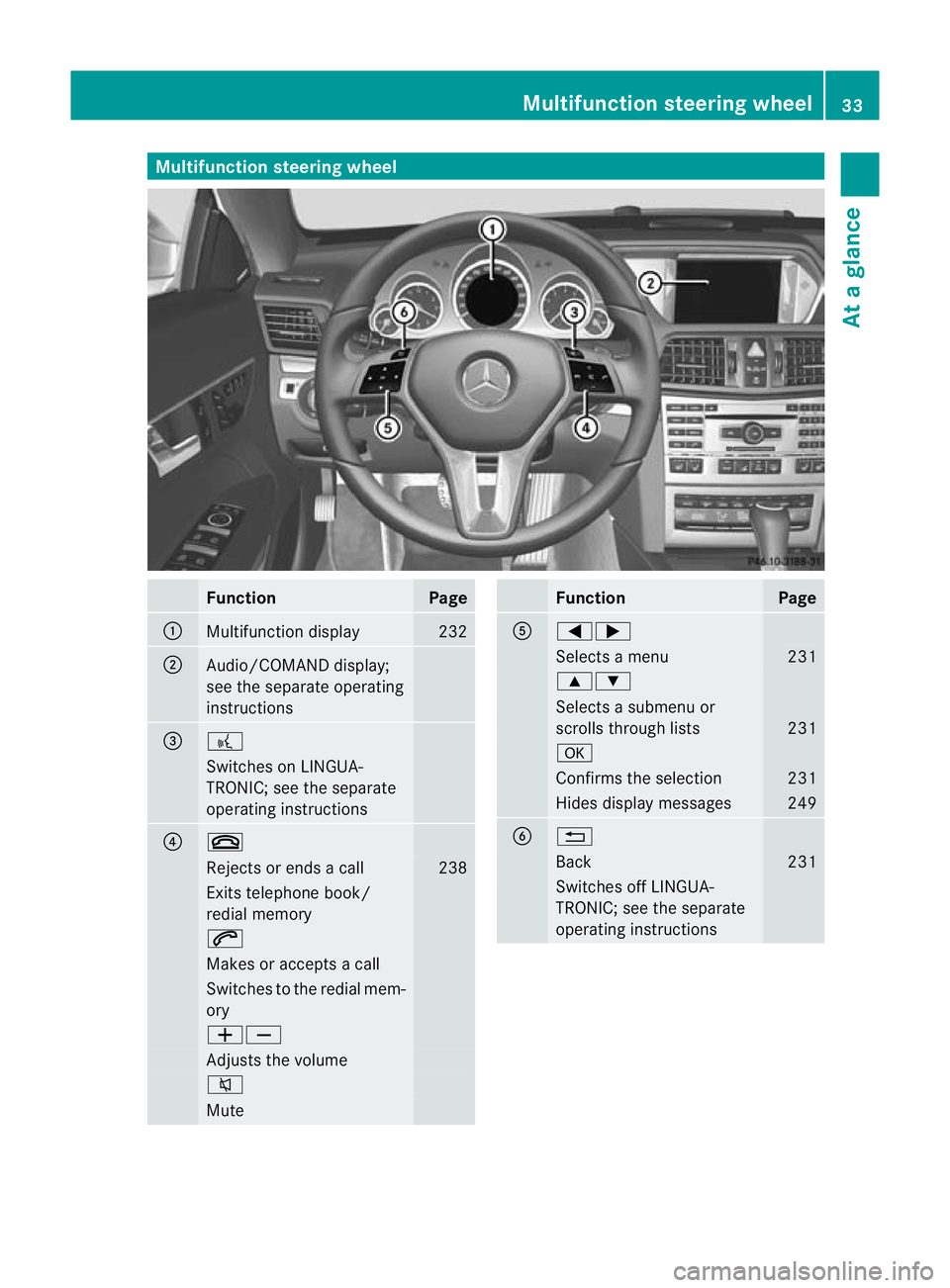
Multifunction steering wheel
Function Page
:
Multifunction display 232
;
Audio/COMAND display;
see the separate operating
instructions
=
?
Switches on LINGUA-
TRONIC; see the separate
operating instructions
?
~
Rejects or ends a call 238
Exits telephone book/
redial memory
6
Makes or accepts a call
Switches to the redial mem-
ory
WX
Adjusts the volume
8
Mute Function Page
A
=;
Selects a menu 231
9:
Selects a submenu or
scrolls through lists
231
a
Confirms the selection 231
Hides display messages 249
B
%
Back 231
Switches off LINGUA-
TRONIC; see the separate
operating instructionsMultifunction steering wheel
33At a glance
Page 37 of 389
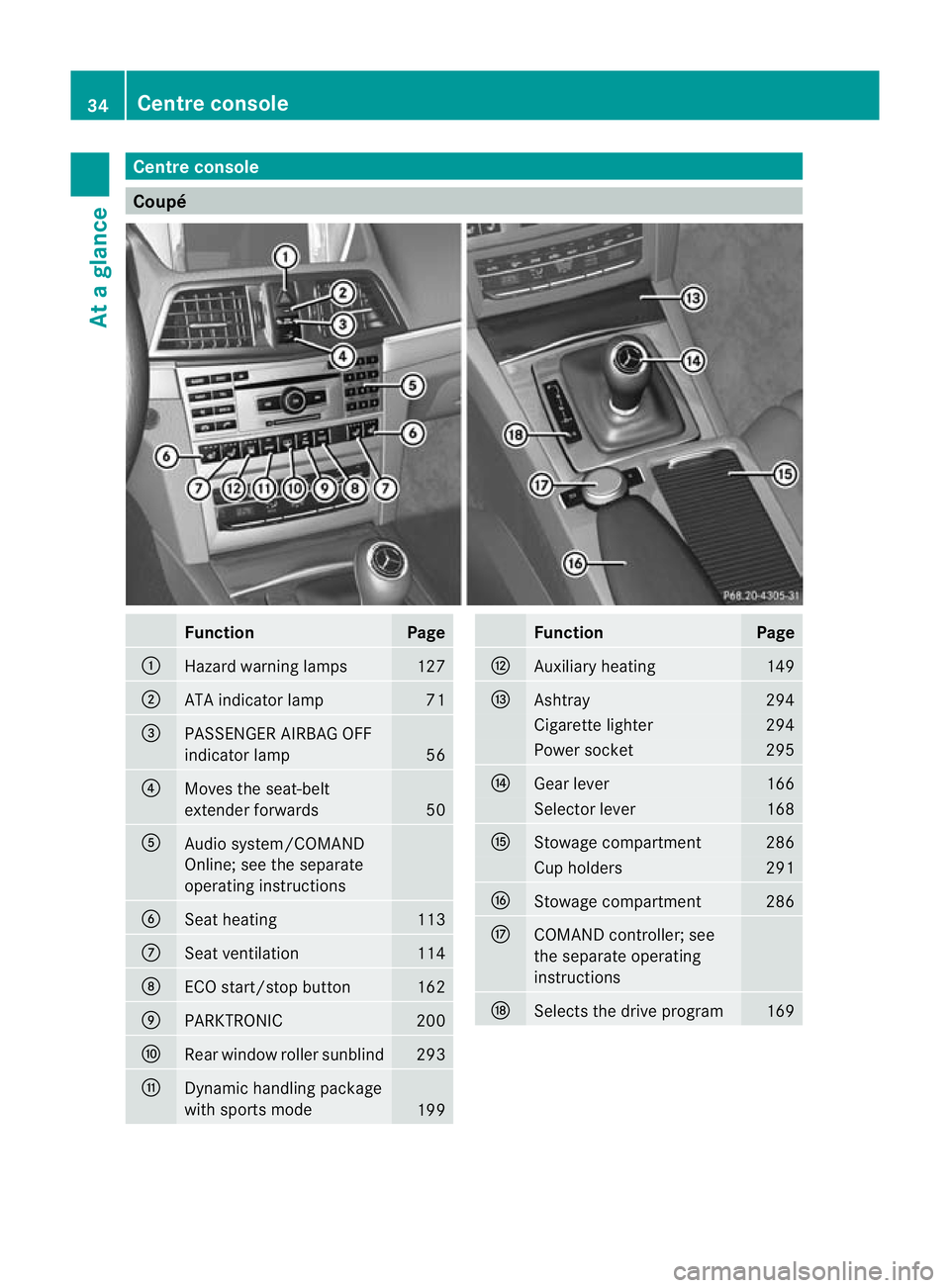
Centre console
Coupé
Function Page
:
Hazard warning lamps 127
;
ATA indicator lamp 71
=
PASSENGER AIRBAG OFF
indicator lamp
56
?
Moves the seat-belt
extender forwards
50
A
Audio system/COMAND
Online; see the separate
operating instructions
B
Seat heating 113
C
Seat ventilation 114
D
ECO start/stop button 162
E
PARKTRONIC 200
F
Rear window roller sunblind 293
G
Dynamic handling package
with sports mode
199 Function Page
H
Auxiliary heating 149
I
Ashtray 294
Cigarette lighter 294
Power socket 295
J
Gear lever 166
Selector lever 168
K
Stowage compartment 286
Cup holders 291
L
Stowage compartment 286
M
COMAND controller; see
the separate operating
instructions N
Selects the drive program 16934
Centre consoleAt a glance
Page 38 of 389
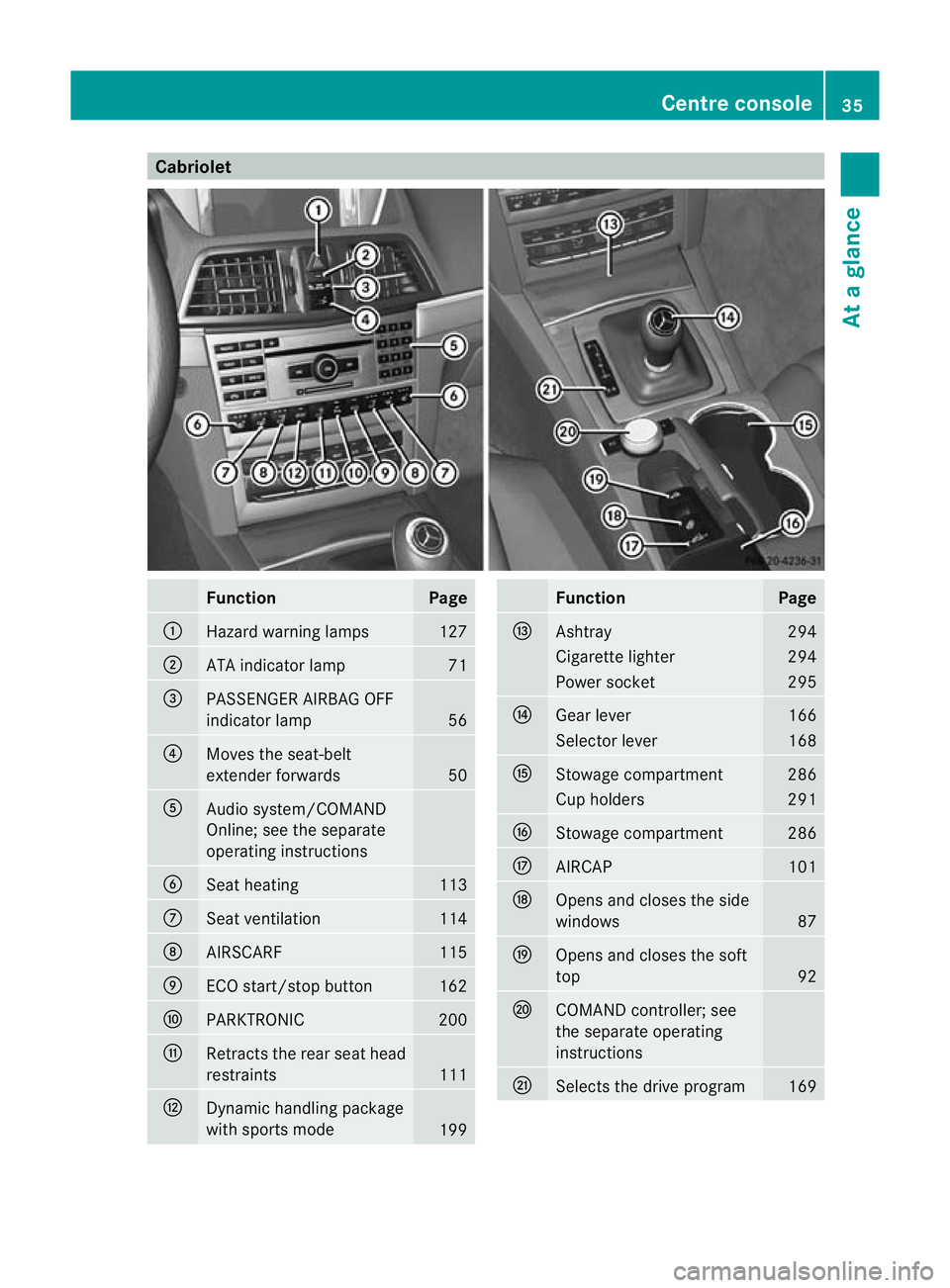
Cabriolet
Function Page
:
Hazard warning lamps 127
;
ATA indicator lamp 71
=
PASSENGER AIRBAG OFF
indicator lamp
56
?
Moves the seat-belt
extender forwards
50
A
Audio system/COMAND
Online; see the separate
operating instructions
B
Seat heating 113
C
Seat ventilation 114
D
AIRSCARF 115
E
ECO start/stop button 162
F
PARKTRONIC 200
G
Retracts the rear seat head
restraints
111
H
Dynamic handling package
with sports mode
199 Function Page
I
Ashtray 294
Cigarette lighter 294
Power socket 295
J
Gear lever 166
Selector lever 168
K
Stowage compartment 286
Cup holders 291
L
Stowage compartment 286
M
AIRCAP 101
N
Opens and closes the side
windows
87
O
Opens and closes the soft
top
92
P
COMAND controller; see
the separate operating
instructions
Q
Selects the drive program 169Centre console
35At a glance
Page 69 of 389
If you are driving at a speed over
30 km/h:ify
ou depress the brake sharply,
BAS PLUS automatically raises the brake
pressure to a value adapted to the traffic sit-
uation.
If you are driving at a speed under
30 km/h:ify ou depress the brake, BAS PLUS
is activated. Braking will be carried out at the
last possible moment.
If BAS PLUS demands particularly high brak-
ing force, preventative passenger protection
measures (PRE-SAFE ®
) are activated simul-
taneously.
X Keep the brake pedal depressed until the
emergency braking situation is over.
ABS prevents the wheels from locking.
BAS PLUS is deactivated and the brakes func-
tion as usual, if:
R you release the brake pedal.
R there is no longer any danger of a rear-end
collision.
R no obstacle is detected in front of your
vehicle.
The radar sensor system is switched off auto-
matically in the vicinity of radio telescope
facilities in the following vehicles:
R vehicles with COMAND Online and naviga-
tion
R vehicles with Audio 20 and Becker ®
MAP
PILOT
Becker ®
MAP PILOT must be connected;
see the separate operating instructions.
The radar sensor system must be switched off
using the on-board computer in the vicinity of
radio telescope facilities in the following vehi-
cles:
R vehicles without COMAND Online and nav-
igation
R vehicles without Audio 20 and Becker ®
MAP PILOT
R vehicles for Australia
For information on switching off the radar
sensor system using the on-board computer,
see (Y page 245). For BAS PLUS to assist you when driving, the
radar sensor system must:
R
be switched on (Y page 245)
R be operational (Y page 263)
If the radar sensor system is malfunctioning,
BAS PLUS will not be available. The brake
system is still available with complete brake
boosting effect and BAS. G
WARNING
BAS PLUS cannot always clearly identify
objects and complex traffic situations. BAS
PLUS cannot intervene in these cases. There
is a risk of an accident.
Always pay careful attention to the traffic sit-
uation and be ready to brake.
In particular, the detection of obstacles can
be impaired if there is:
R dirt on the sensors or anything else cover-
ing the sensors
R snow or heavy rain
R interference by other radar sources
R the possibility of strong radar reflections,
for example, in multi-storey car parks
R a narrow vehicle travelling in front, e.g. a
motorcycle
R a vehicle travelling in front on a different
line G
WARNING
BAS PLUS does not react:
R to people or animals
R to oncoming vehicles
R to crossing traffic
R when cornering
As aresult, BAS PLUS may not intervene in all
critical situations. There is a risk of an acci-
dent.
Always pay careful attention to the traffic sit-
uation and be ready to brake.
Following damage to the fron tend of the vehi-
cle, have the configuratio nand operatio nof
the rada rsensors checked at a qualified spe- 66
Driving safet
ysystemsSafety
Page 73 of 389
G
WARNING
PRE-SAFE ®
Brake will initially brake yourv ehi-
cle by a partial application of the brakes if a
danger of collision is detected. There may be
a collision unless you also brake. Automatic
emergency braking cannot prevent a colli-
sion. There is a risk of an accident.
Always apply the brakes yourself and try to
take evasive action. G
WARNING
PRE-SAFE ®
Brake cannot always clearly iden-
tify objects and complex traffic conditions.
In these cases, PRE-SAFE ®
Brake may:
R give an unnecessary warning and then
brake the vehicle
R neither give a warning nor intervene
There is a risk of an accident.
Always pay particular attention to the traffic
situation and be ready to brake, especially if
PRE-SAFE ®
Brake warns you. Terminate the
intervention in a non-critical driving situation.
In particular, the detection of obstacles can
be impaired if there is:
R dirt on the sensors or anything else cover-
ing the sensors
R snow or heavy rain
R interference by other radar sources
R the possibility of strong radar reflections,
for example, in multi-storey car parks
R a narrow vehicle travelling in front, e.g. a
motorcycle
R a vehicle travelling in front on a different
line G
WARNING
PRE-SAFE ®
Brake does not react:
R to people or animals
R to oncoming vehicles
R to crossing traffic
R when cornering As a result, PRE-SAFE
®
Brake may neither
give warnings nor intervene in all critical sit-
uations. There is a risk of an accident.
Always pay careful attention to the traffic sit-
uation and be ready to brake.
In order to maintain the appropriate distance
to the vehicle in fron tand thus prevent a col-
lision, you must apply the brakes yourself.
X To activate/deactivate: activate or deac-
tivate PRE-SAFE ®
Brake in the on-board
computer (Y page 240).
When PRE-SAFE ®
Brake is activated, the
Ä symbol appears in multifunctio ndis-
play, as long as the HOL Dfunction is deac-
tivated (Y page 198). On vehicles with the
Active Parking Assist driving system, the
Ä symbol is displayed when position P
is engaged or you are driving faste rthan
35 km/h.
For PRE-SAFE ®
Brake to assist you when driv-
ing, the radar sensor system must be
switched on (Y page 245) and be opera-
tional.
The radar sensor system is switched off auto-
matically in the vicinity of radio telescope
facilities in the following vehicles:
R vehicles with COMAND Online and naviga-
tion
R vehicles with Audio 20 and Becker ®
MAP
PILOT
Becker ®
MAP PILOT must be connected;
see the separate operating instructions.
The radar sensor system must be switched off
using the on-board computer in the vicinity of
radio telescope facilities in the following vehi-
cles:
R vehicles without COMAND Online and nav-
igation
R vehicles without Audio 20 and Becker ®
MAP PILOT
R vehicles for Australia 70
Driving safety systemsSafety
Page 195 of 389
tance between your vehicl
eand the vehicle in
front becomes too small.
i Whe nchanging lanes, DISTRONIC PLUS
monitors the left lane for left-hand-drive
vehicles and the right lane for right-hand-
drive vehicles.
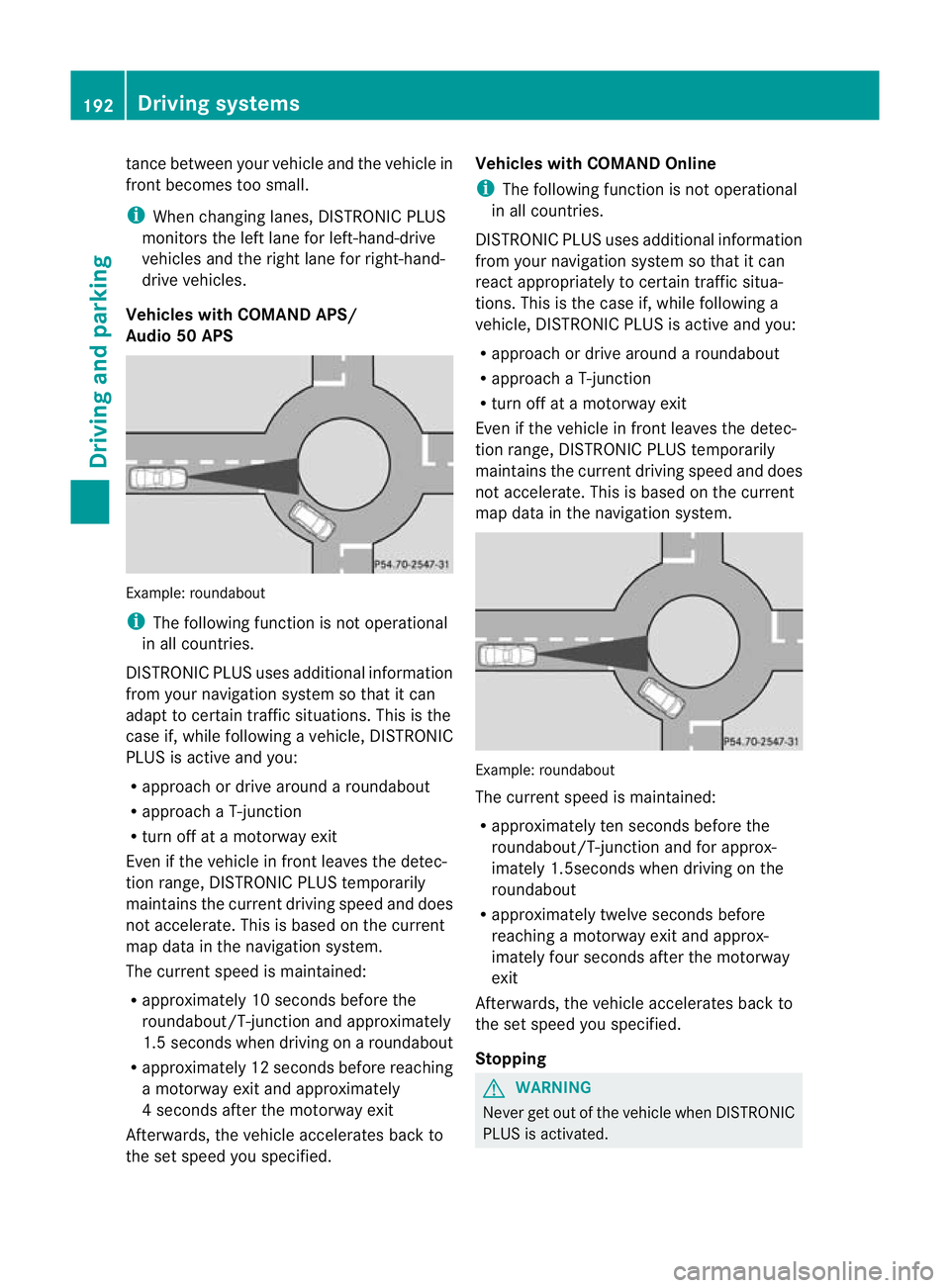
Vehicles with COMAND APS/
Audio 50 APS Example: roundabout
i
The following function is not operational
in all countries.
DISTRONIC PLUS uses additional information
from your navigation system so that it can
adapt to certain traffic situations. This is the
case if, while following a vehicle, DISTRONIC
PLUS is active and you:
R approach or drive around a roundabout
R approach a T-junction
R turn off at a motorway exit
Even if the vehicle in front leaves the detec-
tion range, DISTRONIC PLUS temporarily
maintains the current driving speed and does
not accelerate. This is based on the current
map data in the navigation system.
The current speed is maintained:
R approximately 10 seconds before the
roundabout/T-junction and approximately
1.5 seconds when driving on a roundabout
R approximately 12 seconds before reaching
a motorway exit and approximately
4s econds after the motorway exit
Afterwards, the vehicle accelerates back to
the set speed you specified. Vehicles with COMAND Online
i
The following function is not operational
in all countries.
DISTRONIC PLUS uses additional information
from your navigation system so that it can
react appropriately to certain traffic situa-
tions. This is the case if, while following a
vehicle, DISTRONIC PLUS is active and you:
R approach or drive around a roundabout
R approach a T-junction
R turn off at a motorway exit
Even if the vehicle in front leaves the detec-
tion range, DISTRONIC PLUS temporarily
maintains the curren tdriving speed and does
not accelerate. This is based on the current
map data in the navigation system. Example
:roundabout
The current speed is maintained:
R approximately ten seconds before the
roundabout/T-junction and for approx-
imately 1.5seconds when driving on the
roundabout
R approximately twelve seconds before
reaching a motorway exit and approx-
imately four seconds after the motorway
exit
Afterwards, the vehicle accelerates back to
the set speed you specified.
Stopping G
WARNING
Never get out of the vehicle when DISTRONIC
PLUS is activated. 192
Driving systemsDriving and parking
Page 233 of 389
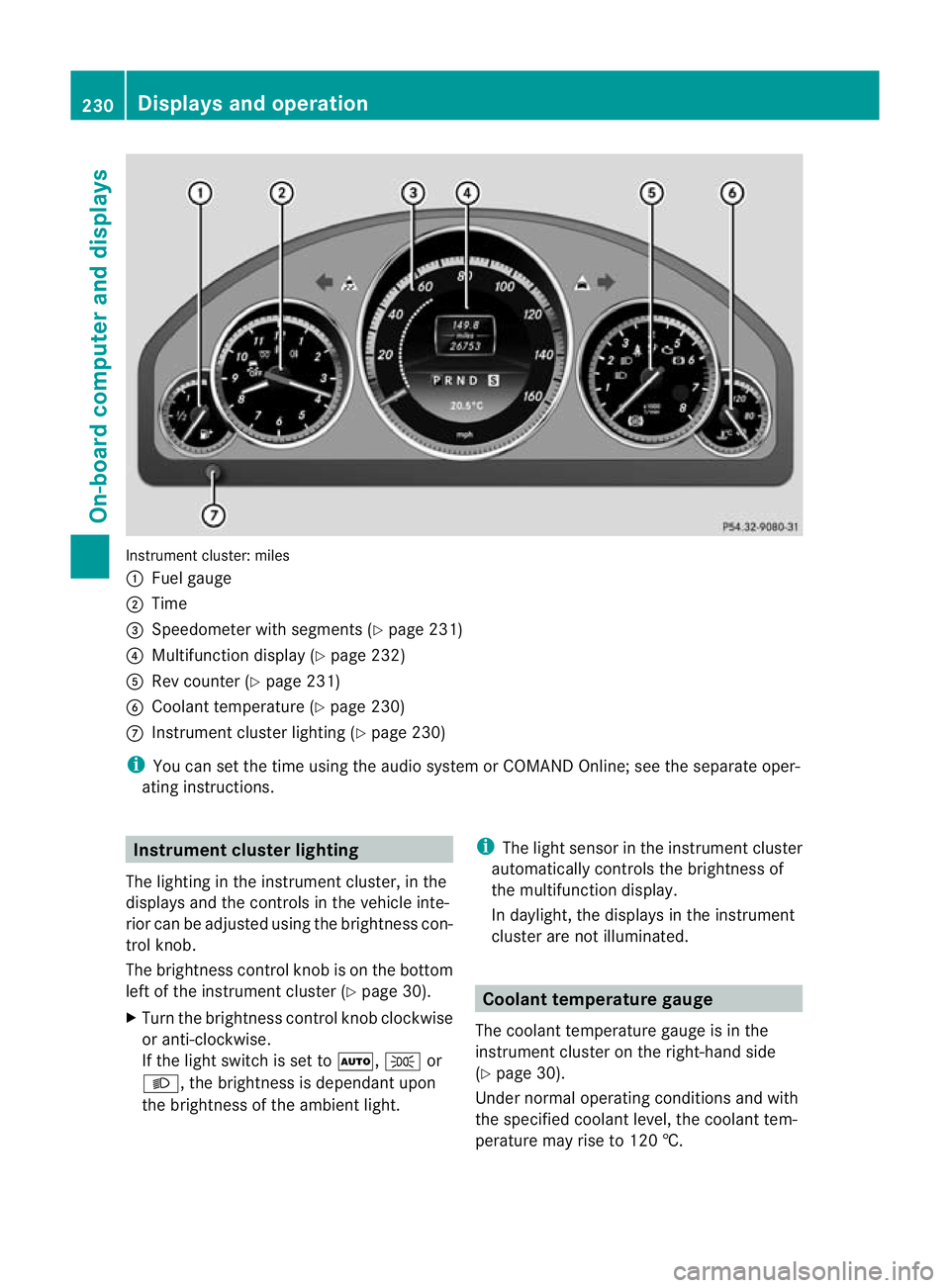
Instrument cluster: miles
:
Fuel gauge
; Time
= Speedometer with segments (Y page 231)
? Multifunction display (Y page 232)
A Rev counter (Y page 231)
B Coolant temperature (Y page 230)
C Instrument cluster lighting (Y page 230)
i You can set the time using the audio system or COMAND Online; see the separate oper-
ating instructions. Instrument clusterl
ighting
The lighting in the instrumen tcluster, in the
displays and the controls in the vehicle inte-
rior can be adjusted using the brightness con-
trol knob.
The brightness control knob is on the bottom
left of the instrument cluster (Y page 30).
X Turn the brightness control knob clockwise
or anti-clockwise.
If the light switch is set to Ã,Tor
L, the brightness is dependant upon
the brightness of the ambien tlight. i
The light sensor in the instrumen tcluster
automatically controls the brightness of
the multifunction display.
In daylight, the displays in the instrument
cluster are not illuminated. Coolant temperature gauge
The coolan ttemperature gauge is in the
instrument cluster on the right-hand side
(Y page 30).
Under normal operating conditions and with
the specified coolant level, the coolant tem-
perature may rise to 120 †. 230
Displays and operationOn-board computer and displays
Page 235 of 389
Left control panel
=
; R
Calls up the menu and menu bar 9
:
Press briefly:
R
Scrolls through lists
R Selects a submenu or function
R In the Audio menu: selects a
stored station, an audio track or
a video scene
R In the Tel (telephone) menu:
switches to the phone book and
selects a name or telephone
number 9
:
Press and hold:
R
In the Audio menu: selects the
previous/nex tstation or selects
an audio track or a video scene
using rapid scrolling
R In the Tel (Telephone) menu:
starts rapid scrolling if the phone
book is open a R
Confirms selection/display mes-
sage
R In the Tel (telephone) menu:
switches to the telephone book
and starts dialling the selected
number
R In the Audio menu: stops the
station search function at the
desired station Right control panel
~ R
Rejects or ends a call
R Exits telephone book/redial
memory 6 R
Makes or accepts a call
R Switches to the redial memory W
X R
Adjusts the volume 8 R
Mute Back button
%
Press briefly:
R
Back
R Switches off LINGUATRONIC;
see the separate operating
instructions
R Hides display messages/calls
up the last Trip menu function
used
R Exits the telephone book/redial
memory %
Press and hold:
R
Calls up the standard display in
the Trip menu
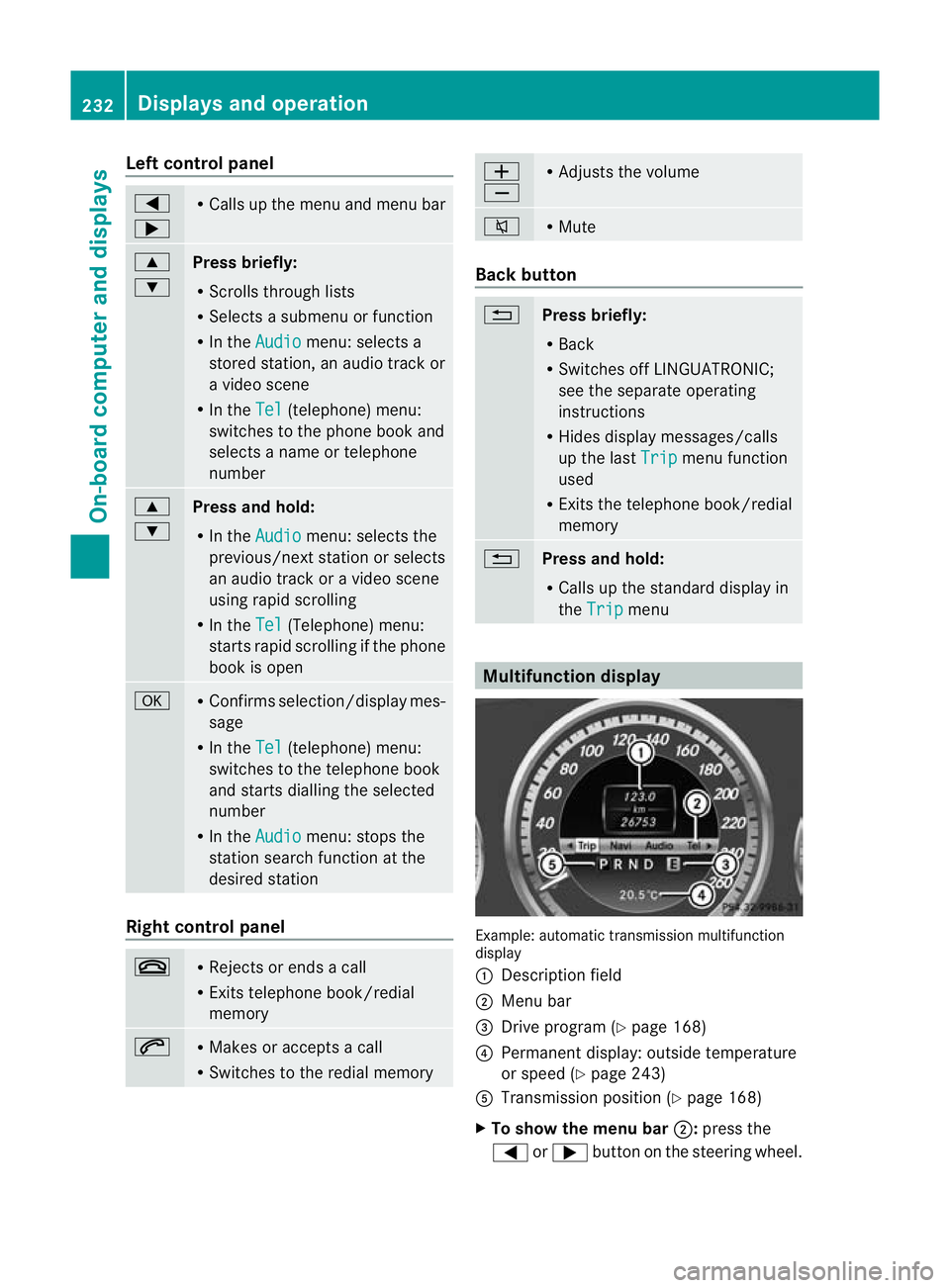
Multifunction display
Example: automatic transmission multifunction
display
:
Description field
; Menu bar
= Drive program (Y page 168)
? Permanent display: outside temperature
or speed (Y page 243)
A Transmission positio n(Ypage 168)
X To show the menu bar ;:press the
= or; button on the steering wheel. 232
Displays and operationOn-board computer and displays