light MERCEDES-BENZ E-Class CABRIOLET 2014 C207 Owner's Manual
[x] Cancel search | Manufacturer: MERCEDES-BENZ, Model Year: 2014, Model line: E-Class CABRIOLET, Model: MERCEDES-BENZ E-Class CABRIOLET 2014 C207Pages: 394, PDF Size: 5.28 MB
Page 228 of 394
Monitoring area
G
WARNING
Active Blind Spot Assist does not detect all
traffic situations and road users .There is a
risk of an accident.
Always make sure that there is sufficient
distance on the side for other traffic or
obstacles. Example: Coupe
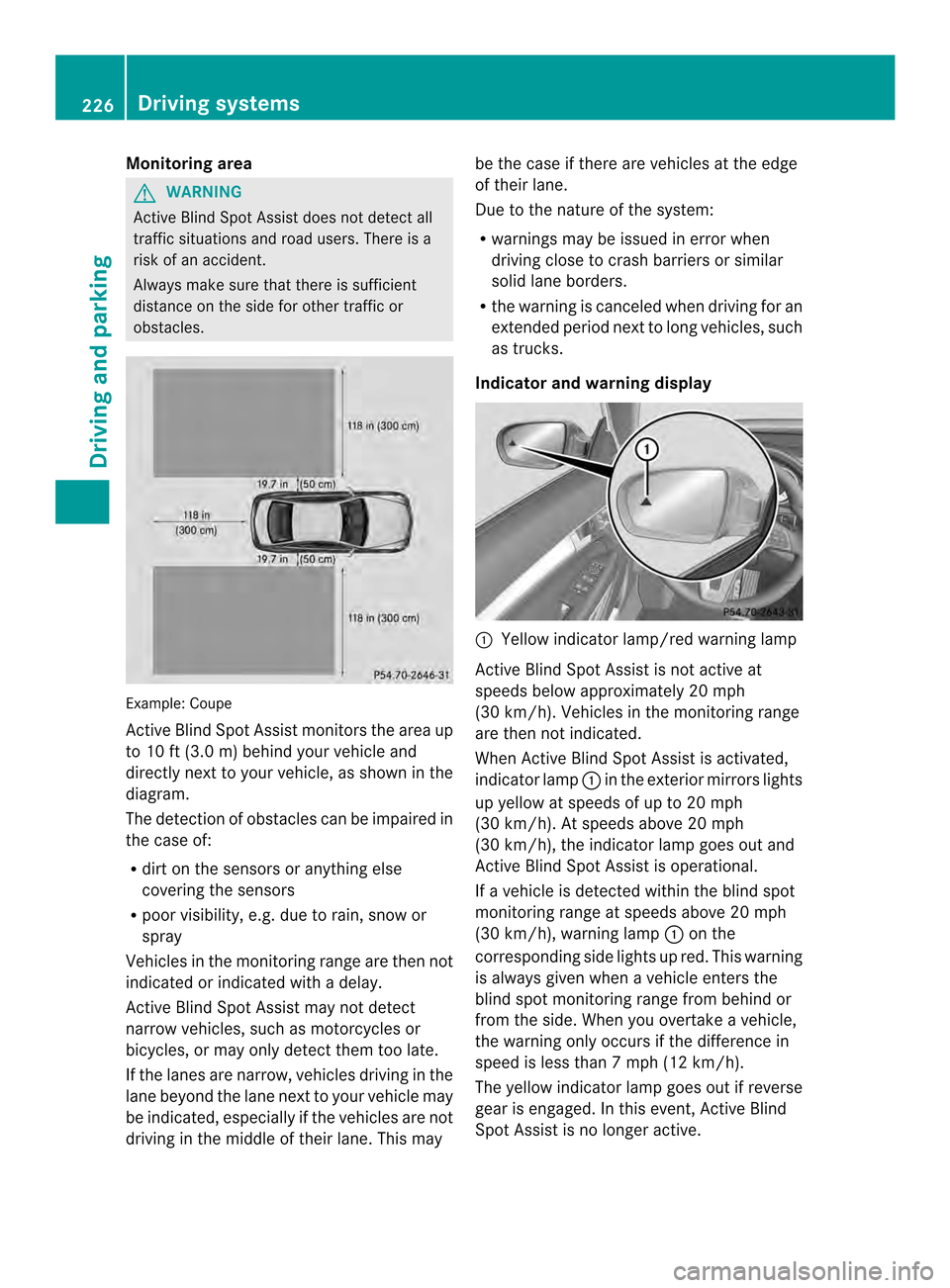
Active Blind Spot Assist monitors the area up
to 10 ft (3.0 m) behind your vehicle and
directly next to your vehicle, as shown in the
diagram.
The detection of obstacles can be impaired in
the case of:
R
dirt on the sensors or anything else
covering the sensors
R poor visibility, e.g. due to rain, snow or
spray
Vehicles in the monitoringr ange are then not
indicated or indicated with a delay.
Active Blind Spot Assist may not detect
narrow vehicles, such as motorcycles or
bicycles, or may only detect them too late.
If the lanes are narrow, vehicles driving in the
lane beyond the lane next to your vehicle may
be indicated, especially if the vehicles are not
driving in the middle of their lane .This may be the case if there are vehicles at the edge
of their lane.
Due to the nature of the system:
R warnings may be issued in error when
driving close to crash barriers or similar
solid lane borders.
R the warning is canceled when driving for an
extended period next to long vehicles, such
as trucks.
Indicator and warning display 0002
Yellow indicator lamp/red warning lamp
Active Blind Spot Assist is not active at
speeds below approximately 20 mph
(30 km/h). Vehicles in the monitoring range
are then not indicated.
When Active Blind Spot Assist is activated,
indicator lamp 0002in the exterior mirrors lights
up yellow at speeds of up to 20 mph
(30 km/h). At speeds above 20 mph
(30 km/h), the indicator lamp goes out and
Active Blind Spot Assist is operational.
If a vehicle is detected within the blind spot
monitoring range at speeds above 20 mph
(30 km/h), warning lamp 0002on the
corresponding side lights up red. This warning
is always given when a vehicle enters the
blind spot monitoring range from behind or
from the side. When you overtake a vehicle,
the warning only occurs if the difference in
speed is less than 7mph (12 km/h).
The yellow indicator lamp goes out if reverse
gear is engaged. In this event, Active Blind
Spot Assist is no longer active. 226
Driving systemsDriving and parking
Page 229 of 394
The brightness of the indicator/warning
lamps is adjusted automatically according to
the ambient light.
Visual and acoustic collision warning
If you switch on the turn signals to change
lanes and a vehicle is detected in the side
monitoring range, you receive a visual and
acoustic collision warning. You then hear a
double warning tone and red warning
lamp 0002flashes. If the turn signal remains on,
detected vehicles are indicated by the
flashing of red warning lamp 0002.There are no
further warning tones.
Course-correcting brake application G
WARNING
Ac ourse-correcting brake application cannot
always prevent a collision. There is a risk of
an accident.
Always steer, brake or accelerate yourself,
especially if Active Blind Spot Assist warns
you or makes a course-correcting brake
application. Always maintain a safe distance
at the sides. If Active Blind Spot Assist detects a risk of a
lateral collision in the monitoring range, a
course-correcting brake application is carried
out. This is meant to assist you in avoiding a
collision.
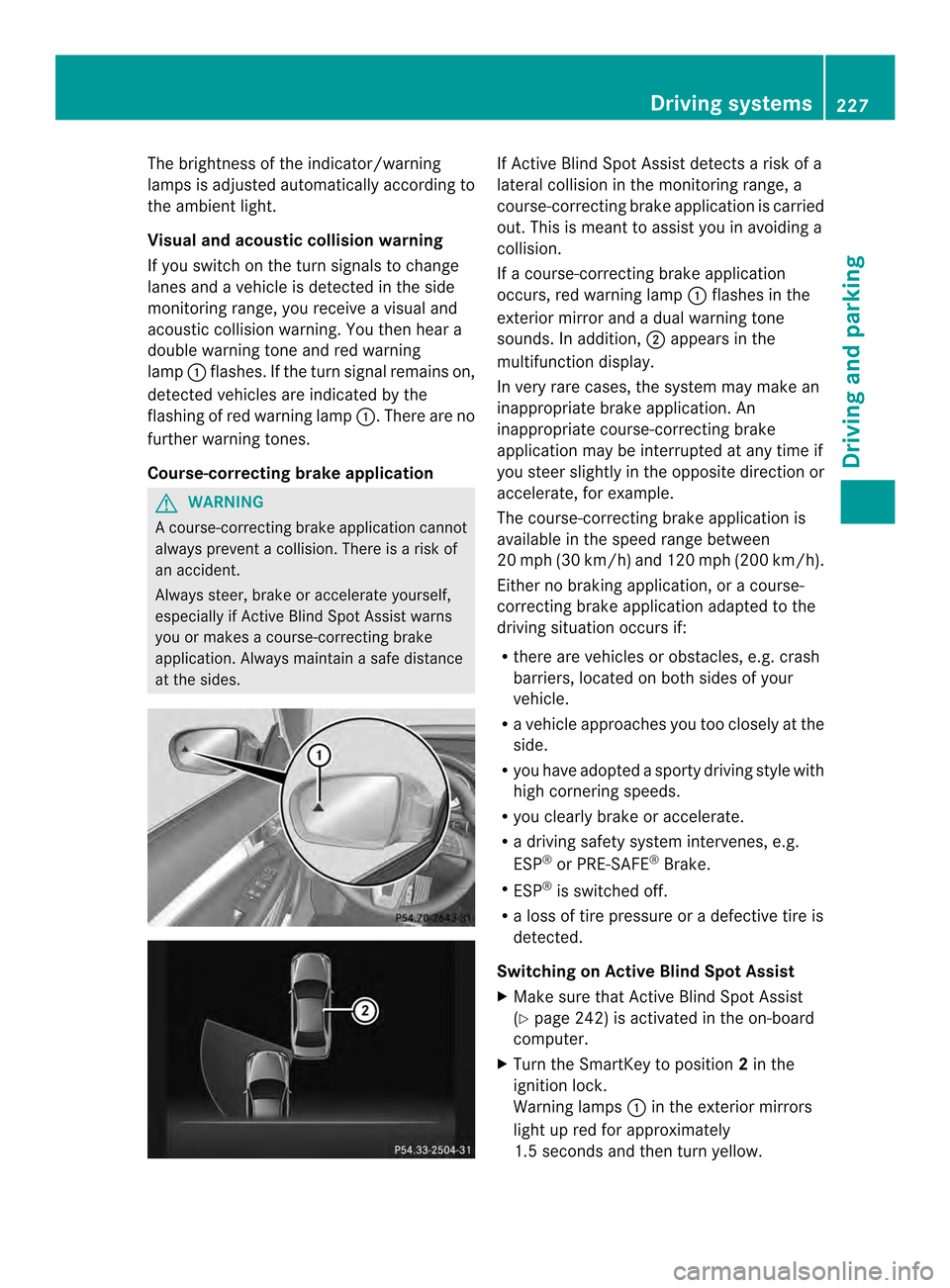
If a course-correcting brake application
occurs, red warning lamp
0002flashes in the
exterior mirror and a dual warning tone
sounds. In addition, 0003appears in the
multifunction display.
In very rare cases, the system may make an
inappropriate brake application. An
inappropriate course-correcting brake
application may be interrupted at any time if
you steer slightly in the opposite direction or
accelerate, for example.
The course-correcting brake application is
available in the speed range between
20 mph (30 km/h) and 120 mph (200 km/h).
Either no braking application, or a course-
correcting brake application adapted to the
driving situation occurs if:
R there are vehicles or obstacles, e.g. crash
barriers, located on both sides of your
vehicle.
R a vehicle approaches you too closely at the
side.
R you have adopted a sporty driving style with
high cornering speeds.
R you clearly brake or accelerate.
R a driving safety system intervenes, e.g.
ESP ®
or PRE-SAFE ®
Brake.
R ESP ®
is switched off.
R a loss of tire pressure or a defective tire is
detected.
Switching on Active Blind Spot Assist
X Make sure that Active Blind Spot Assist
(Y page 242) is activated in the on-board
computer.
X Turn the SmartKey to position 2in the
ignition lock.
Warning lamps 0002in the exterior mirrors
light up red for approximately
1.5 seconds and then turn yellow. Driving systems
227Driving and parking Z
Page 231 of 394
If no vehicle is detected in the adjacent lane
and there are broken lane markings detected,
no lane-correcting brake application is made.
Warning vibration in the steering wheel
A warning may be given if a front wheel
passes over a lane marking. It will warn you
by means of intermittent vibration in the
steering wheel for up to 1.5 seconds.
Lane-correcting brake application G
WARNING
A lane-correcting brake application cannot
always bring the vehicle back into the original
lane. There is a risk of an accident.
Always steer, brake or accelerate yourself,
especially if Active Lane Keeping Assist warns
you or makes a lane-correcting brake
application. G
WARNING
Active Lane Keeping Assist only detects
traffic conditions or road users to a limited
extent. In very rare cases, the system may
make an inappropriate brake application, e.g.
after intentionally driving over a solid lane
marking. There is arisk of an accident.
An inappropriate brake application may be
interrupted at any time if you steer slightly in
the opposite direction .Always make sure that
there is sufficient distance on the side for
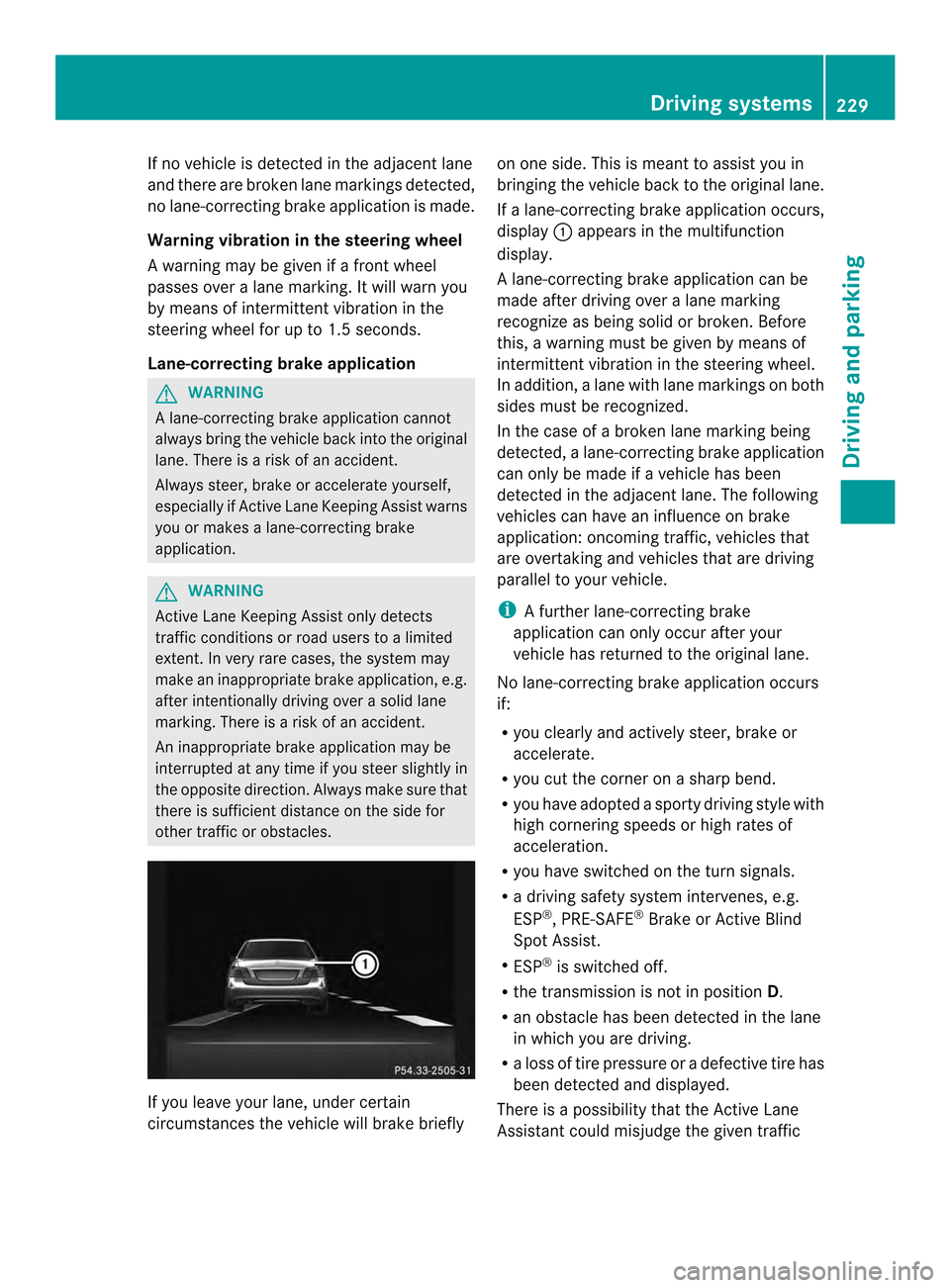
other traffic or obstacles. If you leave your lane, under certain
circumstances the vehicle will brake briefly on one side. This is mean
tto assist you in
bringing the vehicle back to the original lane.
If a lane-correcting brake application occurs,
display 0002appears in the multifunction
display.
A lane-correcting brake application can be
made after driving over a lane marking
recognize as being solid or broken .Before
this, a warning must be given by means of
intermittentv ibration in the steering wheel.
In addition, a lane with lane markings on both
sides must be recognized.
In the case of a broken lane marking being
detected, a lane-correcting brake application
can only be made if a vehicle has been
detected in the adjacent lane. The following
vehicles can have an influence on brake
application: oncoming traffic, vehicles that
are overtaking and vehicles that are driving
parallel to your vehicle.
i A further lane-correcting brake
application can only occur after your
vehicle has returned to the original lane.
No lane-correcting brak eapplication occurs
if:
R you clearly and actively steer, brake or
accelerate.
R you cut the corner on a sharp bend.
R you have adopted a sporty driving style with
high cornering speeds or high rates of
acceleration.
R you have switched on the turn signals.
R a driving safety system intervenes, e.g.
ESP ®
, PRE-SAFE ®
Brake or Active Blind
Spot Assist.
R ESP ®
is switched off.
R the transmission is not in position D.
R an obstacle has been detected in the lane
in which you are driving.
R a loss of tire pressure or a defective tire has
been detected and displayed.
There is a possibility that the Active Lane
Assistant could misjudge the given traffic Driving systems
229Driving and parking Z
Page 232 of 394
situation. An inappropriate brake application
may be interrupted at any time if you:
R steer slightly in the opposite direction
R switch on the turn signal
R clearly brake or accelerate
Al ane-correcting brake applicatio nis
interrupted automatically if:
R a driving safety system intervenes, e.g.
ESP ®
, PRE-SAFE ®
Brake or Active Blind
Spot Assist.
R lane markings can no longer be recognized.
Switching on Active Lane Keeping Assist
X Switch on Active Lane Keeping Assist using
the on-board computer; to do so, select
Standard or
Adaptive (Y
page 242).
If you drive at speeds above 40 mph
(60 km/h) and lane markings are detected,
the lines in the assistance graphics display
(Y page 240) are shown in green. Active
Lane Keeping Assist is ready for use.
If Standard is selected, no warning
vibration occurs if:
R you have switched on the tur nsignals .In
this event, the warnings are suppressed
for a certain period of time.
R a driving safety syste mintervenes, such
as ABS, BAS or ESP ®
.
When Adaptive is selected, no warning
vibration occurs if:
R you have switched on the tur nsignals .In
this event, the warnings are suppressed
for a certain period of time.
R a driving safety syste mintervenes, e.g.
ABS, BAS or ESP ®
.
R you accelerate hard, e.g .kickdown.
R you brake hard.
R you steer actively, e.g. swerve to avoid
an obstacle or change lanes quickly.
R you cut the corner on a sharp bend.
In order that you are warned only when
necessary and in good tim eifyou cross the
lane marking, the system recognizes certain
conditions and warns you accordingly. The warning vibration occurs earlier if:
R
you approach the outer lane marking on a
bend.
R the road has very wide lanes, e.g. a
highway.
R the system recognizes solid lane markings.
The warning vibration occurs later if:
R the road has narrow lanes.
R you cut the corner on a bend. 230
Driving systemsDriving and parking
Page 235 of 394
Outside temperature display
You should pay special attention to road
conditions when temperatures are around
freezing point.
The outside temperature display is in the
multifunction display (Y page 234).
Changes in the outside temperature are
displayed after a short delay. Speedometer with segments
The segments in the speedometer indicate
which speed range is available.
R Cruise control activated (Y page 189):
The segments light up from the stored
speed to the maximum speed.
R DISTRONIC PLUS activated (Y page 191):
One or two segments in the set speed
range light up.
R DISTRONIC PLUS detects avehicle in front:
The segments between the speed of the
vehicle in fron tand the stored speed light
up. Operating the on-board computer
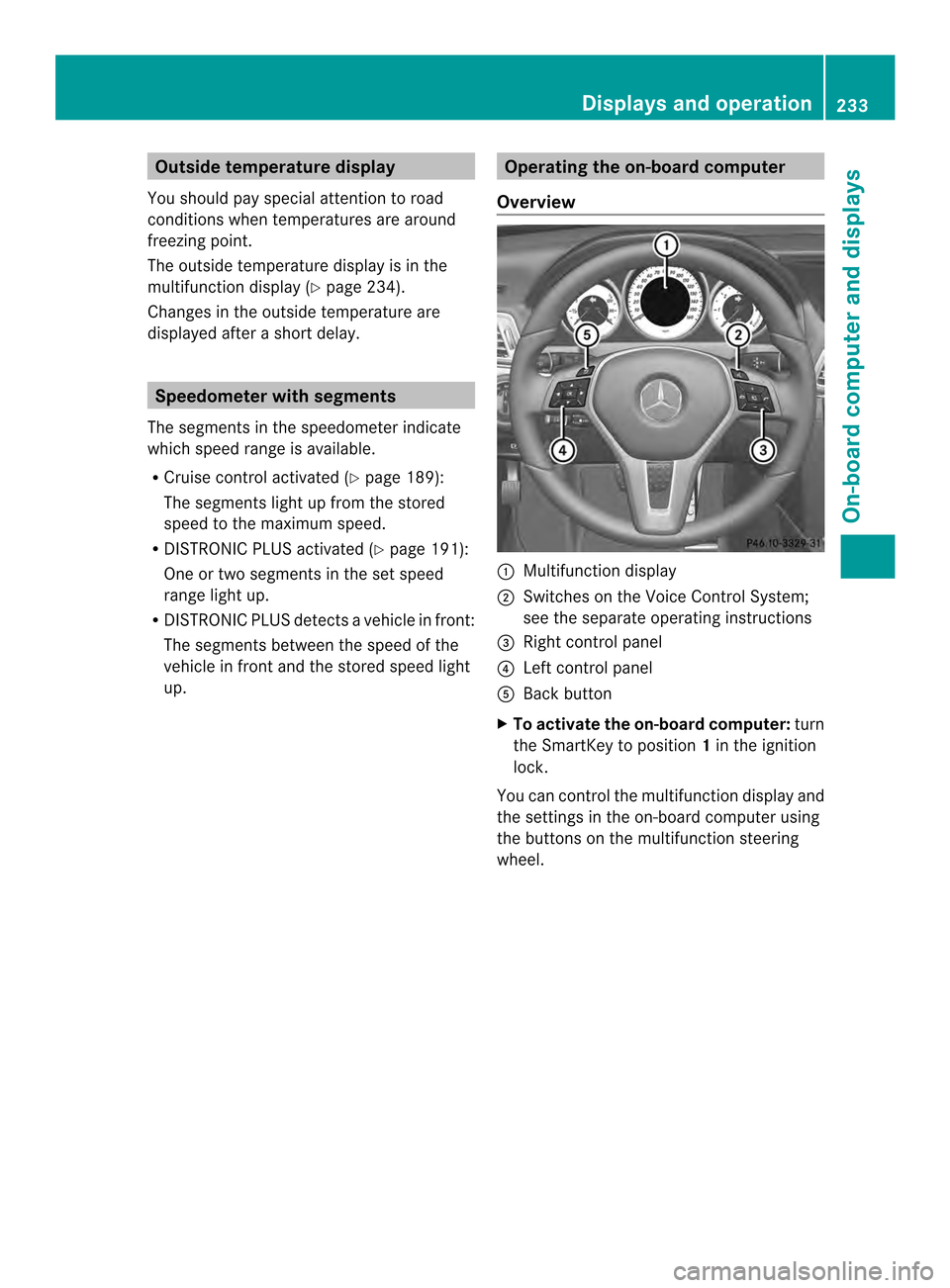
Overview 0002
Multifunctio ndisplay
0003 Switches on the Voice Control System;
see the separate operating instructions
0023 Right control panel
0022 Left control panel
0020 Back button
X To activat ethe on-board computer: turn
the SmartKey to position 1in the ignition
lock.
You can control the multifunction display and
the settings in the on-board computer using
the buttons on the multifunction steering
wheel. Displays and operation
233On-board computer and displays Z
Page 243 of 394
The assistance graphic can display the status
of and information from other driving systems
or driving safety systems.
The assistance graphic shows:
R the 0002 symbol when ATTENTION ASSIST
(Y page 220) is deactivated.
R the lane markings as bright lines when Lane
Keeping Assist (Y page 223) or Active Lane
Keeping Assist (Y page 228) is activated.
R the 0001 symbol when the distance
warning function (Y page 71) is
deactivated.
R the 0001 symbol when PRE-SAFE ®
Brake
(Y page 76) is deactivated.
Deactivating/activating ESP ®i
Observe the "Importan tsafety notes"
section in the description of ESP
(Y page 74). G
WARNING
If you deactivate ESP ®
, ESP ®
no longer
stabilizes the vehicle .There is an increased
risk of skidding and an accident.
Only deactivate ESP ®
in the situations
described in the following.
It may be best to deactivate ESP ®
in the
following situations:
R when using snow chains
R in deep snow
R on sand or gravel
For further information about ESP ®
, see
(Y page 74).
X Start the engine.
X Press the 0002or0005 button on the
steering wheel to select the DriveAssistmenu.
X Press the 0003or0004 button to select
ESP . X
Press the 000Bbutton.
The current selection is displayed.
X To activate/deactivate: press the000B
button again.
ESP ®
is deactivated if the 0015warning lamp
in the instrumentc luster lights up
continuously when the engine is running.
If the 000C warning lamp and the 0015
warning lamp are lit continuously, ESP ®
is not
available due to a malfunction.
Observe the information on warning lamps
(Y page 279).
Observe the information on display messages
(Y page 249).
Activating/deactivating PRE-SAFE ®
Brake PRE-SAFE
®
Brake is only available in vehicles
with DISTRONIC PLUS.
X Press 0002or0005 on the steering wheel
to selec tthe DriveAssist menu.
X Press the 0003or0004 button to select
PRE-SAFE Brake .
X Press the 000Bbutton.
The current selection is displayed.
X To activate/deactivate: press the000B
button again.
When PRE-SAFE ®
Brake is deactivated, the
assistance graphic shows the 0001symbol
in the multifunction display.
For more information on PRE-SAFE ®
Brake,
see (Y page 76).
Activating/deactivating the distance
warning function X
Press the 0002or0005 button on the
steering wheel to select the DriveAssist menu.
X Press 0003or0004 to select Distance Warning . Menus and submenus
241On-board computer and displays Z
Page 245 of 394
Maintenance menu
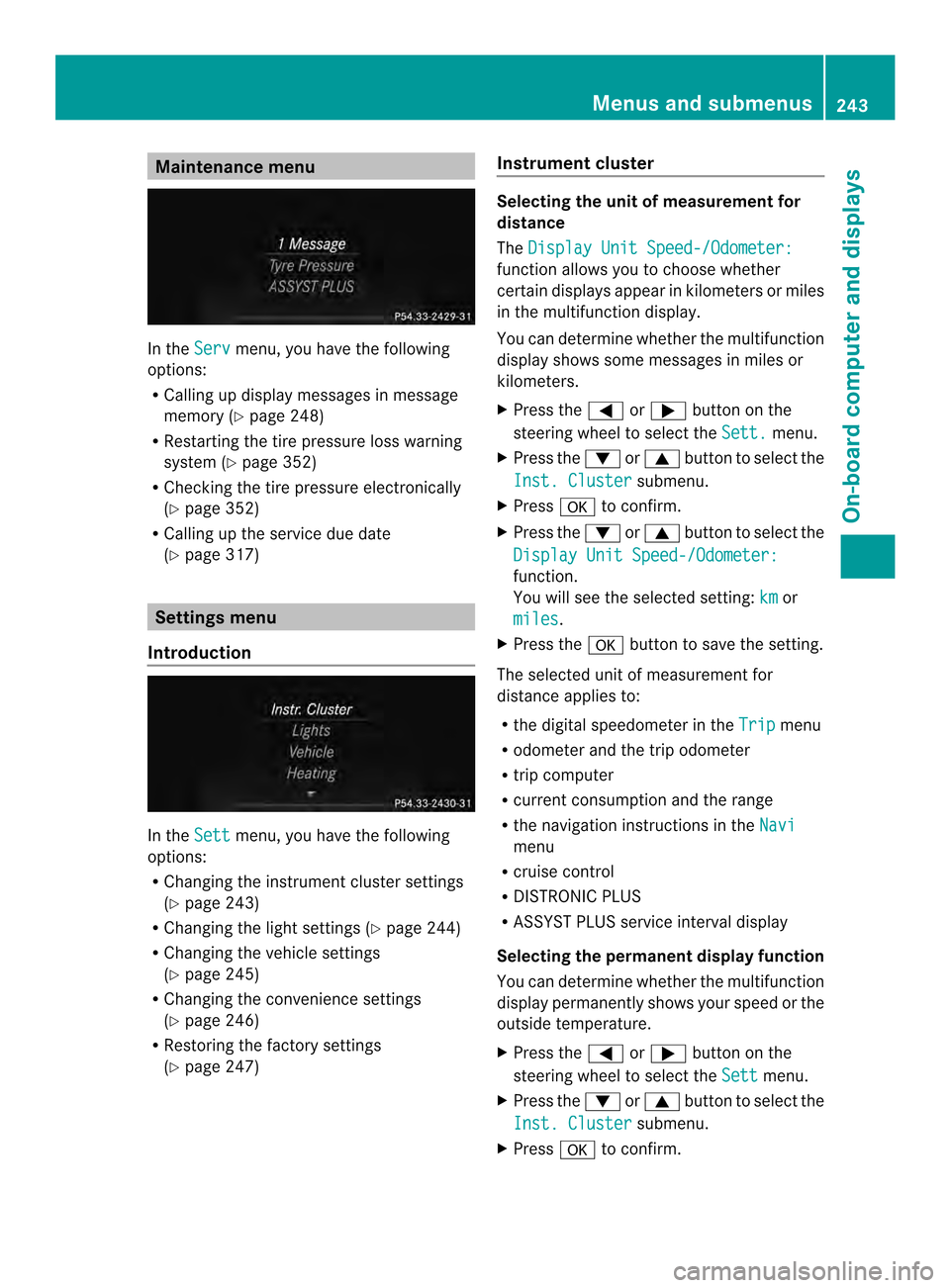
In the
Serv menu, you have the following
options:
R Calling up display messages in message
memory (Y page 248)
R Restarting the tire pressure loss warning
system (Y page 352)
R Checking the tire pressure electronically
(Y page 352)
R Calling up the service due date
(Y page 317) Settings menu
Introduction In the
Sett menu, you have the following
options:
R Changing the instrument cluster settings
(Y page 243)
R Changing the light settings (Y page 244)
R Changing the vehicle settings
(Y page 245)
R Changing the convenience settings
(Y page 246)
R Restoring the factory settings
(Y page 247) Instrument cluster Selecting the unit of measuremen
tfor
distance
The Display Unit Speed-/Odometer: function allows you to choose whether
certain displays appear in kilometers or miles
in the multifunction display.
You can determine whether the multifunction
display shows some messages in miles or
kilometers.
X
Press the 0002or0005 button on the
steering wheel to selec tthe Sett. menu.
X Press the 0004or0003 button to select the
Inst. Cluster submenu.
X Press 000Bto confirm.
X Press the 0004or0003 button to select the
Display Unit Speed-/Odometer: function.
You will see the selected setting:
km or
miles .
X Press the 000Bbutton to save the setting.
The selected unit of measurement for
distance applies to:
R the digital speedometer in the Trip menu
R odometer and the trip odometer
R trip computer
R current consumption and the range
R the navigation instructions in the Navi menu
R cruise control
R DISTRONIC PLUS
R ASSYST PLUS service interval display
Selecting the permanent display function
You can determine whether the multifunction
display permanently shows your speed or the
outside temperature.
X Press the 0002or0005 button on the
steering wheel to select the Sett menu.
X Press the 0004or0003 button to select the
Inst. Cluster submenu.
X Press 000Bto confirm. Menus and submenus
243On-board computer and displays Z
Page 246 of 394
![MERCEDES-BENZ E-Class CABRIOLET 2014 C207 Owners Manual X
Press the 0004or0003 button to select the
Permanent Display function.
You will see the selected setting OutsideTemperature or
Additional Speedometer [km/h] /Additional
Speedometer [mph] .
X Press th](/img/4/3595/w960_3595-245.png "MERCEDES-BENZ E-Class CABRIOLET 2014 C207 Owners Manual X
Press the 0004or0003 button to select the
Permanent Display function.
You will see the selected setting OutsideTemperature or
Additional Speedometer [km/h] /Additional
Speedometer [mph] .
X Press th")
X
Press the 0004or0003 button to select the
Permanent Display function.
You will see the selected setting OutsideTemperature or
Additional Speedometer [km/h] /Additional
Speedometer [mph] .
X Press the 000Bbutton to save the setting.
i The speed is displayed in km/h/mph
according to the setting.
Lights Setting the brightness of the instrument
cluster lighting and switches
The lighting in the instrument cluster, in the
displays and the controls in the vehicle
interior can be adjusted using the
Brightness Display/Switches: function.
X Press the 0002or0005 button on the
steering wheel to select the Sett. menu.
X Press the 0004or0003 button to select the
Lights submenu.
X Press 000Bto confirm.
X Press the 0004or0003 button to select the
Brightness Display/Switches: function.
You will see the selected setting.
X Press 000Bto confirm.
X Press the 0004or0003 button to adjust the
brightness to any level from Level 1 to
Level 5 (bright).
X Press the 000Bor0007 button to save the
setting.
If the light switch is set to 0004,0014or
000B, the brightness is dependent upon
the brightness of the ambient light.
i The light sensor in the instrument cluster
automatically controls the brightness of
the multifunction display.
In daylight, the displays in the instrument
cluster are not illuminated. Switching the daytime running lamps on/
off
i
This function is not available in Canada.
X Press the 0002or0005 button on the
steering wheel to select the Sett. menu.
X Press the 0004or0003 button to select the
Lights submenu.
X Press 000Bto confirm.
X Press 0004or0003 to select the Day Lights function.
If the Day Lights function has been
switched on, the cone of light and the
0003 symbol in the multifunction display
are shown in orange.
X Press the 000Bbutton to save the setting.
Further information on daytime running
lamps (Y page 135).
Setting the brightness of the ambient
lighting
X Press the 0002or0005 button on the
steering wheel to select the Sett. menu.
X Press the 0004or0003 button to select the
Lights submenu.
X Press 000Bto confirm.
X Press the 0004or0003 button to select the
Amb. Light +/-. function.
You will see the selected setting.
X Press 000Bto confirm.
X Press the 0004or0003 button to adjust the
brightness to any level from Off to
Level 5 (bright).
X Press the 000Bor0007 button to save the
setting.
Setting the ambient lighting color
X Press the 0002or0005 button on the
steering wheel to select the Sett. menu.
X Press the 0004or0003 button to select the
Lights submenu.
X Press 000Bto confirm.
X Press the 0004or0003 button to select the
Ambient Light Color function.244
Menus and submenusOn-board computer and displays
Page 247 of 394

X
Press 000Bto confirm.
X Press the 0004or0003 button to set the
color to SOLAR ,
NEUTRAL or
POLAR .
X Press the 000Bor0007 button to save the
setting.
Activating/deactivating surround
lighting and exterior lighting delayed
switch-off
X Press the 0002or0005 button on the
steering wheel to select the Sett. menu.
X Press the 0004or0003 button to select the
Lights submenu.
X Press 000Bto confirm.
X Press 0004or0003 to select the
Surround Lighting function.
If the Surround Lighting function is
activated, the light cone and the area
around the vehicle are displayed in orange
in the multifunction display.
X Press the 000Bbutton to save the setting.
Deactivating delayed switch-off of the
exterior lighting temporarily:
X Before leaving the vehicle, turn the
SmartKey to position 0in the ignition lock.
X Turn the SmartKey to position 2in the
ignition lock.
The exterior lighting delayed switch-off is
deactivated.
Delayed switch-off of the exterior lighting is
reactivated the next time you start the
engine.
If you have activated the SurroundLighting function and the light switch is set
to 0004, the following functions are activated
when it is dark:
R surround lighting: the exterior lighting
remains lit for 40 seconds after unlocking
with the SmartKey. If you start the engine,
the surround lighting is switched off and
automatic headlamp mode is activated
(Y page 135).
R exterior lighting delayed switch-off: the
exterior lighting remains lit for 60 seconds after the engine is switched off.
If you close all the doors and the trunkl
id,
the exterior lighting goes off after
5s econds.
i Depending on your vehicle's equipment,
when the surround lighting and delayed
switch-off exterior lighting are on, the
following light up:
R Parking lamps
R Low-beam headlamps
R Daytime running lamps
R Side marker lamps
R Surround lighting in the exterior mirrors
Activating/deactivating the interior
lighting delayed switch-off
If you activate the Light. Delay function,
the interior lighting remains on for
20 seconds after you remove the key from the
ignition lock.
X Press the 0002or0005 button on the
steering wheel to select the Sett. menu.
X Press the 0004or0003 button to select the
Lights submenu.
X Press 000Bto confirm.
X Press the 0004or0003 button to select the
Light. Delay function.
If the Light. Delay function has been
switched on, the vehicle interior is
displayed in orange in the multifunction
display.
X Press the 000Bbutton to save the setting.
Vehicle Activating/deactivating the automatic
door locking mechanism
X
Press the 0002or0005 button on the
steering wheel to select the Sett. menu.
X Press 0004or0003 to select the Vehicle submenu.
X Press 000Bto confirm. Menus and submenus
245On-board computer and displays Z
Page 248 of 394
X
Press 0004or0003 to select the Auto. Door Locks function.
When the Auto. Door Locks function is
activated, the vehicle doors are displayed
in orange in the multifunction display.
X Press the 000Bbutton to save the setting.
If you activate the Auto. Door Locksfunction, the vehicle is centrally locked above
a speed of around 9 mph (15 km/h).
For further information on the automatic
locking feature, see (Y
page 89).
Activating/deactivating the acoustic
locking verification signal
If you switch on the Acoustic Lock function,
an acoustic signal sounds when you lock the
vehicle.
X Press the 0002or0005 button on the
steering wheel to select the Sett. menu.
X Press 0004or0003 to select the Vehicle submenu.
X Press 000Bto confirm.
X Press the 0004or0003 button to select the
Acoustic Lock function.
If the Acoustic Lock function is activated,
the 000D symbol in the multifunction
display lights up orange.
X Press the 000Bbutton to save the setting.
Convenience Activating/deactivating the EASY-
ENTRY/EXIT feature
G
WARNING
When the EASY-ENTRY/EXIT feature adjusts
the steering wheel, you and other vehicle
occupants –particularly childre n–could
become trapped. There is a risk of injury.
While the EASY-ENTRY/EXIT feature is
making adjustments, make sure that no one
has any body parts in the sweep of the
steering wheel. If somebody becomes trapped:
R
press one of the memory function position
buttons, or
R move the switch for steering wheel
adjustmen tinthe opposite direction to that
in which the steering wheel is moving.
The adjustment process is stopped.
X Press the 0002or0005 button on the
steering wheel to select the Sett. menu.
X Press the 0004or0003 button to select the
Convenience submenu.
X Press 000Bto confirm.
X Press the 0004or0003 button to select the
Easy Entry/Exit function.
If the Easy Entry/Exit function is
activated, the vehicle steering wheel is
displayed in orange in the multifunction
display.
X Press the 000Bbutton to save the setting.
Further information on the EASY-ENTRY/EXIT
feature (Y page 126).
Switching the belt adjustment on/off
X Press the 0002or0005 button on the
steering wheel to select the Sett. menu.
X Press the 0004or0003 button to select the
Convenience submenu.
X Press 000Bto confirm.
X Press the 0004or0003 button to select the
Belt Adjustment function.
If the Belt Adjustment function is
activated, the vehicle seat belt is shown in
orange in the multifunction display.
X Press the 000Bbutton to save the setting.
For further information on belt adjustment,
see (Y page 60).
Switching the fold-in mirrors with the
locking feature on/off
This function is only available on vehicles with
the memory function (Y page 130).
This function is only available in Canada. 246
Menus and submenusOn-board computer and displays