ignition MERCEDES-BENZ E-Class CABRIOLET 2014 C207 Workshop Manual
[x] Cancel search | Manufacturer: MERCEDES-BENZ, Model Year: 2014, Model line: E-Class CABRIOLET, Model: MERCEDES-BENZ E-Class CABRIOLET 2014 C207Pages: 394, PDF Size: 5.28 MB
Page 156 of 394
Problems with the "Cooling with air dehumidification" function
Problem Possible causes/consequences and
0001 Solutions
The indicator lamp in
the
0005 button
flashes three times or
remains off. The
"Cooling with air
dehumidification"
function cannot be
switched on. Cooling with air dehumidification has been deactivated due to a
malfunction.
X
Visit a qualified specialist workshop. Setting climate control to automatic
General notes In automatic mode, the set temperature is
maintained automatically at a constant level.
The system automatically regulates the
temperature of the dispensed air, the airflow
and the air distribution.
The automatic mode functions optimally
when the "Cooling with air dehumidification"
function is activated. If necessary, cooling
with air dehumidification can be deactivated.
If you deactivate the "Cooling with air-
dehumidification" function, the air inside the
vehicle will not be cooled. The air inside the
vehicle will also not be dehumidified. The
windows can fog up more quickly. Therefore,
deactivate the cooling with air-
dehumidification function only briefly.
Activating/switching
X
Turn the SmartKey to position 2in the
ignition lock (Y page 165).
X Set the desired temperature.
X To activate: press the0004button.
The indicator lamp above the 0004button
lights up. Automatic air distribution and
airflow are activated.
i 3-zone automatic climate control: when
automatic mode is activated, you can
select a climate mode (Y page 154).
X To switch to manual mode: Dual-zone automatic climate control: press
air distribution adjustment button
0017(Y
page 149).
3-zone automatic climate control: press air
distribution adjustment button
001B(Y page 151).
The indicator lamp above the 0004button
goes out.
or
X Dual-zone automatic climate control: press
airflow adjustment button 0018(Ypage 149).
3-zone automatic climate control: press
airflow adjustment button 001A(Ypage 151).
The indicator lamp above the 0004button
goes out. Adjusting the climate mode settings
The "Set climate mode" function is only
available with 3-zone automatic climate
control.
You can select the following climate mode
settings in automatic mode:
FOCUS high airflow that is set slightly cooler
MEDIUM medium airflow, standard setting
DIFFUSE low airflow that is set slightly warmer and with less draft 154
Operating the climate control systemsClimate control
Page 157 of 394
X
Turn the SmartKey to position 2in the
ignition lock (Y page 165).
X Press the 0004button.
X Press climate mode selection button 0018up
or down and select the desired level
(Y page 151) Setting the temperature
Dual-zone automatic climate control Different temperatures can be set for the
driver's and front-passenger sides.
X Turn the SmartKey to position 2in the
ignition lock (Y page 165).
X To increase/reduce: press temperature
selection switch 0016or001A up or down
(Y page 149).
Only change the temperature setting in
small increments. Start at 72 ‡ (22 †).
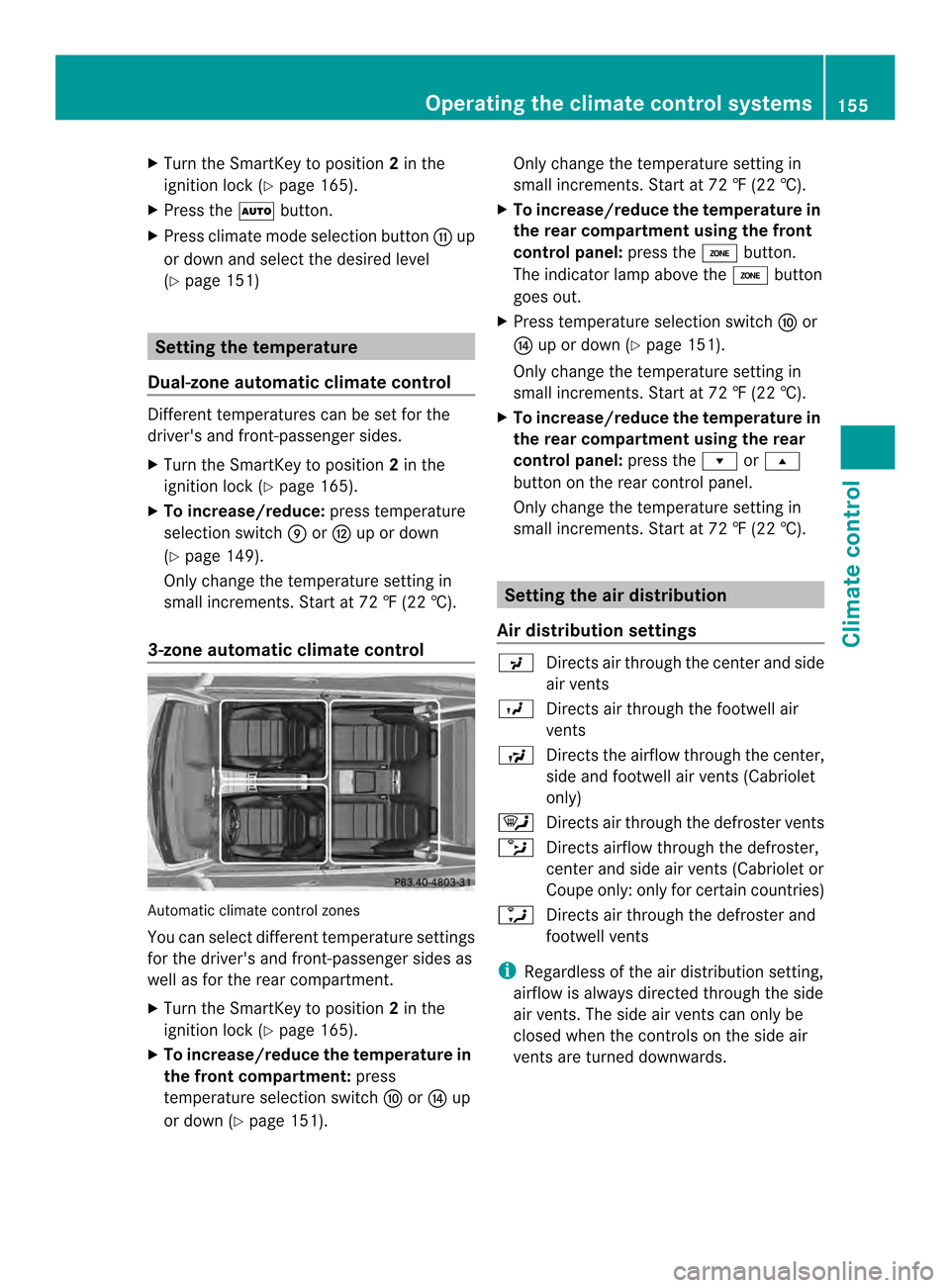
3-zone automatic climate control Automatic climate control zones
You can select different temperature settings
for the driver's and front-passenger sides as
well as for the rear compartment.
X Turn the SmartKey to position 2in the
ignition lock (Y page 165).
X To increase/reduce the temperature in
the front compartment: press
temperature selection switch 0017or001C up
or down (Y page 151). Only change the temperature setting in
small increments. Start at 72 ‡ (22 †).
X To increase/reduce the temperature in
the rear compartment using the front
control panel: press the0003button.
The indicator lamp above the 0003button
goes out.
X Press temperature selection switch 0017or
001C up or down (Y page 151).
Only change the temperature setting in
small increments. Start at 72 ‡ (22 †).
X To increase/reduce the temperature in
the rear compartment using the rear
control panel: press the0008or0007
button on the rear control panel.
Only change the temperature setting in
small increments. Start at 72 ‡ (22 †). Setting the air distribution
Air distribution settings 0018
Directs air through the center and side
air vents
0017 Directs air through the footwell air
vents
0019 Directs the airflow through the center,
side and footwell air vents( Cabriolet
only)
0006 Directs air through the defroste rvents
0016 Directs airflow through the defroster,
center and side air vents (Cabriolet or
Coupe only: only for certain countries)
0015 Directs air through the defroster and
footwell vents
i Regardless of the air distribution setting,
airflow is always directed through the side
air vents. The side air vents can only be
closed when the controls on the side air
vents are turned downwards. Operating the climate control systems
155Climate control
Page 158 of 394
Setting the air distribution
X
Turn the SmartKey to position 2in the
ignition lock (Y page 165).
X Dual-zone automatic climate control: press
air distribution adjustment button 0017up or
down, until the desired symbol appears in
the display (Y page 149).
X 3-zone automatic climate control: press air
distribution adjustment button 001Bup or
down, until the desired symbol appears in
the display (Y page 151). Setting the airflow
Dual-zone automatic climate control X
Turn the SmartKey to position 2in the
ignition lock (Y page 165).
X To increase/reduce: press airflow switch
0018 up or down (Y page 149).
3-zone automatic climate control X
Turn the SmartKey to position 2in the
ignition lock (Y page 165).
X To increase/reduce: press airflow switch
001A up or down (Y page 151).
If the battery is not sufficiently charged,
blower output may be reduced. As soon as
the battery is sufficiently charged, full blower
output will be available. Switching the ZONE function on/off
X To activate: press the0003button.
The indicator lamp above the 0003button
lights up.
Dual-zone automatic climate control: the
temperature setting for the driver's side is
not adopted for the front-passenger side.
3-zone automatic climate control: the
temperature setting for the driver's side is not adopted for the front-passenger side
and the rear compartment.
X To deactivate: press the0003button.
The indicator lamp above the 0003button
goes out.
Dual-zone automatic climate control: the
temperature setting for the driver's side is
adopted for the front-passenger side.
3-zone automatic climate control: the
temperature setting for the driver's side is
adopted for the front-passenger side and
the rear compartment. Defrosting the windshield
You can use this function to defrost the
windshield or to defrost the inside of the
windshield and the side windows.
Switch off the "Windshield defrosting"
function as soon as the windshield is clear
again.
X Turn the SmartKey to position 2in the
ignition lock (Y page 165).
X To activate: press the0009button.
The indicator lamp above the 0009button
lights up.
The climate control system switches to the
following functions:
R high airflow
R high temperature
R air distribution to the windshield and
front side windows
R air-recirculation mode off
If the battery is not sufficiently charged,
blower output may be reduced. Once the
battery is sufficiently charged again, full
blower output will be available again.
X To deactivate: press the0009button.
The indicator lamp above the 0009button
goes out. The previously selected settings
are restored. Air-recirculation mode
remains deactivated.
or 156
Operating the climate control systemsClimate control
Page 159 of 394
X
Press the 0004button.
The indicator lamp above the 0009button
goes out. Airflow and air distribution are set
to automatic mode.
or
X Dual-zone automatic climate control: press
temperature selection switch 0016or001A up
or down (Y page 149).
3-zone automatic climate control: press
temperature selection switch 0017or001C up
or down (Y page 151).
or
X Dual-zone automatic climate control: press
airflow switch 0018up or down
(Y page 149).
3-zone automatic climate control: press
airflow switch 001Aup or down
(Y page 151). MAX COOL maximum cooling
The MAX COOL function is only available in
vehicles for the USA.
MAX COOL is only operational when the
engine is running.
X To activate: press the0001button.
The indicator lamp in the button lights up.
X To activate: press off-road button 0001
again.
The indicator lamp goes out. The previously
selected settings are restored.
When you activate MAX COOL, climate
control switches to the following functions:
R maximum cooling
R maximum airflow
R air-recirculation mode on Defrosting the windows
Windows fogged up on the inside X
Activate the 0005cooling with air
dehumidification function.
X Activate automatic mode 0004.
X Adjust the side air vents so that the warmed
air is directed to the side windows.
X If the windows continue to fog up, activate
the 0009 "Windshield defrosting" function.
i You should only select this setting until
the windshield is clear again.
Windows fogged up on the outside X
Dual-zone automatic climate control: press
air distribution adjustmen tbutton 0017up or
down (Y page 149), until the 0018or
0017 symbol appears in the display.
X 3-zone automatic climate control :press air
distributio nadjustment button 001Bup or
down (Y page 151), until the 0018or
0017 symbol appears in the display.
X Adjust the side air vent sso that no air is
directed to the side windows. Rear window defroster
General notes The rear window defroster has a high current
draw. You should therefore switch it off as
soon as the rear window is clear. Otherwise,
the rear window defroster switches off
automatically after several minutes.
If the battery voltage is too low, the rear
window defroster may switch off.
Activating/deactivating
X
Turn the SmartKey to position 2in the
ignition lock (Y page 165).
X Press the 000Dbutton.
The indicator lamp above the 000Dbutton
lights up or goes out. Operating the climate control systems
157Climate control
Page 160 of 394
Problems with the rear window defroster
Problem Possible causes/consequences and
0001 Solutions
The rear window
defroster has
deactivated
prematurely or cannot
be activated. The battery has not been sufficiently charged.
X
Switch off any consumers that are not required, e.g. reading
lamps, interior lighting or the seat heating.
When the battery is sufficiently charged, the rear window
defroster can be activated again. Activating/deactivating air-
recirculation mode
General notes You can deactivate the flow of fresh air if
unpleasant odors are enteringt
he vehicle
from outside. The air already inside the
vehicle will then be recirculated.
If you switch on air-recirculation mode, the
windows can fog up more quickly, in
particular at low temperatures. Only use air-
recirculation mode briefly to prevent the
windows from fogging up.
The operation of air-recirculation mode is the
same for all control panels.
Activating/deactivating X
Turn the SmartKey to position 2in the
ignition lock (Y page 165).
X To activate: press the0013button.
The indicator lamp above the 0013button
lights up.
i Dual-zone automatic climate control: air-
recirculation mode is automatically
activated at high outside temperatures.
3-zone automatic climate control: air-
recirculation mode is automatically
activated at high levels of pollution or at
high outside temperatures.
When air-recirculation mode is activated
automatically, the indicator lamp above the 0013
button does not light up. Outside air
is added after about 30 minutes.
X To deactivate: press the0013button.
The indicator lamp above the 0013button
goes out.
i Air-recirculation mode deactivates
automatically:
R after approximately five minutes at
outside temperatures below
approximately 41 ‡ (5 †)
R after approximately five minutes if
cooling with air dehumidification is
deactivated
R after approximately 30 minutes at
outside temperatures above
approximately 41 ‡(5†) if the "Cooling
with air dehumidification" function is
activated Activating/deactivating the residual
heat function
General notes The residual heat function is only available in
vehicles for Canada with automatic climate
control.
It is possible to make use of the residual heat
of the engine to continue heating the vehicle
for approximately 30 minutes after the engine
has been switched off. The heating time
depends on the temperature that has been
set.
Coupe: optimum operation of the residual
heat function is only achieved with the side158
Operating the climate control systemsClimate control
Page 161 of 394

windows and panorama roof with power tilt/
sliding panel closed.
Cabriolet: optimum operatio nofthe residual
heat function is only achieved when the soft
top is closed.
Activating/deactivating X
Turn the SmartKey to position 0in the
ignition lock or remove it (Y page 165).
X To activate: press the0002button.
The indicator lamp above the 0002button
lights up.
i If the residual heat function is activated,
the windows may fog up on the inside.
i The blower will run at a low speed
regardless of the airflow setting.
i If you activate the residual heat function
at high temperatures, only the ventilation
will be activated. The blower runs at
medium speed.
X To deactivate: press the0002button.
The indicator lamp above the 0002button
goes out.
Residual heat is deactivated automatically:
R after approximately 30 minutes
R when the ignition is switched on
R if the battery voltage drops Setting the air vents
Important safety notes
G
WARNING
Very hot or very cold air can flow from the air
vents.T his could result in burns or frostbite in
the immediate vicinity of the air vents. There
is a risk of injury.
Make sure that all vehicle occupants always
maintain a sufficient distance to the air
outlets. If necessary, redirect the airflow to
another area of the vehicle interior. In order to ensure the direct flow of fresh air
through the air vents into the vehicle interior,
please observe the following notes:
R
keep the air inlet between the windshield
and the hood free of blockages, such as ice,
snow or leaves.
R never cover the air vents or air intake grilles
in the vehicle interior. Setting the center air vents
0002
Center air vent, left
0003 Center air vent, right
0023 Center vent thumbwheel, right
0022 Center vent thumbwheel, left
X To open/close: turn thumbwheels 0023
and 0022up or down. Setting the side air vents
0002
Defroster vent
0003 Side air vent
0023 Control for side air vent Setting the air vents
159Climate control Z
Page 166 of 394
Useful information
i This Operator's Manual describes all
models and all standard and optional
equipment of your vehicle available at the
time of publication of the Operator's
Manual. Country-specific differences are
possible. Please note that your vehicle may
not be equipped with all features
described. This also applies to safety-
related systems and functions.
i Read the information on qualified
specialist workshops: (Y page 25).Notes on breaking-in
anew vehicle Important safety notes
New and replaced brake pads and discs only
reach their optimum braking effect after
several hundred kilometers of driving.
Compensate for this by applying greater force
to the brake pedal. The first 1000 miles(1500 km)
The more you look after the engine when it is
new, the more satisfied you will be with its
performance in the future.
R You should therefore drive at varying
vehicle and engine speeds for the first
1000 miles (1500 km).
R Avoid heavy loads, e.g .driving at full
throttle, during this period.
R Change gearing ood time, before the
tachometer needle is 0001of the way to the
red area of the tachometer.
R If possible, do not depress the accelerator
pedal past the point of resistance
(kickdown).
After 1000 miles (1500 km), you can increase
the engine speed gradually and accelerate
the vehicle to full speed. i
You should also observe these notes on
breaking in if the engine or parts of the drive
train on your vehicle have been replaced.
i Always observe the respective speed
limits. Driving
Important safety notes
G
WARNING
Objects in the driver's footwell can restric tthe
pedal travel or obstruct adepressed pedal.
The operating and road safety of the vehicle
is jeopardized. There is a risk of an accident.
Make sure that all objects in the vehicle are
stowed correctly, and that they cannot enter
the driver's footwell. Install the floormats
securely and as specified in order to ensure
sufficien tclearance for the pedals. Do not use
loose floormats and do not place floormats on
top of one another. G
WARNING
Unsuitable footwear can hinde rcorrect usage
of the pedals, e.g.:
R shoes with thick soles
R shoes with high heels
R slippers
There is a risk of an accident.
Wear suitable footwear to ensure correct
usage of the pedals. G
WARNING
If you switch off the ignition while driving,
safety-relevant functions are only available
with limitations, or not at all. This could affect,
for example, the power steering and the brake
boosting effect .You will require considerably
more effort to steer and brake. There is a risk
of an accident.
Do not switch off the ignition while driving. 164
DrivingDriving and parking
Page 167 of 394

G
WARNING
If the parking brake has not been fully
released when driving, the parking brake can:
R overheat and cause a fire
R lose its hold function.
There is a risk of fire and an accident. Release
the parking brake fully before driving off.
! Warm up the engine quickly. Do not use
the engine's full performance until it has
reached operating temperature.
Only shift the automatic transmission to
the desired drive position when the vehicle
is stationary.
Where possible, avoid spinning the drive
wheels when pulling away on slippery
roads. You could otherwise damage the
drive train. Keyp
ositions
SmartKey 000F
To remove the SmartKey
(shif tthe transmission to position P)
0006 Power supply for some consumers, such
as the windshield wipers
0007 Ignition (power supply for all consumers)
and drive position
0008 To start the engine
i The SmartKey can be turned in the
ignition lock even if it is not the correct
SmartKey for the vehicle. The ignition is not
switched on. The engine cannot be started. KEYLESS-GO General notes
R
Do not store the KEYLESS-GO key together
with:
-electronic devices, e.g. a mobile phone
or another SmartKey
- metallic objects, e.g. coins or metal film
R Do not keep the KEYLESS-GO key in metal
objects, e.g. metal cases.
This can affect the functionality of
KEYLESS-GO.
Vehicles with KEYLESS-GO are equipped with
SmartKeys featuring the integrated KEYLESS-
GO function and a detachable Start/Stop
button.
The Start/Stop button must be inserted in the
ignition lock and the SmartKey must be in the
vehicle.
Pressing the Start/Stop button several times
in succession corresponds to the different
SmartKey positions in the ignition lock. This
is only the case if you are not depressing the
brake pedal.
If you depress the brake pedal and press the
Start/Stop button, the engine starts
immediately.
The Start/Stop button can be removed from
the ignition lock. Then, you can insert the
SmartKey into the ignition lock.
i You do not have to remove the Start/Stop
button from the ignition lock when you
leave the vehicle. You should, however,
always take the SmartKey with you when
leaving the vehicle. As long as the
SmartKey is in the vehicle:
R the vehicle can be started using the
Start/Stop button and
R electrically powered equipment can be
operated. Driving
165Driving and parking Z
Page 168 of 394
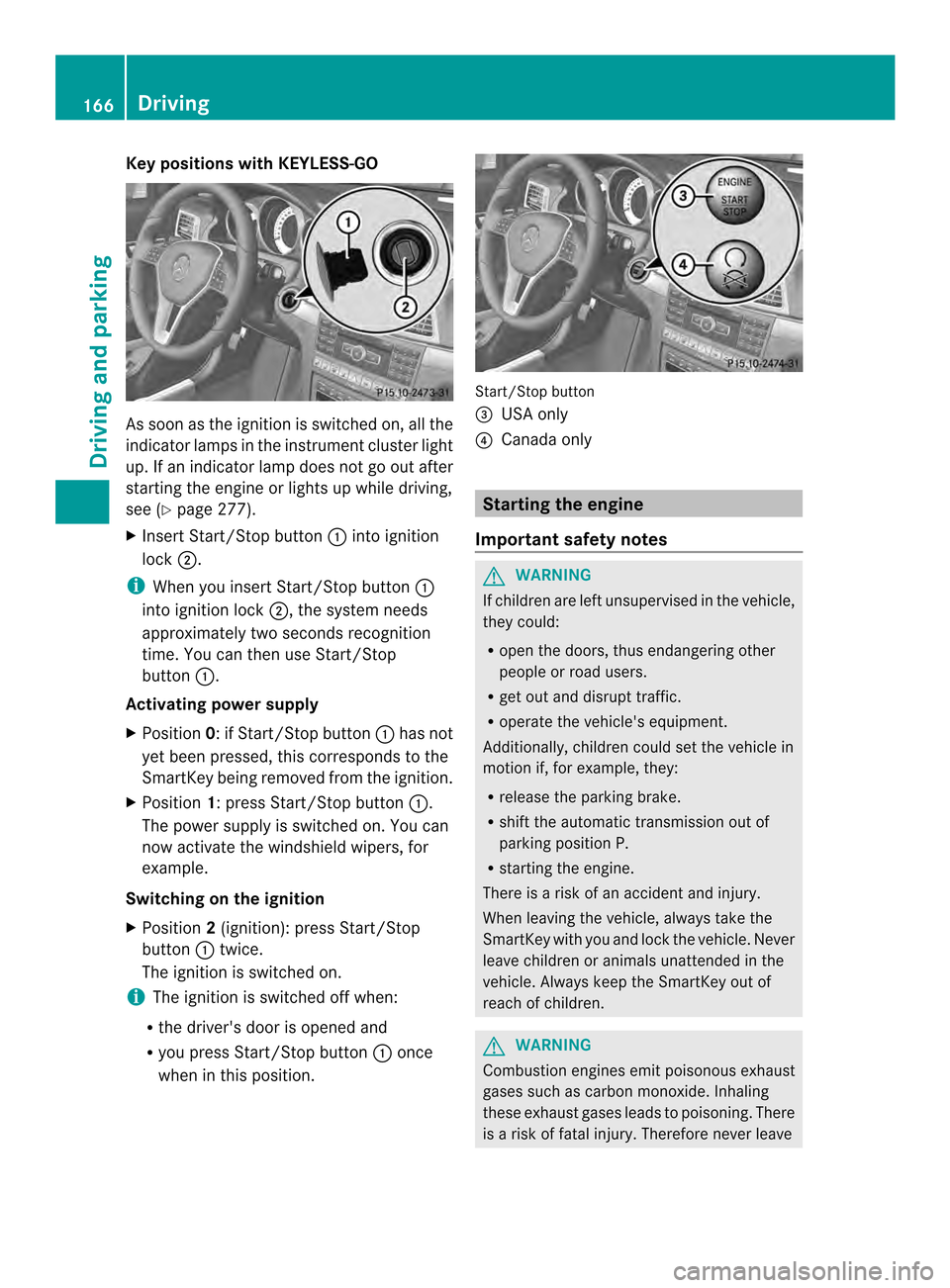
Key positions with KEYLESS-GO
As soo
nas the ignition is switched on, all the
indicator lamps in the instrument cluster light
up. If an indicator lamp does not go out after
starting the engine or lights up while driving,
see (Y page 277).
X Insert Start/Stop button 0002into ignition
lock 0003.
i When you insert Start/Stop button 0002
into ignition lock 0003, the system needs
approximately two seconds recognition
time. You can then use Start/Stop
button 0002.
Activating power supply
X Position 0: if Start/Stop button 0002has not
yet been pressed, this corresponds to the
SmartKey being removed from the ignition.
X Position 1: press Start/Stop button 0002.
The power supply is switched on. You can
now activate the windshield wipers, for
example.
Switching on the ignition
X Position 2(ignition): press Start/Stop
button 0002twice.
The ignition is switched on.
i The ignition is switched off when:
R the driver's door is opened and
R you press Start/Stop button 0002once
when in this position. Start/Stop button
0023
USA only
0022 Canada only Starting the engine
Important safety notes G
WARNING
If children are left unsupervised in the vehicle,
they could:
R open the doors, thus endangering other
people or road users.
R get out and disrupt traffic.
R operate the vehicle's equipment.
Additionally, children could set the vehicle in
motion if, for example, they:
R release the parking brake.
R shift the automatic transmission out of
parking position P.
R starting the engine.
There is a risk of an accident and injury.
When leaving the vehicle, always take the
SmartKey with you and lock the vehicle. Never
leave children or animals unattended in the
vehicle. Always keep the SmartKey out of
reach of children. G
WARNING
Combustion engines emit poisonous exhaust
gases such as carbon monoxide. Inhaling
these exhaust gases leads to poisoning. There
is a risk of fatal injury. Therefore never leave 166
DrivingDriving and parking
Page 169 of 394
the engine running in enclosed spaces
withou tsufficient ventilation. G
WARNING
Flammable materials introduced through
environmental influence or by animals can
ignite if in contact with the exhaust system or
parts of the engine that heat up. There is a risk
of fire.
Carry out regular checks to make sure that
there are no flammable foreign materials in
the engine compartment or in the exhaust
system.
! Do no tdepress the accelerator pedal
when starting the engine.
General notes i
The catalytic converter is preheated for
up to 30 seconds after a cold start. The
sound of the engine may change during this
time.
Automatic transmission X
Shift the transmission to position P.
The transmission position display in the
multifunction display shows P.
i You can also start the engine when the
transmission is in position N.
Starting procedure with the SmartKey i
To start the engine using the SmartKey
instead of KEYLESS-GO, pull the Start/
Stop button out of the ignition lock.
X Turn the SmartKey to position 3in the
ignition lock (Y page 165)and release it as
soo nas the engine is running.
Using KEYLESS-GO to startt he enginei
The Start/Stop button can be used to
start the vehicle without inserting the
SmartKey into the ignition lock. The Start/
Stop button must be inserted in the ignition lock and the SmartKey must be in the
vehicle.
X Depress the brake pedal and keep it
depressed.
X Press the Start/Stop button once
(Y page 165).
The engine starts. Pulling away
Automatic transmission G
WARNING
If the engine speed is above the idling speed
and you engage transmission position Dor
R, the vehicle could pull away suddenly .There
is a risk of an accident.
When engaging transmission position Dor R,
always firmly depress the brake pedal and do
not simultaneously accelerate.
! If a warning tone sounds and the
Release Park. Brake message appears
in the multifunction display, the parking
brake is still applied. Release the parking
brake.
X Depress the brake pedal and keep it
depressed.
X Shift the transmission to position Dor R.
X Release the parking brake (Y page 183).
X Release the brake pedal.
X Carefully depress the accelerator pedal.
i It is only possible to shift the transmission
from position Pto the desired position if
you depress the brake pedal. Only then is
the parking lock released. If you do not
depress the brake pedal, you can move the
DIRECT SELECT lever but the parking lock
remains engaged.
i The vehicle locks centrally once you have
pulled away.T he locking knobs in the doors
drop down.
You can open the doors from the inside at
any time. Driving
167Driving and parking Z