Eco MERCEDES-BENZ E-Class CABRIOLET 2017 A207 Repair Manual
[x] Cancel search | Manufacturer: MERCEDES-BENZ, Model Year: 2017, Model line: E-Class CABRIOLET, Model: MERCEDES-BENZ E-Class CABRIOLET 2017 A207Pages: 322, PDF Size: 7.97 MB
Page 116 of 322
Lamps are an important aspect of vehicle safety.
You must therefore make sure that these func-
tion correctly at all times. Have the headlamp
setting checked regularly.
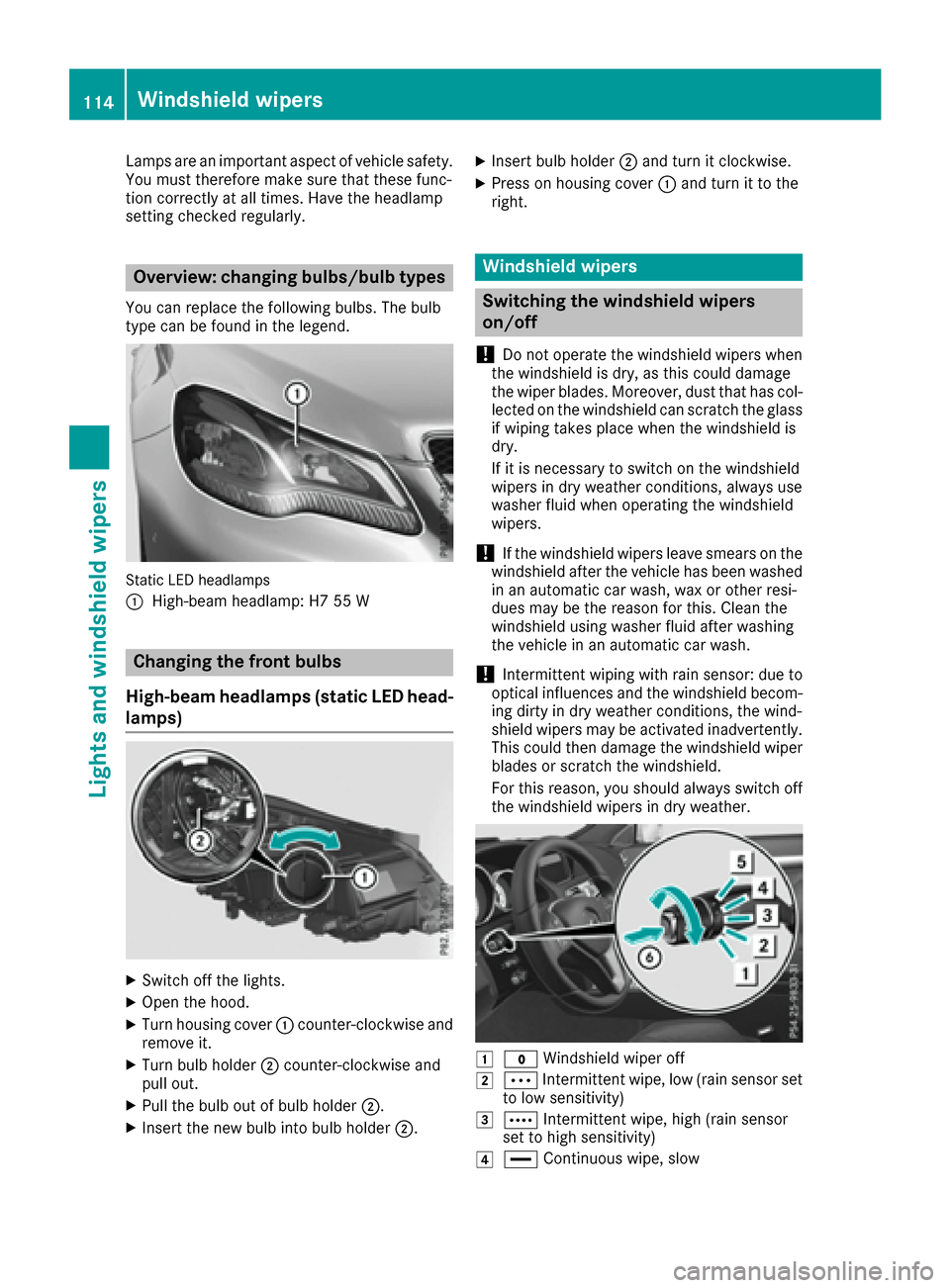
Overview: changing bulbs/bulb types
You can replace the following bulbs. The bulb
type can be found in the legend.
Static LED headlamps
:
High-beam headlamp: H7 55 W
Changing the front bulbs
High-beam headlamps (static LED head-
lamps)
XSwitch off the lights.
XOpen the hood.
XTurn housing cover :counter-clockwise and
remove it.
XTurn bulb holder ;counter-clockwise and
pull out.
XPull the bulb out of bulb holder ;.
XInsert the new bulb into bulb holder ;.
XInsert bulb holder;and turn it clockwise.
XPress on housing cover :and turn it to the
right.
Windshield wipers
Switching the windshield wipers
on/off
!
Do not operate the windshield wipers when
the windshield is dry, as this could damage
the wiper blades. Moreover, dust that has col-
lected on the windshield can scratch the glass
if wiping takes place when the windshield is
dry.
If it is necessary to switch on the windshield
wipers in dry weather conditions, always use
washer fluid when operating the windshield
wipers.
!If the windshield wipers leave smears on the
windshield after the vehicle has been washed
in an automatic car wash, wax or other resi-
dues may be the reason for this. Clean the
windshield using washer fluid after washing
the vehicle in an automatic car wash.
!Intermittent wiping with rain sensor: due to
optical influences and the windshield becom-
ing dirty in dry weather conditions, the wind-
shield wipers may be activated inadvertently.
This could then damage the windshield wiper
blades or scratch the windshield.
For this reason, you should always switch off
the windshield wipers in dry weather.
1$ Windshield wiper off
2ÄIntermittent wipe, low (rain sensor set
to low sensitivity)
3Å Intermittent wipe, high (rain sensor
set to high sensitivity)
4° Continuous wipe, slow
114Windshield wipers
Lights and windshield wipers
Page 117 of 322
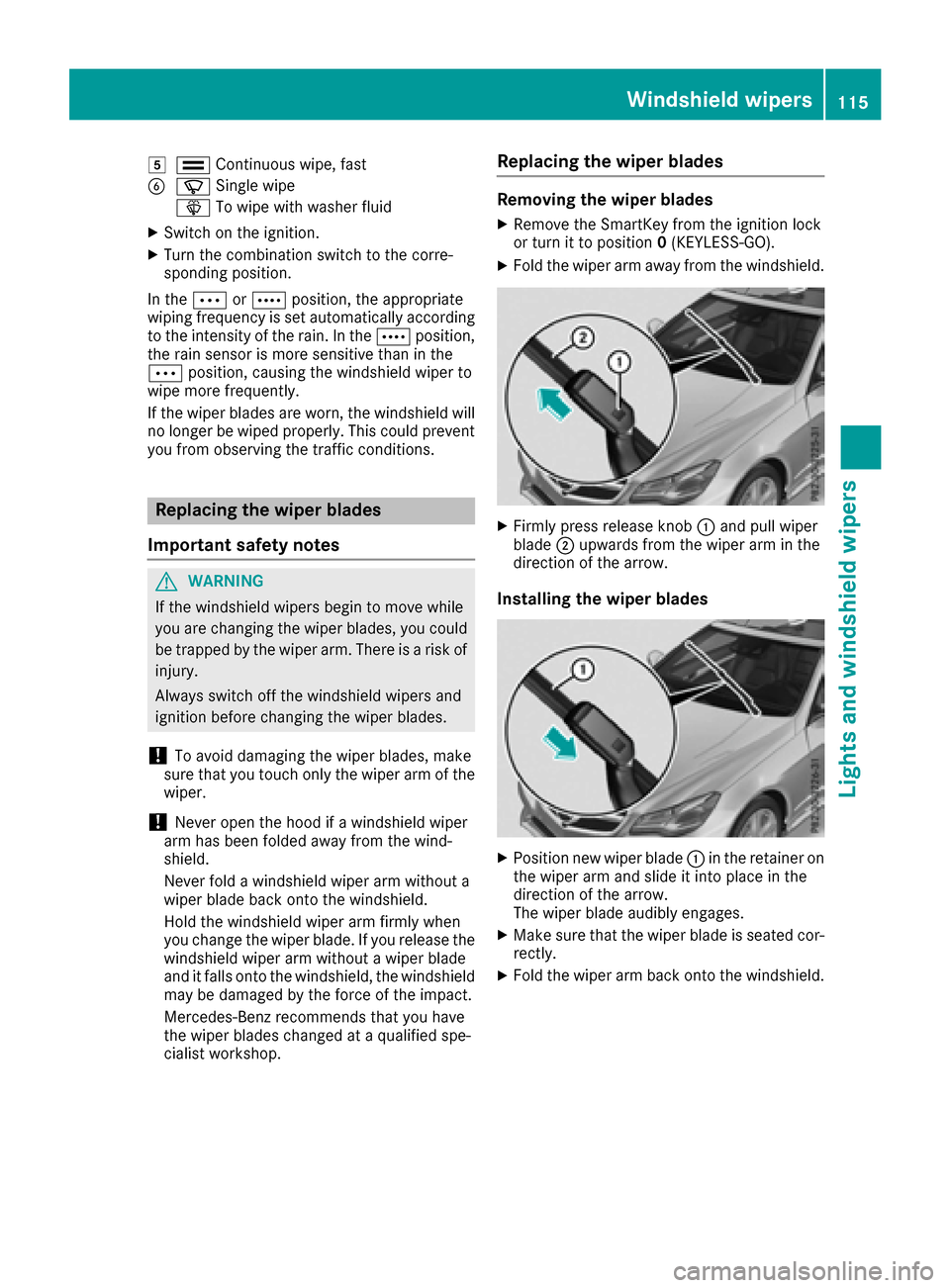
5¯Continuous wipe,fast
BíSingle wipe
î Towipe wit h washer fluid
XSwitch on the ignition.
XTurn the co mbination switch to the corre-
spondin g position.
In the Ä orÅ position, the appropriate
wipin g frequency isset automatically according
to the intensity of the rain. Inthe Å position,
the rain sensor ismore sensitive than inthe
Ä position, causing the windshield wiper to
wipe more frequently.
If the wiper blades are worn, the windshield will
no longer bewiped properly. This could prevent
you from observing the traff icconditions.
Replacing the wiper blades
Important safety notes
GWAR NING
If the wind shield wiper s begin to move while
you are changing the wiper blades, you could
be trapped bythe wiper arm. There isa risk of
injury.
Alwa ysswit ch off the windshield wiper s and
ignition before changing the wiper blades.
!To avoid damaging the wiper blades, make
sure that you touch only thewiper arm of the
wiper .
!Never open the hood ifawind shield wiper
arm has been folded away from the wind-
shield.
Never fold a windshield wiper armwithout a
wiper blade back onto the windshield.
Hold the windshield wiper arm firmly when
you change the wiper blade. Ifyou release the
wind shield wiper armwithout a wiper blade
and itfalls onto the windshield, thewind shield
may bedamaged bythe force of the impact.
Mercedes-Benz recommends that you have
the wiper blades changed at a qualified spe-
cialist workshop.
Replacing the wiper blades
Removing the wiper blades
XRemo vethe SmartKey from the ignition lock
or turn itto position 0(KEYLESS -GO).
XFold the wiper arm away from the windshield.
XFirmly press release knob :and pull wiper
blade ;upwards from the wiper arm in the
direction of the arrow.
Installing the wiper blades
XPosition new wiper blade :in the retainer on
the wiper arm and slide it into place inthe
direction of the arrow.
The wiper blade audibly engages.
XMake sure that the wiperblade is seated cor-
rectly.
XFold the wiper arm back onto the windshield.
Windshield wipers115
Lights and windshield wipers
Z
Page 119 of 322
Overview of climate control systems
General notes
Observe the settings recommended on the fol-
lowing pages. The windows could otherwise fog
up.
To prevent the windows from fogging up:
Rswitch off climate control only briefly
Rswitch on air-recirculation mode only briefly
Rswitch on the cooling with air dehumidifica-
tion function
Rswitch on the defrost windshield function
briefly, if required
Climate control regulates the temperature and
the humidity in the vehicle interior and filters
undesirable substances out of the air.
Climate control can only be operated when the
engine is running. Optimum operation is only
achieved with the side windows and roof closed.
The residual heat function can only be activated
or deactivated with the ignition switched off
(
Ypage 125).
iWhen the weather is warm, ventilate the
vehicle for a brief period. This will speed up
the cooling process and the desired interior
temperature will be reached more quickly.
iThe integrated filter filters out most parti-
cles of dust and soot and completely filters
out pollen. It also reduces gaseous pollutants
and odors. A clogged filter reduces the
amount of air supplied to the vehicle interior.
For this reason, you should always observe
the interval for replacing the filter, which is
specified in the Maintenance Booklet. As it
depends on environmental conditions, e.g.
heavy air pollution, the interval may be
shorter than stated in the Maintenance Book- let.
iIt is possible that the residual heat function
may be activated automatically an hour after
the SmartKey is removed. The vehicle is then ventilated for 30 minutes to dry the automatic
climate control.
Overview of climate control systems117
Climate control
Page 122 of 322
Optimum use of automatic climate
control
Climate control system
Below, you can find a number of notes and rec-
ommendations to help you use climate control
optimally.
The 3-zone automatic climate control is only
available on vehicles for Canada.
RActivate climate control using the Ãand
¿ buttons. The indicator lamps above the
à and¿ buttons light up.
RVehicles with 3-zone automatic climate con-
trol: in automatic mode, you can also set the
climate mode (FOCUS, MEDIUM or DIFFUSE).
The MEDIUM level is recommended.
RSet the temperature to 72 ‡ (22 †).
ROnly use the "Windshield defrosting" function
briefly until the windshield is clear again.
ROnly use air-recirculation mode briefly, e.g. if
there are unpleasant outside odors or when in
a tunnel. The windows could otherwise fog up, since no fresh air is drawn into the vehicle in
air-recirculation mode.
RUse the ZONE function to adopt the temper-
ature settings on the driver's side for the
front-passenger side and the rear compart-
ment as well. The indicator lamp above the
á button goes out.
RVehicles with 3-zone automatic climate con-
trol: use the residual heat function if you want
to heat or ventilate the vehicle interior when
the ignition is switched off. The residual heat
function can only be activated or deactivated with the ignition switched off.
RIf you change the settings of the climate con-
trol system, the climate status display
appears for approximately three seconds at
the bottom of the screen in the multimedia
system display. You will see the current set-
tings of the various climate control functions.
ECO start/stop function
During automatic engine switch-off, the climate
control system only operates at a reduced capa-
city. If you require the full climate control output,
you can switch off the ECO start/stop function
by pressing the ECO button (
Ypage 132).
Operating the climate control sys-
tems
Activating/deactivating climate con-
trol
General notes
When the climate control is switched off, the air
supply and air circulation are also switched off.
The windows could fog up. Therefore, switch off
climate control only briefly
iActivate climate control primarily using the
à button (Ypage 121).
Activating/deactivating
XTurn the SmartKey to position 2in the ignition
lock (Ypage 128).
XTo activate: press theÃbutton.
The indicator lamp above the Ãbutton
lights up. Airflow and air distribution are set to
automatic mode.
XTo deactivate: press the^button.
The indicator lamp above the ^button
lights up.
120Operating the climate control systems
Climate control
Page 128 of 322
Air vents
Important safety notes
GWARNIN G
Ver yhot or ver ycold air can flo wfrom th eair
vents .This could result in burn sor frostbit ein
th eimmediat evicinity of th eair vents .There
is aris kof injury.
Mak esur ethat all vehicl eoccupant salways
maintai n asufficien tdistanc eto th eair out -
lets. If necessary, redirect th eairflow to
another area of th evehicl einterior.
In order to ensur eth edirec tflo wof fresh air
throug hth eair vents int oth evehicl einterior,
pleas eobserv eth efollowin gnotes:
Rkeep th eair inlet between th ewindshield and
th ehoo dfree of blockages, suc has ice ,snow
or leaves.
Rnever cover th eair vents or air intake grilles in
th evehicl einterior.
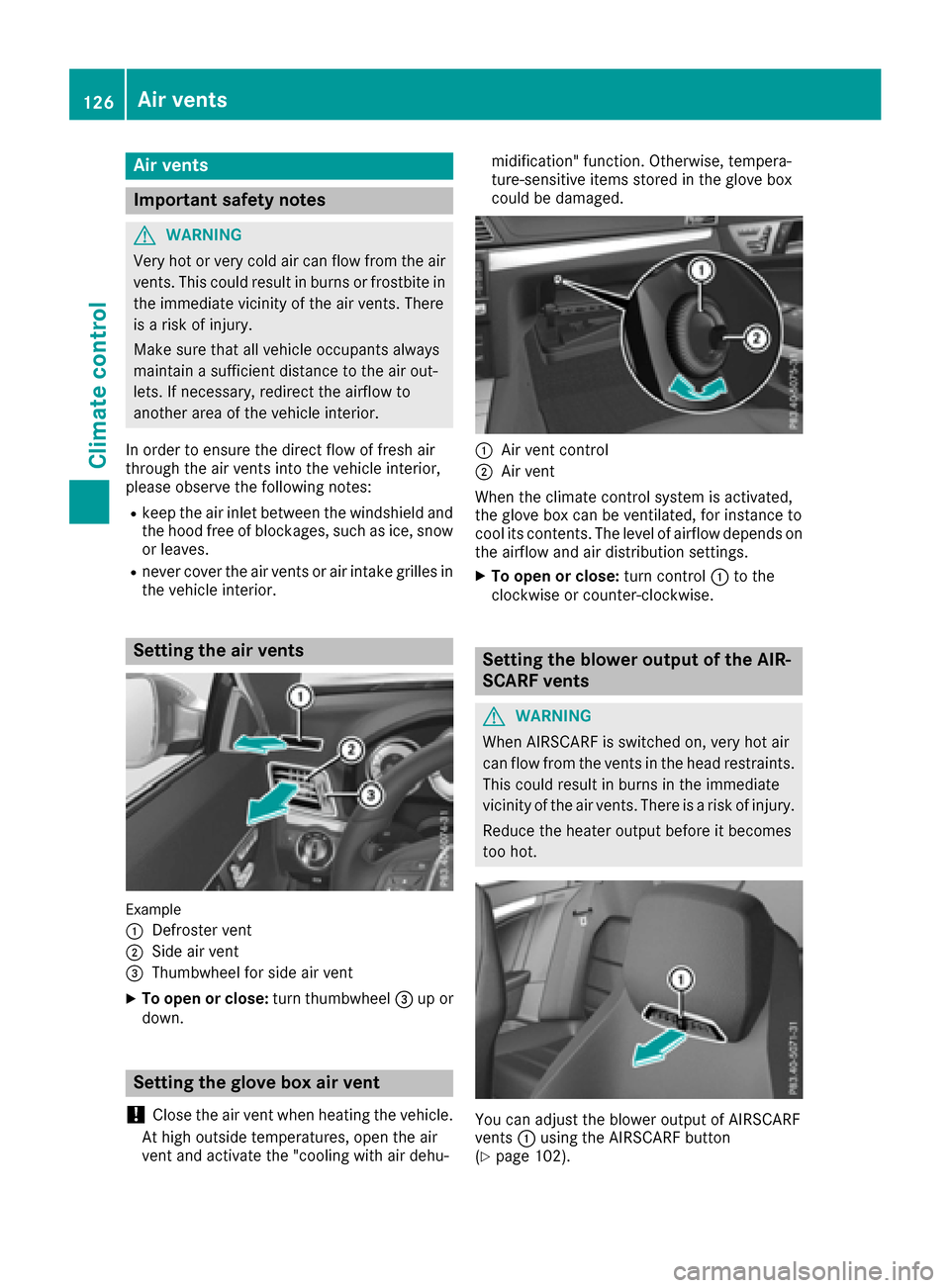
Setting the air vents
Exampl e
:
Defroster ven t
;Sideair ven t
=Thumbwheel for side air ven t
XTo open or close:turnthumbwheel =up or
down .
Setting the glove box air vent
!
Close th eair ven twhen heating th evehicle.
At high outside temperatures ,open th eair
ven tand activat eth e"coolin gwit hair dehu- midification
"function .Otherwise ,tempera-
ture-sensitive items store din th eglov ebox
could be damaged.
:Air ven tcontrol
;Air ven t
When th eclimat econtrol system is activated,
th eglov ebox can be ventilated, for instance to
cool it scontents .The level of airflow depend son
th eairflow and air distribution settings.
XTo open or close: turncontrol :to th e
clockwise or counter-clockwise .
Setting the blower outputofthe AIR-
SCARF vents
GWARNIN G
When AIRSCARF is switched on ,ver yhot air
can flo wfrom th events in th ehead restraints .
This could result in burn sin th eimmediat e
vicinity of th eair vents .There is aris kof injury.
Reduc eth eheater output before it become s
to ohot .
You can adjust th eblowe routput of AIRSCARF
vents :usin gth eAIRSCARF butto n
(
Ypage 102).
126Air vents
Climate control
Page 130 of 322
Where possible, avoid spinning the drive
wheels when pulling away on slippery roads.
You could otherwise damage the drive train.
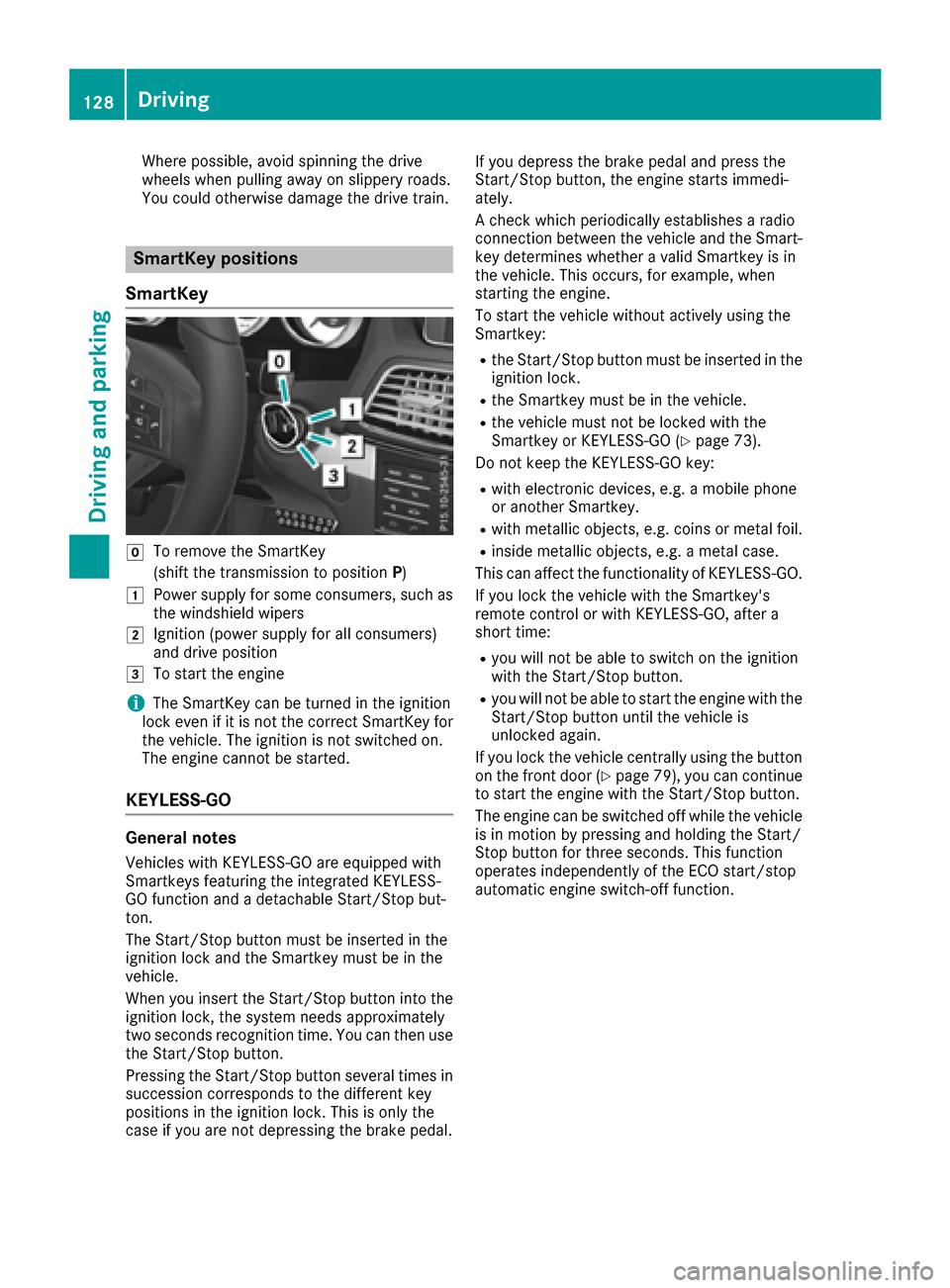
SmartKey positions
SmartKey
gTo remove the SmartKey
(shift the transmission to position P)
1Power supply for some consumers, such as
the windshield wipers
2Ignition (power supply for all consumers)
and drive position
3To start the engine
iThe SmartKey can be turned in the ignition
lock even if it is not the correct SmartKey for
the vehicle. The ignition is not switched on.
The engine cannot be started.
KEYLESS-GO
General notes
Vehicles with KEYLESS-GO are equipped with
Smartkeys featuring the integrated KEYLESS-
GO function and a detachable Start/Stop but-
ton.
The Start/Stop button must be inserted in the
ignition lock and the Smartkey must be in the
vehicle.
When you insert the Start/Stop button into the
ignition lock, the system needs approximately
two seconds recognition time. You can then use
the Start/Stop button.
Pressing the Start/Stop button several times in
succession corresponds to the different key
positions in the ignition lock. This is only the
case if you are not depressing the brake pedal. If you depress the brake pedal and press the
Start/Stop button, the engine starts immedi-
ately.
A check which periodically establishes a radio
connection between the vehicle and the Smart-
key determines whether a valid Smartkey is in
the vehicle. This occurs, for example, when
starting the engine.
To start the vehicle without actively using the
Smartkey:
Rthe Start/Stop button must be inserted in the
ignition lock.
Rthe Smartkey must be in the vehicle.
Rthe vehicle must not be locked with the
Smartkey or KEYLESS-GO (Ypage 73).
Do not keep the KEYLESS-GO key:
Rwith electronic devices, e.g. a mobile phone
or another Smartkey.
Rwith metallic objects, e.g. coins or metal foil.
Rinside metallic objects, e.g. a metal case.
This can affect the functionality of KEYLESS-GO.
If you lock the vehicle with the Smartkey's
remote control or with KEYLESS-GO, after a
short time:
Ryou will not be able to switch on the ignition
with the Start/Stop button.
Ryou will not be able to start the engine with the
Start/Stop button until the vehicle is
unlocked again.
If you lock the vehicle centrally using the button
on the front door (
Ypage 79), you can continue
to start the engine with the Start/Stop button.
The engine can be switched off while the vehicle
is in motion by pressing and holding the Start/
Stop button for three seconds. This fun
ction
operates independently of the ECO start/stop
automatic engine switch-off function.
128Driving
Driving and parking
Page 132 of 322
GWARNING
Flammable materials introduced through
environmental influence or by animals can
ignite if in contact with the exhaust system or
parts of the engine that heat up. There is a risk
of fire.
Carry out regular checks to make sure that
there are no flammable foreign materials in
the engine compartment or in the exhaust
system.
General notes
iThe catalytic converter is preheated for up
to 30 seconds after a cold start. The sound of the engine may change during this time.
Automatic transmission
XShift the transmission to position P.
The transmission position display in the mul-
tifunction display shows P.
iYou can start the engine in transmission
position Pand N.
Starting procedure with the SmartKey
iTo start the engine using the SmartKey
instead of KEYLESS-GO, pull the Start/Stop
button out of the ignition lock.
XTurn the SmartKey to position 3in the ignition
lock and release it as soon as the engine is
running (
Ypage 128).
Using KEYLESS-GO to start the engine
iThe Start/Stop button can be used to start
the vehicle manually without inserting the
SmartKey into the ignition lock. The Start/
Stop button must be inserted in the ignition
lock and the SmartKey must be in the vehicle.
This mode for starting the engine operates
independently of the ECO start/stop auto-
matic engine start function.
XDepress the brake pedal and keep it
depressed.
XPress the Start/Stop button once
(Ypage 128).
The engine starts.
Pulling away
General notes
GWARNING
If the engine speed is above the idling speed
and you engage transmission position Dor R,
the vehicle could pull away suddenly. There is
a risk of an accident.
When engaging transmission position Dor R,
always firmly depress the brake pedal and do not simultaneously accelerate.
!If a warning tone sounds and the ReleasePark. Brakemessage appears in the multi-
function display, the parking brake is still
applied. Release the parking brake.
Depress the accelerator carefully when pulling
away.
The vehicle locks centrally once you have pulled
away. The locking knobs in the doors drop down.
You can open the doors from the inside at any
time.
You can also deactivate the automatic locking
feature (
Ypage 200).
It is only possible to shift the transmission from
position Pto the desired position if you depress
the brake pedal. If you do not depress the brake
pedal, the DIRECT SELECT lever can still be
moved but the parking lock remains engaged.
iUpshifts take place at higher engine speeds
after a cold start. This helps the catalytic con-
verter to reach its operating temperature
more quickly.
Hill start assist
Hill start assist helps you when pulling away for-
wards or in reverse on an uphill gradient. It holds
the vehicle for a short time after you have
removed your foot from the brake pedal. This
gives you enough time to move your foot from
the brake pedal to the accelerator pedal and to
depress it before the vehicle begins to roll.
GWARNING
After a short time, hill start assist will no lon-
ger brake your vehicle and it could roll away.
There is a risk of an accident and injury.
130Driving
Driving and parking
Page 133 of 322

Therefore, quickly move your foot from the
brake pedal to the accelerator pedal. Never
leave the vehicle when it is held by hill start
assist.
Hill start assist is not active if:
Ryou are pulling away on a level road or on a
downhill gradient.
Rthe transmission is in position N.
Rthe parking brake is applied.
RESP®is malfunctioning.
ECO start/stop function
Introduction
The ECO start/stop function switches the
engine off automatically if the vehicle is stopped
under certain conditions.
The engine starts automatically when the driver
wants to pull away again. The ECO start/stop
function thereby helps you to reduce the fuel
consumption and emissions of your vehicle.
Important safety notes
GWARNING
If the engine is switched off automatically and
you exit the vehicle, the engine is restarted
automatically. The vehicle may begin moving.
There is a risk of accident and injury.
If you wish to exit the vehicle, always turn off
the ignition and secure the vehicle against
rolling away.
General notes
:ECO start/stop display
The ECO start/stop function is activated when-
ever you start the engine using the Smartkey or
the Start/Stop button. If the engine has been switched off automati-
cally by the ECO start/stop function, the
¤
symbol is shown in the multifunction display.
Automatic engine switch-off
If the vehicle is braked to a standstill in Dor N,
the ECO start/stop function switches off the
engine automatically.
The ECO start/stop function is operational
when:
Rthe indicator lamp in the ECO button is lit
green.
Rthe outside temperature is within the range
that is suitable for the system.
Rthe engine is at normal operating tempera-
ture.
Rthe set temperature for the vehicle interior
has been reached.
Rthe battery is sufficiently charged.
Rthe system detects that the windshield is not
fogged up when the air-conditioning system is switched on.
Rthe hood is closed.
Rthe driver's door is closed and the driver's
seat belt is fastened.
iAll of the vehicle's systems remain active
when the engine is stopped automatically.
iThe HOLD function can also be activated if
the engine has been switched off automati-
cally. It is then not necessary to continue
applying the brakes during the automatic stop
phase. When you depress the accelerator
pedal, the engine starts automatically and the
braking effect of the HOLD function is deac-
tivated.
iThe engine can be switched off automati-
cally a maximum of four times (first stop and
three subsequent stops) in succession.
Automatic engine start
The engine starts automatically if:
Ryou switch off the ECO start/stop function by
pressing the ECO button
Rin transmission position Dor Nthe brake
pedal is released and the HOLD function is not
active
Ryou depress the accelerator pedal
Ryou engage reverse gear R
Driving131
Driving and parking
Z
Page 134 of 322

Ryou moveth etransmission out of position P
Ryou unfasten your seat belt or open th edriv-
er' sdoo r
Rthevehicl estart sto rol l
Rthebrak esystem require sthis
Rth etemperature in th evehicl einterio rdevi-
ate sfrom th eset range
Rth esystem detects moisture on th ewind-
shield when th eair-conditionin gsystem is
switched on
Rth ebattery' scondition of charg eis to olow
iShiftin gth etransmission to position Pdoes
no tstart th eengine.
Deactivating oractivating the ECO
start/stop function
XTo deactivate: press ECO butto n:.
Indicato rlamp ;goe sout .
XTo activate: press ECO butto n:.
Indicato rlamp ;lights up.
If indicato rlamp ;is off ,th eECO start/sto p
function has been deactivated manually or as
th eresult of amalfunction .The engin ewill then
no tbe switched off automatically when th evehi-
cle stops .
132Driving
Driving and parking
Page 136 of 322
Automa tic trans mission
Import ant safety notes
GWARNIN G
If th eengin espee dis abov eth eidlin gspee d
and you engage transmission position Dor R,
th evehicl ecould pull away suddenly. There is
a ris kof an accident.
When engagin gtransmission position Dor R,
always firmly depress th ebrak epedal and do
no tsimultaneously accelerate .
GWARNING
The automatic transmission switches to neu-
tral position Nwhen you switch off th eengine.
The vehicl emay rol laway. There is aris kof an
accident.
Afte rswitching off th eengine, always switch
to parking position P.Preven tth eparked vehi-
cle from rollin gaway by applyin gth eparking
brake.
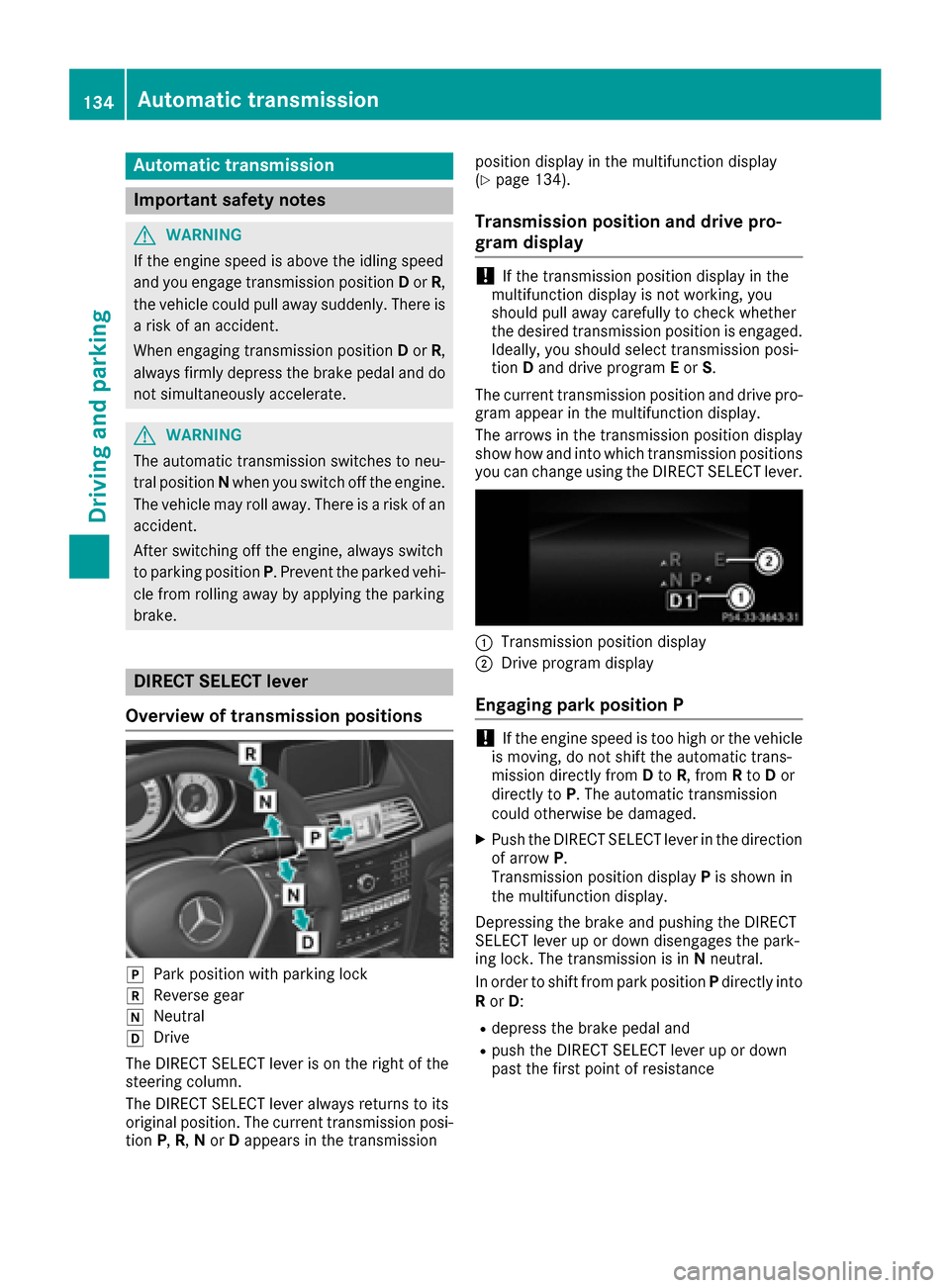
DIRECT SELECT lever
Overview oftrans mission positions
jPark position wit hparking loc k
kReverse gear
iNeutral
hDrive
The DIRECT SELECT lever is on th eright of th e
steering column .
The DIRECT SELECT lever always return sto it s
original position .The curren ttransmission posi-
tion P,R,N or Dappear sin th etransmission position display in th
emultifunction display
(
Ypage 134).
Trans mission position and drive pr o-
gram display
!If th etransmission position display in th e
multifunction display is no tworking ,you
should pull away carefully to chec kwhether
th edesired transmission position is engaged.
Ideally, you should select transmission posi-
tion Dand drive program Eor S.
The curren ttransmission position and drive pro -
gram appear in th emultifunction display.
The arrows in th etransmission position display
sho whow and int owhic htransmission position s
you can chang eusin gth eDIRECT SELECT lever.
:Transmission position display
;Drive program display
Engaging pa rkposition P
!If th eengin espee dis to ohigh or th evehicl e
is moving ,do no tshif tth eautomatic trans -
mission directl yfrom Dto R,from Rto Dor
directl yto P. The automatic transmission
could otherwise be damaged.
XPush th eDIRECT SELECT lever in th edirection
of arrow P.
Transmission position display Pis shown in
th emultifunction display.
Depressing th ebrak eand pushing th eDIRECT
SELECT lever up or down disengages th epark -
ing lock. The transmission is in Nneutral.
In order to shif tfrom park position Pdirectl yint o
R or D:
Rdepress th ebrak epedal and
Rpush th eDIRECT SELECT lever up or down
past th efirst poin tof resistanc e
134Automatic transmission
Driving and parking