door lock MERCEDES-BENZ E-CLASS CABRIOLET 2017 User Guide
[x] Cancel search | Manufacturer: MERCEDES-BENZ, Model Year: 2017, Model line: E-CLASS CABRIOLET, Model: MERCEDES-BENZ E-CLASS CABRIOLET 2017Pages: 521, PDF Size: 10.64 MB
Page 74 of 521

#
Vehicles with HANDS-FREE ACCESS: move
yo ur foot below the bumper (→ page71).
Au tomatic reve rsing function of the boot lid
If an object restricts the boot lid during the auto‐
matic closing process, the boot lid opens again
automaticall y.The automatic reve rsing function
is only an aid and is not a substitute foryo ur
attentiveness. #
When closing, make sure that no body parts
are in the closing area. &
WARNING Risk of becoming trapped
despi tereve rsing function
The reve rsing function does not react:
R tosoft, light and thin objects, e.g. fingers.
R overth e last 8 mm of the closing path.
In these situations in particular, there ve rsing
function cannot pr event someone being trap‐
ped. #
When closing, ma kesure that no body
parts are in the closing area. #
If someone is trapped, use one of the
fo llowing options:
R Press thep button on thekey.
R Press there mo teoperating switch
on the driver's door.
R Press the closing or locking button
on the boot lid.
R Press theto p of thest ar on the boot
lid. HANDS-FREE
ACCESS function Wi
th HANDS-FREE ACCESS you can open or
inter rupt boot lid mo vement byper form ing a
kicking mo vement under there ar bumper.
Obse rveth e no tes when opening (→ page 68)
th e boot lid. Opening and closing
71
Page 77 of 521

#
Activate theove rride feature forthe
re ar side wind ows. #
When leaving theve hicle, alw aysta ke
th eke y with you and lock theve hicle. #
Never lea vechildren unat tended in the
ve hicle. 1
Toclose
2 Toopen
The buttons in the driver's door take prece‐
dence. #
Tostart automatic operation: press/pull
th eW button be yond the pressure point. #
Tointer rupt automatic operation: press/
pull theW button again. %
The automatic operation for closing is only
fo rth e front side windo ws. %
Only vehicles with an automatic transmis‐
sion ha vethis function.
Using button 1all side windo wscan be opened
or closed simul taneously. #
Switch the ignition on. 74
Opening and closing
Page 87 of 521
Problem
Possible causes/consequences and M
MSolutions #
Make sure that the ignition is switched on.
The boot lid is open. #
Closing the boot lid .
The boot separator is not closed. #
Remo ve ov erhanging luggage and close the boot separator.
The mechanical soft-to p components or control sy stem are defective. #
Consult a qualified specialist workshop.
The soft top has been opened and closed se veral times in a row. The soft-top drive has been switched off
au tomatical lyand will be available again af ter appro ximately ten minu tes. #
Repeat the opening or closing procedure af ter appro ximately ten minu tes. Anti-theft pr
otection Immobiliser
The immobiliser pr
events your vehicle from
being star ted without the cor rect key.
The immobiliser is automatically activated when
th e ignition is switched off and deactivated when
th e ignition is switched on. ATA
(Anti-Theft Alarm sy stem) Fu
nction of theATA system (anti-theft ala rm
sy stem)
If th eATA system is primed, a visual and audible
alarm is triggered in thefo llowing situations:
R A door is opened.
R The boot lid is opened. R
The bonn etis opened.
R Interior pr otection is triggered. (→ page 86)
R Tow- aw ay protection is triggered.
(→ page 85)
The ATA system is primed automatically af ter
appr oximately 10seconds:
R After locking theve hicle with thekey. 84
Opening and closing
Page 88 of 521

R
After locking theve hicle using KEYLESS-GO. When
theATA system is primed, indicator lamp
1 flashes.
The ATA sy stem is automatically deactivated:
R After unlocking theve hicle with thekey.
R After pressing thest art/ stop button with the
ke y inside theve hicle. R
After unlocking theve hicle using KEYLESS-
GO.
% When the Mercedes‑Benz emer gency call
sy stem is active and the alarm stay s on for
more than 30 seconds, a message is auto‐
matically sent tothe Cus tomer Assis tance
Centre (→ page 310).
Deactivating theATA (anti-theft ala rmsys‐
te m) ala rm #
Press the%, &orp button on the
key.
or #
Press thest art/ stop button (the key is inside
th eve hicle).
St opping the ala rmusing KEYLESS-GO #
Grasp the outside door handle (with thekey
outside theve hicle). To
w- aw ay protection An audible and visual alarm is triggered if
your
ve hicle's angle of inclination is altered while tow-
aw ay protection is primed. To
w- aw ay protection is automatically primed
af te r about 60 seconds:
R After locking theve hicle with thekey.
R After locking theve hicle using KEYLESS-GO.
To w- aw ay protection is only primed when thefo l‐
lowing components are closed:
R Doo rs
R Boot lid
To w- aw ay protection is automatically deactiva‐
te d:
R After pressing the% orp button on
th ekey.
R After pressing thest art/ stop button with the
ke y inside theve hicle.
R After unlocking theve hicle using KEYLESS-
GO.
R When using HANDS-FREE ACCESS. Opening and closing
85
Page 89 of 521

Priming/deactivating
tow- aw ay protection Multimedia sy
stem:
, Vehicle .
î Vehicle settings .
Tow-
away protection #
Activate Oor deacti vate ª the function.
To w- aw ay protection remains deactivated until:
R The vehicle is unloc ked again.
R A door is opened and closed again.
R The vehicle is loc ked again. Interior pr
otection When interior pr
otection is primed, a visual and
audible alarm is triggered if mo vement is de tec‐
te d in theve hicle interior.
Interior pr otection is primed automatically af ter
appr oximately 10seconds:
R After locking theve hicle with thekey.
R After locking theve hicle using KEYLESS-GO. Interior pr
otection is only primed when thefo l‐
lowing components are closed:
R Doo rs
R Boot lid
Interior pr otection is automatically deactivated:
R After pressing the% orp button on
th ekey.
R After pressing thest art/ stop button with the
ke y inside theve hicle.
R After unlocking theve hicle using KEYLESS-
GO.
R When using HANDS-FREE ACCESS.
The following situations can lead toafa lse
alarm:
R Moving objects such as masc ots in theve hi‐
cle interior.
R The side window is open. Priming/deactivating interior pr
otection Multimedia sy
stem:
, Vehicle .
î Vehicle settings .
Inte-
rior motion sensor #
Activate Oor deacti vate ª the function.
Interior pr otection remains deactivated until:
R The vehicle is unloc ked again.
R A door is opened and closed again.
R The vehicle is loc ked again. 86
Opening and closing
Page 103 of 521
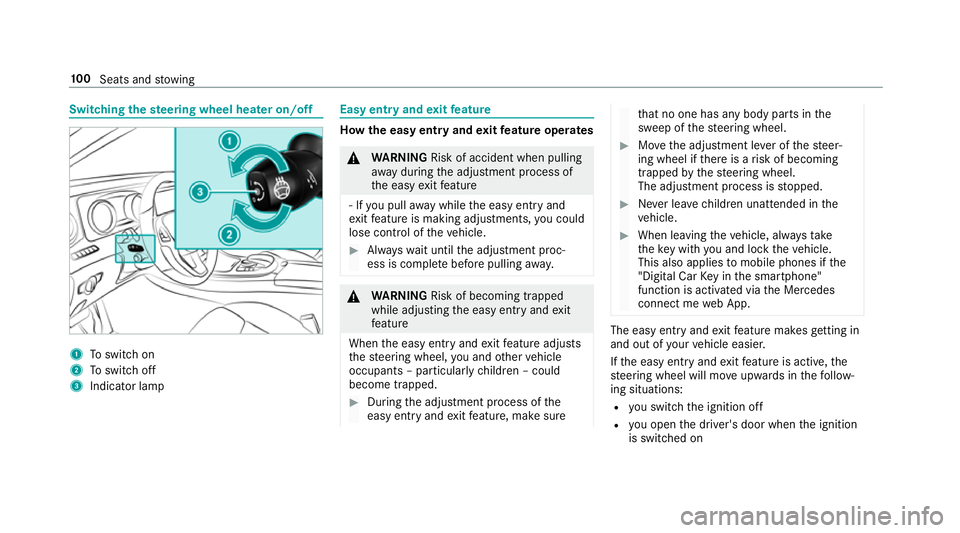
Switching
thest eering wheel heater on/off 1
Toswitch on
2 Toswitch off
3 Indicator lamp Easy entry and
exitfeature How
the easy entry and exitfeature operates &
WARNING Risk of accident when pulling
aw ay during the adjustment process of
th e easy exitfeature
‑ If you pull away while the easy entry and
ex itfeature is making adjustments, you could
lose cont rol of theve hicle. #
Alw ayswa it until the adjustment proc‐
ess is comple tebefore pulling away. &
WARNING Risk of becoming trapped
while adjusting the easy entry andexit
fe ature
When the easy entry andexitfeature adjusts
th esteering wheel, you and other vehicle
occupants – particularly children – could
become trapped. #
During the adjustment process of the
easy entry andexitfeature, make sure th
at no one has any body parts in the
sweep of thesteering wheel. #
Movethe adjustment le ver of thesteer‐
ing wheel if there is a risk of becoming
trapped bythesteering wheel.
The adjustment process is stopped. #
Never lea vechildren unat tended in the
ve hicle. #
When leaving theve hicle, alw aysta ke
th eke y with you and lock theve hicle.
This also applies tomobile phones if the
"Digital Car Key in the smartphone"
function is activated via the Mercedes
connect me web App. The easy ent
ryand exitfeature makes getting in
and out of your vehicle easier.
If th e easy entry andexitfeature is active, the
st eering wheel will mo veupwards in thefo llow‐
ing situations:
R you swit chthe ignition off
R you open the driver's door when the ignition
is switched on 100
Seats and stowing
Page 104 of 521
The
steering wheel mo ves back tothe last drive
position in thefo llowing cases:
R you swit ch the ignition on when the driver's
door is closed
R you close the driver's door when the ignition
is switched on
The last drive position of thesteering wheel is
st ored in thefo llowing situations:
R you swit chthe ignition off
R you sa vethe seat setting using the memory
function
If yo u press one of the memory function position
buttons, the adjustment process is stopped.
Setting the easy entry and exitfeature
Multimedia sy stem:
, Vehicle .
î Vehicle set-
tings .
Easy Entry/Exit #
Activate Oor deacti vate ª the function. Using
the memory function &
WARNING Risk of an accident if memo ry
function is used while driving
If yo u use the memory function on the driv‐
er's side while driving, you could lose cont rol
of theve hicle as a result of the adjustments
being made. #
Only use the memory function on the
driver's side when theve hicle is station‐
ar y. &
WARNING Risk of entrapment when set‐
ting the seat with the memory function
If yo u use the memory function toset the
seat or thesteering wheel, you and other
ve hicle occupants, especially children, could
be ent rapped. #
During the setting procedure of the
memory function, ensure that no body
parts are in the sweep of the seat or
th esteering wheel. #
If somebody becomes trapped, immedi‐
ately release the memory function posi‐
tion button.
The adjustment process is stopped. &
WARNING Risk of entrapment if the
memory function is activated bychildren
Children could become trapped if they acti‐
va te the memory function, particularly when
unattended. #
Never lea vechildren unat tended in the
ve hicle. #
When leaving theve hicle, alw aysta ke
th eke y with you and lock theve hicle.
This also applies tomobile phones if the
"Digital Car Key in the smartphone"
function is activated via the Mercedes
connect me web app. The memory function can be used when
the igni‐
tion is switched off.
Seat adjustments for up tothre e people can be
st ored and called up using the memory function. Seats and
stowing 101
Page 162 of 521
&
WARNING Risk of accident and inju ry
due tochildren left unat tended in the
ve hicle
If yo u lea vechildren unat tended in theve hi‐
cle, they may be able toset theve hicle in
motion, forex ample by:
R Releasing the parking brake.
R Shifting the transmission out of park
position j.
R Starting the engine.
In addition, they may operate vehicle equip‐
ment. #
Never lea vechildren and animals unat‐
te nded in theve hicle. #
When leaving theve hicle, alw aysta ke
th eke y with you and lock theve hicle.
This also applies tomobile phones if the
"Digital Car Key in the smartphone"
function is activated via the Mercedes
me connect web app. *
NO
TEDama getotheve hicle or the driv‐
et ra in caused bytheve hicle rolling away #
Alw ays proper lysecure theve hicle
against rolling away. #
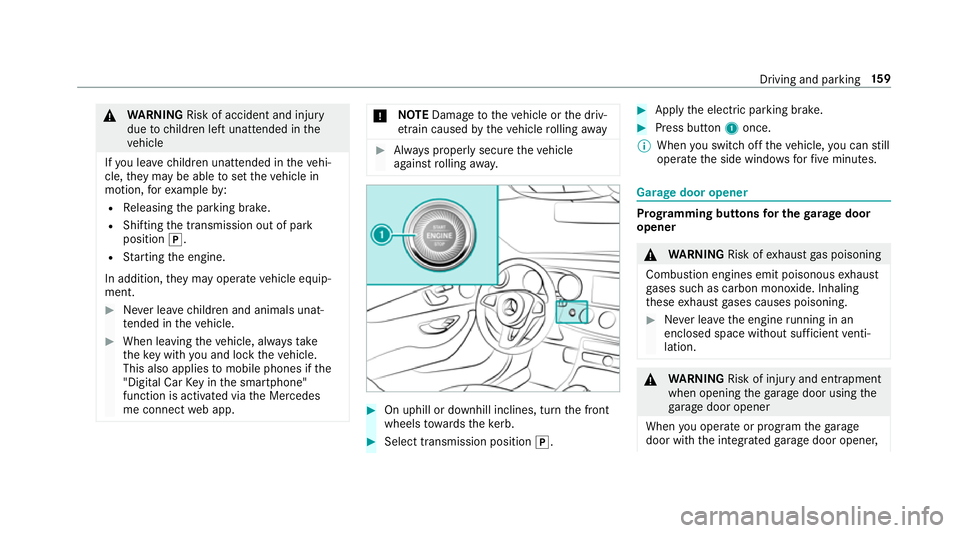
On uphill or downhill inclines, turn the front
wheels towa rdsth eke rb. #
Select transmission position j. #
Apply the electric parking brake. #
Press button 1once.
% When you swit choff theve hicle, you can still
opera tethe side windo wsforfive minutes. Garage door opener
Prog
ramming buttons for the garage door
opener &
WARNING Risk ofexhaust gas poisoning
Combustion engines emit poisonous exhaust
ga ses such as carbon monoxide. Inhaling
th ese exhaust gases causes poisoning. #
Never lea vethe engine running in an
enclosed space wi thout suf ficient venti‐
lation. &
WARNING Risk of inju ryand ent rapment
when opening thega rage door using the
ga rage door opener
When you operate or program thega rage
door with the integrated garage door opener, Driving and parking
15 9
Page 167 of 521
Electric pa
rking brake Au
tomatically applying the electric parking
brake &
WARNING Risk of accident and inju ry
due tochildren left unat tended in the
ve hicle
If yo u lea vechildren unat tended in theve hi‐
cle, they may be able toset theve hicle in
motion, forex ample by:
R Releasing the parking brake.
R Shifting the transmission out of park
position j.
R Starting the engine.
In addition, they may operate vehicle equip‐
ment. #
Never lea vechildren and animals unat‐
te nded in theve hicle. #
When leaving theve hicle, alw aysta ke
th eke y with you and lock theve hicle.
This also applies tomobile phones if the
"Digital Car Key in the smartphone" function is activated via
the Mercedes
me connect web app. The elect
ric pa rking brake is applied if the trans‐
mission is in position jand one of thefo llow‐
ing conditions is fulfilled:
R The engine is switched off.
R The seat belt tongue is not inser ted in the
seat belt buckle of the driver's seat and the
driver's door is opened.
% Toprev ent application: pull the handle of the
electric parking brake.
In thefo llowing situations, the electric parking
brake is also engaged:
R Distance Pilot DISTRONIC brings theve hicle
to ast andstill.
R The HOLD function is keeping theve hicle sta‐
tionar y.
R Parking Pilot is keeping theve hicle station‐
ar y. This is only
the case if one of thefo llowing con‐
ditions is also fulfilled:
R The engine is switched off.
R The seat belt tongue is not inser ted in the
seat belt buckle of the driver's seat and the
driver's door is opened.
R There is a sy stem malfunction.
R The po wer supply is insuf ficient.
R The vehicle is stationary for a lengt hyperiod.
When the electric parking brake is applied,
th e! indicator lamp lights up in the instru‐
ment clus ter.
The electric parking brake is not automatically
applied if the engine is switched off bythe ECO
st art/ stop function.
Re leasing the electric pa rking brake auto‐
matically
The elect ric pa rking brake is released when the
fo llowing conditions are fulfilled:
R The engine is running.
R The seat belt tongue is inser ted into the seat
belt buckle of the driver's seat. 16 4
Driving and pa rking
Page 223 of 521
#
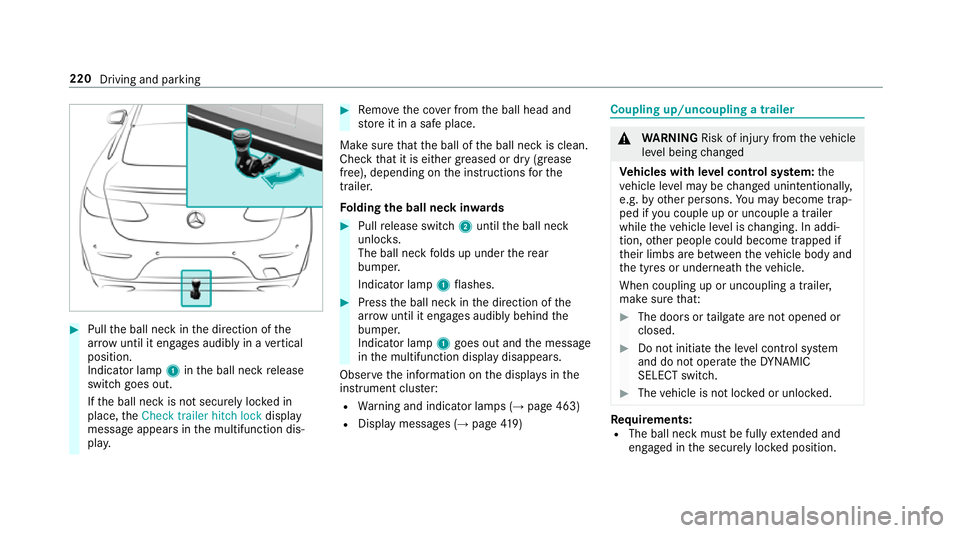
Pull the ball neck in the direction of the
ar row until it en gage s audibly in a vertical
position.
Indicator lamp 1inthe ball neck release
switch goes out.
If th e ball neck is not securely loc ked in
place, theCheck trailer hitch lock display
message appears in the multifunction dis‐
pla y. #
Remo vethe co ver from the ball head and
st ore it in a safe place.
Make sure that the ball of the ball neck is clean.
Check that it is either greased or dr y (grease
free), depending on the instructions forthe
traile r.
Fo lding the ball neck in wards #
Pull release switch 2until the ball neck
unloc ks.
The ball neck folds up under there ar
bumper.
Indicator lamp 1flashes. #
Press the ball neck in the direction of the
ar row until it en gage s audibly behind the
bumper.
Indicator lamp 1goes out and the message
in the multifunction display disappears.
Obser vethe information on the displa ysinthe
instrument clus ter:
R Warning and indicator lamps (→ page 463)
R Display messages (→ page419) Cou
pling up/uncoupling a trailer &
WARNING Risk of inju ryfrom theve hicle
le ve l being changed
Ve hicles with le vel control sy stem: the
ve hicle le vel may be changed unin tentional ly,
e.g. by ot her persons. You may become trap‐
ped if you couple up or uncouple a trailer
while theve hicle le vel is changing. In addi‐
tion, other people could become trapped if
th eir limbs are between theve hicle body and
th e tyres or underneath theve hicle.
When coupling up or uncoupling a trailer,
make sure that: #
The doors or tailgate are not opened or
closed. #
Do not initiate the le vel control sy stem
and do not operate theDY NA MIC
SELECT switch. #
The vehicle is not loc ked or unloc ked. Re
quirements:
R The ball neck must be fully extended and
engaged in the securely loc ked position. 220
Driving and parking