sensor MERCEDES-BENZ E-CLASS CABRIOLET 2017 User Guide
[x] Cancel search | Manufacturer: MERCEDES-BENZ, Model Year: 2017, Model line: E-CLASS CABRIOLET, Model: MERCEDES-BENZ E-CLASS CABRIOLET 2017Pages: 521, PDF Size: 10.64 MB
Page 170 of 521
th
eeve nt of associated dama ge, which may not
be visible, tothe bumpers or radiator grille, ha ve
th e function of thera dar sensors checked at a
qu alified specialist workshop. The driver assis‐
ta nce sy stem may no longer workproperly. Overview of driving sy
stems and driving
saf ety sy stems In
this section, you will find information about
th efo llowing driving sy stems and driving saf ety
sy stems:
R 360° Camera (→ page 201)
R ABS (Anti-lock BrakingSystem) (→ page167)
R Distance Pilot DISTRONIC (→ page 180)
R Adaptive brake lights (→ page177)
R AIR BODY CONTROL (→ page191)
R Active Brake Assi st (→page 172)
R Active Lane Keeping Assist (→ page215)
R ATTENTION ASSIST (→ page 209)
R BAS (Bra keAssist System) (→ page168)
R DYNA MIC BODY CONTROL (→ page191) R
EBD ( Electronic Brakeforc eDistribution)
(→ page 171)
R ESP ®
(Electronic Stability Program)
(→ page 168)
R Hill Start Assist (→ page189)
R HOLD function (→ page190)
R STEER CONTROL (→ page 172)
R Steering Pilot (→ page187)
R Limi ter (→ page 177)
R Parking Pilot (→ page 204)
R Parking Assist PARKTRONIC(→ page194)
R Reversing camera (→ page198)
R Cruise control (→ page 177)
R Blind Spot Assi stand Active Blind Spot Assi st
( → page 213)
R Traf fic Sign Assi st (→page 210) Fu
nctions of ABS (anti-lock braking sy stem) ABS
regulates the brake pressure in critical driv‐
ing situations:
R During braking, e.g. at maximum full-s top
braking or insuf ficient traction of the tyres,
th e wheels are pr evented from blocking.
R Vehicle steerability while braking is ensured.
If ABS inter venes when braking, you will feel a
pulsing in the brake pedal. The pulsating brake
pedal can be an indication of hazardous road
conditions and can ser veas a reminder totake
ex tra care while driving.
Sy stem limitations
R ABS is active from speeds of appr ox.
8 km/h.
R ABS may be impai red or may not function if a
malfunction has occur red and theye l‐
low ! ABSwarning lamp lights up contin‐
uously in the instrument clus ter af terthe
engine is star ted. Driving and parking
167
Page 179 of 521
Sy
stem limitations
Ac tive Brake Assi stmay be impaire d or may not
function in thefo llowing situations:
R In sno w,rain, fog, heavy spr ay, if there is
gl are, in direct sunlight or in great lyvarying
light conditions.
R Ifth e sensors are dirty, mis ted up, damaged
or co vered.
R Ifth e sensors malfunction due to otherradar
source inter fere nce, forex ample strongradar
re flections in multi-s torey car par ks.
R If a loss of tyre pressure or a defective tyre
has been de tected and displ ayed.
The sy stem may not react cor rectly:
R In compl extraf fic st ations where objects
cannot alw ays be clearly identified.
R Topedestrians or vehicles if they mo ve
qu ickly into the sensor de tection range.
R Topedestrians who are hidden by other
objects.
R Ifth e typical outline of a pedestrian cann ot
be distinguished from the bac kground. R
If a pedestrian is not recognised as su ch, e.g.
due tospecial clo thing or other objects.
R On bends with a tight radius. Setting
Active Brake Assi st Multimedia sy
stem:
, Vehicle .
k Assistance .
Active
Brake Assist
Ve hicles without Driving Assistance pack‐
age: The settings can be made af terst arting the
ve hicle.
Ve hicles with Driving Assistance pac kage:
The settings can be made when the ignition is
switched on.
% It is recommended that you alw ays lea ve
Ac tive Brake Assi stswitched on.
The moment of warning or inter vention can be
adjus ted as follo ws: #
Select Active Brake Assist Warning/brake
application: early: your selection is retained
when theve hicle is next star ted. #
Select Active Brake Assist Warning/brake
application: medium :yo ur selection is
re tained when theve hicle is next star ted. #
Select Active Brake Assist Warning/brake
application: late :yo ur selection is retained
when theve hicle is next star ted. #
Select Active Brake Assist Warning/brake
application: off:
Ve hicles without Driving Assistance pack‐
age: The dis tance warning function and the
autonomous braking function are deactiva‐
te d. When theve hicle is next star ted, the
middle setting is auto matically selected.
Ve hicles with Driving Assistance pack‐
age: The dis tance warning function and the
autonomous braking function are deactiva‐
te d. Evasive Steering Assist is una vailable.
When the ignition is next star ted, the middle
setting is selected automatically and Evasive
St eering Assist is available.
% When Active Brake Assi stis deactivated, the
æ symbol appears inthe assis tance
graphic in the multifunction displa y.176
Driving and pa rking
Page 185 of 521
If no speed limit is display
ed whenthe le ver is
operated, the speed set bythe driver is adop ted.
Drive prog ram
The DYNA MIC SELECT switch allo wsyouto
ch ange the driving style of Dis tance Pilot
DISTRONIC. Depending on which drive program
is selected, the driving characteristics can be
ge ared towa rds fuel econom y,comfort or
dynamic per form ance (→ page148).
Sy stem limitations
Dis tance Pilot DISTRONIC is acti veinthe
0 km/h to200 km/h speed range.
Ve hicles with the Driving Assistance Pack‐
age: Distance Pilot DISTRONIC is acti veinthe
0 km/h to210 km/h speed range.
The sy stem may be impaired or may not function
in thefo llowing ins tances:
R In sno w,rain, fog, heavy spr ay, if there is
gl are, in direct sunlight or in great lyvarying
light conditions.
R The windsc reen in the area of the camera is
dirty, mis ted up, damaged or co vered.
R Ifth era dar sensors are dirty or co vered. R
On slippery roads, braking or accelerating
can cause the drive wheels tolose traction
and theve hicle could then skid.
R In multi-s torey car par ks,to llst ations or on
ro ads with steep uphill or downhill gradients.
Do not use Dis tance Pilot DISTRONIC in these
situations.
Tips
Pa y particular attention in thefo llowing traf fic
situations. In such situations, brake if necessar y.
Dis tance Pilot DISTRONIC is then deactivated:
R When cornering, entering and exiting a bend.
R When not driving in the cent reofthe lane.
R When other vehicles are changing lane.
R Ifth ere are nar rowvehicles.
R Ifth ere are obs tacles and stationary vehi‐
cles.
R Ifth ere are crossing vehicles, pedestrians,
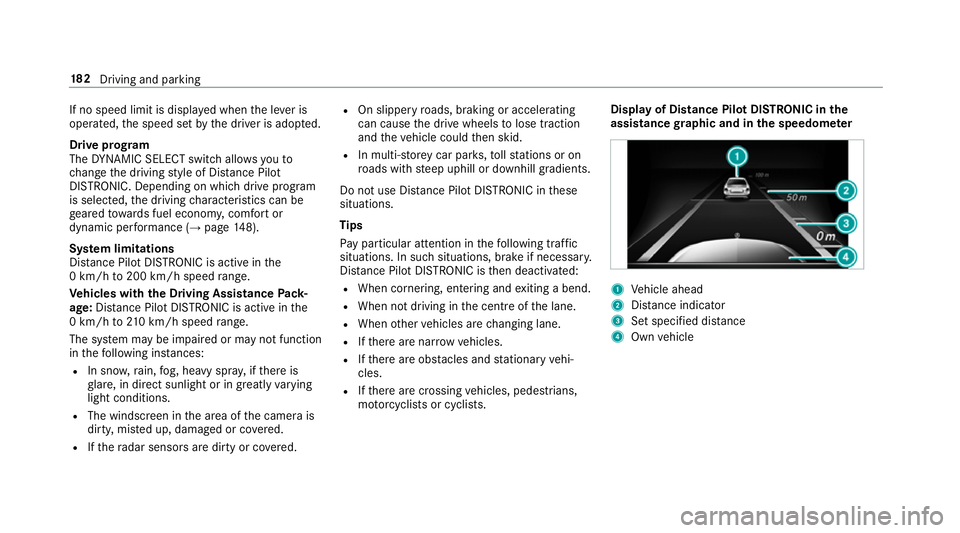
mo torcyc lists or cyclists. Display of Distance Pilot DISTRONIC in
the
assi stance graphic and in the speedome ter 1
Vehicle ahead
2 Distance indica tor
3 Set specified di stance
4 Own vehicle 18 2
Driving and pa rking
Page 197 of 521
The
vehicle is lo wered again in thefo llowing sit‐
uations:
R When driving fasterthan 80 km/h.
R When driving between 60 km/h and
80 km/h for appro ximately thre e minutes.
R After selecting a drive program using the
DY NA MIC SELECT switch.
The vehicle is adjus tedto the height of the last
active drive program.
Lo weri ngtheve hicle #
Press button 1.
Indicator lamp 2goes out. The vehicle is
adjus tedto the height of the last active drive
program. Pa
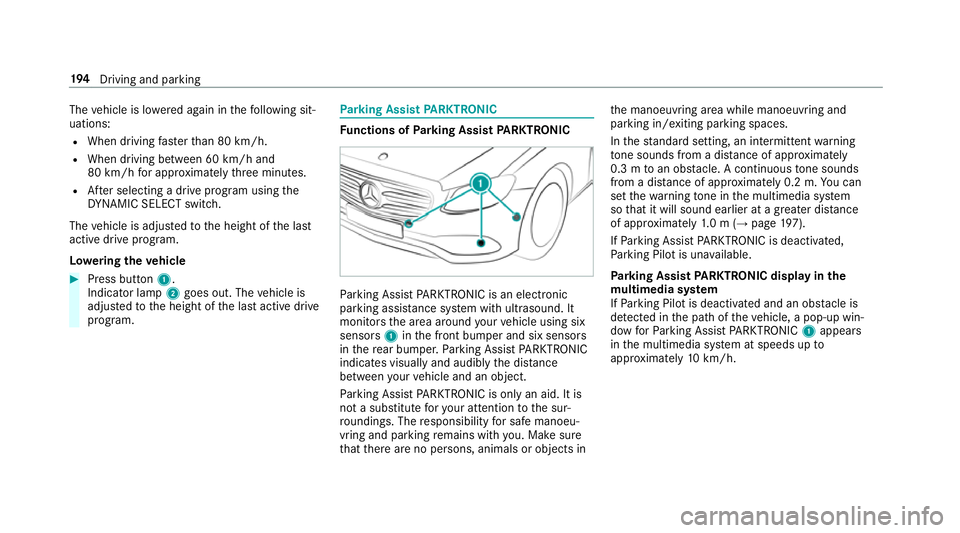
rking Assist PARKTRONIC Fu
nctions of Parking Assist PARKTRONIC Pa
rking Assist PARKTRONIC is an electronic
parking assi stance sy stem with ultrasound. It
monitors the area around your vehicle using six
sensors 1inthe front bumper and six sensors
in there ar bumper. Parking Assist PARKTRONIC
indicates visually and audibly the dis tance
between your vehicle and an object.
Pa rking Assist PARKTRONIC is on lyan aid. It is
not a substitute foryo ur attention tothe sur‐
ro undings. The responsibility for safe manoeu‐
vring and parking remains with you. Make sure
th at there are no persons, animals or objects in th
e manoeuvring area while manoeuvring and
parking in/exiting parking spaces.
In thest andard setting, an intermit tent wa rning
to ne sounds from a di stance of appr oximately
0.3 m toan obs tacle. A continuous tone sounds
from a di stance of appr oximately 0.2 m. You can
set thewa rning tone in the multimedia sy stem
so that it will sound earlier at a greater dis tance
of appr oximately 1.0 m (→ page197).
If Pa rking Assist PARKTRONIC is deacti vated,
Pa rking Pilot is una vailable.
Pa rking Assist PARKTRONIC displ ayinthe
mu ltimedia sy stem
If Pa rking Pilot is deactivated and an obs tacle is
de tected in the path of theve hicle, a pop-up win‐
dow forPa rking Assist PARKTRONIC 1appears
in the multimedia sy stem at speeds up to
appr oximately 10km/h. 194
Driving and pa rking
Page 198 of 521
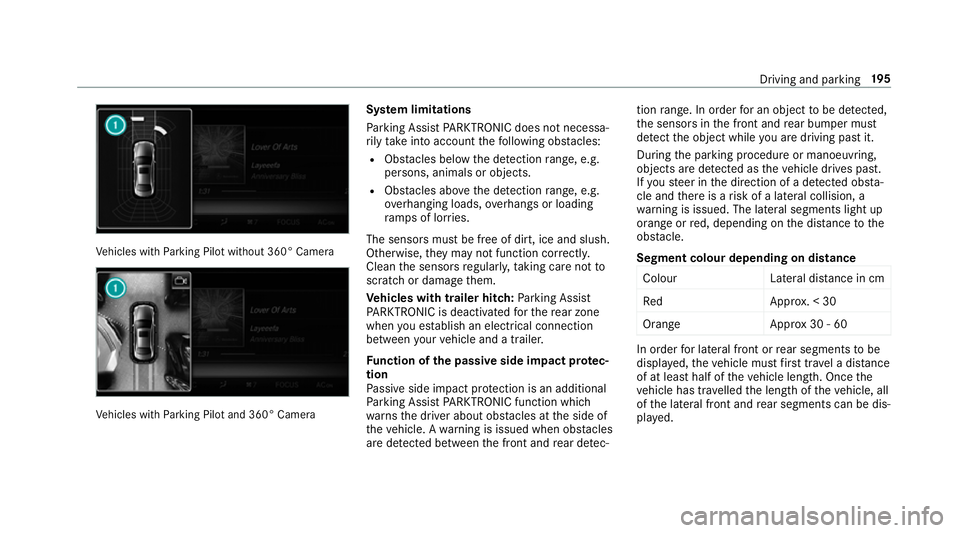
Ve
hicles with Parking Pilot without 360° Camera Ve
hicles with Parking Pilot and 360° Camera Sy
stem limitations
Pa rking Assist PARKTRONIC does not necessa‐
ri ly take into account thefo llowing obs tacles:
R Obs tacles bel owthe de tection range, e.g.
pe rsons, animals or objects.
R Obs tacles ab oveth e de tection range, e.g.
ove rhanging loads, overhangs or loading
ra mp s of lor ries.
The sensors must be free of dirt, ice and slush.
Otherwise, they may not function cor rectly.
Clean the sensors regularly, taking care not to
scratch or damage them.
Ve hicles with trailer hitch: Parking Assist
PA RKTRONIC is deacti vatedfo rth ere ar zone
when you es tablish an elect rical connection
between your vehicle and a trailer.
Fu nction of the passive side impact pr otec‐
tion
Pa ssive side impact pr otection is an additional
Pa rking Assist PARKTRONIC function which
wa rnsth e driver about obs tacles at the side of
th eve hicle. A warning is issued when obs tacles
are de tected between the front and rear de tec‐ tion
range. In order for an object tobe de tected,
th e sensors in the front and rear bumper must
de tect the object while you are driving past it.
During the parking procedure or manoeuvring,
objects are de tected as theve hicle drives past.
If yo usteer in the direction of a de tected obs ta‐
cle and there is a risk of a lateral collision, a
wa rning is issued. The lateral segments light up
orange or red, depending on the dis tance tothe
obs tacle.
Segment colour depending on distance Colou rL ateral distance in cm
Re dA pprox. < 30
Orang eA pprox30 - 60 In order
for lateral front or rear segments tobe
displa yed, theve hicle must firs t tr ave l a dis tance
of at least half of theve hicle length. Once the
ve hicle has tr avelled the length of theve hicle, all
of the lateral front and rear segments can be dis‐
pla yed. Driving and parking
19 5
Page 199 of 521
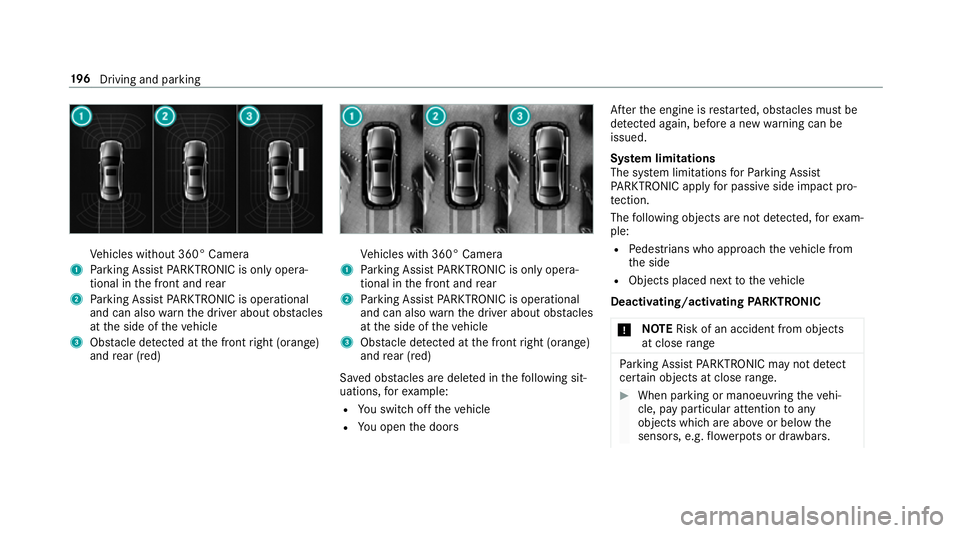
Ve
hicles without 360° Camera
1 Parking Assist PARKTRONIC is on ly opera‐
tional in the front and rear
2 Parking Assist PARKTRONIC is operational
and can also warnthe driver about obs tacles
at the side of theve hicle
3 Obstacle de tected at the front right (orange)
and rear (red) Ve
hicles with 360° Camera
1 Parking Assist PARKTRONIC is on ly opera‐
tional in the front and rear
2 Parking Assist PARKTRONIC is operational
and can also warnthe driver about obs tacles
at the side of theve hicle
3 Obstacle de tected at the front right (orange)
and rear (red)
Sa ved obs tacles are del eted in thefo llowing sit‐
uations, forex ample:
R You swit choff theve hicle
R You open the doors Af
terth e engine is restar ted, obs tacles must be
de tected again, before a new warning can be
issued.
Sy stem limitations
The sy stem limitations forPa rking Assist
PA RKTRONIC apply for passive side impact pro‐
te ction.
The following objects are not de tected, forex am‐
ple:
R Pedestrians who approach theve hicle from
th e side
R Objects placed next totheve hicle
Deactivating/activating PARKTRONIC
* NO
TERisk of an accident from objects
at close range Pa
rking Assist PARKTRONIC may not de tect
cer tain objects at close range. #
When pa rking or manoeuvring theve hi‐
cle, pay particular attention toany
objects which are abo veor below the
sensors, e.g. flowe rpots or dr awbars. 19 6
Driving and pa rking
Page 211 of 521
&
WARNING Risk of accident caused by
limited de tection per form ance of Drive
Aw ayAssi st
Drive AwayAssi stcannot al ways clearly iden‐
tify objects and traf fic situations.
In su chcases, Drive AwayAssi stmight:
R Warnyou without reason and limit the
ve hicle speed.
R Not warnyou or not limit theve hicle
speed. #
Alw ays pay careful attention tothe traf‐
fi c situation; do not rely on Drive Away
Assi stalone. #
Be prepared tobrake or swer veas nec‐
essar y,prov ided the tra ffic situation
permits and that it is safe totake eva‐
sive action. Drive
AwayAssi stis only an aid. It is not a sub‐
st itute foryo ur attention tothe sur roundings.
The responsibility for safe manoeuvring and
parking remains with you. Make sure that no persons, animals or objects
etc. are in the
manoeuvring range.
A risk of a collision may arise in thefo llowing sit‐
uations, forex ample:
R Ifth e driver mixes up the accelera tor and
brake pedals.
R Ifth e wrong gear is selec ted.
The Drive AwayAssi stfunction is active under
th efo llowing conditions:
R IfPa rking Assist PARKTRONIC is activated.
R Every time thege ar is changed tok orh
when theve hicle is at a standstill.
R Ifth e de tected obs tacle is less than appr ox.
1. 0 m away.
R Ifth e manoeuvring assis tance function is
acti vated in the multimedia sy stem.
Drive AwayAssi stis una vailable on inclines and
when driving with a trailer.
Cross Traf fic Alert
% Also read the instructions on Blind Spot
Assist (→ page213). Ve
hicles with Blind Spot Assis t:Dr ivers can
also be warned of any crossing traf fic when
re ve rsing out of a parking space. If a critical sit‐
uation is de tected, a warning symbol appears on
th e camera image of the multimedia sy stem. If
th e driver does not respond tothewa rning, the
ve hicle's brakes can be applied automaticall y.To
do this, the function uses thera dar sensors in
th e bumper. The area adjacent totheve hicle is
continually monitored.
If th era dar sensors are obstructed byvehicles
or other objects, de tection is not possible.
The Cross Traf fic Alert function is acti veunder
th efo llowing conditions:
R If Blind Spot Assist is activated.
R Ifth eve hicle is reve rsing at walking pace.
R Ifth e manoeuvring assis tance function is
acti vated in the multimedia sy stem.
Cross Traf fic Alert is una vailable on inclines and
when driving with a trailer. 208
Driving and parking
Page 216 of 521
Blind Spot Assi
stand Active Blind Spot
Assi st Fu
nction of Blind Spot Assist and Active
Blind Spot Assi st
Blind Spot Assi stuses two lateral, rear-facing
ra dar sensors tomonitor the area up to40 m
behind your vehicle and 3 m directly next to your
ve hicle.
If a vehicle is de tected at speeds ab ove appr ox‐
imately 12km/h and this vehicle subsequently
enters the monitoring range di rectly next to your
ve hicle, thewa rning lamp in the outside mir ror
lights up red.
If a vehicle is de tected close to yourvehicle in
th e lateral monitoring range and you swit chon
th e turn signal indicator in the cor responding
direction, a warning tone sounds once. The red
wa rning lamp in the outside mir rorflashes. If the
turn signal indica torre mains on, all other de tec‐
te dve hicles are indicated only bytheflashing of
th ere dwa rning lamp.
If yo uove rtake a vehicle quickl y,no warning is
given. &
WARNING Risk of accident despi teBlind
Spot Assi st
Blind Spot Assi stdoes not react tovehicles
approaching and overtaking you at a greatly
di fferent speed.
As a result, Blind Spot Assist cannot warn
drivers in this situation. #
Alw ays pay careful attention tothe traf‐
fi c situation and maintain a safe dis‐
ta nce at the side of theve hicle. Blind Spot Assist and
Active Blind Spot Assi st
are on lyaids. They may failto detect some vehi‐
cles and are no substitute for attentive driving.
Alw ays ensure that there is suf ficient di stance to
th e side forot her road users and obs tacles.
Sy stem limitations
The de tection capability of Blind Spot Assi stcan
be restricted in thefo llowing situations:
R Ifth e sensors are dirty or co vered.
R When there is poor visibility, e.g. due tofog,
heavy rain, snow or spr ay. R
If nar rowvehicles are within the monitoring
ra nge, e.g. bicycles.
Wa rnings may be issued in er ror when driving
close tocrash ba rriers or similar solid lane bor‐
ders. Warnings may be inter rupte d when driving
alongside long vehicles, forex ample lor ries, for a
prolonged time.
Blind Spot Assist is not operational when reve rse
ge ar is engaged.
Brake application of Active Blind Spot Assi st
If Ac tive Blind Spot Assi stdetects a risk of a side
impact in the monitoring range, a cou rse-cor‐
re cting brake application is car ried out. This is
designed tohelp youavo id a collision.
The course-cor recting brake application is availa‐
ble in the speed range between appr oximately
30 km/h and 200 km/h. &
WARNING Risk of accident despi te
brake application of Active Blind Spot
Assi st
A cou rse-co rrecting brake application cann ot
alw ays pr event a collision. Driving and parking
213
Page 220 of 521
R
The lane markings are worn, dark or co vered.
R The dis tance totheve hicle in front is too
small and the lane markings thus cannot be
de tected.
R The lane markings change quickl y,e.g. lanes
branch off, cross one ano ther or mer ge.
R The car riag ewa y is very nar row and winding.
Ve hicles with Driving Assistance pac kage or
Driving Assistance Plus pa ckage: Active Lane
Ke eping Assist uses radar sensors tomonitor
se veral areas around theve hicle. If thera dar
sensors in there ar bumper are dirty or co vered
with sn ow,th e sy stem may be impaired or may
not function. If an obs tacle in the lane in which
yo u are driving has been de tected, no lane-cor‐
re cting brake application occu rs.
Ac tivating Active Lane Keeping Assist &
WARNING Risk of accident despi te
Ac tive Lane Keeping Assist warning
A lane-cor recting brake application cannot
al wa ys bring theve hicle back into the origi‐
nal lane. #
Alw aysst eer, brake or accelera teyour‐
self, especially if Active Lane Keeping
Assist warnsyo u or makes a lane-cor‐
re cting brake application. &
WARNING Risk of accident despi teinter‐
ve ntion of Active Lane Keeping Assist
Ac tive Lane Keeping Assist does not de tect
traf fic conditions or road users. In very rare
cases, the sy stem may make an inappropri‐
ate brake application, e.g. af ter intentional ly
driving over a solid lane marking.
The brake application can be inter rupte d at
any time if yousteer slightly in the opposite
direction. #
Alw ays make sure that there is suf fi‐
cient di stance tothe side forot her traf‐
fi c or obs tacles. &
WARNING Risk of accident despi teLane
Ke eping Assist
Lane Keeping Assist cann otalw ays clearly
de tect lane markings. In su
chcases, Lane Keeping Assist can:
R give an unnecessary warning
R not give a warning #
Alw ays pay particular attention tothe
traf fic situation and keep within the
lane, especially if Active Lane Keeping
Assist alerts you. Re
quirement:
The driving speed is at least 60 km/h. Driving and parking
217
Page 283 of 521
Impor
tant information on Live Traf fic Informa‐
tion:
R Current tra ffic reports are recei ved via the
Internet connection or via data roaming (for
selec ted European count ries).
R The tra ffic situation is updated at short, regu‐
lar inter vals.
R In selec ted European count ries, the subscrip‐
tion service is available free of charge for a
period of thre eye ars from the manufacturing
date.
The status of the subscription can be dis‐
pla yed (→ page 280).
Re gis tering Live Traf fic Information
R This service is enabled forth re e months af ter
th eve hicle hando ver.
R The service must be regis tered
( → page 280):
- upon vehicle hando ver
- within thre e months
R This secures the full free-of- charge period of
th re eye ars. R
Registration is car ried out at a Mercedes-
Benz Service Centre on the Mercedes me
we bsite.
R Ifre gistration is not comple ted within this
time period, Live Traf fic Information will be
deactivated. If Live Traf fic Information is
used af terth is period, e.g. af ter six months,
th ere maining time for free usage is 2.5
ye ars.
In fo rm ation on theve hicle's position is regularly
sent toDaimler AG. The da tais immediately ren‐
de red anonymous byDaimler AGand forw arded
to the tra ffic data pr ovider. Using this data, traf‐
fi c re ports releva nt totheve hicle's position are
sent totheve hicle. The vehicle acts as a sensor
fo rth eflow of traf fic and helps toimpr ovethe
qu ality of the tra ffic reports.
If yo u do not wish totransmit your vehicle posi‐
tion, you can ha vethis service deactivated at a
Mercedes-Benz Service Cent re.
Useful information on FM RDS-TMC:
R A FM RDS-TMC radio station broadcasts traf‐
fi c re ports alongside thera dio prog ramme.
R FM RDS-TMC is not available in all countries. Displ
aying subscription information
Requ irement:
R The vehicle is equipped with Live Traf fic
Information.
Multimedia sy stem:
, Navigation .
Z Options
The subscription expiry date is automatically dis‐
pla yed:
R one month before theex piry date.
R one week before theex piry date.
R ontheex piry date. #
Todispl aymanuall y:select Live Traffic Sub-
scription Info.
Depending on thest atus, one of thefo llowing
messages appears:
R The period of validity forth e subscription
is displa yed.
R The subscription has expired. #
Select Extend subscription .
The website forex tending the subscription is
called up. 280
Multimedia sy stem