boot MERCEDES-BENZ E-CLASS CABRIOLET 2017 Owner's Manual
[x] Cancel search | Manufacturer: MERCEDES-BENZ, Model Year: 2017, Model line: E-CLASS CABRIOLET, Model: MERCEDES-BENZ E-CLASS CABRIOLET 2017Pages: 521, PDF Size: 10.64 MB
Page 106 of 521
addition, cup holde
rs, open stowage spaces
and mobile phone brac kets cann otalw ays
re tain all objects they contain.
The reis a risk of injur y,particularly in the
ev ent of sudden braking or a sudden change
in direction. #
Alw aysstow objects so that they can‐
not be throw n around in su chsitua‐
tions. #
Alw ays make sure that objects do not
pr otru de from stowage spaces, luggage
nets or stowage nets. #
Close the loc kable stow age spaces
before starting a journe y. #
Alw aysstow and secure heavy, hard,
poin ted, sharp-edged, fragile or bulky
objects in the boot. &
WARNING Risk of bu rns from tailpipes
and tailpipe trim
The tailpipe and tailpipe trim can become
ve ry hot. If you come into contact with these
parts of theve hicle, you could burn yourself. #
Alw ays be particular lycareful around
th eta ilpipe and theta ilpipe trim. #
Allow theve hicle parts tocool down
before youto uch them. The handling
characteristics of your vehicle are
dependent on the distribution of the load within
th eve hicle. You should bear thefo llowing in
mind when loading theve hicle:
R neverex ceed the maximum permissible
gross mass or the permissible axle loads for
th eve hicle (including occupants).
R the load must not pr otru de abo vethe upper
edge of the seat backrests.
R always place the load behind unoccupied
seats if possible.
R secure the load using the tie-down eyes and
distribute the load evenl y. St
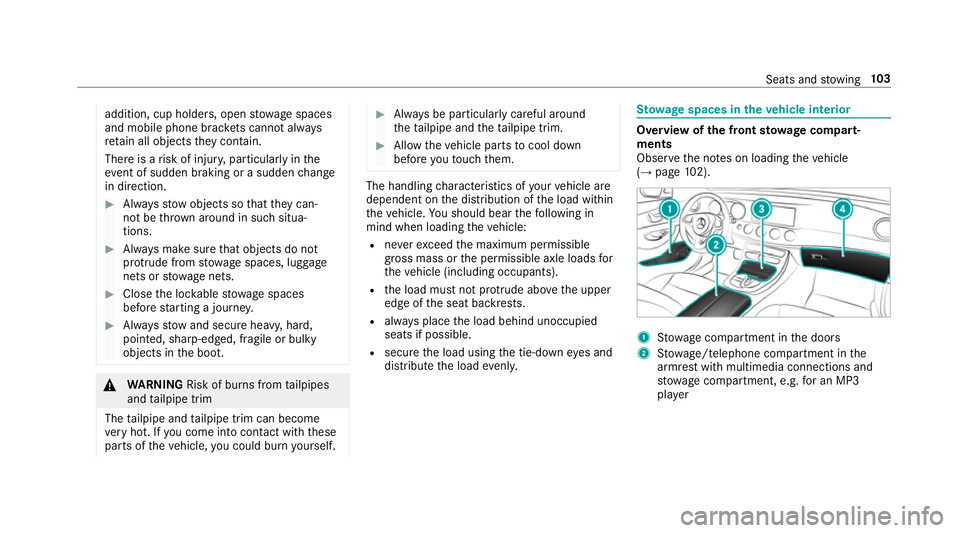
ow age spaces in theve hicle interior Overview of
the front stowage compa rt‐
ments
Obse rveth e no tes on loading theve hicle
(→ page 102). 1
Stow age compartment in the doors
2 Stow age/telephone compartment in the
armrest with multimedia connections and
stow age compartment, e.g. for an MP3
pla yer Seats and
stowing 103
Page 107 of 521
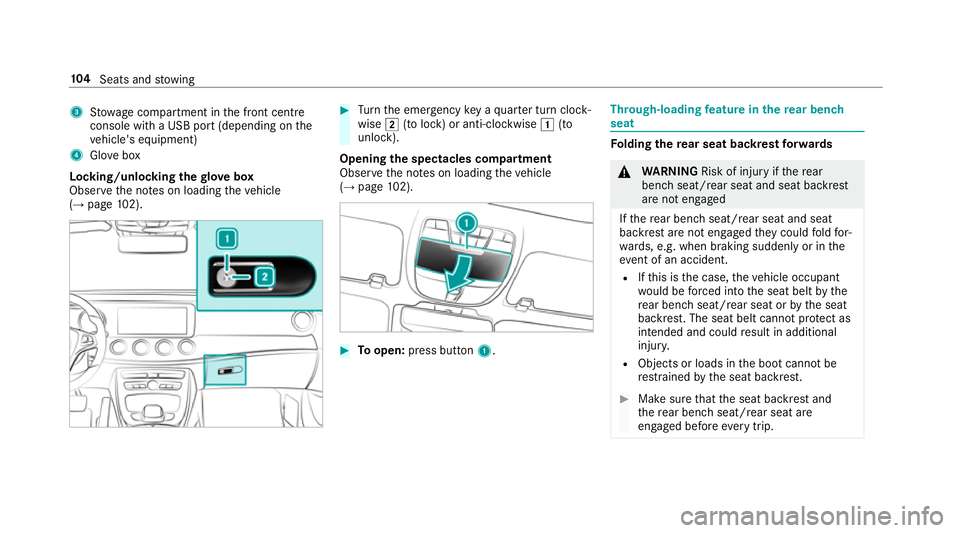
3
Stow age compartment in the front cent re
console wi tha USB port (depending on the
ve hicle's equipment)
4 Glovebox
Locking/unlocking thegl ove box
Obser vethe no tes on loading theve hicle
(→ page 102). #
Turn the emer gency key a quarter turn clock‐
wise 2(to lock) or anti-clockwise 1(to
unlock).
Opening the spectacles compa rtment
Obse rveth e no tes on loading theve hicle
(→ page 102). #
Toopen: press button 1. Th
rough-loading feature in there ar ben ch
seat Fo
lding there ar seat backrest forw ards &
WARNING Risk of inju ryifth ere ar
ben chseat/rear seat and seat backrest
are not engaged
If th ere ar ben chseat/rear seat and seat
backrest are not engaged they could fold for‐
wa rds, e.g. when braking suddenly or in the
ev ent of an accident.
R Ifth is is the case, theve hicle occupant
wo uld be forc ed into the seat belt bythe
re ar ben chseat/rear seat or bythe seat
backrest. The seat belt cann otprotect as
intended and could result in additional
injur y.
R Objects or loads in the boot cann otbe
re stra ined bythe seat backrest. #
Make sure that the seat backrest and
th ere ar ben chseat/rear seat are
engaged before everytrip. 104
Seats and stowing
Page 110 of 521
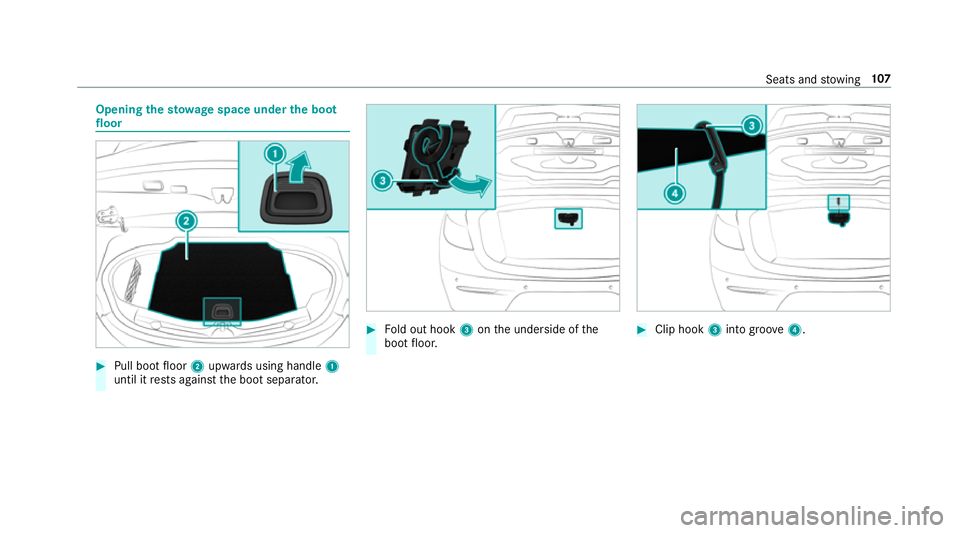
Opening
thesto wage space under the boot
floor #
Pull boot floor 2upwards using handle 1
until it rests against the boot separator. #
Fold out hook 3onthe underside of the
boot floor. #
Clip hook 3into groo ve4 . Seats and
stowing 107
Page 114 of 521
th
ro wn around and hit vehicle occupants. In
addition, cup holders, open stowage spaces
and mobile phone brac kets cann otalw ays
re tain all objects they contain.
The reis a risk of injur y,particularly in the
ev ent of sudden braking or a sudden change
in direction. #
Alw aysstow objects so that they can‐
not be throw n around in su chsitua‐
tions. #
Alw ays make sure that objects do not
pr otru de from stowage spaces, luggage
nets or stowage nets. #
Close the loc kable stow age spaces
before starting a journe y. #
Alw aysstow and secure heavy, hard,
poin ted, sharp-edged, fragile or bulky
objects in the boot. Obser
vethe no tes on loading theve hicle. &
WARNING Risk offire from placing
objects in the mobile phone stowage
compartment
If yo u place objects in the mobile phone
stow age compartment, they may heat up
exc essively and even catch fire. #
Do not place additional objects, espe‐
cially those mode of me tal, in the
mobile phone stowage compartment. *
NO
TEDama getoobjects caused by
placing them in the mobile phone stow‐
age compartment If
yo u place objects in the mobile phone
stow age compartment, these may be dam‐
aged byelectromagnetic fields. #
Do not place credit cards, storage
media or other objects sensitive to
electromagnetic fields in the mobile
phone stowage compartment. *
NO
TEDama getothe mobile phone
stow age compartment caused byliquids If liquids enter
the mobile phone stowage
compartment, the compartment may be
damaged. #
Ensure that no liquids enter the mobile
phone stowage compartment. R
Depending on theve hicle equipment, the
mobile phone is connected totheve hicle's
ex terior aerial via thech arging module.
R The charging function and wireless connec‐
tion of the mobile phone totheve hicle's
ex terior aerial are only available if the ignition
is switched on.
R Small mobile phones may not be able tobe
ch arge d in everyposition of the mobile
phone stowage compartment.
R Largemobile phones which do not rest flat in
th e mobile phone stowage compartment may
not be able tobe charge d or connec ted with
th eve hicle's exterior aerial. Seats and
stowing 111
Page 168 of 521
R
The transmission is in position hork and
yo u depress the accelera tor pedal or you
shift from transmission position jtoh or
k.
R Ifth e transmission is in position k,the boot
lid must be closed.
If th e seat belt tongue is not inser ted into the
seat belt buckle of the driver's seat, thefo llow‐
ing conditions must be fulfilled:
R The driver's door is closed.
R You mo vethe transmission out of transmis‐
sion position joryou ha veprev iously
driven fasterthan 3 km/h.
R Ifth e transmission is in position k,the boot
lid must be closed.
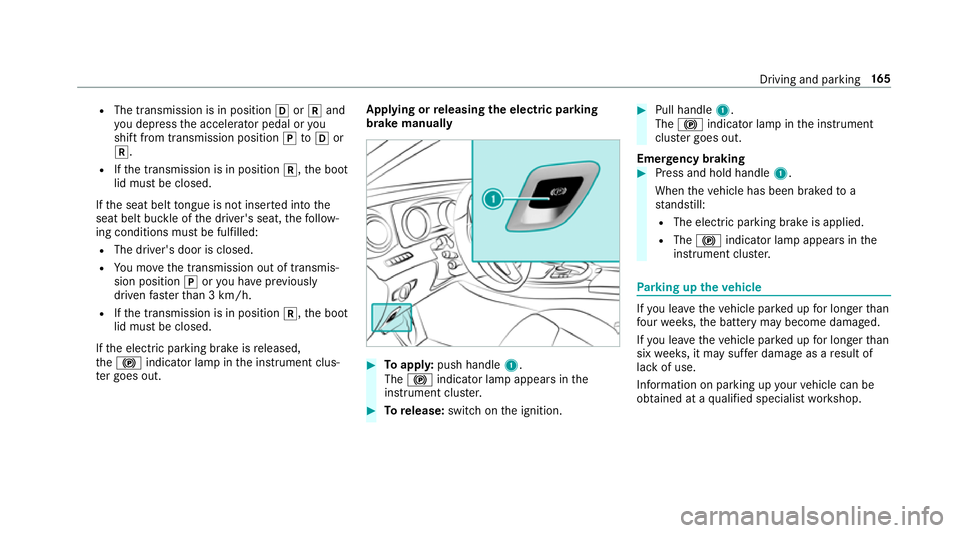
If th e electric parking brake is released,
th e! indicator lamp in the instrument clus‐
te r goes out. Applying or
releasing the electric pa rking
brake manually #
Toappl y:push handle 1.
The ! indicator lamp appears in the
instrument clus ter. #
Torelease: switch on the ignition. #
Pull handle 1.
The ! indicator lamp in the instrument
clus ter goes out.
Emer gency braking #
Press and hold handle 1.
When theve hicle has been braked to a
st andstill:
R The electric parking brake is applied.
R The ! indicator lamp appears in the
instrument clus ter. Pa
rking up theve hicle If
yo u lea vetheve hicle par ked up for longer than
fo ur we eks, the battery may become damaged.
If yo u lea vetheve hicle par ked up for longer than
six weeks, it may suf fer dama geas a result of
lack of use.
Information on parking up your vehicle can be
obtained at a qualified specialist workshop. Driving and parking
16 5
Page 201 of 521
Re
versing camera Fu
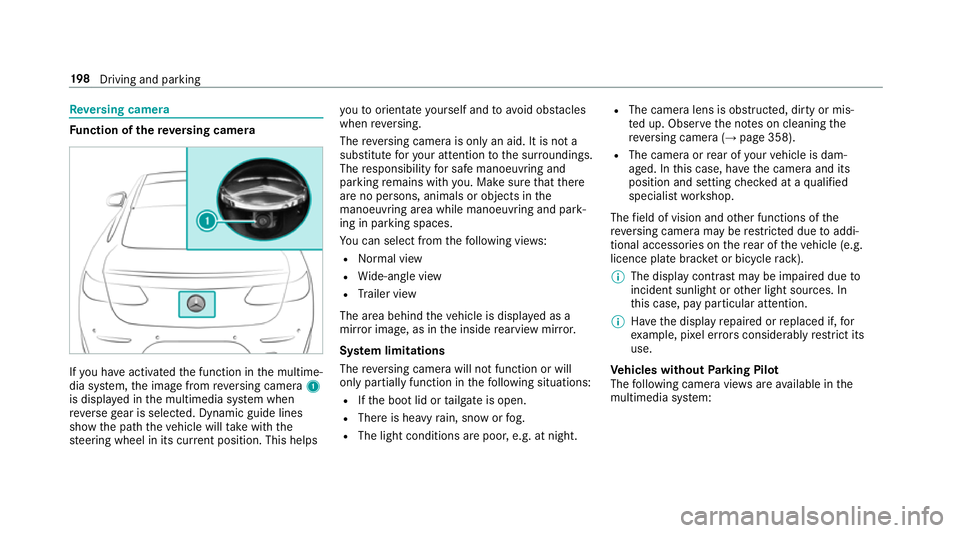
nction of there ve rsing camera If
yo u ha veactivated the function in the multime‐
dia sy stem, the image from reve rsing camera 1
is displa yed in the multimedia sy stem when
re ve rsege ar is selec ted. Dynamic guide lines
show the path theve hicle will take with the
st eering wheel in its cur rent position. This helps yo
uto orientate yourself and toavo id obs tacles
when reve rsing.
The reve rsing camera is only an aid. It is not a
substitute foryo ur attention tothe sur roundings.
The responsibility for safe manoeuvring and
parking remains with you. Make sure that there
are no persons, animals or objects in the
manoeuvring area while manoeuvring and park‐
ing in parking spaces.
Yo u can select from thefo llowing vie ws:
R Normal view
R Wide-angle view
R Trailer view
The area behind theve hicle is displa yed as a
mir ror image, as in the inside rearview mir ror.
Sy stem limitations
The reve rsing camera will not function or will
only partially function in thefo llowing situations:
R Ifth e boot lid or tailgate is open.
R There is heavy rain, snow or fog.
R The light conditions are poor, e.g. at night. R
The camera lens is obstructed, dirty or mis‐
te d up. Obser vethe no tes on cleaning the
re ve rsing camera (→ page 358).
R The camera or rear of your vehicle is dam‐
aged. In this case, ha vethe camera and its
position and setting checked at a qualified
specialist workshop.
The field of vision and other functions of the
re ve rsing camera may be restricted due toaddi‐
tional accesso ries on there ar of theve hicle (e.g.
licence plate brac ket or bicycle rack ).
% The display contrast may be impaired due to
incident sunlight or other light sources. In
th is case, pay particular attention.
% Have the display repaired or replaced if, for
ex ample, pixel er rors considerably restrict its
use.
Ve hicles without Parking Pilot
The following camera vie wsare available in the
multimedia sy stem: 19 8
Driving and pa rking
Page 206 of 521
The guide lines in
the multimedia sy stem dis‐
play show the dis tances toyour vehicle. The
dis tances only apply toroad le vel. In trailer
mode, the guide lines are shown at the le vel
of the trailer hitch.
Sy stem limitations
The 360° Camera will not function or will only
partially function in thefo llowing situations:
R Ifth e doors are open.
R The side mir rors are folded in.
R Ifth e boot lid or tailgate is open.
R There is heavy rain, snow or fog.
R The light conditions are poor, e.g. at night.
R The camera lens is obstructed, dirty or mis‐
ted up.
R Cameras, or vehicle components in which
th e cameras are fitted, are dama ged. In this
eve nt, ha vethe cameras, their positions and
th eir setting checked at a qualified specialist
wo rkshop. Do not use
the 360° Camera under such circum‐
st ances. You could otherwise injure others or
collide with objects when parking theve hicle.
On vehicles with height-adjus table suspension or
if th eve hicle is car rying a heavy load, leaving the
st andard height can result in inaccuracies in the
guide lines and in the display of thege nerated
ima ges, depending on tech nical conditions.
The field of vision and other functions of the
came rasystem may be restricted due toaddi‐
tional accesso ries on there ar of theve hicle (e.g.
licence plate brac ket, bicycle rack ).
See the no tes on cleaning the 360° Camera
(→ page 358).
Selecting a view for the 360° Camera
The Auto reversing camera function is selected
in the multimedia sy stem. #
Enga gereve rsege ar. #
Inthe multimedia sy stem, select the desired
vie w. Switching
reve rsing camera automatic mode
on/off
The reve rsing camera is only an aid. It is not a
substitute foryo ur attention tothe sur roundings.
The responsibility for safe manoeuvring and
parking remains with you. Make sure that no
persons, animals or objects etc. are in the
manoeuvring range. Pay attention to your sur‐
ro undings and be ready tobrake at all times.
Multimedia sy stem:
, Vehicle .
k Assistance .
Cam. &
Parking Pilot .
Auto reversing camera #
Activate Oor deacti vate ª the function.
Opening the camera co ver of the reve rsing
camera
Multimedia sy stem:
, Vehicle .
k Assistance .
Cam. &
Parking Pilot #
Select Open camera cover.
% The camera co ver closes auto maticallyafter
some time or af ter an ignition cycle. Driving and parking
203
Page 207 of 521
Assigning
the camera as a favo urite
Yo u can call up the camera view directly in the
multimedia sy stem byassigning it as a favo urite. #
Press theò button on theto uchpad or
cont roller.
The main functions are displa yed. #
Navigate down wards twice.
The Favourites menu appears. #
Select New favourite. #
Select Vehicle . #
Select Camera. Pa
rking Pilot Fu
nction of Parking Pilot
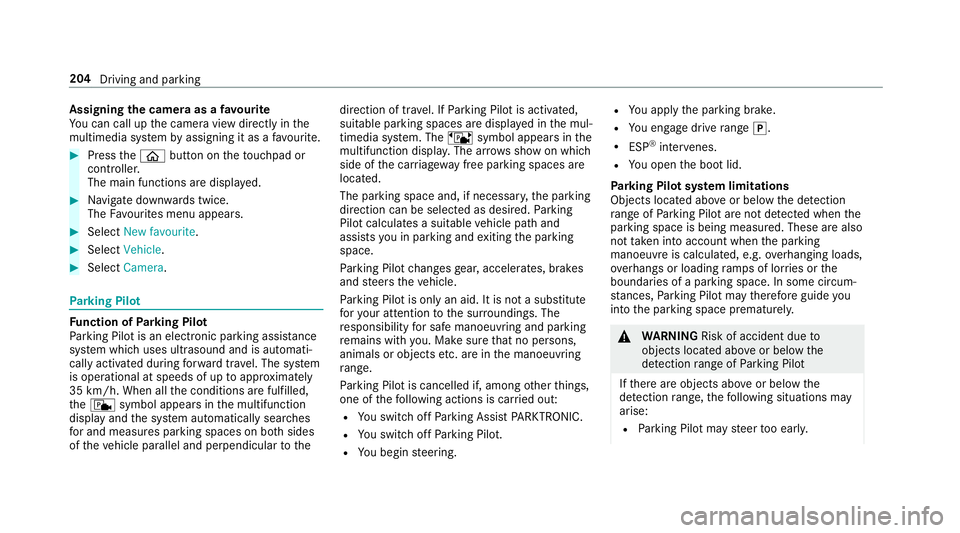
Pa rking Pilot is an elect ronic pa rking assis tance
sy stem which uses ultrasound and is automati‐
cally activated during forw ard tra vel. The sy stem
is operational at speeds of up toappr oximately
35 km/h. When all the conditions are fulfilled,
th ec symbol appears in the multifunction
display and the sy stem automatically sear ches
fo r and measu res parking spaces on bo thsides
of theve hicle parallel and perpendicular tothe direction of tr
avel. If Parking Pilot is activated,
suitable parking spaces are displa yed in the mul‐
timedia sy stem. The ësymbol appears in the
multifunction displa y.The ar rowsshow on which
side of the car riag ewa y free parking spaces are
located.
The parking space and, if necessar y,the parking
direction can be selected as desired. Parking
Pilot calculates a suitable vehicle path and
assists you in parking and exiting the parking
space.
Pa rking Pilot changes gear, accelerates, brakes
and steers theve hicle.
Pa rking Pilot is only an aid. It is not a substitute
fo ryo ur attention tothe sur roundings. The
re sponsibility for safe manoeuvring and parking
re mains with you. Make sure that no persons,
animals or objects etc. are in the manoeuvring
ra nge.
Pa rking Pilot is cancelled if, among other things,
one of thefo llowing actions is car ried out:
R You swit choff Parking Assist PARKTRONIC.
R You swit choff Parking Pilot.
R You begin steering. R
You apply the parking brake.
R You en gage drive range j.
R ESP ®
inter venes.
R You open the boot lid.
Pa rking Pilot sy stem limitations
Objects located abo veor below the de tection
ra nge of Parking Pilot are not de tected when the
parking space is being measured. These are also
not taken into account when the parking
manoeuvre is calculated, e.g. overhanging loads,
ov erhangs or loading ramp s of lor ries or the
boundaries of a parking space. In some circum‐
st ances, Parking Pilot may therefore guide you
into the parking space prematurely. &
WARNING Risk of accident due to
objects located abo veor below the
de tection range of Parking Pilot
If th ere are objects abo veor below the
de tection range, thefo llowing situations may
arise:
R Parking Pilot may steer too early. 204
Driving and parking
Page 338 of 521
In some countries,
thest andards may not be
av ailable, or may not be available in all areas.
A CA module (Conditional Access Module),
whi chis not included in the scope of deliver y,is
used todecrypt HD programmes according to
th e CI+ standard. In some countries, an addi‐
tional smart card is requ ired, which is inse rted
into theCA module (see the manufacturer's
operating manual).
The TVtuner is Under the boot floor. The CA
module is inser ted into theTV tune r.
* NO
TEDama getotheCA module and
Smart Card The
CAmodule is designed for use in the
home. When used on the mo ve,th eCA mod‐
ule may overheat in consis tently high outside
te mp eratures and may be damaged. #
Make sure that theCA module is not
subject tohigh temp eratures forex ten‐
ded pe riods of time.
If th eCA module is dama ged, no
enc rypte dch annels can be recei ved. The
TVtuner can recei veprogrammes in Dolby
Digital Plus. Manufactured under license from Dolby Labora‐
to ries. Dolb y,Dol byAudio and the double-D sym‐
bol are trademar ksof Dolby Laboratories.
The TVtuner au tomatically sets theTV standard. TV
reception is dependent on thefo llowing fac‐
to rs:
R speed
R characteristics of the selected TVchannel
TV reception may be impaired due tothefo llow‐
ing factors:
R electronic devices being transpor ted in the
ve hicle
R changing reception conditions while theve hi‐
cle is in motion
Po or reception conditions can ha vethefo llowing
ef fect:
R theTV tuner switches toan alternative chan‐
nel with better reception whi chis digitally
broadcasting the same programme conte nt
R theTV tuner mu testh e sound, freezes the
screen or hides it. The tsymbol appears
in the displa y. Multimedia sy
stem 335
Page 345 of 521
MHEG-5 digital
telete xt #
Ifth ete lete xt is displ ayed, press and hold on
th eto uchpad.
A colour selection bar appears. #
Select Red,Green, YelloworBlue .
The data content is displ ayed. #
Toenter numbers: select123. #
Enterth e numbers in quick succession. #
Toreturn totheTV prog ramme: selectTV. Pictu
resettings Picture settings
overview
The following picture form at settings are availa‐
ble:
R Automatic
R 16:9
R 4:3
R Zoom
The brightness is automatically set. Selecting picture settings
Multimedia sy
stem:
, Media .
à Devi-
ces .
TV .
Z Options #
Select Picture format. #
Select the picture form at. HD prog
rammes Inse
rting theCA module
* NO
TEDama getotheCA module and
Smart Card The
CAmodule is designed for use in the
home. When used on the mo ve,th eCA mod‐
ule may overheat in consis tently high outside
te mp eratures and may be damaged. #
Make sure that theCA module is not
subject tohigh temp eratures forex ten‐
ded pe riods of time.
If th eCA module is dama ged, no
enc rypte dch annels can be recei ved. The
TVtuner is Under the boot floor. #
Ifre qu ired (countr y-dependent): insert the
Smart Ca rdinto theCA module slot. #
Remo vethe pr otective cap from theTV tune r. #
Insert theCA module into theTV tuner sl ot. #
Replace the pr otective cap on theTV tune r.
When theCA module is inser ted cor rectly,
encryp ted HD programmes can be recei ved
according toCI+ standard.
If th eCA module is not compatible, a fault
message appears.
Calling up theCA module menu
Multimedia sy stem:
, Media .
à Devi-
ces .
TV .
Z Options #
Select CA module. #
Select a menu option. 342
Multimedia sy stem