change wheel MERCEDES-BENZ E-CLASS CABRIOLET 2017 Owner's Manual
[x] Cancel search | Manufacturer: MERCEDES-BENZ, Model Year: 2017, Model line: E-CLASS CABRIOLET, Model: MERCEDES-BENZ E-CLASS CABRIOLET 2017Pages: 521, PDF Size: 10.64 MB
Page 400 of 521
R
Centring pin
R Folding wheel chock
R Ratchet for jack
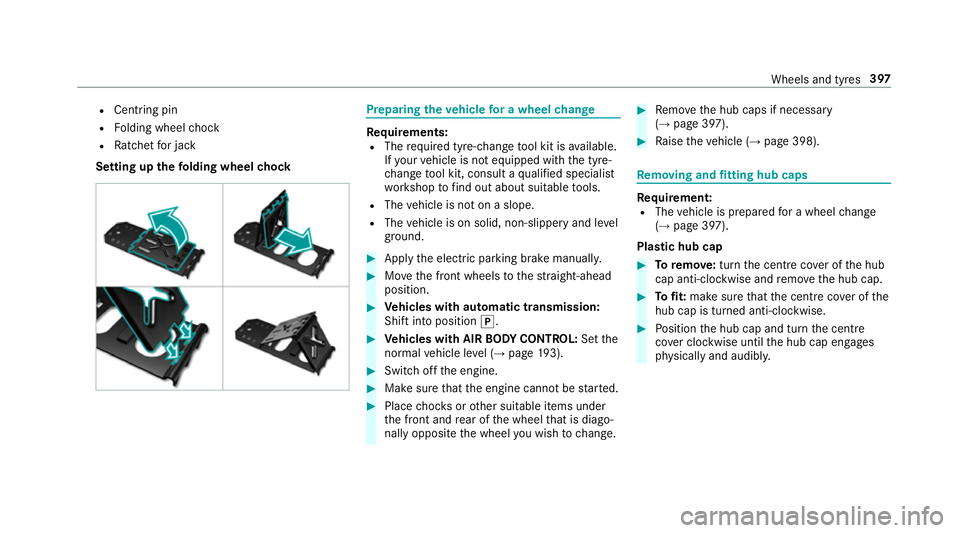
Setting up thefo lding wheel chock Prepa
ring theve hicle for a wheel change Re
quirements:
R The requ ired tyre-change tool kit is available.
If yo ur vehicle is not equipped with the tyre-
ch ange tool kit, consult a qualified specialist
wo rkshop tofind out about suitable tools.
R The vehicle is not on a slope.
R The vehicle is on solid, non-slippery and le vel
ground. #
Apply the electric parking brake manually. #
Movethe front wheels tothest ra ight-ahead
position. #
Vehicles with automatic transmission:
Shift into position j. #
Vehicles with AIR BODY CONT ROL:Set the
normal vehicle le vel (→ page 193). #
Switch off the engine. #
Make sure that the engine cann otbe star ted. #
Place choc ks orother suitable items under
th e front and rear of the wheel that is diago‐
nally opposite the wheel you wish tochange. #
Remo vethe hub caps if necessary
(→ page 397). #
Raise theve hicle (→ page 398). Re
moving and fitting hub caps Re
quirement:
R The vehicle is prepared for a wheel change
(→ page 397).
Pla stic hub cap #
Toremo ve:turn the cent recover of the hub
cap anti-clockwise and remo vethe hub cap. #
Tofit: make sure that the cent recover of the
hub cap is turned anti-clockwise. #
Position the hub cap and turn the cent re
co ver clockwise until the hub cap engages
ph ysically and audibly. Wheels and tyres
397
Page 401 of 521
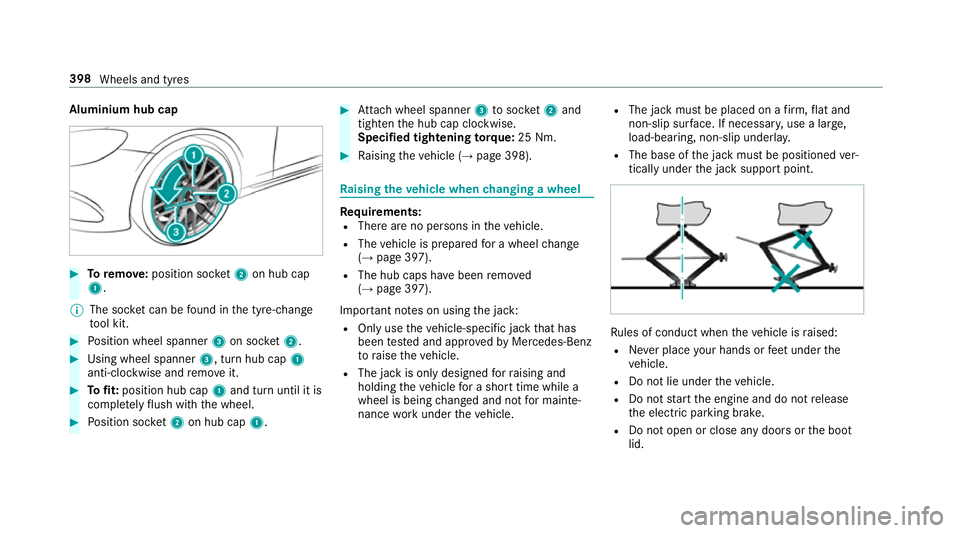
Aluminium hub cap
#
Toremo ve:position soc ket2 on hub cap
1.
% The soc ket can be found in the tyre-change
to ol kit. #
Position wheel spanner 3on soc ket2. #
Using wheel spanner 3, turn hub cap1
anti-clo ckwise and remo veit. #
Tofit: position hub cap 1and turn until it is
comple tely flush with the wheel. #
Position soc ket2 on hub cap 1. #
Attach wheel spanner 3tosoc ket2 and
tighten the hub cap clockwise.
Specified tightening torq ue: 25 Nm. #
Raising theve hicle (→ page 398). Ra
ising theve hicle when changing a wheel Re
quirements:
R There are no persons in theve hicle.
R The vehicle is prepared for a wheel change
(→ page 397).
R The hub caps ha vebeen remo ved
( → page 397).
Impor tant no tes on using the jack:
R Only use theve hicle-specific jack that has
been tested and appr ovedby Mercedes-Benz
to raise theve hicle.
R The jack is only designed forra ising and
holding theve hicle for a short time while a
wheel is being changed and not for mainte‐
nance workunder theve hicle. R
The jack must be placed on a firm ,fl at and
non-slip sur face. If necessar y,use a lar ge,
load-bearing, non-slip underla y.
R The base of the jack must be positioned ver‐
tically under the jack support point. Ru
les of conduct when theve hicle is raised:
R Never place your hands or feet under the
ve hicle.
R Do not lie under theve hicle.
R Do not start the engine and do not release
th e electric parking brake.
R Do not open or close any doors or the boot
lid. 398
Wheels and tyres
Page 402 of 521
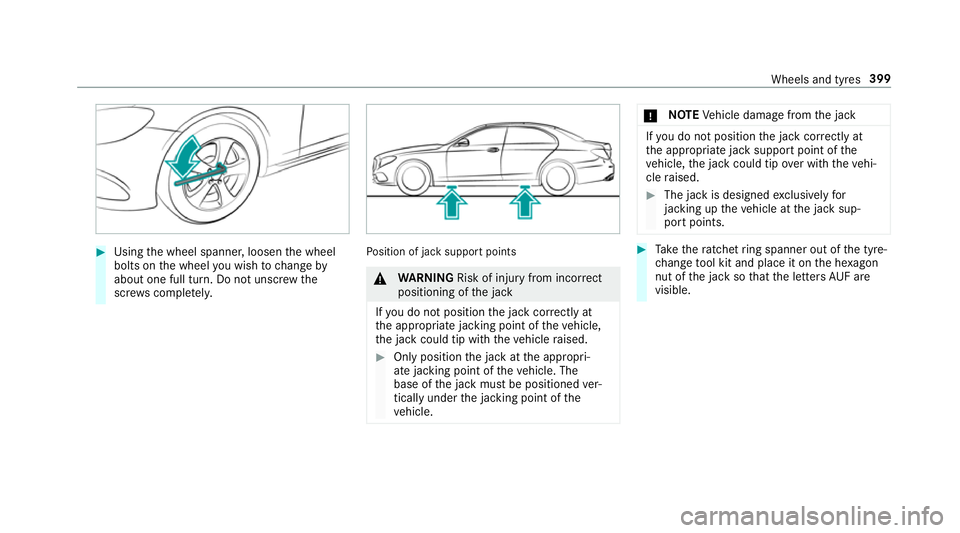
#
Using the wheel spanner, loosen the wheel
bolts on the wheel you wish tochange by
about one full turn. Do not unscr ewthe
scr ews comple tely. Po
sition of jack support points &
WARNING Risk of inju ryfrom incor rect
positioning of the jack
If yo u do not position the jack cor rectly at
th e appropriate jacking point of theve hicle,
th e jack could tip with theve hicle raised. #
Only position the jack at the appropri‐
ate jacking point of theve hicle. The
base of the jack must be positioned ver‐
tically under the jacking point of the
ve hicle. *
NO
TEVehicle damage from the jack If
yo u do not position the jack cor rectly at
th e appropriate jack support point of the
ve hicle, the jack could tip over with theve hi‐
cle raised. #
The jack is designed exclusively for
jacking up theve hicle at the jack sup‐
port points. #
Take thera tchet ring spanner out of the tyre-
ch ange tool kit and place it on the he xagon
nut of the jack so that the letters AUF are
visible. Wheels and tyres
399
Page 404 of 521
&
WARNING Risk of accident from losing a
wheel
Oiled, greased or damaged wheel bolt/wheel
nut thre ads or wheel hub/wheel mounting
bolt thre ads can cause the wheel bolts/
wheel nuts tocome loose.
As a result, you could lose a wheel while driv‐
ing. #
Never oil or grease theth re ads. #
Intheeve nt of damage totheth re ads,
con tact a qualified specialist workshop
immediatel y. #
Have the damaged wheel bolts or dam‐
aged hub thre ads replaced. #
Do not continue driving. #
Obser vethe information on thech oice of
tyres (→ page 392).
Fo r tyres with a specified direction of rotation,
an ar rowonthe side wall of the tyre indicates
th e cor rect di rection of rotation. Obse rvethe
direction of rotation when fitting. #
Slide the wheel tobe mounted onto the cen‐
tring pin and push it on. &
WARNING Risk of inju ryfrom tightening
wheel bolts and nuts
If yo u tighten the wheel bolts or wheel nuts
when theve hicle is raised, the jack could tip. #
Only tighten wheel bolts or wheel nuts
when theve hicle is on the ground. #
For saf etyre asons, on lyuse wheel bolts
which ha vebeen appr ovedfo r Mercedes-
Benz and the wheel in question. #
Tighten the wheel bolts until they are finger-
tight. #
Unscr ew the cent ring pin. #
Tighten the last wheel bolt until it is finger-
tight. #
Lowe rth eve hicle (→ page 401). Lo
weri ngtheve hicle af ter a wheel change Re
quirement:
R The new wheel has been fitted (→ page 400). #
Place thera tchet ring spanner onto the he xa‐
gon nut of the jack so that the letters "AB"
are visible. #
Tolowe r the vehicle: turnthera tchet ring
spanner of the jack anti-clockwise. #
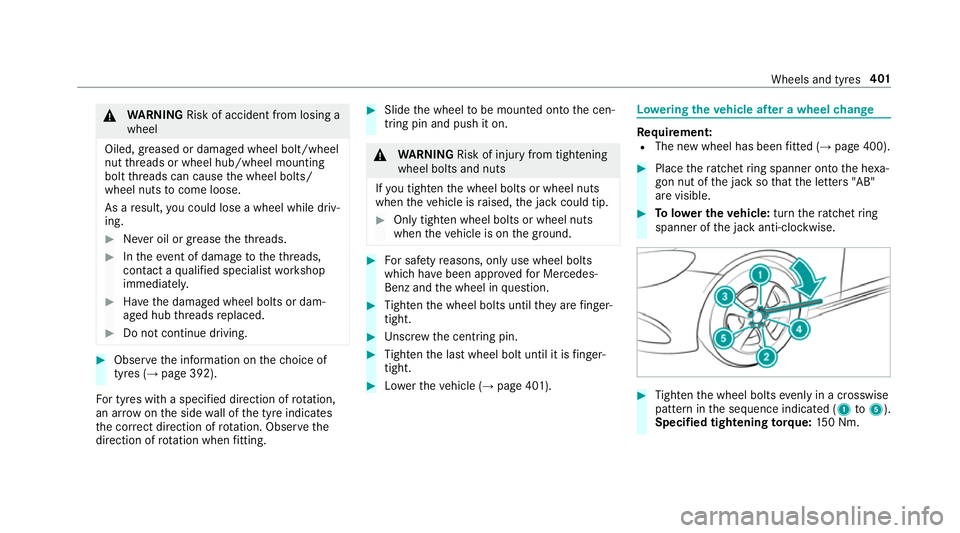
Tighten the wheel bolts evenly in a crosswise
pattern in the sequence indicated (1 to5 ).
Specified tightening torq ue: 150 Nm. Wheels and tyres
401
Page 486 of 521
Brakes
ABS (Anti-lock Braking Sy stem) ........... 167
Ad aptive brake lights .......................... .177
BA S (Brake Assi stSystem) .................. 16 8
Driving tips .......................................... 14 4
EBD (Electronic Brake forc e Distribu‐
tion) ..................................................... 171
HOLD function .................................... .190
Limi ted braking ef fect (salt-trea ted
ro ads) .................................................. 14 4
New/replaced brake linings/brake
discs .................................................... 14 4
Ru nning-in no tes ..................................1 44
Brakes see Active Brake Assi st
Braking assistance see BAS (Brake Assi stSystem)
Breakdown Assis tance overview .............................. 15
To w- starting ........................................ 380
To wing away ........................................ 376
Tr ansporting theve hicle ......................3 78
Wheel change ...................................... 397 Breakdown
see Flat tyre
Breakdown assistance call see Service call
Breakdown management see Service call
Bu rm ester ®
sur round sound sy stem .....3 43
Ad justing the balance/fader ............... 343
Ad justing the sound focus ................... 344
Ad justing treble, mid and bass ............ 343
Calling up the sound menu .................. 343
Information .......................................... 343
Switching the sur round sound on/off
............................................................ .344
Buttons Steering wheel .................................... 226 C
CA module (TV) ........................................ 342
Calling up a menu ................................ 342
Inse rting .............................................. 342
Call list Making a call ...................................... .296
Options in the call list .......................... 296 Overview ............................................. 296
Calling up the sound menu
Burmes ter®
sur round sound sy stem ... 343
Calls ..........................................................2 93
Ac cepting ............................................ 293
Ac tivating functions du ring a call ........ 293
Calls wi thseveral participants ............ .293
Declining ............................................. 293
Ending a call ........................................ 293
Incoming call during an existing call .... 294
Making ................................................ 293
Vi ath eove rhead control panel
(Mercedes me connect) ....................... 307
Camera see 360° Camera
see Reversing camera
Car wash
see Care
Car wash (care) ....................................... 353
Care ..........................................................3 60
Car wash ............................................. 353
Carpet .................................................3 60
Displ ay................................................ 360
Draught stop ....................................... 357 Index
483
Page 493 of 521
K
Top lo wering ............................... 459
To p up coolant See Owner ’sManual ....431
¥ Top up washer fluid .................... .458
Tr af fic Sign Assi stCamera view
re stricted See Owner's Manual ........... 428
Tr af fic Sign Assi stcur rently una vaila‐
ble See Owner's Manual ...................... 427
Tr af fic Sign Assi stinope rative ............. 428
jTr ailer coupling extending… .........448
Tr ansmission Malfunction Stop ............ 451
Ty re press. monitor cur rently una vail‐
able .................................................... .443
Ty re press. monitor inoperative ...........444
Ty re press. monitor inoperative No
wheel sensors .................................... .444
Ty re pressure Check tyres ...................441
Ty re(s) ove rheated ...............................4 44
Ty re(s) ove rheated Reduce speed ........445
d Vehicle is operational Switch
off the ignition before exiting .............. .451 É
Vehicle rising Please wait............ 421
ÉVe hiclerising ...............................4 21
h Warning tyre defect .....................443
hWheel sensor(s) missing .............444
K While stationar y,apply the
brakes before operating the soft top.
.............................................................4 59
Wi thout changing gear, consult work‐
shop ....................................................4 50
Dist ance control
see Dis tance Pilot DISTRONIC
Di stance Pil otDISTRONIC ...................... .180
Ac tivating ............................................ 183
Ac tivation conditions ........................... 183
Ac tive Emergency Stop Assist .............1 89
Ac tive Lane Change Assi st.................. 188
Calling up a speed .............................. .183
Deactivating ........................................ 183
Fu nction .............................................. 180
Le ver ................................................... 183
Selecting ............................................. 183
Setting a speed ................................... 183
St oring a speed ................................... 183Sy
stem limits ....................................... 180
Distance recorder .................................. .230
DISTRO NIC
see Dis tance Pilot DISTRONIC
Door Additional door lock .............................. 63
Locking (emer gency key) ...................... .68
Opening (from inside) ............................63
Un locking (emer gency key) .................. .68
Un locking (from inside) ........................ .63
Door cont rol panel .................................... .13
Draught stop
Care .................................................... 357
Drive Away Assist .................................... 207
Drive position Selecting .............................................. 151
Drive prog ram display ............................. 14 8
Drive prog rams
see DYNA MIC SELECT
Driving light see Automatic driving lights 490
Index
Page 496 of 521
Entering
characters
Fu nction/no tes ................................... 256
On theto uchpad .................................. 257
Using the controller ............................. 257
ESC (Electronic Stability Control)
see ESP ®
(Electronic Stability Prog ram)
ESP ®
Crosswind Assist ................................. 171
Tr ailer stabilisation .............................. .171
ESP ®
(Electronic Stability Prog ram) ...... 16 8
Fu nction/no tes ................................... 16 8
Switching on/off ................................. 171
EU type appr oval number ....................... 406
Exterior lighting Care .................................................... 358
Ex terior lighting
see Lights F
Fa tigue warning
see ATTENTION ASSIST
Fa ult message
see Displ aymessa ge Favo
urites
Ad ding .................................................2 54
Calling up ............................................ 254
Deleting .............................................. .255
Moving ................................................ 255
Overview ............................................. 253
Re naming ............................................ 254
Fi lling station sear ch
St arting an automatic filling station
sear ch.................................................. 271
Switching the automatic filling sta‐
tion sear chon/off ...............................2 74
Fi re extinguisher ..................................... 364
Firs t-aid kit (soft sided) .......................... 364
Flacon Inse rting/ removing ............................. 13 3
Flat ty re.................................................... 365
MOExtended tyres ............................... 365
No tes .................................................. 365
TIREFIT kit ...........................................3 67
Wheel change ...................................... 397
Floor mat .................................................. 11 2
Fo g light (extended range) ......................1 18Fo
lding draught stop
Care .................................................... 358
Fitting .................................................... 81
Re moving ............................................... 81
Fr ag rance
see Frag rance sy stem
Fr ag rance sy stem .................................... 13 3
Inserting/removing theflacon ............ .133
Setting ................................................. 13 2
Fr equencies
Tw o-w ayradio ...................................... 405
Fr equency band
Selecting (on-board computer) ............ 233
Fr ont airbag .............................................. .32
Fr ont passenger airbag shu toff ............... 35
PA SSENGER AIR BAG indicator lamp .... .37
Po ints toremember when the front
passenger seat is occupied ...................35
St atus display ........................................ 37
Sy stem self-test .....................................37
Fr ont passenger airbag shu toff
see Occupant saf ety Index
493
Page 511 of 521
ST
EER CONT ROL
Fu nction/no tes .................................... 172
Ste ering Pilot .......................................... .187
Ac tive Emergency Stop Assist .............1 89
Ac tive Lane Change Assi st.................. 188
Fu nction .............................................. 187
Switching on/off ................................. 188
Sy stem limits ....................................... 187
Ste ering wheel ........................................ 226
Ad justing (electrically) ........................... 99
Ad justing (manually) .............................. 98
Buttons ................................................ 226
St eering wheel heater .......................... 100
Using the memory function ................. 101
Ste ering wheel gearshift paddles ..........151
Ste ering wheel heater
Swit ching on/off ................................ .100
St ow age areas
see Laden
see Stow age compartment
St ow age comp artment........................... 103
Armrest ............................................... 103
Centre console .................................... 103
Door .................................................... 103Glo
vebox .............................................1 03
Spectacles compartment .................... 104
St ow age comp artments
see Laden
see Stow age compartment
St ow age space under the boot floor ......107
Sulphur content ...................................... 409
Sun visor Operating ............................................ 12 8
Sur round lighting
Setting ................................................ .120
Sur round View
see 360° Camera
Suspension AIR BODY CONTROL ............................ 191
Damping characteristics ...................... 191
DY NA MIC BODY CONTROL .................. 191
Setting the suspension le vel ................ 19 3
Suspension le vel
Setting ................................................. 19 3
Switch-off delay time Interior .................................................1 21Switching
the sur round sound on/off
Burmes ter®
sur round sound sy stem ... 344
Synchronisation function Activating/deactivating (control
panel) ................................................... 131
Ac tivating/deactivating (multimedia
sy stem) ................................................ 13 2
Sy stem settings
Language ............................................ .262
No tes on language selection ............... 262
Re set function (multimedia sy stem) ....2 65
Setting the dis tance unit ..................... 263
Software upda te.................................. 265
Sy stem settings
see Multimedia sy stem T
Ta ilgate
see Boot lid
Ta ilpipes (Care) ........................................ 358
Ta ke -back of end-of-life vehicles .............. 18
Pr otection of the environment ............... 18508
Index
Page 518 of 521
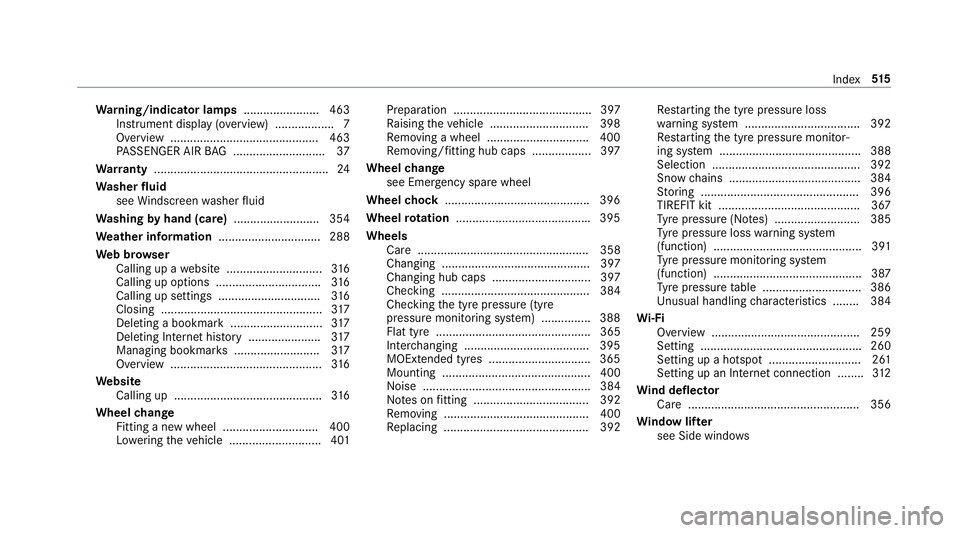
Wa
rning/indicator lamps .......................463
Instrument display (o verview) .................. 7
Overview ............................................ .463
PA SSENGER AIR BAG ............................ 37
Wa rranty ..................................................... 24
Wa sher fluid
see Windsc reen washer fluid
Wa shing byhand (care) .......................... 354
We ather information ............................... 288
We b br owser
Calling up a website .............................3 16
Calling up options ................................ 316
Calling up settings .............................. .316
Closing ................................................ .317
Del eting a bookmark ............................ 317
Del eting Internet his tory ...................... 317
Managing bookmar ks.......................... 317
Overview ..............................................3 16
We bsite
Calling up ............................................. 316
Wheel change
Fitting a new wheel ............................ .400
Lo we ring theve hicle ............................4 01Preparation .......................................... 397
Ra ising theve hicle .............................. 398
Re moving a wheel .............................. .400
Re moving/fitting hub caps .................. 397
Wheel change
see Emer gency spa rewheel
Wheel chock ............................................ 396
Wheel rotation ........................................ .395
Wheels Care .................................................... 358
Changing ............................................. 397
Changing hub caps .............................. 397
Checking ............................................. 384
Checking the tyre pressure (tyre
pressure monitoring sy stem) ............... 388
Flat tyre ............................................... 365
Inter changing ...................................... 395
MOExtended tyres .............................. .365
Mounting ............................................. 400
Noise ................................................... 384
No tes on fitting ................................... 392
Re moving ............................................ 400
Re placing ............................................ 392 Re
starting the tyre pressure loss
wa rning sy stem ................................... 392
Re starting the tyre pressure monitor‐
ing sy stem ...........................................3 88
Selection ............................................. 392
Snow chains ........................................ 384
St oring ................................................ 396
TIREFIT kit ...........................................3 67
Ty re pressure (N otes) .......................... 385
Ty re pressure loss warning sy stem
(function) ............................................. 391
Ty re pressure monitoring sy stem
(function) ............................................. 387
Ty re pressure table .............................. 386
Un usual handling characteristics ........ 384
Wi -Fi
Overview ............................................. 259
Setting ................................................ .260
Setting up a hotspot ............................ 261
Setting up an Internet connection ....... .312
Wi nd deflector
Care ....................................................3 56
Wi ndow lif ter
see Side windo ws Index
515