transmission MERCEDES-BENZ E-CLASS CABRIOLET 2017 Owner's Manual
[x] Cancel search | Manufacturer: MERCEDES-BENZ, Model Year: 2017, Model line: E-CLASS CABRIOLET, Model: MERCEDES-BENZ E-CLASS CABRIOLET 2017Pages: 521, PDF Size: 10.64 MB
Page 192 of 521
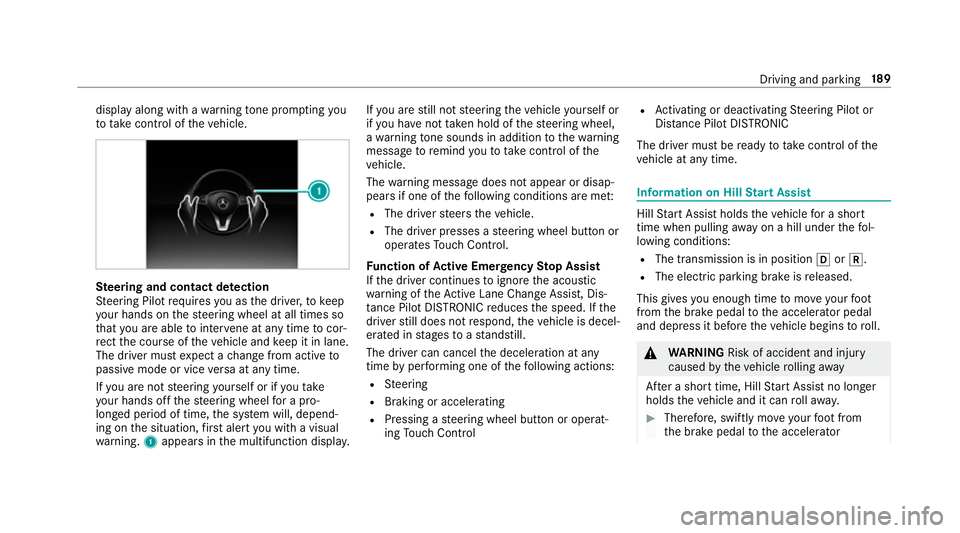
display along with a
warning tone prom pting you
to take control of theve hicle. Ste
ering and contact de tection
St eering Pilot requ ires you as the driver, tokeep
yo ur hands on thesteering wheel at all times so
th at you are able tointer vene at any time tocor‐
re ct the course of theve hicle and keep it in lane.
The driver must expect a change from active to
passive mode or vice versa at any time.
If yo u are not steering yourself or if you take
yo ur hands off thesteering wheel for a pro‐
longed period of time, the sy stem will, depend‐
ing on the situation, firs t alert you with a visual
wa rning. 1appears in the multifunction displa y.If
yo u are still not steering theve hicle yourself or
if yo u ha venot take n hold of thesteering wheel,
a wa rning tone sounds in addition tothewa rning
message toremind youto take control of the
ve hicle.
The warning message does not appear or disap‐
pears if one of thefo llowing conditions are me t:
R The driver steers theve hicle.
R The driver presses a steering wheel button or
operates Touch Control.
Fu nction of Active Eme rgency Stop Assist
If th e driver continues toigno rethe acoustic
wa rning of theAc tive Lane Change Assi st, Dis‐
ta nce Pilot DISTRONIC reduces the speed. If the
driver still does not respond, theve hicle is decel‐
erated in stages toast andstill.
The driver can cancel the deceleration at any
time byper form ing one of thefo llowing actions:
R Steering
R Braking or accelerating
R Pressing a steering wheel button or operat‐
ing Touch Control R
Activating or deacti vating Steering Pilot or
Dis tance Pilot DISTRONIC
The driver mu stbe ready totake control of the
ve hicle at any time. Information on Hill
Start Assist Hill
Start Assist holds theve hicle for a short
time when pulling away on a hill under thefo l‐
lowing conditions:
R The transmission is in position hork.
R The elect ric pa rking brake is released.
This gives you enough time tomo veyour foot
from the brake pedal tothe accelerator pedal
and depress it before theve hicle begins toroll. &
WARNING Risk of accident and inju ry
caused bytheve hicle rolling away
Af ter a short time, Hill Start Assist no lon ger
holds theve hicle and it can rollaw ay. #
Therefore, swiftly mo veyour foot from
th e brake pedal tothe accelerator Driving and parking
18 9
Page 193 of 521
pedal. Ne
ver attem pttolea vetheve hi‐
cle if it is being held byHill Start Assist. HOLD function
HOLD function
The HOLD function holds theve hicle at a stand‐
st ill without requ iring youto depress the brake
pedal, such as when pulling away on steep
slopes.
Sy stem limits
The incline must not be greaterth an 30%.
Ac tivating/deactivating the HOLD function &
WARNING Risk of an accident due tothe
HOLD function being activated when you
lea vetheve hicle
If yo u lea vetheve hicle while only the HOLD
function is braking theve hicle, theve hicle
can rollaw ay inthefo llowing situations:
R Ifth ere is a malfunction in the sy stem or
in the po wer supp ly. R
Ifth e HOLD function is deactivated by
depressing the accelera tor pedal or the
brake pedal, e.g. byave hicle occupant.
R Ifth e electrics in the engine compart‐
ment, the battery or the fuses are tam‐
pered with or if the battery is disconnec‐
te d. #
Alw ays deactivate the HOLD function
and secure theve hicle against rolling
aw ay before leaving theve hicle. *
NO
TEDama gefrom auto matic braking If
Ac tive Brake Assi st, Dis tance Pilot
DISTRONIC or the HOLD function is activa‐
te d, theve hicle brakes automatically in cer‐
ta in situations.
To avo id damage totheve hicle, deactivate
th ese sy stems in thefo llowing or similar sit‐
uations: #
During towing #
In a car wash Re
quirements:
R The vehicle is stationar y.
R The driver's door is closed or the seat belt on
th e driver's side is fastened.
R The engine is running or has been au tomati‐
cally switched off bythe ECO start/ stop
function.
R The electric parking brake is released.
R Distance Pilot DISTRONIC is not acti vated.
R The transmission is in position h,kori.
Ac tivating the HOLD function #
Dep ress the brake pedal and af ter a short
time depress fur ther until theë display
appears in the multifunction displa y. #
Release the brake pedal.
Deactivating the HOLD function #
Depress the accelerator pedal topull away.
or #
Depress the brake pedal until theë dis‐
play disappears from the multifunction dis‐
pla y. 19 0
Driving and pa rking
Page 194 of 521
The HOLD function is deactivated in
thefo llow‐
ing situations:
R If Dis tance Pilot DISTRONIC has been acti va‐
te d.
R The transmission is switched toposition j.
R When theve hicle is secured with the electric
parking brake.
In thefo llowing situations, theve hicle is held by
th e transmission position jorby the electric
parking brake:
R When the seat belt is unfas tened and the
driver's door is opened.
R When the engine is switched off.
R When there is a malfunction in the sy stem or
if th e po wer supp lyis insuf ficient. DY
NA MIC BODY CONT ROL DY
NA MIC BODY CONTROL has thefo llowing
ch aracteristics:
R Variable damping characteristics R
Continual adjustment of the damping forc es
The damping characteristics adapt tothe cur rent
operating and driving situation.
The da mping is tuned individually for each wheel
and is af fected bythefo llowing factors:
R The road sur face conditions
R Vehicle load
R The drive program selected
The drive program can be adjus ted using the
DY NA MIC SELECT switch. AIR
BODY CONT ROL AIR
BODY CONT ROL function
AIR BODY CONTROL is an air suspension sy stem
with variable damping for impr oved driving com‐
fo rt. The all-round le vel control sy stem ensures
th e best possible suspension and const ant
ground clearance, even with a laden vehicle.
When driving at speed, theve hicle is lo wered
automatically toimpr ovedriving saf ety and to re
duce fuel consum ption. The option of manually
adjusting theve hicle le vel is also available.
AIR BODY CONTROL comprises:
R Air suspension with variable spring rate
R Automatic le vel control sy stem
R Speed-dependent lo wering toreduce fuel
consum ption
R Manual le vel adjustment
R ADS PLUS (Adaptive Damping Sy stem with
const ant damping forc e adjustment)
R DYNA MIC SELECT switch and le vel button Driving and parking
191
Page 209 of 521
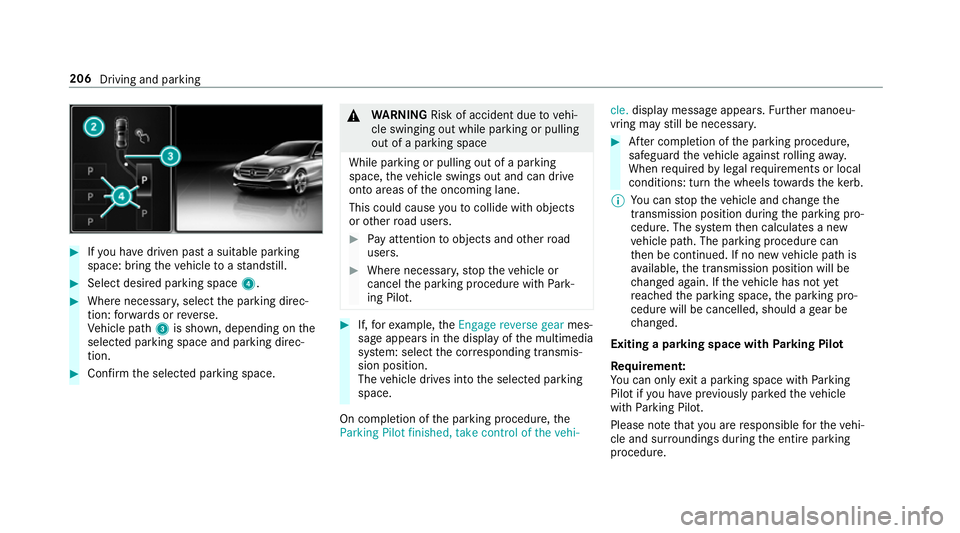
#
Ifyo u ha vedriven past a suitable parking
space: bring theve hicle toast andstill. #
Select desired parking space 4.#
Where necessar y,select the parking direc‐
tion: forw ards or reve rse.
Ve hicle path 3is shown, depending on the
selected parking space and parking direc‐
tion. #
Confirm the selected parking space. &
WARNING Risk of accident due tovehi‐
cle swinging out while parking or pulling
out of a parking space
While parking or pulling out of a parking
space, theve hicle swings out and can drive
onto areas of the oncoming lane.
This could cause youto collide wi thobjects
or other road users. #
Pay attention toobjects and other road
users. #
Where necessar y,stop theve hicle or
cancel the parking procedure with Park‐
ing Pilot. #
If,forex ample, theEngage reverse gear mes‐
sage appears in the display of the multimedia
sy stem: select the cor responding transmis‐
sion position.
The vehicle drives into the selected parking
space.
On completion of the parking procedure, the
Parking Pilot finished, take control of the vehi- cle.
display message appears. Further manoeu‐
vring may still be necessar y. #
After completion of the parking procedure,
safeguard theve hicle against rolling away.
When requ ired bylegal requirements or local
conditions: turn the wheels towa rdsth eke rb.
% You can stop theve hicle and change the
transmission position du ring the parking pro‐
cedure. The sy stem then calculates a new
ve hicle path. The parking procedure can
th en be continued. If no new vehicle path is
av ailable, the transmission position will be
ch anged again. If theve hicle has not yet
re ached the parking space, the parking pro‐
cedure will be cancelled, should a gear be
ch anged.
Exiting a pa rking space with Parking Pilot
Re quirement:
Yo u can on lyex it a parking space with Parking
Pilot if you ha veprev iously par kedth eve hicle
with Parking Pilot.
Please no tethat you are responsible forth eve hi‐
cle and sur roundings during the entire parking
procedure. 206
Driving and parking
Page 210 of 521
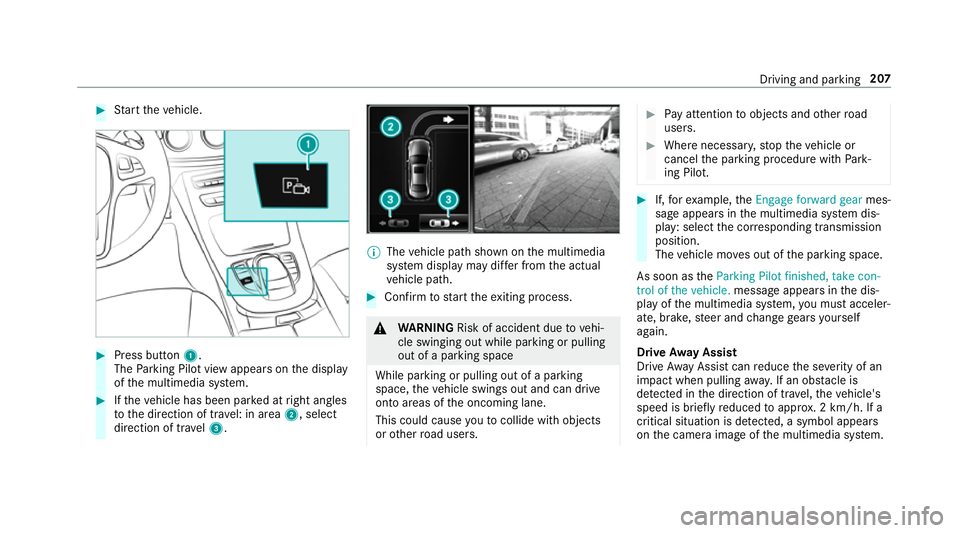
#
Start theve hicle. #
Press button 1.
The Parking Pilot view appears on the display
of the multimedia sy stem. #
Ifth eve hicle has been par ked at right angles
to the direction of tra vel: in area 2, select
direction of tra vel3. %
The vehicle path shown on the multimedia
sy stem display may dif fer from the actual
ve hicle path. #
Confirm tostart theex iting process. &
WARNING Risk of accident due tovehi‐
cle swinging out while parking or pulling
out of a parking space
While parking or pulling out of a parking
space, theve hicle swings out and can drive
onto areas of the oncoming lane.
This could cause youto collide wi thobjects
or other road users. #
Pay attention toobjects and other road
users. #
Where necessar y,stop theve hicle or
cancel the parking procedure with Park‐
ing Pilot. #
If,forex ample, theEngage forward gear mes‐
sage appears in the multimedia sy stem dis‐
play: select the cor responding transmission
position.
The vehicle mo ves out of the parking space.
As soon as theParking Pilot finished, take con-
trol of the vehicle. message appears in the dis‐
play of the multimedia sy stem, you must acceler‐
ate, brake, steer and change gears yourself
again.
Drive Away Assist
Drive AwayAssi stcan reduce the se verity of an
impact when pulling away. If an obs tacle is
de tected in the direction of tr avel, theve hicle's
speed is brief lyreduced toappr ox. 2 km/h. If a
critical situation is de tected, a symbol appea rs
on the camera image of the multimedia sy stem. Driving and parking
207
Page 231 of 521
#
Toscroll in the menu bar: swipetothe left
or right on the left-hand Touch Control. #
Tocall up the menu or confirm the selec‐
tion: press the left-hand Touch Control. #
Toscroll through displa ysor lists in the
menu: swipe upwards or down wards on the
left-hand Touch Control. #
Tocall up the submenu or confirm the
selection: pressthe left-hand Touch Control. #
Toexitth e submenu: pressthe back button
on the left.
If yo u are br owsing a submenu and you press
and hold the back button on the left, the menu
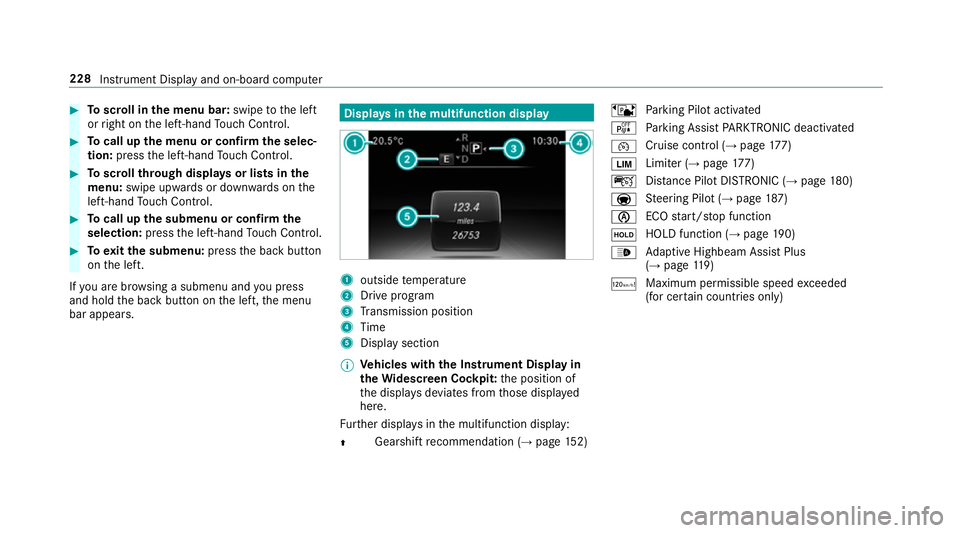
bar appears. Displa
ysinthe multifunction display 1
outside temp erature
2 Drive prog ram
3 Transmission position
4 Time
5 Display section
% Ve
hicles with the Instrument Display in
th eWi descreen Co ckpit: the position of
th e displa ysdeviates from those displa yed
here.
Fu rther displa ysinthe multifunction display:
Z Gearshift
recommendation (→ page 152) ë
Parking Pilot activated
é Parking Assist PARKTRONIC deacti vated
¯ Cruise cont
rol (→ page 177)
È Limi
ter (→ page 177)
ç Distance Pilot DISTRONIC (→ page 180)
a St
eering Pilot (→ page187)
è ECO
start/ stop function
ë HOLD function (→
page190)
_ Ad
aptive Highbeam Assist Plus
(→ page 119)
ð Ma
ximum pe rmissible speed exceeded
(for cer tain countries only) 228
Instrument Display and on-board computer
Page 295 of 521
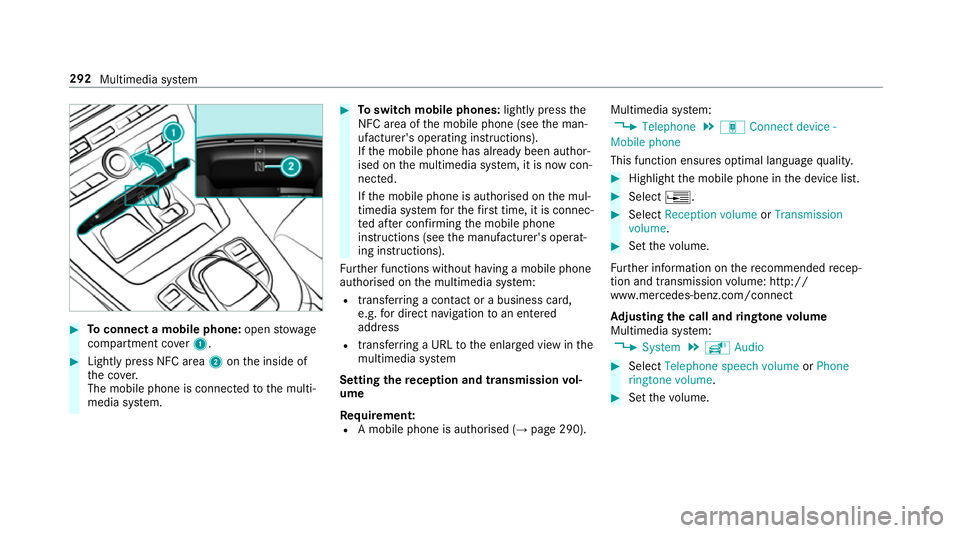
#
Toconnect a mobile phone: openstowage
compartment co ver1. #
Lightly press NFC area 2onthe inside of
th e co ver.
The mobile phone is connected tothe multi‐
media sy stem. #
Toswitch mobile phones: lightly pressthe
NFC area of the mobile phone (see the man‐
ufacturer's operating instructions).
If th e mobile phone has already been author‐
ised on the multimedia sy stem, it is now con‐
nected.
If th e mobile phone is authorised on the mul‐
timedia sy stem forth efirs t time, it is connec‐
te d af ter confirming the mobile phone
instructions (see the manufacturer's operat‐
ing instructions).
Fu rther functions without having a mobile phone
authorised on the multimedia sy stem:
R transfer ring a contact or a business card,
e.g. for direct navigation toan entered
address
R transfer ring a URL tothe enlar ged view in the
multimedia sy stem
Setting there ception and transmission vol‐
ume
Re quirement:
R A mobile phone is authorised (→ page 290).Multimedia sy
stem:
, Telephone .
á Connect device -
Mobile phone
This function ensures optimal language qualit y. #
Highlight the mobile phone in the device list. #
Select ¥. #
Select Reception volume orTransmission
volume . #
Set thevo lume.
Fu rther information on there commended recep‐
tion and transmission volume: http://
www.me rcedes-benz.com/connect
Ad justing the call and ringtone volume
Multimedia sy stem:
, System .
õ Audio #
Select Telephone speech volume orPhone
ringtone volume. #
Set thevo lume. 292
Multimedia sy stem
Page 304 of 521
St
oring the SIM card PIN in thete lephone
module
Multimedia sy stem:
, Telephone .
á Connect device - no
device connected .
SIM Card #
Select ¥. #
Switch Store PIN onO.
Te lephone module settings
Settings for using the telephone module with
th e mobile phone
Nu m‐
ber Fu
nction
0003 1A ctivates caller ID transmission
00030 Deacti vates caller ID transmission
0006 1A ctivates da taroaming
0006 0D eactivates data roaming
00 071A ctivates network pr ovider restric‐
tion 00070 Deacti
vates network pr ovider
re striction
0008 1A ctivates text messa getrans fer
00080 Deactivates text messa getrans fer
00082 Sets situation-rela ted dimming of
th e indicator lamp
0008 3D oes not change the brightness of
th e indicator lamp Setting
theringtone for the telephone mod‐
ule
Multimedia sy stem:
, Telephone .
á Connect device -
Mobile phone #
Highlight a mobile phone. #
Select ¥. #
Select Ringtones. #
Select a ringtone.
The ringtone is pl ayed.
The settings are applied once youex itthe
menu. Tr
ansfer ring the phone book via thete le‐
phone module
The transfer take s place automatically once a
connection has been es tablished via Blue tooth®
:
R Ifth e mobile phone supports the PBAP
(Phone BookAccess Profile), the sy stem
gives priority toloading phone book ent ries
from the phone memor y.
R Ifth ere are no entri es inthe phone memor y,
th e phone book entri es fromthe SIM card
are impor ted.
A list of compatible mobile phones can be found
at:
http://www.mercedes-benz.com/connect
Note s onreceiving text messages when
using thete lephone module
Obser vethefo llowing no tes when using thete le‐
phone module with Blue tooth®
(SAP profile):
R it is only possible toaccess thete xt messa ge
memory of the SIM card.
R incoming text messa ges are sa ved on the
SIM card. Multimedia sy
stem 301
Page 308 of 521
R
The full range of functions for Android Autois
only possible with an Internet connection.
Multimedia sy stem:
, Connect .
Android Auto #
Select the mobile phone from the device list.
Ac cepting/rejecting the data pr otection reg‐
ulations
A message with the data pr otection regulations
appears. #
Select Accept and start.
or #
Select Reject and end.
Ac tivating automatic start #
Select Start automatically O.
St arting manually #
Select the mobile phone from the device list.
Exiting Android Auto #
Press theò button. Calling up
the Android Auto to ne settings
Multimedia sy stem:
, Connect .
Android Auto .
Sound #
Select theto ne menu (→ page 343).
Ending Android Auto
Multimedia sy stem:
, Connect .
Android Auto #
Select Disconnect.
The connection is ended.
The mobile phone continues tobe supplied
with elect ricity.
or #
Disconnect the connecting cable between
th e mobile phone and multimedia sy stem.
Mercedes-Benz recommends disconnecting
th e connecting cable only when theve hicle is
st ationar y. Tr
ansfer redve hicle data when using Apple
CarPlay™ and Android Auto Note
s on transfer redve hicle data
When using Android Autoor Apple CarPlay™,
cer tain vehicle data is transfer redto the mobile
phone. This enables youto getth e best out of
selected mobile phone services. Vehicle data is
not directly accessible.
Sy stem information:
R software release of the multimedia sy stem
R system ID (anonymised)
The transfer of this data is used tooptimise
communication between theve hicle and the
mobile phone.
To do this, and toassign se veralve hicles tothe
mobile phone, a vehicle ID is randomly gener‐
ated.
This has no connection totheve hicle identifica‐
tion number (VIN) and is dele ted when the multi‐
media sy stem is reset (→ page 265).
Driving status data:
R transmission position engaged Multimedia sy
stem 305
Page 344 of 521
R
The programme transmission may be indica‐
te d with thefo llowing symbols:
m Programme with audio explanations for
th e visually impaired
o Stereo broadcast
n Programme forth e hard of hearing
If a symbol is not shown, the prog ramme is
either broadca stin mono or the transmission
properties are unkn own.
Subtitles R The function is switched on:
Subtitles are shown in the selected language
fo rth e cur rent programme (if available).
Setting the audio language
Multimedia sy stem:
, Media .
à Devi-
ces .
TV .
Z Options #
Select Audio/subtitles. #
Select one of theav ailable audio languages.
The audio language selec ted only applies to
th e cur rent programme. Setting subtitles
Multimedia sy
stem:
, Media .
à Devi-
ces .
TV .
Z Options #
Select Audio/subtitles. #
Select Show subtitles.
The subtitles are switched on Oor off ª. #
Select one of theav ailable languages forthe
subtitles.
The language selected only applies tothe
cur rent programme. Te
lete xt Te
lete xt ove rview
Te lete xt pa ges are located between page 100
and page 899.
A dynamic telete xt pa geconsi sts of se veral sub‐
pages.
Information on MHEG-5 digital telete xt:
R digi taltelete xt is only available in some coun‐
tries, e.g. the UK and New Zealand R
interactive multimedia applications such as
weather fore casts, ne wsreports and sport
re sults are available
R it may take some time before all the pages
load
Displaying telete xt
Multimedia sy stem:
, Media .
à Devi-
ces .
TV .
p Teletext #
Tocall up the pr evious or next telete xt
page: swipe upwards or down wards on the
to uchpad. #
Toenter numbers: press and holdthe
to uchpad. #
Enterth e numbers in quick succession. #
Toselect a subpage: swipe left orright on
th eto uchpad.
% The subpage cur rently selected is ma rked by
a blue symbol. #
Toreturn totheTV prog ramme: press and
hold the% button. Multimedia sy
stem 341