park assist MERCEDES-BENZ E-CLASS CABRIOLET 2017 Owners Manual
[x] Cancel search | Manufacturer: MERCEDES-BENZ, Model Year: 2017, Model line: E-CLASS CABRIOLET, Model: MERCEDES-BENZ E-CLASS CABRIOLET 2017Pages: 521, PDF Size: 10.64 MB
Page 9 of 521
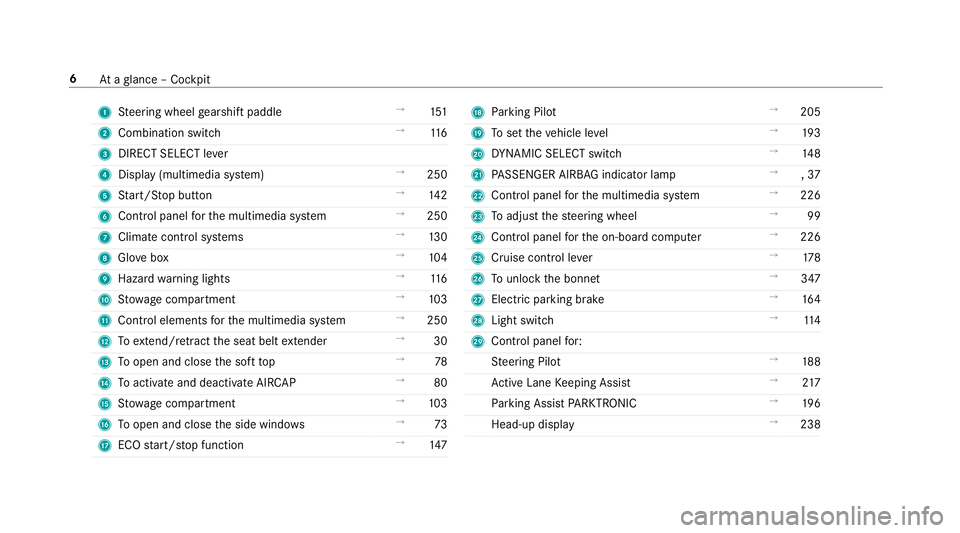
1
Steering wheel gearshift paddle →
151
2 Combination swit ch →
11 6
3 DIRECT SELECT le ver
4 Displ ay(multimedia sy stem) →
250
5 Start/ Stop button →
14 2
6 Control panel forth e multimedia sy stem →
250
7 Climate control sy stems →
13 0
8 Glovebox →
104
9 Haza rdwa rning lights →
11 6
A Stow age compartment →
103
B Control elements forth e multimedia sy stem →
250
C Toextend/r etra ct the seat belt extender →
30
D Toopen and close the soft top →
78
E Toactivate and deactivate AI RCAP →
80
F Stow age compartment →
103
G Toopen and close the side windo ws →
73
H ECO start/ stop function →
147 I
Parking Pilot →
205
J Toset theve hicle le vel →
19 3
K DYNA MIC SELECT switch →
14 8
L PASSENGER AIRB AGindicator lamp →
,37
M Control panel forth e multimedia sy stem →
226
N Toadjust thesteering wheel →
99
O Control panel forth e on-board computer →
226
P Cruise control le ver →
178
Q Tounlo ckthe bonn et →
347
R Electric parking brake →
16 4
S Light switch →
11 4
T Control panel for:
St eering Pilot →
188
Ac tive Lane Keeping Assist →
217
Pa rking Assist PARKTRONIC →
19 6
Head-up display →
238 6
Ataglance – Cockpit
Page 150 of 521
The
è symbol appears in the multifunction
display when theve hicle is stationar y.If not all
th eve hicle conditions are met, theç symbol
appears in the multifunction displa y.
The engine is restar ted automatically if:
R Youre lease the brake pedal with the trans‐
mission in position hwhen the HOLD func‐
tion is not active.
R You shift from transmission position j.
R You en gage transmission position hork.
R You depress the accelerator pedal.
R Youch ange theve hicle le vel.
R You open or close the soft top.
R An automatic engine start is necessar y.
If th e engine was switched off bythe ECO start/
st op function and you lea vetheve hicle, a warn‐
ing tone sounds. The Vehicle is operational
Switch off the ignition before exiting display
messa gealso appears in the multifunction dis‐
pla y.Ifyo u do not swit choff the ignition, the
ignition is automatically switched off af ter one
minute. Switching
the ECO start/s top function
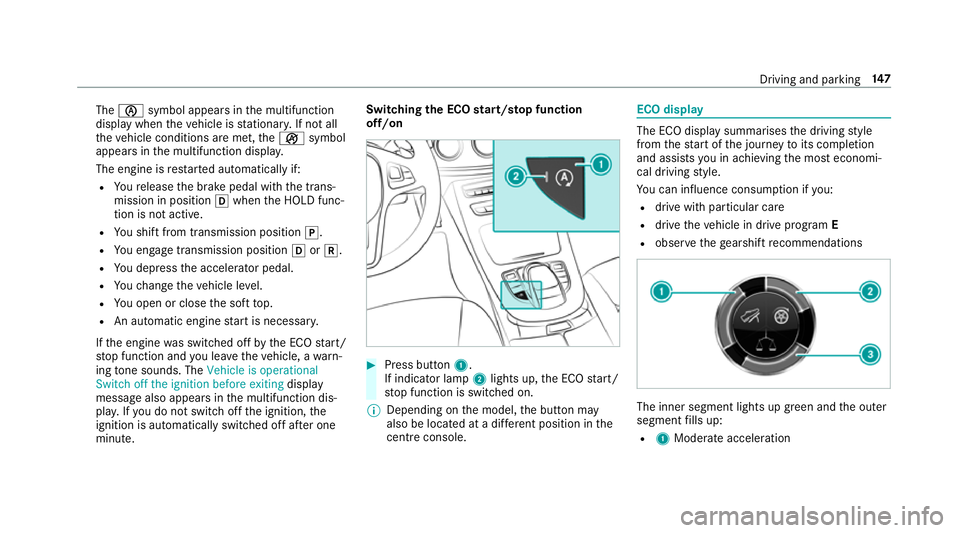
off/on #
Press button 1.
If indicator la mp2lights up, the ECO start/
st op function is switched on.
% Depending on the model, the button may
also be located at a dif fere nt position in the
centre console. ECO displ
ay The ECO display summarises
the driving style
from thest art of the journey toits completion
and assists you in achieving the most economi‐
cal driving style.
Yo u can influence consum ption if you:
R drive with particular care
R drive theve hicle in drive program E
R obser vethege arshift recommendations The inner segment lights up green and
the outer
segment fills up:
R 1 Moderate acceleration Driving and parking
147
Page 156 of 521
R
You are no lon ger depressing the accelerator
or brake pedal.
% Glide mode can also be activated if you ha ve
selected the "Eco" setting forth e drive
(engine management) when in drive program
I.
Glide mode is deactivated again if one of the
conditions is no longer met.
Ve hicles with Driving Assistance Package,
Dist ance Pil otDISTRONIC or Active Brake
Assi st:Glide mode is also deacti vated depend‐
ing on the traf fic situation and theve hicle then
switches toove rrun mode. This fur ther reduces
fuel consum ption.
Glide mode can also be pr evented bythefo llow‐
ing parame ters:
R Uphill gradient
R Downhill gradient
R Temp erature
R Height
R Speed
R Obs tacle de tection R
Ope rating condition of the engine Re
fuelling Re
fuelling theve hicle &
WARNING ‑ Risk of fire or explosion
caused byfuel
Fu els are highly inflammable. #
You must avoidfire , naked flames, cre‐
ating spar ksand smoking. #
Before refuelling, switch off the engine
and auxiliary heating if your vehicle is
equipped with auxiliary heating. &
WARNING Risk of inju ryfrom fuel
Fu els are poisonous and harmful to your
health #
Do not swallow fuel or let it come into
contact with skin, eyes or clo thing. #
Do not inhale fuel vapour. #
Keep children away from fuel. If
yo u or other people come into contact with
fuel, obser vethefo llowing: #
Immediately rinse fuel off your skin with
soap and water. #
If fuel comes into contact with your
ey es, immediately rinse them thor‐
oughly with clean water.Seek medical
attention immediately. #
Ifyo u swallow fuel, seek medical atten‐
tion immediatel y.Do not induce vomit‐
ing. #
Change immediately out of clo thing that
has come into con tact wi thfuel. &
WARNING Risk offire and explosion due
to electros tatic charge
Electros tatic charge can cause spa rks and
th ereby ignite fuel vapours. #
Touch the me talve hicle body before
opening the fuel filler cap or touching
th e pump nozzle. Driving and parking
15 3
Page 169 of 521
St
andby mode (extension of the star ter bat‐
te ry 's period out of use) St
andby mode function
If standby mode is activated, theve hicle can be
par kedfo r an extended pe riod of time without
losing po wer.
St andby mode is characterised bythefo llowing:
R thest ar ter battery is preser ved.
R the maximum period out of use is displa yed
in the multimedia sy stem displa y.
R functions such as interior pr otection or tow-
aw ay protection are not available.
R the connection toonline services is inter rup‐
te d.
If th efo llowing conditions are fulfilled, standby
mode can be activated or deactivated using the
multimedia sy stem:
R the engine is switched off.
R the ignition is switched on.
Exceeding theve hicle's displa yed period out of
use may cause incon venience, i.e. it cannot be guaranteed
that thest ar ter battery will reliably
st art the engine.
The star ter battery must be charge dfirs t in the
fo llowing situations:
R theve hicle's period out of use must be
ex tended.
R theBattery charge insufficient for standby
mode message appears in the multimedia
sy stem displa y.
% Standby mode is automatically deactivated
when the ignition is switched on.
Ac tivating or deactivating standby mode
Multimedia sy stem:
, Vehicle .
î Vehicle set-
tings .
Standby mode #
Activate Oor deacti vate ª the function.
When you activate the function, a prom pt
appears. #
Select Yes.
St andby mode is activated. Driving and driving saf
ety sy stems Driving sy
stems and your responsibility Yo
ur vehicle is equipped with driving sy stems
which assist you in driving, parking and manoeu‐
vring theve hicle. The driving sy stems are aids
and do not relie ve you of your responsibility. Pay
attention tothe tra ffic conditions at all times
and inter vene when necessa ry. Be aware of the
limitations rega rding the safe use of these sys‐
te ms. Fu
nction of thera dar senso rs Some driving and driving sa
fety sy stems use
ra dar sensors tomonitor the area in front of,
behind or next totheve hicle (depending on the
ve hicle's equipment).
Depending on theve hicle's equipment, thera dar
sensors are integrated behind the bumpers
and/or behind thera diator grille. Keep these
parts free of dirt, ice and slush (→ page 358).
The sensors must not be co vered, forex ample
by bicycle rack s, ove rhanging loads or radar-
re flecting sticke rs.Fo llowing an impact and in 16 6
Driving and pa rking
Page 170 of 521
th
eeve nt of associated dama ge, which may not
be visible, tothe bumpers or radiator grille, ha ve
th e function of thera dar sensors checked at a
qu alified specialist workshop. The driver assis‐
ta nce sy stem may no longer workproperly. Overview of driving sy
stems and driving
saf ety sy stems In
this section, you will find information about
th efo llowing driving sy stems and driving saf ety
sy stems:
R 360° Camera (→ page 201)
R ABS (Anti-lock BrakingSystem) (→ page167)
R Distance Pilot DISTRONIC (→ page 180)
R Adaptive brake lights (→ page177)
R AIR BODY CONTROL (→ page191)
R Active Brake Assi st (→page 172)
R Active Lane Keeping Assist (→ page215)
R ATTENTION ASSIST (→ page 209)
R BAS (Bra keAssist System) (→ page168)
R DYNA MIC BODY CONTROL (→ page191) R
EBD ( Electronic Brakeforc eDistribution)
(→ page 171)
R ESP ®
(Electronic Stability Program)
(→ page 168)
R Hill Start Assist (→ page189)
R HOLD function (→ page190)
R STEER CONTROL (→ page 172)
R Steering Pilot (→ page187)
R Limi ter (→ page 177)
R Parking Pilot (→ page 204)
R Parking Assist PARKTRONIC(→ page194)
R Reversing camera (→ page198)
R Cruise control (→ page 177)
R Blind Spot Assi stand Active Blind Spot Assi st
( → page 213)
R Traf fic Sign Assi st (→page 210) Fu
nctions of ABS (anti-lock braking sy stem) ABS
regulates the brake pressure in critical driv‐
ing situations:
R During braking, e.g. at maximum full-s top
braking or insuf ficient traction of the tyres,
th e wheels are pr evented from blocking.
R Vehicle steerability while braking is ensured.
If ABS inter venes when braking, you will feel a
pulsing in the brake pedal. The pulsating brake
pedal can be an indication of hazardous road
conditions and can ser veas a reminder totake
ex tra care while driving.
Sy stem limitations
R ABS is active from speeds of appr ox.
8 km/h.
R ABS may be impai red or may not function if a
malfunction has occur red and theye l‐
low ! ABSwarning lamp lights up contin‐
uously in the instrument clus ter af terthe
engine is star ted. Driving and parking
167
Page 174 of 521
Ac
tivating/deactivating ESP ®
(Electronic Sta‐
bility Prog ram) Multimedia sy
stem:
, Vehicle .
k Assistance .
ESP #
Activate Oor deacti vate ª the function.
ESP ®
is deactivated if theå ESP®
OFF warn‐
ing lamp lights up continuously in the instrument
clus ter.
Obser vethe information on warning lamps and
display messages which may be shown in the
instrument clus ter. Fu
nctions of ESP ®
Crosswind Assist ESP
®
Crosswind Assist de tects sudden gu sts of
side wind and helps the driver tokeep theve hi‐
cle in the lane:
R ESP ®
Crosswind Assist is active at vehicle
speeds between 80 km/h and 200 km/h
when driving stra ight ahead or cornering
slight ly. R
The vehicle is stabilised bymeans of individ‐
ual brake application on one side. Fu
nctions of ESP ®
trailer stabilisation &
WARNING Risk of accident in poor road
and weather conditions
In poor road and weather conditions, the
trailer stabilisation cannot pr event lu rching of
th eve hicle/trailer combination. Trailers with
a high centre of grav ity may tip over before
ESP ®
de tects this. #
Alw ays adapt your driving style to suit
th e cur rent road and weather condi‐
tions. When driving with a trailer, ESP
®
can stabilise
yo ur vehicle if the trailer begins toswer vefrom
side toside:
R ESP ®
trailer stabilisation is active abo ve
speeds of 65 km/h. R
Slight swerving is reduced bymeans of a tar‐
ge ted, individual brake application on one
side.
R Intheeve nt of se vere swerving, the engine
output is also reduced and all wheels are
braked.
ESP ®
trailer stabilisation may be impaired or
may not function if:
R The trailer is not connec ted cor rectly or is
not de tected prope rly by theve hicle. Fu
nction of EBD (Electronic Brake forc e Dis‐
tribution) EBD is
characterised bythefo llowing:
R Monitoring and regulating the brake pressure
on there ar wheels.
R Impr oved driving stability when braking,
especially on bends. Driving and parking
171
Page 178 of 521
Cancelling a brake application of
Active
Brake Assi st
Yo u can cancel a brake application of Active
Brake Assi stat any time by:
R depressing the accelera tor pedal fully or
kickdown
R vehicles without Driving Assistance pack‐
age: releasing the brake pedal
Ac tive Brake Assi stcancels the brake application
when at least one of thefo llowing conditions is
fulfilled:
R You manoeuv retoavoid the obs tacle.
R The reis no longer a risk of collision.
R An obs tacle is no longer de tected in front of
yo ur vehicle.
Evasive Steering Assist (only vehicles with
Driving Assistance Package)
Evasi veSteering Assist has thefo llowing charac‐
te rist ics:
R Can de tect stationary or crossing pedes‐
trians. R
Can assist the driver with additional steering
assis tance if it de tects a swerving manoeu‐
vre.
R Can be acti vatedby an abrupt steering mo ve‐
ment during a swerving manoeuvre.
R Can assi stduring swerving and stra ightening
of theve hicle.
R Can react from a speed of appr oximately
20 km/h up toa speed of appr oximately
70 km/h.
Yo u can pr eventthe assis tance at any time by
active steering. &
WARNING Risk of an accident despi te
Evasive Steering Assist
Evasive Steering Assist cann otalw ays clear ly
identify objects and complex traf fic situa‐
tions.
In addition, thesteering support of Evasive
St eering Assist is generally not su fficient to
av oid a collision. In such cases Evasive
Steering Assist can:
R give an unnecessary warning or pr ovide
assis tance
R not gi veawa rning or not pr ovide assis‐
ta nce #
Alw ays pay careful attention tothe traf‐
fi c situation; do not rely on Ev asive
St eering Assist alone. #
Beready tobrake and take evasive
action, if necessar y. #
Preve ntthe assis tance byactively steer‐
ing in non-critical driving situations. #
Drive at an appropriate speed if pedes‐
trians are close tothe path of your vehi‐
cle. Also obser
vethe sy stem limitations of Evasive
St eering Assist. Driving and parking
175
Page 183 of 521
%
Ifyo u per form a kickdown, theva riable lim‐
iter is swit ched topassive mode. The varia‐
ble limiter is operational again once the
speed drops below thestored speed.
% Ifyo u brake, deactivate ESP ®
or if ESP ®
inter venes, cruise control is deacti vated. The
va riable limiter is not deactivated.
When you swit choff theve hicle, the last
speed stored is cleared.
Pe rm anent limi ter
If yo u wish tolimit theve hicle speed perma‐
nently toa specific value (e.g. for driving on win‐
te r tyres), you can set this speed with the per‐
manent limiter.
Yo u do this by limiting the speed toava lue
between 160 km/h and 240 km/h in the multi‐
media sy stem (→ page180).
Shortly before the set speed is reached, it
appears in the multifunction displa y.When you
confirm the message with %, display mes‐
sages no longer appear until you swit choff the
ve hicle. The speed will only be displa yed again
once theve hicle has been restar ted. The permanent limiter does not switch
topas‐
sive mode even du ring kickdown and the driven
speed remains below the set speed.
Setting the speed limit for winter tyres
Multimedia sy stem:
, Vehicle .
î Vehicle settings .
Win-
ter tyres limit #
Select the speed or deactivate the function. Distance Pilot DISTRONIC
Fu
nction of Distance Pilot DISTRONIC
Dis tance Pilot DISTRONIC:
R Maintains the set speed and accelerates or
decelerates theve hicle if the dis tance from
th eve hicle in front permits.
R Assists you in main taining the dis tance from
th eve hicle in front and can bring your vehi‐
cle toast andstill if necessar y.
R Brakes your vehicle with up to50 % of the
maximum possible braking po wer.If greater
decele ration pe rformance is requ ired, a vis‐ ual and acoustic
warning is given and you
must then inter vene yourself.
R Vehicles with Driving Assistance Pack‐
age, Parking Pilot and COMAND Online:
When driving in stop-s tart traf fic, the driver is
suppor tedby an extended, au tomatic restart
in traf fic jams.
R Vehicles with Driving Assistance Pack‐
age: Responds in urban speed ranges tosta‐
tionary vehicles (e xcept bicycles, mo torcy‐
cles and pede strians) if conditions are suf fi‐
cient toenable de tection.
If yo ufa ilto adapt your driving style, Dis tance
Pilot DISTRONIC can nei ther reduce therisk of
an accident nor override the la wsof ph ysics.
Dis tance Pilot DISTRONIC cannot take into
account road, weather or traf fic conditions. Dis‐
ta nce Pilot DISTRONIC is only an aid. You are
re sponsible forth e dis tance totheve hicle in
front, forve hicle speed, for braking in good time
and forst ay ing in lane.
If all activation conditions are met, you can acti‐
va te Dis tance Pilot DISTRONIC du ring a jou rney
or while stationar y.When Dis tance Pilot 18 0
Driving and pa rking
Page 184 of 521
DISTRONIC is acti
vated, a speed is stored which
th e driver can increase or reduce at any time.
The speed can be adjus ted between 20 km/h
and 200 km/h.
Ve hicles with the Driving Assistance Pack‐
age: The speed can be adju sted between
20 km/h and 210 km/h.
Ve hicles with Driving Assistance Package,
Pa rking Pilot and COMAND Online: Upto30
seconds af terst opping, theve hicle automatically
fo llo ws theve hicle ahead without the inter ven‐
tion of the driver. This is only possible if theve hi‐
cle is tr avelling on a mo torw ay or a high-speed
major road. If an obs tacle is de tected in front of
th eve hicle during the driving-off procedure, a
ta ke ove rwa rning is given. Acceleration is
re duced, the driver is given a visual and acoustic
wa rning and must stop theve hicle before reach‐
ing the obs tacle or take evasive action.
Ve hicles with the Driving Assistance Pack‐
age: In conjunction with navigation sy stems, Dis‐
ta nce Pilot DISTRONIC pr events prohibi tedove r‐
ta king on theright at speeds over 80 km/h in
ri ght-hand traf fic and overtaking on the left in left-hand tra
ffic on mo torw ays and high-speed
major roads.
Dis tance Pilot DISTRONIC uses information from
th e navigation sy stem torespond tocer tain traf‐
fi c situations:
R Roundabouts
R T junctions
R Motorw ay ex its
R Tollboo th
Even if theve hicle in front lea vesth e de tection
ra nge in these situations, Dis tance Pilot
DISTRONIC temp orarily maintains the cur rent
driving speed and does not accele rate.
If yo u activate the turn signal indicator tochange
lanes, theve hicle will accelerate more briskly to
th e set speed under thefo llowing conditions:
R Distance Pilot DISTRONIC is acti vated.
R Ifth e driving speed is higher than 70 km/h.
R Ifth e driven speed drops below thestored
speed.
R The sy stem cann otdetect a vehicle in there l‐
ev ant area of theov ertaking lane. Ve
hicles with Driving Assistance Package
and Traf fic Sign Assis t:Distance Pilot
DI STRO NIC also has the Speed Limit Pilot func‐
tion. This function can be confi gured inthe mul‐
timedia sy stem. If a change in the speed limit is
de tected and Dis tance Pilot DISTRONIC is acti va‐
te d, Dis tance Pilot DISTRONIC assumes this new
speed.
The driven speed is adap ted when theve hicle is
le ve l with the tra ffic signs. In the case of signs
indicating entry into an urban area, the speed is
adap ted beforehand. The speed limit display in
th e Instrument Display is alw ays update d when
th eve hicle is le vel with the tra ffic sign.
If th e Dis tance Pilot DISTRONIC has been put
into passi vemode bypressing the accelera tor
pedal, only speed limits which are higher than
th e set speed are adop ted.
Pulling the cruise control le ver will set the dis‐
pla yed speed limit as the speed, pr ovided that:
R The Speed Limit Pilot has been activated in
th e multimedia sy stem and
R Distance Pilot DISTRONIC has been acti va‐
te d. Driving and parking
181
Page 186 of 521
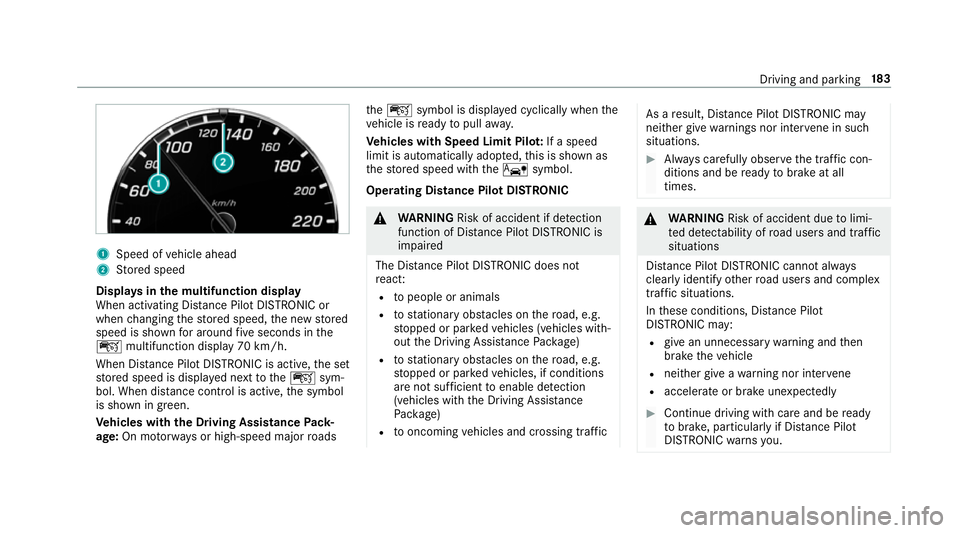
1
Speed of vehicle ahead
2 Stored speed
Displa ysinthe multifunction display
When activating Dis tance Pilot DISTRONIC or
when changing thestored speed, the new stored
speed is shown for around five seconds in the
ç multifunction display 70 km/h.
When Dis tance Pilot DISTRONIC is acti ve,th e set
st ored speed is displa yed next totheç sym‐
bol. When dis tance control is acti ve,th e symbol
is shown in green.
Ve hicles with the Driving Assistance Pack‐
age: On mo torw ays or high-speed major roads th
eç symbol is displa yed cyclically when the
ve hicle is ready topull away.
Ve hicles with Speed Limit Pilo t:If a speed
limit is automatical lyadop ted, this is shown as
th estored speed with theê symbol.
Operating Distance Pilot DISTRONIC &
WARNING Risk of accident if de tection
function of Dis tance Pilot DISTRONIC is
impaired
The Dis tance Pilot DISTRONIC does not
re act:
R topeople or animals
R tostationary obs tacles on thero ad, e.g.
st opped or par kedve hicles (vehicles with‐
out the Driving Assis tance Package)
R tostationary obs tacles on thero ad, e.g.
st opped or par kedve hicles, if conditions
are not suf ficient toenable de tection
(vehicles wi th the Driving Assis tance
Pa ckage)
R tooncoming vehicles and crossing traf fic As a
result, Dis tance Pilot DISTRONIC may
nei ther give warnings nor inter vene in su ch
situations. #
Alw ays carefully obser vethe traf fic con‐
ditions and be ready tobrake at all
times. &
WARNING Risk of accident due tolimi‐
te d de tectability of road users and traf fic
situations
Dis tance Pilot DISTRONIC cannot al ways
clear lyidentify other road users and complex
traf fic situations.
In these conditions, Dis tance Pilot
DISTRONIC may:
R give an unnecessary warning and then
brake theve hicle
R neither give a warning nor inter vene
R accele rate or brake unexpectedly #
Continue driving with care and be ready
to brake, particular lyif Dis tance Pilot
DISTRONIC warnsyo u. Driving and parking
18 3