reset MERCEDES-BENZ E-CLASS CABRIOLET 2018 User Guide
[x] Cancel search | Manufacturer: MERCEDES-BENZ, Model Year: 2018, Model line: E-CLASS CABRIOLET, Model: MERCEDES-BENZ E-CLASS CABRIOLET 2018Pages: 589, PDF Size: 10.56 MB
Page 263 of 589
Re
setting values on the trip menu of the on-
board compu terOn-board computer:
Trip
% The spelling on the main menu displa yed
may dif fer. Therefore, obser vethe menu
ove rview forth e instrument display
(→ page 254).
Yo u can reset theva lues of thefo llowing func‐
tions:
R Trip dis tance
R Trip computer From startandFrom reset
R ECO displa y(→ page 165) #
Toselect the function tobe rese t:swipe
upwards or down wards on the left-hand
To uch Control. #
Press the left-hand Touch Control. #
Select Yes. #
Press the left-hand Touch Control. If
yo u press and hold the left-hand Touch Con‐
trol, theva lues of the function will be reset
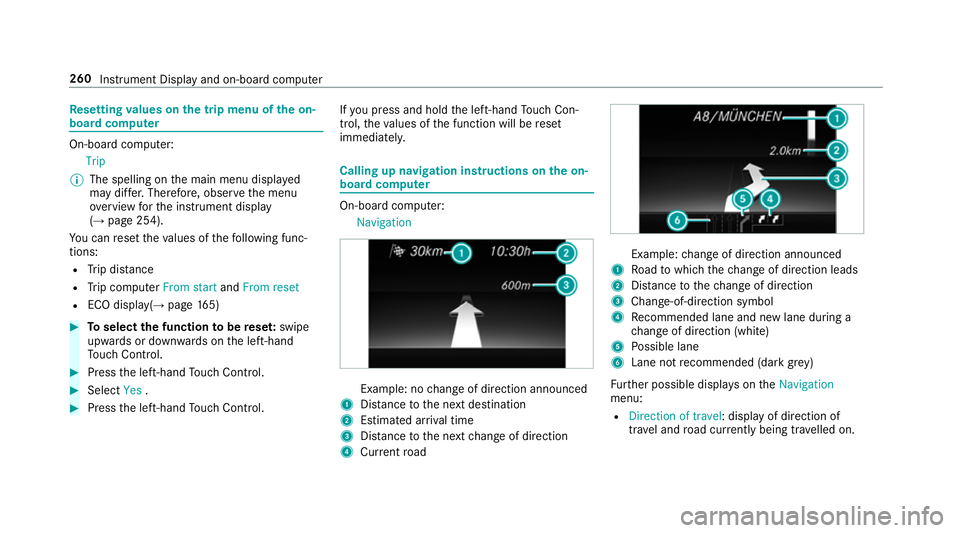
immediatel y. Calling up navigation instructions on
the on-
board compu ter On-board computer:
Navigation Example: no
change of direction announced
1 Distance tothe next destination
2 Estimated ar riva l time
3 Distance tothe next change of direction
4 Current road Example:
change of direction announced
1 Road towhich thech ange of direction leads
2 Distance tothech ange of direction
3 Chan ge-of-direction symbol
4 Recommended lane and new lane du ring a
ch ange of direction (white)
5 Possible lane
6 Lane not recommended (da rkgrey)
Fu rther possible displa yson theNavigation
menu:
R Direction of travel: display of direction of
tra vel and road cur rently being tr avelled on. 260
Instrument Display and on-board computer
Page 264 of 589
R
New route... orCalculating route…: a new
ro ute is being calculated.
R Road not mapped :th ero ad is unknown, e.g.
fo r newly built roads.
R No route: no route could be calculated tothe
selected destination.
R Off map: the map forth e cur rent location is
not available.
R Area of destination reached: you ha ve
re ached the area of destination.
R O: you ha vereached the destination or an
intermediate destination. #
Toexitth e menu: pressthe back button on
th e left.
Ve hicles with the COMAND Online multime‐
dia sy stem: you can also start navigation toone
of there cent destinations on theNavigation
menu: #
Press the left-hand Touch Control. #
Toselect a destination: swipe upwards or
down wards on the left-hand Touch Control. #
Press the left-hand Touch Control.
Ro ute guidance is star ted.
If ro ute guidance has already been activated,
a re qu est will appear asking whe ther you
wish toend the cur rent route guidance. #
Select Yes. #
Press the left-hand Touch Control.
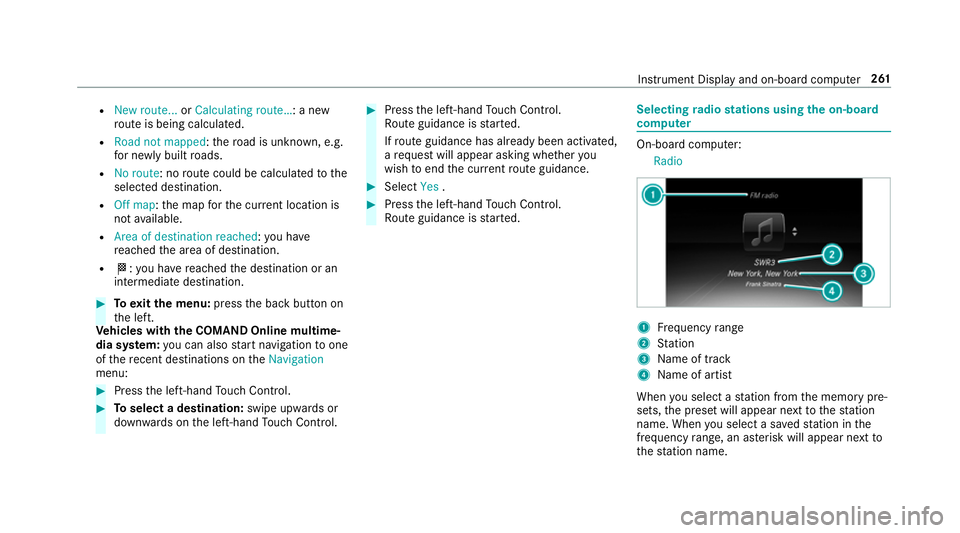
Ro ute guidance is star ted. Selecting
radio stations using the on-boa rd
compu ter On-board computer:
Radio 1
Frequency range
2 Station
3 Name of track
4 Name of artist
When you select a station from the memory pre‐
sets, the preset will appear next tothest ation
name. When you select a sa vedstation in the
frequency range, an as terisk will appear next to
th est ation name. In
stru ment Display and on-board computer 261
Page 265 of 589
#
Toselect a radio station: swipe upwards or
down wards on the left-hand Touch Control.
Selecting the frequency range or memory
preset #
Press the left-hand Touch Control. #
Swipe upwards or down wards on the left-
hand Touch Control. #
Press the left-hand Touch Control. Media playba
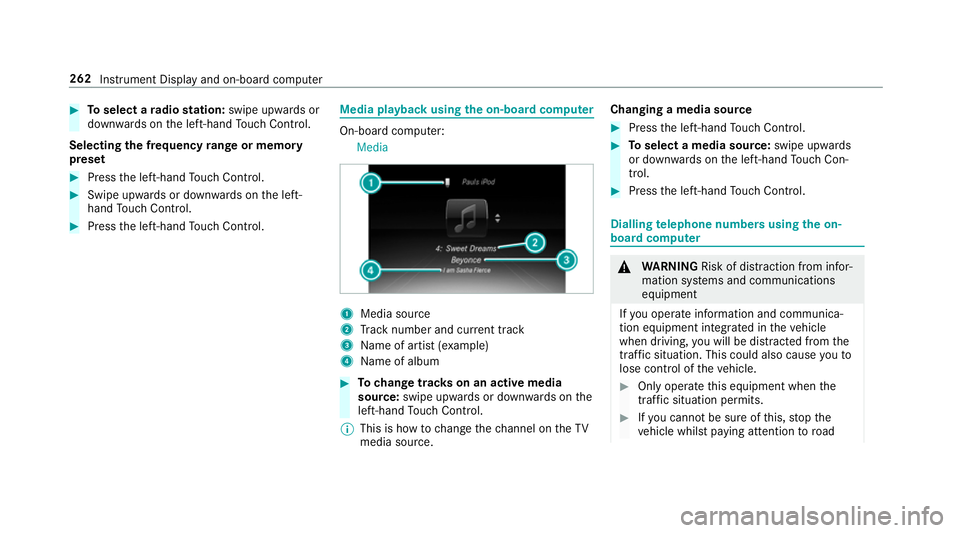
ckusing the on-boa rdcompu ter On-board computer:
Media 1
Media source
2 Track number and cur rent track
3 Name of artist (e xamp le)
4 Name of album #
Tochange trac kson an active media
source: swipe upwards or down wards on the
left-hand Touch Control.
% This is how tochange thech annel on theTV
media source. Changing a media source #
Press the left-hand Touch Control. #
Toselect a media source: swipe upwards
or down wards on the left-hand Touch Con‐
trol. #
Press the left-hand Touch Control. Dialling
telephone numbers using the on-
board compu ter &
WARNING Risk of di stra ction from infor‐
mation sy stems and communications
equipment
If yo u operate information and communica‐
tion equipment integ rated in theve hicle
when driving, you will be distracted from the
traf fic situation. This could also cause youto
lose control of theve hicle. #
Only operate this equipment when the
traf fic situation permits. #
Ifyo u cannot be sure of this, stop the
ve hicle whilst paying attention toroad 262
Instru ment Display and on-board computer
Page 288 of 589
Main functions
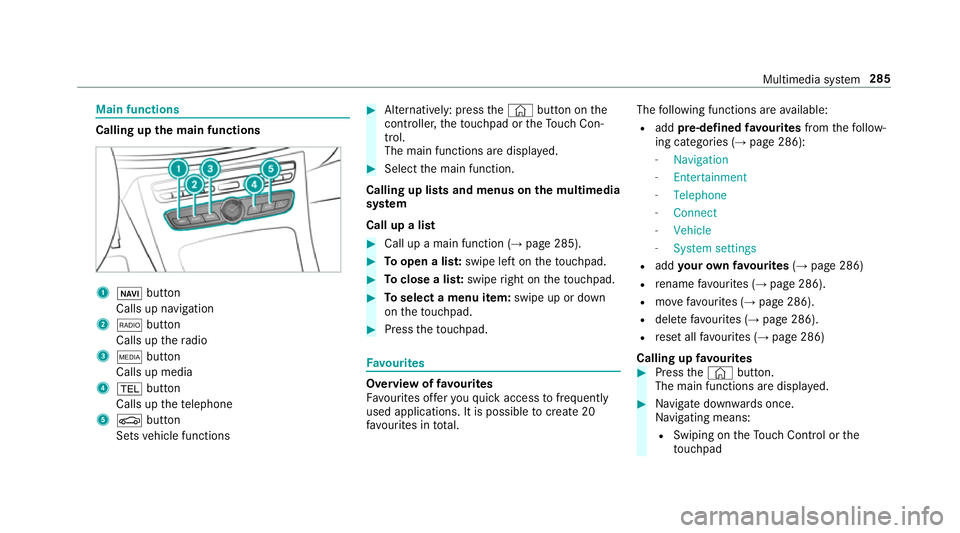
Calling up
the main functions 1
ß button
Calls up navigation
2 $ button
Calls up thera dio
3 Õ button
Calls up media
4 % button
Calls up thete lephone
5 Ø button
Sets vehicle functions #
Alternatively: press the© button on the
controller, theto uchpad or theTo uch Con‐
trol.
The main functions are displ ayed. #
Select the main function.
Calling up lists and menus on the multimedia
sy stem
Call up a list #
Call up a main function (→ page 285). #
Toopen a lis t:swipe left on theto uchpad. #
Toclose a lis t:swipe right on theto uchpad. #
Toselect a menu item: swipe up or down
on theto uchpad. #
Press theto uchpad. Favo
urites Overview of
favo urites
Fa vourites of feryo uqu ick access tofrequently
used applications. It is possible tocrea te20
fa vo urites in tota l. The
following functions are available:
R add pre-defined favo urites fromthefo llow‐
ing categories (→ page 286):
- Navigation
- Entertainment
- Telephone
- Connect
- Vehicle
- System settings
R add your ow nfa vo urites (→page 286)
R rename favo urites (→ page 286).
R movefavo urites (→ page 286).
R dele tefavo urites (→ page 286).
R reset all favo urites (→ page 286)
Calling up favo urites #
Press the© button.
The main functions are displa yed. #
Navigate down wards once.
Na vigating means:
R Swiping on theTo uch Control or the
to uchpad Multimedia sy
stem 285
Page 289 of 589
R
Sliding the controller
Leaving thefa vo urites menu #
Press the© button.
Ad ding favo urites
Ad ding prede fined favo urites #
Press the© button.
The main functions are displa yed. #
Navigate down wards twice.
The Favourites menu appears. #
Select New favourite.
The categories are displ ayed. #
Select a categor y.
The favo urites are displ ayed. #
Select a favo urite. #
Store thefa vo urite at the desired position.
If a favo urite has already been added at this
position, it will be overwritten.
Example: adding your ow nfa vo urites #
Select Vehicle. #
Select Full screen: Consumption . #
Press and hold the© button until the
fa vo urites are displ ayed. #
Store thefa vo urite at the desired position.
If No function available for saving is shown,the
selected function cannot be added.
Re naming favo urites #
Press the© button.
The main functions are displa yed. #
Navigate down wards once. #
Select a favo urite. #
Navigate down wards once.
The Favourites menu appears. #
Select Rename. #
Enterth ech aracters. #
Toconfirm the entr y:select ¡.
Moving favo urites #
Press the© button.
The main functions are displa yed. #
Navigate down wards once. #
Select a favo urite. #
Navigate down wards once.
The Favourites menu appears. #
Select Move. #
Movethefa vo urite tothe desired position.
If a favo urite has already been added at this
position, it will be overwritten.
Deleting favo urites #
Press the© button.
The main functions are displa yed. #
Navigate down wards once. #
Select a favo urite. #
Navigate down wards once.
The Favourites menu appears. #
Todel ete: select Delete. #
Select Yes. #
Toresto reall favo urites: selectReset all.
A prom ptappears. #
Select Yes.
The favo urites are reset tothefa ctory set‐
tings. 286
Multimedia sy stem
Page 301 of 589
R
The Personalisation service is active
(→ page 298).
If th e PIN has been entered incor rectly three
times, the PIN will be bloc ked. You can ha ve a
single-use password sent toyou via the
Mercedes me connect online por talto reset the
PIN pr otection. #
Select Unblock PIN. #
Ente rth e single-use password.
PIN pr otection is reset, and you can set a
new PIN.
% Alternativel y,yo u can ha vePIN pr otection
re set at a Mercedes-Benz service centre. User profile
Setting a user profile
Multimedia sy
stem:
System gPersonalisation
Displaying a user profile when starting
If th is function is active, a prom ptappears when
st arting the sy stem asking which user profile to
use. #
Select Display profile list after start . #
Activate Oor deacti vate ª the function.
Selecting a user profile #
Select Guestor individual profile #.
% Some settings from the user profile are only
loaded when theve hicle is stationary or
when the ignition is switched on.
Au tomatic syn chronisation
Each time the ignition is switched off or on, the
individual user profiles are synchronised on the
multimedia sy stem and on the ser ver.This
ensures that the latest user profiles are alw ays
av ailable. #
Select Automatic synchronisation. #
Activate Oor deacti vate ª the function.
% For more information about importing/
ex porting user profiles (→ page 298).Creating a user profile
Multimedia sy
stem:
System gPersonalisation Create
profile #
Ente r a name. #
Select a.
The following information is sa ved in the user
profile, forex ample:
R System settings
R Settings in theTV tuner's channel list
R Navigation and traf fic information
The settings di ffer depending on theve hicle
equipment.
Importing/exporting user profiles
Requ irements:
R There is an Internet connection
(→ page 357).
R A Mercedes me account exists at http://
www.me rcedes.me.
R The Personalisation service is active.298
Multimedia sy stem
Page 302 of 589
Multimedia sy
stem:
System gPersonalisation Manual
export/import
This function is not available in all countries.
On ly individu al profiles can be impor ted or
ex por ted.
The individual profiles are alw ays collectively
impor ted or expor ted. #
Impor t:select Import profiles from the
server.
The The profile import overwrites the exist-
ing profiles. Do you want to continue? mes‐
sage appears. #
Select Yes.
User profiles are impor ted. #
Expor t:select Export profiles to the server.
User profiles are expor ted.
% Certain settings, such as address book
ent ries or pr evious destinations from the
navigation sy stem, are not expor ted. Setting user profile options
Multimedia sy
stem:
System gPersonalisation #
Highlight a profile. #
Select ¥options.
The following options are available:
R Rename
R Delete
R Reset
% The guest profile cannot be dele ted or
re named. So
ftwa reupdate Information on software updates
The multimedia sy
stem pr ovides a message
when an update is available.
Depending on the source, you can per form vari‐
ous updates: Software update Source of
the
update Up
date type
Up dates via mobile
phone Na
vigation map, sys‐
te m updates, Digital
Owner's Manual
Up dates via an exter‐
nal storage medium,
e.g. a USB flash drive Na
vigation maps %
Updates via mobile phone requ ire an active
Internet connection forth eve hicle. This is
not available in all countries. For fur ther
information on connecting tothe Internet,
see (→ page 356).
Ad vantages of updating software
Thanks tothe software update, your vehicle sta‐
tus is up-to-date.
In order tocons tantly impr ovethequ ality of our
services you will recei vefuture updates foryo ur
multimedia sy stem, the Mercedes me connect
services and your vehicle's communication mod‐
ule. These will con veniently be sent to you via Multimedia sy
stem 299
Page 304 of 589
R
Notes and warnings ha vebeen read and
accep ted.
R The parking brake is applied.
If all requirements are met, the update will be
ins talled. The multimedia sy stem cann otbe
operated while the update is being ins talled and
ve hicle functions are restricted.
If er rors should occur during the ins tallation, the
multimedia sy stem automatically attem ptsto
re store the pr evious version. If restoration of the
pr ev ious version is not possible, a symbol
appears on the cent reconsole displ ay. Please
consult a qualified specialist workshop to
re solve the problem. Re
set function Multimedia sy
stem:
System Reset
Pe rsonal data is dele ted, forex ample:
R Station presets
R Connec ted mobile phones #
Select Yes.
If PIN pr otection is activated, a prom ptappears
asking if you also wish torestore this to thefa c‐
to ry settings during a reset. #
Select Yes. #
Enter the cur rent PIN.
The PIN is reset.
or #
Select No.
The cur rent PIN stay sth e same af terre set‐
ting.
% Ifyo u ha veforg ottenyo ur PIN, a Mercedes-
Benz service centre can deactivate the PIN
pr otection foryo u.
A prom ptappears again asking whe ther you
re ally wish toreset. #
Select Yes.
The multimedia sy stem is reset tothefa ctory
settings. Fi
t & Healthy ENE
RGIZING comfort Multimedia sy
stem 301
Page 332 of 589
Displaying
the compass
Multimedia sy stem:
Navigation ÀRoute and position #
Select Compass.
The compass display sho wsthefo llowing
information:
R the cur rent di rection of tr avel with bear‐
ing (360° form at) and compass direction
R longitude and latitude coo rdinates in
degrees, minutes and seconds
R height (rounded)
R number of GPS satellites from which a
signal can be recei ved
Displaying Qibla
Requ irements:
R The Qibla display is available in your count ry.Multimedia sy
stem:
Navigation ÀRoute and position #
Select Qibla.
The ar rowonthe compass sho wsthe direc‐
tion of pr ayer toMecca in relation tothe cur‐
re nt di rection of tr avel.
The number of satellites recei ved is shown.
Setting the map scale automatically
Multimedia sy stem:
Navigation ZOptions
The map scale is set automatically depending on
yo ur driving speed.
Fo r journe ysin cities with de tailed city models, a
map view from the driver's perspective is used. #
Switch Auto zoom onO or off ª.
% The automatically selected map scale can be
changed manually for a short time. The set‐
ting is reset automatically af ter a few sec‐
onds. Displaying
the satellite map
Multimedia sy stem:
Navigation ZOption sM ap content #
Swit chSatellite map onO or off ª.
or #
If sa tellite map display 6isavailable in the
map menu, switch it on Oor off ª
(→ page 324).
Switched on O: satellite maps are displa yed
in map scales of 2 km or less.
Swit ched off ª: satellite maps are not dis‐
pla yed in map scales from 2 km to10 km.
% Satelli temaps forth ese map scales are not
av ailable in all countries.
Displ aying weather information
Re quirements:
R Mercedes me connect is available.
R You ha vea user account forth e Mercedes
me por tal.
R The service is available.
R The service has been activated at a
Mercedes-Benz service centre. Multimedia sy
stem 329
Page 346 of 589
Depending on
the mobile phone, the multimedia
sy stem only displa ysnew incoming text mes‐
sa ge s or the10 0 ne west text messa ges.
The ú symbol is displa yed when the mobile
phone's message memory is full.
Configuring the displa yedte xt messages
Multimedia sy stem:
Telephone ZOption sText mes-
sage Message display #
Select p.
A menu with thefo llowing options is shown:
R All messages
R New and unread messages
R New messages
R Off (The text messa ges are not displa yed
automaticall y.) #
Select an option.
% The setting may not be acti veuntil the
mobile phone is reconnected. Re
ading text messages
Multimedia sy stem:
Telephone iText message
Re ading a text message #
Select a text messa ge.
The message text is displ ayed.
Using there ad-aloud function #
Select a text messa ge. #
Select Read aloud .
The text messa geisread aloud.
Composing and sending a text message
Multimedia sy stem:
Telephone iText message #
Select Write new text message.
Ad ding a recipient #
Select Press to add recipient. #
Select the conta ct.
Dictating text #
Select Press to dictate. #
Tostart the dictation function: press on
th e cent ral control element.
The app forth e dictation function is loaded.
If th ere was no prior Internet connection, a
connection is now es tablished. #
Say the message.
The dictation ends automatically af teryou
ha ve finished speaking.
Af terth evo ice message has been processed,
it is shown as text. #
Toreplace a message: selectReplace mes-
sage.
The text that has been dictated and shown
on the display is reset and can be dictated
again.
Editing text #
Select thewo rd. #
Tocall up the cor rection menu: press on
th e cent ral control element.
The following options are available:
R adjusting the capitalisation of words (if
suppor tedby thech aracter set) Multimedia sy
stem 343