display MERCEDES-BENZ E-CLASS CABRIOLET 2018 Owner's Manual
[x] Cancel search | Manufacturer: MERCEDES-BENZ, Model Year: 2018, Model line: E-CLASS CABRIOLET, Model: MERCEDES-BENZ E-CLASS CABRIOLET 2018Pages: 589, PDF Size: 10.56 MB
Page 121 of 589
#
Fold cor responding seat backrest 1back
until it engages.
If th e seat backrest is not engaged and
loc ked, this will be shown on the multifunc‐
tion display on the instrument clus ter. Overview of
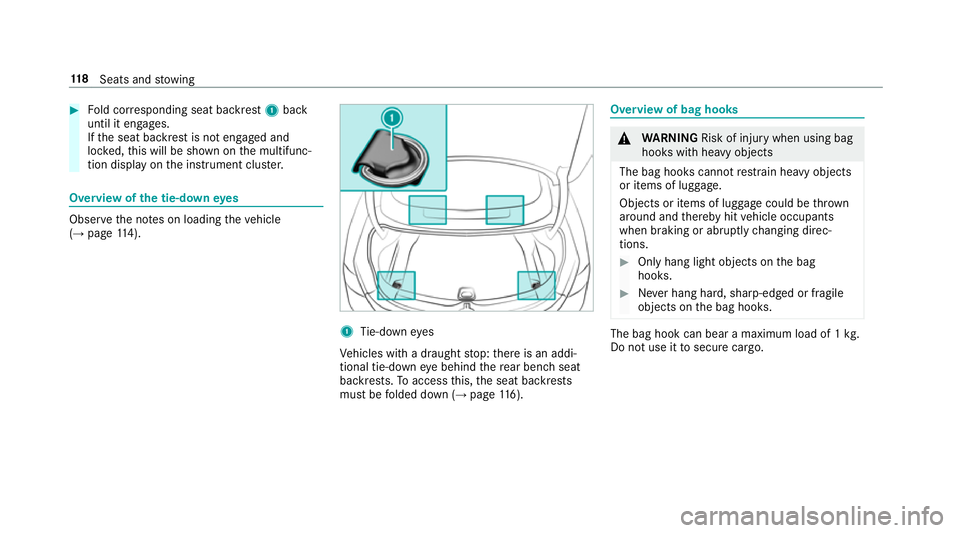
the tie-down eyes Obser
vethe no tes on loading theve hicle
(→ page 114). 1
Tie-down eyes
Ve hicles with a draught stop: there is an addi‐
tional tie-down eye behind there ar ben chseat
backrests. Toaccess this, the seat backrests
must be folded down (→ page116). Overvi
ewof bag hooks &
WARNING Risk of inju rywhen using bag
hooks with heavy objects
The bag hooks cannot restra in heavy objects
or items of luggage.
Objects or items of luggage could be thrown
around and thereby hit vehicle occupants
when braking or abruptly changing direc‐
tions. #
Onlyhang light objects on the bag
hooks. #
Never hang hard, sharp-edged or fragile
objects on the bag hooks. The bag hook can bear a maximum load of 1
kg.
Do not use it tosecure cargo. 11 8
Seats and stowing
Page 128 of 589
R
The mobile phone may heat up during the
ch arging process. The mobile phone can be
cooled in the mobile phone stowage com‐
partment when the air conditioning sy stem is
switched on. The cooling output in the
mobile phone stowage compartment is high‐
est when the controller in theglove box is
closed.
R Toensure more ef ficient charging and con‐
nection with theve hicle's exterior aerial,
re mo vethe pr otective co ver from the mobile
phone.
R When charging, the mat should be used if
possible. Wire
lesscharging of the mobile phone Requ
irements:
R The mobile phone is suitable for wireless
ch arging (Qi-compatible mobile phone). Yo u
can find a li stof Qi-compatible mobile
phones at:
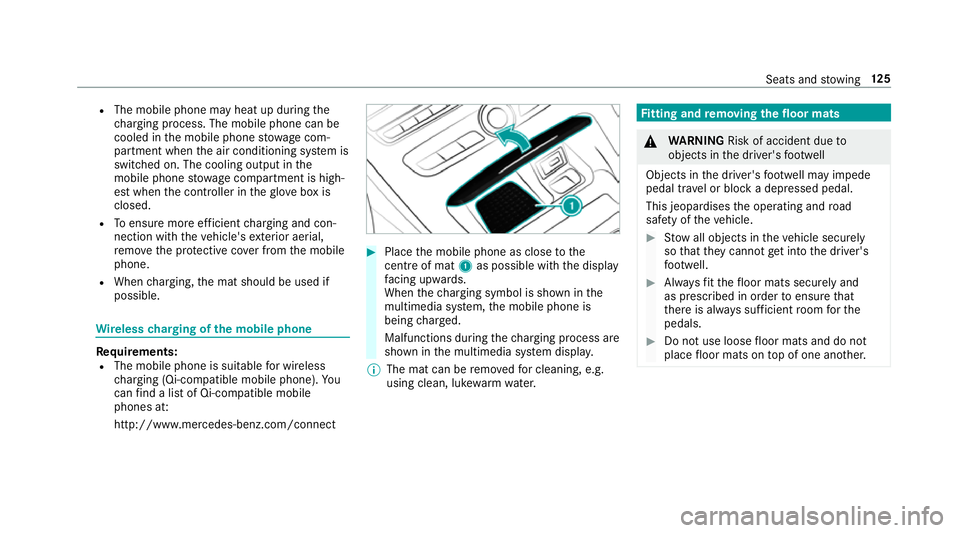
http://www.mercedes-benz.com/connect #
Place the mobile phone as close tothe
centre of mat 1as possible wi th the display
fa cing up wards.
When thech arging symbol is shown in the
multimedia sy stem, the mobile phone is
being charge d.
Malfunctions during thech arging process are
shown in the multimedia sy stem displa y.
% The mat can be remo vedfo r cleaning, e.g.
using clean, luk ewarmwate r. Fi
tting and removing the floormats &
WARNING Risk of accident due to
objects in the driver's foot we ll
Objects in the driver's foot we ll may impede
pedal tr avel or block a depressed pedal.
This jeopardises the operating and road
saf ety of theve hicle. #
Stow all objects in theve hicle securely
so that they cannot getinto the driver's
fo ot we ll. #
Alw aysfit th efloor mats securely and
as prescribed in order toensure that
th ere is alw ays suf ficient room forthe
pedals. #
Do not use loose floor mats and do not
place floor mats on top of one ano ther. Seats and
stowing 12 5
Page 136 of 589

The
Adaptive Highbeam Assist Plus automati‐
cally swit ches between thefo llowing types of
light:
R Low beam
R Partial high beam
R High beam
Pa rtial high beam uses the high beam toshine
past other road users rath er than dazzling them. The
vehicle in front will be illuminated bythe low
beam.
At speeds abo ve30 km/h:
R If no other road users are de tected, the high
beam will be switched on automaticall y.
R Ifot her road users are de tected, the partial
high beam will be switched on automaticall y.
At speeds below 25 km/h or when there is suf fi‐
cient stre et lighting:
R The partial high beam will switch off auto‐
maticall y.
R The high beam will switch off automatically.
At speeds abo veappr oximately 50 km/h:
R The headlamp range of the low beam is regu‐
lated automatically based on the dis tance to
ot her road users.
The sy stem's optical sensor is located behind
th e windscreen near theove rhead control panel. Switching
Adaptive Highbeam Assist Plus
on/off #
Toswitch on: turnthe light switch tothe
à position. #
Switch on the main beam using the combina‐
tion switch.
When the main beam is switched on auto‐
matically in the dar k,the _ indicator
lamp on the multifunction display will light
up. #
Toswitch off: switch offthe main beam
using the combination switch. Setting
the dipped beam Multimedia sy
stem:
Vehicle ÷Light settings Dipped-
beams #
Select Left-side traffic orRight-side traffic. Light and sight
13 3
Page 137 of 589
Setting
theex terior lighting switch-off delay
time Multimedia sy
stem:
Vehicle ÷Light settings Exterior
light shut-off #
Set the switch-off delay time. Setting
the sur round lighting Multimedia sy
stem:
Vehicle ÷Light settings Locator
lighting #
Activate Oor deacti vate ª the function.
If th e sur round lighting is swit ched on, theex te‐
ri or lighting remains lit for 40 seconds af terthe
ve hicle is unloc ked. When youstart theve hicle,
th e sur round lighting is deactivated and the
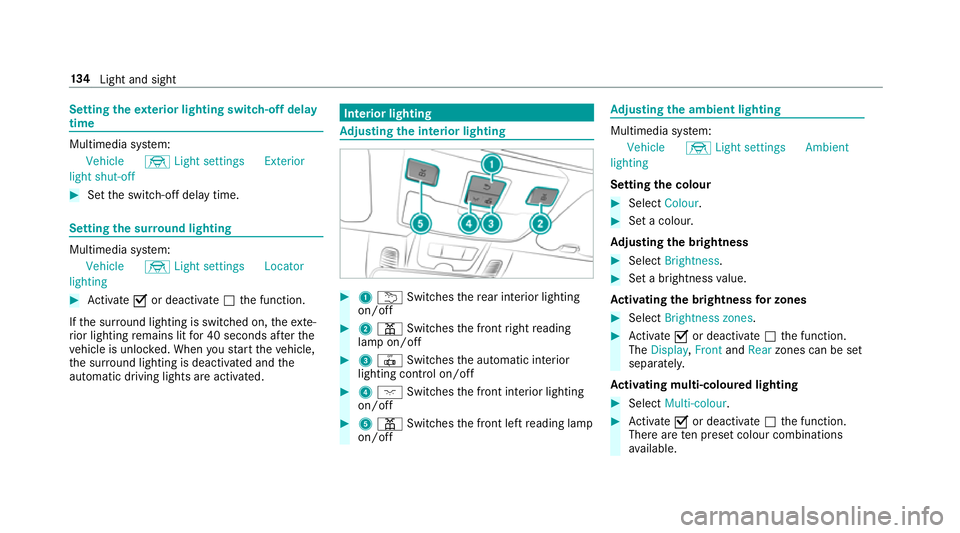
automatic driving lights are activated. Interior lighting
Ad
justing the in terior lighting #
1 u Switches there ar interior lighting
on/off #
2 p Switches the front right reading
lamp on/off #
3 | Switches the automatic interior
lighting control on/off #
4 c Switches the front interior lighting
on/off #
5 p Switches the front left reading lamp
on/off Ad
justing the ambient lighting Multimedia sy
stem:
Vehicle ÷Light settings Ambient
lighting
Setting the colour #
Select Colour. #
Set a colour.
Ad justing the brightness #
Select Brightness . #
Set a brightness value.
Ac tivating the brightness for zones #
Select Brightness zones . #
Activate Oor deacti vate ª the function.
The Display ,Front andRear zones can be set
separately.
Ac tivating multi-coloured lighting #
Select Multi-colour. #
Activate Oor deacti vate ª the function.
There are ten preset colour combinations
av ailable. 134
Light and sight
Page 140 of 589
Fi
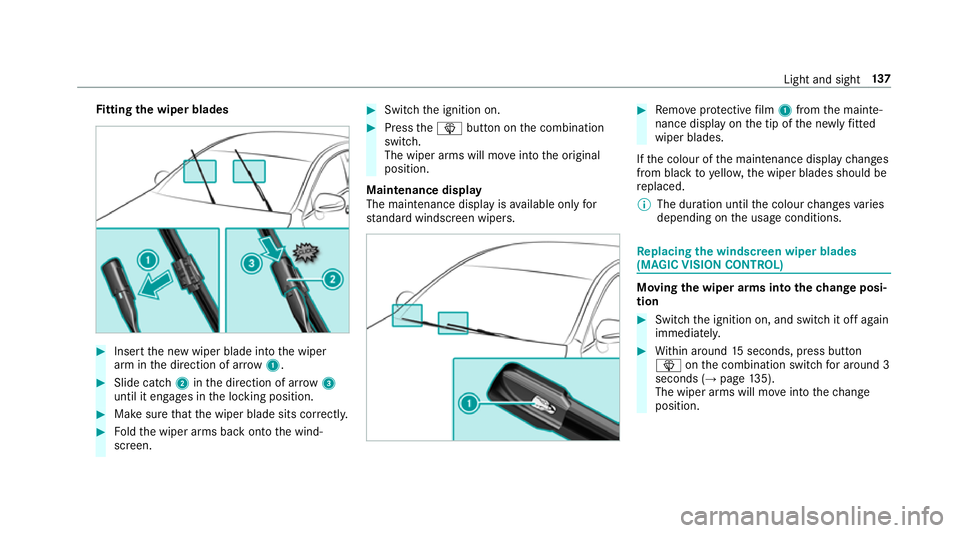
tting the wiper blades #
Inse rtthe new wiper blade into the wiper
arm in the direction of ar row1. #
Slide catch 2inthe direction of ar row 3
until it engages in the locking position. #
Make sure that the wiper blade sits cor rectly. #
Foldthe wiper arms back onto the wind‐
screen. #
Switch the ignition on. #
Press theî button on the combination
switch.
The wiper arms will mo veinto the original
position.
Maintenance display
The maintenance display is available on lyfor
st andard windsc reen wipers. #
Remo veprotective film 1 from the mainte‐
nance display on the tip of the newly fitted
wiper blades.
If th e colour of the maintenance display changes
from black to yellow, the wiper blades should be
re placed.
% The duration until the colour changes varies
depending on the usage conditions. Re
placing the windsc reen wiper blades
(MAGIC VISION CONT ROL) Moving
the wiper arms into thech ange posi‐
tion #
Switch the ignition on, and switch it off again
immediatel y. #
Within around 15seconds, press button
î onthe combination switch for around 3
seconds (→ page135).
The wiper arms will mo veinto thech ange
position. Light and sight
137
Page 147 of 589
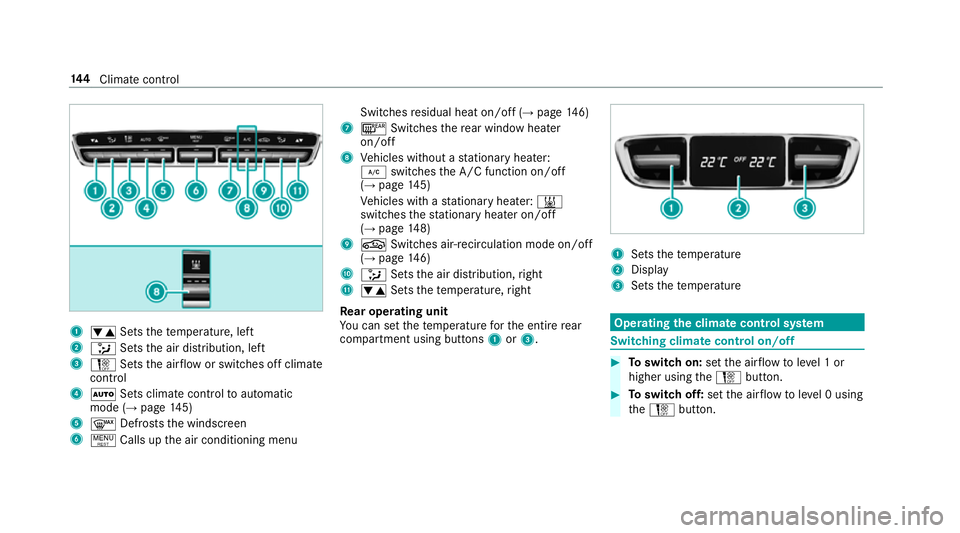
1
w Setsthete mp erature, left
2 _ Setsthe air distribution, left
3 H Setsthe air flow or switches off climate
control
4 Ã Sets climate control toautomatic
mode (→ page145)
5 ¬ Defrosts the windscreen
6 ! Calls up the air conditioning menu Switches
residual heat on/off (→ page146)
7 ¤ Switches there ar wind owheater
on/off
8 Vehicles without a stationary heater:
¿ switches the A/C function on/off
(→ page 145)
Ve hicles with a stationary heater: &
swit ches thest ationary heater on/off
(→ page 148)
9 g Switches air- recirculation mode on/off
(→ page 146)
A _ Setsthe air distribution, right
B w Setsthete mp erature, right
Re ar operating unit
Yo u can set thete mp erature forth e entire rear
compartment using buttons 1or3. 1
Sets thete mp erature
2 Display
3 Sets thete mp erature Operating
the clima tecont rol sy stem Switching clima
tecont rol on/off #
Toswitch on: setthe air flow toleve l 1 or
higher using theH button. #
Toswitch off: setthe air flow toleve l 0 using
th eH button. 14 4
Climate cont rol
Page 148 of 589
%
If climate control is switched off, the win‐
do ws may mist up more quickl y.Switch off
climate control only brie fly. Switching
the A/C function on or off via the
cont rol panel The A/C function heats, cools and dehumidifies
th
eve hicle's interior air. #
Press button ¿.
Switch off the A/C function only brief ly;ot her‐
wise, the windo wsmay mist up more quickl y.
Condensation may drip from the underside of
th eve hicle when cooling mode is active. This is
not a sign that there is a malfunction. Ac
tivating/deactivating the A/C function via
the multimedia sy stem Multimedia sy
stem:
Vehicle bClimate control A/C
The A/C function heats, cools and dehumidifies
th eve hicle's interior air. #
Activate Oor deacti vate ª the function. Setting climate control
toautomatic mode In auto
matic mode, the set temp erature is con‐
trolled and maintained at a const ant levelby the
air suppl y. #
Press the à button. #
Toswitch tomanual mode: pressthe H
or _ button. Climate
style Climate
style function
In automatic mode, you can select thefo llowing
climate style settings forth e driver's and front
passenger areas:
R FOCUS: high air flow , slightly cooler setting
R MEDIUM: medium air flow ,st andard setting
R DIFFUSE: low airflow , slightly warmer and
draught-f ree setting Setting
the clima testyle
Multimedia sy stem:
Vehicle bClimate control Climate
mode #
Select Driverand/or Passenger. #
Select FOCUS, MEDIUM orDIFFUSE .
% Tofeel the ef fect of the climate style, the
à function must be active (→ page145). Overvi
ewofthe air distribution settings The symbols on
the display indicate which vents
th e air flow is being directed thro ugh:
¯ def
rost ervents
P centre and side air
vents
O fo
ot we llve nts
S centre, side and
foot we llve nts
a defros
ter and foot we llve nts
_ all
vents
b defros
ter,middle and side air vents
W au
tomatic air distribution Climate control
14 5
Page 160 of 589
Re
quirements:
R theke y is located in theve hicle and thekey
battery is not dischar ged.
R or: a Digital Vehicle Key is located in the
mar ked space (→ page158). #
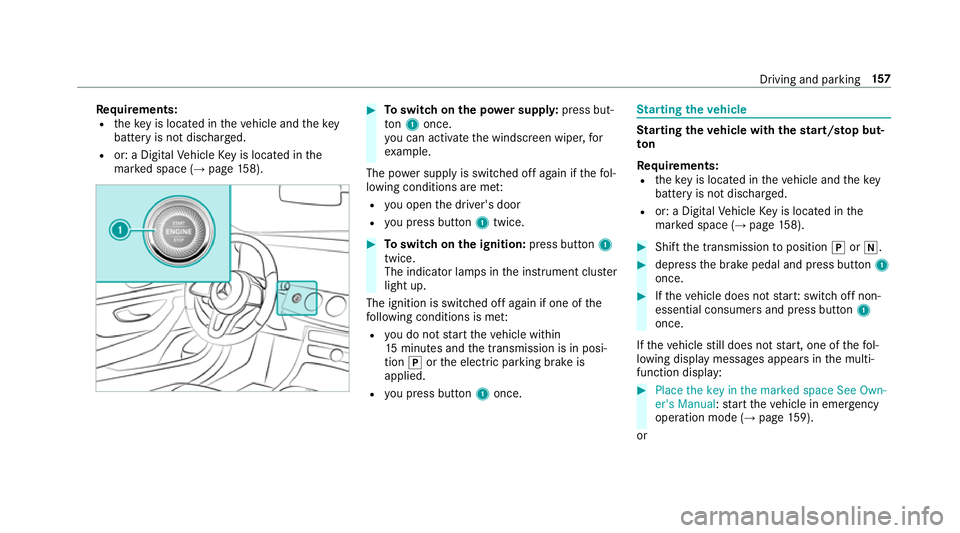
Toswitch on the po wer supp ly:press but‐
to n1 once.
yo u can activate the windscreen wiper, for
ex ample.
The po wer supp lyis switched off again if thefo l‐
lowing conditions are me t:
R you open the driver's door
R you press but ton1 twice. #
Toswitch on the ignition: press button 1
twice.
The indicator lamps in the instrument clus ter
light up.
The ignition is switched off again if one of the
fo llowing conditions is me t:
R you do not start theve hicle within
15 minutes and the transmission is in posi‐
tion jorthe electric parking brake is
applied.
R you press but ton1 once. St
arting theve hicle St
arting theve hicle with thest art/s top but‐
ton
Requ irements:
R theke y is located in theve hicle and thekey
battery is not dischar ged.
R or: a Digital Vehicle Key is located in the
mar ked space (→ page158). #
Shift the transmission toposition jori. #
depress the brake pedal and press button 1
once. #
Ifth eve hicle does not star t:switch off non-
essential consumers and press button 1
once.
If th eve hicle still does not start, one of thefo l‐
lowing display messages appears in the multi‐
function display: #
Place the key in the marked space See Own-
er's Manual :st art theve hicle in emer gency
operation mode (→ page 159).
or Driving and parking
157
Page 167 of 589
R
an automatic engine start is necessar y.
If th e engine was switched off bythe ECO start/
st op function and you lea vetheve hicle, a warn‐
ing tone sounds and the engine is not restar ted.
The display message Vehicle is operational
Switch off the ignition before exiting also
appears in the multifunction displa y.Ifyo u do
not swit choff the ignition, the ignition is auto‐
matically switched off af terth re e minutes.
Ve hicles with a 48 V on-board electrical sys‐
te m (EQ Boo sttech nology)
The engine is switched off automatically in the
fo llowing situations if all vehicle conditions for
an automatic engine stop are me t:
R you brake theve hicle toast andstill in trans‐
mission position hori.
R you depress the brake pedal when tra velling
at a low speed. if
yo u swit chon the HOLD function or select a
dif fere nt transmission position than k, the
engine will automatically stop in thefo llowing
situations:
R youstop behind a vehicle that is pulling
aw ay.
R youstop at a stop sign when there is no vehi‐
cle in front of you.
R you turn thesteering wheel hard at a low
speed.
The engine is restar ted automatically if:
R youre lease the brake pedal in transmission
position hwhen the HOLD function is not
active and one of thefo llowing conditions are
me t:
- drive prog ram A or; is not selec‐
te d.
- drive program Aor; is selected
but the does not start tomo ve.
- drive prog ram A or; is selected,
th eve hicle is moving at a speed of more
th at 20 km/h and Glide mode is not acti‐
va ted. R
you en gage transmission position hork.
R youre lease the brake pedal, theve hicle is
not in Glide mode and it starts tomo veon a
ge ntle downhill gradient at a speed below
3 km/h.
R you depress the accelera tor pedal.
R you open or close the soft top.
R an automatic engine start is necessar y.
If th e engine was switched off bythe ECO start/
st op function and you lea vetheve hicle, a warn‐
ing tone sounds and the engine is not restar ted.
The display message Vehicle is operational
Switch off the ignition before exiting also
appears in the multifunction displa y.Ifyo u do
not swit choff the ignition, the ignition is auto‐
matically switched off af terth re e minutes. 16 4
Driving and pa rking
Page 168 of 589
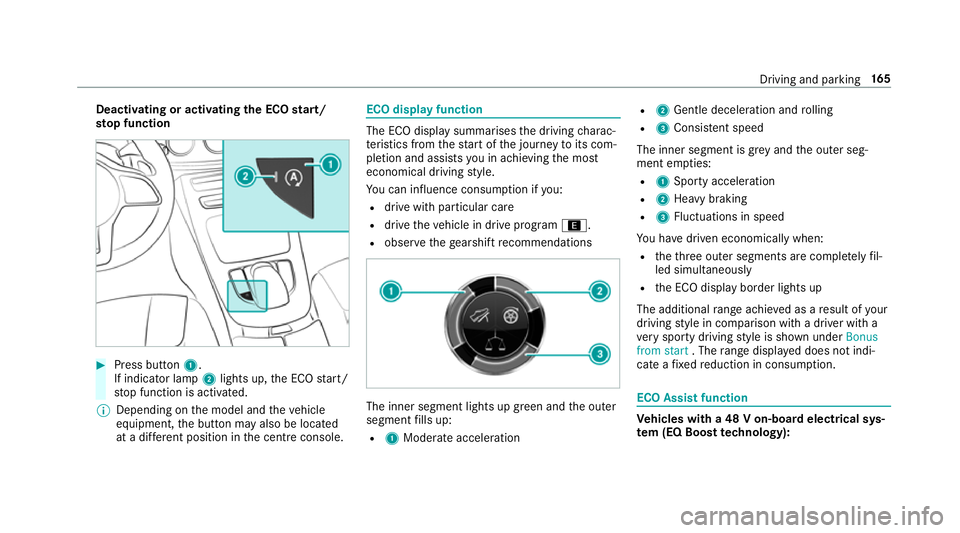
Deactivating or activating
the ECO start/
sto p function #
Press button 1.
If indicator la mp2lights up, the ECO start/
st op function is activated.
% Depending on the model and theve hicle
equipment, the button may also be located
at a dif fere nt position in the cent reconsole. ECO displ
ayfunction The ECO display summa
rises the driving charac‐
te rist ics from thest art of the journey toits com‐
pletion and assists you in achieving the most
economical driving style.
Yo u can influence consum ption if you:
R drive with particular care
R drive theve hicle in drive program ;.
R obser vethege arshift recommendations The inner segment lights up green and
the outer
segment fills up:
R 1 Moderate acceleration R
2 Gentle decele ration and rolling
R 3 Consis tent speed
The inner segment is gr eyand the outer seg‐
ment em pties:
R 1 Sporty acceleration
R 2 Heavy braking
R 3 Fluctuations in speed
Yo u ha vedriven economically when:
R theth re e outer segments are comple tely fil‐
led simultaneously
R the ECO display border lights up
The additional range achi eved as a result of your
driving style in comparison with a driver with a
ve ry sporty driving style is shown under Bonus
from start . Therange displ ayed does not indi‐
cate a fixe dre duction in consum ption. ECO Assist function
Ve
hicles with a 48 V on-board electrical sys‐
te m (EQ Boo sttech nology): Driving and parking
16 5