radio MERCEDES-BENZ E-CLASS CABRIOLET 2018 Owner's Manual
[x] Cancel search | Manufacturer: MERCEDES-BENZ, Model Year: 2018, Model line: E-CLASS CABRIOLET, Model: MERCEDES-BENZ E-CLASS CABRIOLET 2018Pages: 589, PDF Size: 10.56 MB
Page 443 of 589
Ra
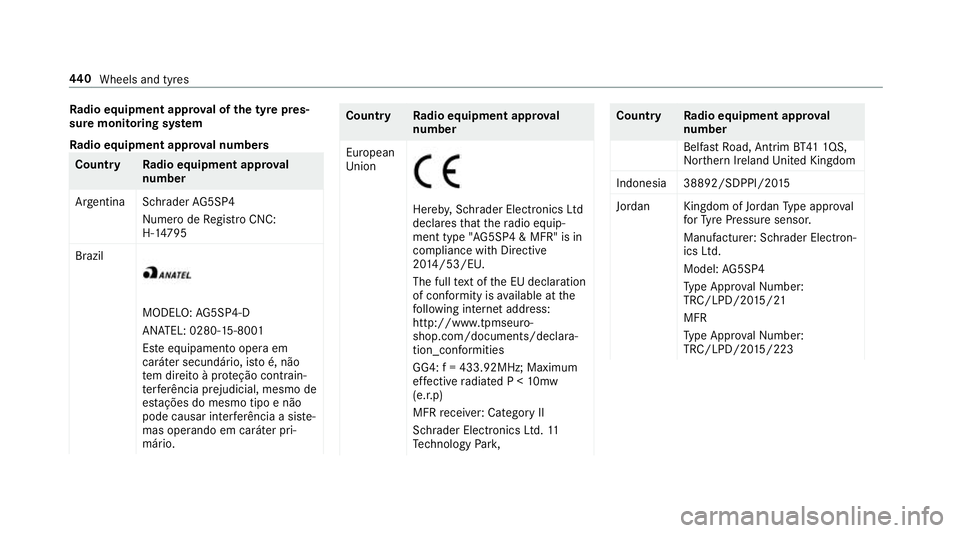
dio equipment appr oval of the ty repres‐
sure moni toring sy stem
Ra dio equipment appr oval numbers Countr
yRadio equipment appr oval
number
Ar ge ntina Schrader AG5SP4
Numero de Registro CNC:
H-1 4795
Brazil MODELO:
AG5SP4-D
AN ATEL: 0280-15-8001
Es te equipamento opera em
caráter secundário, is toé, não
te m direito à pr oteção contrain‐
te rferência prejudicial, mesmo de
es tações do mesmo tipo e não
pode causar inter ferê ncia a si ste‐
mas operando em caráter pri‐
mário. Countr
yRadio equipment appr oval
number
European
Union Hereb
y,Schrader Electronics Ltd
declares that thera dio equip‐
ment type "AG5SP4 & MFR" is in
compliance with Directive
20 14 /53/EU.
The full text of the EU declaration
of confo rmity is available at the
fo llowing internet address:
http://www.tpmseuro‐
shop.com/documents/declara‐
tion_conformities
GG4: f = 433.92MHz; Maximum
ef fective radiated P < 10mw
(e.r.p)
MFR recei ver:Category II
Schrader Elect ronics Ltd. 11
Te ch nology Park, Count
ryRadio equipment appr oval
number
Belfast Road, Antrim BT41 1QS,
Nor thern Ireland United Kingdom
Indonesia 38892/SDPPI/20 15
Jordan Kingdom of Jordan Type appr oval
fo rTy re Pressure sensor.
Manufacturer: Schrader Elect ron‐
ics Ltd.
Model: AG5SP4
Ty pe Appr oval Numb er:
TRC/LPD/20 15/21
MFR
Ty pe Appr oval Numb er:
TRC/LPD/20 15/223 440
Wheels and tyres
Page 444 of 589
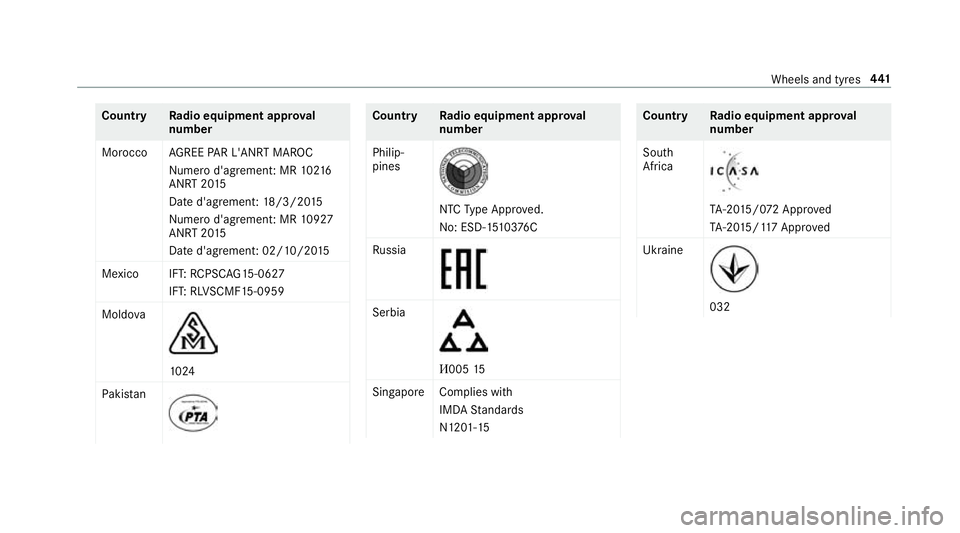
Count
ryRadio equipment appr oval
number
Morocco AGREE PAR L'ANRT MA ROC
Nume rod'agrement: MR 10216
ANRT 20 15
Date d'agrement: 18/3/20 15
Nume rod'agrement: MR 10927
ANRT 20 15
Date d'agrement: 02/10/20 15
Mexico IFT: RCPSC AG15-0627
IFT: RL VSCMF 15-0959
Moldo va 10
24
Pa kis tan Count
ryRadio equipment appr oval
number
Philip‐
pines NTC
Type Appr oved.
No: ESD-15 10376C
Ru ssia Serbia
И005
15
Singapor eComplies with
IMDA Standards
N1201- 15 Count
ryRadio equipment appr oval
number
South
Africa TA
-20 15/0 72 App roved
TA -20 15/117 App roved
Ukraine 032 Wheels and tyres
441
Page 445 of 589
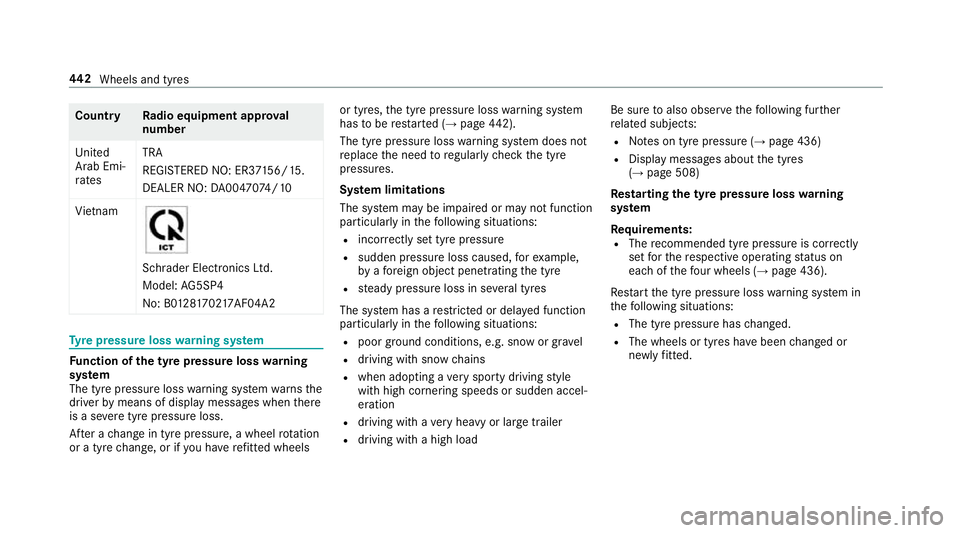
Count
ryRadio equipment appr oval
number
United
Arab Emi‐
ra tes TRA
REGISTERED NO: ER3
7156/15.
DEALER NO: DA00470 74/10
Vi etnam Schrader Electronics Ltd.
Model:
AG5SP4
No: B0 1281702 17AF04A2 Ty
re pressure loss warning sy stem Fu
nction of the ty repressure loss warning
sy stem
The tyre pressure loss warning sy stem warnsthe
driver bymeans of display messa ges when there
is a se vere tyre pressu reloss.
Af ter a change in tyre pressure, a wheel rotation
or a tyre change, or if you ha verefitted wheels or tyres,
the tyre pressure loss warning sy stem
has tobe restar ted (→ page 442).
The tyre pressu reloss warning sy stem does not
re place the need toregular lych eck the tyre
pressures.
Sy stem limitations
The sy stem may be impaired or may not function
particular lyin thefo llowing situations:
R incor rectly set tyre pressure
R sudden pressure loss caused, forex ample,
by afo re ign object penetrating the tyre
R steady pressure loss in se veral tyres
The sy stem has a restricted or del ayed function
particularly in thefo llowing situations:
R poor ground cond itions, e.g. snow or gr avel
R driving with snow chains
R when adopting a very sporty driving style
with high cornering speeds or sudden accel‐
eration
R driving with a very heavy or lar getrailer
R driving wi tha high load Be sure
toalso obse rveth efo llowing fur ther
re lated subjects:
R Notes on tyre pressure (→ page 436)
R Display messages about the tyres
(→ page 508)
Re starting the ty repressure loss warning
sy stem
Re quirements:
R The recommended tyre pressure is cor rectly
set forth ere spective operating status on
each of thefo ur wheels (→ page 436).
Re start the tyre pressure loss warning sy stem in
th efo llowing situations:
R The tyre pressure has changed.
R The wheels or tyres ha vebeen changed or
newly fitted. 442
Wheels and tyres
Page 458 of 589
Note
s ontech nical data
Mercedes-AMG vehicles: be sure toobser ve
th e no tes in the Supplement. Otherwise, you
may failto recognise dangers.
The tech nical da tawa s de term ined in accord‐
ance with EU Directives. The data stated on ly
applies tovehicles with standard equipment. Yo u
can obtain fur ther information from a Mercedes-
Benz Service Centre.
Only for ce rtain countries: you can find vehi‐
cle-specific vehicle data in the EC-Certificate of
Conformity (CERTIFIC ATE OF CONFORMITY).
These documents are deli vered with your vehi‐
cle. On-board electronics
Note
s on tampering with the engine elec‐
tronics *
NO
TEPremature wearthro ugh improper
main tenance Improper maintenance may cause
vehicle
components towe ar more quickly and the
ve hicle's operating permit may be in valida‐
te d. #
Alw ays ha vewo rkon the engine elec‐
tronics and related components car ried
out at a qualified specialist workshop. Tw
o-w ayradios Note
s onfitting two-w ayradios &
WARNING Risk of accident due to
improper workon two-w ayradios
The elect romagnetic radiation from two-w ay
ra dios can inter fere with the on-board elec‐ tronics if RF transmit
ters are manipulated or
re trofitted inco rrectly.
This could jeopardise the operating saf ety of
th eve hicle. #
You should ha veall workon electrical
and electronic components car ried out
at a qualified specialist workshop. &
WARNING Risk of accident from incor‐
re ct ope ration of two-w ayradios
If yo u operate two- wayra dios inco rrectly in
th eve hicle, the electromagnetic radiation
could inter fere with the on-board electronics,
e.g.:
R ifth e two-w ayradio is not connec tedto
an exterior aerial
R ifth eex terior aerial is not cor rectly
mounted or is not of low reflection
This could jeopardise the operating saf ety of
th eve hicle. #
Have the lo w-reflection exterior aerial
fi tted at a qualified specialist workshop. Te
ch nical da ta455
Page 459 of 589
#
When operating two-w ayradios in the
ve hicle, alw ays connect them tothe
lo w- reflection exterior aerial. *
NO
TEInva lidation of the operating per‐
mit due tofailure tocomply wi th the
instructions for ins tallation and use The operating permit may be in
validated if
th e instructions for ins tallation and use of
two-w ayradios are not obser ved. #
Only use appr oved frequency bands. #
Obser vethe maximum permissible out‐
put po wer in these frequency bands. #
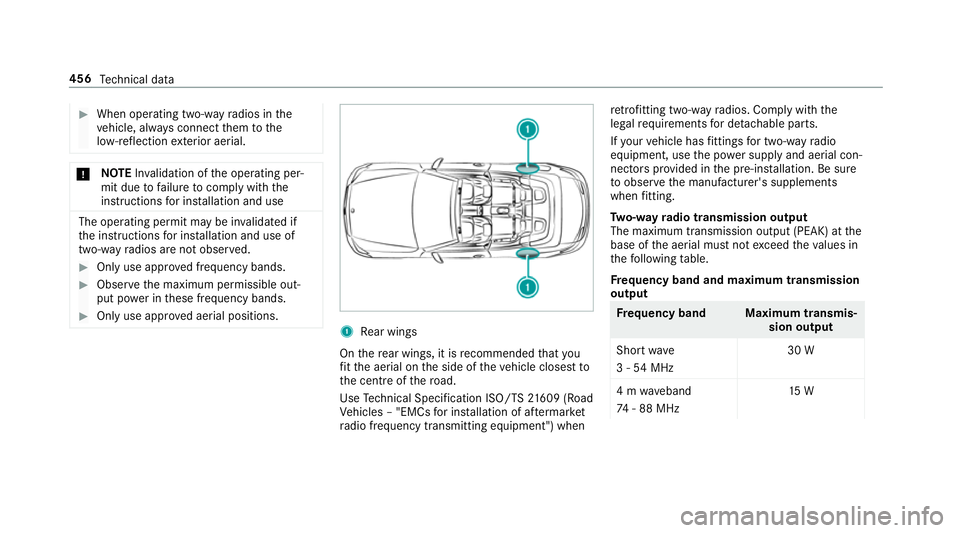
Only use appr oved aerial positions. 1
Rear wings
On there ar wings, it is recommended that you
fi t th e aerial on the side of theve hicle closest to
th e cent reofthero ad.
Use Tech nical Specification ISO/TS 21609 (Road
Ve hicles – "EMCs for ins tallation of af term arket
ra dio frequency transmitting equipment") when re
trofitting two-w ayradios. Comply with the
legal requirements for de tach able parts.
If yo ur vehicle has fittings for two-w ayradio
equipment, use the po wer supp lyand aerial con‐
nec tors prov ided in the pre-ins tallation. Be sure
to obser vethe manufacturer's supplements
when fitting.
Tw o-w ayradio transmission output
The maximum transmission output (PEAK) at the
base of the aerial must not exceed theva lues in
th efo llowing table.
Fr equency band and maximum transmission
output Fr
equency band Maximum transmis‐
sion output
Sho rtwa ve
3 - 54 MHz 30 W
4 m waveband
74 - 88 MHz 15 W456
Tech nical da ta
Page 460 of 589
Fr
equency band Maximum transmis‐
sion output
2 m waveband
14 4 - 174 MHz 25 W
trunked radio sys‐
te m/T etra
380 - 460 MHz 10 W
70 cm waveband
420 - 450 MHz 15 W
Tw o-w ayradio
(2G/3G/4G) 10 WThe
following devices can be used in theve hicle
without restrictions:
R two-w ayradios with a maximum transmission
output of up to100 mW
R two-w ayradios with transmit ter frequencies
in the 380 - 410 MHz frequency band and a
maximum transmission output of up to2 W
(trunked radio sy stem/T etra)
R mobile phones (2G/3G/4G) There are no
restrictions when positioning the
aerial on the outside of theve hicle forth efo llow‐
ing frequency bands:
R trunked radio sy stem/T etra
R 70 cm waveband
R 2G/3G/4G Ve
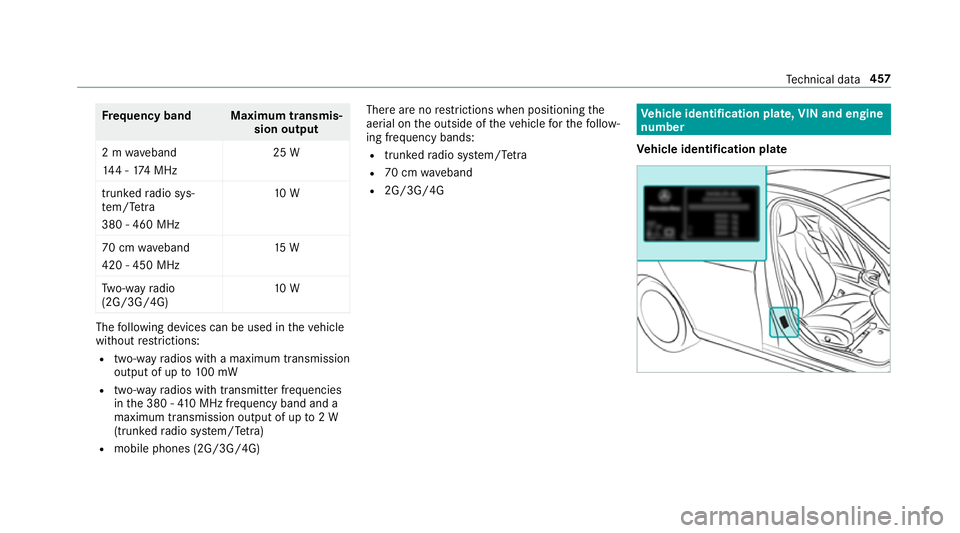
hicle identification plate, VIN and engine
number
Ve hicle identification plate Te
ch nical da ta457
Page 514 of 589

Display messages
Possible causes/consequences and M
MSolutions
Rectify tyre pressure #
When the tyre pressure is cor rect, restart the tyre pressure monitoring sy stem (→ page 439).
h Tyre press. monitor cur-
rently unavailable *T
here is inter fere nce from a po werful radio signal source. As a result, no signals from the tyre pressure sensors are
re cei ved. The tyre pressure monitoring sy stem is temp orarily una vailable. #
Drive on.
The tyre pressure monitoring sy stem restarts automatically as soon as the cause has been rectified.
h
Wheel sensor(s) missing *T
he tyre pressure sensor signal is missing from one or more tyre(s). The pressure of the af fected tyre is not dis‐
pl ay ed. #
Have thefa ulty tyre pressure sensor replaced at a qualified specialist workshop.
h Tyre press. monitor inoper-
ative No wheel sensors *T
he wheels fitted do not ha vesuitable tyre pressure sensors. The tyre pressure monitoring sy stem is deactivated. #
Fit wheels with suitable tyre pressure sensors.
h
Tyre press. monitor inoper-
ative *T
he tyre pressure monitoring sy stem is faulty. &
WARNING Thereis a risk of an accident if the tyre pressure monitoring sy stem is malfunctioning
If th e tyre pressure monitoring sy stem is malfunctioning, it is not able toissue a warning if there is pressure
loss in one or more of the tyres. Display messages and
warning/indicator lamps 511
Page 516 of 589
Key
Display messages
Possible causes/consequences and M
MSolutions
Á Key not detected (red dis‐
play message) *T
hekey cannot be de tected and may no longer be in theve hicle.
The key is no lon ger in theve hicle and you swit choff the engine:
R You can no lon gerst art the engine.
R You cannot centrally lock theve hicle. #
Ensure that theke y is in theve hicle.
If th eke y de tection function has a malfunction due toast ro ng radio signal source: #
Pull over and stop theve hicle safely as soon as possible, paying attention toroad and traf fic conditions. #
Place theke y in the slot forst arting the engine with theke y (→ page 159).
Á Replace key *T
hekey needs tobe replaced. #
Consult a qualified specialist workshop.
Á Key not detected (white
display message) *T
hekey is cur rently und etected. #
Change the location of theke y in theve hicle. #
Ifth eke y is still not recognised, start the engine with theke y in the slot (→ page159). Displ
aymessa ges and warning/indicator lamps 513
Page 560 of 589

ESP
®
Crosswind Assist ................................ .192
Tr ailer stabilisation .............................. 19 2
ESP ®
(Electronic Stability Prog ram) ...... 188
Ac tivating/deactivating ...................... .192
Fu nction/no tes ................................... 188
EU general operating permit number ....457
Exterior lighting Care .................................................... 407
Exterior lighting see Lights
External device Locking (child saf ety lock) .................. .296 F
Fa tigue de tection
see ATTENTION ASSIST
Fa ult message
see Displ aymessa ge
Favo urites
Ad ding .................................................2 86
Calling up ............................................ 285
Deleting ............................................... 286 Moving ................................................ 286
Overview ............................................. 285
Re
naming ............................................ 286
Fi ll le vel
Ad Blue ®
............................................... 257
Fi lling station sear ch
St arting automatic sear ch................... 308
Switching au tomatic sear chon/off ..... 314
Using automatic sear ch....................... 314
Fi re extinguisher ...................................... 414
Firs t-aid kit (soft sided) ...........................413
Flacon Inserting/removing ............................ .147
Flat towing
see Tow- bar sy stem
Flat tyre ....................................................4 14
MOExtended tyres ...............................4 15
No tes ................................................... 414
TIREFIT kit ............................................ 416
Wheel change ...................................... 447
Floor mats ................................................ 12 5
Fo g light (extended range) ......................1 31Fo
il co vering
Ra dar sensors ...................................... 187
Fo lding draught stop
Care .................................................... 407
Fitting .................................................... 93
Re moving ............................................. .93
Fr ag rance
see Frag rance sy stem
Fr ag rance sy stem .................................... 147
Inserting/removing theflacon ............ .147
Setting ................................................. 147
Fr ee software ............................................ 29
Fr equencies
Tw o-w ayradio ...................................... 456
Fr equency band
Dialling (on-board computer) .............. .261
Fr ont airbag .............................................. .38
Fr ont passenger seat
see Seat
Fu el .......................................................... .462
Ad ditives .............................................4 62
Diesel ................................................. .462
E10 ...................................................... 461 Index
557
Page 563 of 589
Intermediate destination
Calculating a route with intermediate
destinations ........................................ 309
En tering ............................................... 308
Modifying ............................................ 309
St arting an automatic filling station
sear ch................................................. 308
St arting the automatic service sta‐
tion sear ch........................................... 314
Internet Calling up a web page .......................... 361
Closing the br ows er ............................3 62
Deleting a bookma rk........................... 362
Deleting br owser data .........................3 62
Managing bookma rks .......................... 362
Internet connection Cancelling permission (mobile
phone) .................................................3 59
Communication module function ......... 357
Connection status .............................. .360
Displ aying the connection status ........ 360
Editing access data (Blue tooth®
) .........3 59
Es tablishing .........................................3 59
Information .......................................... 356
Mobile phone de tails .......................... .359 Re
strictions ......................................... 356
Setting access da ta(Blue tooth ®
) ........ 358
Setting up (Blue tooth ®
) .......................3 58
Setting up (Wi-Fi) ................................. 357
Switching Blue tooth®
profile (DUN/
PA N) .................................................... 358
Internet radio
Calling up ............................................ 363
Deleting stations ................................ .363
Logging out ......................................... 364
Overview ............................................. 363
Re gis tering .......................................... 364
Saving stations .................................... 363
Selecting and connecting toast ation
............................................................ .363
Selecting stre am ................................ .364
Setting options .................................... 364
Te rm s of use ........................................3 64
Ionisation Activating/deactivating (multimedia
sy stem) ................................................ 14 6
iPhone ®
see Apple CarPlay™
see Mercedes-Benz Link ISOFIX
child seat securing sy stem
Fitting .................................................... 59
Seats suitable for attaching ................... 56 J
Jack Declaration of conformity ...................... 23
Storage location ..................................4 47
Jump-start connection ............................424
Gene ral no tes ...................................... 422 K
Ke y.............................................................. 72
Ac oustic locking verification signal ........ 73
Battery ................................................... 74
Emergency key ...................................... .74
Energy consumption .............................. 73
Fe atures ................................................ 72
Ke yring attachment .............................. 74
Overview ............................................... 72
Pa nic alarm ............................................ 73
Problem .................................................75
Un locking setting .................................. .73560
Index