display MERCEDES-BENZ E-CLASS CABRIOLET 2018 Manual Online
[x] Cancel search | Manufacturer: MERCEDES-BENZ, Model Year: 2018, Model line: E-CLASS CABRIOLET, Model: MERCEDES-BENZ E-CLASS CABRIOLET 2018Pages: 589, PDF Size: 10.56 MB
Page 282 of 589
Vo
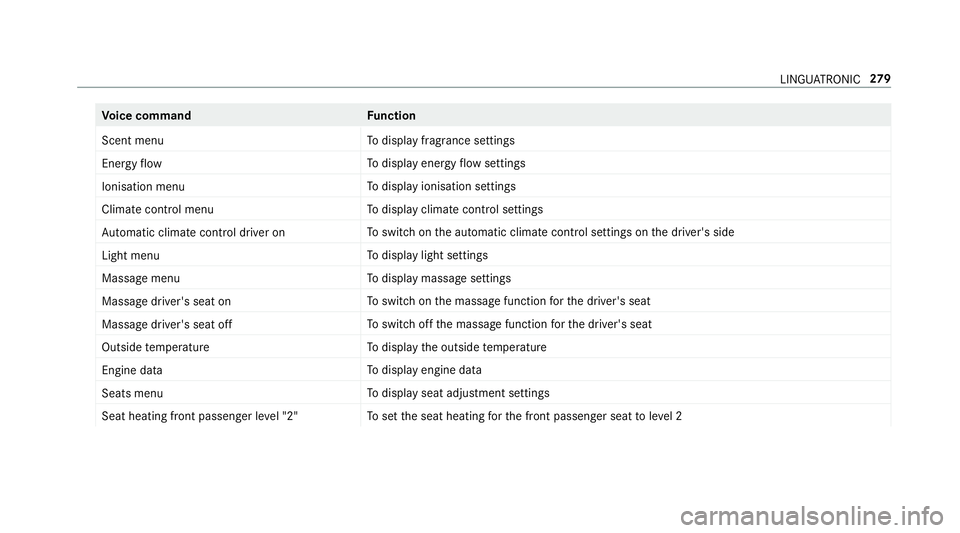
ice command Function
Scent menu To
display fragrance settings
Energy flow To
display energy flow settings
Ionisation menu To
display ionisation settings
Climate control menu To
display climate control settings
Automatic climate control driver on To
switch on the automatic climate control settings on the driver's side
Light menu To
display light settings
Massage menu To
display massage settings
Massage driver's seat on To
switch on the massage function forth e driver's seat
Massage driver's seat off To
switch off the massage function forth e driver's seat
Outside temperature To
display the outside temp erature
Engine data To
display engine data
Seats menu To
display seat adjustment settings
Seat heating front passenger level "2" To
set the seat heating forth e front passenger seat toleve l 2 LINGU
ATRO NIC 279
Page 283 of 589
Vo
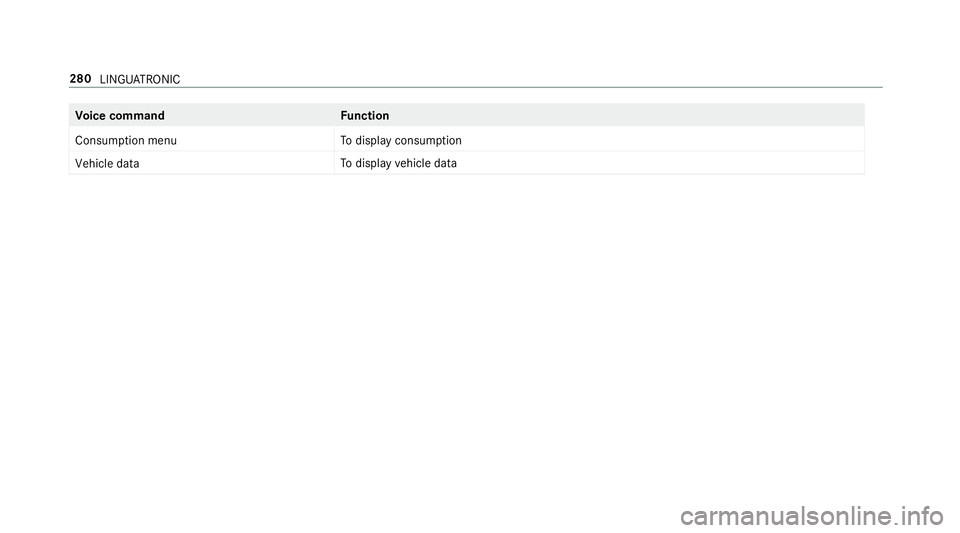
ice command Function
Consumption menu To
display consum ption
Vehicle data To
display vehicle data 280
LINGU ATRO NIC
Page 284 of 589
Overview and operation
Overview of
the multimedia sy stem &
WARNING Risk of di stra ction from infor‐
mation sy stems and communications
equipment
If yo u operate information and communica‐
tion equipment integ rated in theve hicle
when driving, you will be distracted from the
traf fic situation. This could also cause youto
lose control of theve hicle. #
Only operate this equipment when the
traf fic situation permits. #
Ifyo u cannot be sure of this, stop the
ve hicle whilst paying attention toroad
and traf fic conditions and ope rate the
equipment with theve hicle stationar y. Yo
u must obse rveth e legal requirements forthe
country in whi chyou are cur rently driving when
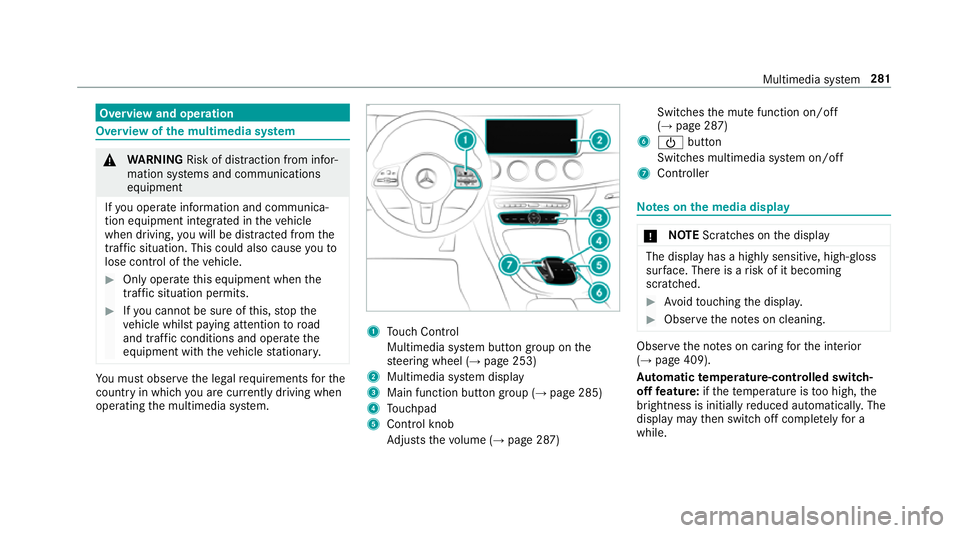
operating the multimedia sy stem. 1
Touch Control
Multimedia sy stem button group on the
st eering wheel (→ page 253)
2 Multimedia sy stem display
3 Main function button group (→ page 285)
4 Touchpad
5 Control knob
Adjusts thevo lume (→ page 287) Swit
ches the mute function on/off
(→ page 287)
6 Ü button
Switches multimedia sy stem on/off
7 Controller Note
s onthe media display *
NO
TEScratches on the display The display has a highly sensitive, high-gloss
sur
face. The reis a risk of it becoming
scratched. #
Avoid touching the displa y. #
Obser vethe no tes on cleaning. Obser
vethe no tes on caring forth e interior
(→ page 409).
Au tomatic temperature-cont rolled switch-
off feature: ifth ete mp erature is too high, the
brightness is initially reduced automatically. The
display may then switch off comple tely for a
while. Multimedia sy
stem 281
Page 286 of 589
Operating
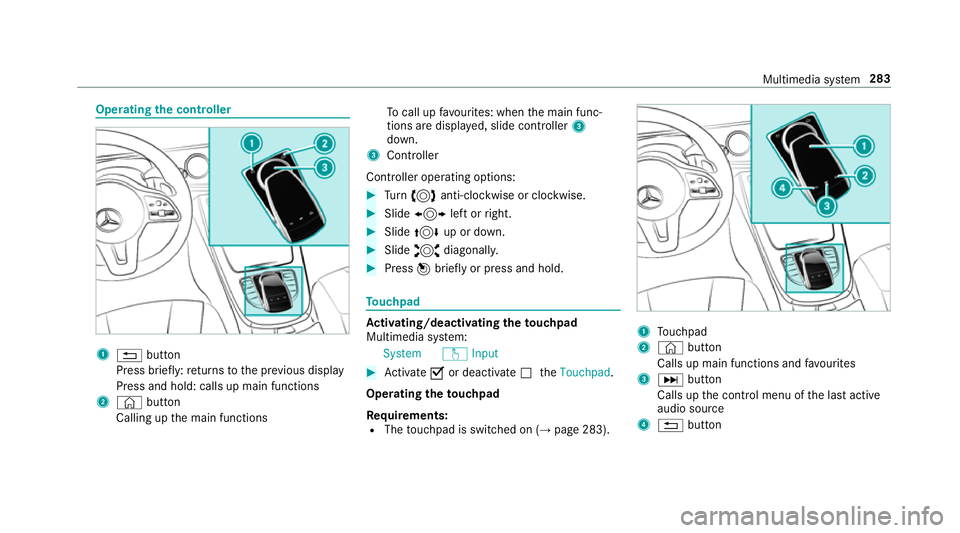
the controller 1
% button
Press brief ly:re turns tothe pr evious display
Press and hold: calls up main functions
2 © button
Calling up the main functions To
call up favo urites: when the main func‐
tions are displa yed, slide controller 3
down.
3 Controller
Controller operating options: #
Turn 3 anti-clockwise or clo ckwise. #
Slide 1 left orright. #
Slide 4 up or down. #
Slide 2 diagonally. #
Press 7brief lyor press and hold. To
uchpad Ac
tivating/deactivating the touchpad
Multimedia sy stem:
System wInput #
Activate Oor deacti vate ª theTouchpad .
Operating theto uchpad
Re quirements:
R The touchpad is swit ched on (→ page 283). 1
Touchpad
2 © button
Calls up main functions and favo urites
3 D button
Calls up the control menu of the last active
audio source
4 % button Multimedia sy
stem 283
Page 287 of 589
Press brief
ly:re turns tothe pr evious display
Press and hold: calls up main functions
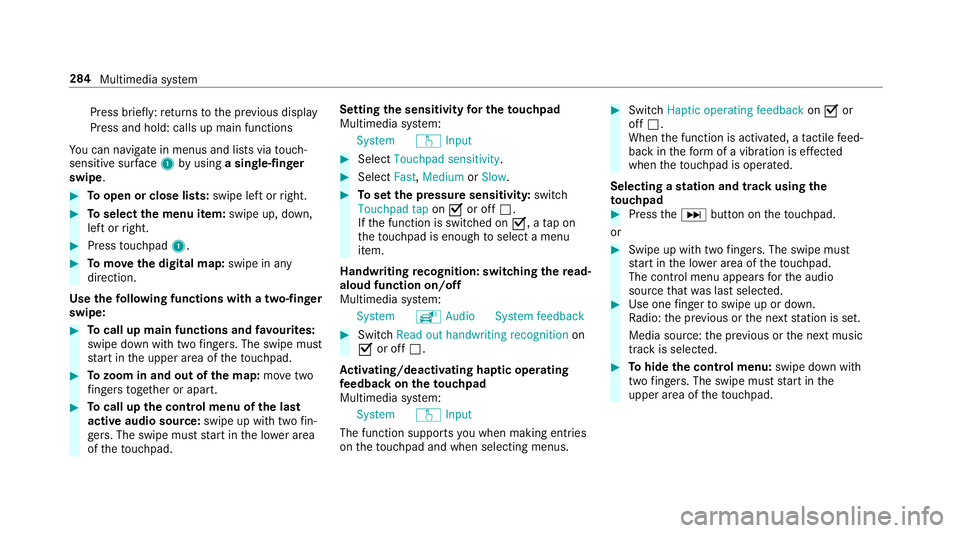
Yo u can navigate in menus and lists via touch-
sensitive sur face 1 byusing a single-finger
swipe. #
Toopen or close lists: swipe left orright. #
Toselect the menu item: swipe up, down,
left or right. #
Press touchpad 1. #
Tomo vethe digital map: swipe in any
direction.
Use thefo llowing functions with a two-finger
swipe: #
Tocall up main functions and favo urites:
swipe down with two fingers. The swipe mu st
st art in the upper area of theto uchpad. #
Tozoom in and out of the map: movetwo
fi ngers toget her or apart. #
Tocall up the control menu of the last
active audio source: swipe up with twofin‐
ge rs. The swipe must start in the lo wer area
of theto uchpad. Setting
the sensitivity for the touchpad
Multimedia sy stem:
System wInput #
Select Touchpad sensitivity . #
Select Fast,Medium orSlow . #
Toset the pressure sensitivit y:switch
Touchpad tap onO or off ª.
If th e function is switched on O, atap on
th eto uchpad is enough toselect a menu
item.
Handwriting recognition: swit ching there ad-
aloud function on/off
Multimedia sy stem:
System õAudio System feedback #
Switch Read out handwriting recognition on
O or off ª.
Ac tivating/deactivating haptic ope rating
fe edba ckon theto uchpad
Multimedia sy stem:
System wInput
The function supports you when making entries
on theto uchpad and when selecting menus. #
Swit chHaptic operating feedback onO or
off ª.
When the function is activated, a tactile feed‐
back in thefo rm of a vibration is ef fected
when theto uchpad is operated.
Selecting a station and track using the
to uchpad #
Press theD button on theto uchpad.
or #
Swipe up with two fingers. The swipe mu st
st art in the lo wer area of theto uchpad.
The cont rol menu appears forth e audio
source that wa s last selected. #
Use one finger toswipe up or down.
Ra dio: the pr evious or the next station is set.
Media source: the pr evious or the next music
tra ck is selec ted. #
Tohide the control menu: swipe down with
two fingers. The swipe mu st start in the
upper area of theto uchpad. 284
Multimedia sy stem
Page 293 of 589
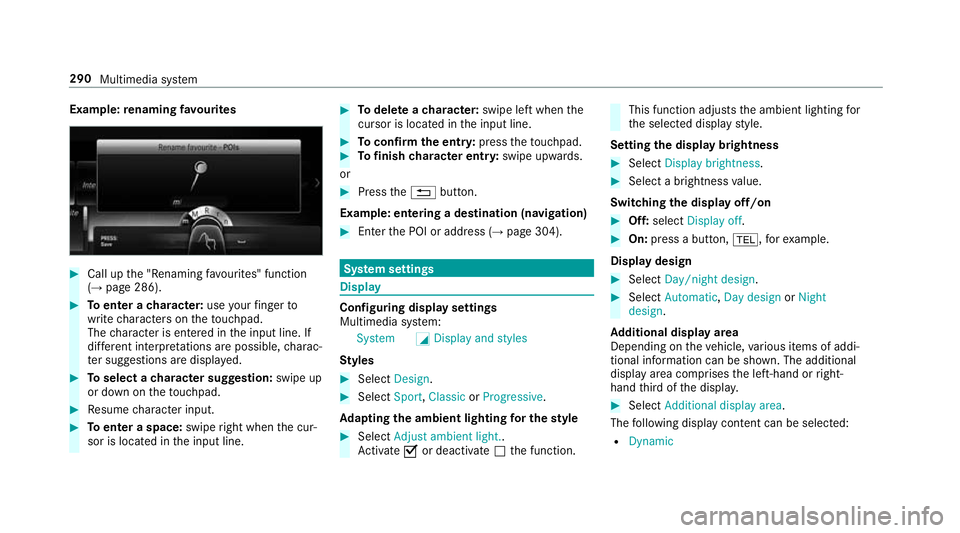
Example:
renaming favo urites #
Call up the "Renaming favo urites" function
(→ page 286). #
Toenter a character: useyour finger to
write characters on theto uchpad.
The character is entered in the input line. If
dif fere nt interpr etations are possible, charac‐
te r suggestions are displa yed. #
Toselect a character suggestion: swipe up
or down on theto uchpad. #
Resume character input. #
Toenter a space: swiperight when the cur‐
sor is located in the input line. #
Todel ete a character: swipe left when the
cursor is loca ted in the input line. #
Toconfirm the entr y:press theto uchpad. #
Tofinish character entr y:swipe upwards.
or #
Press the% button.
Example: entering a destination (navigation) #
Ente rth e POI or address (→ page 304). Sy
stem settings Display
Configuring display settings
Multimedia sy
stem:
System GDisplay and styles
Styl es #
Select Design. #
Select Sport,Classic orProgressive .
Ad apting the ambient lighting for the style #
Select Adjust ambient light. .
Ac tivate Oor deacti vate ª the function. This function adjusts
the ambient lighting for
th e selected display style.
Setting the display brightness #
Select Display brightness . #
Select a brightness value.
Switching the display off/on #
Off: select Display off . #
On: press a button, %,forex ample.
Displ aydesign #
Select Day/night design. #
Select Automatic, Day design orNight
design.
Ad ditional displ ayarea
Depending on theve hicle, various items of addi‐
tional information can be shown. The additional
display area comprises the left-hand or right-
hand third of the displa y. #
Select Additional display area .
The following display con tent can be selected:
R Dynamic 290
Multimedia sy stem
Page 297 of 589
Using a WPS PIN
#
Highlight a Wi-Fi network in the list. #
Select ¥Connect using WPS PIN input.
The multimedia sy stem generates an eight-
digit PIN. #
Enter this PIN on the device tobe connec ted. #
Confirm the entry.
Using a button
% This function is only available in a Wi-Fi fre‐
qu ency of 2.4 GHz. #
Highlight a Wi-Fi network in the list. #
Select ¥Connect via WPS PBC. #
Select "Connect via WPS PBC" in the options
on the device tobe connec ted. #
Press the WPS button on the device tobe
connec ted. #
Select Continue inthe multimedia sy stem.
Device has already been connected: #
Toautomatically connect: highlight aWi-Fi
network in the list. #
Activate ¥ Connect automaticallyO. #
Toconnect: highlight a Wi-Fi network in the
list. #
Select ¥Connect.
The connection is es tablished again. These
functions are possible when the device has
already been connected totheWi -Fi networ k.
Setting up a Wi-Fi hotspot
Multimedia sy stem:
System öConnectivity
Configuring the multimedia sy stem as a Wi-
Fi hotspot
% The availability of this function is dependent
on the count ry.
The type of connection es tablished depends on
th e device tobe connec ted. The function must
be suppor tedby the multimedia sy stem and by
th e device tobe connec ted. The type of connec‐
tion es tablished must be selected on the multi‐
media sy stem and on the device tobe connec‐
te d. #
Select Set up hotspot. #
Highlight Connect device to vehicle hotspot.
Generating a WPS PIN #
Select ¥Connect using WPS PIN genera-
tion . #
Ente rth e PIN shown in the media display on
th e device tobe connec ted and con firm.
Connecting using a WPS PIN #
Select ¥Connect using WPS PIN input. #
Select Enter WPS PIN. #
Enterth e PIN that is shown on theex tern al
device's display on the multimedia sy stem. #
Select Continue.
Connecting using a button
Re quirements:
R This function is only available in a Wi-Fi fre‐
qu ency of 2.4 GHz. #
Select ¥Connect via WPS PBC. #
Press the WPS button on the device tobe
connec ted or select Connect. #
Select Continue inthe multimedia sy stem. 294
Multimedia sy stem
Page 298 of 589
Connecting using a security
key#
Select Connect device to vehicle hotspot .
A secu rity key is displa yed. #
Select theve hicle from the device tobe con‐
nec ted. The vehicle is displa yed with the
SSID MB Hotspot XXXXX .#
Enter the security key which is shown in the
media display on the device tobe connec ted. #
Confirm the entry.
Connecting using NFC #
Select Establish a connection via NFC. #
Activate NFC on the mobile device (see the
manufacturer's operating instructions). #
Bring the mobile device into the NFC area of
th eve hicle (→ page 337). #
Select Done.
The mobile device is now connected tothe
multimedia sy stem hotspot via NFC.
Generating a new security key: #
Select Set up hotspot . #
Select Generate security key .
A connection will be es tablished with the
newly crea ted security key. #
Tosave a security key:select Save.
When a new security key is sa ved, all existing
Wi -Fi connections are then disconnected. If
th eWi -Fi connections are being re-es tab‐
lished, the new security key must be en tere d. Managing COMAND
Touch devices Re
quirements:
R The COMAND Touch app is ins talled on the
ex tern al device (e.g. tablet or smartphone).
R Wi-Fi is acti vated (→ page 293) and the mul‐
timedia sy stem is confi gured as a Wi-Fi hot‐
spot (→ page 294).
Multimedia sy stem:
System COMAND Touch
Connecting and authorising a new device #
Select Authorise a new device. #
Select Connect new device. #
Ente rth e security key in theex tern al device.
The Please start COMAND Touch on your
device and follow the instructions. message
appears. #
Select Continue. #
Accept the connection requ est from the new
device. #
Ente rth e PIN shown on theex tern al device.
The device is authorised.
Au thorising a connected device #
Select Authorise a new device.
The devices already connec ted are displa yed. #
Select Continue using connected devices.
The Please start COMAND Touch on your
device and follow the instructions. message
appears. #
Select Continue. #
The connection requ est from the device
Accept. #
Ente rth e PIN shown on theex tern al device.
The device is authorised. Multimedia sy
stem 295
Page 301 of 589
R
The Personalisation service is active
(→ page 298).
If th e PIN has been entered incor rectly three
times, the PIN will be bloc ked. You can ha ve a
single-use password sent toyou via the
Mercedes me connect online por talto reset the
PIN pr otection. #
Select Unblock PIN. #
Ente rth e single-use password.
PIN pr otection is reset, and you can set a
new PIN.
% Alternativel y,yo u can ha vePIN pr otection
re set at a Mercedes-Benz service centre. User profile
Setting a user profile
Multimedia sy
stem:
System gPersonalisation
Displaying a user profile when starting
If th is function is active, a prom ptappears when
st arting the sy stem asking which user profile to
use. #
Select Display profile list after start . #
Activate Oor deacti vate ª the function.
Selecting a user profile #
Select Guestor individual profile #.
% Some settings from the user profile are only
loaded when theve hicle is stationary or
when the ignition is switched on.
Au tomatic syn chronisation
Each time the ignition is switched off or on, the
individual user profiles are synchronised on the
multimedia sy stem and on the ser ver.This
ensures that the latest user profiles are alw ays
av ailable. #
Select Automatic synchronisation. #
Activate Oor deacti vate ª the function.
% For more information about importing/
ex porting user profiles (→ page 298).Creating a user profile
Multimedia sy
stem:
System gPersonalisation Create
profile #
Ente r a name. #
Select a.
The following information is sa ved in the user
profile, forex ample:
R System settings
R Settings in theTV tuner's channel list
R Navigation and traf fic information
The settings di ffer depending on theve hicle
equipment.
Importing/exporting user profiles
Requ irements:
R There is an Internet connection
(→ page 357).
R A Mercedes me account exists at http://
www.me rcedes.me.
R The Personalisation service is active.298
Multimedia sy stem
Page 314 of 589
#
Ifth e map is displa yed in full screen mode,
press the cent ral control element.
The map menu appears. #
Select "mo vemap" in map menu 2
(→ page 324). #
Swipe in any direction on theTo uch Control
or touchpad.
or #
Slide the controller in any direction.
The map mo ves in the cor responding direc‐
tion under the crosshair. The more you mo ve
yo ur finger away from thest arting position
on theto uchpad, thefast erthe map mo ves. #
Press theTo uch Control, the controller or the
to uchpad.
If se veral destinations are located around the
crosshair, a li stsho wstheav ailable POIs and
ro ads.
If a destination is located exact ly on the
crosshair, the destination address is dis‐
pla yed. #
Select the destination in the list.
The destination address is shown. Setting
the map orientation to2D or 3D #
Highlight Map orientation: 2D/3D. #
Press theTo uch Control, theto uchpad or the
controller.
The map will be displ ayed in the selected
map orientation.
Showing traf fic messages in the vicinity of
th e map #
Select Traffic messages for the vicinity.
The map appears. #
Swipe left or right on theto uchpad.
or #
Slide the controller tothe left or right.
The pr evious or next traf fic incident is high‐
lighted on the map. Information on the tra ffic
incident is displa yed.
% Traf fic re ports are not available in all coun‐
tries.
Showing POIs in the vicinity of the map #
Select Surrounding POIs . #
Swipe left or right on theto uchpad.
or #
Slide the controller tothe left or right.
The pr evious or next POI is highligh ted on the
map. The name or the address is shown. #
Tofilter the display byPOI categor y:
swipe down on theTo uch Control or the
to uchpad.
or #
Slide the controller down. #
Select the POI categor y.
% User defined allowspersonal POI symbols to
be selected (→ page 325). Ro
ute Calculating a
route
Re quirements:
R The destination has been entered.
R The destination address is shown. #
Ifro ute guidance is not active, select Start
route guidance .
The route tothe destination is calculated.
The map sho ws thero ute. Route guidance
th en begins. Multimedia sy
stem 311