tyre pressure MERCEDES-BENZ E-CLASS CABRIOLET 2018 Owners Manual
[x] Cancel search | Manufacturer: MERCEDES-BENZ, Model Year: 2018, Model line: E-CLASS CABRIOLET, Model: MERCEDES-BENZ E-CLASS CABRIOLET 2018Pages: 589, PDF Size: 10.56 MB
Page 6 of 589
Climate control
........................................ 14 3
Overview of climate contro l systems ..........1 43
Operating the climate control sy stem ......... 14 4 Driving and pa
rking ................................. 15 6
Driving ........................................................ 15 6
DY NA MIC SELECT switch ............................1 67
Au tomatic transmission .............................. 16 9
Fu nction of the 4MATIC .............................. 173
Re fuelling .................................................... 173
Pa rking ...................................................... .179
Driving and driving saf ety sy stems .............1 86
Tr ailer hit ch................................................. 24 5
Bicycle rack function .................................. 24 9
Ve hicle towing instructions ........................ .251 Instrument Display and on-board
compu ter.................................................. 252
Instrument display overview ...................... .252
Overview of the buttons on thesteering
wheel ..........................................................2 53
Operating the on-board computer .............. 254
Setting the design ...................................... 255
Setting the additional value range .............. 255 Overview of displ
ays on the multifunc‐
tion display .................................................2 56
Ad justing the instrument lighting ................2 57
Menus and submenus ................................ 257
Head-up Display ......................................... 264 LINGU
ATRO NIC ........................................ 266
No tes on operating saf ety .......................... 266
Ope ration ................................................... 266
Using LINGU ATRO NIC ef fectively ............... 268
Essential voice commands ........................ .269 Multimedia sy
stem .................................. 281
Overview and operation .............................. 281
Sy stem settings .......................................... 290
Fit & Healt hy............................................... 301
Na vigation .................................................. 303
Te lephone .................................................. .330
Online and Internet functions ..................... 356
Media ........................................................ .364
Ra dio .......................................................... 377
TV ............................................................... 380
Sound ......................................................... 389 Main
tenance and care ............................. 391
ASS YST PLUS service inter val display ........ .391
Engine compartment .................................. 392
Cleaning and care ....................................... 399 Breakdown assistance
.............................412
Emergency ................................................. .412
Flat tyre ....................................................... 414
Battery (vehicle) ......................................... 420
To w- starting or towing away ....................... 426
Electrical fuses ........................................... 431 Wheels and tyres
..................................... 435
No tes on noise or unusual handling char‐
acteristics .................................................. .435
No tes on regular lyinspecting wheels and
tyres .......................................................... .435
No tes on snow chains ................................ 435
Ty re pressure .............................................. 436
Wheel change ............................................ .443
Emergency spa rewheel .............................. 453 Contents
3
Page 12 of 589

1
Speedom eter →
252
2 ÷ ESP®
→
527
3 #! Turn signal lights →
12 9
4 Ð Powe r-assis tedsteering malfunction →
538
5 Multifunction display →
256
6 ! ABS malfunction →
527
7 ; Engine diagnostics →
534
8 Rev counter →
252
9 % Diesel engine: preglow
A ! Electric parking brake applied (red) →
527
B J Brakes (red) →
527
C # Electrical fault →
534
D L Distance warning →
533
E ? Coolant too hot/cold →
534
F Coolant temp erature display →
252
G J Brakes (yellow) →
527 H
! Electric pa rking brake (yellow) →
527
I 6 Restra int sy stem →
31
J ü Seat belt not fastened →
532
K ï Trailer hit chis not operational or is swiv‐
elling →
538
L T Standing lights →
127
M Fuel le vel display
8 Fuelreser vewith fuel filler flap location
indicator →
534
N K High beam →
12 9
O L Low beam →
127
P R Rear fog light →
12 8
Q à Suspension malfunction →
533
R h Tyre pressure monitoring sy stem →
536
S å ESP®
OFF →
527 At
aglance – Warning and indicator lamps 9
Page 14 of 589
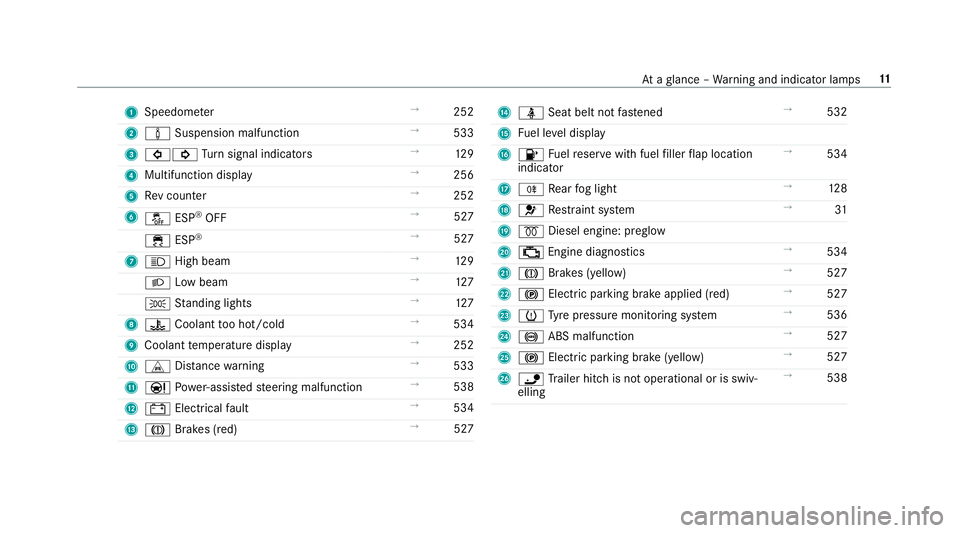
1
Speedom eter →
252
2 à Suspension malfunction →
533
3 #! Turn signal indicators →
12 9
4 Multifunction display →
256
5 Rev counter →
252
6 å ESP®
OFF →
527
÷ ESP®
→
527
7 K High beam →
12 9
L Low beam →
127
T Standing lights →
127
8 ? Coolant too hot/cold →
534
9 Coolant temp erature display →
252
A L Distance warning →
533
B Ð Powe r-assis tedsteering malfunction →
538
C # Electrical fault →
534
D J Brakes (red) →
527 E
ü Seat belt not fastened →
532
F Fuel le vel display
G 8 Fuelreser vewith fuel filler flap location
indicator →
534
H R Rear fog light →
12 8
I 6 Restra int sy stem →
31
J % Diesel engine: preglow
K ; Engine diagnostics →
534
L J Brakes (yellow) →
527
M ! Electric pa rking brake applied (red) →
527
N h Tyre pressure monitoring sy stem →
536
O ! ABS malfunction →
527
P ! Electric pa rking brake (yellow) →
527
Q ï Trailer hit chis not operational or is swiv‐
elling →
538 At
aglance – Warning and indicator lamps 11
Page 22 of 589
Pr
otection of the environment
+ ENVIRONMENTAL
NOTEEnvironmental
dama gedue tooperating conditions and
personal driving style The pollutant emission of
your vehicle is
directly related tothewa yyo u operate your
ve hicle.
Help toprotect the environment byoperating
yo ur vehicle in an environmentally responsi‐
ble manner. Please obser vethefo llowing rec‐
ommendations on ope rating conditions and
pe rsonal driving style.
Operating conditions: #
Make sure that the tyre pressure is cor‐
re ct. #
Do not car ryany unnecessary weight
(e.g. roof luggage rack s once you no
lon ger need them). #
Adhere tothe service inter vals.
A regularly serviced vehicle will contri b‐
ute toenvironmen tal pr otection. #
Alw ays ha vemaintenance workcar ried
out at a qualified specialist workshop.
Pe rsonal driving style: #
Do not depress the accelera tor pedal
when starting the engine. #
Do not warm upthe engine while the
ve hicle is stationar y. #
Drive carefully and maintain a suitable
di st ance from theve hicle in front. #
Avoid frequent, sudden acceleration
and braking. #
Change gear in good time and use each
ge ar on lyup toÔ of its maximum
engine speed. #
Switch off the engine in stationary traf‐
fi c, e.g. byusing the ECO start/ stop
function. #
Drive fuel-ef ficiently. Obser vethe ECO
display for a fuel-ef ficient driving style. Ta
ke -back of end-of-life vehicles
EU countries onl y:
Mercedes-Benz will take back your end-of-life
ve hicle for environment-friendly disposal in
accordance with the European Union(EU) End-
of-Life Vehicles Directive.
A network of vehicle take -ba ckpoints and dis‐
mantlers has been es tablished foryo uto return
yo ur vehicle. You can lea veit at any of these
points free of charge . This makes an impor tant
contribution toclosing there cycling circle and
conse rving resources.
Fo r fur ther information about there cycling and
disposal of end-of-li fevehicles, and theta ke-
back conditions, please visit the national
Mercedes-Benz website foryo ur count ry. Gene
ral no tes 19
Page 30 of 589

In
general, this information documents thest ate
of a component part, a module, a sy stem or the
sur roundings such as:
R operating status of sy stem components (e.g.
fi ll le vels, battery status, tyre pressure)
R status messages concerning theve hicle or
its individual components (e.g. number of
wheel revo lutions/speed, longitudinal accel‐
eration, lateral acceleration, display of fas‐
te ned seat belts)
R malfunctions or faults in impor tant sy stem
components (e.g. lights, brakes)
R information on events leading tovehicle
damage
R system reactions in special driving situations
(e.g. airbag deployment, inter vention of sta‐
bility control sy stems)
R ambient conditions (e.g. temp erature, rain
sensor)
In addition toprov iding the actual control unit
function, this data assists the manufacturer in
de tecting and rectifying faults and optimising
ve hicle functions. The majority of this data is te
mp orary and is only processed in theve hicle
itself. Only a small portion of the data is stored
in theeve nt or fault memor y.
When your vehicle is serviced, tech nical da ta
from theve hicle can be read out byservice net‐
wo rkemplo yees (e.g. workshops, manufactur‐
ers) or third parties (e.g. breakdown services).
Services include repair services, maintenance
processes, warranty claims and quality assur‐
ance measures, forex ample. The read out is per‐
fo rm ed via the legally prescribed port forthe
diagnostics connection in theve hicle. The
re spective service network locations or third
parties collect, process and use the data. They
document tech nical statuses of theve hicle,
assist in finding faults and impr oving quality and
are transmitted tothe manufacturer, if neces‐
sar y.Fu rthermore, the manufacturer is subject
to product liability. Forth is, the manufacturer
requ irestech nical da tafrom vehicles.
Fa ult memories in theve hicle can be reset by a
service outlet as part of repair or maintenance
wo rk. Depending on
the selected equipment, you can
import data into theve hicle's comfort and info‐
ta inment functions yourself.
This includes, forex ample:
R multimedia data such as music, films or pho‐
to sfo r playback in an integrated multimedia
sy stem
R address book data for use in connection with
an integrated hands-free sy stem or an inte‐
grated navigation sy stem
R entered navigation destinations
R data about the use of Internet services
This data can be sa ved locally in theve hicle or it
is located on a device which you ha veconnected
to theve hicle (e.g. smartphone, USB flash drive
or MP3 pla yer). If this data is stored in theve hi‐
cle, you can dele teit at any time. This data is
sent tothird parties only at your requ est, partic‐
ular lywhen you use online services in accord‐
ance with the settings that you ha veselected.
Yo u can store or change con venience settings/
individualisations in theve hicle at any time. General no
tes27
Page 164 of 589

To
preser vethe engine during thefirs t1, 500 km:
R drive at varying road speeds and engine
speeds.
R drive theve hicle in drive program A
or ;.
R change gear before there v counter needle is
Ô ofthewa yto there d area of there v coun‐
te r.
R do not shift down a gear manually in order to
brake.
R avoidoverstra ining theve hicle, e.g. driving at
full thro ttle.
R do not depress the accelera tor pedal past
th e pressure point (kickdown).
R only increase the engine speed gradually and
accelerate theve hicle tofull speed af ter
1, 500 km.
This also applies when the engine or parts of the
driv etra in ha vebeen replaced. Please also obser
vethefo llowing running-in
no tes:
R in cer tain driving and driving saf ety sy stems,
th e sensor sy stem adjusts automatically
while a cer tain dis tance is driven af terthe
ve hicle has been delivered or af terre pairs.
Fu ll sy stem ef fectiveness is not achie ved
until the end of this teach-in process.
R brakepads, brake discs and tyres that are
either new or ha vebeen replaced only ach‐
ie ve optimum braking ef fect and grip af ter
se veral hundred kilom etre s of driving. Com‐
pensate forth ere duced braking ef fect by
applying greater forc eto the brake pedal. Note
s on driving &
WARNING Risk of accident due to
objects in the driver's foot we ll
Objects in the driver's foot we ll may impede
pedal tra vel or block a depressed pedal.
This jeopardises the operating and road
saf ety of theve hicle. #
Stow all objects in theve hicle securely
so that they cannot getinto the driver's
fo ot we ll. #
Alw aysfit th efloor mats securely and
as prescribed in order toensure that
th ere is alw ays suf ficient room forthe
pedals. #
Do not use loose floor mats and do not
place floor mats on top of one ano ther. &
WARNING Risk of accident due to
unsuitable foot we ar
Operating the pedals may be impaired by
we aring unsuitable foot we ar, e.g.:
R plat form shoes
R high-heeled shoes
R slippers #
Alw ayswe ar suitable foot we ar when
driving so that you can operate the ped‐
als safel y. Driving and pa
rking 161
Page 179 of 589
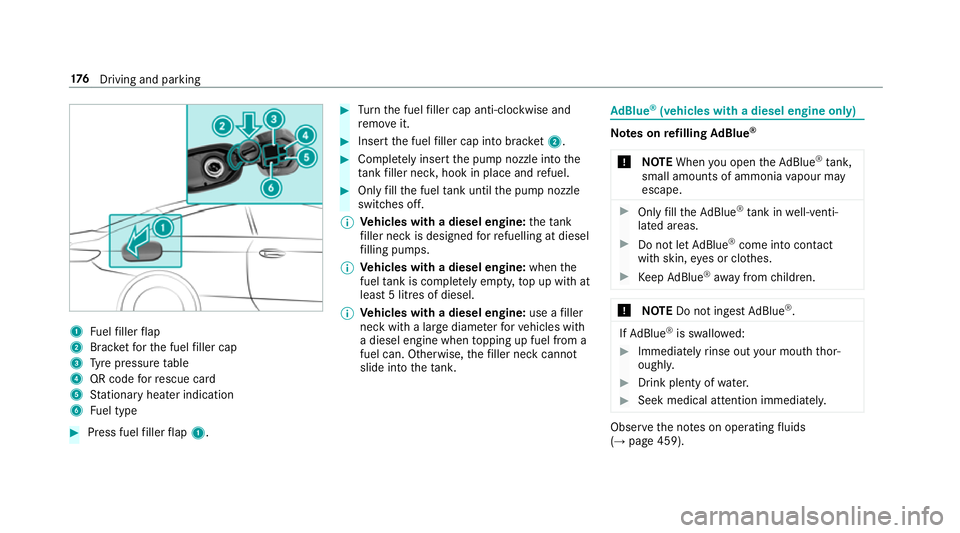
1
Fuelfiller flap
2 Brac ketfo rth e fuel filler cap
3 Tyre pressure table
4 QR code forre scue card
5 Stationary heater indication
6 Fuel type #
Press fuel filler flap 1. #
Turn the fuel filler cap anti-clockwise and
re mo veit. #
Insert the fuel filler cap into brac ket2. #
Comp lete ly inse rtthe pump nozzle into the
ta nk filler nec k,hook in place and refuel. #
Only fill th e fuel tank until the pump nozzle
switches off.
% Vehicles with a diesel engine: theta nk
fi ller neck is designed forre fuelling at diesel
fi lling pumps.
% Vehicles with a diesel engine: whenthe
fuel tank is compl etely em pty, top up with at
least 5 litres of diesel.
% Vehicles with a diesel engine: use afiller
neck with a lar gediame terfo rve hicles with
a diesel engine when topping up fuel from a
fuel can. Otherwise, thefiller neck cannot
slide into theta nk. Ad
Blue ®
(vehicles with a diesel engine on ly) Note
s onrefilling AdBlue ®
* NOTEWhen you open theAd Blue ®
tank,
small amounts of ammonia vapour may
escape. #
Only fill th eAd Blue ®
tank in well-venti‐
lated areas. #
Do not let AdBlue ®
come into contact
wi th skin, eyes or clo thes. #
Keep AdBlue ®
aw ay from children. *
NOTEDo not ingest AdBlue ®
. If
Ad Blue ®
is swallo wed: #
Immediately rinse out your mouth thor‐
oughl y. #
Drink plenty of water. #
Seek medical attention immediately. Obser
vethe no tes on operating fluids
(→ page 459). 176
Driving and pa rking
Page 190 of 589
Fu
nction of thera dar senso rs Some driving and driving sa
fety sy stems use
ra dar sensors tomonitor the area in front of,
behind or next totheve hicle (depending on the
ve hicle's equipment).
Depending on theve hicle's equipment, thera dar
sensors are integrated behind the bumpers
and/or behind the Mercedes star. Keep these
parts free of dirt, ice and slush (→ page 407).
The sensors must not be co vered, forex ample
by cycle rack s, ove rhanging loads, sticke rs,fo il
or foils toprotect against stone chipping. In the
eve nt of dama getothe bumpers or radiator
grille, or following a collision impacting the
bumpers or radiator grille, ha vethe function of
th era dar sensors checked at a qualified special‐
ist workshop. The driver assis tance sy stem may
no longer workproper ly. Overview of driving sy
stems and driving
saf ety sy stems In
this section, you will find information about
th efo llowing driving sy stems and driving saf ety
sy stems:
R 360° Camera (→ page 225)
R ABS (A nti-lock Braking System)
(→ page 187)
R Active Dis tance Assi stDISTRONIC
(→ page 202)
R Adaptive brake lights (→ page198)
R AIR BODY CONTROL (→ page215)
R Active Brake Assi st (→page 193)
R Active Lane Keeping Assist (→ page242)
R ATTENTION ASSIST (→ page 235)
R BAS (B rake Assist System) (→ page188)
R Hill Start Assist (→ page213)
R DYNA MIC BODY CONT ROL (→ page 215)
R EBD ( Electronic Brakeforce Distribution)
(→ page 192) R
ESP ®
(Electronic Stability Program)
(→ page 188)
R Active Speed Limit Assi st (→page 205)
R HOLD function (→ page214)
R STEER CONTROL (→ page 193)
R Active Steering Assist (→ page 208)
R Speed limiter (→ page199)
R Active Parking Assist (→ page 229)
R Parking Assist PARKTRONIC (→ page218)
R Reversing camera (→ page 222)
R Cruise control (→ page198)
R Blind Spot Assi stand Active Blind Spot Assi st
( → page 239)
R Traf fic Sign Assi st (→page 237) Fu
nction of ABS (Anti-lock Braking Sy stem) ABS
regulates the brake pressure in critical driv‐
ing situations:
R During braking, e.g. at full brake application
or insuf ficient tyre traction, the wheels are
pr eve nted from lo cking. Driving and parking
187
Page 200 of 589

Sy
stem limitations
The sy stem may be impaired or may not function
in thefo llowing situations:
R In sno w,rain, fog, heavy spr ay, if there is
gl are, in direct sunlight or in greatlyvarying
light conditions.
R Ifth e sensors are dirty, mis ted up, damaged
or co vered.
R Ifth e sensors malfunction due to otherradar
source inter fere nce, forex ample stro ng radar
re flections in multi-s torey car par ks.
R If a loss of tyre pressure or a defective tyre
has been de tected and displ ayed.
R Full sy stem per form ance is not available for a
fe w seconds af ter switching on the ignition
or af ter driving off.
The sy stem may not react cor rectly:
R In compl extraf fic situations whe reobjects
cannot always be clearly identified.
R Topedestrians or vehicles if they mo ve
qu ickly into the sensor de tection range. R
Topedestrians who are hidden by other
objects.
R Ifth e typical outline of a pedestrian cann ot
be distinguished from the bac kground.
R If a pedestrian is not recognised as su ch, e.g.
due tospecial clo thing or other objects.
R On bends with a tight radius. Setting
Active Brake Assi st Multimedia sy
stem:
Vehicle kAssistance Active Brake
Assist
Ve hicles without Driving Assistance Pack‐
age: the settings can be made af terst arting the
ve hicle.
Ve hicles with Driving Assistance Package:
th e settings can be made when the ignition is
switched on.
The following settings are available:
R Early
R Medium R
Late #
Select a setting.
% Your selection is retained when theve hicle is
next star ted.
Deactivating Active Brake Assi st
% It is recommended that you alw ays lea ve
Ac tive Brake Assi stactivated. #
Select Off.
The dis tance warning function and the auton‐
omous braking function are deactivated.
Ve hicles without Driving Assistance Pack‐
age: when theve hicle is next star ted, the
medium setting is auto matically selected.
Ve hicles with Driving Assistance Pack‐
age: Evasi veSteering Assist is not available.
When the ignition is next star ted, the
medium setting is selected auto maticallyand
Evasive Steering Assist is available.
% IfAc tive Brake Assi stis deactivated, the
æ symbol appears inthest atus bar of the
multifunction displa y. Driving and pa
rking 197
Page 202 of 589
no
te ofthis when driving a laden vehicle. By
doing so, you will make use of the engine's brak‐
ing ef fect. This relie vesth e load on the brake
sy stem and pr events the brakes from overheat‐
ing and wearing tooqu ickl y.
Do not use cruise control in thefo llowing situa‐
tions:
R In traf fic situations whi chrequ ire frequent
ch anges of speed, e.g. in heavy traf fic, on
winding roads.
R On slippe ryroads. Accelerating can cause
th e drive wheels tolose traction and the
ve hicle could then skid.
R Ifyo u are driving when visibility is poor.
Fu nction of the limiter
The limiter restricts the speed of theve hicle. To
re duce the speed tothe set speed, the limiter
applies the brakes automaticall y.
Yo u can limit the speed as follo ws:
R Variable: for speed limits, e.g. in built-up
areas.
R Perm anen t:for long-term speed restrictions,
e.g. when driving in winter tyre mode. The
variable limiter is operated using the cor re‐
sponding steering wheel buttons. You can store
any speed abo ve20 km/h up tothe maximum
speed or up tothe set winter tyre limit. You can
also per form settings while theve hicle is station‐
ary if theve hicle has been star ted.
If yo ufa ilto adapt your driving style, the limiter
can neither reduce therisk of an accident nor
ov erride the la wsof ph ysics. It cannot take into
account road, weather or traf fic conditions. The
limiter is only an aid. You are responsible for
maintaining a safe dis tance totheve hicle in
front, forve hicle speed, for braking in good time
and forst ay ing in lane.
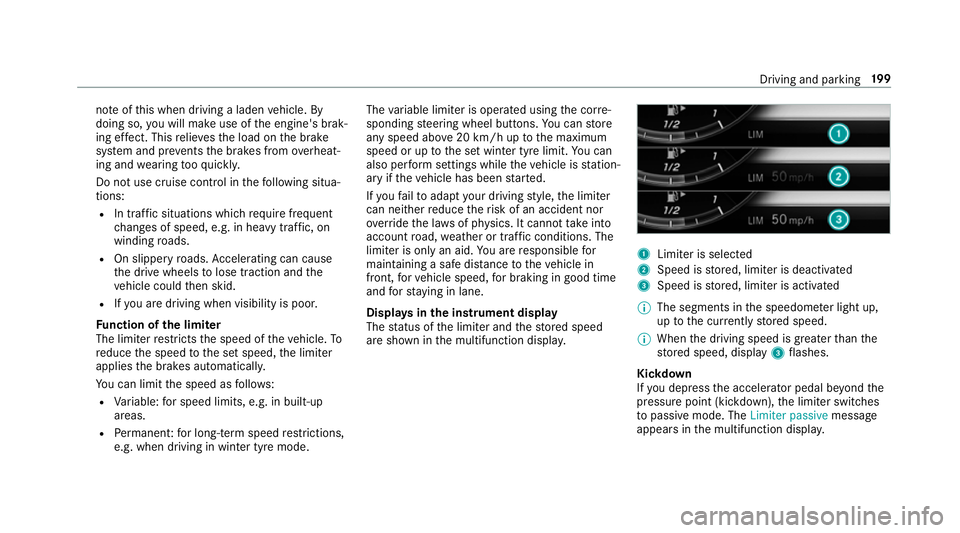
Displa ysinthe instrument display
The status of the limiter and thestored speed
are shown in the multifunction displa y. 1
Limiter is selected
2 Speed is stored, limiter is deactivated
3 Speed is stored, limiter is activated
% The segments in the speedome ter light up,
up tothe cur rently stored speed.
% When the driving speed is greater than the
st ored speed, display 3flashes.
Kickd own
If yo u depress the accelerator pedal be yond the
pressure point (kickdown), the limiter switches
to passive mode. The Limiter passivemessage
appears in the multifunction displa y. Driving and pa
rking 19 9