ad blue MERCEDES-BENZ E-CLASS CABRIOLET 2019 User Guide
[x] Cancel search | Manufacturer: MERCEDES-BENZ, Model Year: 2019, Model line: E-CLASS CABRIOLET, Model: MERCEDES-BENZ E-CLASS CABRIOLET 2019Pages: 530, PDF Size: 44.1 MB
Page 304 of 530
0007
Select Synch ronizeContacts .
Cal ling up contacts
Mu ltimed iasystem:
Phone ªContac ts
Depen dingonthech aract erset,th efo llo wing
op tion scan beused tosear chforcont acts:
R sear ching byinit ials
R sear ching bynam e
R searching byphone number 0007
Enterch aract ersint oth esear chfield.
A select ionofpossible contacts appea rs.
Ent ering mor ech aract ersint oth esear ch
fi eld narrows down thenumber ofpossible
select ions. 0007
Select thecon tact.
A cont actcan cont ain th efo llo wing details:
R phon enumb ers
R navig ation addresses
R geo-coor dinates
R Interne taddr ess Editing
thefo rm atofaco ntact's name
Mul timedi asy stem:
Phone ZOption sCon-
tact sN ameFormat
The follo wing option sar eav ailable:
R Last Name ,Fir stName
R Last Name FirstName
R FirstName LastName 0007
Select anoptio n.
Ov ervie wof impor tingcontact s
Contact sfrom various sour ces Sour
ce Requirement s
ò Memor ycar dT heSD memor ycar d
is inser ted.
ò USBdevice TheUSB device is
inser tedin theUSB
por t. Sour
ce Requirement s
ñ Bluetooth®
con‐
nectio n If
th esendin gof
vCar dsvia Blue tooth®
is suppor ted, vCar ds
can berecei vedon
mobile phones ornet‐
book s,forex am ple.
Blue tooth®
is act iva‐
te din themultimedia
sy stem and onthe
re spectiv ede vice
(see themanuf actur‐
er's oper ating instruc‐
tion s).
ó Mobile phone Themobile phoneis
con nect edtothemul‐
timedia system. Im
por ting contacts intoth econtact smenu
Multi media system:
Phone ZOption sContacts 0007
Select Import. 0007
Select anoption. 302
Multimedia system
Page 305 of 530
Sa
ving amobile phonecontact
Multimedia system:
Phone ªContac ts 0007
Select themobile phonecontact ó. 0007
Sele ctp. 0007
Sele ctSave toVeh icle.
The cont actsave din themultimedia system
is identif iedbythef symbol.
Calling acontact
Multimedia system:
Phone ªContac ts 0007
Enterch aract ersint oth esear chfield. 0007
Select thecon tact. 0007
Sele ctthete lephon enumb er.
The numb erisdialed.
Selecting further options inthecontact s
menu
Multi media system:
Phone ªContac ts 0007
Select acon tact. 0007
Sele ctp. Depe
nding onthestor ed dat a,thefo llo wing
op tion sar eav ailable:
R Call
R Sen dTex tMess age
R Show Webs ite(ifan Inte rn et addr esshas
been stor ed)
R Navigate (ifan addr esshas been stor ed)
R Save MyFavorite
R Send DTMF Tones (for anumber withDT MF
to nes) 0007
Select anoptio n.
De letin gaco ntact
Mu ltimed iasystem:
Phone ªContac ts
Yo ucan deletecont acts stor ed intheve hicle. 0007
Sear chforth econ tact. 0007
Sele ctthecon tact. 0007
Sele ctp. 0007
Sele ctDele teCo ntact . 0007
Sele ctYes . Cal
lli st Call
listove rview
Depen dingonwhe ther your mob ilephon esup‐
por tsthePB AP Blue tooth®
pr ofile ornot,th is
can have differe nt effects onthepr esent ation
and func tionsof thecall list.
If th ePB AP Blue tooth®
pr ofile issuppor ted, the
ef fects are asfollo ws :
R The calllists from themobile phonearedis‐
pla yedin themultimedia system.
R When connect ingthemobile phone, youma y
ha ve toconf irm thecon nect ionforth ePB AP
Blue tooth®
pr ofile.
If th ePB AP Blue tooth®
pr ofile isno tsuppor ted,
th eef fects areas follo ws :
R The multimedia system gener ates its owncal l
li st s.
R The calllistis no tsync hronized withth ecall
lis ts inthemobile phone. Multimedia
system 303
Page 306 of 530
Making
acall from thecall list
Multi media system:
Phone øRecent Calls 0007
Select anumber .
The callismade. Te
xt messag es Ov
ervie wof text messag efunctions
If th econ nect edmobile phonesuppor tsthe
MAP Bluetooth®
pr ofile, thete xt mes sage func‐
tions canbeuse don themultimedia system.
Yo ucan obtain further information aboutset‐
ting sand suppor tedfunc tionsof Blue tooth®
-
cap ablemob ile pho nes from anauthor ized
Mer cedes-B enzCent eror at:htt p://
www .mercedes-ben z.com/con nect
Some mobile phones requ ire fur ther settings
af te rbeing connect edtothemultimedia system
(see manuf acturer'soper ating instruction s).
Ne wmessag esareidentif iedbythei sym‐
bol inthemedia displayand anaudible signal. Depen
dingonthemobile phone, themultimedia
sy stem onlydispla ysnewinco ming text mes ‐
sa ge sor the10 0ne we sttext mes sage s.
Conf iguringthete xt messag esdispla yed
Multimedia system:
Phone ZOption sTextMes-
sage Message Display 0007
Select p.
A menu withth efo llo wing option sis sho wn:
R AllMessage s
R New andUnread Message s
R New Message s
R Off (The text mes sage sar eno tdispla yed
aut omat ically.) 0007
Select anoption.
0009 The setting mayno tbe acti veunt ilth e
mobil ephone isreconnect ed. Re
ading text messag es
Multimedia system:
Phone iTextMessage
Re ading ate xt messag e 0007
Select ate xt mes sage .
The messag ete xt isdispl ayed.
Using there ad-aloud function 0007
Select ate xt mes sage . 0007
Select Read Alou d.
The text mes sage isread aloud.
Com posingand send ingate xt messag e
Multimedia system:
Phone iTextMessage 0007
Select WriteNewTextMessage.
Ad ding are cipie nt 0007
Select PresstoAdd Recip ient. 0007
Select thecon tact.
Di ctating text 0007
Select PresstoDictat e. 30
4
Multimedia system
Page 309 of 530
Sir
i®
vo ice- oper ated con trol system. Youcan
act ivat eth evo ice- opera tedcon trol system by
pr essing andholding the00E3 buttononthe
multifu nctionsteer ing wheel.
When usingApple CarPla y™viathevo ice- oper‐
at ed con trol system, themultimedia system can
st ill be oper ated via theVo ice Cont rolSy stem
(→ pag e23 1).
Onl yone mobile phoneatatime canbecon nec‐
te dvia Apple CarPla y™tothemultimedia sys‐
te m.
The availabilit yof App leCarPla y™mayva ry
acc ordin gto thecount ry.
The service prov ider isresponsible forth is appli‐
cat ion and theser vices andcontent conne cted
to it.
Inf orma tion onApp leCar Play™
While usingApple CarPla y™various funct ionsof
th emultimedia system, e.g.telephon yor the
media sourcesBlue tooth®
audio andiPod ®
,ar e
una vailable.
Onl yone routeguidan cecan beact ive at atim e.
If ro uteguidan ceisact ive on themultimedia sys‐ te
m, itis closed whenrouteguidan ceisstar ted
on themobile phone.
Connecting aniPhone ®
via Apple CarPla y™
Re quirement s:
R Apple ®
oper atingsy stem version iOS 8.3or
abo veisins talled ontheiPhone ®
.
R AnInterne tcon nect ionisrequ ired forth efull
ra ng eof func tions forApple CarPla y™.
R The iPho ne®
is connect edtothemultimedia
sy stem viatheUSB port00C2 using asuit a‐
ble cable (→pag e325).
Multimedia system:
Connec tAppleCarPlay
Se tting automat icor manu alstar t
A messa geappear swhen connectedfo rth efirs t
tim e. 0007
Automatic star t:select Automatically.
Start Automatically isactiv ated 0073.
Apple CarPla y™will nowstar timm ediat ely
af te rth eiPhone ®
is con nect edtothemulti‐
media system using aUSB cable. 0007
Manua lst ar t:select Manual ly. 0007
Select theiPhone ®
in thede vice list.
Ac cep ting/r eject ingtheda ta protection reg‐
ulat ions
A messag ewit hth edat apr otect ion regulations
appear s. 0007
Select Accept &Start .
or 0007
Select Decline &End.
Exiting AppleCarPla y™ 0007
Press the00E2 buttononthemultifunc tion
st eer ing wheel, forex am ple.
0009 IfApp leCarPla y™wasno tdispla yedin the
fo re ground beforedisconn ecting,theappli‐
cation star ts inthebac kground when recon‐
nect ed.Youcan callupApple CarPla y™in
th emain menu.
Calling upApple CarPla y™sound settings
Multimedia system:
Connec tAppleCarPlay Sound 0007
Select theto ne menu (→page 342). Mul
timedi asy stem 30
7
Page 310 of 530
Endin
gApp leCar Play™
Mult imedia system:
Connec tAppleCarPlay 0007
Select Disconnect.
The connection isended.
The mobile phonecontinues tobe supplied
wit helect ricity .
or 0007
Disco nnect thecon nect ingcable between
th emobile phoneandmultimedia system.
Mer cedes- Benzrecomme ndsdisconnecti ng
th econ nect ingcable onlywhen theve hicle is
st atio nary. Andr
oidAuto Andr
oidAutoove rview 000A
WARNIN GRisk ofdist ra ction from infor‐
mati onsystems andcomm unication s
eq uipment
If yo uoper ateinf ormat ionand comm unic a‐
tio neq uipme ntintegratedin theve hicle when
driving, youwill bedistract ed from the
tr af fic situ ation. Thiscou ldalso cau seyouto
lose control of theve hicle. 0007
Onlyoper ateth is eq uipmen twhen the
tr af fic situ ation per mits. 0007
Ifyo ucan notbe sur eof this, stop the
ve hicle whilstpa ying attention toroad
and traffic condi tions andoperate the
eq uipment withth eve hicle statio nary. Yo
umus tobse rveth eleg alrequ iremen tsforth e
cou ntryin whi chyouar ecur rentl ydr ivi ng when
op erati ng themultimedia system.
Mobile phonefunctionscan beused with
An droid Autousin gth eAn droid oper ating sys‐
te m on themultimedia system. Itis oper ated
using thecent ralcon trol elemen tor thevo ice
con trol. Youcan activat eth evo ice- opera tedcon ‐
tr ol system bypressing andholding the00E3
butt onon themultifunc tionsteer ing wheel.
When usingAndroid Autovia thevo ice- opera ted
contr olsystem, themultimedia system can still
be opera tedvia theVo ice Cont rolSy stem
(→ pag e23 1). Onl
yone mobile phoneatatime canbecon nec‐
te dvia Android Autoto themultimedia system.
The availabilit yof An droid Autoand Android Auto
App sma yva ry acc ordin gto thecount ry.
The service prov ider isresponsible forth is appli‐
cat ion and theser vices andcontent conne cted
to it.
Inf orma tion onAndr oidAuto
While usingAndroid Auto,va rious funct ionsof
th emultimedia system, forex am ple themedia
sour ceBlue tooth®
audio, areno tav ailable.
On lyone routeguidan cecan beact ive at atim e.
If ro uteguidan ceisact ive on themultimedia sys‐
te m, itis closed whenrouteguidan ceisstar ted
on themobile phone.
Connecting amobile phoneviaAndr oidAuto
Re quirement s:
R The firs tacti vatio nof Andr oid Au toon the
multime diasystem mus tbe car ried out when
th eve hicle isstatio naryfo rsaf etyre ason s.
R The mobi lephon esuppo rts Andr oidAuto
fr om Andr oid5.0. 308
Multimedi asy stem
Page 311 of 530
R
The Andr oidAutoapp isins talled onthe
mobil ephone.
R Inorder touse thete lephon efunc tions,the
mobil ephone mustbe connect edtothemul‐
timedia system viaBlue tooth®
(→ pag e296).
If th er ewa sno prior Interne tconn ection, this
is es tab lished withth euse ofthemobile
phone withAn droid Auto.
R The mobile phoneisconn ectedtothemulti‐
media system viatheUSB port00C2 using a
suit able cable (→pag e325).
R AnInterne tcon nect ionisrequ ired forth efull
ra ng eof func tions forAndr oidAuto.
Multimedia system:
Connec tAndroidAuto 0007
Select themobile phonefrom thede vice list.
Ac cep ting/r eject ingtheda ta protection reg‐
ulat ions
A messag ewit hth edat apr otect ion regulations
appear s. 0007
Select Accept &Start .
or 0007
Select Decline &End.
Ac tiv atin gaut omati cst ar t 0007
Select StartAutoma tically0073.
St arting manuall y 0007
Select themobile phonefrom thede vice list.
Exiting AndroidAuto 0007
Press the00E2 buttononthemultifunc tion
st eer ing wheel, forex am ple.
0009 IfAn droid Autowa sno tdispla yedin thefo re ‐
gr ound beforedisconn ecting,theapplication
st ar ts inthebac kground when reconnect ed.
Yo ucan callupAndroid Autointhemain
menu.
Calling uptheAndr oidAutosound settings
Multimedia system:
Connec tAndroidAuto Sound 0007
Select theto ne menu (→page 342). Endi
ngAndr oidAuto
Multimedia system:
Connec tAndroidAuto 0007
Select Disc onnec t.
The conne ctionis end ed.
The mob ile pho neconti nuesto be supplied
wit helect ricity .
or 0007
Disco nnect thecon nect ingcable between
th emobile phoneandmultimedia system.
Mer cedes- Benzrecomme ndsdisconnecti ng
th econ nect ingcable onlywhen theve hicle is
st atio nary. Tr
ansf erre dve hicl edata withAndroidAuto
and Apple CarPla y™ Ov
ervie wof transf erre dve hicl edata
When using Andr oidAutoor Apple CarPla y™,
cer tain vehicle datais transf erredto themobile
phone. Thisenables youto getth ebes tout of
select edmobile phoneservices. Vehicle datais
no tdir ectl yaccessible. Multimedia
system 309
Page 323 of 530
R
Login toTuneIn Account :log into your
Tu neIn user acco unt.
R Log Outof Accou nt:log ou tof your TuneIn
us er acco unt. 0007
Select anoptio n. Med
ia Au
dio mode In
fo rm ation ontheaud iomod e 000A
WARNIN GRisk ofdist ra ction whenha n‐
dl ing data stor ag emedia
If yo uhan dleadat ast or ag emedium while
dr iving, your att entio nis div ertedfrom the
tr af fic condi tions.Thi scou ldalso cau seyou
to lose control of theve hicle. 0007
Onlyhandle adat ast or ag emedium
when theve hicle isstatio nary. Pe
rm issible file systems:
R FAT32
R exFA T R
NTFS
Pe rm issible datast or ag emedium:
R SD card
R USB stor ag ede vice
R iPod ®
/iPhone ®
R MTP devices
R Blue tooth®
audio equipme nt
0009 Obse rveth efo llo wing notes:
R The multimedia system suppor tsatot al
of up to50,000 files.
R Dat ast or ag emedia upto2TB aresup ‐
por ted(32‑ bitaddr essspace).
Suppor tedfo rm ats :
R MP3
R WMA
R AAC
R WAV
R FLAC
R ALAC 0009
Obser vethefo llo wing notes:
R Due tothelar ge variet yof available
music files rega rding encoder s,sam pling
ra tesand datara tes, pla ybac kcanno t
alw aysbe guar anteed.
R Due tothewide rang eof USB device s
av ailable onthemar ket,play bac kcann ot
be guar anteed forall USB devices.
R Cop y-pr otect edmusic files orDRM
enc rypte dfiles can notbe playedbac k.
R MP3 players mus tsupp ortMedi aTr ans ‐
fe rPr oto col (MT P). Mu
ltimed iasystem 32
1
Page 333 of 530
Blue
tooth®
audio Inf
ormation aboutBluetooth®
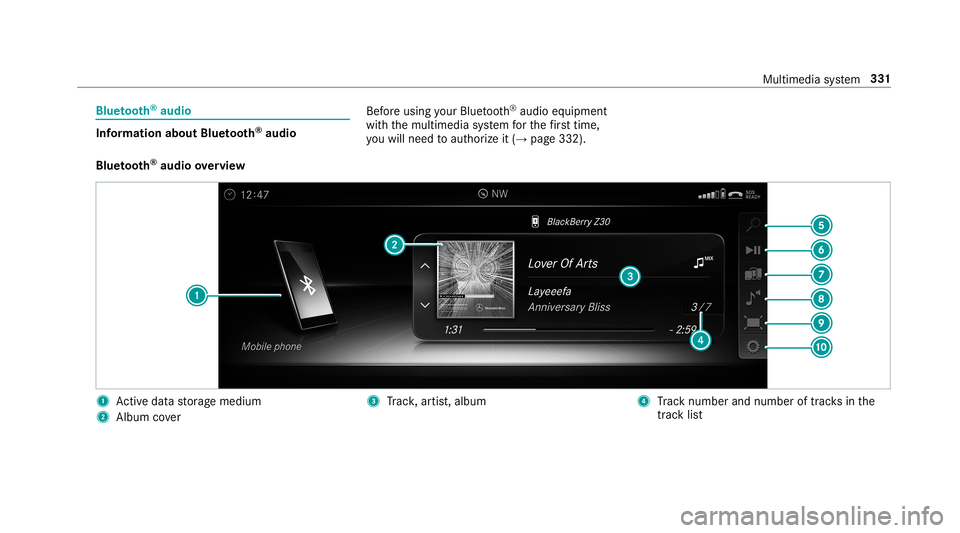
audio Bef
oreusi ng your Blue tooth®
audio equipme nt
wit hth emultimedia system forth efirs ttim e,
yo uwill need toaut hor ize it(→ pag e33 2).
Blu etoo th®
audio overview 1
Activeda ta stor ag emedium
2 Album cover 3
Trac k, artis t,album 4
Trac knum berand num beroftrac ks inthe
tr ac klist Multimedia
system 33
1
Page 334 of 530
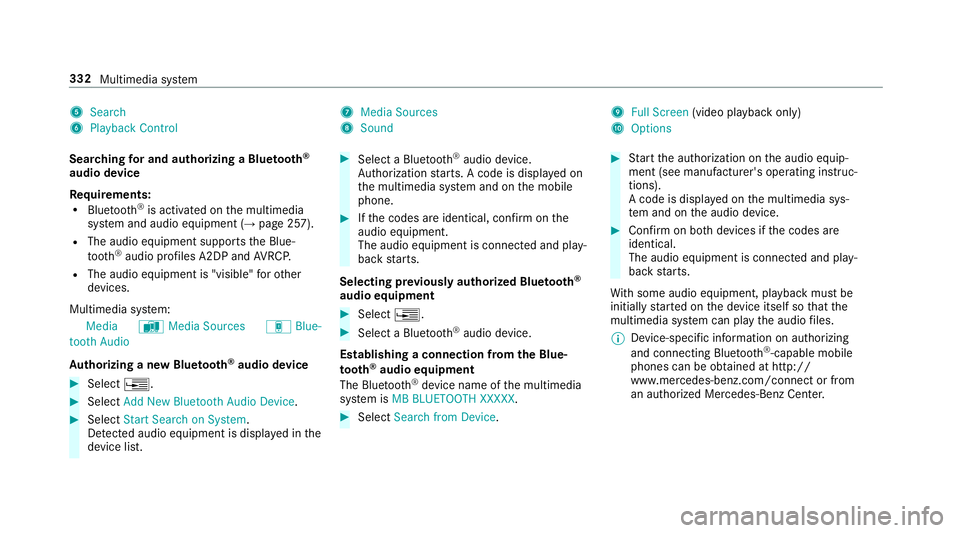
5
Search
6 Play ba ck Control 7
Med iaSou rces
8 Sound 9
FullScree n(vi deo play bac konl y)
A Option s
Sear ching forand author izing aBlue tooth®
audio devic e
Re quirement s:
R Blue tooth®
is act ivat ed on themultimedia
sy stem and audio equipment (→pag e25 7).
R The audio equipment supportstheBlue‐
to oth®
audio profiles A2DP and AVRC P.
R The audio equipment is"visible" forot her
de vices.
Multimedia system:
Media àMedia Sources áBlue-
toot hAudio
Au thorizing ane wBlu etoo th®
audio devic e 0007
Select 0080. 0007
Select AddNew Bluetooth AudioDevice. 0007
Select StartSearch onSystem .
De tected audio eq uipme ntisdispl ayed inthe
de vice list. 0007
Select aBlue tooth®
audio devic e.
Au thor ization star ts.A cod eis displa yedon
th emultimedia system and onthemobile
phone. 0007
Ifth ecodes areidentic al,con firm onthe
audio equipme nt.
The audio equipme ntiscon nectedand play‐
bac kst ar ts.
Select ingprev iousl yaut hor ized Bluetooth®
audio equipment 0007
Select 0080. 0007
Select aBlue tooth®
audio devic e.
Es tablis hingaconnect ionfrom theBlu e‐
to oth®
audio equipment
The Blue tooth®
de vice name ofthemultimedia
sy stem isMB BLUE TOOTH XXXXX. 0007
Select Search fromDevic e. 0007
Startth eaut hor ization ontheaudio equip‐
ment (seemanuf acturer'soper ating instruc‐
tion s).
A code isdispla yedon themultimedia sys‐
te m and ontheaudio device. 0007
Conf irm on both devices ifth ecodes are
identic al.
The audio equipment iscon nect edand play‐
bac kst ar ts.
Wi th some audioeq uipment, playbac kmus tbe
initially star tedon thede vice itself sothat the
multime diasystem can playth eaudio files.
0009 Device -specif icinf ormatio non aut hor izin g
and connectingBlue tooth®
-cap ablemob ile
pho nes can beobt ained athttp://
ww w.mer cedes-be nz.com/c onnectorfrom
an author ized Mercedes-B enzCent er. 332
Multimedia system
Page 335 of 530
Ac
tiv atin gBlue tooth®
audio
Mul timedi asy stem:
Media àMedia Sources 0007
Select áBluetoot hAudio.
The multimedia system activ ates thecon nec‐
te dBlue tooth®
audio equipme nt.
Select ingthemed iapla yeron the Blue tooth®
audio devic e
Mul timedi asy stem:
Media ª 0007
Select theBluetoot hAudio Players categor y.
If multip lemedia players arepr esen ton the
Blu etoo th®
audio equipme ntalis tappear s. 0007
Select amedi apla yer.
Pla ybac kst ar ts.
0009 The function isno tsuppo rted byeve ry
mobil ephone. Sear
ching fora musi ctrac kon the Blue ‐
to oth®
audio devic e
Mul timedi asy stem:
Media àMedia Sources áBlue-
toot hAudio 0007
Select ª. 0007
Select acat egor y.
A trac klist appear s. 0007
Select atrac k.
0009 The funct ionisonl yav ailable whenthe
mobil ephone andthemedia playersele cted
on themobile phonesuppor tth is func tion.
Switc hingBluetoo th®
audio equipment via
NFC
Re quirement s:
R Obser vetheno teson using NFC
(→ pag e299).
R The Blue tooth®
audio overvie wisdispla yed
( → pag e33 1). 0007
Lightl ypr ess theNFC area on themobile
phone (seethemanuf acturer'soper ating
ins truction s).
If th emobile phonehasalready been author‐
ized onthemultimedia system asBlue tooth®
audio equipme nt,it is no wcon nected.
If th emobile phoneisaut hor ized onthemul‐
timedia system asBlue tooth®
audio equip‐
men tfo rth efirs ttim e,itis conne cted afte r
conf irming theins truction sfo rth emobile
phone (seethemanuf acturer'soper ating
ins truction s).
Disconnec tingBluetooth®
audio equipment
Mul timedi asy stem:
Phone áMedia Sources 0007
Select thei symbol intheline ofthe
mobil ephone.
The disconnection ofthemobile phonetake s
place without acon firm atio npr om pt.The
mob ile pho neremains author ized inthesy s‐
te m. Mul
timedi asy stem 333