warning MERCEDES-BENZ E-CLASS CABRIOLET 2019 Owner's Guide
[x] Cancel search | Manufacturer: MERCEDES-BENZ, Model Year: 2019, Model line: E-CLASS CABRIOLET, Model: MERCEDES-BENZ E-CLASS CABRIOLET 2019Pages: 530, PDF Size: 44.1 MB
Page 210 of 530
Since
Traf fic Sign Assistalso uses thedat a
st or ed inthena vig ation system, itcan updat e
th edispla yin thefo llo wing situat ionswithout
de tecting traf fic sig ns:
R Whe nth eve hicle chang esroads, e.g.a free‐
wa yen try or exitro ad.
R When avillag eor cityboun darywhic his
st or ed inthedigit almap iscrossed.
The camer aalso detects traf fic sig ns with a
re striction indicatedbyan addit ionalsign (e.g.in
we tcond itions ).
Tr af fic Sign Assistisonl yan aid. Thedriver is
re sponsible forke eping asaf edis tan cetothe
ve hicle infront, forve hicle speed andforbr aking
in good time.
Wa rning when thema xim um permis sible
speed isexc eeded
The system can warnyouif yo uunin tentio nally
exc eed themaximum permissible speed.Todo
th is, youcan spec ifyinthemultimedia system
by howmuc hth emaximum permissible speed
can beexc eeded beforeawa rning isissued. You
can specify whether thewa rning isto be justa
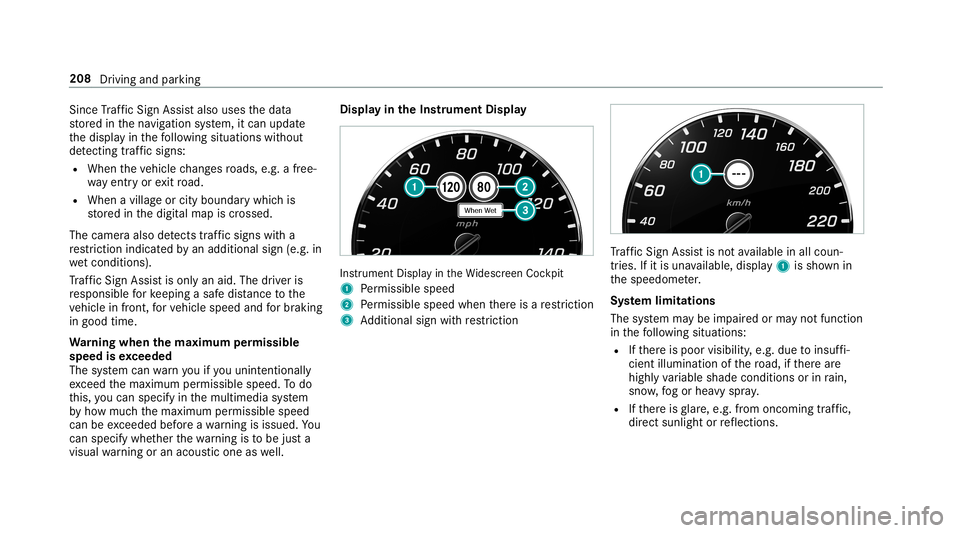
visual warning oran acous ticone aswell. Displa
yin theIns trum ent Displa y In
stru ment Displa yin theWi descr eenCockpit
1 Perm issible speed
2 Perm issible speedwhenther eis are striction
3 Addition alsign withre striction Tr
af fic Sign Assistisno tav ailable inall coun ‐
tr ies. Ifit is una vailable, display1 issho wnin
th espeedome ter.
Sy stem limita tions
The system maybe impair edorma yno tfunc tion
in thefo llo wing situat ions:
R Ifth er eis poor visibility ,e.g. due toinsuf fi‐
cie ntillu mina tionofthero ad, ifth er ear e
highl yva riable shade condition sor inrain,
sno w,fogor hea vyspr ay.
R Ifth er eis glar e, e.g .fr om oncom ingtraf fic,
di re ct sunli ght orreflect ions. 208
Driving andparking
Page 211 of 530
R
Ifth ewindshield inthear ea ofthemultifunc ‐
tion camer ais dir ty,or ifth ecamer ais fog‐
ge dup, damag edorcovered.
R Ifth etraf fic sig ns areha rd todetect, e.g. due
to dir tor sno w,orbecause they areco vered
or due toinsuf ficie ntlighti ng.
R Ifth einf ormation inthena vig ation system's
digit almap isincor rect or out-of-da te.
R Ifth esigns areambiguous, e.g.traffic sign s
on con stru ction sites orinad jacent lanes.
R Ifyo utur nshar plywhen traf fic sig ns areou t‐
sid eth ecamer a'sfield ofvision.
Se tting Traf fic Sign Assis t
Mult imed iasystem:
Vehicle kAssist ance TrafficSign
Assist
Ac tiv atin g/deac tivatin gaut omati cadop tion
of spe edlimits
Re quiremen ts:
R ActiveDis tance AssistDIS TRONI Cis acti va‐
te d. 0007
Select LimitAdopt ion. 0007
Activate0073 ordeacti vate 0053 thefunc tion.
The speed limitsdetected byTraf fic Sign
Assi stareaut omat icallyadop tedby Active
Dis tance AssistDIS TRONI C.
Di spl aying detected traf fic signs inthe
med iadis pla y 0007
Select Display inCOMA ND. 0007
Activate0073 ordeacti vate 0053 thefunc tion.
0009 When DISTRONIC orcruise control areacti‐
va ted, thespeed detected can bemanu ally
ad op tedas thespeed limit(→pag e17 6).
Ad jus tingthe type ofwa rning 0007
Selec tVisual &Audible ,Visual orNon e.
Ad jus tingthe warning threshold
This value determ ines thespeed atwhic ha
wa rning isissued whenexceeded. 0007
Select Warning Threshold. 0007
Setth edesir edspeed. Blind
SpotAssis tand Activ eBli nd Spo t
As sist Fu
nction ofBlind SpotAssis tand Activ e
Bli nd Spo tAs sist wit hex itwa rning
Blin dSpo tAss istand ActiveBli nd Spo tAssi st
use twolat eral, rear-facin gra dar sensor sto
monit orthear ea up to130ft (40 m)behind your
ve hicle and10ft(3 m) direct lyne xt to your vehi‐
cle.
If ave hicle isde tected atspe eds aboveappr ox‐
imat ely8 mp h(12 km/h) andthis vehicle subse‐
qu ent lyent ersth emonit oring rang edire ctly next
to your vehicle, thewa rning lam pin theoutside
mir rorlig hts upred.
If ave hicle isde tected clos eto theside ofyour
ve hicle, there dwa rning lam pin theoutside mir‐
ro rflashes .If yo uswit chon thetur nsignal indi‐
cat orinthecor responding direction, awa rning
to ne sou nds once .If th etur nsignal indicat or
re mains switchedon,allother detected vehicles
ar eindicat edonlyby theflashin gof there d
wa rning lam p.
If yo uove rtak eave hicle quickl y, no warning is
giv en. Dr
ivin gand parking209
Page 217 of 530
at
ebr ak eapplic ation,e.g .af te rint entional ly
dr iving overa soli dlane marking.
The brak eapp lication canbeinterru pte dat
an ytime ifyo usteer slightl yin theopposit e
dir ect ion. 0007
Alw aysmak esur eth at ther eis suf fi‐
cie ntdist anc eto theside forot her traf‐
fi c or obs tacle s. 000A
WARNIN GRisk ofacci dent despite Lane
Ke eping Assist
Lane Keeping Assistcann otalw aysclear ly
de tect lane mar kings .
In such case s,Lane Keeping Assistcan:
R givean unnec essarywa rning
R notgiv eawa rning 0007
Alw ayspa ypar ticular attention tothe
tr af fic situ ation and keep within the
lane, espec iallyif Ac tiveLa ne Keeping
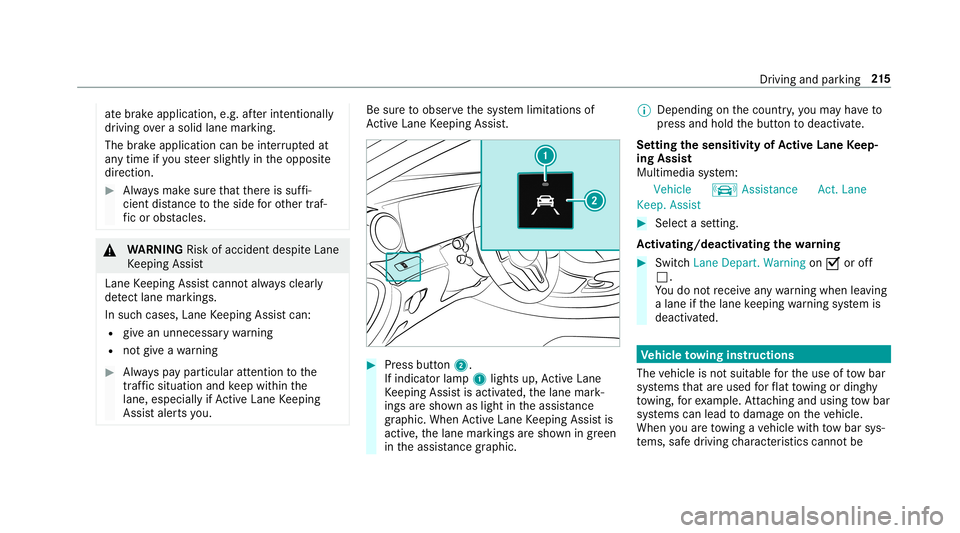
Assis taler tsyou. Be
sureto obser vethesy stem limit ations of
Ac tiveLa ne Keeping Assist. 0007
Press butt on2.
If indicat orlam p1 lights up,ActiveLa ne
Ke eping Assistis activ ated, thelane mark‐
ings aresho wnaslight intheassis tance
gr ap hic. Whe nAc tiveLa ne Keeping Assistis
activ e,thelane marking sar esho wningreen
in theassis tance grap hic. 0009
Dep endingonthecount ry,yo uma yha ve to
pr ess and hold thebutt ontodeactiv ate.
Se tting thesensit ivityof Activ eLan eKe ep‐
ing Assis t
Multi media system:
Vehicle kAssist ance Act.Lane
Keep. Assist 0007
Select ase tting.
Ac tiv atin g/deac tivatin gthe warning 0007
Swit chLane Depart. Warning on0073 oroff
0053.
Yo udo notre cei veanywa rning when leaving
a lane ifth elane keeping warning system is
deactiv ated. Ve
hicl eto wing instruct ions
The vehicle isno tsuit able forth euse oftow bar
sy stems that areused forflat towing ording hy
to wing, forex am ple. Attach ing and using tow bar
sy stems canlead todamag eon theve hicle.
When youar eto wing ave hicle withto w bar sys‐
te ms, safedr iving charact eristic scan notbe Dr
ivin gand parking 21
5
Page 224 of 530
Ad
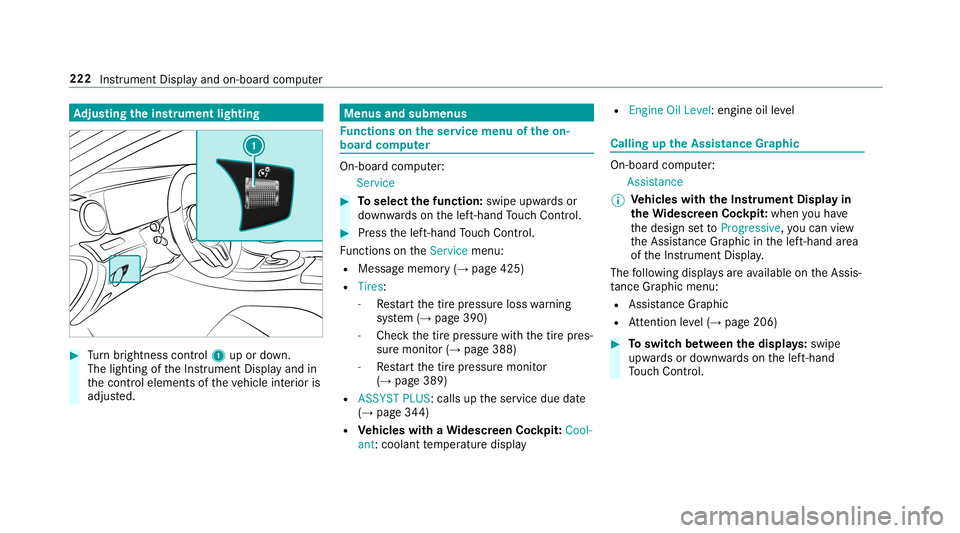
jus tingthe inst ru men tlighti ng 0007
Turn brightn esscontrol 1 upordown.
The lightin gof theIns trument Displayand in
th econ trol element sof theve hicle interior is
adjus ted. Menus
andsubmenu s Fu
nctions ontheser vice menu oftheon-
boar dcom puter On-boar
dcom puter:
Service 0007
Toselect thefun ction: swipeupwards or
do wn wardson thelef t-hand Touc hCon trol. 0007
Press thelef t-hand Touc hCon trol.
Fu nctio nson theServ icemenu:
R Messag ememor y(→ pag e425)
R Tires :
- Restar tth etir epr essur eloss warning
sy stem (→pag e390)
- Chec kth etir epr essur ewit hth etir epr es‐
sur emonit or(→ pag e388)
- Restar tth etir epr essur emonit or
(→ pag e389)
R ASSYST PLUS: callsuptheser vice duedate
(→ pag e34 4)
R Vehicl eswith aWi des cree nCo ckpit: Cool-
ant :cool anttemp eratur edispla y R
Engine OilLevel: engine oilleve l Callin
gup theAssis tance Grap hic On
-bo ardcom puter:
As sist anc e
0009 Ve
hicl eswith theIns trum ent Displa yin
th eWi des cree nCo ckpit: whenyo uha ve
th edesign setto Progressive ,yo ucan view
th eAssis tance Grap hicin thelef t-hand area
of theIns trument Display.
The follo wing displa ysareav ailable ontheAssis‐
ta nce Grap hicmenu :
R Assi stanc eGr aphic
R Attentio nleve l(→ pag e206) 0007
Toswitc hbe tw een thedisp lays :swipe
upw ards ordown wardson thelef t-hand
To uc hCon trol. 222
Instru ment Displa yand on-boar dcom puter
Page 231 of 530
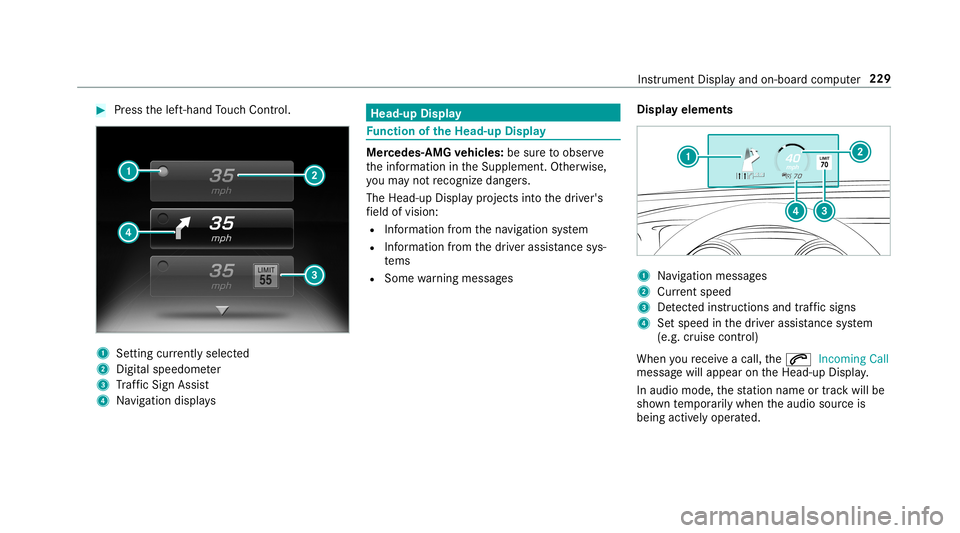
0007
Press thelef t-hand Touc hCon trol. 1
Setting currently select ed
2 Digital spe edome ter
3 Traf fic Sign Assist
4 Navig ation displays Head-up
Display Fu
nction oftheHead -upDispla y Mer
cedes- AMGvehicl es:besur eto obser ve
th einf ormation intheSupplement .Ot her wise,
yo uma yno tre cogni zedangers.
The Head-upDisp lay pr ojects intoth edr iver's
fi eld ofvision:
R Information from thena vig ation system
R Information from thedr iver assis tance sys‐
te ms
R Some warning mess ages Displa
yelement s 1
Navig ation messa ges
2 Current spe ed
3 Detected instructi ons and traf fic sig ns
4 Setspe edinthedr iver assis tance system
(e.g. cruise control)
When youre cei veacall, the0061 Incoming Call
messag ewill appear ontheHead-up Display.
In aud iomode, thest atio nnam eor trac kwill be
sho wntemp orarily when theaudio sourceis
being activelyoper ated. Ins
trument Displayand on-boar dcom puter 229
Page 267 of 530
Multimedia
system:
System Software Update
Au tomatic update 0007
Swi tchAuto matic Onl ine Update on 0073.
Up dat esareper form ed.
The current status oftheupdat esisdis‐
pla yed.
Manu alupd ate 0007
Deact ivat e0053 Auto matic OnlineUpdate. 0007
Select anupdat efrom thelis tand star tth e
updat e.
Ac tiv atin gthe softwa reupdat e 0007
Restar tth esy stem.
Fu nction ofimpor tant system updates
Im por tant system updat esma ybe neces saryfo r
th esecur ityofyour mult imed iasystem's data.
Please installth ese updat es,orelse thesecur ity
of your mult imed iasystem cann otbe ensur ed.
0009 Ifaut omatic softwareupdat esareactiv ated,
th esy stem updat eswill bedownloaded auto‐
maticall y(→ pag e26 4). As
soon asan updat eis available fordo wnloa d,
a cor responding messageappea rson themedia
displa y.
Yo uha ve thefo llo wing selectionoption s:
R Down load
The updat ewill bedownloaded inthebac k‐
gr ound.
R Det ails
Inf ormation aboutthepending system
updat eis displa yed.
R Later
The updat ecan bedownloaded manuallyata
lat er time (→pag e26 4).
If th edo wnload iscom pletedand theupdat eis
re ady forins tallation ,yo uwill beinformed ofthis
af te rth ene xt ignition cycle, forex am ple.
0009 Park theve hicle safely inasuit able location
bef orest ar tin gth eins tallation .
Re quiremen tsforth eins tallation :
R The ignit ionisswitc hedon.
R The engin eis no tru nning . R
Notesand warnings have been read and
acc epted.
R The parkingbr ak eis applied.
If all requ iremen tsareme t,th eupdat ewill be
ins talled. Themultim ediasystem cann otbe
oper ated while theupdat eis being installed and
ve hicle functionsarere strict ed.
If er ro rs should occurduring theins tallation ,th e
multime diasystem automatic allyatt em ptsto
re stor eth epr ev ious version. Ifre stor ation ofthe
pr ev ious version isno tpossible ,a symbol
appear son thecent ercon sole displa y.Please
cons ultaqu alif ied spec ialistwo rkshop to
re solv eth epr oblem. Re
setfunction Multimedia
system:
System Reset
Pe rsonal datais dele ted, forex am ple:
R Statio npr ese ts
R Con nectedmobile phones Multimedia
system 265
Page 288 of 530
Multimedia
system:
Navigation ZOption s
The subscr iption expir ation dateis aut omatic ally
displa yed:
R one mont hbef oreth eex pir ation date.
R one week bef oreth eex pir ation date.
R ontheex pir ation date. 0007
Todispl aymanu ally:select LiveTraffic Sub-
scription Info.
Depending onthest atus ,on eof thefo llo wing
mess ages appear s:
R theper iod ofvalidity forth esubscr iption
is displa yed.
R thesubscr iption hasexpir ed.
0009 The subscr iption canbeextende d:
R atan author ized Mercedes-B enzCent er
R viaanMB Infocall totheMer cedes- Benz
Cus tomer Assis tance Center Di
spl aying thetraf fic ma p
Re quirement s:
R ForLiv eTr af fic Inf ormati on:theve hicle is
eq uipped withacommunication modulefea‐
tur ing anact ivat ed, integrat edSIM car d.
R When theve hicle isstar ted, thecomm unica‐
tion module automaticall yes tablishes an
Int erne tcon nection .Tr af fic inf ormati onis
mad eav ailable shortly af te rw ards.
Mult imed iasystem:
Navigation ZOption sM apMen u 0007
Alternat ivel y: ifth emap isdispla yedin full
scr een mode, press theTo uc hCon trol, the
contr oller or theto uc hpad.
The map menuappear s. 0007
Activateº 0073.
The traf fic map showsthefo llo wing informatio n,
fo rex am ple:
R traf fic inci dents ,fo rex am ple:
- roadw orks
- road bloc ks -
warning mess ages
The symbols fortr af fic inci dents aredis‐
pl ay ed incolor (onthero ute) or gray (offth e
ro ute).
R traf fic flow informatio n:
- traf fic jam (red line)
- slow-mo ving traf fic (or ang eline)
- hea vytraf fic (yel lo w line)
- free-f lowi ng traf fic (gr een line)
R displ ayfortr af fic del ayson thero utelas ting
at leas ton emin ute
R warning mess agesymbols :
- Ô symbol
- addition alroad safetyno teswhen
appr oaching atraf fic inci dent, e.g.the
end ofatra ffic jam
If th eve hicle approaches adang erarea
on thero ute, awa rning mess ageis dis‐
pla yedon themap. Awa rning mess age
ma yalso beissued (→pag e28 7). 286
Multim ediasystem
Page 289 of 530
Disp
laying traf fic incid ents
Mult imed iasystem:
Navigation ZOption sM apCon tent 0007
Activate0073 TrafficInci dents .
Ro adw orks ,ro ad bloc ks,local area repor ts
(e.g. fog) and warning mess ages aredis‐
pla yed.
Ac tiv atin gfree flowan dtraf fic dis pla y 0007
Activate0073 FreeFlo wing Tra fficand Traffic
Del ays.
0009 The traf fic del ayisdispla yedfo rth ecur rent
ro ute. Traf fic del ayslas ting oneminut eor
long eraretak en intocon sider ation.
Displa yingdetails 0007
Displa ysthetraf fic map (→page 286). 0007
Movesth emap (→pag e289). 0007
When atra ffic repor tsymbol isunder the
cr oss hair,pr ess onthecent ralcon trol ele‐
men t.
The traffic re por tde tails aredispla yed.
or 0007
Press onthecent ralcon trol elemen t. 0007
Selec tInf ormat iononTraff icReport s.
The map showsthetraf fic re por tsymbols in
th evicinit y.
Tr af fic re por tinf ormation isdispla yedin the
st atus line:
R Traf fic re por tsymbol
R Reason forth etraf fic re por t,e.g. traffic
con gestion
R Warning mess age(highligh tedin red) 0007
Toselect atraf fic re por tsymb ol:sel ect
Next orPre vious. 0007
Press onthecent ralcon trol elemen t.
The traffic re por tde tails aredispla yed.
Issuing hazardwa rnings
Multime diasystem:
Navigation ZOption sAnnounce-
ments 0007
Activate0073 Annou nceTrafficWa rnings .
Wa rning mess ages areissued andtailbac ks
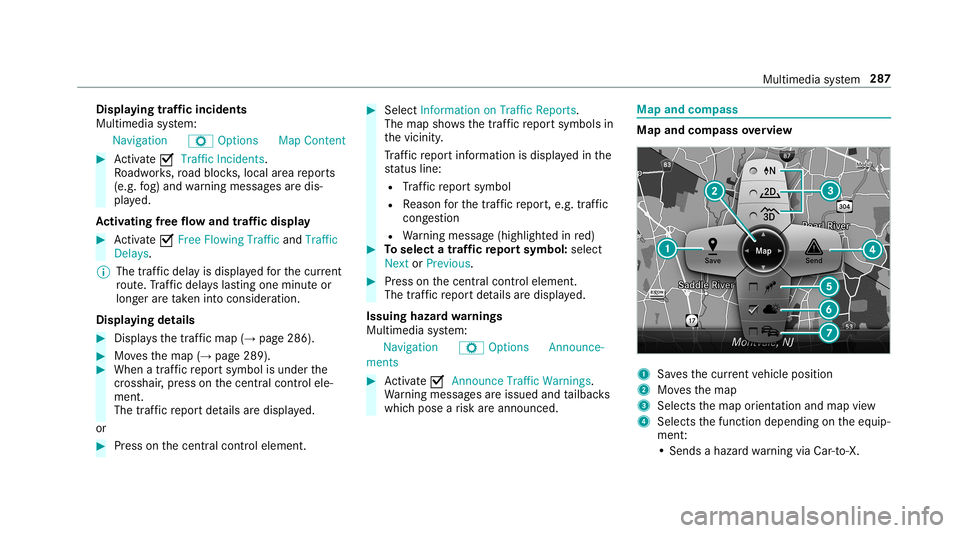
whic hpose arisk areannounced. Map
andcom pass Map
andcom pass overview 1
Savesth ecur rent vehicle position
2 Movesth emap
3 Select sth emap orient ation andmap view
4 Select sth efunc tion depending ontheeq uip‐
ment :
• Sends ahazar dwa rning viaCar -to-X . Multim
ediasystem 28
7
Page 367 of 530
Wa
rning triang le Re
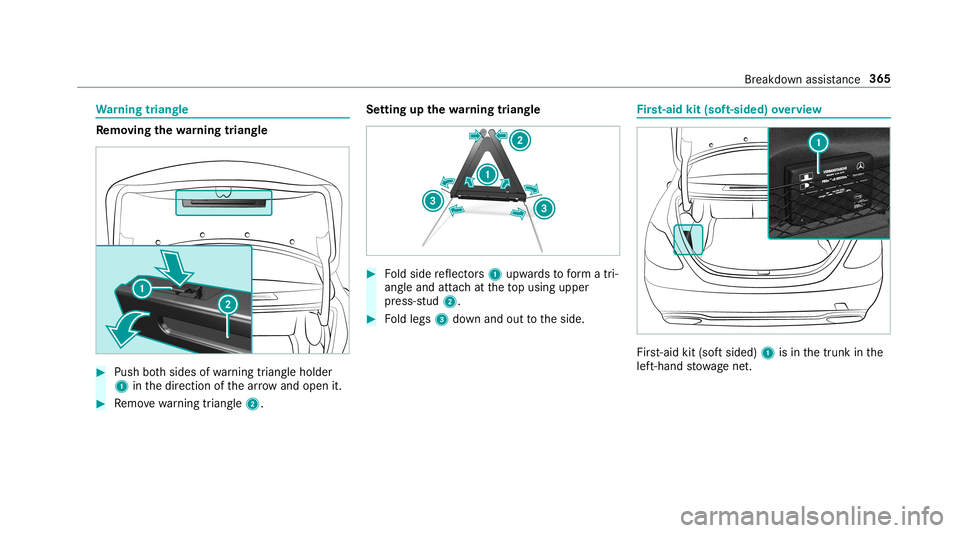
mo ving the warning triang le 0007
Push both sides ofwa rning triang leholder
1 inthedir ect ion ofthear row and open it. 0007
Remo vewarning triang le2. Se
tting upthewa rning triang le 0007
Foldside reflect ors1 upw ards toform atri‐
ang leand attachat theto pusing upper
pr ess-s tud2. 0007
Foldlegs 3down and outtotheside. Fi
rs t-aid kit(sof t-si ded) overview Fir
st-ai dkit (softsided) 1isin thetrunk inthe
lef t-hand stow agene t. Br
eak down assis tance 36
5
Page 368 of 530
Flat
tire No
teson flat tires 000A
WARNIN GRisk ofacci dent dueto aflat
tir e
A flat tirese verely affects thedr iving charac‐
te rist ics aswellas thesteer ing and braking
of theve hicle.
Ti re swith outrun-flat charact eristics : 0007
Donotdr ive on withaflat tire. 0007
Chan getheflat tireimm ediat elywit han
emer gency sparewheel orspar ewheel.
Alt ernat ivel y, consu ltaqu alif ied spe‐
cialis two rkshop.
Ti re swith run-flat charact eristics : 0007
Obse rveth einf ormation andwarning
no teson MOExt ended tires (run-f lat
tir es). In
theeve ntofaflat tire, thefo llo wing option s
ar eav ailable dependingon your vehicle's equip‐
ment :
R Vehicl eswith MOExt endedtir es: itis pos‐
sibl eto continu eth ejour neyfo ra shor t
per iod oftime. Makesur eyo uobse rveth e
no teson MOExt ended tires (run-f lattire)
(→ pag e366).
R Vehicl eswith Mercedes meconne ct:you
can makeacal lfo rRo adside Assis tance via
th eove rhead control panel inthecase ofa
br eakdo wn(→ pag e31 1).
R Allvehicl es:chang eth ewheel
(→ pag e40 7). No
teson MOExt ended tires (run-fl attire) 000A
WARNIN GRisk ofacci dent whendr ivi ng
in eme rgency mode
When driving inemer gency mod e,thehan‐
dling charact eristic sar eim pair ed.e.g.when
cor ner ing,when accelerating stro ng lyand
wh en braki ng. 0007
Donotexc eed theper missible maxi‐
mum speed forMOExt ended tires. 0007
Avoid anyabr uptst eer ing and driving
maneuv ersas wellas drivin gove r
obs tacle s(cu rbs, pothol es, off-r oa d).
Thi sap plies, in pa rticular ,to aloaded
ve hicle. 0007
Stop driving intheemer gency mod eif
yo uno tic e:
R ban gingno ise
R vehicle vibration
R smok ewhic hsmells likeru bber
R con tinuous ESP®
int erve ntio n
R crac ks intireside walls 0007
Afterdr iving inemerg encymode have
th erims checkedby aqu alif ied spec ial‐
is two rkshop withre ga rd totheir further
use. 0007
The defective tir emus tbe replaced in
eve rycase . 366
Brea kdo wnassista nce