wheel MERCEDES-BENZ E-CLASS CABRIOLET 2019 Service Manual
[x] Cancel search | Manufacturer: MERCEDES-BENZ, Model Year: 2019, Model line: E-CLASS CABRIOLET, Model: MERCEDES-BENZ E-CLASS CABRIOLET 2019Pages: 530, PDF Size: 44.1 MB
Page 196 of 530

0007
Select WarnEarl y. 0007
Activate0073 ordeacti vate 0053 thefunc tion.
Ac tiv atin g/deac tivatin gaudi ofa deo ut
Yo ucan spec ifywhe ther thevo lume ofamedia
sour ceinthemultimedia system isto be
re duced whenParking AssistPA RK TRONI Cgiv es
an audible warning. 0007
Selec tAudio Fadeout DuringWarn ingTone s. 0007
Activate0073 ordeacti vate 0053 thefunc tion. Re
versing camer a Fu
nction ofthere ar vie wcamer a When
youen gage reve rsege ar,th eimag efrom
re ar vie wcam era1 issho wninthemultimedia
sy stem. Dynamic guidelinesshowthepat hth e
ve hicle willtake wit hth esteer ing wheel inits
cur rent positio n.Thi shel psyouto orient your‐
self and toavoid obstacle swhe nba cking up. The
rear vie wcam erais on lyan aid. Itis no ta
subs titutefo ryo ur att entio nto thesur round ings.
The responsibili tyforsaf emaneu vering and
pa rking remains withyo u. Mak esur eth at ther e
ar eno per sons, animals orobjec tsetc., inthe
maneu vering area while ma neu vering and park‐
ing.
Yo ucan selectfrom thefo llo wing views:
R Normalvie w
R Wide-ang levie w
R Trailer view
The area behin dth eve hicle isdispla yedas a
mir rorimag e,as intheinside rear vie wmir ror.
Sy stem limita tions
The rear vie wcam erawill notfun ction orwill
on lypa rtially function inthefo llo wing situat ions:
R Ifth etrunk lidortailg ateis open .
R Ther eis hea vyrain, sno wor fog.
R The ambient lightispoor ,e.g. atnight.
R The camer alens isobs truct ed, dirtyor fog‐
ge dup. Obser vetheno teson cleaning the
re ar vie wcam era(→ pag e36 0). 19
4
Driving and parking
Page 197 of 530
R
The camer aor rear ofyour vehicle isdam‐
ag ed. Inthis case, have thecamer aand its
position andsetting checkedat aqu alif ied
spec ialistwo rkshop.
The field ofvision andother funct ionsofthere ar
vie wcam erama ybe restrict ed dueto addit ional
acc esso ries on there ar oftheve hicle (e.g.
license platebr ac ketor bicy cle rack ).
0009 The displa ycon tras tma ybe impair eddue to
inc ident sunligh tor other light sources. In
th is case, paypar ticular attent ion.
0009 Have thedispla yre pair edorreplaced if,for
ex am ple, pixelerro rs consi derablyrestrict its
us e.
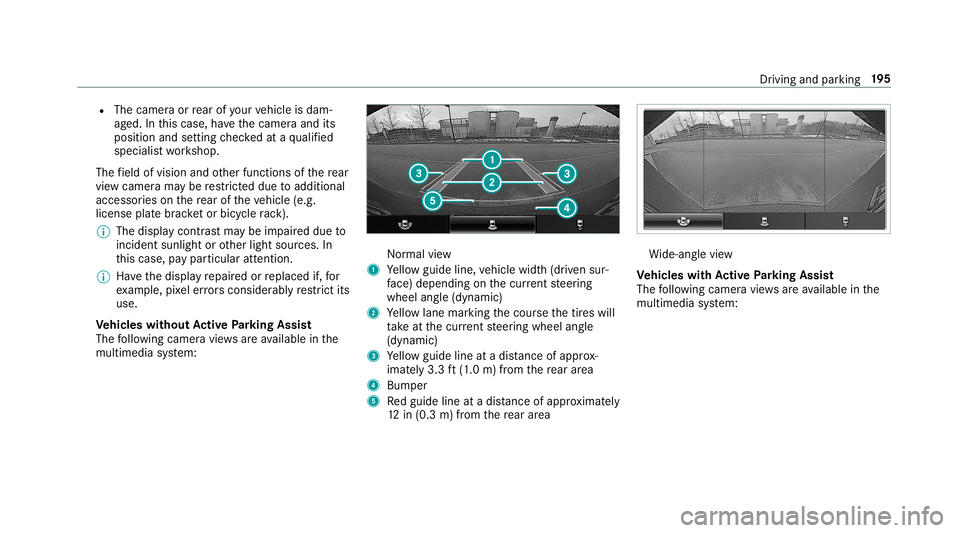
Ve hicl eswithout Activ ePa rking Assis t
The follo wing camera views areav ailable inthe
multime diasystem: Nor
mal view
1 Yello wguide line,vehicle width(dr iven sur‐
fa ce) dep endi ngon thecur rent steer ing
wheel angle(dynamic)
2 Yello wlane markingth ecour sethetir es will
ta ke atthecur rent steer ing wheel angle
(dynamic)
3 Yello wguide lineatadis tance ofapprox ‐
imat ely3. 3ft (1.0 m) from there ar area
4 Bum per
5 Redguide lineatadis tance ofapprox imat ely
12 in(0. 3m) from there ar area Wi
de-ang levie w
Ve hicl eswith Activ ePa rking Assis t
The follo wing camera views areav ailable inthe
multime diasystem: Dr
iving andparking 19
5
Page 198 of 530
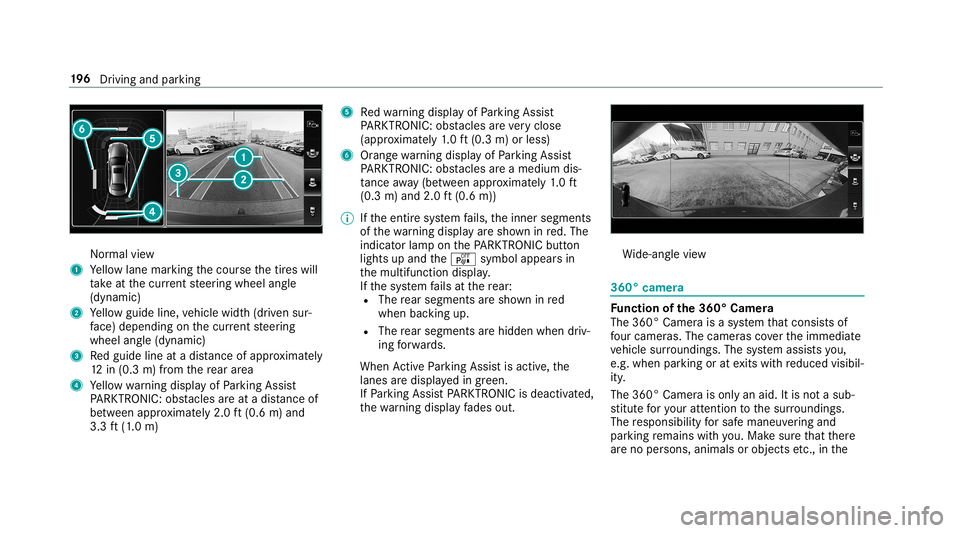
Nor
mal view
1 Yello wlane markingth ecour sethetir es will
ta ke atthecur rent steer ing wheel angle
(dynamic)
2 Yello wguide line,vehicle width(dr iven sur‐
fa ce) dep endi ngon thecur rent steer ing
wheel angle(dynamic)
3 Redguide lineatadis tance ofapprox imat ely
12 in(0. 3m) from there ar area
4 Yello wwa rning displa yof Parking Assist
PA RK TRONI C:obs tacles areat adis tance of
be twee nap prox imat ely2. 0ft (0.6 m)and
3.3 ft(1.0 m) 5
Redwa rning displa yof Parking Assist
PA RK TRONI C:obs tacles areve ry clos e
(a ppr oximat ely1. 0 ft (0.3 m)orless)
6 Orang ewa rning displa yof Parking Assist
PA RK TRONI C:obs tacles areamed iumdis‐
ta nce away (be tween appr oximat ely1. 0 ft
(0.3 m)and 2.0ft(0.6 m))
0009 Ifth eent ire sy stem fails, theinner segment s
of thewa rning displa yar esho wninred. The
indicat orlam pon thePA RK TRONI Cbut ton
light sup and theé symbol appearsin
th emultifunc tiondispla y.
If th esy stem fails atthere ar :
R The rear segm entsar esho wninred
when backingup.
R The rear segm entsar ehidde nwhen driv‐
ing forw ards.
When ActivePa rking Assistis act ive, the
lanes aredispla yedin green.
If Pa rking AssistPA RK TRONI Cis deac tiva ted,
th ewa rning displa yfa des out. Wi
de-ang levie w 360°
camer a Fu
nction ofthe360° Camera
The 360° Camera isasy stem that con sistsof
fo ur cam eras. The cam eras coverth eimmediat e
ve hicle surround ings.The system assis tsyou,
e.g .when parkingor atexits withre duced visibil‐
ity .
The 360°Camer ais onl yan aid. Itis no ta sub‐
st itut efo ryo ur att entio nto thesur round ings.
The responsibili tyforsaf emaneu vering and
pa rking remains withyo u. Mak esur eth at ther e
ar eno per sons, animals orobjec tsetc., inthe 19
6
Driving and parking
Page 199 of 530
maneu
vering area while ma neu vering and park‐
ing.
The system evaluat esimag esfrom thefo llo wing
cameras:
R Rear vie wcam era
R Front camer a
R Twoside camer asintheoutside mirrors
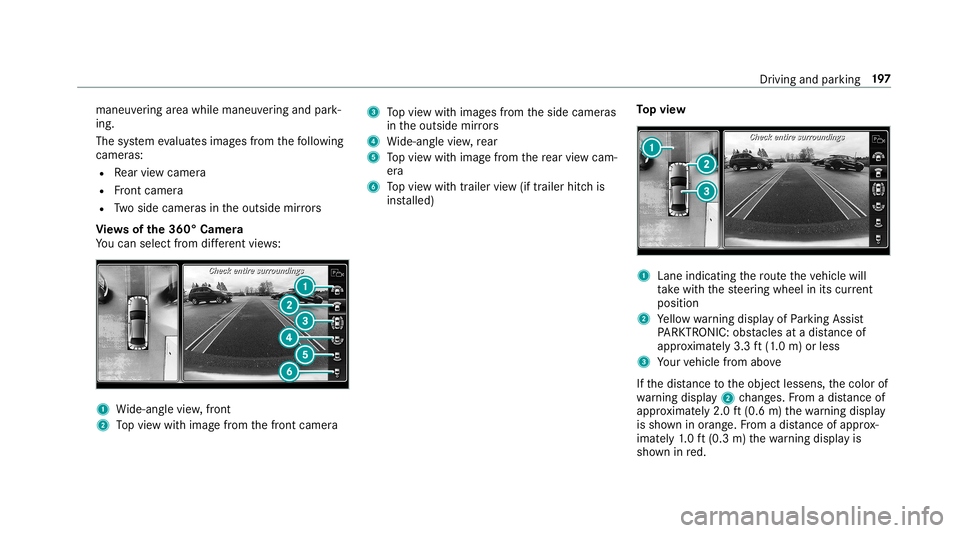
Vi ew sof the360° Camera
Yo ucan selectfrom differe nt vie ws: 1
Wide-ang levie w, front
2 Topvie wwit himag efrom thefront camer a 3
Topvie wwit himag esfrom theside camer as
in theoutside mirrors
4 Wide-ang levie w, rear
5 Topvie wwit himag efrom there ar vie wcam ‐
er a
6 Topvie wwit htrailer view(if trailer hitchis
ins talled) To
pvie w 1
Lane indicati ngthero uteth eve hicle will
ta ke wit hth esteer ing wheel inits cur rent
po sitio n
2 Yello wwa rning displa yof Parking Assist
PA RK TRONI C:obs tacles atadis tance of
ap prox imat ely3. 3ft (1.0 m) orless
3 Your vehicle from above
If th edis tance totheobjec tlessens, thecolor of
wa rning displa y2 chang es.From adis tance of
ap prox imat ely2. 0ft (0.6 m)thewa rning displa y
is sho wninorang e.From adis tance ofapprox ‐
imat ely1. 0 ft (0.3 m)thewa rning displa yis
sho wninred. Dr
iving andparking 19
7
Page 200 of 530
When
Parking AssistPA RK TRONI Cis oper ational
and noobj ectis de tected, thesegment sof the
wa rning displa yar esho wningray .
0009 Ifth eent ire sy stem fails, thesegment sof
th ewa rning displa yar esho wninred. The
indicat orlam pon thePA RK TRONI Cbut ton
light sup and theé symbol appearsin
th emultifunc tiondispla y.
If th esy stem fails atthere ar,th edispla yof
th esegment sch ang esasfollo ws :
R The rear segm entsar esho wninred
when backingup.
R The rear segm entsar ehidde nwhen driv‐
ing forw ards.
If Pa rking AssistPA RK TRONI Cis deac tiva ted,
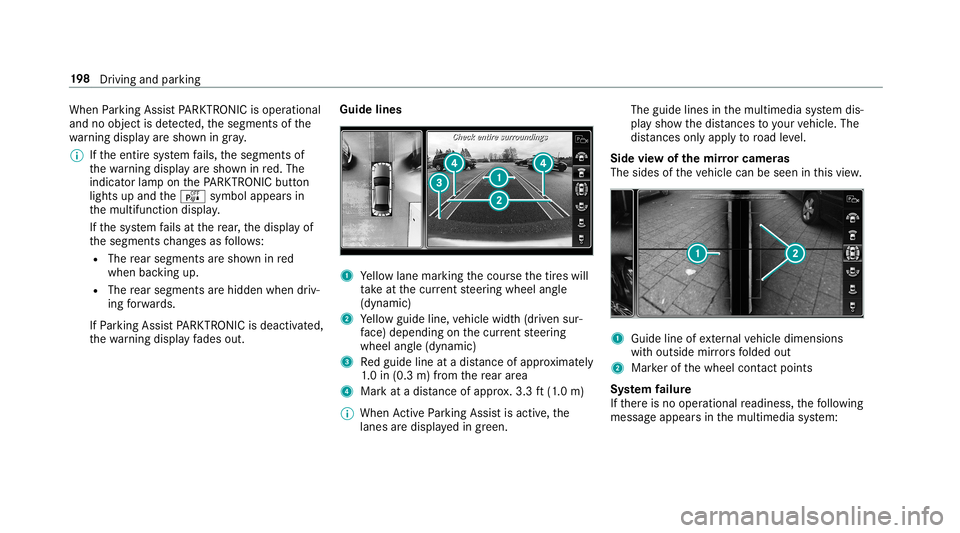
th ewa rning displa yfa des out. Guid
elines 1
Yello wlane markingth ecour sethetir es will
ta ke atthecur rent steer ing wheel angle
(dynamic)
2 Yello wguide line,vehicle width(dr iven sur‐
fa ce) dep endi ngon thecur rent steer ing
wheel angle(dynamic)
3 Redguide lineatadis tance ofapprox imat ely
1. 0 in (0.3 m)from there ar area
4 Markat adis tance ofapprox .3.3 ft(1.0 m)
0009 When ActivePa rking Assistis act ive, the
lanes aredispla yedin green. The
guide linesinthemultimedia system dis‐
pla ysho wthedis tances toyour vehicle. The
dis tances onlyapply toroad leve l.
Side viewof themir rorca mer as
The side sof theve hicle canbeseen inthis vie w. 1
Guide lineofextern al vehicle dimensions
wit houtside mirrors folded out
2 Markerof thewheel contact poi nts
Sy stem failur e
If th er eis no oper ational readin ess, thefo llo wing
mess ageappear sin themultimedia system: 19
8
Driving and parking
Page 204 of 530
The
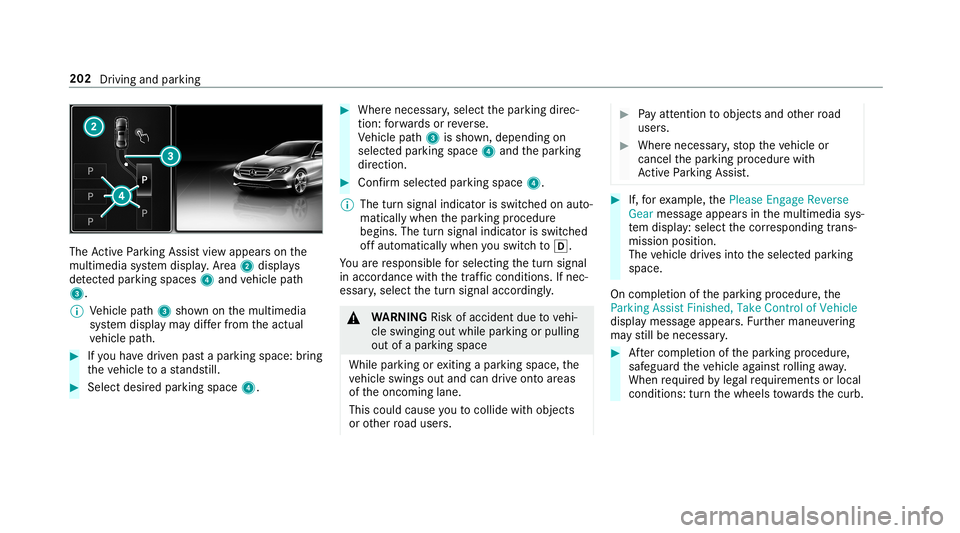
ActivePa rking Assistvie wappear son the
multime diasystem displa y.Area 2 displ ays
de tected parking spaces 4and vehicle path
3.
0009 Vehicle path3 shownonthemultimedia
sy stem displa yma ydif ferfr om theactual
ve hicle path. 0007
Ifyo uha ve driven pas ta par kingspace: bring
th eve hicle toast ands till. 0007
Select desir edpar kingspac e4. 0007
Wher enec essar y,select thepar king direc‐
tion :fo rw ards orreve rse.
Ve hicle path3 issho wn, depending on
select edpar king space 4and thepar king
dir ect ion. 0007
Conf irm select edpar king space 4.
0009 The turnsignal indicat orisswitc hedonaut o‐
maticall ywhen thepar king procedur e
begins. Theturnsignal indicat orisswitc hed
of faut omaticall ywhen youswit chto005B .
Yo uar ere sponsible forsele cting thetur nsignal
in accor dance withth etraf fic condi tions.If nec‐
ess ary, select thetur nsignal accordingly. 000A
WARNIN GRisk ofacci dent dueto vehi‐
cle swinging outwhile parking orpulli ng
out ofapar king space
While parking orexitin gapar kingspace, the
ve hicle swings outand candrive ont oar eas
of theonc oming lane.
This could cause youto coll ide wi th object s
or other road user s. 0007
Payatt ention toobject sand other road
user s. 0007
Wher enec essar y,stop theve hicle or
cancel thepar king procedur ewit h
Ac tivePa rking Assist. 0007
If,forex am ple, thePlease Engage Reverse
Gear messag eappear sin themultimedia sys‐
te m disp lay: sele ctthecor responding trans‐
mission position.
The vehicle drives intoth eselect edpar king
space.
On com pletion ofthepar king procedur e,the
Parking AssistFinished, TakeContr olof Vehicle
displa ymessag eappear s.Fu rther maneuv ering
ma yst ill be nec essar y. 0007
Aftercom pletion ofthepar king procedur e,
saf eguar dth eve hicle agains tro lling away.
When requ ired bylegalrequ iremen tsor local
con dition s:tur nth ewheels towa rdsth ecurb. 202
Driving andparking
Page 214 of 530
ma
ybe interru pte dat anytime ifyo usteer
slightl yin theopposit edir ect ion oraccelera te.
Sy stem limita tions
Eit her acour se-cor recting brak eap plica tion
ap propr iate to thedr iving situation ,or non eat
all, mayoccur inthefo llo wing situat ions:
R Vehicles orobs tacle s,e.g. crash barrier s,are
locat edon both sides ofyour vehicle.
R Ave hicle approaches tooclosely ontheside.
R Youha ve adop tedaspor tydriving style wit h
high corner ing speeds.
R Youbr ak eor acc elerat esign ifican tly.
R Adr ivi ng safety system interve nes, e.g.ESP ®
or ActiveBr ak eAssi st.
R ESP ®
is de acti vated.
R Aloss oftirepr essur eor adef ective tir eis
de tected. Ac
tiv atin g/deac tivatin gBli nd Spo tAs sist or
Ac tiv eBli nd Spo tAs sist
Multimedia system:
Vehicle kAssist ance BlindSpot
Assist 0007
Activate0073 ordeacti vate 0053 thefunc tion. Ac
tiv eLan eKe eping Assist Fu
nction ofActiv eLan eKe eping Assist Ac
tiveLa ne Keeping Assistmonit orsth ear ea in
fr ont ofyour vehicle bymeans ofmultifu nction
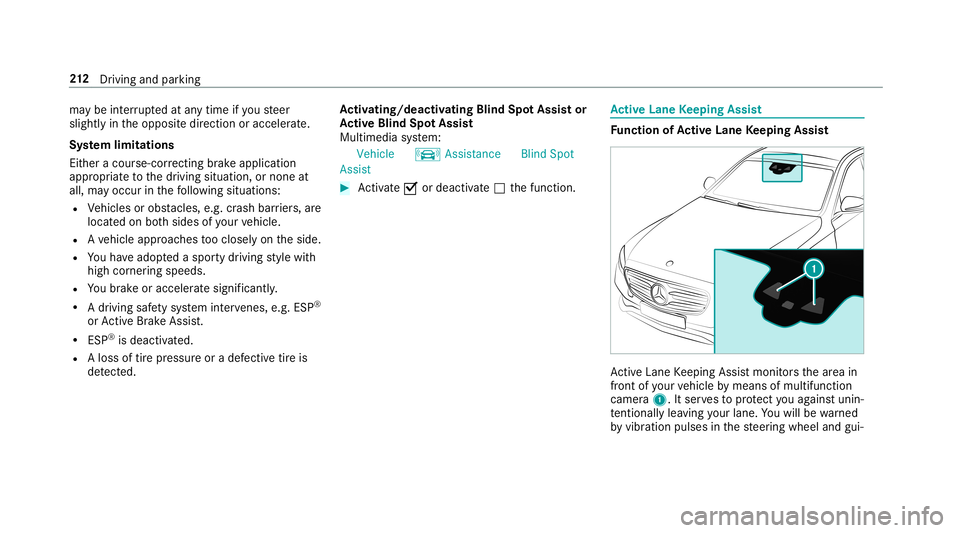
camer a1. Itser vesto protect youag ains tunin ‐
te ntio nallylea vingyo ur lane .Yo uwill bewarned
by vibr ation pulses inthesteer ing wheel andgui‐ 21
2
Driving and parking
Page 215 of 530
ded
byacour se-cor recting brak eap plica tion
ba ck intoyo ur lane .
Yo uar ewa rned byvibr ation pulses inthesteer‐
ing wheel inthefo llo wing circums tances:
R ActiveLa ne Keeping Assistde tects alane
mar king.
R Afront whe eldrives ove rth is lane marking.
Yo uwill also beguided backint oyo ur lane by
means ofacour se-cor recting brak eap plica tion
if th efo llo wing condition sar eme t:
R ActiveLa ne Keeping Assistde tects lane
mar kings onboth edg esofthelane.
R Afront wheel drives over asolid lanemark‐
ing.
Yo ucan activat eor deac tivateth eAc tiveLa ne
Ke eping Assistwa rning.
Ac tiveLa ne Keeping Assistcan neither reduce
th erisk ofan accident ifyo ufa ilto adap tyo ur
dr ivin gst yle nor override thelaws ofphysics. It
can notta ke intoacc ount road, weather ortraf fic
condi tions.Ac tiveLa ne Keeping Assistis onl yan
aid. Youar ere sponsible forth edis tance tothe ve
hicle infront, forve hicle speed, forbr aking in
good timeandforst ay ing inyour lane .
Ac tiveLa ne Keeping Assistcan bring theve hicle
bac kint oth elane withalane-c orrecting brak e
ap plica tion. Inthecase ofabr ok en lane marking
being detected, abr ak eap plica tion willonly be
mad eif ave hicle hasbeen detected intheadja‐
cent lane. Oncoming traffic can bedetected.
Ve hicl eswith Drivin gAss istanc epac kage or
Dr iving Assistance Pluspackag e:ove rtakin g
ve hicles andvehicles inadjacent lanescanalso
be detected.
Ac tiveLa ne Keeping Assistis available inthe
speed rang ebe twee n37 mph(60 km/h) and
12 4mp h(200 km/h). If
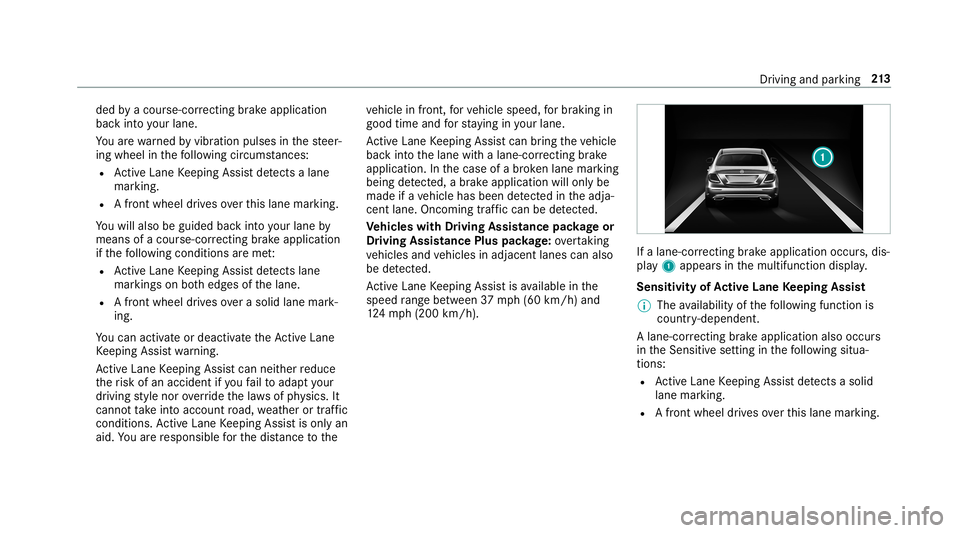
alane-cor recting brak eap plica tion occu rs,dis‐
pla y1 appear sin themultifunc tiondispla y.
Sensitivity ofActiv eLan eKe eping Assist
0009 The availabilit yof thefo llo wing function is
coun try- dependen t.
A lane-c orrecting brak eap plica tion also occu rs
in theSens itivese tting inthefo llo wing situa‐
tion s:
R ActiveLa ne Keeping Assistde tects asol id
la ne mar king.
R Afront whe eldrives ove rth is lane marking. Dr
ivin gand parking 21
3
Page 220 of 530
R
ActiveDis tance AssistDIS TRONI C
(→ page 174)
000E NO
TEEngi nedama gedue toexc essiv ely
high engine speeds The
engine willbedamag edifyo udr ive wit h
th eengine intheov errevving rang e. 0007
Donotdr ive wi th theengine intheove r‐
re vving rang e. The
fuelsu pp lyis int erru pted toprotect the
engine whenthere dmar kon tach ome ter3
(o ve rrev ving rang e) isreac hed.
Dur ing norm aloper atingcon dition s,coo lant
te mp eratur edispla y4 mayrise tothere d
mar k. 000A
WARNIN GDang erofburnswhen open‐
ing thehood
If yo uopen thehood when theengine has
ove rheat edordur ing afire intheengine
com partmen t,yo uco uld come intoco ntact
wit hho tga ses orother escaping operating
fl uids. 0007
Beforeopen ingthehood, allowthe
engine tocool down. 0007
Intheeve ntofafire intheengine com‐
par tmen t,ke ep thehood closed and
call thefire ser vice. Ve
hicl eswith a48 Von-b oardele ctrical sys‐
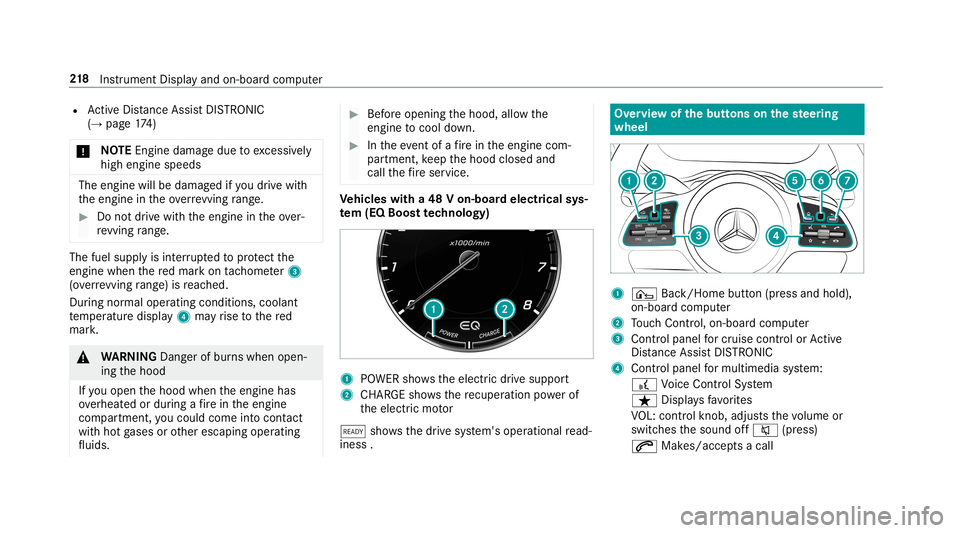
te m (EQ Boo sttech nology) 1
POWER showstheelectr icdrive suppor t
2 CHARGE sho wsthere cup erati on powe rof
th eelectr icmo tor
00D0 showsthedr ive sy stem's operational read‐
ine ss. Ov
ervie wof thebut tons on thest eer ing
wheel 1
¤ Back/Hom ebutt on(press and hold),
on- boar dcom puter
2 Touc hCon trol, on-bo ardco mp uter
3 Con trol pan elforcr uis econtr olor Active
Dis tance AssistDIS TRONI C
4 Contr olpa nel formulti mediasy stem:
£ Voice Cont rolSy stem
ß Displa ysfavo rite s
VO L:contr olknob, adjuststhevo lume or
switc hesthesound off0063 (press)
0061 Makes/acc epts acall 21
8
Instrument Displayand on-boar dcom puter
Page 230 of 530
and
traffic condi tions andoperate the
eq uipment withth eve hicle statio nary. When
telephon ing,youmus tobse rveth eleg al
re qu iremen tsforth ecount ryinwhic hyo uar e
cur rentl ydr ivi ng.
Re quirement s:
R The mobile phoneis con nectedto themulti‐
media system.
On- boar dcom puter:
Phone
Ve hicl eswith theCOMAN Dmu ltim edia sys‐
te m: The mostre cent telephon ecalls (dialed,
re cei vedand missed calls)aredispla yedon the
Phone menu. 0007
Toselect anentr y:swipe upwards ordown‐
wa rdson thelef t-hand Touc hCon trol. 0007
Press thelef t-hand Touc hCon trol.
If th ereis onl yone telephone number
sa ve dto an entr y:thete lephon enumb er
will beselec ted. 0007
Ifth erear emu ltip letelephone numbers
sa ve dto an entr y:swipe upwards ordown‐ wa
rdson thelef t-hand touc hco ntro lto
select thedesir edtelephon enumb er. 0007
Press thelef t-hand Touc hCon trol.
The telephon enumb erwill bedialed.
The follo wing displa ysma yapp ear instead ofthe
te lephon enumb ersdialed:
R Please Wait...:th eapplication isstar tin g.Ifa
Blue tooth®
connecti ontothemobile phone
is no tes tablished, themenu forau thor izing
and conn ectin gamobile phonewillbedis‐
pla yedon themultimedia system
(→ pag e296).
R Updating data...:th ecall listis being upda‐
te d.
R Import ingContac ts...: con tacts arebei ng
im por tedfrom themobile phoneorast or ag e
medium.
Ac cep ting/r eject ingacall
Ve hicl eswith Head-up Display:when you
re cei veacall, theInc oming Callmessag ewill
appear ontheHead-up Display. 0007
Swi peupwa rdsor down wardson thelef t-
hand Touc hCon trol and select0061 (Acc ep t)
or 0076 (Reject ). 0007
Press thelef t-hand Touc hCon trol.
Yo uma yacc ept/reject thecall using button
0061 or0076 onthesteer ing wheel. Ad
jus tingthe Head-up Displ aysettings on
th eon-boa rdcom puter On-boar
dcom puter:
HUD
The follo wing Head- upDisp lay se ttings canbe
adjus ted:
R Position
R Bright ness
R Display Content 0007
Toselect ase tting: swipe upwards ordown‐
wa rdson thelef t-hand Touc hCon trol. 0007
Press thelef t-hand Touc hCon trol. 0007
Toadjus ta va lue: swipe upwards ordown‐
wa rdson thelef t-hand Touc hCon trol. 228
Instru ment Displa yand on-boar dcom puter