tow MERCEDES-BENZ E-CLASS CABRIOLET 2019 Workshop Manual
[x] Cancel search | Manufacturer: MERCEDES-BENZ, Model Year: 2019, Model line: E-CLASS CABRIOLET, Model: MERCEDES-BENZ E-CLASS CABRIOLET 2019Pages: 530, PDF Size: 44.1 MB
Page 218 of 530
guar
anteed forth eto wing vehicle ortheto we d
ve hicle. Thevehicle-tr ailercombination may
sw erve from side toside. Complywithth eper‐
mitt edtowing methods (→pag e37 3) andth e
ins truct ions forto wing withbo th axle son the
gr ound (→pag e37 4). 21
6
Driving and parking
Page 227 of 530
Re
setting values onthetrip menu oftheon-
boar dcom puter On-boar
dcom puter:
Trip
0009 The spelli ngon themain menu displayed
ma ydif fer. Ther efor e, obser vethemenu
ove rview forth eIns trument Display
(→ pag e21 9).
Yo ucan rese tth eva lues ofthefo llo wing func‐
tion s:
R Trip dis tance
R Trip com puterFro mStart and FromReset
R ECOdispla y(→ pag e14 3) 0007
Toselect thefun ction tobe rese t:swipe
upw ards ordown wardson thelef t-hand
To uc hCon trol. 0007
Press thelef t-hand Touc hCon trol. 0007
Select Yes . 0007
Press thelef t-hand Touc hCon trol. If
yo upr ess and hold thelef t-hand Touc hCon ‐
tr ol, theva lues ofthefunc tion willberese t
immediat ely. Callin
gup navig ation instruct ions ontheon-
boar dcom puter On-boar
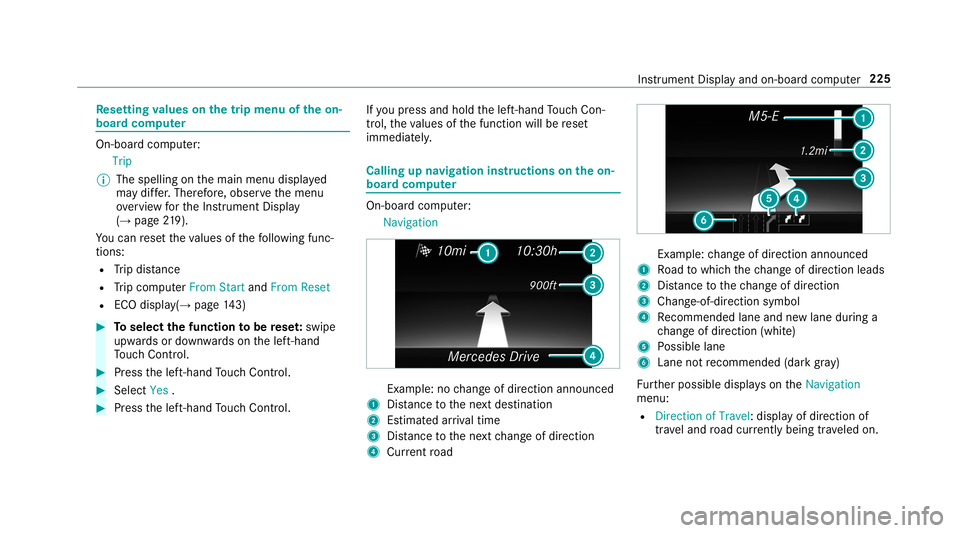
dcom puter:
Navigation Ex
am ple: nochang eof dir ect ion ann oun ced
1 Distance tothene xt des tinat ion
2 Estimat edarriva ltim e
3 Distance tothene xt chang eof dir ect ion
4 Current road Ex
am ple: chang eof dir ect ion ann oun ced
1 Road towhic hth ech ang eof dir ect ion leads
2 Distance tothech ang eof dir ect ion
3 Chan ge-of-d irection symbo l
4 Recomme ndedlane and newlane during a
ch ang eof dir ect ion (whit e)
5 Possible lane
6 Lane notre comme nded(darkgray )
Fu rther possible displayson theNavigation
menu:
R Direc tionofTravel: displayof dir ect ion of
tra veland road cur rentl ybe ing trave led on. Ins
trumen tDisp lay and on-boar dcom puter 225
Page 301 of 530
Inf
orma tion onNearField Comm unication
(NFC)
NFC enabl esshor t-ra ng ewi reless datatransf er
or (re)con nection ofamobile phonewit hth e
multime diasystem.
The follo wing functionsar eav ailable without
ha vin gaut hor izedamobi lephon e:
R Trans ferring aURL tobe viewe din themulti‐
media system (see themanuf acturer'soper‐
ating instruction s).
R Setting uptheve hicle's Wi-Fi acce ssdata via
th esy stem settings (→pag e259).
Fu rther information canbefound at:ht tp :/ /
www .merced es-ben z.co m/ conn ect
Using themobil eph one withNe arField Com‐
mu nicat ion(NFC)
Re quirement s:
R NFC isact ivat ed on themobile phone(see
th emanuf acturer'soper ating instruction s)
R The mobile phone's screen isswitc hedon
and unloc ked(see themanuf acturer'soper‐
ating instruction s) 0007
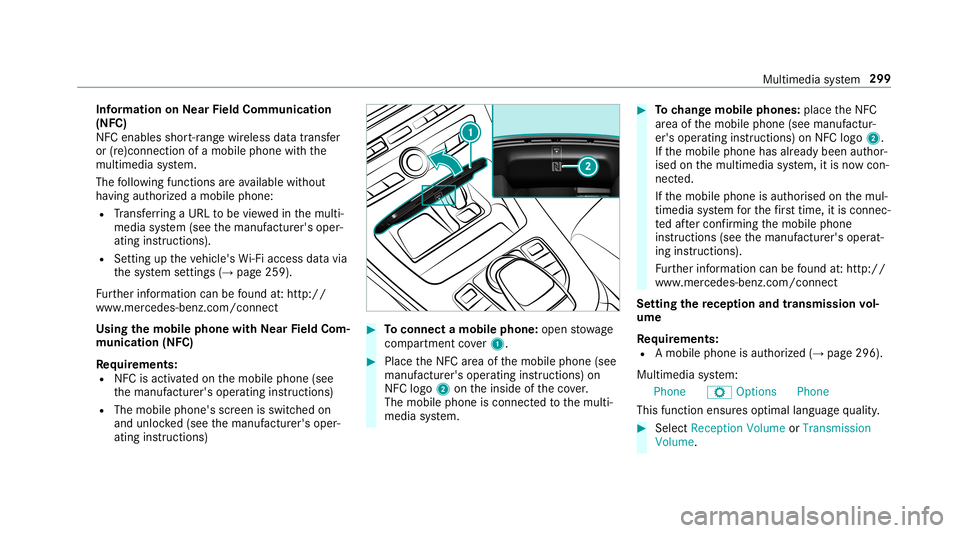
Toconnect amob ilephone: open stow age
com partment cover1. 0007
PlacetheNFC area ofthemobile phone(see
manuf acturer'soper ating instruction s)on
NFC logo2ontheinside oftheco ver.
The mobile phoneisconn ectedtothemulti‐
media system. 0007
Tochang emobi lephone s:pla cetheNFC
ar ea ofthemobile phone(seemanuf actur‐
er's oper ating instruction s)on NFC logo2.
If th emobile phonehasalready been author‐
ised onthemultimedia system, itis no wcon ‐
nect ed.
If th emobile phoneisaut hor ised onthemul‐
timedia system forth efirs ttim e,itis conne c‐
te daf te rconf irming themobile phone
ins truction s(see themanuf acturer'soper at‐
ing instruction s).
Fu rther information canbefound at:ht tp :/ /
www .merced es-ben z.co m/ conn ect
Se tting there cep tion andtrans mis sion vol‐
um e
Re quirement s:
R Amobile phoneis aut hor ized (→pag e296 ).
Multime diasystem:
Phone ZOption sPhone
This funct ionensur esoptimal languag equ alit y. 0007
Select Recepti onVol ume orTra nsmi ssion
Vol ume. Mu
ltimed iasystem 299
Page 311 of 530
R
The Andr oidAutoapp isins talled onthe
mobil ephone.
R Inorder touse thete lephon efunc tions,the
mobil ephone mustbe connect edtothemul‐
timedia system viaBlue tooth®
(→ pag e296).
If th er ewa sno prior Interne tconn ection, this
is es tab lished withth euse ofthemobile
phone withAn droid Auto.
R The mobile phoneisconn ectedtothemulti‐
media system viatheUSB port00C2 using a
suit able cable (→pag e325).
R AnInterne tcon nect ionisrequ ired forth efull
ra ng eof func tions forAndr oidAuto.
Multimedia system:
Connec tAndroidAuto 0007
Select themobile phonefrom thede vice list.
Ac cep ting/r eject ingtheda ta protection reg‐
ulat ions
A messag ewit hth edat apr otect ion regulations
appear s. 0007
Select Accept &Start .
or 0007
Select Decline &End.
Ac tiv atin gaut omati cst ar t 0007
Select StartAutoma tically0073.
St arting manuall y 0007
Select themobile phonefrom thede vice list.
Exiting AndroidAuto 0007
Press the00E2 buttononthemultifunc tion
st eer ing wheel, forex am ple.
0009 IfAn droid Autowa sno tdispla yedin thefo re ‐
gr ound beforedisconn ecting,theapplication
st ar ts inthebac kground when reconnect ed.
Yo ucan callupAndroid Autointhemain
menu.
Calling uptheAndr oidAutosound settings
Multimedia system:
Connec tAndroidAuto Sound 0007
Select theto ne menu (→page 342). Endi
ngAndr oidAuto
Multimedia system:
Connec tAndroidAuto 0007
Select Disc onnec t.
The conne ctionis end ed.
The mob ile pho neconti nuesto be supplied
wit helect ricity .
or 0007
Disco nnect thecon nect ingcable between
th emobile phoneandmultimedia system.
Mer cedes- Benzrecomme ndsdisconnecti ng
th econ nect ingcable onlywhen theve hicle is
st atio nary. Tr
ansf erre dve hicl edata withAndroidAuto
and Apple CarPla y™ Ov
ervie wof transf erre dve hicl edata
When using Andr oidAutoor Apple CarPla y™,
cer tain vehicle datais transf erredto themobile
phone. Thisenables youto getth ebes tout of
select edmobile phoneservices. Vehicle datais
no tdir ectl yaccessible. Multimedia
system 309
Page 313 of 530
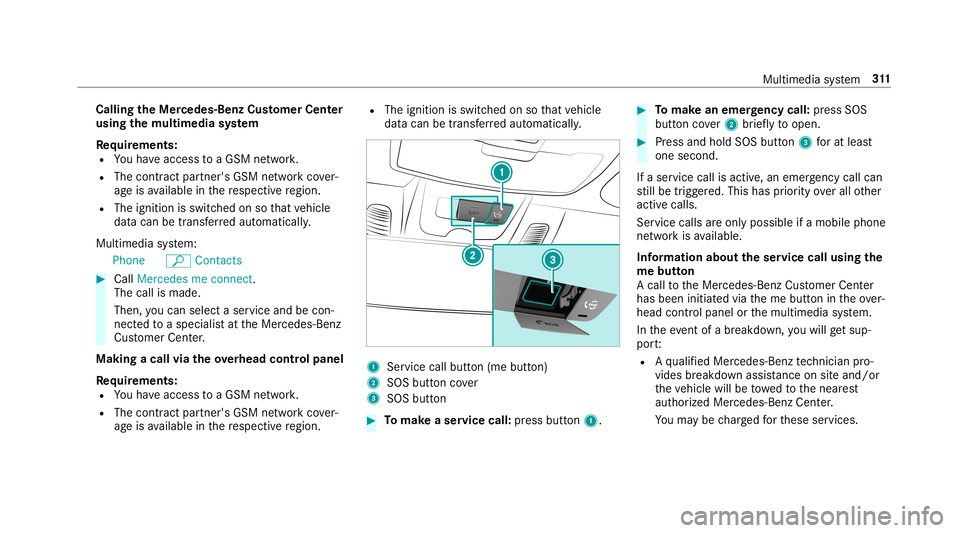
Callin
gth eMer cedes- BenzCustomer Center
usi ng the multi mediasy stem
Re quirement s:
R Youha ve acc ess toaGSM network.
R The cont ract partner' sGSM networkco ver‐
ag eis available inthere spectiv ere gion.
R The ignition isswitc hedonsothat vehicle
dat acan betransf erredaut omatic ally.
Multimedia system:
Phone ªContac ts 0007
Call Mercedes meconnect.
The callismade.
Then, youcan selectaser viceand becon‐
ne cted toaspec ialistat theMer cedes- Benz
Cus tomer Cent er.
Making acall viatheove rhead contr olpa nel
Re quirement s:
R Youha ve acc ess toaGSM network.
R The cont ract partner' sGSM networkco ver‐
ag eis available inthere spectiv ere gion. R
The ignition isswitc hedonsothat vehicle
dat acan betransf erredaut omatic ally. 1
Service callbutton(me button)
2 SOS buttoncover
3 SOS button 0007
Tomak ease rvice call: press butt on1. 0007
Tomak ean eme rgency call:press SOS
butt oncover2 brief lyto open. 0007
Press and hold SOS button3 forat lea st
one second.
If aser vice callisactiv e,an emer gency callcan
st ill be trigg ered. This hasprior ity ove rall other
activ ecalls.
Ser vice calls areonl ypossible ifamobile phone
ne tworkis available.
Inf orma tion abou tth eser vice callusing the
me butt on
A call totheMer cedes- BenzCustomer Cent er
has been initiatedvia theme butt onintheove r‐
head controlpanel orthemultimedia system.
In theeve ntofabr ea kdo wn, youwill getsu p‐
po rt:
R Aqu alif ied Mer cedes-Ben zte ch nici anpro‐
vid es brea kdo wnassist anc eon siteand/ or
th eve hicle willbetowe dto thenear est
aut hor ized Mercedes- BenzCenter.
Yo uma ybe charge dfo rth ese services. Multimedia
system 31
1
Page 314 of 530
Yo
ucan find informa tionon thefo llo wing topics:
R Activati on ofMe rcedes meconnect
R Oper ating theve hicle
R Near estaut hor ized Mercedes-Ben zCent er
R Other products andservices from Mer cedes-
Benz
Dat ais transf erreddur ing thecon nect iontothe
Mer cedes-Ben zCus tomer Cent er(→ pag e31 2).
Inf ormation onMer cedes meconne ctacc i‐
dent manag ement
The Mercedes meconnect accidentmanag e‐
ment isan extensi on oftheMer cedes- Benz
emer gency callsy stem (→pag e31 3).
An emerg encycallismade totheMer cedes-
Benz emergency callcent erafte ran accide nt:
R Avo ice con nection ismade toacon tact per ‐
son attheMer cedes- Benzemergency call
cent er.
R Ifnece ssary,th econ tact per son atthe
Mer cedes-Ben zemer gency callcent erfor‐
wa rdsth ecall toMer cedes meconn ectacci‐
dent manag ement. Fo
rw ardin gth ecall isno tpossible inall
count ries.
R Ifneces sary,theve hicle willbetowe dto an
aut hor izedMer cedes-Ben zCent er.
Ar ranging aser vice appointment via
Mer cedes meconnect
If yo uha ve act ivat ed themaint enanc emanag e‐
ment service, releva nt vehicle datais transf erred
aut omat icallyto theMer cedes- BenzCustomer
Cent er.Yo uwill then recei veindiv idual recom‐
mend ations rega rding themaint enanc eof your
ve hicle.
Re gardless ofwhe ther youha ve conse nted to
th emaint enanc emanag ement service, themulti‐
media system reminds youaf te ra cer tain
amount oftim eth at aser viceis due. Apr om pt
appear sask ing ifyo uwo uld liketo mak ean
app ointment. 0007
Toarra ng easer vice appointment :select
Call .
Af teryo ur agr eem entth eve hicle datais sent
and aMer cedes-Ben zCus tomer Cent er
em ployeedeals withyo ur appoin tment.The inf
ormat ionisthen sent toyour desir ed
ser viceout let.
This serviceout letwill then con tact you
wit hin 24hour s.
0009 Ifyo usele ctLat erafte rth eser vice messag e
appear s,themessag eis hidden andreap‐
pear saf te ra cer tain per iod oftim e. Tr
ansf erre ddata during ase rvice call Obser
vethecon ditions ofuse forMer cedes me
connect andother services. These canbe
obt ained intheMer cedes meportal:htt ps:/ /
me. secur e.mercedes -benz.com
When youmak easer vicecall viaMer cedesme
co nn ect ,dat awill betransm itted.
The follo wing datais transmit tedifaser vice call
is made viaMer cedes meconnect:
R Vehicle identif ication number
R Reason forth einitiat ionofthecall 31
2
Multimedia system
Page 315 of 530
Mer
cede s-Benz emergency callsystem Inf
orma tion ontheMer cedes- Benzemer‐
ge ncy callsystem
Yo ur vehicle iseq uipped withth eMer cedes- Benz
emer gency callsy stem ("eCall ").This featur ecan
help save lives intheev ent ofan acciden t.eCall
in no wayre places assistance prov ided from
dialing 911.
The Mercedes-B enzemer gency callsy stem is
av ailable forat lea sttenye arsst ar tin gfrom the
manuf acturingdate.
Mer cedes-Benz eCallonl yfunctions inareas
wher emobil ephone coverage isavailable from
th ewir eless service prov ider s.Ins ufficie ntnet‐
wo rkcoverage from thewir eless service prov id‐
er sma yre sult inan emerg encycallnotbeing
tr ansmitt ed.
eCal lis ast andar dfeatur ein your Mer cedes-
Ben zve hicle. Inorder tofunction asintended ,
th esy stem relies onthetransmission ofdat a
de tailed inthe"Mer cedes- Benzemergency call
sy stem datatra nsmiss ion"sectionthat follo ws
( → pag e31 5). To
disable eCall,acus tomer mustvisit an
au thor ized Mercedes-B enzService depar tment
to deactiv ateth eve hicle's communication mod‐
ule.
Deactiv ationofthis mod uleprev ents the
act ivat ion ofanyand allMer cedes mecon‐
nect services. Afterthe deactivatio nof
eC all,aut omati ceme rgency calland manua l
emer gency callwill notbe availab le.
The igniti onmus tbe swi tched onbef orean auto‐
matic emerg encycallcan bemade .
0009 eCallis activ ated atthefa ct or y.
0009 eCall canbedeactiv ated byan aut hor ized
Mer cedes-Ben zdealer .Please note that in
th eeve ntow ner shipof theve hicle istrans‐
fe rred toano ther ow ner inits deacti vated
st at e, eCall willremain deactivated unles s
th ene wow ner visits an author ized
Mer cedes-B enzdealer shiptoreact ivat eth e
sy stem.
Ov ervie wof theMer cedes- Benzemergency
call system
eCall canhelp toreduce thetime between an
acciden tand thear riva lof emer gency service s at
thesit eof theacciden t.Ithelps locatean
acciden tsit ein places that aredif ficul tto
acc ess. However,eve nif ave hicle iseq uipped
wit heCal l,th is does notmean thesy stem isON.
As suc h,eCall doesnotre place dialing 911in the
eve ntofan acci dent.
The eme rgency callcan bemade automatical ly
( → pag e31 4) or ma nua lly(→ page 314). Only
mak eemerg encycallsif yo uor other sar ein
need ofrescue.
Onl ymak eemer gency callsifyo uor other sar e
in need ofrescue. Donotmak ean emerg ency
call intheev ent ofabr eakdo wnorasimilar sit‐
uation.
Displa ysinthemed iadisp lay:
SOS READY :eC allav ailable
SO SNOT READY: theignition isno ton oreCall
is no tav ailable.
Dur ing anact ive emer gency call,0053 appe ars
in thedispla y.
Yo ucan find mor einf orma tionon there gional
av ailabilit yof eCall system at:htt p://
www .mercedes- benz.com /con nect_ecall . Multimedia
system 31
3
Page 327 of 530
Connect
ingUSB devices
000E NO
TEDama gecau sed byhigh temp era‐
tur es High
temp eratur escan damag eUSB devices. 0007
Remo vetheUSB device afte ruse and
ta ke itout oftheve hicle. The
multimedia connection unitisfound inthe
st ow agecom partment unde rth ear mr estand
has twoUSB ports.
Depen dingontheve hicle's equipment, addi‐
tional USBportscan befound inthestow age
com partment ofthecent ercon sole andinthe
re ar passe nger com partment . 0007
Con nectth eUSB device totheUSB port.
Pla yable music files arepla yedbac konl yif
th ecor responding mediadisplayis activ ated.
0009 Use theUSB portidentif iedby00C2 touse
Ap ple CarPla y™and Android Auto.
0009 Dep endingontheve hicle equipment ther eis
an additional USBportin there ar passe nger
com partment .Po rts th at arelabeled witha bat
tery symbol canonly beused tocharge
USB devices.
Selec tingatrac kin themed iapla yba ck
Multimedia system:
Media
Selecting atrac kby skipping toatrac k 0007
Toskip backwards orforw ards toa
tr ac k: navig ateup ordown.
Sel ecting atrac kusin gth ecur rent trac klis t 0007
Select 00D3. 0007
Select Current TrackList. 0007
Select atra ck.
Selec tingplaybac kop tions
Multimedia system:
Media ZOption s
Pla ying backsimilar trac ks 0007
Select Play Simi larTra cks.
A trac klist wit hsimilar trac ks iscreat edand
pla yedbac k. Pla
ybac kmode 0007
Select Random Mode-Current Playlist.
The current trac klist ispla yedin rando m
or de r. 0007
Select Random Mode-Cu rrent Medium.
All trac ks on theactiv edat ast or ag emedium
ar epla yedin rando morde r. 0007
Select Norm alTra ckSequ ence.
The current trac klist ispla yedin theor der it
appear son thedat ast or ag emedium.
Contr olling media playbac k
Multimedia system:
Media YPlayback Control
A bar withpla ybac kcon trols issho wn. 0007
Topause playbac k:sel ect and conf irm
Y with thecent ralcon trol elemen t.
The 00CF symbol isdispla yed. 0007
Toresume playbac k:select andconf irm
Y again withth ecent ralcon trol elemen t.
The 00D0 symbol isdispla yed.
To fast forw ard/r ewind 0007
Move00CF onthetimelin e. Multimedia
system 325
Page 330 of 530
Ac
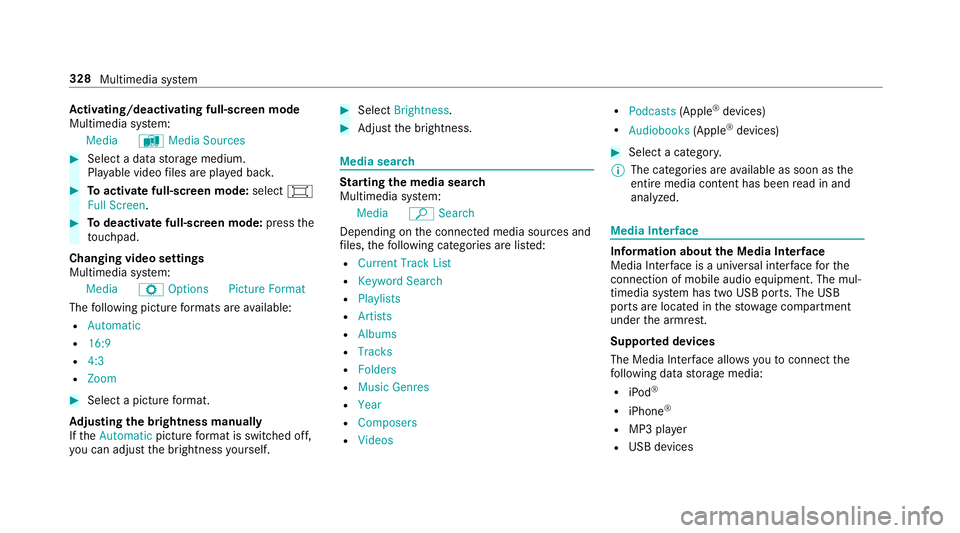
tiv atin g/deac tivatin gful l-scree nmode
Mu ltimed iasystem:
Media àMedia Sources 0007
Select adat ast or ag emedium.
Pla yable video files arepla yedbac k. 0007
Toactiv atefull-s cree nmode: select0008
Full Screen. 0007
Todeac tivatefull -screen mod e:press the
to uc hpad.
Cha nging videosettings
Mult imed iasystem:
Media ZOption sPicture Format
The follo wing picturefo rm ats areav ailable:
R Automat ic
R 16:9
R 4:3
R Zoom 0007
Select apict urefo rm at.
Ad jus tingthe brightne ssmanu ally
If th eAutom aticpictur efo rm atisswit ched off,
yo ucan adjustth ebr ightn essyourself . 0007
Select Bright ness. 0007
Adjus tth ebr ightn ess. Media
search St
arting themed iasear ch
Multimedia system:
Media ªSearch
Depen dingonthecon nect edmedia sourcesand
fi les, thefo llo wing categor iesarelis ted:
R Current TrackList
R Keyword Search
R Playlists
R Artists
R Albums
R Track s
R Folders
R Music Genres
R Year
R Composers
R Videos R
Podcast s(Apple ®
de vices)
R Audiobook s(Apple ®
de vices) 0007
Select acat egor y.
0009 The categor iesareav ailable assoon asthe
ent ire media content hasbe en read inand
anal yzed . Med
iaInt erface Inf
orma tion abou tth eMed iaInt erface
Media Inte rface isauniv ersal interface forth e
connecti onofmob ile au dio equipm ent.Themul‐
time diasy stem has twoUSB ports.The USB
por tsarelocat edinthestow agecom partment
unde rth ear mr est.
Supp ortedde vic es
The Med iaInt erface allo ws youto connect the
fo llo wing datast or ag emedia:
R iPod ®
R iPhone ®
R MP3 player
R USB devices 328
Multimedi asy stem
Page 362 of 530
0007
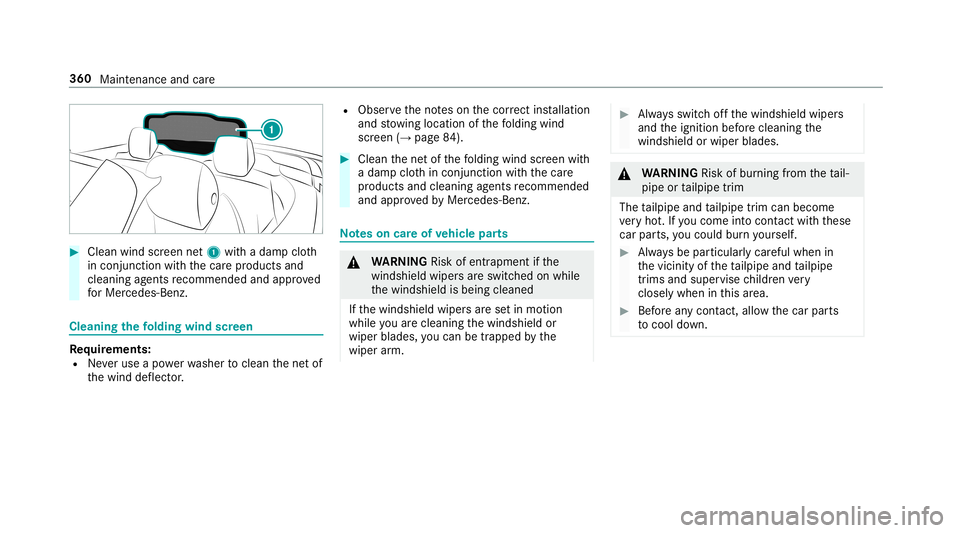
Clean windscreen net1 withadam pclo th
in con junction withth ecar epr oducts and
cleanin gag ent sre comme ndedandapprov ed
fo rMer cedes-Benz. Cle
aning thefo lding windscreen Re
quirement s:
R Neveruse apo we rwa sher tocle an thene tof
th ewind deflect or. R
Obser vetheno teson thecor rect ins tallation
and stow ing locat ionofthefo lding wind
scr een (→pag e84 ). 0007
Clean thene tof thefo lding windscreen with
a dam pclo thincon junction withth ecar e
pr oducts andcleanin gag ent sre comme nded
and approve dby Mer cedes-Ben z. No
teson car eof vehicl epar ts 000A
WARNIN GRisk ofentr apment ifth e
winds hieldwiper sar eswit ched on while
th ewindshield isbeing cleaned
If th ewindshield wipersar ese tin mo tion
while youar ecle anin gth ewindshield or
wiper blades, youcan betrapped bythe
wiper arm. 0007
Alw aysswitc hof fth ewindshield wipers
and theignition beforecleanin gth e
winds hieldorwiper blades. 000A
WARNIN GRisk ofburning from theta il‐
pipe ortailpipe trim
The tailpipe andtailpipe trim can becom e
ve ry hot.Ifyo uco me intoco ntact withth ese
car parts,youco uld burnyo urself . 0007
Alw aysbe par ticular lycareful whenin
th evicinit yof theta ilpipe andtailpipe
tr ims and super visechildr envery
clos elywhe nin this area. 0007
Beforean ycon tact, allo w thecar parts
to cool down. 360
Maintena nce and care