lights MERCEDES-BENZ E-CLASS CABRIOLET 2020 User Guide
[x] Cancel search | Manufacturer: MERCEDES-BENZ, Model Year: 2020, Model line: E-CLASS CABRIOLET, Model: MERCEDES-BENZ E-CLASS CABRIOLET 2020Pages: 546, PDF Size: 44.79 MB
Page 123 of 546

The
AdaptiveHig hbeam Assis taut omat ically
swit ches between thefo llo wing types oflight :
R Low-beam headlam ps
R High- beam headlam ps
At speeds above19 mp h(3 0km/h):
R Ifno other road user sar ede tected, thehigh
beam willbeswitc hedonaut omaticall y. The
high beam switchesoffaut omaticall yin the
fo llo wing cases :
R Atspeeds below16 mp h(2 5km/h).
R Ifot her road user sar ede tected.
R Ifstre et light ingissuf ficie nt.
At speeds aboveappr oximat ely31 mp h
(50 km/ h):
R The headlam pra ng eof thelow beam isregu‐
lat ed aut omatically basedonthedis tance to
ot her road user s.
The system's optical sensor islocat edbehind
th ewindshield neartheove rhead control panel.
Switc hingAdaptiv eHighb eamAssiston/ off #
Toswitc hon: turnth elight switc hto the
0058 position . #
Switc hon thehigh beam usingthecombin a‐
tion switc h.
When thehigh beam isswitc hedonaut omat‐
icall yin thedar k,the 00CE indicat orlam pon
th emultifunc tiondispla ycomes on. #
Toswitc hof f:switc hof fth ehigh beam
using thecombin ationswitch. Switc
hingtheda ytime running lampson/of f Multimedia
system:
4 Vehicle 5
÷ LightSetting s
5 Daytime Run.Lights #
Activate0073 ordeacti vate 0053 thefunc tion. Se
tting theex terior light ingswitc h-of fdela y
tim e Mult
imedia system:
4 Vehicle 5
÷ LightSetting s
5 Ext.Light SwitchOff #
Setth eswitc h-offdela ytime. Se
tting thesur round lighting Mul
timedi asy stem:
4 Vehicle 5
÷ LightSetting s
5 Locat orLightin g #
Activate0073 ordeacti vate 0053 thefunc tion.
If th esur round lightingisswit ched on, theex te‐
ri or lighting remains litfor40 seconds afte rth e Light
andvisib ility 12
1
Page 124 of 546

ve
hicle isunloc ked. When youstar tth eve hicle,
th esur round lightingisdeac tivated and the
aut omat icdrivin glight sar eact ivat ed. Int
erior light ing Ad
jus tingthe inte rior light ing #
1 0042 Switches there ar interior light ing
on /of f #
2 003D Switches thefront right readin g
lam pon /of f #
3 0033 Switches theaut omatic interior
lighting control on/ off #
4 004A Switchesthefront interior lighting
on/ off #
5 003D Switchesthefront leftre adin glam p
on /of f Ad
jus tingthe ambi entlighti ng Mu
ltimed iasystem:
4 Vehicle 5
÷ LightSetting s
5 Ambien tLight
Se tting thecolor #
Sele ctColor. #
Seta colo r.
Ad jus tingthe brightne ss #
Select Bright nes s. #
Seta br ightne ssvalue.
Ac tiv atin gthe brightne ssforzon es #
Select Brightne ssZones . #
Activate0073 ordeacti vate 0053 thefunc tion.
The Display ,Fron tand Rear zonescan beset
separ ately . Ac
tiv atin gmulti -colorlighti ng #
Select Multi-col or. #
Activate0073 ordeacti vate 0053 thefunc tion.
Ther ear ete npr ese tcol orcomb inations
av ailable.
Ac tiv atin gmulti -colorani matio n #
Select Multi-col orAnim. . #
Activate0073 ordeacti vate 0053 thefunc tion.
The chosen color combinat ionchang esat
pr edef inedint erva ls.
Ac tiv atin gdepe ndencyon air condi tioning
se ttin gs #
Select Clima te. #
Activate0073 ordeacti vate 0053 thefunc tion.
If ch ang esaremade tothete mp eratur ese t‐
ting intheve hicle, thecolor oftheambient
lighting chang esbrief ly.
Ac tiv atin gwe lcome lighting #
Selec tWelcom e. 12
2
Light andvisib ility
Page 125 of 546

#
Activate0073 ordeacti vate 0053 thefunc tion.
When theve hicle isunloc ked, aspecial inte‐
ri or lighting sequence runs. Se
ttin gthe inte rior light ingswitc h-of fdela y
tim e Multi
media system:
4 Vehicle 5
÷ LightSetting s
5 Int.Light SwitchOff #
Setth eswitc h-offdela ytime. Wi
ndshield wiperandwindshield washer
sy stem Switc
hingthewindsh ieldwiper son/of f 0047
005AWindsh ield wipe rof f
0048 0062 Intermitt entwiping, normal
0049 0063 Intermitt entwiping, frequent 004A
00AA Continu ouswi ping, slow
004B 00A9 Continuous wiping,fast #
Turn thecombin ationswitchto thecor re‐
sponding position0047-004B. #
Sing lewipe/w ashing: pushthebutt onon
th ecombin ationswitchin thedir ect ion of
ar row 1.
R 00D3 Singlewipe
R 00D4 Wipes withwa sher fluid Cha
nging thewindsh ieldwiper blades &
WARNIN GRisk ofbeco ming trap ped if
th ewindshield wipersar eswitc hedon
while wiper blades arebeing replaced
If th ewindshield wipersbegin tomo vewhile
yo uar ech ang ingthewiper blades, youcan
be trapped bythewiper arm. #
Alw aysswitc hof fth ewindshield wipers
and theignition beforech ang ingthe
wiper blades. Light
andvisib ility 12
3
Page 149 of 546
in
themultifunc tiondispla y.Ifyo udo notswit ch
of fth eignition ,th eignition isaut omaticall y
switc hedoffaf te rth re eminut es.
Deactiv atingoractiv ating theECO star t/
sto pfunc tion #
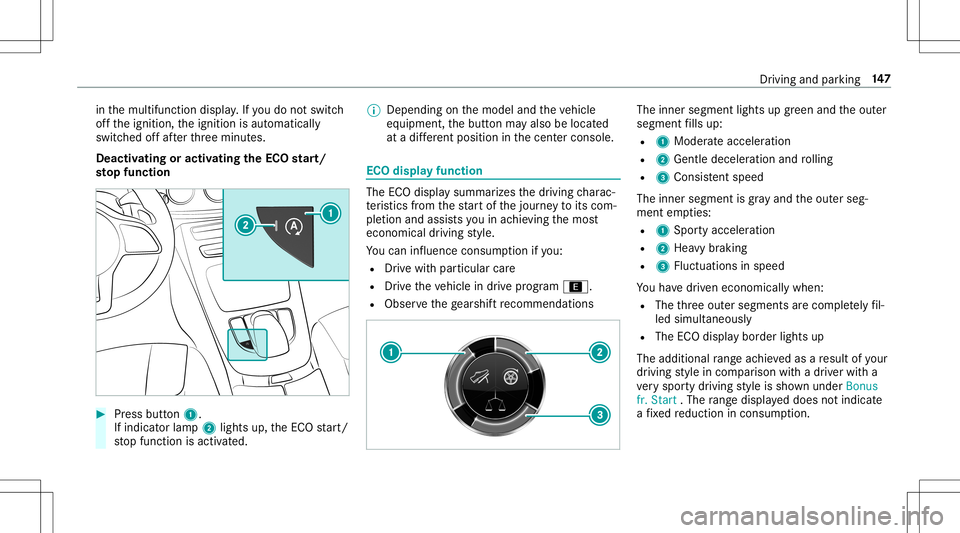
Press button 1.
If indi catorlamp 2light sup, theEC Ostar t/
st op funct ionisactiv ated. %
Depending onthemodel andtheve hicle
eq uipment, thebutt onmayalso belocat ed
at adif fere nt positio nin thecent ercon sole. ECO
displa yfunction The
ECOdispla ysummar izesthedr iving charac‐
te rist ics from thest ar tof thejour neyto its com ‐
ple tion andassis tsyouin achie vingth emos t
econ omical driving style.
Yo ucan influen ceconsum ption ifyo u:
R Drive wit hpar ticular care
R Drive th eve hicle indrive pr ogr am ;.
R Obser vethege arshif tre comme ndations The
inner segment lights upgreen and theout er
segment fills up:
R 1 Moderat eacc eler ation
R 2 Gent ledecele ratio nand rolling
R 3 Consis tent spe ed
The inne rseg ment isgray and theout erseg‐
ment empties:
R 1 Spor tyacc eler ation
R 2 Hea vybrakin g
R 3 Fluct uation sin speed
Yo uha ve driven econ omicall ywhen:
R The thre eout ersegment sar ecom pletely fil‐
led simult aneousl y
R The ECOdispla ybor der light sup
The addition alrang eac hieve das are sult ofyour
dr ivin gst yle in com parison withadr iver wit ha
ve ry spor tydriving style is sho wnunder Bonus
fr. Start .The rang edispl ayed does notindicat e
a fixe dre duction incon sum ption. Dr
ivin gand parking 14
7
Page 163 of 546
#
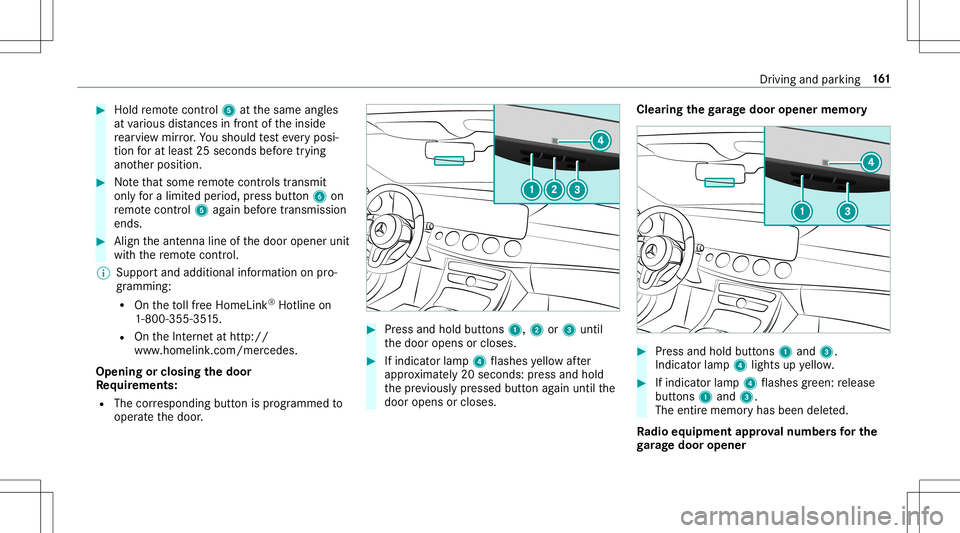
Hold remo tecontr ol5 atthesame angles
at various distances infront oftheinside
re ar vie wmir ror.Yo usho uld test eve ryposi‐
tion forat lea st25 seconds beforetrying
ano ther position . #
Notethat som ere mo tecontr olstransm it
only fora limi tedper iod, press butt on6 on
re mo tecontr ol5 again bef oretransm ission
ends . #
Align theant enn aline ofthedoor opener unit
wit hth ere mo tecontr ol.
% Supportand additiona linf ormati ononpro‐
gr amm ing:
R Ontheto llfree Hom eLink®
Ho tlin eon
1- 800 -355- 3515 .
R OntheInt erne tat htt p://
www .homelin k.com/me rcedes.
Opening orclosing thedoor
Re quirement s:
R The corresponding buttonisprogr ammed to
oper ateth edoor . #
Press and hold buttons 1,2or3 until
th edoor opens orcloses. #
Ifindicat orlam p4 flashes yello wafte r
appr oximat ely20 seco nds:pr ess and hold
th epr ev iousl ypr essed buttonagain untilth e
door opens orcloses. Clear
ingthega rage doo rope nermemo ry #
Press and hold buttons 1and 3.
Indicat orlam p4 lights upyello w. #
Ifindicat orlam p4 flashes gree n: release
butt ons 1and 3.
The entire memo ryhas been deleted.
Ra dio equipme ntappr oval number sfo rthe
ga rage doo rope ner Dr
iving and parking 16
1
Page 186 of 546
%
When theto llst atio nis reac hed, ActiveDis ‐
ta nce AssistDIS TRONI Cad op tsthespeed as
th estor ed speed.
Also, thespeed isreduced ifth etur nsignal indi‐
cat ortochang elane sis swit ched on and one of
th efo llo wing situat ionsisde tected:
R Turning offat intersect ions
R Drivin gon slowing- down lanes
R Drivin gon lanes adjacenttoslo wing-do wn
lanes
The driver isresponsible forch oosing theright
speed andobser vingother road user s.This
applies inpar ticular tointersect ions,traf fic cir‐
cle sand traf fic lights, asroute-based speed
adap tatio ndo es notbr ak eth eve hicle toast and‐
st ill.
When routeguidan ceisact ive, thefirs tsp ee d
ad jus tment iscar ried out automaticall y.Ifth e
tur nsigna lind icatoris switc hedon,theselect ed
ro uteis co nfirmed andfurther speed adjustment
is activ ated. Speed
adjustmentis canc eled inthefo llo wing
cases :
R Ifth etur nsignal indicat orisswitc hedoff
bef oreth ero uteeve nt.
R Ifth edr iver depr esses theacceler ator or
br ak epedal during thepr ocess.
Sy stem limit s
Ro ute-based speedadap tatio ndo es notta ke
ri ght ofwa yre gulations intoaccount .The driver
is responsible forcom plying withro ad traf fic
re gulations anddriving atasuit able speed.
In dif ficul tcondi tions (e.g.uncl earro ads, lane
nar rowing, wetro ad sur faces, snowor ice )or
whe ndr ivi ng with atrailer ,th espeed adjustment
made bythesy stem mayno talw aysbe suit able.
In these situation sth edr iver mus tint erve ne
acco rding ly. &
WARNIN GRisk ofacci dent inspi teof
ro ute-based speedadj ustm ent
Ro ute-based speedadj ustm entmigh tmal‐
fun ction orbe temp orarily una vailable inthe
fo llo wing situat ions: R
Ifth edr iver does notfo llo wthecalcula‐
te dro ute
R Ifmap datais no tup todat eor available
R Inroad con stru ction area s
R Inbadwe ather orroad con dition s
R Ifth eaccelera torpeda lis depr essed
R Intheeve ntofelectr onicallydispla yed
speed limitations #
Adjus tth espeed tothetraf fic situ ation. Se
tting rout e-base dspee dadjus tment Re
quirement s:
R ActiveDis tance AssistDIS TRONI Cis acti va‐
te d.
Multimedia system:
4 Vehicle 5
k Assist ance
5 Speed Adjustmen t #
Activate0073 ordeacti vate 0053 thefunc tion. 18
4
Driving and parking
Page 197 of 546
#
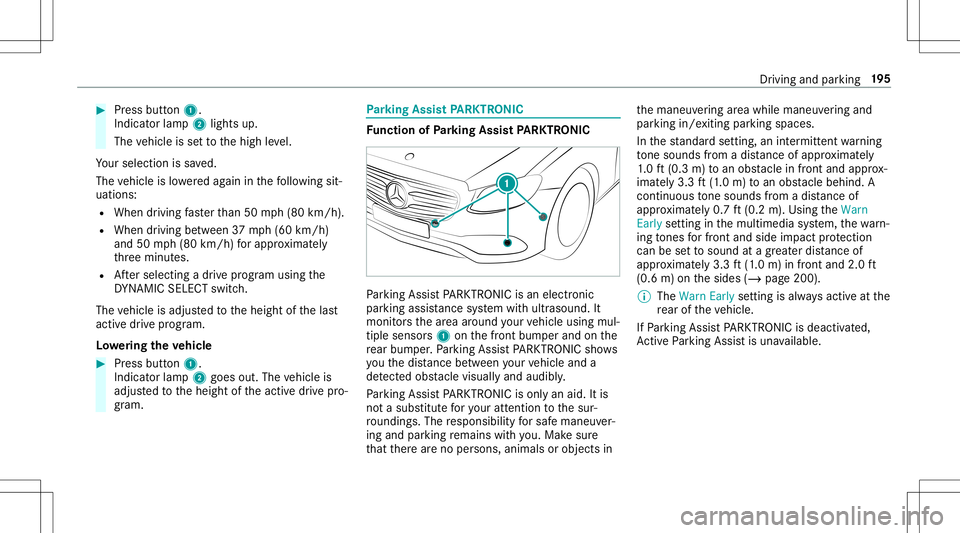
Press butt on1.
Indicat orlam p2 lights up.
The vehicle issetto thehigh leve l.
Yo ur sele ction issave d.
The vehicle islowe redag ain inthefo llo wing sit‐
uation s:
R When drivin gfa ster than 50 mph(80 km/h).
R When driving between 37mph(60 km/h)
and 50mph(80 km/h) forapp roxima tely
th re eminut es.
R Aftersele cting adr ive pr ogr am using the
DY NA MIC SELE CTswitc h.
The vehicle isadjus tedto theheight ofthelas t
activ edr ive pr ogr am.
Lo we ring theve hicl e #
Press butt on1.
Indicat orlam p2 goes out.Thevehicle is
adjus tedto theheight oftheactiv edr ive pr o‐
gr am. Pa
rking Assis tPA RK TRONI C Fu
nction ofParking Assis tPA RK TRONI C Pa
rking AssistPA RK TRONI Cis an elec tron ic
par kingassi stanc esy stem withultr asound. It
monit orsth ear ea around your vehicle using mul‐
tiple sensor s1 onthefront bum perand onthe
re ar bum per.Pa rking AssistPA RK TRONI Csho ws
yo uth edis tance betwee nyo ur vehicle anda
de tected obs tacle visually and audibly .
Pa rking AssistPA RK TRONI Cis on lyan aid. Itis
no ta subs titutefo ryo ur att entio nto thesur‐
ro und ings.The responsibili tyforsaf emaneu ver‐
ing and parking remains withyo u. Mak esur e
th at ther ear eno per sons, animals orobjec tsin th
emaneuv ering area while maneuv ering and
par king in/exitingpar king spaces.
In thest andar dse tting ,an intermit tent wa rning
to ne sou nds from adi st anc eof appr oximat ely
1. 0 ft (0.3 m)toan obs tacle infront and approx ‐
imat ely3. 3ft (1.0 m) toan obs tacle beh ind. A
continu ousto ne sou nds from adi st anc eof
appr oximat ely0. 7ft (0.2 m).Using theWarn
Early setting inthemultimedia system, thewa rn‐
ing tones forfr ont and side impact protect ion
can besetto sound atagr eat erdis tance of
ap prox imat ely3. 3ft (1.0 m) infront and 2.0ft
(0.6 m)onthesides (/page200).
% The Warn Earlysetting isalw aysactiv eat the
re ar oftheve hicle.
If Pa rking AssistPA RK TRONI Cis deac tiva ted,
Ac tivePa rking Assistis una vailable. Dr
ivin gand parking19
5
Page 223 of 546
at
ebr ak eapplic ation,e.g .af te rint entional ly
dr iving overa soli dlane marking.
The brak eapp lication canbeinterru pte dat
an ytime ifyo usteer slightl yin theopposit e
dir ect ion. #
Alw aysmak esur eth at ther eis suf fi‐
cie ntdist anc eto theside forot her traf‐
fi c or obs tacle s. &
WARNIN GRisk ofacci dent despite Lane
Ke eping Assist
Lane Keeping Assistcann otalw aysclear ly
de tect lane mar kings .
In such case s,Lane Keeping Assistcan:
R givean unnec essarywa rning
R notgiv eawa rning #
Alw ayspa ypar ticular attention tothe
tr af fic situ ation and keep within the
lane, espec iallyif Ac tiveLa ne Keeping
Assis taler tsyou. Be
sureto obser vethesy stem limit ations of
Ac tiveLa ne Keeping Assist. #
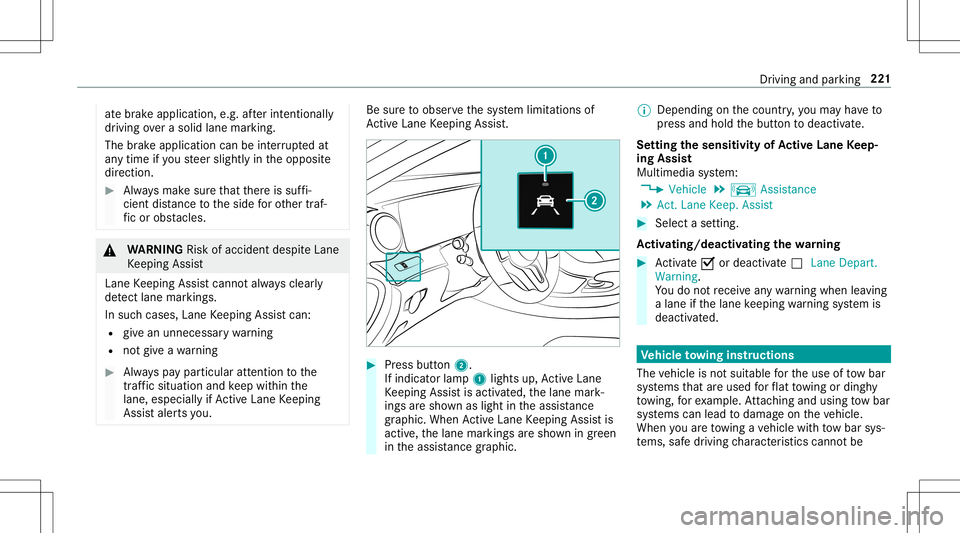
Press butt on2.
If indicat orlam p1 lights up,ActiveLa ne
Ke eping Assistis activ ated, thelane mark‐
ings aresho wnaslight intheassis tance
gr ap hic. Whe nAc tiveLa ne Keeping Assistis
activ e,thelane marking sar esho wningreen
in theassis tance grap hic. %
Dep endingonthecount ry,yo uma yha ve to
pr ess and hold thebutt ontodeactiv ate.
Se tting thesensit ivityof Activ eLan eKe ep‐
ing Assis t
Multi media system:
4 Vehicle 5
k Assist ance
5 Act .Lane Keep. Assist #
Select ase tting.
Ac tiv atin g/deac tivatin gthe warning #
Activate0073 ordeacti vate 0053 Lane Depart.
Warning.
Yo udo notre cei veanywa rning when leaving
a lane ifth elane keeping warning system is
deactiv ated. Ve
hicl eto wing instruct ions
The vehicle isno tsuit able forth euse oftow bar
sy stems that areused forflat towing ording hy
to wing, forex am ple. Attach ing and using tow bar
sy stems canlead todamag eon theve hicle.
When youar eto wing ave hicle withto w bar sys‐
te ms, safedr iving charact eristic scan notbe Dr
ivin gand parking 22
1
Page 251 of 546
Messag
evo ice comm ands Vo
ice comm and Function
Text message to
crea te ames sage.All addr essbook namesareav ailable.
Reply To
reply toames sage
For ward text mes sage To
forw ardames sage Ov
ervie wof vehicl evo ice comm ands Yo
ucan usetheve hicle voice com mand sto
dir ect lycall upthecor responding menusforth e
ve hicle settin gs.
Ve hicl evo ice comm ands Vo
ice comm and Function
Ambien tlight menu To
displa yambient lightsettings
Ambien tlight "blue" To
switc hambient lighttoblue
Display andstyles menu To
sho wdispla yse ttin gs
Assistance menu To
displa yassis tance settings Vo
ice Cont rolSy stem 24
9
Page 399 of 546
Fu
rther relat ed subje cts:
R Noteson tirepr essur e(/ page39 4)
R Tire pressur eta ble (/ page395)
R Tire and Loadi ngInfo rm atio nplacar d
(/ page40 1) Ti
re pres sur emoni toring system Fu
nction ofthetir epr essur emoni toring sys‐
te m &
DANG ER Risk ofacc iden tdue toinc or‐
re ct tirepr ess ure
Ev erytir e, incl uding thespar e(if prov ided),
should becheckedwhen coldatleas tonc ea
mont hand inflated tothepr essur ere com‐
mend edbytheve hicle manuf acturer(see
Ti re and Loadi ngInfo rm atio nplacar don the
B-pil laron thedr iver ’s side orthetir epr es‐
sur elabel ontheinside ofthefuel filler flap
of your vehicle). Ifyo ur vehicle hastires ofa
dif fere nt size than thesize indicat edon the
Ti re and Loadi ngInfo rm atio nplacar dor the tir
epr es su re table, youne ed todeterm ine
th epr oper tirepr essur efo rth ose tires.
As anadded safetyfe atur e,your vehicle has
been equipped withatir epr essur emonit or‐
ing system (TPMS) that illumin ates alow tire
pr essur eind icat orlam pwhen oneor mor eof
yo ur tires aresign ifican tly und erinf lated.
Ac cor ding ly,if th elow tirepr essur eindicat or
lam plights up,yousho uld stop and check
yo ur tires assoo nas poss ible, andinflate
th em tothepr oper pressur e.Driving ona
signif icantlyunder inflated tirecauses thetir e
to ove rheat and canlead totirefa ilur e.
Und erinf lation alsoincreases fuelconsum p‐
tion andreduces tiretread life, and may
af fect theve hicle's handling andbraking abil‐
ity .Please note that theTPMS isno ta subs ti‐
tut efo rpr oper tiremaint enance, anditis the
dr iver's responsibili tyto maint aincorrect tire
pr ess ure, even ifunder inflation hasnot
re ac hed theleve lto trig ge rill umina tionof
th eTPMS low tirepr essur eindicat orlam p.
Yo ur vehicle hasalso been equipped witha
TPMS malfunction indicatortoindic atewhen th
esy stem isno toper ating proper ly.The
TPMS malfunct ionindicat oriscombin edwith
th elow tirepr essur eindicat orlam p.When
th esy stem detects amal functi on,theindica‐
to rlamp willfl ash forapp roxima tely amin ute
and then remain continuously illumina ted.
This sequence willcontinue upon subseq uent
ve hicle star t-ups aslon gas themalfunct ion
ex ists.
When themalfunct ionindicat orisillumina‐
te d, thesy stem mayno tbe able todetect or
sig nal low tirepr ess ureas intende d.TPM S
mal functi onsmayoccu rfo ra va riet yof rea‐
son s,inc ludin gth eins tallation ofinc om pati‐
ble replacemen tor alternat etir es orwheels
on theve hicle that prev ent theTPMS from
func tioningproper ly.
Alw aysch eckth eTPMS malfunct ionwarning
lam paf te rre placing oneormor etir es or
wheels onyour vehicle toensur eth at the
re placemen tor alternat etir es and wheels
allo wtheTPMS tocontinu eto function prop‐
er ly. Wheels
andtires 39
7