warning MERCEDES-BENZ E-CLASS CABRIOLET 2020 Owners Manual
[x] Cancel search | Manufacturer: MERCEDES-BENZ, Model Year: 2020, Model line: E-CLASS CABRIOLET, Model: MERCEDES-BENZ E-CLASS CABRIOLET 2020Pages: 469, PDF Size: 8.47 MB
Page 232 of 469
&
WARNING Risk of accident despi teBlind
Spot Assi st
Blind Spot Assi stdoes not react tovehicles
approaching and overtaking you at a greatly
di fferent speed.
Blind Spot Assist cann otwa rndrivers in this
situation. #
Alw ays pay careful attention tothe traf‐
fi c situation and maintain a safe dis‐
ta nce at the side of theve hicle. Obser
vethe no tes on driving sy stems and your
re sponsibility; you may otherwise failto recog‐
nise dangers (/ page 180).
Exit warning
The exitwa rning is an additional function of
Blind Spot Assist and can warnvehicle occu‐
pants about approaching vehicles when leaving
th eve hicle when stationar y. &
WARNING Risk of accident despi teexit
wa rning
The exitwa rning neither reacts tostationary
objects nor tovehicles approaching you at a
great lydif fering speed.
The exitwa rning cannot warndrivers in these
situations. #
Alw ays pay particular attention tothe
traf fic situation when opening the doors
and make sure there is suf ficient clear‐
ance. If
th ere is a vehicle in the monitoring range, this
is indicated in the outside mir ror.If a vehicle
occupant opens the door on the side with the
wa rning, a warning tone sounds and thewa rning
lamp in the outside mir rorst arts toflash.
This additional function is on lyavailable when
Blind Spot Assist is active. When theex itwa rn‐
ing is activated, it can warnvehicle occupants
fo r up tothre e minutes af ter switching the igni‐
tion off. The exitwa rning is no longer available
once thewa rning lamp in the outside mir ror
fl ashes thre e times. The
exitwa rning is only an aid and not a substi‐
tute forth e attention of vehicle occupants. The
re sponsibility for opening and closing the doors
and for leaving theve hicle remains with theve hi‐
cle occupants.
Sy stem limits
Blind Spot Assist and Active Blind Spot Assi st
may be limi ted in thefo llowing situations, in par‐
ticular:
R ifth ere is dirt on the sensors or the sensors
are obscured
R in poor visibility, e.g. due tofog, heavy rain or
snow
R ifth ere are nar row vehicles, e.g. bicycles or
mo torbikes
R ifth ero ad has very wide or nar rowlanes
R ifve hicles are not driving in the middle of
th eir lane
Wa rnings may be issued in er ror when driving
close tocrash ba rriers or similar continuous lane
borders. Alw ays make sure that there is suf fi‐
cient di stance tothe side forot her traf fic or
obs tacles. Driving and pa
rking 229
Page 233 of 469
Wa
rnings may be inter rupte d when driving along‐
side long vehicles, forex ample lor ries, for a pro‐
longed time.
Blind Spot Assist is not operational when reve rse
ge ar is engaged.
Blind Spot Assist and theex itwa rning are not
operational when a trailer is coupled totheve hi‐
cle and the electrical connection has been cor‐
re ctly es tablished.
The exitwa rning may be limited in thefo llowing
situations:
R when the sensors are co veredby adjacent
ve hicles in nar rowparking spaces
R when people approach theve hicle
R intheeve nt of stationary or slowly moving
objects
Fu nction of brake application (Active Blind
Spot Assist)
If Ac tive Blind Spot Assi stdetects a risk of a side
impact in the monitoring range, a cou rse-cor‐
re cting brake application is car ried out. This is
designed tohelp youavo id a collision. The course-cor
recting brake application is availa‐
ble in the speed range between appr oximately
30 km/h and 200 km/h. &
WARNING Risk of accident despi te
brake application of Active Blind Spot
Assi st
A cou rse-co rrecting brake application cann ot
alw ays pr event a collision. #
Alw aysst eer, brake or accelera teyour‐
self, especially if Active Blind Spot
Assi stwa rnsyo u or makes a course-
co rrecting brake application. #
Alw ays maintain a safe dis tance at the
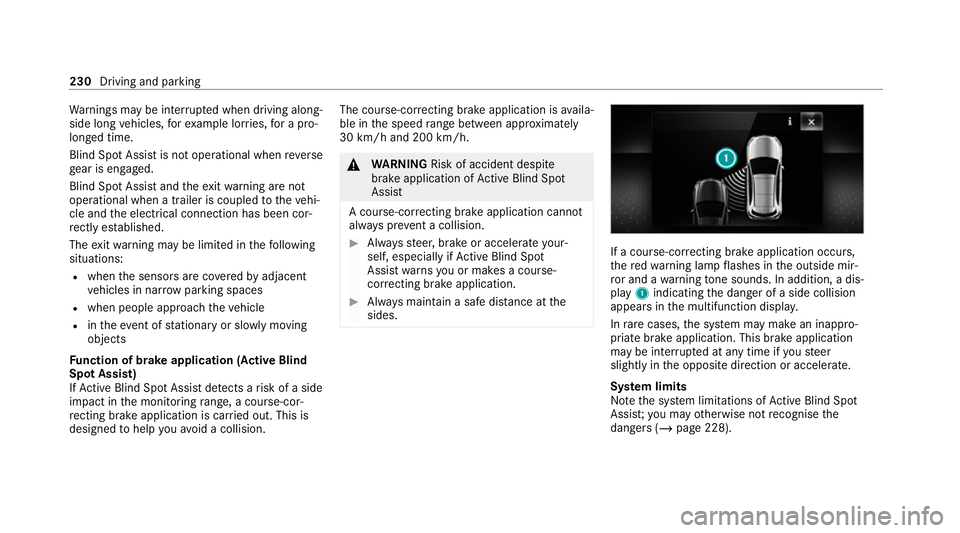
sides. If a course-cor
recting brake application occu rs,
th ere dwa rning lamp flashes in the outside mir‐
ro r and a warning tone sounds. In addition, a dis‐
pl ay 1 indicating the danger of a side collision
appears in the multifunction displa y.
In rare cases, the sy stem may make an inappro‐
priate brake application. This brake application
may be inter rupte d at any time if yousteer
slightly in the opposite direction or accelera te.
Sy stem limits
No tethe sy stem limitations of Active Blind Spot
Assi st;yo u may otherwise not recognise the
dangers (/ page 228). 230
Driving and parking
Page 237 of 469
Setting
Active Lane Keeping Assist
Multimedia sy stem:
4 © 5
Settings 5
Assistance
5 Active Lane Keeping Assist
Setting the sensitivity
% The availability of this function is dependent
on the count ry. #
Select Standard ,Sensitive orOff.
Ac tivating or deactivating the haptic warning #
Select Warning.
Ac tivate or deacti vate the function. Tr
ailer hitch Note
s on trailer operation *
NO
TEMercedes-AMG vehicles #
Obser vethe no tes in the Supplement.
Yo u could otherwise failto recognise
dangers. Obser
vethefo llowing no tes on theto ngue
we ight:
R Do not use a tongue weight that exceeds or
fa lls below the permissible tongue weight
R Use a tongue weight as close as possible to
th e maximum tongue weight
Do not exceed thefo llowing values:
R Perm issible towing capacity
R Perm issible rear axle load of theto wing vehi‐
cle
R Perm issible gross weight of theto wing vehi‐
cle
R Perm issible grossweight of the trailer
R Maximum permissible speed of the trailer
Ensure thefo llowing before starting a journey:
R The tyre pressure on there ar axle of theto w‐
ing vehicle is set for a maximum load
R The lighting of the connected trailer is opera‐
tional R
Vehicles without LED headlamps or MUL‐
TIBEAM LED headlamps: the headlamps
ha ve been set cor rectly
In theeve nt of increased rear axle load, the car/
trailer combination must not exceed a maximum
speed of 100 km/h forre asons concerning the
operating permit. This also applies in countri es
in which the permissible maximum speed for
car/trailer combinations is ab ove100 km/h. Fo
lding the ball neck out or in &
WARNING Risk of accident due tothe
ball neck not being engaged
If th e ball neck is not engaged, the trailer
may come loose. #
Alw ays engage the ball neck as descri‐
bed. 234
Driving and parking
Page 238 of 469
&
WARNING Risk of inju ryfrom ball neck
swinging outwards
The ball neck may swing outwards when
unlo cking or when it has not been properly
engaged.
There is a risk of injury within the ball neck's
ra nge of mo vement! #
Unlock the ball neck only when its
ra nge of mo vement is unobstructed. #
Alw ays be sure the ball neck is engaged
when folding in wards. Re
quirements:
R The vehicle is secured against rolling away.
R The swivel range is clear.
R The trailer cables or adap ter plugs ha vebeen
re mo ved. Fo
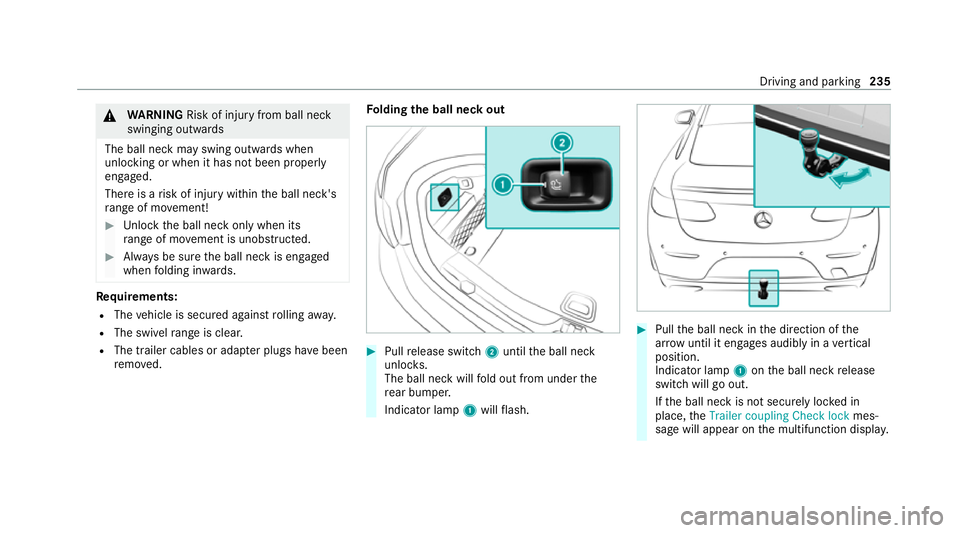
lding the ball neck out #
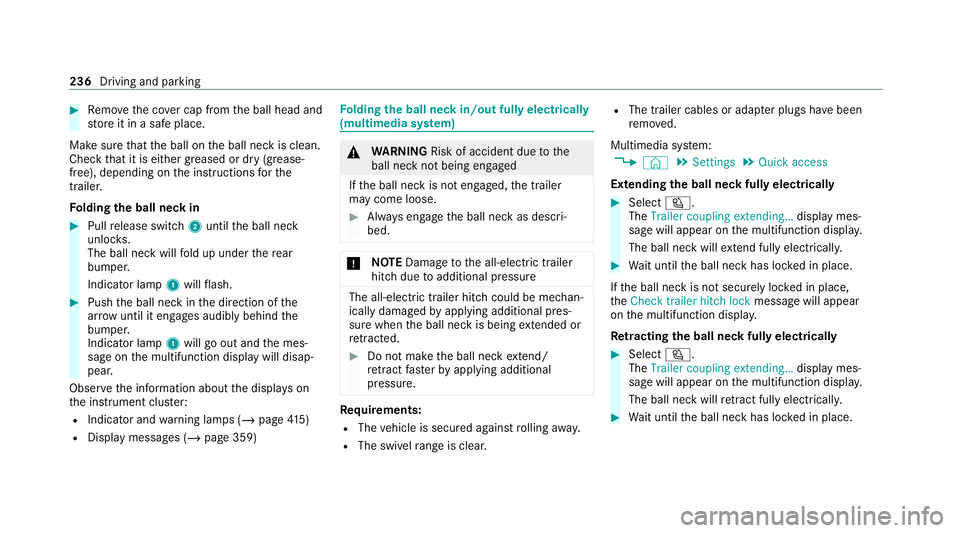
Pull release switch 2until the ball neck
unloc ks.
The ball neck will fold out from under the
re ar bumper.
Indicator lamp 1will flash. #
Pull the ball neck in the direction of the
ar row until it en gage s audibly in a vertical
position.
Indicator lamp 1onthe ball neck release
switch will go out.
If th e ball neck is not securely loc ked in
place, theTrailer coupling Check lock mes‐
sage will appear on the multifunction displa y. Driving and pa
rking 235
Page 239 of 469
#
Remo vethe co ver cap from the ball head and
st ore it in a safe place.
Make sure that the ball on the ball neck is clean.
Check that it is either greased or dr y (grease-
free), depending on the instructions forthe
traile r.
Fo lding the ball neck in #
Pull release switch 2until the ball neck
unloc ks.
The ball neck will fold up under there ar
bumper.
Indicator lamp 1will flash. #
Push the ball neck in the direction of the
ar row until it en gage s audibly behind the
bumper.
Indicator lamp 1will go out and the mes‐
sage on the multifunction display will disap‐
pear.
Obser vethe information about the displa yson
th e instrument clus ter:
R Indicator and warning lamps (/ page415)
R Displ aymessa ges (/ page 359) Fo
lding the ball neck in/out fully electrically
(multimedia sy stem) &
WARNING Risk of accident due tothe
ball neck not being engaged
If th e ball neck is not engaged, the trailer
may come loose. #
Alw ays engage the ball neck as descri‐
bed. *
NO
TEDama getothe all-electric trailer
hitch due toadditional pressure The all-electric trailer hit
chcould be mechan‐
ically damaged byapplying additional pres‐
sure when the ball neck is being extended or
re tracted. #
Do not ma kethe ball neck extend/
re tract faster by applying additional
pressure. Re
quirements:
R The vehicle is secured against rolling away.
R The swivel range is clear. R
The trailer cables or adap ter plugs ha vebeen
re mo ved.
Multimedia sy stem:
4 © 5
Settings 5
Quick access
Extending the ball neck fully electrically #
Select Ü.
The Trailer coupling extending… display mes‐
sage will appear on the multifunction displa y.
The ball neck will extend fully electrically. #
Wait until the ball neck has loc ked in place.
If th e ball neck is not securely loc ked in place,
th eCheck trailer hitch lock message will appear
on the multifunction displa y.
Re tracting the ball ne ckfully electrical ly #
Select Ü.
The Trailer coupling extending… displaymes‐
sage will appear on the multifunction displa y.
The ball neck will retract fully electrically. #
Wait until the ball neck has loc ked in place. 236
Driving and parking
Page 240 of 469
If
th e ball neck is not securely loc ked in place,
th eCheck trailer hitch lock message will appear
on the multifunction displa y.Coupling/uncoupling a trailer
&
WARNING Risk of inju ryfrom theve hicle
le ve l being changed
Ve hicles with le vel control sy stem: the
ve hicle le vel may be changed unin tentional ly,
e.g. by ot her persons. You may become trap‐
ped if you couple up or uncouple a trailer
while theve hicle le vel is changing. In addi‐
tion, other people could become trapped if
th eir limbs are between theve hicle body and
th e tyres or underneath theve hicle.
When coupling up or uncoupling a trailer,
make sure that: #
The doors or tailgate are not opened or
closed. #
You do not initiate the le vel control sys‐
te m and do not operate theDY NA MIC
SELECT switch. #
Do not lock or unlock theve hicle. Re
quirements:
R The ball neck is extended and engaged in a
secu rely loc ked position.
Tr ailers with a 7-pin plug can be connec tedto
th eve hicle with thefo llowing adap ters:
R Adapter plug
R Adapter cable
The trailer will be cor rectly de tected bytheve hi‐
cle only if thefo llowing conditions are me t:
R The trailer is connected cor rectly
R The trailer lighting sy stem is in working order
The functions of thefo llowing sy stems will be
af fected bya cor rectly connected traile r:
R Active Lane Keeping Assist
R ESP ®
trailer stabilisation
R Parking Assist PARKTRONIC
R Active Parking Assist
R Blind Spot Assist or Active Blind Spot Assi stR
Drive AwayAssi st
R Cross Traf fic Alert
R Reversing camera
R 360° camera
R AIR BODY CONTROL
Coupling up a trailer
* NO
TEDama getothest ar ter battery due
to full dischar ge Charging
the trailer battery using the po wer
supply of the trailer can damage thest ar ter
batter y. #
Do not use theve hicle's po wer supply
to charge the trailer batter y. #
Remo vethe co ver cap from the ball head and
st ore it in a safe place (/ page113). #
Position the trailer on a le vel sur face behind
th eve hicle and couple it up totheve hicle. Driving and parking
237
Page 241 of 469
#
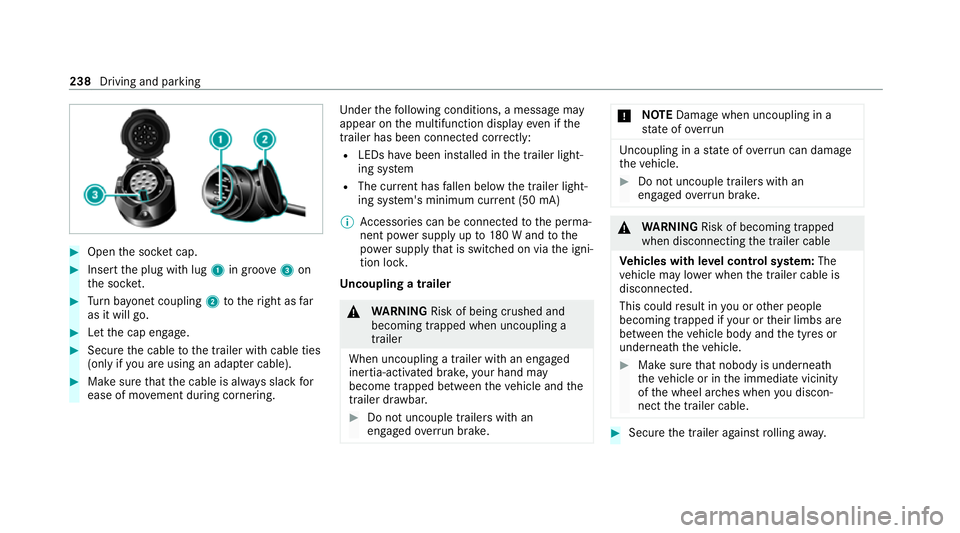
Open the soc ket cap. #
Inse rtthe plug with lug 1in groo ve3 on
th e soc ket. #
Turn bayonet coupling 2totheright as far
as it will go. #
Let the cap engage. #
Secure the cable tothe trailer with cable ties
(only if you are using an adap ter cable). #
Make sure that the cable is alw ays slack for
ease of mo vement during cornering. Under
thefo llowing conditions, a message may
appear on the multifunction display even if the
trailer has been connected cor rectly:
R LEDs ha vebeen ins talled in the trailer light‐
ing sy stem
R The cur rent has fallen below the trailer light‐
ing sy stem's minimum cur rent (50 mA)
% Accessories can be connected tothe perma‐
nent po wer supp lyup to180 W and tothe
po we r supp lythat is swit ched on via the igni‐
tion loc k.
Un coupling a trailer &
WARNING Risk of being crushed and
becoming trapped when uncoupling a
trailer
When uncoupling a trailer wi than engaged
ine rtia-activated brake, your hand may
become trapped between theve hicle and the
trailer dr awbar. #
Do not uncouple trailers with an
engaged overrun brake. *
NO
TEDama gewhen uncoupling in a
st ate of overrun Uncou
pling in a state of overru n can dama ge
th eve hicle. #
Do not uncouple trailers with an
engaged overrun brake. &
WARNING Risk of becoming trapped
when disconnecting the trailer cable
Ve hicles with le vel control sy stem: The
ve hicle may lo wer when the trailer cable is
disconnected.
This could result in you or other people
becoming trapped if your or their limbs are
between theve hicle body and the tyres or
underneath theve hicle. #
Make sure that nobody is unde rneath
th eve hicle or in the immediate vicinity
of the wheel ar ches when you discon‐
nect the trailer cable. #
Secure the trailer against rolling away. 238
Driving and parking
Page 242 of 469
#
Disconnect the electrical connection
between theve hicle and the trailer. #
Uncouple the trailer. #
Place the co ver cap on the ball head. Bicycle
rackfunction &
WARNING Risk of an accident when
using the bicycle rack incor rectly
The bicycle rack may become de tach ed from
th eve hicle in thefo llowing cases:
R the permissible load capacity of the
trailer hitch is exceeded.
R the bicycle rack is used incor rectl y.
R the bicycle rack is secured tothe ball
neck beneath the ball head.
Obser vethefo llowing foryo ur ow n sa fety
and that of other road users: #
always adhere tothe permissible load
capacity of the trailer hitch. #
only use the bicycle rack totranspo rt
bicycles. #
always proper lysecure the bicycle rack
by attaching it tothe ball head. #
only use bicycle rack s appr ovedby
Mercedes-Benz. #
always obser vethe bicycle rack operat‐
ing instructions. *
NO
TEDama geto, or cra cks on, the
trailer hitch due tounsuitable bic ycle
ra ck s or bicycle rack s being used incor‐
re ctly #
use only bicycle rack s appr ovedby
Mercedes-Benz. Depending on
the bicycle rack 's design, up to
th re e bicycles can be transpor ted on the bicycle
ra ck.
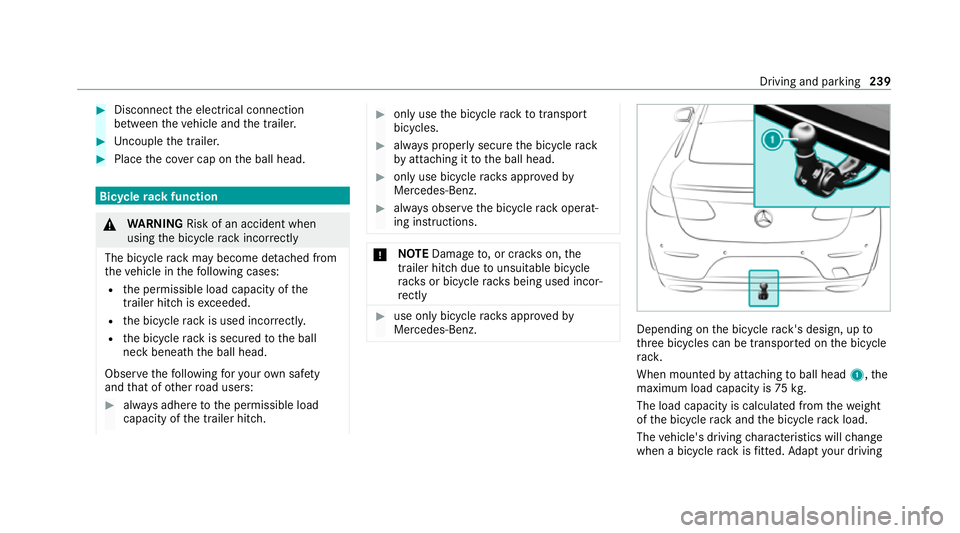
When mounted byattaching toball head 1,the
maximum load capacity is 75kg.
The load capacity is calculated from thewe ight
of the bicycle rack and the bicycle rack load.
The vehicle's driving characteristics will change
when a bicycle rack isfitted. Adapt your driving Driving and parking
239
Page 244 of 469
Note
s onthe instrument display and on-
board compu ter &
WARNING Risk of accident due toan
instrument display malfunction
If th e instrument display has failed or mal‐
functioned, the function restrictions applying
to saf etyre leva nt sy stems are not visible.
The operating saf ety of your vehicle may be
impaired. #
Drive on carefull y. #
Have theve hicle checked immediately
at a qualified specialist workshop. &
WARNING Risk of di stra ction from infor‐
mation sy stems and communications
equipment
If yo u operate information and communica‐
tion equipment integ rated in theve hicle
when driving, you will be distracted from the
traf fic situation. This could also cause youto
lose control of theve hicle. #
Only operate this equipment when the
traf fic situation permits. #
Ifyo u cannot be sure of this, stop the
ve hicle whilst paying attention toroad
and traf fic conditions and ope rate the
equipment with theve hicle stationar y. *
NO
TEMercedes-AMG vehicles #
Obser vethe no tes in the Supplement.
Yo u could otherwise failto recognise
dangers. Yo
u must obse rveth e legal requirements forthe
country in whi chyou are cur rently driving when
operating the on-board computer.
The on-board computer sho wsonly display mes‐
sages and warnings from specific sy stems on
th e multifunction displa y.Yo u must therefore
ensure that your vehicle is alw aysre liable.
If th e operating saf ety of your vehicle is
impaired, park theve hicle immediately and
safel y.Con tact a qualified specialist workshop. Instrument display and on-board computer
241
Page 248 of 469
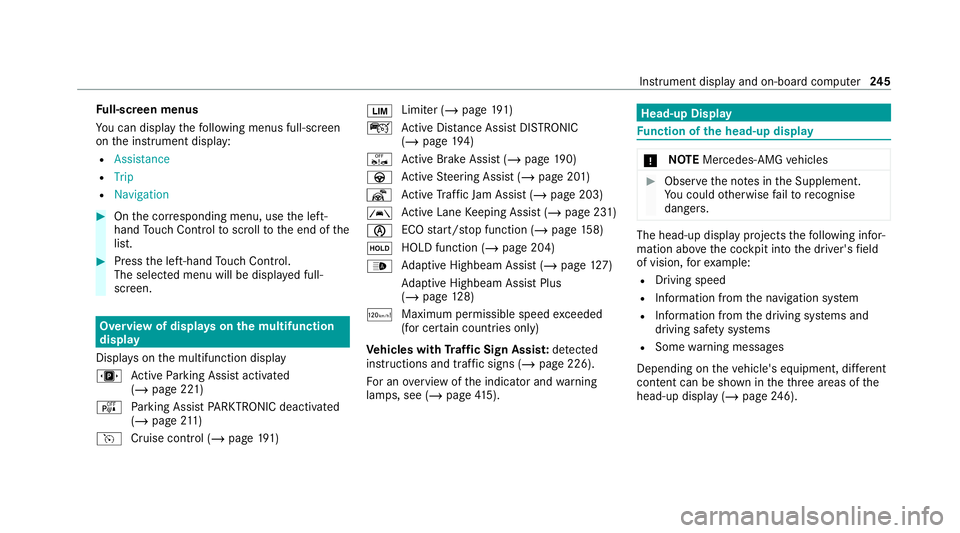
Fu
ll-screen menus
Yo u can displ aythefo llowing menus full-screen
on the instrument display:
R Assistance
R Trip
R Navigation #
Onthe cor responding menu, use the left-
hand Touch Control toscroll tothe end of the
list. #
Press the left-hand Touch Control.
The selected menu will be displ ayed full-
screen. Overview of displa
yson the multifunction
display
Displa yson the multifunction display
u Active Parking Assist activated
(/ page 221)
é Parking Assist PARKTRONIC deacti vated
( / page 211)
h Cruise control (/ page191) È
Limi
ter (/ page191)
ç Active Dis tance Assi stDISTRONIC
(/ page 194)
ê Active Brake Assi st (/ page 190)
à Active Steering Assist (/ page 201)
¬ Active Traf fic Jam Assi st (/ page 203)
à Ac
tive Lane Keeping Assist (/ page 231)
è ECO
start/ stop function (/ page158)
ë HOLD fu
nction (/ page 204)
_ Ad
aptive Highbeam Assist (/ page127)
Ad aptive Highbeam Assist Plus
(/ page 128)
ð Maximum pe rmissible speed exceeded
(for cer tain countries only)
Ve hicles with Traf fic Sign Assis t:de tected
instructions and traf fic signs (/ page 226).
Fo r an overview of the indicator and warning
lamps, see (/ page415). Head-u
p Display Fu
nction of the head-up display *
NO
TEMercedes-AMG vehicles #
Obser vethe no tes in the Supplement.
Yo u could otherwise failto recognise
dangers. The head-up displ
ayprojects thefo llowing infor‐
mation abo vethe cockpit into the driver's field
of vision, forex ample:
R Driving speed
R Info rm ation from the navigation sy stem
R Information from the driving sy stems and
driving saf ety sy stems
R Some warning messages
Depending on theve hicle's equipment, dif fere nt
content can be shown in theth re e areas of the
head-up display (/ page246). Instrument display and on-boa
rdcompu ter245