climate control MERCEDES-BENZ E-CLASS CABRIOLET 2020 User Guide
[x] Cancel search | Manufacturer: MERCEDES-BENZ, Model Year: 2020, Model line: E-CLASS CABRIOLET, Model: MERCEDES-BENZ E-CLASS CABRIOLET 2020Pages: 469, PDF Size: 8.47 MB
Page 148 of 469
The
stationary heater/ ventilation will switch off
au tomatical lyafte r 50 minutes.
Operation using the app: thest ationary
heater/ ventilation can also be operated via the
Mercedes me connect app. You can find fur ther
information in the separate Owner's Manual at
https://moba.i.daimler.com/mar kets/ece-r ow/
baix/cars/connectme/en_GB/#emotions/
St artseite.html.
Setting thest ationary heater/stationary ven‐
tilation via the multimedia sy stem #
Call up the air conditioning menu
(/ page 140). #
Select Auxiliary heating.
Selecting the departu retime #
Select the time TIME A: XX, TIME B: XXor
TIME C: XX.
Setting the departu retime #
Select the time TIME A: XX, TIME B: XXor
TIME C: XX. #
Select the pen beside the time. #
Set a time. Setting
thest ationary heater/ventilation via
re mo tecont rol
Re quirements:
R The fuel tank is filled toat least there ser ve
le ve l.
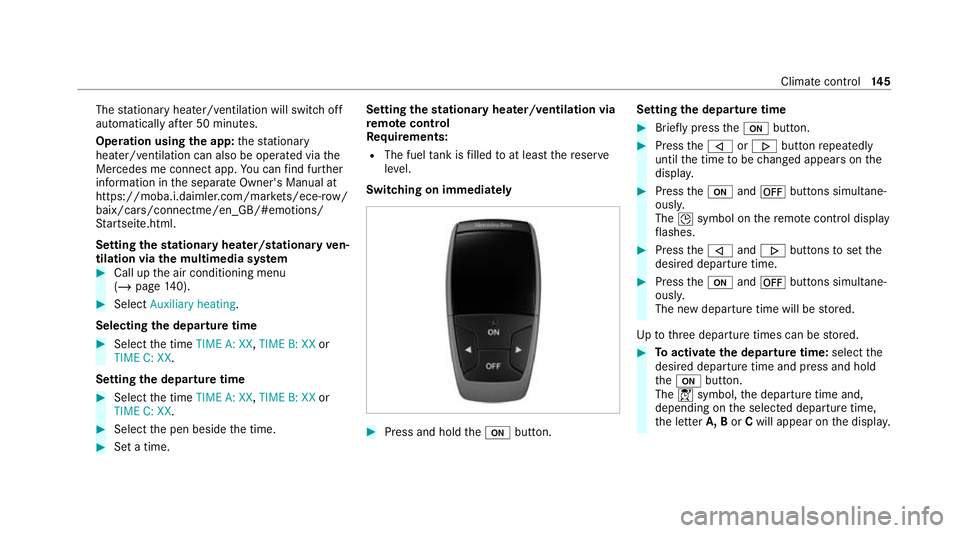
Switching on immedia tely #
Press and hold theu button. Setting
the departu retime #
Brie fly press theu button. #
Press the, or. button repeatedly
until the time tobe changed appears on the
displa y. #
Press theu and^ buttons simultane‐
ousl y.
The Îsymbol on there mo tecontrol displ ay
fl ashes. #
Press the, and. buttons toset the
desired departure time. #
Press theu and^ buttons simultane‐
ousl y.
The new departure time will be stored.
Up tothre e departure times can be stored. #
Toactivate the departu retime: select the
desired departure time and press and hold
th eu button.
The Ísymbol, the departure time and,
depending on the selected departure time,
th e letter A, BorCwill appear on the displa y. Climate cont
rol14 5
Page 150 of 469
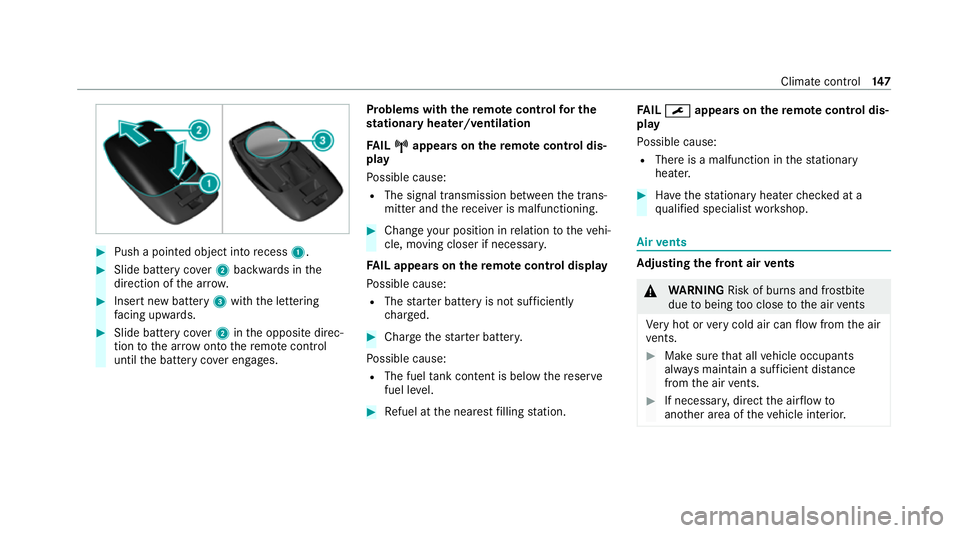
#
Push a pointed object into recess 1. #
Slide battery co ver2 backwards in the
direction of the ar row. #
Insert new battery 3with the lettering
fa cing up wards. #
Slide battery co ver2 inthe opposite direc‐
tion tothe ar row onto there mo tecontrol
until the battery co ver engages. Problems with
there mo tecont rolfo r the
st ationary heater/ventilation
FA IL¨
¨ appea rson there mo tecont rol dis‐
play
Po ssible cause:
R The signal transmission between the trans‐
mitter and there cei ver is malfunctioning. #
Change your position in relation totheve hi‐
cle, moving closer if necessar y.
FA IL appea rson there mo tecont rol display
Po ssible cause:
R The star ter battery is not suf ficiently
ch arge d. #
Char gethest ar ter batter y.
Po ssible cause:
R The fuel tank content is below there ser ve
fuel le vel. #
Refuel at the nearest filling station. FA
IL¯ ¯ appea rson there mo tecont rol dis‐
play
Po ssible cause:
R There is a malfunction in thest ationary
heater. #
Have thest ationary heater checked at a
qu alified specialist workshop. Air
vents Ad
justing the front air vents &
WARNING Risk of bu rns and frostbite
due tobeing too close tothe air vents
Ve ry hot or very cold air can flow from the air
ve nts. #
Makesure that all vehicle occupants
alw ays maintain a suf ficient di stance
from the air vents. #
If necessa ry, direct the air flow to
ano ther area of theve hicle interior. Climate control
147
Page 373 of 469
Climate control
Displ
aymessages
Possible causes/consequences and M
MSolutions
& inoperative See Owner's
Man. *T
hestationary heater is temp orarily malfunctioning. #
When theve hicle is stationary on a le vel sur face and the engine has cooled down, make up tofour attem ptsto
switch on thest ationary heater, waiting se veral minutes between each attem pt. #
Ifth est ationary heater does not swit chon, consult a qualified specialist workshop.
&
inoperative Battery low *T
he on-board electrical sy stem voltage is too lo w.
The stationary heater has swit ched itself off. #
Drive an extended di stance until the battery has reached a suf ficient charge leve l again.
&
inoperative Refuel vehicle *T
here is too little fuel in the fuel tank. The stationary heater cannot be swit ched on. #
Refuel theve hicle. 37 0
Displaymessa ges and warning/indicator lamps
Page 434 of 469
Air-conditioning sy
stem
see Climate control
Air-recirculation mode ............................14 2
Air-water duct .......................................... 295
Ke eping free ........................................2 95
Airbag ........................................................ .42
Ac tivation .............................................. 36
Fr ont airbag (driver, front passenger) ....42
Head airbag ........................................... 42
Ins tallation locations ............................ .42
Knee airbag ........................................... 42
Overview ............................................... 42
PA SSENGER AIR BAG indicator lamp .... .47
Pr otection ..............................................43
Re duced pr otection ...............................44
Side airbag ............................................ 42
AI RC AP
Ac tivating .............................................. 85
Deactivating .......................................... 85
Ai rflow
Setting ................................................ .139
AIRSCARF Adjusting the outlets ........................... 14 8
Switching on/off ................................. 107Alarm sy
stem
see ATA (anti-theft alarm sy stem)
All-wheel drive see 4MATIC
Ambient lighting Setting (multimedia sy stem) ................1 31
Android Auto
see Smartphone integration
Animals Pets in theve hicle ................................. 70
Anti-lock braking sy stem
see ABS (Anti-lock Braking Sy stem)
Anti-skid chains
see Snow chains
Anti-theft pr otection
Ad ditional door lock ...............................74
Immobiliser ........................................... 92
Anticipatory occupant pr otection
see PRE- SAFE®
(anticipatory occu‐
pant pr otection)
see PRE-SAFE ®
PLUS (anticipatory
occupant pr otection plus) Apple CarPlay
®
see Smartphone integration
Assistance sy stems
see Driving saf ety sy stem
ASS YST PLUS ........................................... 288
Battery disconnection pe riods .............2 89
Displ aying the service due date ........... 288
Fu nction/no tes ................................... 288
Re gular maintenance work .................. 288
Special service requ irements .............. 288
ATA (anti-theft ala rmsystem) .................. 93
Deactivating the alarm .......................... 93
Fu nction ................................................ 93
Fu nction of interior pr otection ............... 94
Priming/deactivating interior pr otec‐
tion ........................................................ 95
Priming/deactivating tow- aw ay pro‐
te ction ................................................... 94
To w- aw ay protection function ................93
AT TENTION ASSI ST.......................... 22 4, 226
Fu nction .............................................. 224
Setting ................................................. 226
Sy stem limitations ...............................2 24 Index
431
Page 436 of 469
Blind Spot Assi
st..................................... 228
Ac tivating/deactivating ...................... .231
Fu nction .............................................. 228
Sy stem limitations ...............................2 28
Blo wer
see Climate control
BlueTEC see AdBlue ®
Bonn et
Re setting (active bonnet) .................... 289
Boot lid Closing .................................................. 80
HANDS-FREE ACCESS .......................... .80
Locking separa tely ................................ .81
Opening .................................................79
Opening dimensions ............................3 54
Boot separator Closing .................................................. 84
Opening .................................................84
Brake Assi stSystem
see BAS (Brake Assi stSystem)
Brake fluid Notes .................................................. 353 Brake
forc e distribution
EBD (Elect ronic Brake forc e Distribu‐
tion) ..................................................... 185
Brakes ABS (Anti-lo ckBraking Sy stem) ........... 182
Ac tive Brake Assi st.............................. 186
Ad aptive brake lights .......................... .190
BA S (Brake Assi stSystem) .................. 182
Driving tips .......................................... 15 6
EBD (Electronic Brake forc e Distribu‐
tion) ..................................................... 185
HOLD function .................................... .204
Limi ted braking ef fect (salt-trea ted
ro ads) .................................................. 15 6
New/replaced brakepads/brake
discs .................................................... 154
Ru nning-in no tes ..................................1 54
Braking assistance see BAS (Brake Assi stSystem)
Breakdown Overview of the help functions .............. 16
To w- starting ........................................ 322
To wing away ........................................ 318
Tr ansporting theve hicle ......................3 20
Wheel change ...................................... 335 Breakdown
see Flat tyre
Buttons Steering wheel .....................................2 43 C
Calls Mercedes me ...................................... 269
Camera see 360° Camera
see Reversing camera
Car key
see Key
Car wash
see Care
Car wash (care) ....................................... 295
Car-to-X-Communication Displaying hazard warnings ................ .263
Care .......................................................... 302
360° Camera ....................................... 301
Air-water duct ...................................... 295
Car wash ............................................. 295
Carpet .................................................3 02 Index
433
Page 438 of 469
Cleaning
see Care
Climate control ........................................ 13 9
Ac tivating/deactivating the A/C
function (cont rol panel) ...................... .140
Ac tivating/deactivating the A/C
function (MBUX multimedia sy stem) ... 14 0
Ac tivating/deactivating the synchro‐
nisation function (cont rol panel) .......... 141
Ac tivating/deactivating the synchro‐
nisation function (MBUX multimedia
sy stem) ................................................ 141
Air-reci rculation mode ........................ .142
Au tomatic control ................................ 141
Calling up the air conditioning menu ... 14 0
Climate style function .......................... 141
Demi sting the windscreen ...................1 39
Demisting wind ows............................. 14 2
Fr ont air vents ..................................... 147
Inserting/removing theflacon (fra‐
gr ance sy stem) .................................... 14 2
Ionisation ............................................. 14 2
No te .................................................... 13 9
Re ar air vents ...................................... 14 8
Re sidual heat ....................................... 14 2Setting (MBUX multimedia sy
stem) ..... 14 0
Setting the air distribution ...................1 39
Setting the air flow ............................... 13 9
Setting the climate style ......................1 41
Setting the fragrance sy stem ............... 14 2
Setting thete mp erature ......................1 39
St ationary heater/ ventilation .............. 14 3
Switching on/off ................................. 14 0
Switching there ar wind owheater
on/off .................................................1 39
THERMATIC control panel .................... 13 9
THERMOTRONIC contro l panel ............13 9
Ve ntilating theve hicle (con venience
opening) ................................................ 91
Climate style
Fu nction ............................................... 141
Setting ................................................. 141
Cockpit ........................................................ .6
Overview .................................................6
Cof fee cup symbol
see ATTENTION ASSIST
Combination switch ................................124
Compu ter
see On-board computer Consum
ption indicator
Calling up ............................................ 16 4
Con venience closing ................................. 91
Con venience opening ................................ 91
Coolant (engine) Check le vel .......................................... 293
No tes .................................................. 353
Cooling see Climate control
Co pyright ...................................................34
Cornering light ........................................ .125
Cross Traf fic Alert .................................. .224
Crosswind Assist Function/no tes ................................... 185
Cruise control .......................................... 191
Ac tivating ............................................ 19 2
Buttons ................................................ 19 2
Calling up a speed .............................. .192
Deactivating ........................................ 19 2
Fu nction ............................................... 191
Re quirements ...................................... 19 2
Selecting ............................................. 19 2
Setting a speed ................................... 19 2 Index
435
Page 448 of 469
Head-up display
....................................... 24 6
Ad justing display elements (on-board
compu ter) ............................................ 24 6
Ad justing the brightness (on-board
computer) ............................................ 24 6
Fu nction .............................................. 24 5
Menu (on-board computer) .................. 24 6
Operating the memory function ........... 11 2
Setting the position (on-board com‐
puter) ................................................... 24 6
Switching on/off ................................. 247
Headlamp flashing .................................. 124
Headlamps see Automatic driving lights
Heating see Climate control
Help call see Mercedes-Benz emergency call sy stem
High beam Activating/deactivating ...................... .124
Ad aptive Highbeam Assist .................. .127
Ad aptive Highbeam Assist Plus .......... .128
High-pressure cleaner (care) ................. 296Hill
Start Assist ....................................... 204
HOLD function ......................................... 204
Fu nction/no tes ................................... 204
Switching on/off ................................. 205
Home screen (media display) Overview ............................................. 24 9
Hooking the luggage net .........................117 I
i-Size child seat securing sy stem
Fitting .................................................... 60
i‑Size child seat securing sy stem
Seats suitable for attaching ................... 59
Identification plate Engine ................................................. 343
Vehicle ................................................ 343
Ignition Switching on (S tart/S top button) ........ 15 0
Ignition key
see Key
Immobiliser ................................................ 92 Implied
warranty
Ve hicle ................................................... 31
In-Car Of fice ............................................ .273
Fe atures .............................................. 273
Indicator lamps see Warning/indicator lamps
Individual drive prog ram
Con figuring .......................................... 16 3
Selecting ............................................. 16 3
Inspection see AS SYST PLUS
Instrument clus ter
Fu nction/no tes ............................2 41,24 2
Instrument display Function/no tes ................................... 24 2
Instrument clus ter ................................. 10
Wa rning/indicator lamps .................... .415
Instrument display and on-board
compu ter
Fu nction/no tes .................................... 241
Intelligent Light Sy stem
Ac tive headla mps ................................ 12 5
Ad aptive Highbeam Assist .................. .127 Index
445