radio MERCEDES-BENZ E-CLASS CABRIOLET 2020 User Guide
[x] Cancel search | Manufacturer: MERCEDES-BENZ, Model Year: 2020, Model line: E-CLASS CABRIOLET, Model: MERCEDES-BENZ E-CLASS CABRIOLET 2020Pages: 469, PDF Size: 8.47 MB
Page 268 of 469
Obser
vethe additional information on stowing
mobile communications devices cor rectly:
R Loading theve hicle (/ page113)
Blue tooth ®
connection:
The menu view and theav ailable functions in the
te lephone menu are in part dependent on the
Blu etoo th®
profile of the connected mobile
phone. Full functionality is only available if the
mobile phone supports bo thofthefo llowing
Blue tooth ®
profiles:
R PBAP (Phone Book Access Profile)
- The contacts on the mobile phone are
shown automatically on the multimedia
sy stem.
R MAP (Message Access Profile)
- The mobile phone message functions can
be used on the multimedia sy stem.
Ir re spective of this, Blue tooth ®
audio functional‐
ity can byused with any mobile radio unit.
Fo r information on thera nge of functions of the
mobile radio unit tobe connec ted, see the man‐
ufacturer's operating instructions. Ne
twork connection:
The following cases can lead tothe call being
disconnected while theve hicle is in motion:
R You swit chinto a transmission/reception
st ation, in which no communication channel
is free.
R The SIM card used is not compatible with the
network available
R a mobile phone with "Twincard" is logged into
th e network with the second SIM card at the
same time
The multimedia sy stem supports calls in HD
Vo ice ®
for impr oved speech qualit y.Arequ ire‐
ment forth is is that the mobile phone and the
mobile phone network pr ovider of the person
yo u are calling suppo rtHD Voice ®
.
Depending on thequ ality of the connection, the
vo ice quality may fluctuate.
Fu rther information can be obtained from a
Mercedes-Benz service centre or at: https://
www.mercedes-benz.com/connect MBUX multimedia sy
stem 265
Page 287 of 469
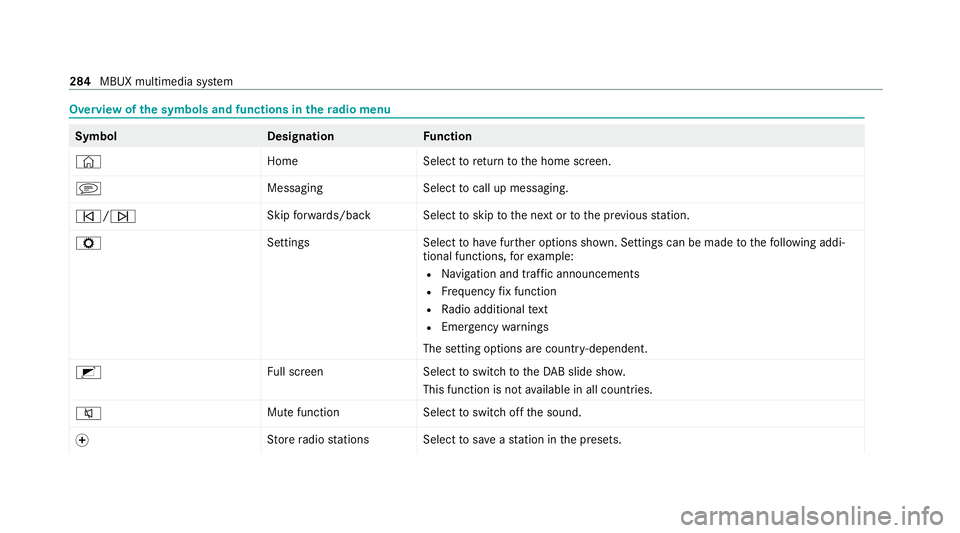
Overview of
the symbols and functions in thera dio menu Symbo
lD esignationFunction
© HomeSelecttoreturn tothe home screen.
j MessagingSelecttocall up messaging.
û/ü Skip
forw ards/bac kS electtoskip tothe next or tothe pr evious station.
Z SettingsS electtohave further options shown. Settings can be made tothefo llowing addi‐
tional functions, forex ample:
R Navigation and traf fic announcements
R Frequency fix function
R Radio additional text
R Emergency warnings
The setting options are countr y-dependent.
2 Full screen Selecttoswitch totheDA B slide sho w.
This function is not available in all countries.
8 Mute function
Selecttoswitch off the sound.
f St
ore radio stations Select tosave ast ation in the presets. 284
MBUX multimedia sy stem
Page 288 of 469
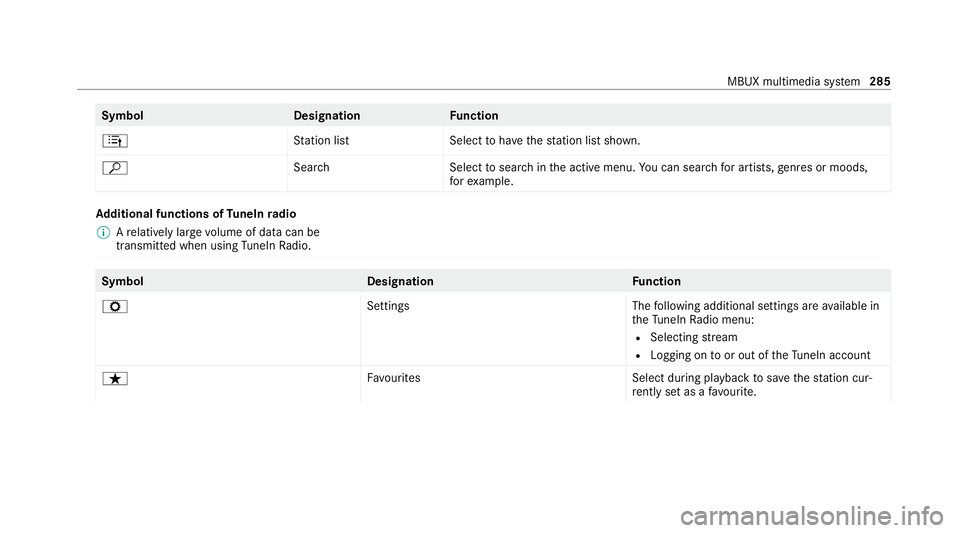
Symbol
DesignationFunction
4 Station lis tS electtohave thest ation list shown.
ª Search Selecttosear chinthe active menu. You can sear chfor artists, genres or moods,
fo rex ample. Ad
ditional functions of TuneIn radio
% Arelatively lar gevolume of data can be
transmitte d when using TuneIn Radio. Symbol
DesignationFunction
Z SettingsThefollowing additional settings are available in
th eTu neIn Radio menu:
R Selecting stre am
R Logging on toor out of theTu neIn account
ß Favourites Select during playbacktosave thest ation cur‐
re ntly set as a favo urite. MBUX multimedia sy
stem 285
Page 289 of 469
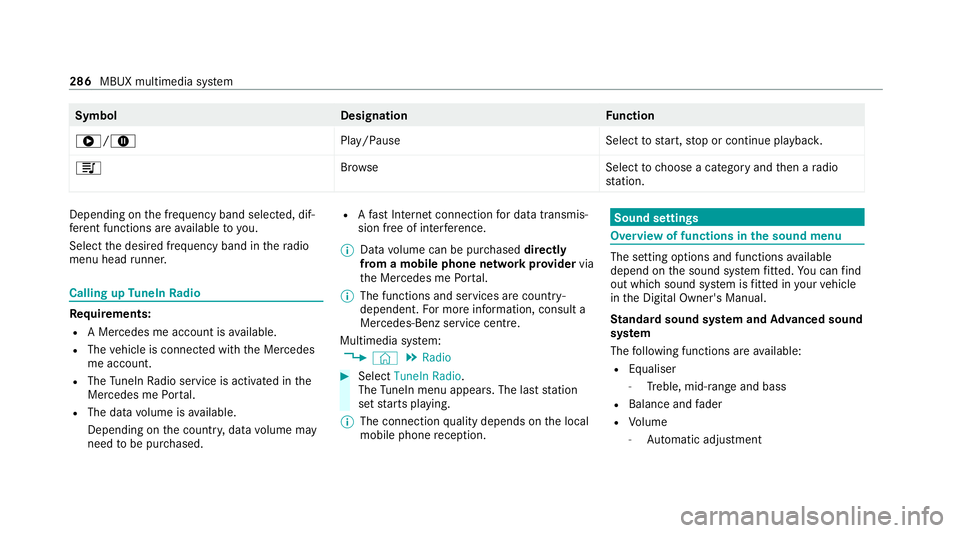
Symbol
DesignationFunction
6/8 Play/PauseSelecttostart, stop or continue playbac k.
5 Brows eS electtochoose a category and then a radio
st ation. Depending on
the frequency band selected, dif‐
fe re nt functions are available to you.
Select the desired frequency band in thera dio
menu head runner. Calling up
TuneIn Radio Re
quirements:
R A Mercedes me account is available.
R The vehicle is connected with the Mercedes
me account.
R The TuneIn Radio service is activated in the
Mercedes me Portal.
R The data volume is available.
Depending on the count ry, data volume may
need tobe pur chased. R
Afast Internet connection for data transmis‐
sion free of inter fere nce.
% Data volume can be pur chased directly
from a mobile phone network pr ovider via
th e Mercedes me Portal.
% The functions and services are countr y-
dependent. For more information, consult a
Mercedes-Benz service centre.
Multimedia sy stem:
4 © 5
Radio #
Select TuneIn Radio.
The TuneIn menu appears. The la st station
set starts playing.
% The connection quality depends on the local
mobile phone reception. Sound settings
Overview of functions in the sound menu
The setting options and functions
available
depend on the sound sy stem fitted. You can find
out which sound sy stem is fitted in your vehicle
in the Digital Owner's Manual.
St andard sound sy stem and Advanced sound
sy stem
The following functions are available:
R Equaliser
- Treble, mid-range and bass
R Balance and fader
R Volume
- Automatic adju stment 286
MBUX multimedia sy stem
Page 344 of 469
Note
s ontech nical data
* NO
TEMercedes-AMG vehicles #
Obser vethe no tes in the Supplement.
Yo u could otherwise failto recognise
dangers. The
tech nical da tawa s de term ined in accord‐
ance with EU Directives. The data stated on ly
applies tovehicles with standard equipment. Yo u
can obtain fur ther information from a Mercedes-
Benz Service Centre.
Only for ce rtain countries: you can find vehi‐
cle-specific vehicle data in the COC documents
(CERTIFIC ATE OF CONFORMITY). These pape rs
are included with theve hicle. On-board electronics
Note
s on tampering with the engine elec‐
tronics *
NO
TEPremature wearthro ugh improper
main tenance Improper maintenance may cause
vehicle
components towe ar more quickly and the
ve hicle's operating permit may be in valida‐
te d. #
Alw ays ha vewo rkon the engine elec‐
tronics and related components car ried
out at a qualified specialist workshop. Tw
o-w ayradios Note
s onfitting two-w ayradios &
WARNING Risk of accident due to
improper workon two-w ayradios
If two-w ayradios are manipulated or retrofit‐
te d incor rectl y,the electromagnetic radiation
from the two-w ayradios can inter fere with th
eve hicle electronics and jeopardise the
operating saf ety of theve hicle. #
You should ha veall workon electrical
and electronic components car ried out
at a qualified specialist workshop. &
WARNING Risk of accident from incor‐
re ct ope ration of two-w ayradios
If yo u use two- wayra dios in theve hicle
improperly, their electromagnetic radiation
can disrupt theve hicle's electronics. This is
true in thefo llowing situations, in particular:
R The two-w ayradio is not connec tedto an
ex terior aerial.
R The exterior aerial is fitted inco rrectly or
is not a lo w-reflection aerial.
This could jeopardise the operating saf ety of
th eve hicle. #
Have the lo w-reflection exterior aerial
fi tted at a qualified specialist workshop. Te
ch nical da ta341
Page 345 of 469
#
When operating two-w ayradios in the
ve hicle, alw ays connect them tothe
lo w- reflection exterior aerial. *
NO
TEInva lidation of the operating per‐
mit due tofailure tocomply wi th the
instructions for ins tallation and use The operating permit may be in
validated if
th e instructions for ins tallation and use of
two-w ayradios are not obser ved. #
Only use appr oved frequency bands. #
Obser vethe maximum permissible out‐
put po wer in these frequency bands. #
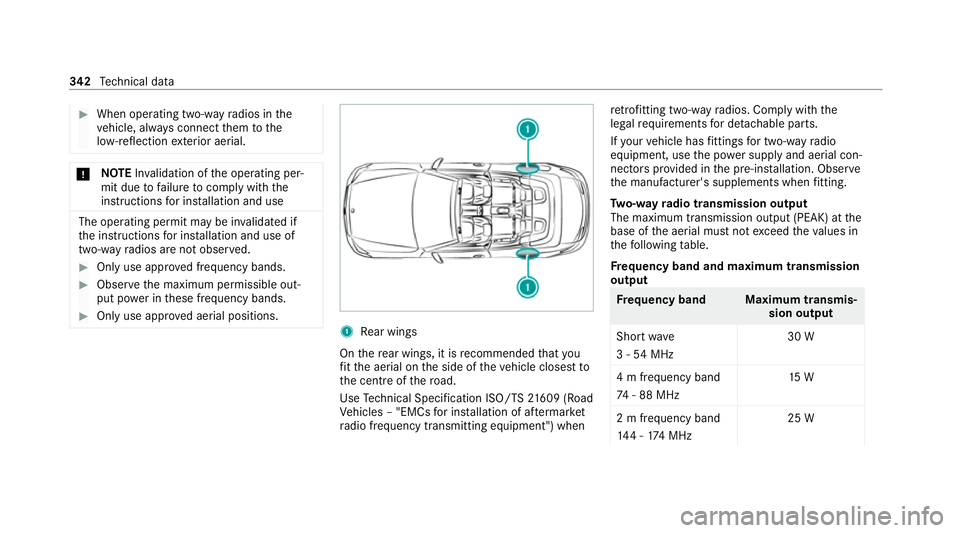
Only use appr oved aerial positions. 1
Rear wings
On there ar wings, it is recommended that you
fi t th e aerial on the side of theve hicle closest to
th e cent reofthero ad.
Use Tech nical Specification ISO/TS 21609 (Road
Ve hicles – "EMCs for ins tallation of af term arket
ra dio frequency transmitting equipment") when re
trofitting two-w ayradios. Comply with the
legal requirements for de tach able parts.
If yo ur vehicle has fittings for two-w ayradio
equipment, use the po wer supp lyand aerial con‐
nec tors prov ided in the pre-ins tallation. Obser ve
th e manufacturer's supplements when fitting.
Tw o-w ayradio transmission output
The maximum transmission output (PEAK) at the
base of the aerial must not exceed theva lues in
th efo llowing table.
Fr equency band and maximum transmission
output Fr
equency band Maximum transmis‐
sion output
Sho rtwa ve
3 - 54 MHz 30 W
4 m frequency band
74 - 88 MHz 15 W
2 m frequency band
14 4 - 174 MHz 25 W342
Tech nical da ta
Page 346 of 469
Fr
equency band Maximum transmis‐
sion output
trunked radio sys‐
te m/T etra
380 - 460 MHz 10 W
70 cm frequency
band
420 - 450 MHz 15 W
Tw o-w ayradio
(2G/3G/4G) 10 WThe
following devices can be used in theve hicle
without restrictions:
R two-w ayradios with a maximum transmission
output of up to100 mW
R two-w ayradios with transmit ter frequencies
in the 380 - 410 MHz frequency band and a
maximum transmission output of up to2 W
(trunked radio sy stem/T etra)
R mobile phones (2G/3G/4G) There are no
restrictions when positioning the
aerial on the outside of theve hicle forth efo llow‐
ing frequency bands:
R trunked radio sy stem/T etra
R 70 cm frequency band
R 2G/3G/4G Ra
dio ope rating permits forve hicle comp o‐
nents
Manufacturer information about wireless vehicle
components can be found using theke y phrase
"Radio operating permits" in the Digital Owner's
Manual in theve hicle, on the internet and in the
app. Ve
hicle identification plate, VIN and engine
number overview
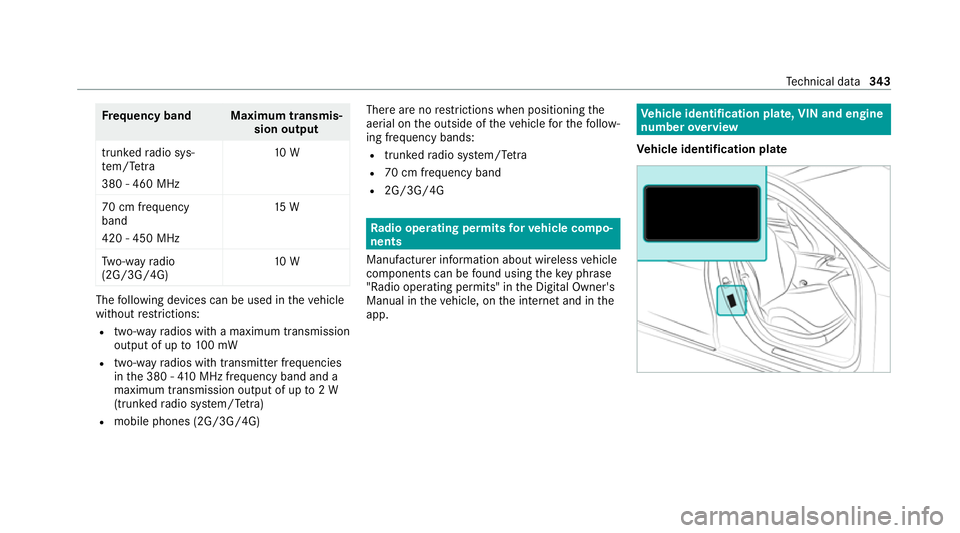
Ve hicle identification plate Te
ch nical da ta343
Page 367 of 469
Display messages
Possible causes/consequences and M
MSolutions
Á Key not detected (white dis‐
play message) *T
hekey is cur rently und etected. #
Change the location of theke y in theve hicle. #
Ifth eke y is still not recognised, place it in the slot forst arting with theke y (/ page152).
Á Key not detected (red dis‐
play messa ge) *T
hekey cannot be de tected and may no longer be in theve hicle.
The key is no lon ger in theve hicle and you swit choff the engine:
R You can no lon gerst art the engine.
R You cannot centrally lock theve hicle. #
Ensure that theke y is in theve hicle.
If th eke y de tection function has a malfunction due toast ro ng radio signal source: #
Stop theve hicle immediately in accordance with the traf fic conditions. #
Place theke y in the slot forst arting the engine with theke y (/ page152).
Place the key in the
marked space See Owner's
Manual *K
eydetection is malfunctioning. #
Change the location of theke y in theve hicle. #
Place theke y in the slot forst arting the engine with theke y (/ page152). 364
Displaymessa ges and warning/indicator lamps
Page 408 of 469
Ty
re pressure moni tor Display messages
Possible causes/consequences and M
MSolutions
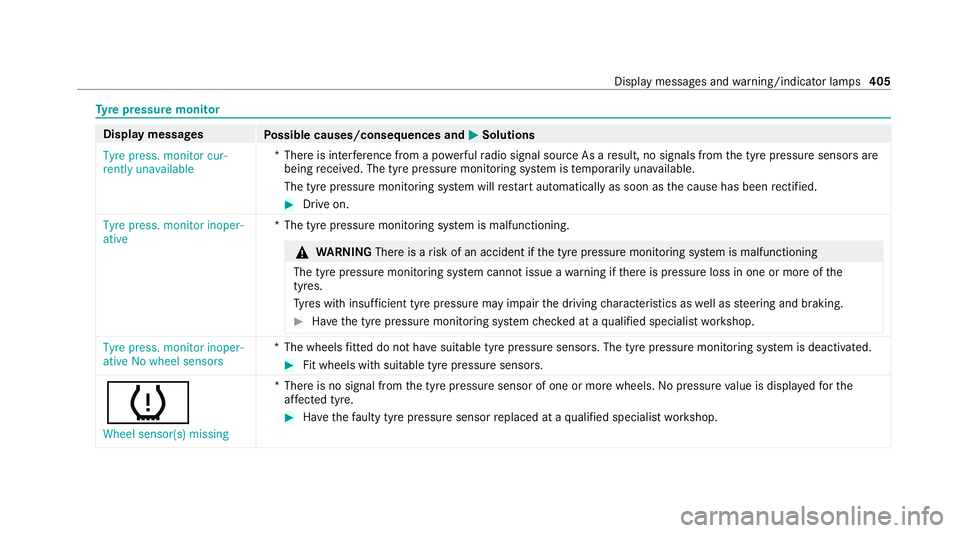
Tyre press. monitor cur-
rently unavailable *T
here is inter fere nce from a po werful radio signal source As a result, no signals from the tyre pressure sensors are
being recei ved. The tyre pressure monitoring sy stem is temp orarily una vailable.
The tyre pressure monitoring sy stem will restart automatically as soon as the cause has been rectified. #
Drive on.
Tyre press. monitor inoper-
ative *T
he tyre pressure monitoring sy stem is malfunctioning. &
WARNING Thereis a risk of an accident if the tyre pressure monitoring sy stem is malfunctioning
The tyre pressure monitoring sy stem cann otissue a warning if there is pressure loss in one or more of the
tyres.
Ty res with insuf ficient tyre pressure may impair the driving characteristics as well as steering and braking. #
Have the tyre pressure monitoring sy stem checked at a qualified specialist workshop. Tyre press. monitor inoper-
ative No wheel sensors
*T
he wheels fitted do not ha vesuitable tyre pressure sensors. The tyre pressure monitoring sy stem is deactivated. #
Fit wheels with suitable tyre pressure sensors.
h
Wheel sensor(s) missing *T
here is no signal from the tyre pressure sensor of one or more wheels. Nopressure value is displa yedfo rthe
af fected tyre. #
Have thefa ulty tyre pressure sensor replaced at a qualified specialist workshop. Display messages and
warning/indicator lamps 405
Page 447 of 469
Fo
il co vering
Ra dar and ultrasonic sensors .............. 181
Fo lding draught stop
Care .................................................... 300
Fitting .................................................... 86
Re moving ............................................. .86
Fr ag rance
see Fragrance sy stem
Fr ag rance sy stem .................................... 14 2
Inserting/removing theflacon ............ .142
Setting ................................................. 14 2
Fr ee software ............................................ 34
Fr equencies
Mobile phone ...................................... 342
Tw o-w ayradio ...................................... 342
Fr ont airbag .............................................. .42
Fr ont passenger seat
see Seat
Fu el .......................................................... .348
Ad ditives .............................................3 48
Diesel ................................................. .348
E10 ...................................................... 347
Fu elreser ve ........................................ 349 Low outside
temp eratures ...................3 48
Pe trol ................................................... 347
Quality (diesel) .................................... 348
Quality (p etro l) .................................... .347
Re fuelling ............................................ 16 9
Sulphur content ................................... 347
Ta nk content ....................................... 349
Fu nction seat
see Door cont rol panel
Fu ses ........................................................ 322
Before replacing a fuse ........................ 322
Fu se assignment diagram ...................3 22
Fu se box in the boot ............................3 24
Fu se box in the engine compartment .. 323
Fu se box in the front passenger foot‐
we ll ...................................................... 324
Fu se box on the dashboard ................. 324
No tes .................................................. 322 G
Garage door opener Cleari ngthe memory ........................... 17 7
Opening or closing the door ................1 77
Programming buttons .......................... 175
Re solving problems ............................. 17 7Synchronising
thero lling code ............ .176
Gearshift recommendation .....................167
Genera l operating permit number
(EU) .......................................................... .343
Genuine parts ............................................ 21
Genuine wood (Care) .............................. 302
Glide mode .............................................. .168 H
Handbrake see Electric parking brake
Handling characteristics (unusual) ....... 325
HANDS-FREE ACCESS ................................ 80
Haza rdwa rning lights ............................ .124
Head airbag ............................................... 42
Head le vel heating (AIRSCARF) ..............107
Head restra int
Fr ont (adjusting mechanically) .............1 00
Re ar (fitting/removing) ........................ 102444
Index