reset MERCEDES-BENZ E-CLASS CABRIOLET 2020 User Guide
[x] Cancel search | Manufacturer: MERCEDES-BENZ, Model Year: 2020, Model line: E-CLASS CABRIOLET, Model: MERCEDES-BENZ E-CLASS CABRIOLET 2020Pages: 469, PDF Size: 8.47 MB
Page 287 of 469
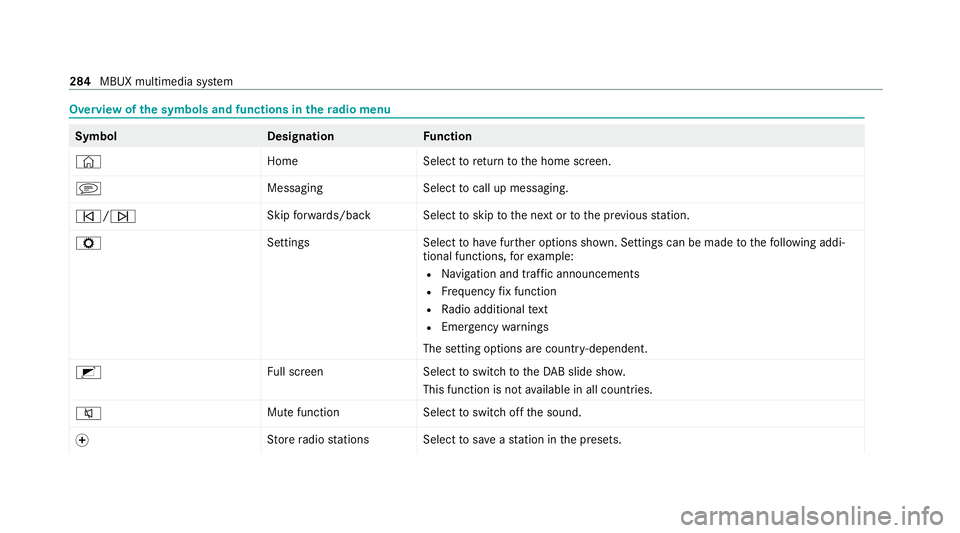
Overview of
the symbols and functions in thera dio menu Symbo
lD esignationFunction
© HomeSelecttoreturn tothe home screen.
j MessagingSelecttocall up messaging.
û/ü Skip
forw ards/bac kS electtoskip tothe next or tothe pr evious station.
Z SettingsS electtohave further options shown. Settings can be made tothefo llowing addi‐
tional functions, forex ample:
R Navigation and traf fic announcements
R Frequency fix function
R Radio additional text
R Emergency warnings
The setting options are countr y-dependent.
2 Full screen Selecttoswitch totheDA B slide sho w.
This function is not available in all countries.
8 Mute function
Selecttoswitch off the sound.
f St
ore radio stations Select tosave ast ation in the presets. 284
MBUX multimedia sy stem
Page 292 of 469
fi
ed based on the actual operating conditions
and/or loads.
Examples of arduous operating conditions:
R regular city driving with frequent intermedi‐
ate stops
R mainly short-dis tance driving
R frequent operation in mountainous terrain or
on poor road sur faces
R when the engine is of ten le ftidling for long
periods
R operation in particula rly dusty conditions
and/or if air-recirculation mode is frequently
used
In these or similar operating conditions, ha vethe
interior air filter, engine air cleaner, engine oil
and oil filter etc. changed more frequent ly. The
ty re s must be checked more frequently if the
ve hicle is operated under increased loads. Fur‐
th er information can be obtained at a qualified
specialist workshop. Battery disconnection periods
The ASS
YST PLUS se rvice inter val display
can only calculate the service due da tewhen
th e bat tery is connected. #
Notedown the service due date displa yed on
th e instrument display before disconnecting
th e battery (/ page 288). Engine compartment
Ac
tive bonn et(pedestrian pr otection) Operation of
the active bonnet (pedestrian
pr otection)
In cer tain accident situations, the actuation of
th e active bonn etreduces therisk of injury to
pedestrians. The rear area of the bonn etis
ra ised byappr oximately 85 mm.
Fo rth e drive tothewo rkshop, reset the actuated
active bonn etyourself (/ page 289).
Af terth e active bonn ethas been actuated,
pedestrian pr otection may be limited.
Ha ve the full functionality of the active bonn et
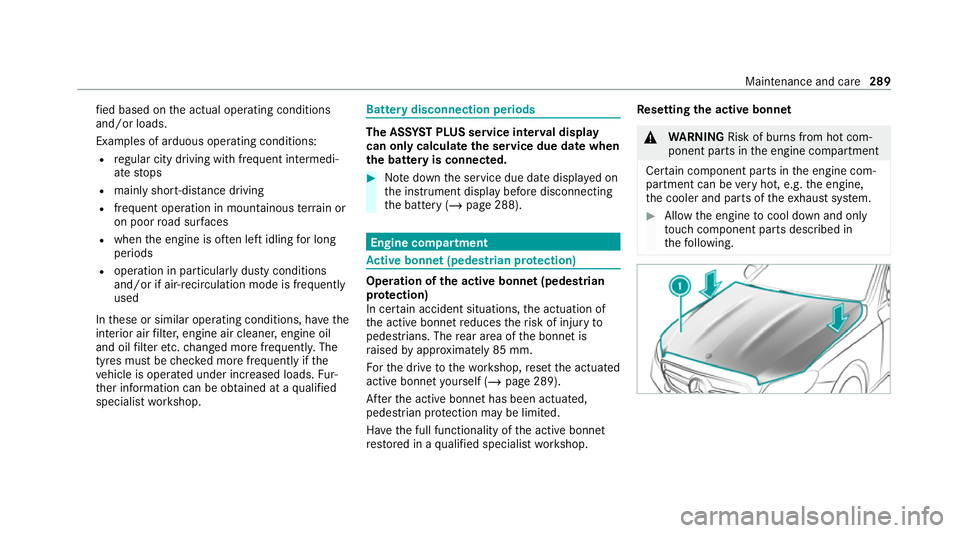
re stored in a qualified specialist workshop. Re
setting the active bonnet &
WARNING Risk of bu rns from hot com‐
ponent parts in the engine compartment
Cer tain component parts in the engine com‐
partment can be very hot, e.g. the engine,
th e cooler and parts of theex haust sy stem. #
Allow the engine tocool down and only
to uch co mponent parts described in
th efo llowing. Maintenance and care
289
Page 451 of 469
Lu
ggage
Lu ggage net ......................................... 11 7
Secu ring ............................................... 11 3
Lu mbar support
see Lumbar support (4-w ay)
Lu mbar support (4-w ay)........................ .100 M
MAGIC VISION CONTROL Windsc reen wipers .............................. 13 4
Maintenance see ASS YST PLUS
Malfunction Restra int sy stem ................................... 36
Manoeuvring assistant Activating/deactivating ...................... .224
Cross Traf fic Alert ................................ 224
Drive AwayAssi st................................ 223
Map ........................................................... 262
Displaying online map contents .......... 263
Displaying weather information .......... .263
Moving ................................................ 262
Selecting the map orientation .............2 62Setting
the map scale .......................... 262
Switching mo torw ay information
on/off ................................................ .262
Massage prog rammes
Overview ............................................ .103
Re setting the settings .......................... 104
Massage prog rams
Selecting the front seats ..................... 104
Massage settings Resetting ............................................. 104
Matt finish (cleaning instructions) ........ 297
Maximum gross vehicle weight ............ .343
Maximum speed see Limi ter
MBUX multimedia sy stem ...................... 24 8
Ac tivating/deactivating standby
mode .................................................. .180
Configu ring drive program I ................. 16 3
No tes ................................................... 24 8
Overview ............................................. 24 8
Setting route-based speed adap ta‐
tion ...................................................... 200
St andby mode function ...................... .180 Media
Overview of the functions and sym‐
bols ..................................................... 280
Media mode Connecting Blue tooth®
audio equip‐
ment .................................................... 282
Medical aids .............................................. .30
Memory function Function ............................................... 111
Head-up display — Calling up stored
settings ................................................ 11 2
Head-up display — Storing settings ...... 11 2
Operating ............................................. 11 2
Outside mir rors — Calling up stored
settings ................................................ 11 2
Outside mir rors —St oring settings .......1 12
Seat — Calling up stored settings ......... 11 2
Seat — Storing settings ........................ 11 2
St eering wheel — Calling up sa ved
settings ................................................ 11 2
St eering wheel — Saving settings ......... 11 2
Menu (on-board computer) Head-up display ................................... 24 6
Overview ............................................. 24 3448
Index