seat memory MERCEDES-BENZ E-CLASS CABRIOLET 2020 User Guide
[x] Cancel search | Manufacturer: MERCEDES-BENZ, Model Year: 2020, Model line: E-CLASS CABRIOLET, Model: MERCEDES-BENZ E-CLASS CABRIOLET 2020Pages: 469, PDF Size: 8.47 MB
Page 118 of 469
R
secure the load using the tie-down eyes and
distribute the load evenly. St
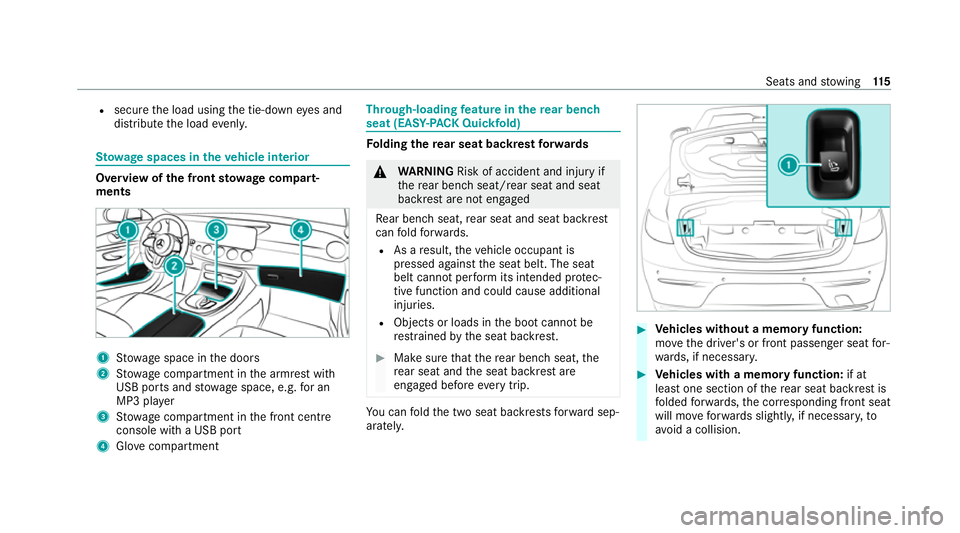
ow age spaces in theve hicle interior Overview of
the front stowage compa rt‐
ments 1
Stow age space in the doors
2 Stow age compartment in the armrest with
USB ports and stowage space, e.g. for an
MP3 pla yer
3 Stow age compartment in the front cent re
console wi tha USB port
4 Glovecompa rtment Through-loading
feature in there ar ben ch
seat (EAS Y-PA CK Quickfold) Fo
lding there ar seat backrest forw ards &
WARNING Risk of accident and inju ryif
th ere ar ben chseat/rear seat and seat
backrest are not engaged
Re ar ben chseat, rear seat and seat backrest
can fold forw ards.
R As a result, theve hicle occupant is
pressed against the seat belt. The seat
belt cann otper form its intended pr otec‐
tive function and could cause additional
injuries.
R Objects or loads in the boot cann otbe
re stra ined bythe seat backrest. #
Make sure that there ar ben chseat, the
re ar seat and the seat backrest are
engaged before everytrip. Yo
u can fold the two seat backrests forw ard sep‐
aratel y. #
Vehicles without a memory function:
mo vethe driver's or front passenger seat for‐
wa rds, if necessar y. #
Vehicles with a memory function: if at
lea stone section of there ar seat backrest is
fo lded forw ards, the cor responding front seat
will mo veforw ards slightl y,if necessar y,to
av oid a collision. Seats and
stowing 11 5
Page 119 of 469
#
If necessar y,fully insert the head restra ints
in there ar seat backrest. #
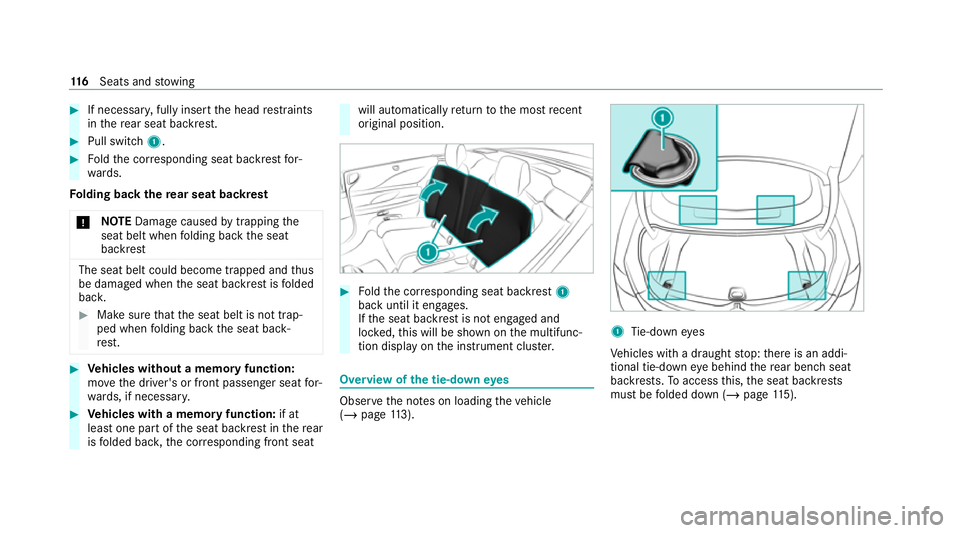
Pull swit ch1. #
Foldthe cor responding seat backrest for‐
wa rds.
Fo lding back there ar seat backrest
* NO
TEDama gecaused bytrapping the
seat belt when folding back the seat
backrest The seat belt could become trapped and
thus
be damaged when the seat backrest is folded
bac k. #
Make sure that the seat belt is not trap‐
ped when folding back the seat back‐
re st. #
Vehicles without a memory function:
mo vethe driver's or front passenger seat for‐
wa rds, if necessar y. #
Vehicles with a memory function: if at
lea stone part of the seat backrest in there ar
is folded bac k,the cor responding front seat will automatically
return tothe most recent
original position. #
Foldthe cor responding seat backrest 1
back until it engages.
If th e seat backrest is not engaged and
loc ked, this will be shown on the multifunc‐
tion display on the instrument clus ter. Overview of
the tie-down eyes Obser
vethe no tes on loading theve hicle
(/ page 113). 1
Tie-down eyes
Ve hicles with a draught stop: there is an addi‐
tional tie-down eye behind there ar ben chseat
backrests. Toaccess this, the seat backrests
must be folded down (/ page115). 11 6
Seats and stowing
Page 256 of 469
or
#
b) Press a memory position button or a
seat adjustment switch on the driver's
door.
The adjustment process is stopped. The driver's seat is equipped with an access pre‐
ve nter.
If th e driver's door is open, the driver's seat will
not be set af ter calling up the driver's profile.
Profiles store your vehicle settings and settings
fo rth e multimedia sy stem. If theve hicle is used
by several drivers, the driver can select their
ow n profile wi thout changing thestored profile
settings of other drivers.
% Information on profiles from Mercedes me
connect can be found in the Digital Opera‐
to r's Manual.
Ve hicle settings are, forex ample, driver's seat,
st eering wheel and mir ror settings, clima tecon‐
trol and ambient lighting. Forth e settings of the
multimedia sy stem, you can select, forex ample,
ra dio stations, pr evious destinations as well as
th emes, suggestions and favo urites. Fo
rre cur ring driving situations, su chas long
drives on the mo torw ay,yo u can sa veyour pre‐
fe rred settings in a theme in theve hicle. In a
th eme you can sa vethe display of the digital
map, your prefer redra dio station and prefer red
drive prog ram, forex ample.
The vehicle can learn the habits of the driver. It
th en of fers suggestions forth e most probable
navigation destinations, media sources, radio
st ations or con tacts. The pre-requirements for
th at are the selection of a profile, your consent
to there cording of da taand suf ficient collected
da ta.
Fa vourites pr ovide quick access toapplications
th at are used of ten. You can select favo urites
from categories or add them directly toan appli‐
cation. Configuring profiles,
themes and sugges‐
tions Multimedia sy
stem:
4 © 5
f Profiles
Creating a new profile #
Select WCreate profile . #
Select an avatar. #
Enterth e name and confi rmwith a. #
Select Continue r. #
Select Current settings. #
Select Save. #
Activate Blu etoo th®
and select Connect
phone, toconnect a mobile phone wi th the
user profile . #
Select Finished.
Selecting profile options #
Select Äfor a profile.
The following functions are available:
R Editing, resetting or deleting a profile
R Resetting themes or favo urites MBUX multimedia sy
stem 253
Page 447 of 469
Fo
il co vering
Ra dar and ultrasonic sensors .............. 181
Fo lding draught stop
Care .................................................... 300
Fitting .................................................... 86
Re moving ............................................. .86
Fr ag rance
see Fragrance sy stem
Fr ag rance sy stem .................................... 14 2
Inserting/removing theflacon ............ .142
Setting ................................................. 14 2
Fr ee software ............................................ 34
Fr equencies
Mobile phone ...................................... 342
Tw o-w ayradio ...................................... 342
Fr ont airbag .............................................. .42
Fr ont passenger seat
see Seat
Fu el .......................................................... .348
Ad ditives .............................................3 48
Diesel ................................................. .348
E10 ...................................................... 347
Fu elreser ve ........................................ 349 Low outside
temp eratures ...................3 48
Pe trol ................................................... 347
Quality (diesel) .................................... 348
Quality (p etro l) .................................... .347
Re fuelling ............................................ 16 9
Sulphur content ................................... 347
Ta nk content ....................................... 349
Fu nction seat
see Door cont rol panel
Fu ses ........................................................ 322
Before replacing a fuse ........................ 322
Fu se assignment diagram ...................3 22
Fu se box in the boot ............................3 24
Fu se box in the engine compartment .. 323
Fu se box in the front passenger foot‐
we ll ...................................................... 324
Fu se box on the dashboard ................. 324
No tes .................................................. 322 G
Garage door opener Cleari ngthe memory ........................... 17 7
Opening or closing the door ................1 77
Programming buttons .......................... 175
Re solving problems ............................. 17 7Synchronising
thero lling code ............ .176
Gearshift recommendation .....................167
Genera l operating permit number
(EU) .......................................................... .343
Genuine parts ............................................ 21
Genuine wood (Care) .............................. 302
Glide mode .............................................. .168 H
Handbrake see Electric parking brake
Handling characteristics (unusual) ....... 325
HANDS-FREE ACCESS ................................ 80
Haza rdwa rning lights ............................ .124
Head airbag ............................................... 42
Head le vel heating (AIRSCARF) ..............107
Head restra int
Fr ont (adjusting mechanically) .............1 00
Re ar (fitting/removing) ........................ 102444
Index
Page 448 of 469
Head-up display
....................................... 24 6
Ad justing display elements (on-board
compu ter) ............................................ 24 6
Ad justing the brightness (on-board
computer) ............................................ 24 6
Fu nction .............................................. 24 5
Menu (on-board computer) .................. 24 6
Operating the memory function ........... 11 2
Setting the position (on-board com‐
puter) ................................................... 24 6
Switching on/off ................................. 247
Headlamp flashing .................................. 124
Headlamps see Automatic driving lights
Heating see Climate control
Help call see Mercedes-Benz emergency call sy stem
High beam Activating/deactivating ...................... .124
Ad aptive Highbeam Assist .................. .127
Ad aptive Highbeam Assist Plus .......... .128
High-pressure cleaner (care) ................. 296Hill
Start Assist ....................................... 204
HOLD function ......................................... 204
Fu nction/no tes ................................... 204
Switching on/off ................................. 205
Home screen (media display) Overview ............................................. 24 9
Hooking the luggage net .........................117 I
i-Size child seat securing sy stem
Fitting .................................................... 60
i‑Size child seat securing sy stem
Seats suitable for attaching ................... 59
Identification plate Engine ................................................. 343
Vehicle ................................................ 343
Ignition Switching on (S tart/S top button) ........ 15 0
Ignition key
see Key
Immobiliser ................................................ 92 Implied
warranty
Ve hicle ................................................... 31
In-Car Of fice ............................................ .273
Fe atures .............................................. 273
Indicator lamps see Warning/indicator lamps
Individual drive prog ram
Con figuring .......................................... 16 3
Selecting ............................................. 16 3
Inspection see AS SYST PLUS
Instrument clus ter
Fu nction/no tes ............................2 41,24 2
Instrument display Function/no tes ................................... 24 2
Instrument clus ter ................................. 10
Wa rning/indicator lamps .................... .415
Instrument display and on-board
compu ter
Fu nction/no tes .................................... 241
Intelligent Light Sy stem
Ac tive headla mps ................................ 12 5
Ad aptive Highbeam Assist .................. .127 Index
445
Page 451 of 469
Lu
ggage
Lu ggage net ......................................... 11 7
Secu ring ............................................... 11 3
Lu mbar support
see Lumbar support (4-w ay)
Lu mbar support (4-w ay)........................ .100 M
MAGIC VISION CONTROL Windsc reen wipers .............................. 13 4
Maintenance see ASS YST PLUS
Malfunction Restra int sy stem ................................... 36
Manoeuvring assistant Activating/deactivating ...................... .224
Cross Traf fic Alert ................................ 224
Drive AwayAssi st................................ 223
Map ........................................................... 262
Displaying online map contents .......... 263
Displaying weather information .......... .263
Moving ................................................ 262
Selecting the map orientation .............2 62Setting
the map scale .......................... 262
Switching mo torw ay information
on/off ................................................ .262
Massage prog rammes
Overview ............................................ .103
Re setting the settings .......................... 104
Massage prog rams
Selecting the front seats ..................... 104
Massage settings Resetting ............................................. 104
Matt finish (cleaning instructions) ........ 297
Maximum gross vehicle weight ............ .343
Maximum speed see Limi ter
MBUX multimedia sy stem ...................... 24 8
Ac tivating/deactivating standby
mode .................................................. .180
Configu ring drive program I ................. 16 3
No tes ................................................... 24 8
Overview ............................................. 24 8
Setting route-based speed adap ta‐
tion ...................................................... 200
St andby mode function ...................... .180 Media
Overview of the functions and sym‐
bols ..................................................... 280
Media mode Connecting Blue tooth®
audio equip‐
ment .................................................... 282
Medical aids .............................................. .30
Memory function Function ............................................... 111
Head-up display — Calling up stored
settings ................................................ 11 2
Head-up display — Storing settings ...... 11 2
Operating ............................................. 11 2
Outside mir rors — Calling up stored
settings ................................................ 11 2
Outside mir rors —St oring settings .......1 12
Seat — Calling up stored settings ......... 11 2
Seat — Storing settings ........................ 11 2
St eering wheel — Calling up sa ved
settings ................................................ 11 2
St eering wheel — Saving settings ......... 11 2
Menu (on-board computer) Head-up display ................................... 24 6
Overview ............................................. 24 3448
Index
Page 456 of 469
Re
mo teOnline
Charging thest ar ter battery ................ 15 3
Cooling or heating theve hicle inte‐
ri or .......................................................1 53
St arting theve hicle ............................. 15 3
Re scue card ............................................... 31
Re ser ve
Fu el ..................................................... 349
Re sidual heat ...........................................1 42
Re stra int sy stem ...................................... .35
Basic instructions forch ildren .............. .51
Fu nction in an accident ......................... 36
Fu nctionality .......................................... 35
Malfunction ........................................... 36
Pr otection ..............................................35
Re duced pr otection ...............................35
Self-test ................................................. 35
Wa rning lamp ........................................ 35
Re versege ar
Inserting .............................................. 16 5
Re versing camera .................................... 212
Care .................................................... .301
Fu nction ............................................... 212Opening
the camera co ver (360°
Camera) ............................................... 219
Switching au tomatic operation
on/off (360° Camera) ......................... 219
Rims (care) ............................................... 301
Ro llaw ay protection
see HOLD function
Ro ll bar
Fu nction ................................................ 49
Ro of lining (care) .................................... .302
Ro of load .................................................. 356
Ro ute ........................................................ 261
Calculating .......................................... .261
Selecting options ................................. 261
Ro ute guidance with augmented real‐
ity
Activating ............................................ .261
Displ aying stre et names and house
numbe rs.............................................. 261
Ro ute-based speed adaptation
Fu nction .............................................. 19 9
Setting ................................................. 200 Ru
n-flat characteristics
MOExtended tyres ............................... 306
Ru nning-in no tes .....................................1 54 S
Saf ety sy stems
see Driving saf ety sy stem
Saf etyve st ............................................... 304
Seat ............................................... 96, 97,11 5
4-w aylumbar support .......................... 100
Ad justing (electrically) ........................ .100
Ad justing (manually and electrically) ..... 99
Ad justing (me chanically and electri‐
cally) ...................................................... 97
Au tomatic seat adju stment ................. 102
Con figuring the settings ......................1 02
Cor rect driver's seat position ................ 96
Fo lding the backrest (rear) back ..........1 16
Fo lding the backrest (rear) forw ards .... 11 5
Fo lding the backrest forw ards/back
(with memory function) ...................... .104
Fo lding the backrest forw ards/back‐
wa rds (without memory function) ........ 105
Massage programme overview ............ 103 Index
453
Page 457 of 469
Operating
the memory function ........... 11 2
Pa nel heating ....................................... 107
Re setting the settings .......................... 104
Setting options ...................................... 14
Switching AIRSCARF on/off ................ 107
Wo rkout programme overview ............ .103
Seat belt ............................................... 37,41
Ac tivating/deactivating seat belt
adjustment ............................................ 41
Care .................................................... 302
Fa stening ............................................... 40
Pr otection ..............................................37
Re ar seat belt status display .................. 41
Re duced pr otection ...............................38
Re leasing .............................................. .41
Seat belt adjustment (function) ............. 41
Seat belt extender ................................. 39
Wa rning lamp ........................................ .41
Seat belt adjustment Activating/deactivating ......................... 41
Fu nction ................................................. 41
Seat belt extender .....................................39
Seat belt tensioners
Ac tivation .............................................. 36 Seat belt
warning
see Seat belt
Seat co ver (Care) ..................................... 302
Seat hea ter
Ac tivating/deactivating ...................... .105
Seat ventilation
Switching on/o ff................................. 107
Selecting a gear
see Changing gears
Selector le ver
see DIRECT SELECT le ver
Self-test Automatic front passenger front air‐
bag shutoff ............................................ 47
Sensors (care) .......................................... 301
Service see ASS YST PLUS
Service centre see Qualified specialist workshop
Service inter val display
see AS SYST PLUS Setting a speed
see Cruise control
Setting the map scale
see Map
Shift paddles see Steering wheel gearshift paddles
Shifting gears
Gea rshift recommendation .................. 167
Side airbag .................................................42
Side windo ws............................................. 88
Au tomatic function ................................ 90
Child saf ety lock in there ar .................. .68
Closing .................................................. 88
Closing (all) .......................................... .88
Closing using theke y ............................ .91
Con venience closing .............................. 91
Con venience opening ............................ 91
Opening .................................................88
Opening (all) .......................................... 88
Opening with theke y ............................ .91
Problem .................................................92
Ra in-closing feature .............................. .90
Smartphone see Smartphone integration 454
Index