fuel MERCEDES-BENZ E-CLASS CABRIOLET 2020 Owner's Manual
[x] Cancel search | Manufacturer: MERCEDES-BENZ, Model Year: 2020, Model line: E-CLASS CABRIOLET, Model: MERCEDES-BENZ E-CLASS CABRIOLET 2020Pages: 469, PDF Size: 8.47 MB
Page 175 of 469
tion proper
ly, only use AdBlue ®
in accordance
wi th ISO 222 41 .
Ad Blue ®
is ch aracterised bythefo llowing:
R non-t oxic
R colourless and odourless
R non-flammable
If yo u open theAd Blue ®
tank, small amounts of
ammonia vapour may be released. Only fill the
Ad Blue ®
tank in well-ventilated areas.
Do not let AdBlue ®
come into contact wi thskin,
ey es or clo thes. Keep AdBlue ®
aw ay from chil‐
dren.
Do not ingest AdBlue ®
. If AdBlue ®
is swallo wed,
immediately rinse your mouth out thoroughly.
Drink plenty of water.Seek medical attention at
once.
Obser vethe no tes on operating fluids
(/ page 345). Ad
Blue ®
is available here:
R AdBlue ®
can be topped up byfast service at
a qu alified specialist workshop, e.g. a
Mercedes-Benz Service Centre.
R AdBlue ®
is available at many filling stations
from AdBlue ®
filling pumps.
R Alternativel y,Ad Blue ®
is available at qualified
specialist workshops, e.g. Mercedes-Benz
Service Centres, and at many filling stations
in Ad Blue ®
re fill canis ters or AdBlue ®
re fill
bottles.
% Ensure the connection between there fill
con tainer and vehicle filler neck does not
drip.
To pping up AdBlue ®
* NOTEEngine dama gedue toAd Blue ®
being in the fuel #
AdBlue ®
must not be used tofill the
fuel tank. #
Only use AdBlue ®
to fill th eAd Blue ®
ta nk. #
Do not overfill theAd Blue ®
tank. *
NO
TEContamination of theve hicle inte‐
ri or due toAd Blue ®
lea kage #
Afterto pping up, carefully close the
Ad Blue ®
re fill con tainer. #
Avoid car rying AdBlue ®
re fill con tainers
permanently in theve hicle. Re
quirements:
R The vehicle is unloc ked.
The following messages appear in order in the
multifunction display when theAd Blue ®
tank
requ irestopping up:
R Refill AdBlue See Owner’s Manual The
Ad Blue ®
leve l has fallen below there ser ve
ra nge. Top up AdBlue ®
immediately.
R Top up AdBlue Emergency op. in XXX miles
See Owner's ManualThe low AdBlue ®
level 17 2
Driving and pa rking
Page 176 of 469
will lead
tolimited per form ance af terthe
re maining dis tance displ ayed has been
driven. Top up AdBlue ®
immediately.
R XX,X l Top up AdBlue Emer. op.: max. XXX
km/h Start not poss. in XXX kmThe low
Ad Blue ®
leve l will lead tolimited per form‐
ance from the speed displa yed. Af terthe
re maining dis tance displ ayed has been cov‐
ered, it will no longer be possible tostart the
engine. Top up with at least the amount of
Ad Blue ®
displ ayed.
R XX,X l Top up AdBlue Switch on ignition, wait
60 sec. or eng. start not poss. TheAdBlue ®
ta nk is em pty. Yo u can no lon gerst art the
engine. Top up with at least the amount of
Ad Blue ®
displ ayed. Switch on the ignition
and waitfor appro ximately 60 seconds. Start
th e engine.
Yo u can see theAd Blue ®
ra nge and le vel in the
Service menu in the multifunction displa y.
% The AdBlue ®
ra nge shown depends strongly
on the driving style and operating condi‐ tions. The actual
range can therefore deviate
from the calculated range.
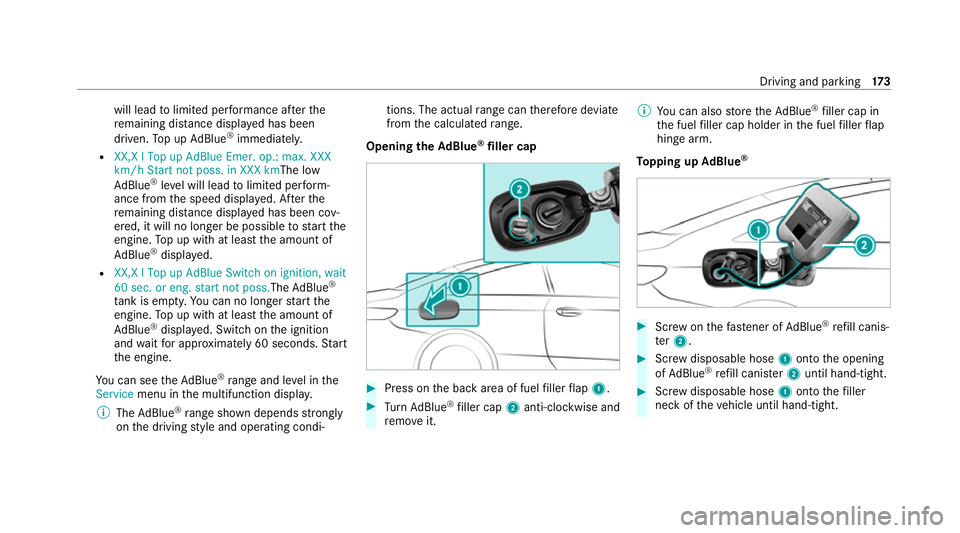
Opening the AdBlue ®
filler cap #
Press on the back area of fuel filler flap 1. #
Turn AdBlue ®
filler cap 2anti-clockwise and
re mo veit. %
You can also store theAd Blue ®
filler cap in
th e fuel filler cap holder in the fuel filler flap
hin gearm.
To pping up AdBlue ® #
Screw onthefast ener of AdBlue ®
re fill canis‐
te r2. #
Screw disposable hose 1onto the opening
of Ad Blue ®
re fill canis ter2 until hand-tight. #
Screw disposable hose 1onto thefiller
neck of theve hicle until hand-tight. Driving and parking
17 3
Page 177 of 469
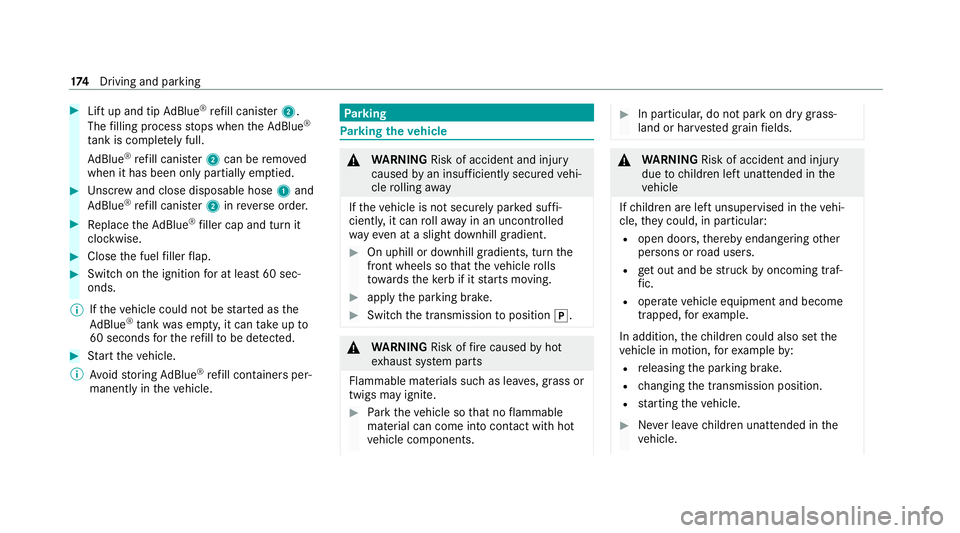
#
Lift up and tip AdBlue ®
re fill canis ter2.
The filling process stops when theAd Blue ®
ta nk is compl etely full.
Ad Blue ®
re fill canis ter2 can be remo ved
when it has been only partially em ptied. #
Unscr ew and close disposable hose 1and
Ad Blue ®
re fill canis ter2 inreve rse order. #
Replace theAd Blue ®
filler cap and turn it
clockwise. #
Close the fuel filler flap. #
Swit chon the ignition for at least 60 sec‐
onds.
% Ifth eve hicle could not be star ted as the
Ad Blue ®
tan kwa s em pty, it can take up to
60 seconds forth ere fill to be de tected. #
Start theve hicle.
% Avoid storing AdBlue ®
re fill con tainers per‐
manently in theve hicle. Pa
rking Pa
rking theve hicle &
WARNING Risk of accident and inju ry
caused byan insuf ficiently secu redve hi‐
cle rolling away
If th eve hicle is not securely par ked suf fi‐
ciently, it can rollaw ay in an uncont rolled
wa yev en at a slight downhill gradient. #
On uphill or downhill gradients, turn the
front wheels so that theve hicle rolls
to wa rdsth eke rb if it starts moving. #
apply the parking brake. #
Switch the transmission toposition j. &
WARNING Risk offire caused byhot
ex haust sy stem parts
Flammable materials such as lea ves, grass or
twigs may ignite. #
Park theve hicle so that no flammable
material can come into con tact wi thhot
ve hicle components. #
In particular, do not park on dry grass‐
land or har vested grain fields. &
WARNING Risk of accident and inju ry
due tochildren left unat tended in the
ve hicle
If ch ildren are left unsupervised in theve hi‐
cle, they could, in pa rticular:
R open doors, thereby endangering other
persons or road users.
R get out and be stru ck byoncoming traf‐
fi c.
R ope rate ve hicle equipment and become
trapped, forex ample.
In addition, thech ildren could also set the
ve hicle in motion, forex ample by:
R releasing the parking brake.
R changing the transmission position.
R starting theve hicle. #
Never lea vechildren unat tended in the
ve hicle. 174
Driving and pa rking
Page 197 of 469
#
Press J.
The maximum permissible speed shown by
th e traf fic sign is stored and theve hicle
maintains or does not exceed this speed.
Deactivating cruise control or theva riable
limi ter #
Press ±.
% Ifyo u brake, deactivate ESP ®
or if ESP ®
inter venes, cruise control is deacti vated. The
va riable limiter is not deactivated.
Pe rm anent limi ter
If th eve hicle should ne verexc eed a specific
speed (e.g. for driving in winter tyre mode), you
can set this speed with the permanent limiter.
Yo u do this by limiting the speed toava lue
between 160 km/h and 240 km/h in the multi‐
media sy stem (/ page194).
Shortly before the set speed is reached, it
appears in the multifunction displa y.When you
confirm the message, display messages no lon‐
ge r appear until you swit choff theve hicle. The
speed will only be displa yed again once theve hi‐ cle has been
restar ted or if the set speed is
ch anged.
The permanent limiter does not swit chtopas‐
sive mode even du ring kickdown and the driven
speed remains below the set speed.
Setting the speed limitation for winter tyres
Multimedia sy stem:
4 © 5
Settings 5
Vehicle
5 Winter tyres limit #
Select a speed or deactivate the function. Ac
tive Di stance Assist DISTRO NIC Fu
nction of Active Di stance Assist
DISTRO NIC
Ac tive Dis tance Assi stDISTRONIC maintains the
set speed on free-flowing roads. If vehicles in
front are de tected, the set dis tance is main‐
ta ined, if necessar y,until theve hicle comes to a
halt. The vehicle accelerates or brakes depend‐
ing on the dis tance totheve hicle in front and
th e set speed. The speed and dis tance tothe
ve hicle in front are set and sa ved using the
st eering wheel. Av
ailable speed range:
R Vehicles without Driving Assistance Pack‐
age: 20 km/h - 200 km/h
R Vehicles with Driving Assistance Pack‐
age: 20 km/h - 210 km/h
Other features of Active Dis tance Assi st
DISTRONIC:
R Adjusts the driving style depending on the
selected drive program (fuel ef ficient, com‐
fo rtable or dynamic)
R Initiates acceleration tothestored speed if
th e turn signal indicator is switched on to
ch ange totheov ertaking lane
R Vehicles with Driving Assistance Pack‐
age:
- Reacts tostationary vehicles de tected in
urban speed ranges (e xcept bicycles and
mo torcyc les)
- Take s one-sided overtaking restrictions
into account on mo torw ays or on multi-
lane roads with separate car riag ew ays
(countr y-dependent) 194
Driving and pa rking
Page 202 of 469
cally adop
ted as thestored speed
(/ page 227).
The driven speed is adjus ted when theve hicle is
le ve l with the traf fic sign at the latest. In the
case of signs indicating entry into an urban area,
th e speed is adap ted according tothe speed
permitted within the urban area. The speed limit
display in the Instrument Display is alw ays upda‐
te d when theve hicle is le vel with the tra ffic sign.
If th ere is no speed restriction on an unlimi ted
st re tch of road (e.g. on a mo torw ay),th ere com‐
mended speed is au tomatical lyadop ted as the
st ored speed. The sy stem uses the speed stored
on an unlimited stre tch of road as there com‐
mended speed. If you do not alter thestored
speed on an unlimited stre tch of road, there c‐
ommended speed is 130 km/h.
If Ac tive Dis tance Assi stDISTRONIC has been
put into passi vemode bypressing the accelera‐
to r pedal, only speed limits which are higher
th an the set speed are adop ted.
Obser vethe no tes on driving sy stems and your
re sponsibility; you may otherwise failto recog‐
nise dangers (/ page 180). Sy
stem limits
The sy stem limits of Traf fic Sign Assi stapply to
th e de tection of traf fic signs (/ page 226).
Speed limits bel ow20 km/h are not auto mati‐
cally adop tedby the sy stem as thestored speed.
Te mp orary speed restrictions (e.g. for a cer tain
time or due towe ather conditions) cannot be
proper ly detected bythe sy stem. The maximum
permissible speed applying toave hicle with a
trailer is not de tected bythe sy stem.
Ad just the speed in these situations. &
WARNING Risk of accident due toActive
Speed Limit Assi stadapting theve hicle's
speed
The speed adop tedby Active Speed Limit
Assi stmay be too high or incor rect in some
individual cases, su chas:
R at speed limits below 20 km/h
R inwe t conditions or in fog
R when towing a trailer #
Ensure that the driven speed complies
with traf fic re gulations. #
Adjust the driving speed tosuit cur rent
traf fic and weather conditions. Fu
nction of route-based speed adaptation When
Active Dis tance Assi stDISTRONIC is acti‐
va ted, theve hicle speed will be adap ted accord‐
ingly tothero ute events ahead. Depending on
th e drive prog ram selected, theve hicle negoti‐
ates a route event ahead in a fuel-s aving, com‐
fo rtable or dynamic manner. When thero ute
eve nt has been passed, theve hicle accelerates
again tothestored speed. The set dis tance to
th eve hicle in front, vehicles de tected ahead and
speed restrictions ahead are take n into account.
Yo u can activate and deactivate route-based
speed adap tation in the multimedia sy stem
(/ page 200).
The following route events are take n into
account:
R Bends Driving and pa
rking 19 9
Page 209 of 469
R
The driving style
The drive program can be adjus ted using the
DY NA MIC SELECT switch. AIR
BODY CONT ROL AIR
BODY CONT ROL function
* NO
TEMercedes-AMG vehicles #
Obser vethe no tes in the Supplement.
Yo u could otherwise failto recognise
dangers. AIR BODY
CONTROL is an air suspension sy stem
with variable damping for impr oved driving com‐
fo rt. The all-round le vel control sy stem ensures
th e best possible suspension and const ant
ground clearance, even wi tha laden vehicle.
When driving at speed, theve hicle is lo wered
automatically toimpr ovedriving saf ety and to
re duce fuel consum ption. You also ha vethe
option of manually adjusting theve hicle le vel. AIR
BODY CONTROL includes thefo llowing com‐
ponents and functions:
R Air suspension with variable spring rate
R Automatic le vel control sy stem
R Speed-dependent lo wering toreduce fuel
consum ption
R Manually selec table high-le vel setting for
grea ter ground clea rance
R ADS PLUS (Ada ptive Damping Sy stem with
const ant damping forc e adjustment)
R DYNA MIC SELECT switch and le vel button
Suspension settings and vehicle le vel per
drive prog ram
Drive program A:
R The suspension setting is comfor table.
R The vehicle is set tothe normal le vel.
R When driving at speeds of appr oximately
12 5 km/h or abo ve,th eve hicle is lo wered.
R When driving at speeds below appr oximately
80 km/h, theve hicle is raised again. Drive program
;:
R The suspension setting is com fortable.
R The vehicle is set tolow le vel -1.
R The vehicle is not lo wered any fur ther if you
are tr avelling at higher speeds.
Drive prog ram C:
R The suspension setting is firm er.
R The vehicle is set tolow le vel -1.
R The vehicle is not lo wered any fur ther if you
are tra velling at higher speeds.
Drive prog ram B:
R The suspension setting is evenfirm er.
R The vehicle is set tolow le vel -1.
R The vehicle is not lo wered any fur ther if you
are tra velling at higher speeds.
Individual suspension settings can be called up
in drive prog ram = (/page 163). 206
Driving and pa rking
Page 245 of 469
Instrument display
overview 1
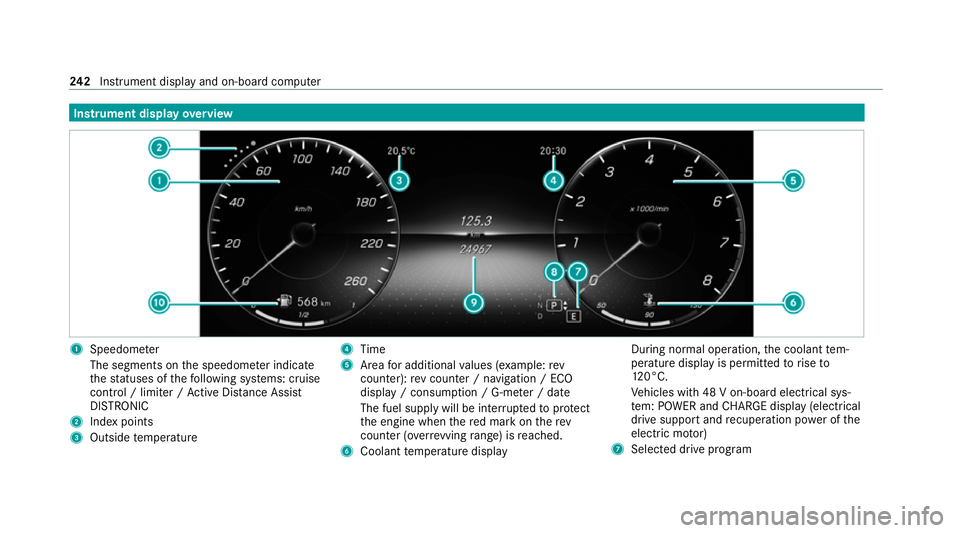
Speedome ter
The segments on the speedome ter indica te
th est atuses of thefo llowing sy stems: cruise
control / limiter / Active Dis tance Assi st
DISTRONIC
2 Index points
3 Outside temp erature 4
Time
5 Area for additional values (e xamp le:rev
counter): rev counter / navigation / ECO
display / consum ption / G-me ter / date
The fuel supply will be inter rupted toprotect
th e engine when there d mark on therev
counter (o verrev ving range) is reached.
6 Coolant temp erature display During normal operation,
the coolant tem‐
perature display is permitted torise to
12 0°C.
Ve hicles with 48 V on-board electrical sys‐
te m: POWER and CHARGE displ ay(elect rical
drive suppo rtand recuperation po wer of the
electric mo tor)
7 Selected drive program 242
Instrument display and on-board computer
Page 246 of 469
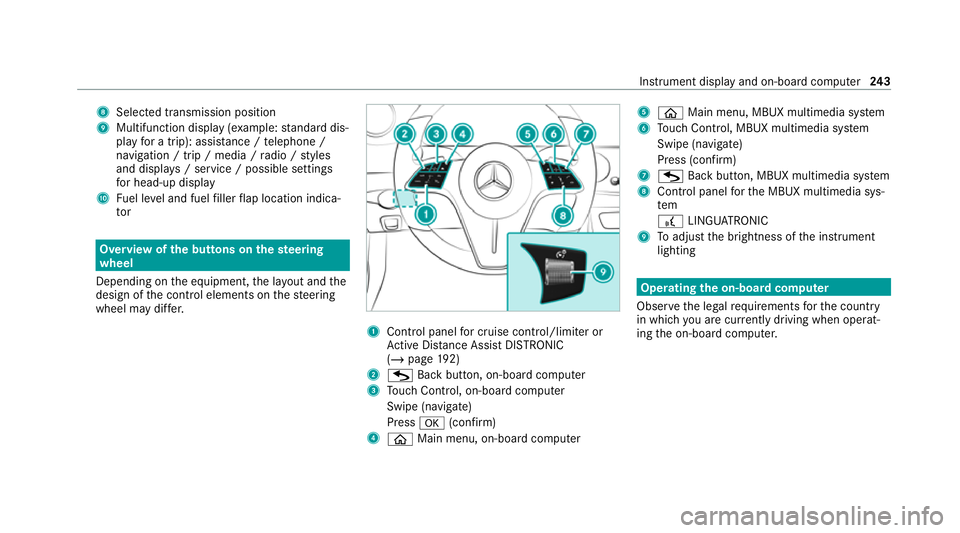
8
Selected transmission position
9 Multifunction displ ay(exa mp le:standard dis‐
play for a trip): assi stance / telephone /
navigation / trip / media / radio / styles
and displa ys/ service / possible settings
fo r head-up display
A Fuel le vel and fuel filler flap location indica‐
tor Overview of
the but tons on thest eering
wheel
Depending on the equipment, the la yout and the
design of the control elements on thesteering
wheel may dif fer. 1
Control panel for cruise control/limiter or
Ac tive Dis tance Assi stDISTRONIC
(/ page 192)
2 G Back button, on-board compu ter
3 Touch Control, on-board co mputer
Swipe (navigate)
Press a(confirm)
4 ò Main menu, on-board co mputer 5
ò Main menu, MBUX multimedia sy stem
6 Touch Control, MBUX multimedia sy stem
Swipe (navigate)
Press (confirm)
7 G Back button, MBUX multimedia sy stem
8 Control panel forth e MBUX multimedia sys‐
tem
£ LINGU ATRO NIC
9 Toadjust the brightness of the instrument
lighting Operating
the on-boa rdcompu ter
Obser vethe legal requ irements forth e count ry
in which you are cur rently driving when operat‐
ing the on-board computer. Instrument display and on-board computer
243
Page 293 of 469
#
With your hand flat, push down active bonnet
1 inthe area around the hinges on bo th
sides (ar rows).
The engine bonnet must engage in position. #
Ifth e active bonn etcan be raised slight lyat
th ere ar in the area of the hinges, repeat the
st ep until it engages cor rectl y. Opening and closing
the bonnet &
WARNING Risk of accident due todriv‐
ing with the bonn etunlo cked
The bonn etmay open and block your vie w. #
Neverre lease the bonn etwhen driving. #
Before every trip, ensure that the
engine bonn etis loc ked. &
WARNING Risk of accident and inju ry
when opening and closing the bonn et
The bonnet may suddenly drop into the end
position. There is a
risk of injury for an yone in the bon‐
net's range of mo vement. #
Open or close the bonn etonly when
th ere is nobody in the bonn et's range of
mo vement. &
WARNING Danger of bu rns when open‐
ing the bonn et
If yo u open the engine bonn etwhen the
engine has overheated or during a fire inthe
engine compartment, you could come into
contact with hot gases or other escaping
operating fluids. #
Before opening the bonn et, allow the
engine tocool down. #
Intheeve nt of a fire inthe engine com‐
partment, keep the engine bonn et
closed and call thefire service. &
WARNING Risk of inju rydue tomoving
parts
Components in the engine compartment may
continue running or start up sudden ly,even if
th e ignition is switched off.
Make sure of thefo llowing before per form ing
ta sks in the engine compartmen t: #
Switch the ignition off. #
Neverre ach into the danger zone sur‐
ro unding moving co mponents, e.g. the
ro tation area of thefa n. #
Remo vejewe llery and watches. #
Keep items of clo thing and hair away
from moving parts. &
WARNING Risk of inju ryfrom touching
co mp onents under voltage
The ignition sy stem and the fuel injection
sy stem workunder high voltage. You could
re cei vean electric shoc k.290
Maintenance and care
Page 294 of 469
#
Neverto uch co mponents of the ignition
sy stem or the fuel injection sy stem
when the ignition is switched on. &
WARNING Risk of bu rns from hot com‐
ponent parts in the engine compartment
Cer tain component parts in the engine com‐
partment can be very hot, e.g. the engine,
th e cooler and parts of theex haust sy stem. #
Allow the engine tocool down and only
to uch co mponent parts described in
th efo llowing. &
WARNING Risk of inju ryfrom using the
windscreen wipers while the engine bon‐
net is open
When the engine bonn etis open, and the
windscreen wipers are set in motion, you can
be trapped bythe wiper linkage. #
Alw ays switch off the windscreen wip‐
ers and ignition before opening the
engine bonn et. Opening
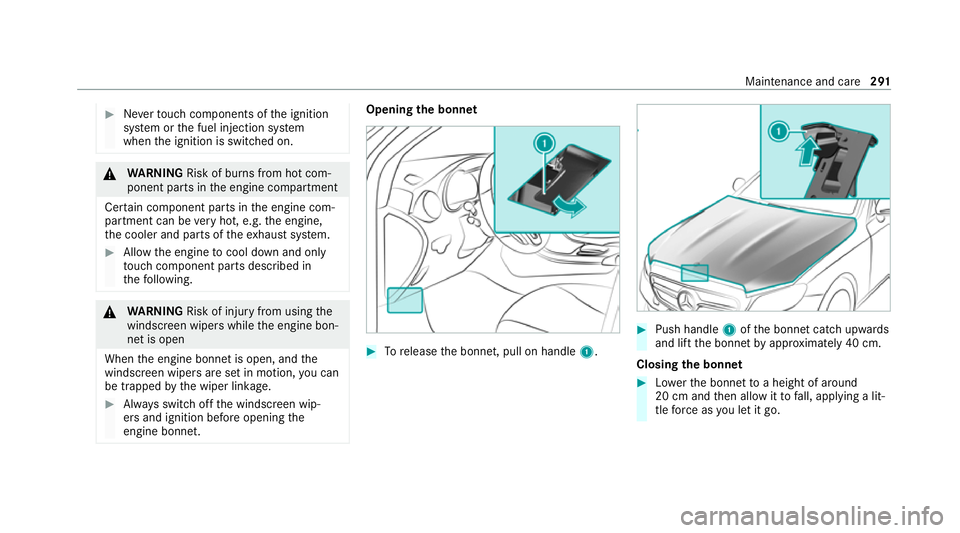
the bonnet #
Torelease the bonn et, pull on handle 1. #
Push handle 1ofthe bonn etcatch up wards
and lift the bonn etby appr oximately 40 cm.
Closing the bonnet #
Lowe rth e bonn etto a height of around
20 cm and then allow it tofall, applying a lit‐
tle forc e as you let it go. Main
tenance and care 291