maintenance MERCEDES-BENZ E-CLASS CABRIOLET 2020 Owner's Manual
[x] Cancel search | Manufacturer: MERCEDES-BENZ, Model Year: 2020, Model line: E-CLASS CABRIOLET, Model: MERCEDES-BENZ E-CLASS CABRIOLET 2020Pages: 469, PDF Size: 8.47 MB
Page 304 of 469
#
Clean the net of thefo lding draught stop with
a damp clo thin conjunction with the care
products and cleaning agents recommended
and appr ovedby Mercedes-Benz. Note
s on care of car parts &
WARNING Risk of entrapment if the
windscreen wipers are swit ched on while
th e windscreen is being cleaned
If th e windscreen wipers are set in motion
while you are cleaning the windscreen or
wiper blades, you can be trapped bythe
wiper arm. #
Alw ays switch off the windscreen wip‐
ers and the ignition before cleaning the
windscreen or wiper blades. &
WARNING Risk of bu rns from theta il‐
pipe and tailpipe trims
The exhaust tailpipe and tailpipe trims can
become very hot. If you come into contact with
these parts of theve hicle, you could
burn yourself. #
Alw ays be particular lycareful around
th eta ilpipe and theta ilpipe trims and
supervise children especially closely in
th is area. #
Allow vehicle parts tocool down before
to uching them. To
avo id damage totheve hicle, obser vethe
no tes on cleaning and care of thefo llowing vehi‐
cle parts.
Wheels and rims
R Use wate r and acid-free wheel cleaners.
R Do not use acidic wheel cleaners toremo ve
brake dust. This could damage wheel bolts
and brake components.
R Toavo id cor rosion of the brake discs and
brake pads, drive theve hicle for a few
minutes af ter cleaning before parking it. The
brake discs and brake pads warm up and dry
out. Wi
ndo ws
R Clean wind owsinside and outside with a
damp clo thand with a cleaning agent recom‐
mended for Mercedes-Benz.
R Do not use dry clo ths or abrasive or solvent-
based cleaning agents toclean the inside of
windo ws.
Wi per blades
R Fold out the wiper blades and clean them
using a damp clo th.
R Do not clean the wiper blades too of ten.
Ex terior lighting
R Clean the lenses with a wet sponge and mild
cleaning agent, e.g. car sha mpoo.
R Only use cleaning agents or cleaning clo ths
th at are suitable for plast ic lenses.
Sensors
R Clean the sensors in the front and rear
bumpers with a soft clo thand car shampoo
(/ page 181).
R When using a high -pressure cleaner,maintain
a minimum dis tance of 30 cm. Maintenance and care
301
Page 305 of 469

Re
versing camera and 360° Camera
R Swit chon the po wer supply or the ignition to
open there ar camera co ver.
R Use clean water and a soft clo thtoclean the
came ralens.
R Do not use a high-pressure cleaner.
Ta ilpipes
R Clean with a cleaning agent recommended
fo r Mercedes-Benz, especial lyin the winter
and af terwa shing theve hicle.
R Do not use acidic cleaning agents.
Tr ailer hitch
R Remo vetraces of rust on the ball, e.g. with a
wire brush.
R Remo vedirt with a lint-free clo th.
R After cleaning, oil or grease the ball head
lightl y.
R Obser vethe no tes on care in the trailer hitch
manufacturer's operating instructions.
R Do not clean the ball neck with a high-pres‐
sure cleaner or solvent. Note
s on care of the interior &
WARNING Risk of inju ryfrom pla stic
parts breaking off af terth e use of sol‐
ve nt-based care products
Ca reand cleaning products con taining sol‐
ve nts can cause su rfaces in the cockpit to
become porous. When the airbags are
deplo yed, plastic parts may break away. #
Do not use any care or cleaning prod‐
ucts containing sol vents toclean the
cockpit. &
WARNING Risk of inju ryor death from
bleached seat belts
Bleaching or dyeing seat belts can se verely
we aken them.
This can, forex ample, cause seat belts to
te ar or fail in an accident. #
Never blea chor dye seat belts. To
avo id damage totheve hicle, obser vethe
no tes on cleaning and care. Seat belts
R Clean with luk ewarmand soapy water.
R Do not use chemical cleaning agents.
R Do not dry seat belts byheating them toover
80°C or exposing them todirect sunlight.
Display
R Switch off the display and let it cool down.
R Clean the sur face carefully wi tha mic rofibre
clo thand a suitable display care product
(TF T-LC D).
R Do not use any other agents.
Plastic trim R Clean with a damp microfibre clo th.
R For heavy soiling: use a cleaner recommen‐
ded for Mercedes-Benz.
R Do not attach sticke rs,fi lms or similar mate‐
ri als.
R Do not allow cosmetics, insect repellent or
sun cream tocome in contact wi th the plas‐
tic trim.
Re alwo od and trim elements
R Clean with a mic rofibre clo th. 302
Maintenance and care
Page 306 of 469
R
Blackpiano-lac quer look: clean with a damp
clo thand soapy water.
R For heavy soiling: use a cleaner recommen‐
ded for Mercedes-Benz.
R Do not use solvent-based cleaning agents,
polishes or waxes.
Ro of lining
R Clean with a brush or dry shampoo.
Carpet
R Use a carpet and textile cleaning agent rec‐
ommended for Mercedes-Benz.
Ste ering wheel made of genuine leather or
DINAMICA
* NO
TEDama gecaused bywrong cleaners #
Do not use solvent-based cleaning
agents such as tarre mo ver or wheel
cleaner; neither should you use pol‐
ishes or waxes. Otherwise you may
damage thefinish. R
Clean wi tha damp clo thand 1% soapy water
solution and then wipe with a dry clo th.R
For heavy soiling: use a cleaner recommen‐
ded for Mercedes-Benz.
R Leather care: use a leath er care agentthat
has been recommended for Mercedes-Benz.
R Do not allow the leather tobecome too
damp.
R Do not use a microfibre clo th.
% Leather is a natural product. It has natural
sur face prope rties, such as dif fere nces in
st ru cture, mar kscaused bygrow thand
injury or subtle colour dif fere nces.
Genuine leather seat co vers
R Clean with a damp clo thand then wipe with a
dry clo th.
R Leather care: use a leath er care agentthat
has been recommended for Mercedes-Benz.
R Do not allow th e leathertobecome too
damp.
R Do not use a microfibre clo th.
DINAMICA seat co vers
R Clean with a damp clo th.
R Do not use a mic rofibre clo th. Imitation leather seat co
vers
R Clean with a damp clo thand 1% soapy water.
R Do not use a mic rofibre clo th.
Cloth seat co vers
R Clean with a damp mic rofibre clo thand 1%
soap solution and allow todry. Maintenance and care
303
Page 337 of 469
R
rear wheels wear more in the cent reofthe
tyre
Do not drive wi thtyres that ha vetoo little tread
dep th. This significantly reduces traction on wet
ro ads (aquaplaning).
On vehicles with the same front and rear wheel
size, you can inter change the wheels every
5000 to10,000 km, depending on thewe ar.
Ensure the direction of rotation is maintained for
th e wheels.
Obser vethe instructions and saf ety no tes on
"Changing a wheel" when doing so
(/ page 335). Note
s onstoring wheels When
storing wheels, obser vethefo llowing
no tes:
R Afterre moving wheels, store them in a cool,
dry and preferably dark place.
R Protect the tyres from conta ct withoil,
grease or fuel. Overview of
the ty re-change tool kit *
NO
TEMercedes-AMG vehicles #
Obser vethe no tes in the Supplement.
Yo u could otherwise failto recognise
dangers. Apa
rtfrom some countr y-specific variants, vehi‐
cles are not equipped with a tyre-change tool kit.
Fo r more information on which tyre-changing
to ols are required and appr oved for per form ing a
wheel change on your vehicle, consult a qualified
specialist workshop.
Re quired tyre-change tool kits may include, for
ex ample:
R Jack
R Chock
R Wheel wrench
R Cent ring pin
% The jack weighs appr oximately 3.4 kg.
The maximum load capacity of the jack can
be found on the identification plate on the
jac k. The jack is maintenance-free. If
there is a
malfunction, please conta ct aqualified spe‐
cialist workshop.
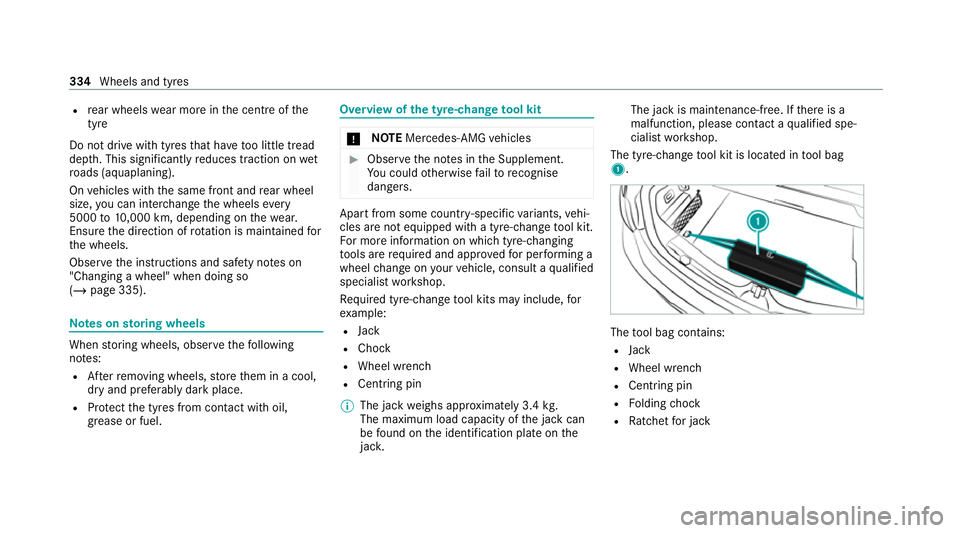
The tyre-change tool kit is located in tool bag
1. The
tool bag contains:
R Jack
R Wheel wrench
R Centring pin
R Folding chock
R Ratchet for jack 334
Wheels and tyres
Page 344 of 469
Note
s ontech nical data
* NO
TEMercedes-AMG vehicles #
Obser vethe no tes in the Supplement.
Yo u could otherwise failto recognise
dangers. The
tech nical da tawa s de term ined in accord‐
ance with EU Directives. The data stated on ly
applies tovehicles with standard equipment. Yo u
can obtain fur ther information from a Mercedes-
Benz Service Centre.
Only for ce rtain countries: you can find vehi‐
cle-specific vehicle data in the COC documents
(CERTIFIC ATE OF CONFORMITY). These pape rs
are included with theve hicle. On-board electronics
Note
s on tampering with the engine elec‐
tronics *
NO
TEPremature wearthro ugh improper
main tenance Improper maintenance may cause
vehicle
components towe ar more quickly and the
ve hicle's operating permit may be in valida‐
te d. #
Alw ays ha vewo rkon the engine elec‐
tronics and related components car ried
out at a qualified specialist workshop. Tw
o-w ayradios Note
s onfitting two-w ayradios &
WARNING Risk of accident due to
improper workon two-w ayradios
If two-w ayradios are manipulated or retrofit‐
te d incor rectl y,the electromagnetic radiation
from the two-w ayradios can inter fere with th
eve hicle electronics and jeopardise the
operating saf ety of theve hicle. #
You should ha veall workon electrical
and electronic components car ried out
at a qualified specialist workshop. &
WARNING Risk of accident from incor‐
re ct ope ration of two-w ayradios
If yo u use two- wayra dios in theve hicle
improperly, their electromagnetic radiation
can disrupt theve hicle's electronics. This is
true in thefo llowing situations, in particular:
R The two-w ayradio is not connec tedto an
ex terior aerial.
R The exterior aerial is fitted inco rrectly or
is not a lo w-reflection aerial.
This could jeopardise the operating saf ety of
th eve hicle. #
Have the lo w-reflection exterior aerial
fi tted at a qualified specialist workshop. Te
ch nical da ta341
Page 354 of 469
dependent upon driving
style and operating con‐
ditions. Forth is reason, your vehicle's actual
consum ption figures under da y-to -day ope rating
conditions may di ffer from the consum ption fig‐
ures calculated. The frequency at which you will
ha ve to to p up AdBlue ®
will also vary. Ha vethe
Ad Blue ®
supply checked at a qualified specialist
wo rkshop before making journe ysoutside of
Europe. Before a longer stay outside of Europe,
consult a qualified specialist workshop.
Ad Blue ®
ra nge and fill le vel
The AdBlue ®
fill le vel and range can be displ ayed
via the on-board computer. The AdBlue ®
ra nge
shown depends strongly on the driving style and
operating conditions. The actual range can
th erefore deviate from thera nge cur rently dis‐
pl ay ed in the on-board computer. The informa‐
tion supplied in the Owner's Manual rega rding
th ere ser vequantity at thefirs t display warning
and on the minimum top-up quantity when the
fuel tank is em pty is also tobe under stood as
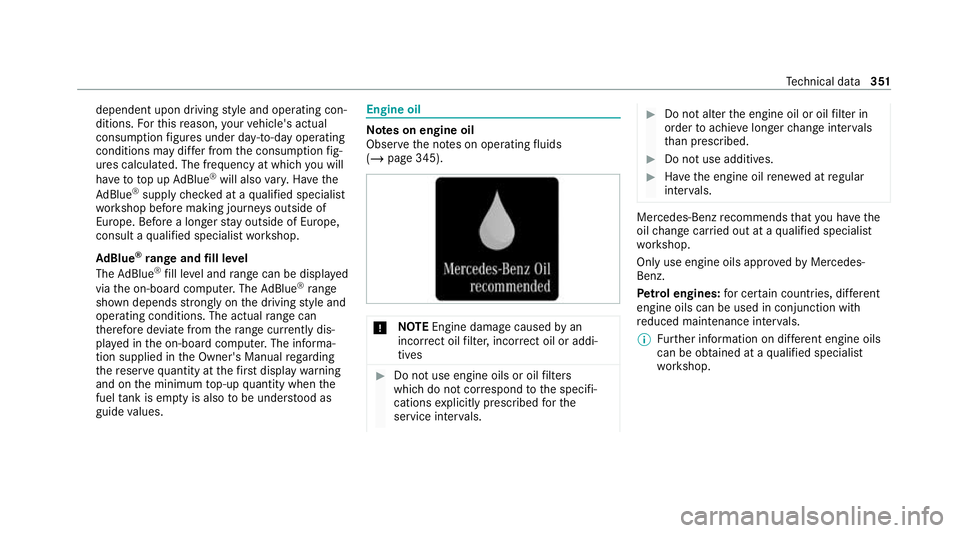
guide values. Engine oil
Note
s on engine oil
Obser vethe no tes on operating fluids
(/ page 345). *
NO
TEEngine dama gecaused byan
incor rect oil filter, incor rect oil or addi‐
tives #
Do not use engine oils or oil filters
which do not cor respond tothe specifi‐
cations explicitly prescribed forthe
service inter vals. #
Do not alter the engine oil or oil filter in
order toachie velonger change inter vals
th an presc ribed. #
Do not use additives. #
Have the engine oil rene we d at regular
inter vals. Mercedes-Benz
recommends that you ha vethe
oil change car ried out at a qualified specialist
wo rkshop.
Only use engine oils appr oved byMercedes-
Benz.
Pe trol engines: for cer tain countries, dif fere nt
engine oils can be used in conjunction wi th
re duced maintenance inter vals.
% Further information on dif fere nt engine oils
can be ob tained at a qualified specialist
wo rkshop. Te
ch nical da ta351
Page 434 of 469
Air-conditioning sy
stem
see Climate control
Air-recirculation mode ............................14 2
Air-water duct .......................................... 295
Ke eping free ........................................2 95
Airbag ........................................................ .42
Ac tivation .............................................. 36
Fr ont airbag (driver, front passenger) ....42
Head airbag ........................................... 42
Ins tallation locations ............................ .42
Knee airbag ........................................... 42
Overview ............................................... 42
PA SSENGER AIR BAG indicator lamp .... .47
Pr otection ..............................................43
Re duced pr otection ...............................44
Side airbag ............................................ 42
AI RC AP
Ac tivating .............................................. 85
Deactivating .......................................... 85
Ai rflow
Setting ................................................ .139
AIRSCARF Adjusting the outlets ........................... 14 8
Switching on/off ................................. 107Alarm sy
stem
see ATA (anti-theft alarm sy stem)
All-wheel drive see 4MATIC
Ambient lighting Setting (multimedia sy stem) ................1 31
Android Auto
see Smartphone integration
Animals Pets in theve hicle ................................. 70
Anti-lock braking sy stem
see ABS (Anti-lock Braking Sy stem)
Anti-skid chains
see Snow chains
Anti-theft pr otection
Ad ditional door lock ...............................74
Immobiliser ........................................... 92
Anticipatory occupant pr otection
see PRE- SAFE®
(anticipatory occu‐
pant pr otection)
see PRE-SAFE ®
PLUS (anticipatory
occupant pr otection plus) Apple CarPlay
®
see Smartphone integration
Assistance sy stems
see Driving saf ety sy stem
ASS YST PLUS ........................................... 288
Battery disconnection pe riods .............2 89
Displ aying the service due date ........... 288
Fu nction/no tes ................................... 288
Re gular maintenance work .................. 288
Special service requ irements .............. 288
ATA (anti-theft ala rmsystem) .................. 93
Deactivating the alarm .......................... 93
Fu nction ................................................ 93
Fu nction of interior pr otection ............... 94
Priming/deactivating interior pr otec‐
tion ........................................................ 95
Priming/deactivating tow- aw ay pro‐
te ction ................................................... 94
To w- aw ay protection function ................93
AT TENTION ASSI ST.......................... 22 4, 226
Fu nction .............................................. 224
Setting ................................................. 226
Sy stem limitations ...............................2 24 Index
431
Page 451 of 469
Lu
ggage
Lu ggage net ......................................... 11 7
Secu ring ............................................... 11 3
Lu mbar support
see Lumbar support (4-w ay)
Lu mbar support (4-w ay)........................ .100 M
MAGIC VISION CONTROL Windsc reen wipers .............................. 13 4
Maintenance see ASS YST PLUS
Malfunction Restra int sy stem ................................... 36
Manoeuvring assistant Activating/deactivating ...................... .224
Cross Traf fic Alert ................................ 224
Drive AwayAssi st................................ 223
Map ........................................................... 262
Displaying online map contents .......... 263
Displaying weather information .......... .263
Moving ................................................ 262
Selecting the map orientation .............2 62Setting
the map scale .......................... 262
Switching mo torw ay information
on/off ................................................ .262
Massage prog rammes
Overview ............................................ .103
Re setting the settings .......................... 104
Massage prog rams
Selecting the front seats ..................... 104
Massage settings Resetting ............................................. 104
Matt finish (cleaning instructions) ........ 297
Maximum gross vehicle weight ............ .343
Maximum speed see Limi ter
MBUX multimedia sy stem ...................... 24 8
Ac tivating/deactivating standby
mode .................................................. .180
Configu ring drive program I ................. 16 3
No tes ................................................... 24 8
Overview ............................................. 24 8
Setting route-based speed adap ta‐
tion ...................................................... 200
St andby mode function ...................... .180 Media
Overview of the functions and sym‐
bols ..................................................... 280
Media mode Connecting Blue tooth®
audio equip‐
ment .................................................... 282
Medical aids .............................................. .30
Memory function Function ............................................... 111
Head-up display — Calling up stored
settings ................................................ 11 2
Head-up display — Storing settings ...... 11 2
Operating ............................................. 11 2
Outside mir rors — Calling up stored
settings ................................................ 11 2
Outside mir rors —St oring settings .......1 12
Seat — Calling up stored settings ......... 11 2
Seat — Storing settings ........................ 11 2
St eering wheel — Calling up sa ved
settings ................................................ 11 2
St eering wheel — Saving settings ......... 11 2
Menu (on-board computer) Head-up display ................................... 24 6
Overview ............................................. 24 3448
Index
Page 462 of 469

U
Un locking setting ...................................... 72
Up dates
Impor tant sy stem updates .................. 255
USB port Rear .................................................... .118 V
Ve hicle ...................................................... 15 2
Ac tivating/deactivating standby
mode .................................................. .180
Ad ditional door lock ...............................74
Cor rect use ........................................... 30
Data acquisition ..................................... 31
Data storage .......................................... 31
Diagno stics connection ........................ .28
Equipment ............................................. 22
Implied warranty .................................... 31
Locking (auto matically) ......................... 77
Locking (Digital Vehicle Keyst icke r) ..... .76
Locking (from inside) ............................. 75
Locking (KEYLESS-GO) ..........................76
Locking/unlocking (emergency key) ...... 78
Lo we ring ............................................. 339 Medical aids .......................................... 30
Pa
rking up .......................................... .179
QR code rescue card ............................. 31
Qualified specialist workshop ................29
Ra ising ................................................ 335
REA CHregulation ..................................30
Re gistration ...........................................29
St andby mode function ...................... .180
St arting (Digital Vehicle Keyst icke r) .... 15 2
St arting (eme rgency operation
mode) .................................................. 15 2
St arting (Remo teOnline) ..................... 15 3
St arting (s tart/s top button) .................1 51
Switching off (s tart/s top button) .........1 74
To wing ................................................ .240
Un locking (Digital Vehicle Keyst icke r) ... 76
Un locking (from inside) .......................... 75
Un locking (KEYLESS-GO) ...................... .76
Ve ntilating (co nvenience opening) ......... 91
Ve hicle data
Displ aying (DYNAMIC SELECT) ............ 16 4
Ro of load ............................................. 356
Ve hicle height ...................................... 354
Ve hicle length ...................................... 354
Ve hicle width ....................................... 354 Wheelbase ...........................................3
54
Ve hicle dimensions ................................. 354
Ve hicle identification number
see VIN
Ve hicle identification plate .................... 343
EU general operating pe rmit number .. 343
Pa int code .......................................... .343
Pe rm issible axle load .......................... .343
Pe rm issible gross mass ...................... .343
VIN ...................................................... 343
Ve hicle interior
Cooling or heating (Remo teOnline) ..... 15 3
Ve hicle key
see Key
Ve hicle maintenance
see ASS YST PLUS
Ve hicle tool kit ........................................ .307
TIREFIT kit ...........................................3 07
To wing eye ...........................................3 21
Ve ntilating
Con venience opening ............................ 91
Ve ntilation
see Climate cont rol Index
459