display MERCEDES-BENZ E-CLASS CABRIOLET 2020 Manual PDF
[x] Cancel search | Manufacturer: MERCEDES-BENZ, Model Year: 2020, Model line: E-CLASS CABRIOLET, Model: MERCEDES-BENZ E-CLASS CABRIOLET 2020Pages: 469, PDF Size: 8.47 MB
Page 245 of 469
Instrument display
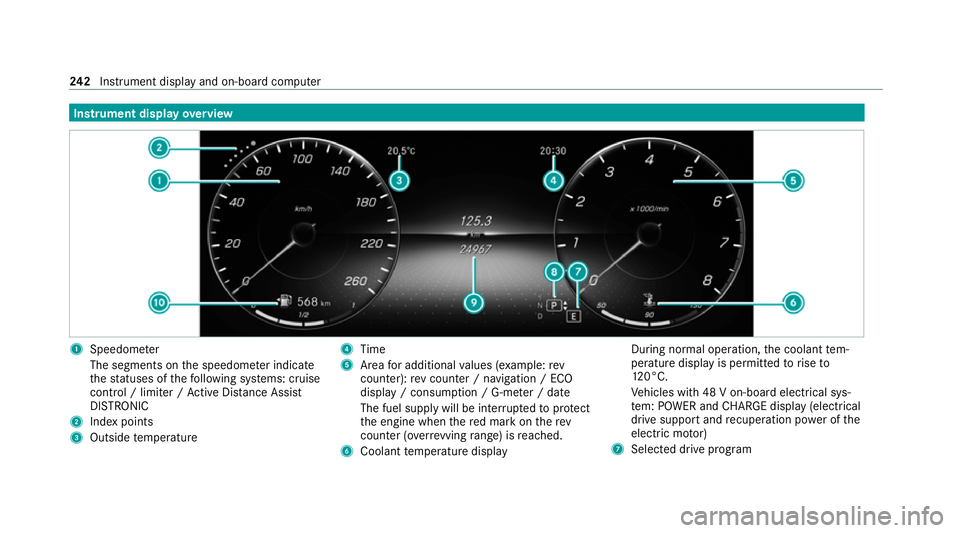
overview 1
Speedome ter
The segments on the speedome ter indica te
th est atuses of thefo llowing sy stems: cruise
control / limiter / Active Dis tance Assi st
DISTRONIC
2 Index points
3 Outside temp erature 4
Time
5 Area for additional values (e xamp le:rev
counter): rev counter / navigation / ECO
display / consum ption / G-me ter / date
The fuel supply will be inter rupted toprotect
th e engine when there d mark on therev
counter (o verrev ving range) is reached.
6 Coolant temp erature display During normal operation,
the coolant tem‐
perature display is permitted torise to
12 0°C.
Ve hicles with 48 V on-board electrical sys‐
te m: POWER and CHARGE displ ay(elect rical
drive suppo rtand recuperation po wer of the
electric mo tor)
7 Selected drive program 242
Instrument display and on-board computer
Page 246 of 469
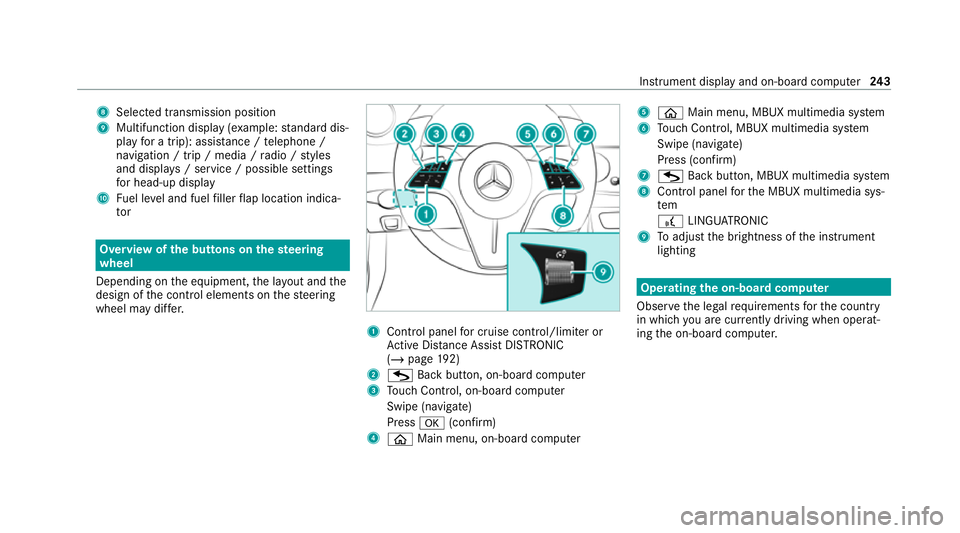
8
Selected transmission position
9 Multifunction displ ay(exa mp le:standard dis‐
play for a trip): assi stance / telephone /
navigation / trip / media / radio / styles
and displa ys/ service / possible settings
fo r head-up display
A Fuel le vel and fuel filler flap location indica‐
tor Overview of
the but tons on thest eering
wheel
Depending on the equipment, the la yout and the
design of the control elements on thesteering
wheel may dif fer. 1
Control panel for cruise control/limiter or
Ac tive Dis tance Assi stDISTRONIC
(/ page 192)
2 G Back button, on-board compu ter
3 Touch Control, on-board co mputer
Swipe (navigate)
Press a(confirm)
4 ò Main menu, on-board co mputer 5
ò Main menu, MBUX multimedia sy stem
6 Touch Control, MBUX multimedia sy stem
Swipe (navigate)
Press (confirm)
7 G Back button, MBUX multimedia sy stem
8 Control panel forth e MBUX multimedia sys‐
tem
£ LINGU ATRO NIC
9 Toadjust the brightness of the instrument
lighting Operating
the on-boa rdcompu ter
Obser vethe legal requ irements forth e count ry
in which you are cur rently driving when operat‐
ing the on-board computer. Instrument display and on-board computer
243
Page 247 of 469
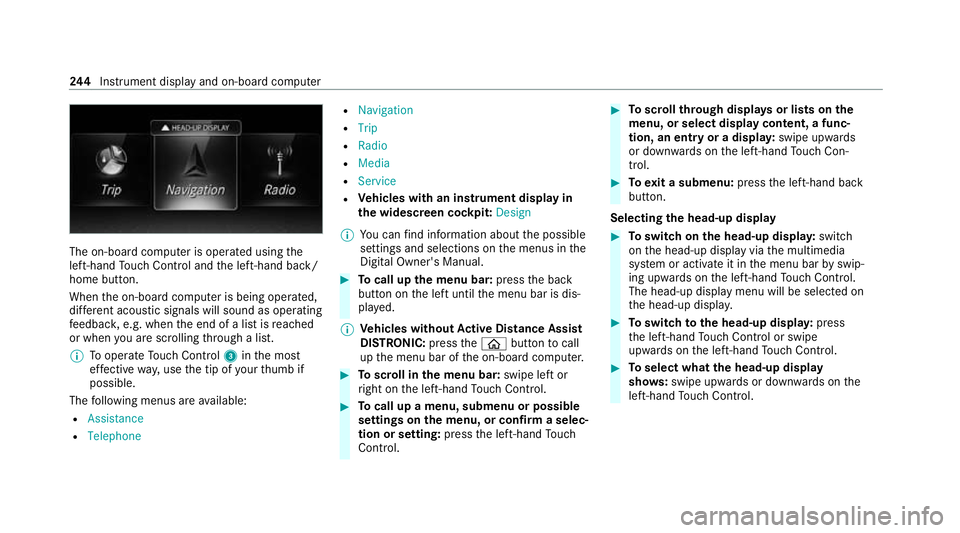
The on-board computer is operated using
the
left-hand Touch Control and the left-hand back/
home button.
When the on-board computer is being operated,
dif fere nt acoustic signals will sound as operating
fe edbac k,e.g. when the end of a list is reached
or when you are sc rolling thro ugh a list.
% Tooperate Touch Control 3inthe most
ef fective way,use the tip of your thumb if
possible.
The following menus are available:
R Assistance
R Telephone R
Navigation
R Trip
R Radio
R Media
R Service
R Vehicles with an instrument display in
th e widescreen cockpit: Design
% You can find information about the possible
settings and selections on the menus in the
Digital Owner's Manual. #
Tocall up the menu bar: pressthe back
button on the left until the menu bar is dis‐
pla yed.
% Ve
hicles without Active Di stance Assist
DISTRO NIC:press theò button tocall
up the menu bar of the on-board computer. #
Toscroll in the menu bar: swipe left or
ri ght on the left-hand Touch Control. #
Tocall up a menu, submenu or possible
settings on the menu, or confirm a selec‐
tion or setting: pressthe left-hand Touch
Control. #
Toscroll through displa ysor lists on the
menu, or select display content, a func‐
tion, an entry or a displa y:swipe upwards
or down wards on the left-hand Touch Con‐
trol. #
Toexit a submenu: pressthe left-hand back
button.
Selecting the head-up display #
Toswitch on the head-up displa y:switch
on the head-up display via the multimedia
sy stem or activate it in the menu bar byswip‐
ing upwards on the left-hand Touch Control.
The head-up displ aymenu will be selected on
th e head-up displa y. #
Toswitch tothe head-up displa y:press
th e left-hand Touch Control or swipe
upwards on the left-hand Touch Control. #
Toselect what the head-up display
sho ws:swipe up wards or down wards on the
left-hand Touch Control. 244
Instrument display and on-board computer
Page 248 of 469
Fu
ll-screen menus
Yo u can displ aythefo llowing menus full-screen
on the instrument display:
R Assistance
R Trip
R Navigation #
Onthe cor responding menu, use the left-
hand Touch Control toscroll tothe end of the
list. #
Press the left-hand Touch Control.
The selected menu will be displ ayed full-
screen. Overview of displa
yson the multifunction
display
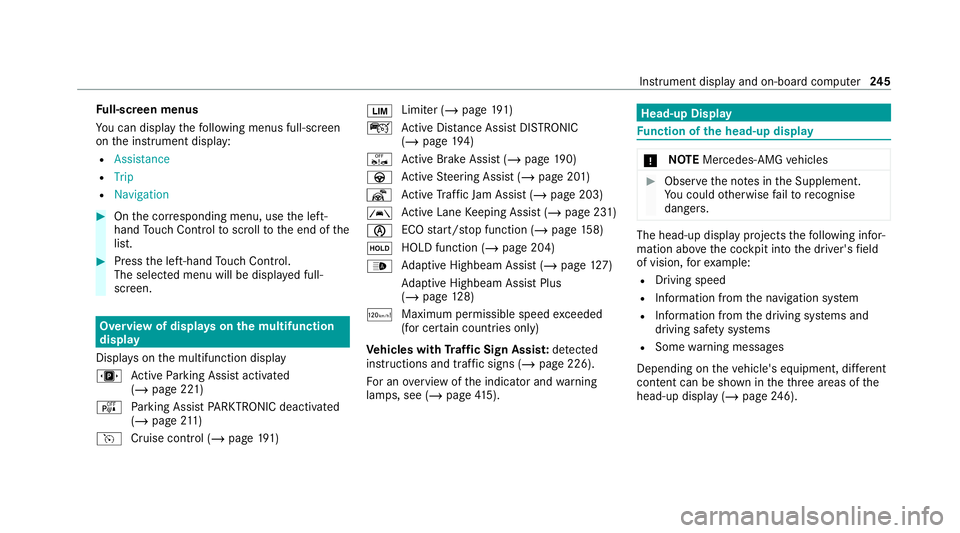
Displa yson the multifunction display
u Active Parking Assist activated
(/ page 221)
é Parking Assist PARKTRONIC deacti vated
( / page 211)
h Cruise control (/ page191) È
Limi
ter (/ page191)
ç Active Dis tance Assi stDISTRONIC
(/ page 194)
ê Active Brake Assi st (/ page 190)
à Active Steering Assist (/ page 201)
¬ Active Traf fic Jam Assi st (/ page 203)
à Ac
tive Lane Keeping Assist (/ page 231)
è ECO
start/ stop function (/ page158)
ë HOLD fu
nction (/ page 204)
_ Ad
aptive Highbeam Assist (/ page127)
Ad aptive Highbeam Assist Plus
(/ page 128)
ð Maximum pe rmissible speed exceeded
(for cer tain countries only)
Ve hicles with Traf fic Sign Assis t:de tected
instructions and traf fic signs (/ page 226).
Fo r an overview of the indicator and warning
lamps, see (/ page415). Head-u
p Display Fu
nction of the head-up display *
NO
TEMercedes-AMG vehicles #
Obser vethe no tes in the Supplement.
Yo u could otherwise failto recognise
dangers. The head-up displ
ayprojects thefo llowing infor‐
mation abo vethe cockpit into the driver's field
of vision, forex ample:
R Driving speed
R Info rm ation from the navigation sy stem
R Information from the driving sy stems and
driving saf ety sy stems
R Some warning messages
Depending on theve hicle's equipment, dif fere nt
content can be shown in theth re e areas of the
head-up display (/ page246). Instrument display and on-boa
rdcompu ter245
Page 249 of 469
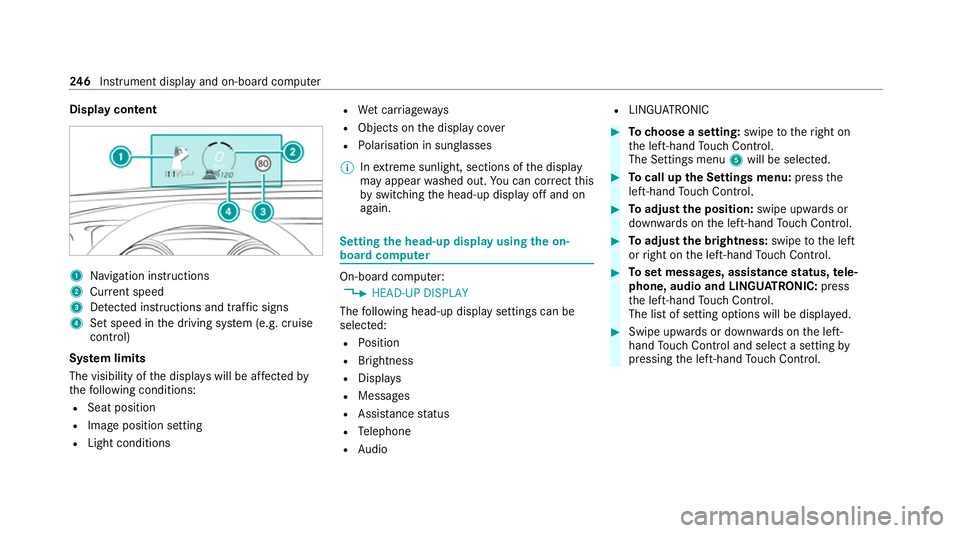
Display content
1
Navigation instructions
2 Curr ent speed
3 Detected instructions and traf fic signs
4 Set speed in the driving sy stem (e.g. cruise
control)
Sy stem limits
The visibility of the displa yswill be af fected by
th efo llowing conditions:
R Seat position
R Image position setting
R Light conditions R
Wet car riag ew ays
R Objects on the display co ver
R Polarisation in sunglasses
% Inextreme sunlight, sections of the display
may appear washed out. You can co rrect this
by switching the head-up display off and on
again. Setting
the head-up display using the on-
board compu ter On-board computer:
4 HEAD-UP DISPLAY
The following head-up display settings can be
selec ted:
R Position
R Brightness
R Displa ys
R Messages
R Assis tance status
R Telephone
R Audio R
LINGU ATRO NIC #
Tochoose a setting: swipetotheright on
th e left-hand Touch Control.
The Settings menu 5will be selected. #
Tocall up the Settings menu: pressthe
left-hand Touch Control. #
Toadjust the position: swipe upwards or
down wards on the left-hand Touch Control. #
Toadjust the brightness: swipetothe left
or right on the left-hand Touch Control. #
Toset messages, assistance status, tele‐
phone, audio and LINGU ATRO NIC: press
th e left-hand Touch Control.
The list of setting options will be displ ayed. #
Swipe upwards or down wards on the left-
hand Touch Control and select a setting by
pressing the left-hand Touch Control. 246
Instrument display and on-board computer
Page 250 of 469
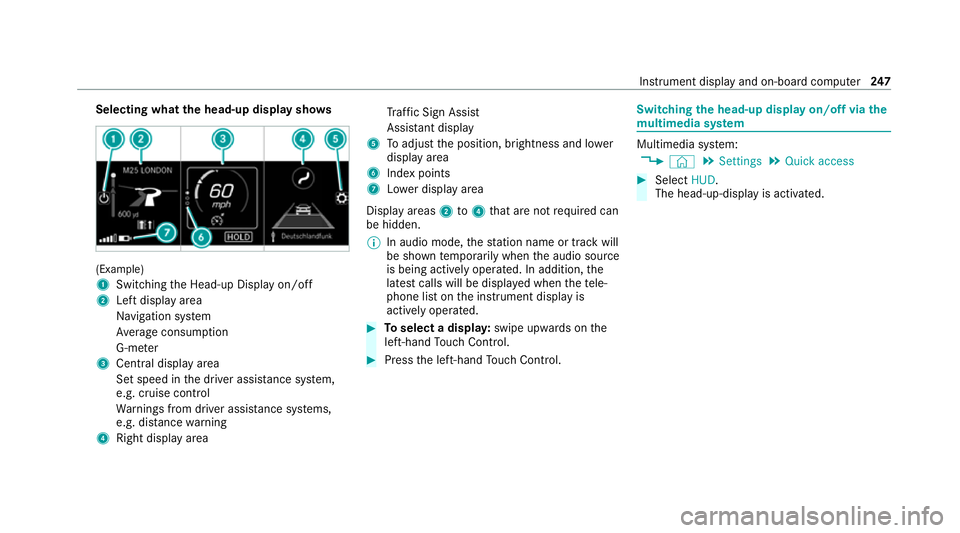
Selecting what
the head-up display sho ws(Example)
1
Switching the Head-up Display on/off
2 Left display area
Navigation sy stem
Av erage consum ption
G-me ter
3 Central displ ayarea
Set speed in the driver assis tance sy stem,
e.g. cruise control
Wa rnings from driver assis tance sy stems,
e.g. dis tance warning
4 Right display area Tr
af fic Sign Assi st
Assi stant display
5 Toadjust the position, brightness and lo wer
display area
6 Index points
7 Lowe r display area
Display areas 2to4 that are not requ ired can
be hidden.
% In audio mode, thest ation name or track will
be shown temp orarily when the audio source
is being actively operated. In addition, the
latest calls will be displa yed when thete le‐
phone list on the instrument display is
actively operated. #
Toselect a displa y:swipe upwards on the
left-hand Touch Control. #
Press the left-hand Touch Control. Swit
ching the head-up display on/off via the
mu ltimedia sy stem Multimedia sy
stem:
4 © 5
Settings 5
Quick access #
Select HUD.
The head-up-display is activated. Instrument display and on-board computer
247
Page 251 of 469
Overview and operation
Note
s onthe MBUX multimedia sy stem &
WARNING Risk of di stra ction from infor‐
mation sy stems and communications
equipment
If yo u operate information and communica‐
tion equipment integ rated in theve hicle
when driving, you will be distracted from the
traf fic situation. This could also cause youto
lose control of theve hicle. #
Only operate this equipment when the
traf fic situation permits. #
Ifyo u cannot be sure of this, stop the
ve hicle whilst paying attention toroad
and traf fic conditions and ope rate the
equipment with theve hicle stationar y. Yo
u must obse rveth e legal requirements forthe
country in whi chyou are cur rently driving when
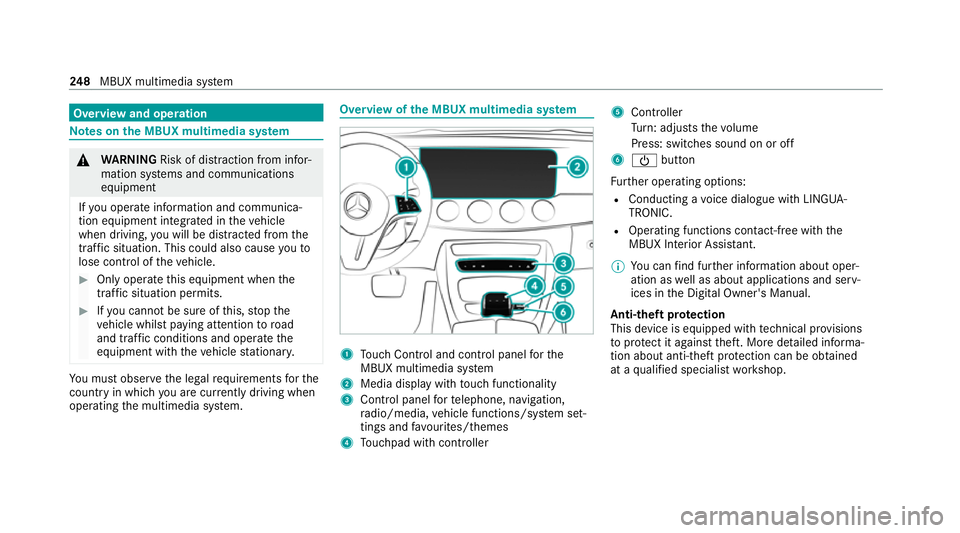
operating the multimedia sy stem. Overview of
the MBUX multimedia sy stem 1
Touch Control and cont rol panel forthe
MBUX multimedia sy stem
2 Media display with touch functionality
3 Control panel forte lephone, navigation,
ra dio/media, vehicle functions/sy stem set‐
tings and favo urites/ themes
4 Touchpad with cont roller 5
Cont roller
Tu rn: adjusts thevo lume
Press: switches sound on or off
6 Ü button
Fu rther operating options:
R Conducting a voice dialogue with LINGUA‐
TRONIC.
R Operating functions con tact-free wi th the
MBUX Interior Assis tant.
% You can find fur ther information about oper‐
ation as well as about applications and serv‐
ices in the Digital Owner's Manual.
Anti-theft pr otection
This device is equipped with tech nical pr ovisions
to protect it against theft. More de tailed informa‐
tion about anti-theft pr otection can be obtained
at a qualified specialist workshop. 248
MBUX multimedia sy stem
Page 253 of 469
%
If Mercedes me connect is active 5,the
ve hicle is linked with Mercedes me connect.
Ve hicle data is then transmit tedto the bac k-
end sy stem. What data is transmit ted
depends on which services are activated.
Fu rther de tails can be found in the Mercedes
me connect term s and conditions and data
pr otection information. The function is coun‐
tr y- dependent.
If Transmission of vehicle position is active
6, Mercedes me connect services ha ve
been activated forth is vehicle which access
th eve hicle's geoposition. In which ins tances
th ege oposition is transmitted depends on
th e particular services. Further de tails can
be found in the Mercedes me connect terms
and conditions and data pr otection informa‐
tion. The function is count ry-dependent. Ope
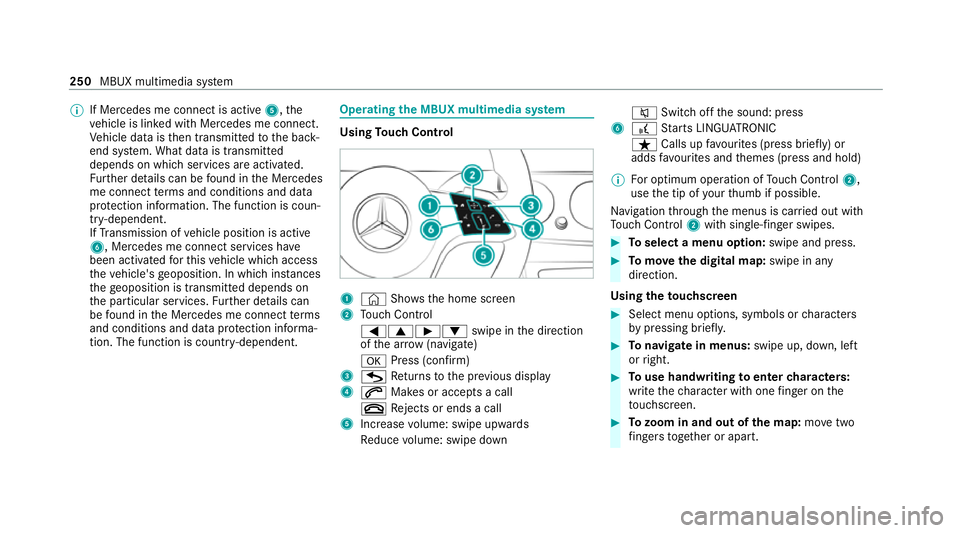
rating the MBUX multimedia sy stem Using
Touch Control 1
© Shows th e home screen
2 Touch Control
=9Ì :swipe in the direction
of the ar row (navigate)
a Press (con firm)
3 G Returns tothe pr evious display
4 6 Makes or accepts a call
~ Rejects or ends a call
5 Increase volume: swipe upwards
Re duce volume: swipe down 8
Switchoff the sound: press
6 £ Starts LINGU ATRO NIC
ß Calls up favo urites (press brief ly) or
adds favo urites and themes (press and hold)
% For optimum operation of Touch Control 2,
use the tip of your thumb if possible.
Na vigation thro ugh the menus is car ried out with
To uch Control 2with sin gle-finger swipes. #
Toselect a menu option: swipe and press. #
Tomo vethe digital map: swipe in any
direction.
Using theto uchscreen #
Select menu options, symbols or characters
by pressing briefly. #
Tonavigate in menus: swipe up, down, left
or right. #
Touse handwriting toenter characters:
write thech aracter with one finger on the
to uchsc reen. #
Tozoom in and out of the map: movetwo
fi ngers toget her or apart. 250
MBUX multimedia sy stem
Page 254 of 469
#
Tocall up thegl obal menu: press and hold
on theto uchsc reen until theOPTIONS menu
appears.
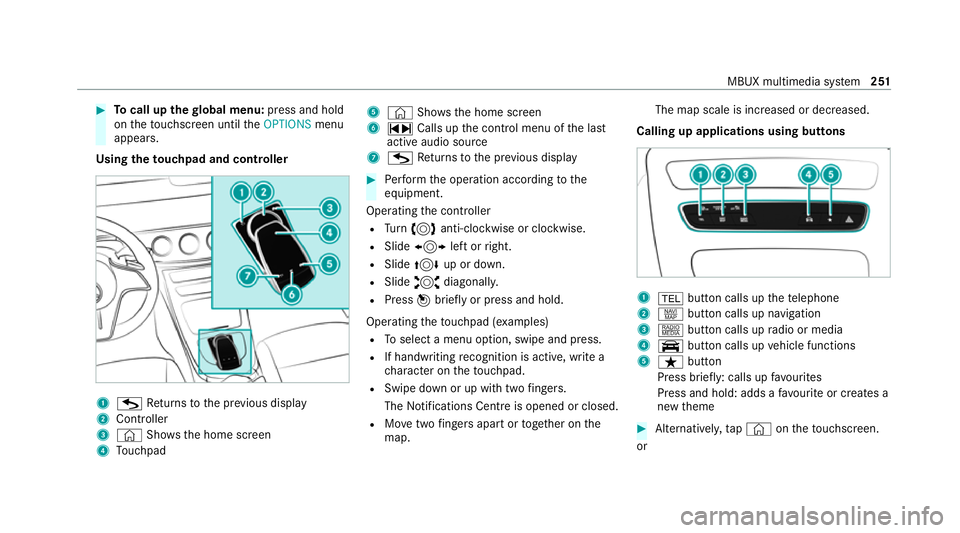
Using theto uchpad and controller 1
G Returns tothe pr evious display
2 Cont roller
3 © Shows th e home screen
4 Touchpad 5
© Shows the home screen
6 ~ Calls up the control menu of the last
active audio source
7 G Returns tothe pr evious display #
Perform the operation according tothe
equipment.
Operating the controller
R Turn 3 anti-clockwise or clo ckwise.
R Slide 1 left orright.
R Slide 4 up or down.
R Slide 2 diagonally.
R Press 7briefly or press and hold.
Operating theto uchpad (e xamples)
R Toselect a menu option, swipe and press.
R If handwriting recognition is acti ve, write a
ch aracter on theto uchpad.
R Swipe down or up with two fingers.
The Notifications Centre is opened or closed.
R Movetwo fingers apart or toge ther on the
map. The map scale is increased or decreased.
Calling up applications using buttons 1
% button calls up thete lephone
2 z button calls up navigation
3 | button calls up radio or media
4 y button calls up vehicle functions
5 ß button
Press brief ly: calls up favo urites
Press and hold: adds a favo urite or creates a
new theme #
Alternatively, tap© ontheto uchsc reen.
or MBUX multimedia sy
stem 251
Page 256 of 469
or
#
b) Press a memory position button or a
seat adjustment switch on the driver's
door.
The adjustment process is stopped. The driver's seat is equipped with an access pre‐
ve nter.
If th e driver's door is open, the driver's seat will
not be set af ter calling up the driver's profile.
Profiles store your vehicle settings and settings
fo rth e multimedia sy stem. If theve hicle is used
by several drivers, the driver can select their
ow n profile wi thout changing thestored profile
settings of other drivers.
% Information on profiles from Mercedes me
connect can be found in the Digital Opera‐
to r's Manual.
Ve hicle settings are, forex ample, driver's seat,
st eering wheel and mir ror settings, clima tecon‐
trol and ambient lighting. Forth e settings of the
multimedia sy stem, you can select, forex ample,
ra dio stations, pr evious destinations as well as
th emes, suggestions and favo urites. Fo
rre cur ring driving situations, su chas long
drives on the mo torw ay,yo u can sa veyour pre‐
fe rred settings in a theme in theve hicle. In a
th eme you can sa vethe display of the digital
map, your prefer redra dio station and prefer red
drive prog ram, forex ample.
The vehicle can learn the habits of the driver. It
th en of fers suggestions forth e most probable
navigation destinations, media sources, radio
st ations or con tacts. The pre-requirements for
th at are the selection of a profile, your consent
to there cording of da taand suf ficient collected
da ta.
Fa vourites pr ovide quick access toapplications
th at are used of ten. You can select favo urites
from categories or add them directly toan appli‐
cation. Configuring profiles,
themes and sugges‐
tions Multimedia sy
stem:
4 © 5
f Profiles
Creating a new profile #
Select WCreate profile . #
Select an avatar. #
Enterth e name and confi rmwith a. #
Select Continue r. #
Select Current settings. #
Select Save. #
Activate Blu etoo th®
and select Connect
phone, toconnect a mobile phone wi th the
user profile . #
Select Finished.
Selecting profile options #
Select Äfor a profile.
The following functions are available:
R Editing, resetting or deleting a profile
R Resetting themes or favo urites MBUX multimedia sy
stem 253