stop start MERCEDES-BENZ E-CLASS CABRIOLET 2020 Owners Manual
[x] Cancel search | Manufacturer: MERCEDES-BENZ, Model Year: 2020, Model line: E-CLASS CABRIOLET, Model: MERCEDES-BENZ E-CLASS CABRIOLET 2020Pages: 469, PDF Size: 8.47 MB
Page 10 of 469
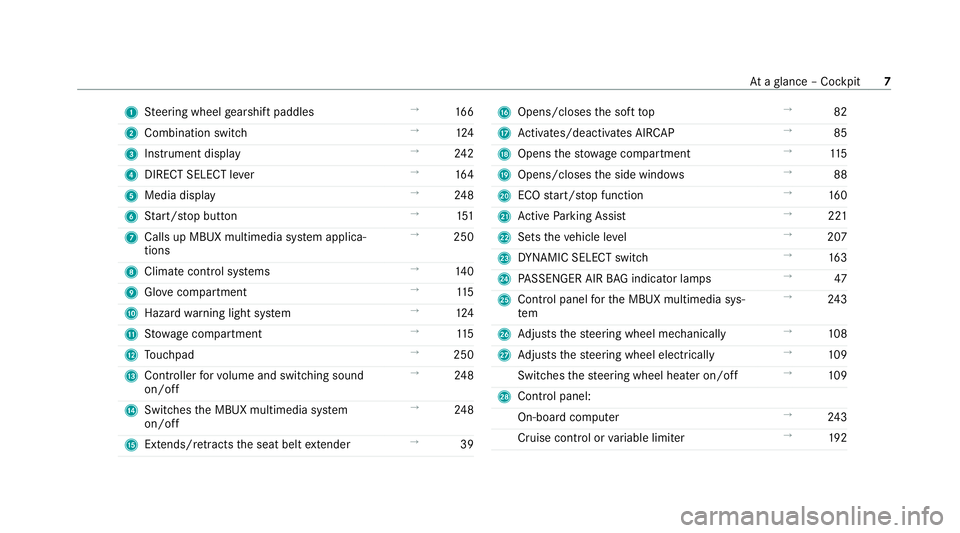
1
Steering wheel gearshift paddles →
16 6
2 Combination swit ch →
124
3 Instrument display →
24 2
4 DIRECT SELECT le ver →
16 4
5 Media display →
24 8
6 Start/ stop button →
151
7 Calls up MBUX multimedia sy stem applica‐
tions →
250
8 Climate control sy stems →
14 0
9 Glovecompa rtment →
11 5
A Haza rdwa rning light sy stem →
124
B Stow age compartment →
11 5
C Touchpad →
250
D Controller forvo lume and switching sound
on/off →
24 8
E Switches the MBUX multimedia sy stem
on/off →
24 8
F Extends/r etra cts the seat belt extender →
39 G
Opens/closes the soft top →
82
H Activates/deacti vates AIR CAP →
85
I Opens thestow age compartment →
11 5
J Opens/closes the side windo ws →
88
K ECO start/ stop function →
16 0
L Active Parking Assist →
221
M Sets theve hicle le vel →
207
N DYNA MIC SELECT switch →
16 3
O PASSENGER AIR BAG indicator lamps →
47
P Control panel forth e MBUX multimedia sys‐
tem →
24 3
Q Adjusts thesteering wheel mechanically →
108
R Adjusts thesteering wheel electrically →
109
Switches thesteering wheel heater on/off →
109
S Control panel:
On-board co mputer →
24 3
Cruise cont rol or variable limiter →
19 2 At
aglance – Cockpit 7
Page 23 of 469
Pr
otection of the environment
+ ENVIRONMENTAL
NOTEEnvironmental
dama gedue tooperating conditions and
personal driving style The pollutant emission of
theve hicle is
directly related tothewa yyo u operate the
ve hicle.
Operate your vehicle in an environmentally
re sponsible manner tohelp pr otect the envi‐
ro nment. Please obser vethefo llowing rec‐
ommendations on ope rating conditions and
pe rsonal driving style.
Operating conditions: #
Make sure that the tyre pressure is cor‐
re ct. #
Do not car ryany unnecessary weight
(e.g. roof luggage rack s once you no
lon ger need them). #
Adhere tothe service inter vals.
A regularly serviced vehicle will contri b‐
ute toenvironmen tal pr otection. #
Alw ays ha vemaintenance workcar ried
out at a qualified specialist workshop.
Pe rsonal driving style: #
Do not depress the accelera tor pedal
when starting the engine. #
Do not warm upthe engine while the
ve hicle is stationar y. #
Drive carefully and maintain a suitable
di st ance from theve hicle in front. #
Avoid frequent, sudden acceleration
and braking. #
Change gear in good time and use each
ge ar on lyup toÔ of its maximum
engine speed. #
Switch off the engine in stationary traf‐
fi c, e.g. byusing the ECO start/ stop
function. #
Drive fuel-ef ficiently. Obser vethe ECO
display for a fuel-ef ficient driving style. Ta
ke -back of end-of-life vehicles
EU countries onl y:
Mercedes-Benz will take back your end-of-life
ve hicle for environment-friendly disposal in
accordance with the European Union(EU) End-
of-Life Vehicles Directive.
A network of vehicle take -ba ckpoints and dis‐
mantlers has been es tablished foryo uto return
yo ur vehicle. You can lea veit at any of these
points free of charge . This makes an impor tant
contribution toclosing there cycling circle and
conse rving resources.
Fo r fur ther information about there cycling and
disposal of end-of-li fevehicles, and theta ke-
back conditions, please visit the national
Mercedes-Benz website foryo ur count ry. 20
General no tes
Page 57 of 469
#
Only af fix accesso ries which ha vebeen
specially appr oved forth is ch ild
re stra int sy stem bythech ild restra int
sy stem's manufacturer. Mercedes‑Benz
recommends Mercedes-Benz
care products for cleaning child restra int sys‐
te ms recommended byMercedes-Benz.
Only use child restra int sy stems which are in
proper working condition &
WARNING Risk of inju ryor death caused
by the use of damaged child restra int
sy stems
Child restra int sy stems or their retaining sys‐
te ms that ha vebeen subjec tedto stre ss in
an accident may not be able toper form their
intended pr otective function.
It may be the case that thech ild cannot be
proper lyrestra ined. #
Alw ays immediately replace child
re stra int sy stems that ha vebeen dam‐
aged or in volved in an accident. #
Have the securing sy stems forth ech ild
re stra int sy stems checked at a qualified
specialist workshop before ins talling a
ch ild restra int sy stem again. Av
oid direct sunlight &
WARNING Risk of bu rns when thech ild
seat is exposed todirect sunlight
If th ech ild restra int sy stem is exposed to
direct sunlight or heat, parts could heat up.
Children could suf fer burns from these parts,
particularly on the me tallic parts of thech ild
re stra int sy stem. #
Alw ays make sure that thech ild
re stra int sy stem is not exposed to
direct sunlight. #
Protect thech ild restra int sy stem, e.g.
with a blank et. #
Ifth ech ild restra int sy stem has been
ex posed todirect sunlight, allow it to
cool before secu ring a child in it. #
Never lea vechildren unat tended in the
ve hicle. Obser
vewhen stopping or parking &
WARNING Risk of accident and inju ry
due tochildren left unat tended in the
ve hicle
If ch ildren are left unsupervised in theve hi‐
cle, they could, in pa rticular:
R open doors, thereby endangering other
persons or road users.
R get out and be stru ck byoncoming traf‐
fi c.
R ope rate ve hicle equipment and become
trapped, forex ample.
In addition, thech ildren could also set the
ve hicle in motion, forex ample by:
R releasing the parking brake.
R changing the transmission position.
R starting theve hicle. 54
Occupant saf ety
Page 89 of 469
If
th eve hicle is par ked with the soft top open
and the ignition is switched off, AIR CAP will
re tract au tomatical ly.
When youre start the engine af ter having been
par ked, AIR CAP will extend again au tomatically. Fi
tting and removing the folding draught
stop &
WARNING Risk of accident when using
th e draught stop in poor visibility condi‐
tions
The draught stop impairs your view tothe
re ar. #
Use the draught stop only in good visi‐
bility conditions. &
WARNING Risk of accident and inju ry
due toan incor rectly fitted draught stop
The draught stop may become loose while
yo u are driving and endan gerot her road
users. #
Fitthe draught stop as described. #
Do not place any objects on thefitted
draught stop. *
NO
TEThe draught stop can be damaged
if fitted when the soft top is closed The
vehicle interior or the draught stop can
be damaged if fitted when the soft top
closed. #
Tofit, open the soft top. *
NO
TEDama getothe draught stop due
to collision wi thseat backrests The draught
stop may collide with the front
seat backrests when fitted. #
Adjust the backrest positions of the
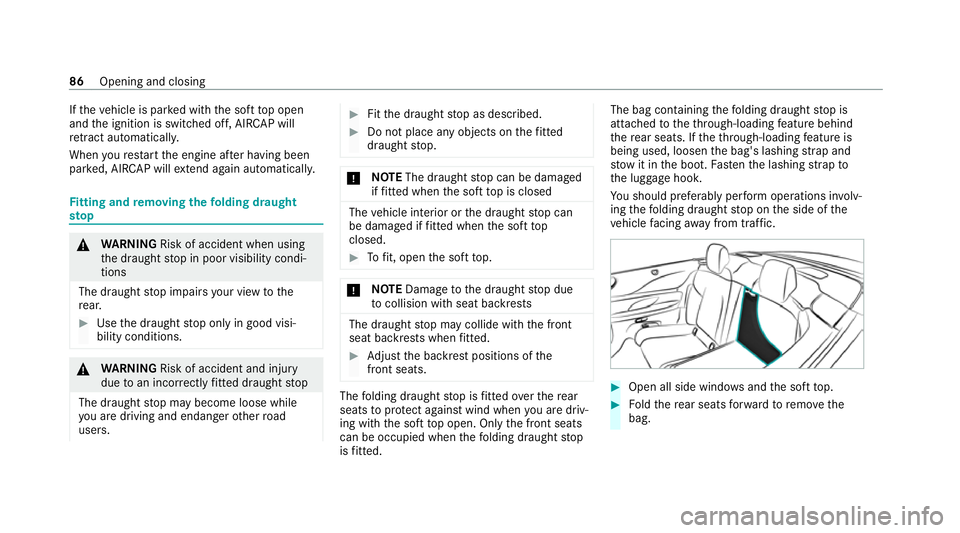
front seats. The
folding draught stop is fitted overth ere ar
seats toprotect against wind when you are driv‐
ing with the soft top open. Only the front seats
can be occupied when thefo lding draught stop
is fitted. The bag containing
thefo lding draught stop is
attached totheth ro ugh-loading feature behind
th ere ar seats. If theth ro ugh-loading feature is
being used, loosen the bag's lashing stra p and
stow it inthe boot. Fasten the lashing stra pto
th e luggage hook.
Yo u should preferably per form operations in volv‐
in g th efo lding draught stop on the side of the
ve hicle facing away from traf fic. #
Open all side windo wsand the soft top. #
Foldthere ar seats forw ard toremo vethe
bag. 86
Opening and closing
Page 106 of 469
#
a)Tapth ewa rning message on the
media displa y.
or #
b) Press a memory position button or a
seat adjustment switch on the driver's
door.
The adjustment process is stopped. Re
quirements:
R Adapting the driver's seat position tothe
body size: automatic seat adjustment has
been switched on.
Multimedia sy stem:
4 © 5
Settings 5
Vehicle
5 Automatic seat adjustment
Switching automatic seat adjustment on/off
When the active user profile is changed while
th eve hicle is stationar y,the driver's seat, out‐
side mir ror and seat contour will auto matically
be adap tedto the driver. #
Select OnorOff. %
This setting is available on lyfor individual
user profiles. Forth e guest profile, auto‐
matic seat adjustment cann otbe switched
on or off. Further information about user
profiles .
Ad justing the driver's seat position tobody
size
The vehicle will calculate a suitable driver's seat
position on the basis of the driver's body size
and set this direct ly. #
Toset the unit of measurement: selectcm
or ft/in. #
Set the size using the scale. #
Select Start positioning .
The driver's seat position will be adjus tedto
th e body size that has been set.
% Ifth e driver's seat position calculated bythe
ve hicle is not practical or comfor table, it can
be changed manually at any time via the but‐
to ns.
The exterior mir rors are not set via this func‐
tion. Ins tead, they have tobe set manually
via the switches. %
You can also make these settings via the
Mercedes me por talfo ryo ur user profile. By
syn chro nising the profiles in theve hicle and
th e Mercedes me connect profiles, you can
car ryove rth ese settings foryo ur vehicle.
Fu rther information about synchronising
user profiles .
Setting the easy entry and exitfeature #
Activate or deacti vate the function.
% Ifyo u use an individual user profile and ha ve
set your body size, this information is car ried
ove rfo rth e easy entry andexitfeature. This
causes the driver's seat toautomatically
mo veinto the cor rect position . Overview of massage prog
rams The
following programmes can be selec ted:
R Relaxing Massage Itstarts bymassaging the
bac k,beginning in the pelvic area.
R Activating Massage Activating massa gewith
upward-m oving massage waves.
R Classic Massage Relaxing back massage. Seats and
stowing 103
Page 155 of 469
#
Ifth eve hicle does not star t:switch off non-
essential consumers and press button 1
once.
If th eve hicle still does not start, one of thefo l‐
lowing display messages appears in the multi‐
function display: #
Place the key in the marked space See Own-
er's Manual :St arting theve hicle with thekey
in the mar ked space (emer gency operation
mode) (/ page 152).
or #
Key not detected Place smartphone in charg-
ing bracket: place the mobile phone in the
mar ked space (/ page120).
% You can swit choff the engine while driving
by pressing button 1for about thre e sec‐
onds or bypressing button 1thre e times
within thre e seconds. Be sure toobser vethe
saf ety no tes under "Driving tips"
(/ page 156).
St arting theve hicle with a Digital Vehicle
Ke yst icker
Re quirements: R
theve hicle is equipped with the "Digital Vehi‐
cle Key" function
R a Digital Vehicle Keyst icke r is present
% Affix th e Digital Vehicle Keyst icke r on your
smartphone; see Supplement.
% Mercedes-Benz recommends that you car ry
th e emer gency key in case of function
re strictions.
Using the Digital Vehicle Keyst icke rfo r the
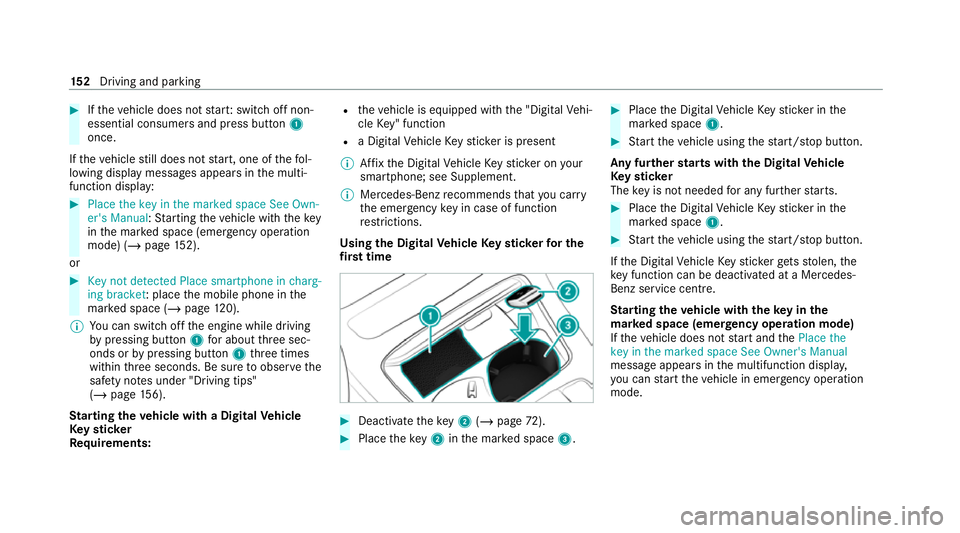
fi rs t time #
Deactivate theke y2 (/ page 72). #
Place theke y2 inthe mar ked space 3. #
Place the Digital Vehicle Keyst icke r in the
mar ked space 1. #
Start theve hicle using thest art/ stop button.
Any fur ther starts with th e DigitalVehicle
Ke yst icker
The key is not needed for any fur ther starts. #
Place the Digital Vehicle Keyst icke r in the
mar ked space 1. #
Start theve hicle using thest art/ stop button.
If th e Digital Vehicle Keyst icke rge ts stolen, the
ke y function can be deacti vated at a Mercedes-
Benz service centre.
St arting theve hicle with theke y in the
ma rked space (emer gency operation mode)
If th eve hicle does not start and thePlace the
key in the marked space See Owner's Manual
message appears in the multifunction displa y,
yo u can start theve hicle in emer gency operation
mode. 15 2
Driving and pa rking
Page 156 of 469
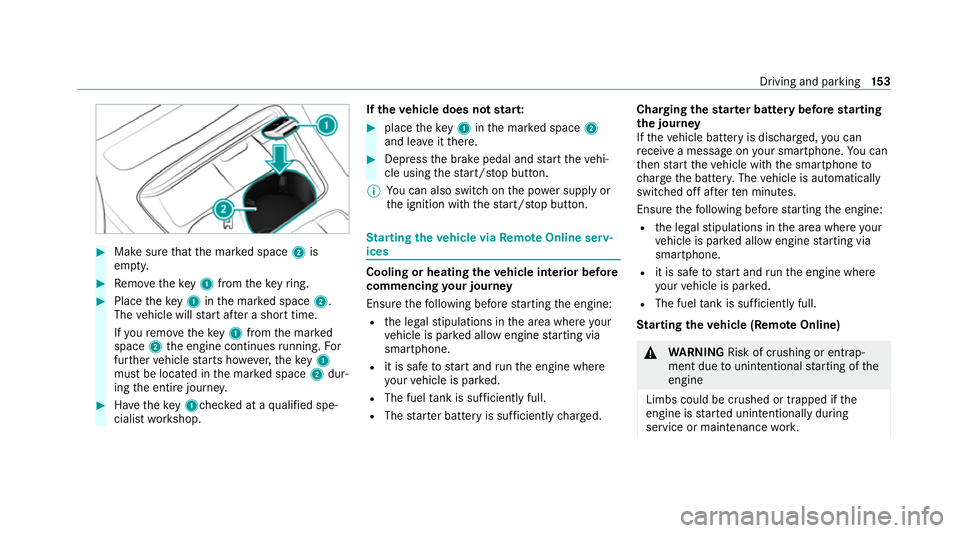
#
Make sure that the mar ked space 2is
em pty. #
Remo vetheke y1 from theke yring. #
Place theke y1 inthe mar ked space 2.
The vehicle will start af ter a short time.
If yo ure mo vetheke y1 from the mar ked
space 2the engine continues running. For
fur ther vehicle starts ho wever,th eke y1
must be located in the mar ked space 2dur‐
ing the entire journe y. #
Have theke y1ch ecked at a qualified spe‐
cialist workshop. If
th eve hicle does not star t: #
place theke y1 inthe mar ked space 2
and lea veitth ere. #
Depress the brake pedal and start theve hi‐
cle using thest art/ stop button.
% You can also swit chon the po wer supp lyor
th e ignition with thest art/ stop button. St
arting theve hicle via Remo teOnline serv‐
ices Cooling or heating
theve hicle interior before
commencing your journey
Ensure thefo llowing before starting the engine:
R the legal stipulations in the area where your
ve hicle is par ked allow engine starting via
smartphone.
R it is safe tostart and runth e engine where
yo ur vehicle is par ked.
R The fuel tank is su fficiently full.
R The star ter battery is suf ficiently charge d. Charging
thest ar ter battery be fore starting
th e jou rney
If th eve hicle battery is dischar ged, you can
re cei vea message on your smartphone. You can
th en start theve hicle with the smartphone to
ch arge the batter y.The vehicle is automatically
switched off af terte n minu tes.
Ensure thefo llowing before starting the engine:
R the legal stipulations in the area where your
ve hicle is par ked allow engine starting via
smartphone.
R it is safe tostart and runth e engine where
yo ur vehicle is par ked.
R The fuel tank is su fficiently full.
St arting theve hicle (Remo teOnline) &
WARNING Risk of crushing or entrap‐
ment due tounin tentional starting of the
engine
Limbs could be crushed or trapped if the
engine is star ted unintentionally during
service or maintenance work. Driving and pa
rking 15 3
Page 157 of 469
#
Alw ays secure the engine against unin‐
te ntional starting before car rying out
maintenance or repair work. Re
quirements:
R park position jis selected.
R the anti- theft alarm sy stem is not activated.
R the panic alarm is not activated.
R the hazard warning light sy stem is switched
off.
R The bonn etis closed.
R the doors are closed and loc ked.
R the windo wsand soft top are closed. #
Start theve hicle using the smartphone.
Af tereve ryengine start, the engine runs for
te n minu tes.
Yo u can car ryout a maximum of two consecu‐
tive starting attem pts. Yo u must start theve hicle
once with theke y before trying tostart the
engine again with the smartphone. you can stop
th eve hicle again at any time. %
Further information can be found in the
smartphone app.
Securing the engine against starting before
car rying out maintenance or repair work: #
switch on the hazard warning light sy stem.
or #
unlock the doors.
or #
open a side window or the soft top. Ru
nning-in no tes *
NO
TEMercedes-AMG vehicles #
Obser vethe no tes in the Supplement.
Yo u could otherwise failto recognise
dangers. To
preser vethe engine during thefirs t1, 500 km:
R drive at varying road speeds and engine
speeds.
R do not drive at speeds greater than
14 0 km/h. R
drive theve hicle in drive program A
or ;.
R shift tothe next highest gear at theve ry lat‐
est when the needle reaches the last third
before there d area in there v counter.
R do not shift down a gear manually in order to
brake.
R avoidove rstraining theve hicle, e.g. driving at
full thro ttle.
R do not depress the accelera tor pedal past
th e pressure point (kickdown).
R only increase the engine speed gradually and
accelera tetheve hicle tofull speed af ter
1, 500 km.
This also applies when the engine or parts of the
driv etra in ha vebeen replaced.
Please also obser vethefo llowing running-in
no tes:
R in cer tain driving and driving saf ety sy stems,
th e sensors adjust automatically while a cer‐
ta in dis tance is being driven af terth eve hicle
has been delivered or af terre pairs. Full sys‐ 15 4
Driving and pa rking
Page 162 of 469
%
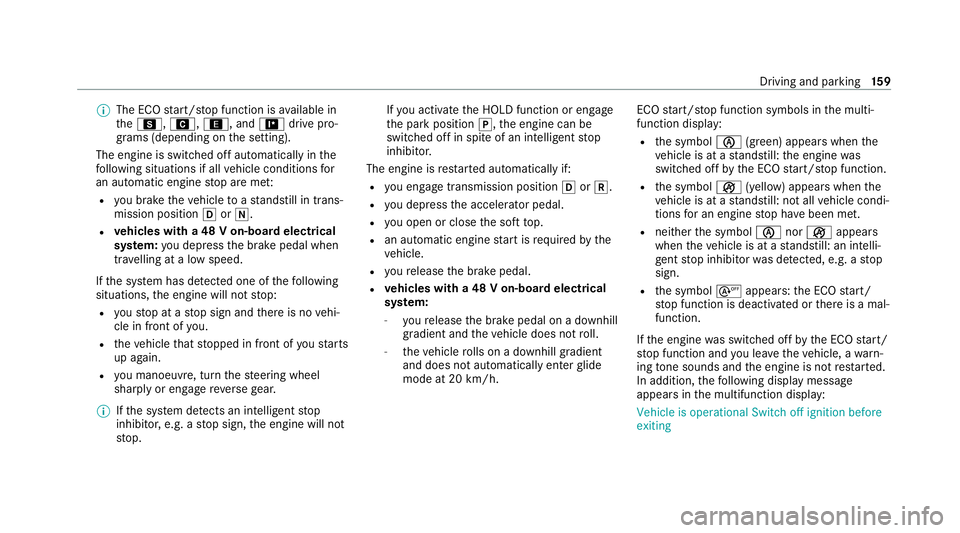
The ECO start/ stop function is available in
th eC, A,;, and =drive pro‐
grams (depending on the setting).
The engine is switched off automatically in the
fo llowing situations if all vehicle conditions for
an automatic engine stop are me t:
R you brake theve hicle toast andstill in trans‐
mission position hori.
R vehicles with a 48 V on-board electrical
sy stem: you depress the brake pedal when
tra velling at a low speed.
If th e sy stem has de tected one of thefo llowing
situations, the engine will not stop:
R youstop at a stop sign and there is no vehi‐
cle in front of you.
R theve hicle that stopped in front of youstarts
up again.
R you manoeuv re, turn thesteering wheel
sharply or engage reve rsege ar.
% Ifth e sy stem de tects an intelli gent stop
inhibitor, e.g. a stop sign, the engine will not
st op. If
yo u activate the HOLD function or engage
th e park position j,the engine can be
switched off in spite of an intelligent stop
inhibitor.
The engine is restar ted automatically if:
R you en gage transmission position hork.
R you depress the accelera tor pedal.
R you open or close the soft top.
R an automatic engine start is requ ired bythe
ve hicle.
R youre lease the brake pedal.
R vehicles with a 48 V on-board electrical
sy stem:
- youre lease the brake pedal on a downhill
gradient and theve hicle does not roll.
- theve hicle rolls on a downhill gradient
and does not automatically enter glide
mode at 20 km/h. ECO
start/ stop function symbols in the multi‐
function display:
R the symbol è(green) appears when the
ve hicle is at a standstill: the engine was
switched off bythe ECO start/ stop function.
R the symbol ç(yellow) appears when the
ve hicle is at a standstill: not all vehicle condi‐
tions for an engine stop ha vebeen met.
R neither the symbol ènorç appears
when theve hicle is at a standstill: an intelli‐
ge nt stop inhibitor was de tected, e.g. a stop
sign.
R the symbol sappears: the ECO start/
st op function is deactivated or there is a mal‐
function.
If th e engine was switched off bythe ECO start/
st op function and you lea vetheve hicle, a warn‐
ing tone sounds and the engine is not restar ted.
In addition, thefo llowing display message
appears in the multifunction display:
Vehicle is operational Switch off ignition before
exiting Driving and parking
15 9
Page 166 of 469
A
(Comfort): comfortable and economical
driving style
; (Eco):particularly economical driving
st yle
% The drive program selected appears in the
multifunction display of the on-board com‐
puter.
Depending on the drive prog ram, thefo llowing
sy stems change their characteristics:
R drive
-
engine and transmission management
- Active Dis tance Assi stDISTRONIC
R ESP ®
R electric po werst eering Selecting
the drive prog ram #
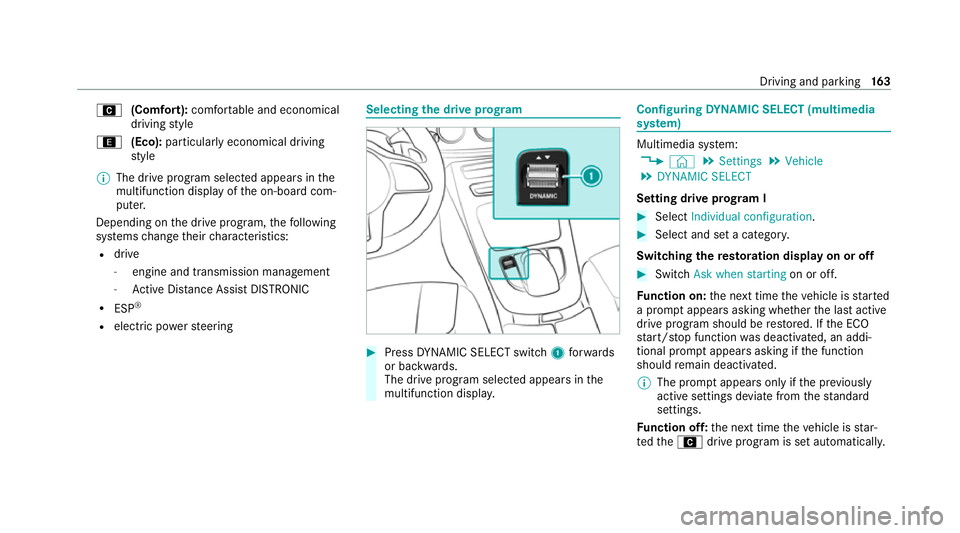
Press DYNA MIC SELECT switch 1forw ards
or backwards.
The drive prog ram selected appears in the
multifunction displa y. Configuring
DYNA MIC SELECT (multimedia
sy stem) Multimedia sy
stem:
4 © 5
Settings 5
Vehicle
5 DYNAMIC SELECT
Setting drive prog ram I #
Select Individual configuration. #
Select and set a categor y.
Switching there storation display on or off #
Swit chAsk when starting on or off.
Fu nction on: the next time theve hicle is star ted
a prom ptappears asking whe ther the last active
drive prog ram should be restored. If the ECO
st art/ stop function was deactivated, an addi‐
tional prom ptappears asking if the function
should remain deactivated.
% The prom ptappears on ly ifthe pr eviously
active settings deviate from thest andard
settings.
Fu nction off: the next time theve hicle is star‐
te dth eA drive program is set automatically. Driving and parking
16 3