brakes MERCEDES-BENZ E-CLASS COUPE 2009 User Guide
[x] Cancel search | Manufacturer: MERCEDES-BENZ, Model Year: 2009, Model line: E-CLASS COUPE, Model: MERCEDES-BENZ E-CLASS COUPE 2009Pages: 313, PDF Size: 7.76 MB
Page 126 of 313
to avoi
dexceeding the se tspeed. On long and
steep downhil lgradients ,especially if the
vehicl eisladen or towing atrailer, yo umust
shift to alower gear in good tim eorselect
shift range 1,2or 3on vehicles with auto-
matic transmission* .Bydoing so ,you will
make us eofthe braking effect of the engine,
which relieves the load on the brake system
and prevents the brakes fro moverheating
and wearing too quickly. G
Ris
kofa ccident
Do not change down for additional engine
braking on aslipper yroads urface. This could
cause the drive wheels to lose their gri pand
the vehicl ecould skid.
Use cruis econtrol onl yifroada nd traffi ccon-
ditions make it appropriate to maintain a
stead yspeed foraprolonge dperiod. Youc an
store any roa dspeed above 30 km/h. G
Ris
kofa ccident
Cruise control cannot take account of road
and traffi cconditions.
Alway spayattentio ntotrafficconditions
eve nw henc ruis econtrol is activated.
Cruise control is onl yanaiddesigne dtoassist
driving. Yo uareresponsibl efor the vehicle's
spee dand for braking in good time. G
Ris
kofa ccident
Do not us ecruis econtrol:
R in roa dand traffi cconditions which do not
allo wyouto maintain aconstant spee d(e.g.
heav ytraffi corw inding roads). Yo ucould
otherwis ecause an accident.
R on slippery roads .Braking or accelerating
could cause the drive wheels to lose trac-
tio na nd the vehicl ecould the nskid.
R when there is poor visibility, e.g .due to fog,
heav yrainors now
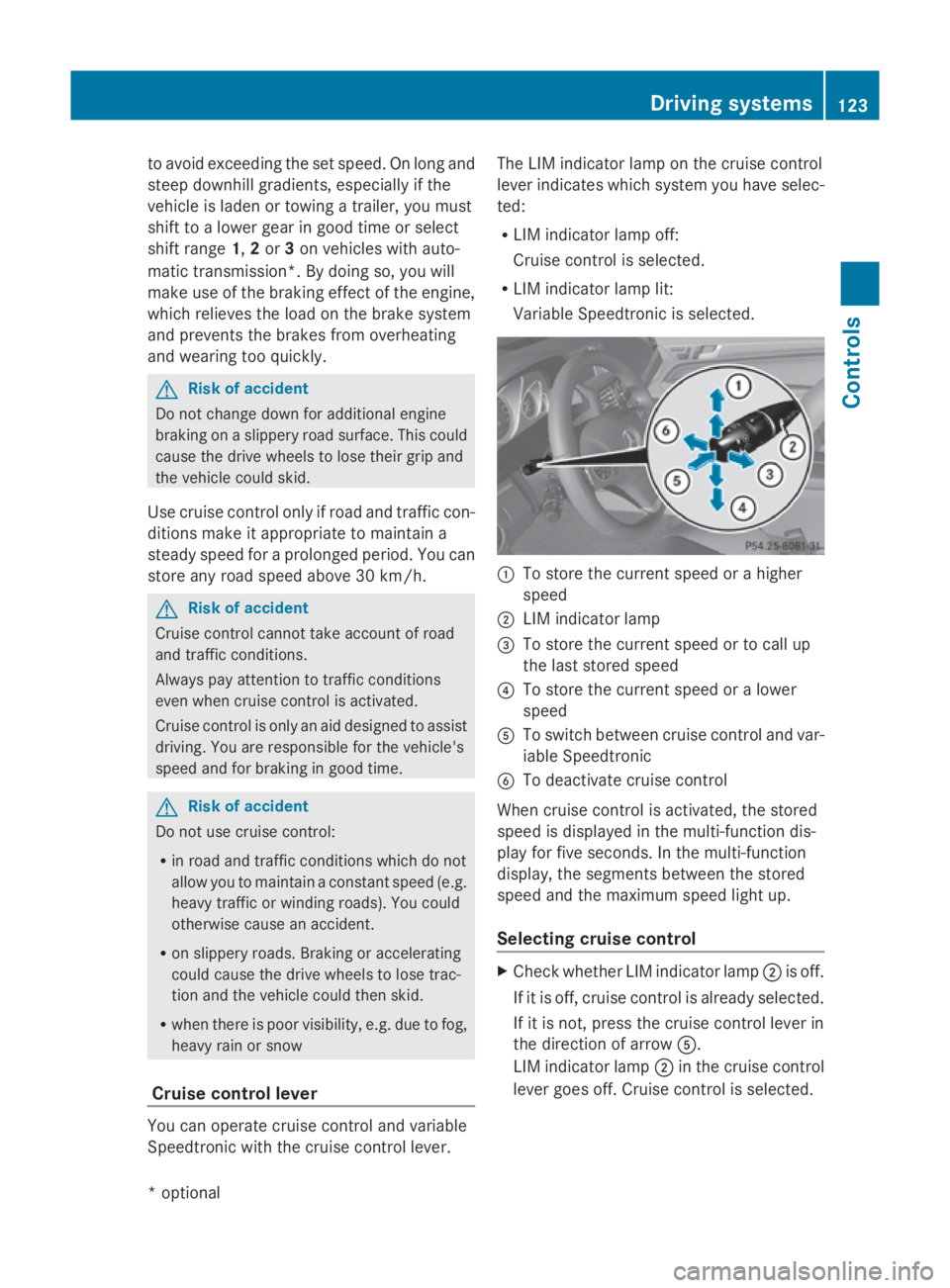
Cruis econtro llever Yo
uc an operate cruis econtrol and variable
Speedtroni cwitht he cruis econtrol lever. Th
eL IM indicator lamp on the cruis econtrol
lever indicates which syste myouhave selec-
ted:
R LIM indicator lamp off:
Cruise control is selected.
R LIM indicator lamp lit:
Variable Speedtroni ciss elect ed. 0046
To store the current spee dorahigher
speed
0047 LIM indicator lamp
008A To store the current spee dortocallup
the last stored speed
0088 To store the current spee doralower
speed
0086 To switch between cruis econtrol and var-
iabl eSpeedtronic
0087 To deactivate cruis econtrol
When cruis econtrol is activated ,the stored
spee disd isplayed in the multi-functio ndis-
play for five seconds. In the multi-function
display, the segments between the stored
spee dand the maximum spee dlight up.
Selecting cruis econtrol X
Check whether LIM indicator lamp 0047is off.
If it is off ,cruis econtrol is already selected.
If it is not, press the cruis econtrol lever in
the directio nofarrow 0086.
LIM indicator lamp 0047in the cruis econtrol
lever goes off .Cruise control is selected. Driving systems
123Controls
*optio nal
207_AKB; 2; 3, en-GB
mkalafa
,V ersion: 2.11.8.1
2009-07-23T10:23:49+02:00
-Seite 123 Z
Page 127 of 313
Storing and maintaining the current
speed
You can store the current speed if you are
driving faster than 30 km/ha nd ESP®
is acti-
vated (Y page 54).
X Accelerate the vehicl etothe desired
speed.
X Briefl ypress the cruis econtro llev er
up 0046 or down 0088to the pressure point.
X Remov eyourfoo tfrom the accelerator
pedal.
Cruise contro lisactivated .The vehicle
automaticall ymaintains the stored speed.
i Cruise contro lmaybe unabl etomaintain
the stored speed on uphill gradients. The
stored speed is resumed when the gradient
evens out. Cruise contro lmaintains the
stored speed on downhil lgradients by
automaticall yapplyin gthe brakes.
Vehicles with manua ltransmission:
R always drive at adequate, bu tnot exces-
sive, engine speeds.
R change gear in goo dtime.
R if possible, do not change down several
gear satat ime.
Storin gthe curren tspeed or callin gup
the las tstored speed G
Ris
kofa ccident
Onl yselect astored speed if yo uknow what
tha tspeed is and whethe ritissuitabl efor the
current situation. Otherwise, sudden acceler-
ation or braking could endanger yo uorothers.
X Briefl ypullt he cruis econtro llev er towards
you 008A.
X Remov eyourfoo tfrom the accelerator
pedal.
The first time cruis econtro lisactivated ,it
stores the current speed or regulate sthe
speed of the vehicl etothe previously
stored speed. Settin
gaspeed X
Press the cruis econtro llev er to the pres-
sure point, up 0046for ahighe rs peed or
down 0088for alower speed.
X Kee pthe cruis econtro llev er presse duntil
the desired speed is reached.
X Releas ethe cruis econtro llev er.
The new speed is stored.
i Cruise contro lisnot deactivated if you
depress the accelerator pedal. For exam-
ple, if yo uaccelerate briefl ytoovertake,
cruis econtro ladjusts the vehicle's speed
to the last speed stored after yo uhavef in-
ished overtaking.
Making fin eadjustments in 1km/h
increments X
Briefl ypress the cruis econtro llev er to the
pressure point, up 0046for ahighe rspeed or
down 0088for alower speed.
The last speed stored is increased or
reduced.
Adjustment in 10 km/h increments X
Briefl ypress the cruis econtro llev er
beyond the pressure point, up 0046for a
highe rspeed or down 0088for alower speed.
The last speed stored is increased or
reduced.
Deactivatin gcruise control There ar
esevera lwaystod eactivate cruise
control:
X Briefl ypress the cruis econtro llev er for-
wards 0087.
or
X Brake.
or 124
Driving systemsControls
207_AKB; 2; 3, en-GB
mkalafa,
Version: 2.11.8.1 2009-07-23T10:23:49+02:00-Seite 124
Page 128 of 313
X
Briefly press the cruise control lever in the
direction of arrow 0086.
Variabl eSpeedtroni cisselected .LIM indi-
cator lamp 0047in the cruise control lever
lights up.
Cruise control is automaticall ydeactivated if:
R yo ud epress the parking brake.
R yo ud rive at less than 30 km/h
R ESP ®
intervenes or yo udeactivate ESP ®
R yo uc hange into neutral in avehicle with
manual transmission while driving or if the
clutch is depressed for longer than 6sec-
onds
R on vehicle swithm anual transmission, you
shift to ahigher gea rand as aresult the
engine speed is too low
R yo um ove the selector lever to Non vehi-
cle sw itha utomatic transmission* while
driving
If cruise control is deactivated, yo uwillh ear
aw arning tone. You see the Cruise con‐
trol off messageinthe multi-function dis-
play for approximately five seconds.
i The last speed store disclearedwheny ou
switch off the engine. DISTRONI
CPLUS*
i Distronic Plu sisnot available in al lcoun-
tries.
Distronic Plu sregulates the speed and auto-
matically maintains the distance to the vehi-
cle in front. It brakes automaticall yinorder
to avoid exceeding the set speed. On long and
stee pdownhil lgradients, especially if the
vehicle is laden or towing atrailer, yo umust
select shift range 1,2or 3in goo dtime .By
doing so, yo uwillm ake us eofthe braking
effect of the engine, which relieves the load
on the brake system and prevents the brakes
from overheating and wearing too quickly. G
Risk of accident
Do not change dow nfor additiona lengine
braking on aslippery roa dsurface .Thisc ould
cause the drive wheel stoloset hei rgripa nd
the vehicle could skid. G
Risk of accident
DISTRONIC PLUS is only an ai ddesigne dto
assist driving .The driver is fully responsible
for the vehicle's distance from othe rvehicles,
the vehicle's speed and for braking in good
time.
DISTRONIC PLUS doe snot react to:
R pedestrians
R stationar yobstacles on the road, e.g. stop-
ped or parked vehicles
R oncoming and crossing traffic
DISTRONIC PLUS may not detect narro wvehi-
cle sdriving in front, e.g. motorcycles, or vehi-
cle sd riving on adifferent line. Therefore,
always pa yattention to traffi cconditions even
whe nDISTRONIC PLUS is activated. Other-
wise, yo umay fai ltorecognise dangers in
time ,cause an accident and injure yourself
and others.
If as lower-moving vehicle is detected in front,
Distronic Plu scauses your vehicle to brake
and maintai napreset distance to the vehicle
in front. G
Risk of accident
DISTRONIC PLUS cannot take account of road
and traffi cconditions .IfDISTRONIC doe snot
recognise or no longer recognise sthe vehicle
in front, do not activate DISTRONIC or, if it is
already active, deactivate it. Thi sisespecially
the case:
R before corners
R in filter lanes Drivin
gsystems
125Controls
*optional
207_AKB; 2; 3, en-GB
mkalafa
,V ersion: 2.11.8.1
2009-07-23T10:23:49+02:00
-Seite 125 Z
Page 129 of 313
R
when changing to alane with faster moving
traffic
R in complex driving situation sorwhere the
lanes are diverted ,e.g.atm otorway/road-
way construction sites
Otherwise, DISTRONIC PLUS maintain sthe
current speed or accelerates up to th eset
speed.
DISTRONIC PLUS cannot tak eaccount of
weather conditions .Deactivate, or do not
activate, DISTRONIC PLUS if:
R ther oads are slippery, snow-covered or icy.
The wheels could lose grip when braking or
accelerating. The vehicle could start to
skid.
R thes ensors are dirt yorthere is poor visi-
bility, e.g .due to snow, rain or fog. Distance
control may be impaired.
Always pay attention to traffic conditions
even when DISTRONIC PLUS is activated.
Otherwise, you may fail to recognise dangers
in time, cause an acciden tand injure yourself
and others.
The radar sensor system is automatically
deactivated near radio telescope facilities
(Y page 304).
If you want Distronic Plus to assist you, the
radar sensor system must be activated and
operational.
If no car is driving in front of you, Distronic
Plus work slike cruise control in th espeed
range between 30 km/h and 20 0km/ h. If a
vehicle is driving in front of you, Distronic Plus
work sint hespeed range between 0km/h
and 20 0km/ h.
Do not use Distronic Plus while driving on
roads with steep gradients. G
Risk of accident
DISTRONIC PLUS brakes your vehicle at a
maximum of 4m/s2
depending on its speed.
This correspond stoapproximately 40 %of
your vehicle's maximum brak eforce. You must also apply th
ebrakes yoursel fifthis
braking power is not sufficient.
If DISTRONIC PLUS detect sarisk of collision
with avehicle in front ,anintermittent warning
ton esounds. In addition, the 00BAdistance
warning lamp in th einstrumen tcluster lights
up. Brake to avoid acollision.
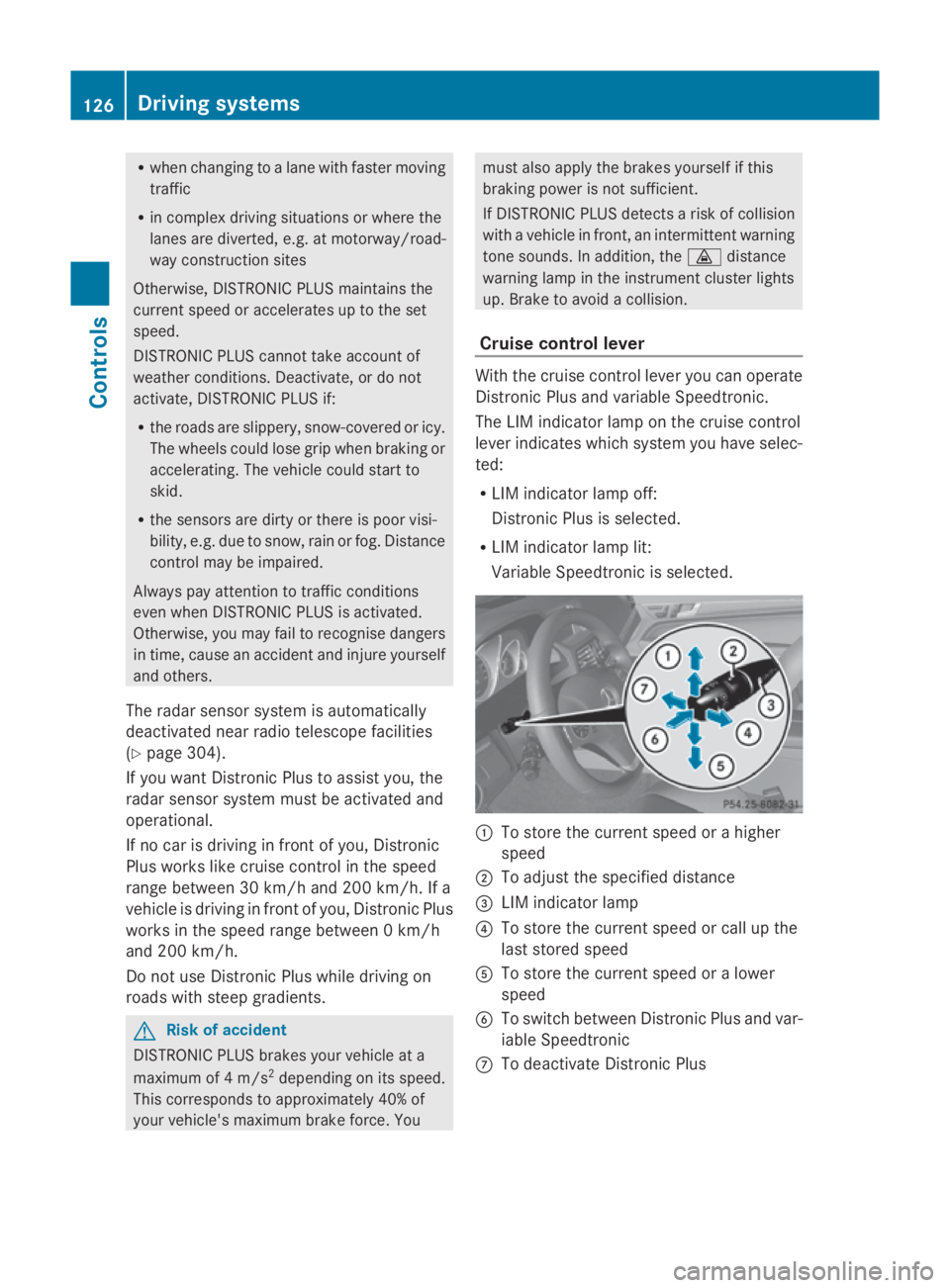
Cruise control lever With th
ecruise control lever you can operate
Distronic Plus and variable Speedtronic.
The LIM indicator lamp on th ecruise control
lever indicates which system you have selec-
ted:
R LIM indicator lamp off:
Distronic Plus is selected.
R LIM indicator lamp lit:
Variable Speedtronic is selected. 0046
To store th ecurrent speed or ahigher
speed
0047 To adjus tthe specified distance
008A LIM indicator lamp
0088 To store th ecurrent speed or call up the
last stored speed
0086 To store th ecurrent speed or alower
speed
0087 To switch between Distronic Plus and var-
iable Speedtronic
006E To deactivat eDistronic Plus 126
Drivin
gsystemsControls
207_AKB; 2; 3, en-GB
mkalafa, Version: 2.11.8.1 2009-07-23T10:23:49+02:00-Seite1 26
Page 131 of 313
Pulling away
X
If the vehicle in front pulls away: remove
your foot from the brake pedal.
X Briefly pull the cruise control lever towards
you 0088.
or
X Accelerate briefly.
Your vehicle pulls away and adapts its
speed to that of the vehicle in front.
Driving
If there is no vehicle in front,D istronic Plus
operates in the same way as cruise control.
If as lower-moving vehicle is detected in front,
Distronic Plus causes your vehicle to brake
and maintain apreset distance to the vehicle
in front.
If Distronic Plus detectsaf aster-moving vehi-
cle in front,iti ncreases the driving speed, but
only up to the stored speed. G
Risk of accident
If you depress the brake, DISTRONIC PLUS is
deactivated unless your vehicle is stationary.
DISTRONIC PLUS then no longer brakes your
vehicle. The driver is fully responsible for the
vehicle's distance from other vehicles, its
speed and for braking in good time.
Stopping G
Risk of accident
The DISTRONIC PLUS braking effect is can-
celled and the vehicle can start moving if:
R DISTRONIC PLUS is deactivated using the
cruise control lever.
R you accelerate.
R the system or the power supply is disrup-
ted, e.g. due to battery failure.
R the electrical system in the engine com-
partment or the fuses are tampered with.
R the battery is disconnected. G
Risk of accident
Never get out of the vehicle when DISTRONIC
PLUS is activated.
DISTRONIC PLUS must never be operated or
deactivated by apassenger or from outside
the vehicle.
DISTRONIC PLUS does not replace the park-
ing brake and must not be used for parking.
If you wish to leave the vehicle or park it,
deactivate DISTRONIC PLUS and secure the
vehicle against rolling away.
If Distronic Plus detectst hat the vehicle in
front is stopping, it brakes your vehicle until
it is stationary.
Once your vehicle is stationary, it remains
stationary and you do not need to depress the
brake.
i Depending on the specified minimum dis-
tance, your vehicle will come to astandstill
at as ufficient distance behind the vehicle
in front.T he specified minimum distance is
set using the thumbwheel on the cruise-
control lever.
When Distronic Plus is activated and the vehi-
cle is at astandstill, awarning message
appears in the multi-function display if:
R the driver's door is opened and you release
the seat belt.
R the engine is switched off.
R the bonnet is opened.
Select Park (P)
X Move the selector lever to Pto prevent the
vehicle from rolling away.
Distronic Plus is deactivated. The warning
message in the multi-function display dis-
appears.
Ah orn will also sound at regular intervals if
Distronic Plus is activated and you:
R switch off the engine, open the driver's
door and remove your seat belt.
R open the bonnet. 128
Driving systemsControls
207_AKB; 2; 3, en-GB
mkalafa,
Version: 2.11.8.1 2009-07-23T10:23:49+02:00-Seite 128
Page 136 of 313
Distroni
cPlusm aydetect vehicles tha tare
crossing your lane by mistake. Activating Dis-
troni cPlusatt rafficlight swithc rossing traf-
fic ,for example, could cause your vehicl eto
pull away unintentionally. SPEEDTRONIC
Speedtroni cbrakes automaticall ysothatyou
do not exceed the se tspeed. On long and
steep downhil lgradients ,especially if the
vehicl eisladen or towing atrailer, yo umust
shift to alower gear in good tim eorselect
shift range 1,2or 3on vehicles with auto-
matic transmission* .Bydoing so, yo uwill
make us eofthe braking effect of the engine,
which relieves the load on the brake system
and prevents the brakes fro moverheating
and wearing too quickly. If yo uneeda ddi-
tional braking ,depress the brake pedal
repeatedly rathe rtha nc ontinuously. G
Ris
kofa ccident
Never depress the brake peda lcontinuously
whil ethe vehicl eisinmotion, e.g .neve rcause
the brakes to ru bbyapplyingconstant slight
peda lpressure. This cause sthe brake system
to overheat, increase sthe braking distance
and can lead to the brakes failing completely. G
Ris
kofa ccident
Do not change down for additional engine
braking on aslipper yroads urface. This could
cause the drive wheels to lose their gri pand
the vehicl ecould skid.
Yo uc an se tavariable or permanent limit
speed:
R variable for speedlimit s, e.g .inbuilt-up
areas
R permanent for long-term spee drestric-
tions, e.g .for driving on winter tyres
(Y page 135) G
Ris
kofa ccident
Speedtroni ciso nlyana iddesigne dtoassist
driving. Yo uareresponsibl efor the vehicle's
spee dand for braking in good time.
i Thes peed indicated in the speedometer
ma ydiffe rs ligh tlyf romt he limi tspeed
stored.
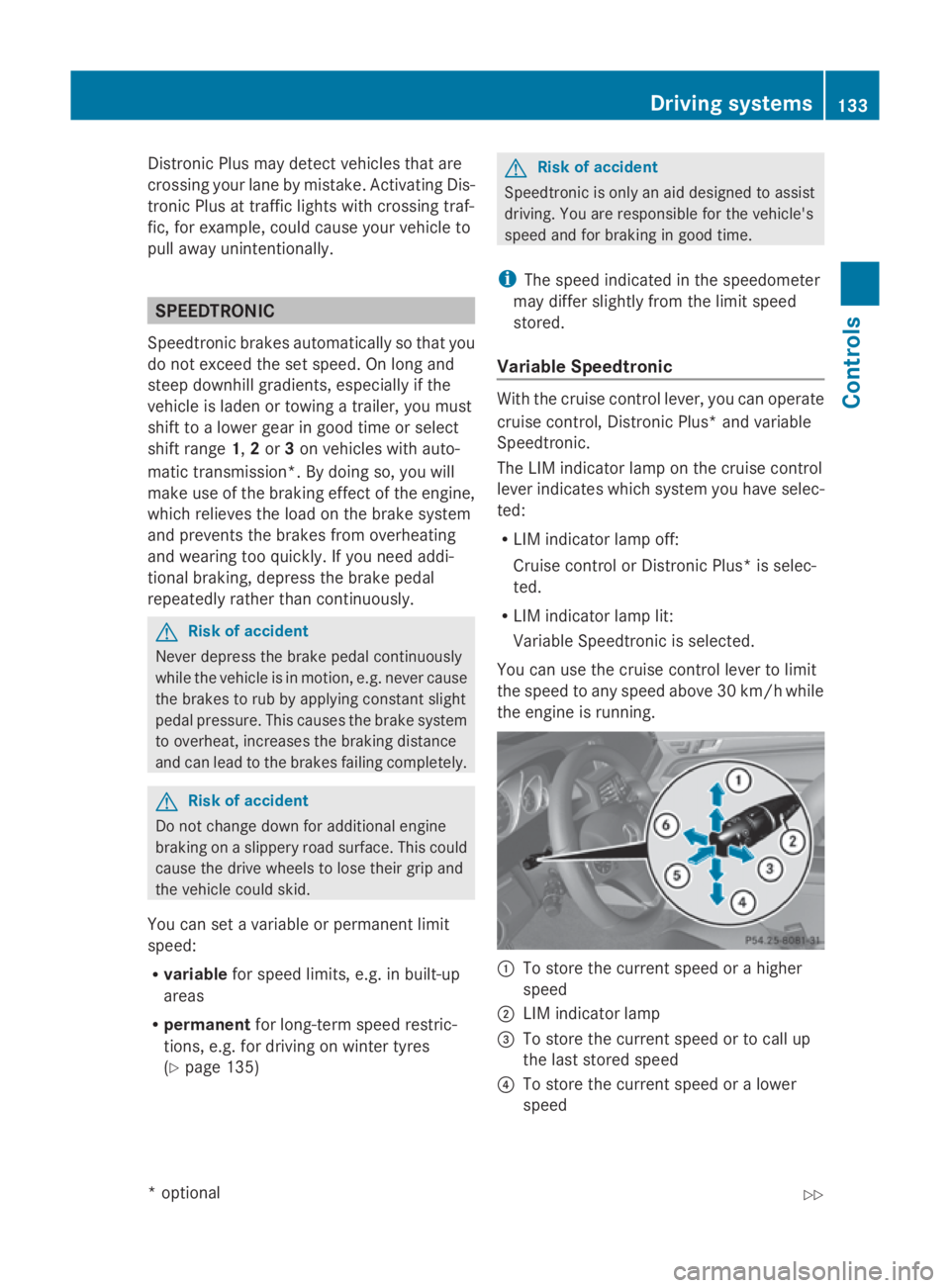
Variabl eSpeedtronic With the cruis
econtro llev er,y ou can operate
cruis econtrol, Distroni cPlus* and variable
Speedtronic.
Th eL IM indicator lamp on the cruis econtrol
lever indicates which syste myouhave selec-
ted:
R LIM indicator lamp off:
Cruise contro lorDistroni cPlus* is selec-
ted.
R LIM indicator lamp lit:
Variable Speedtroni ciss elect ed.
Yo uc an us ethe cruis econtro llev er to limit
the spee dtoany spee dabove 30 km/h while
the engine is running. 0046
To stor ethe current spee dorahigher
speed
0047 LIM indicator lamp
008A To stor ethe current spee dortocallup
the last stored speed
0088 To stor ethe current spee doralower
speed Driving systems
133Controls
*optio nal
207_AKB; 2; 3, en-GB
mkalafa
,V ersion: 2.11.8.1
2009-07-23T10:23:49+02:00
-Seite 133 Z
Page 139 of 313
R
the driver's door is close doryourseatb elt
is fastened.
R the parking brake is not applied.
R the bonnet is closed.
R on vehicles with automatic transmission*,
D, Ror Nis selected.
R Distroni cPlus* is deactivated
Activatin gthe HOL Dfunction X
Make sure tha tthe activatio nconditions
ar em et.
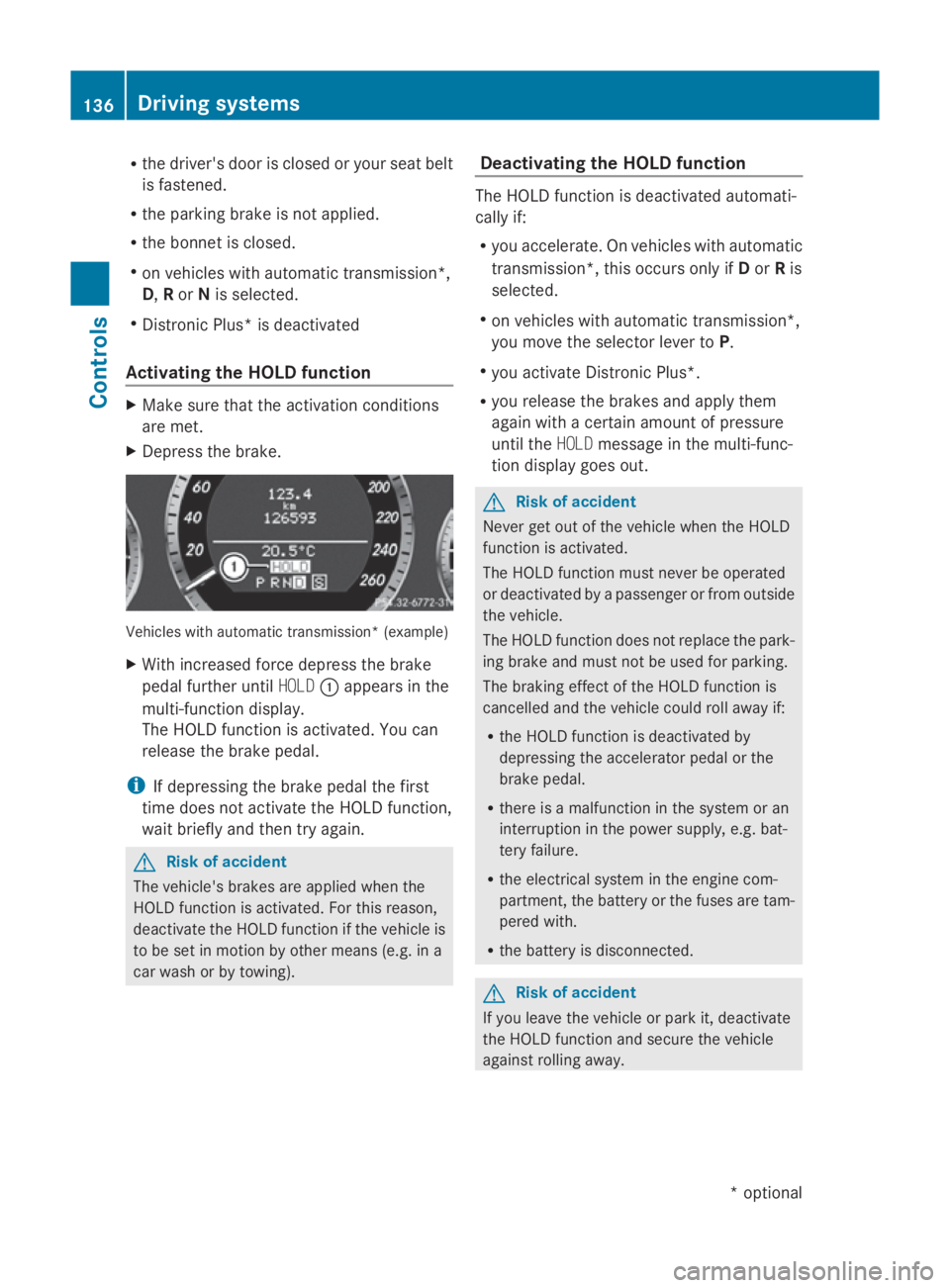
X Depres sthe brake. Vehicle
switha utomatic transmission* (example)
X With increase dforce depress the brake
peda lfur the runtil HOLD 0046appear sinthe
multi-functio ndisplay.
Th eH OLDf unctio nisa ctivated .You can
release the brake pedal.
i If depressing the brake peda lthe first
tim edoesn ot activate the HOL Dfunction,
wait briefl yand the ntry again. G
Ris
kofa ccident
Th ev ehicle' sbrakes ar eapplied when the
HOL Dfunctio nisa ctivated. For thi sreason,
deactivate the HOL Dfunctio nift he vehicl eis
to be se tinmotion by other means (e.g. in a
car wash or by towing). Deactivatin
gthe HOL Dfunction Th
eH OLDf unctio nisd eactivated automati-
cally if:
R yo ua ccelerate. On vehicles with automatic
transmission* ,thiso ccurs onl yifDorRis
selected.
R on vehicles with automatic transmission*,
yo um ovet he selector lever to P.
R yo ua ctivate Distroni cPlus*.
R yo ur elease the brakes and appl ythem
agai nwithac ertainamount of pressure
unti lthe HOLD message in the multi-func-
tio nd isplay goes out. G
Ris
kofa ccident
Never ge toutof the vehicl ewhent he HOLD
functio nisa ctivated.
Th eH OLDf unctio nm ustn eve rbeo perated
or deactivated by apassenge rorfromo utside
the vehicle.
Th eH OLDfunctio ndoesn ot replace the park-
ing brake and must not be used for parking.
Th eb raking effect of the HOL Dfunctio nis
cancelle dand the vehicl ecould rol lawa yif:
R the HOL Dfunctio nisd eactivate dby
depressing the accelerator peda lorthe
brake pedal.
R there is amalfunctio nint he syste moran
interruption in the powe rsupply, e.g.bat-
tery failure.
R the electrica lsystemint he engine com-
partment, the battery or the fuse saretam-
pered with.
R the battery is disconnected. G
Ris
kofa ccident
If yo uleave the vehicl eorparki t, deactivate
the HOL Dfunctio nand secure the vehicle
against rolling away. 136
Driving systemsCont
rols
*optio nal
207_AKB; 2; 3, en-GB
mkalafa
,V ersion: 2.11.8.1
2009-07-23T10:23:49+02:00
-Seite 136
Page 142 of 313
Fron
tsensors Centre Approximately 10
0cm Corners Approximately 60 cm
Rea
rsensors Centre Approximately 12
0cm Corners Approximately 80 cm
!
When parking ,pay particular attentio nto
object sabov eorb elow th esensors, such
as flower pot sortrailer towbars .PAR K-
TRONIC does no tdetect suc hobject swhen
they are in th eimmediat evicinity of the
vehicle .You could damag ethe vehicle or
th eo bjects.
Ultrasonic sources suc hasanautomatic
car wash, alorry's compressed-air brakes
or ap neumatic dril lcou ld caus ePARK-
TRONIC to malfunction.
Minimu mdistance Centre Approximately 20 cm
Corners Approximately 15 cm
If there is an obstacle within this range, all
warning displays light up and
atones ounds.
If th edistanc efalls below th eminimum clear-
ance, it may no longer be shown.
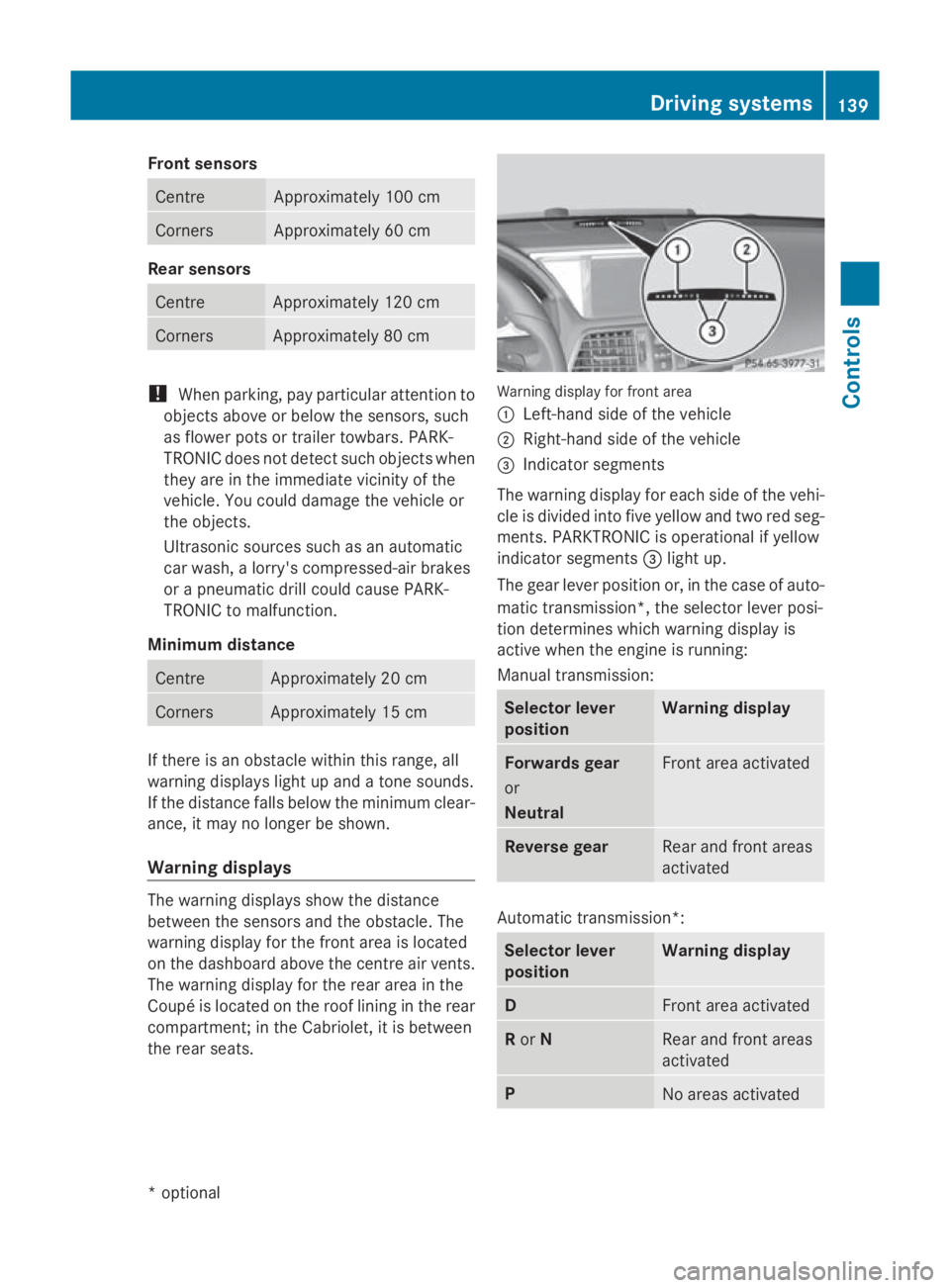
Warning displays The warning displays sho
wthe distance
between th esensor sand th eobstacle .The
warning display for th efront area is located
on th edashboard abov ethe centr eair vents.
The warning display for th erear area in the
Coupé is locate dontheroo flining in th erear
compartment; in th eCabriolet ,itisbetween
th er ear seats. Warning display for fron
tarea
0046 Left-han dside of th evehicle
0047 Right-hand side of th evehicle
008A Indicato rsegments
The warning display for each side of th evehi-
cle is divided int ofivey ellow and two red seg-
ments .PAR KTRONIC is operational if yellow
indicator segments 008Alight up.
The gear leve rpositio nor, in th ecaseofa uto-
matic transmission*, th eselector leve rposi-
tio nd etermine swhichw arning display is
active when th eengineisr unning:
Manual transmission: Selector lever
position Warning display
Forward
sgear
or
Neutral Fron
tarea activated Revers
egear Rear and fron
tareas
activated Automatic transmission*:
Selector lever
position Warning display
D
Fron
tarea activated R
or N Rear and fron
tareas
activated P
No areas activatedDriving systems
139Controls
*optional
207_AKB
;2;3,en-GB
mkalafa ,V ersion: 2.11.8.1
2009-07-23T10:23:49+02:00
-Seite 139 Z
Page 194 of 313
Brakes
G
Ris
kofa ccident
Do not change down for additional engine
braking on aslipper yroads urface. Thi scould
cause the drive wheels to lose thei rgripa nd
the vehicl ecould skid. G
Ris
kofa ccident
Make sure tha tothe rroa du sers are not
endangere dbyyourb raking.
Downhil lgradients On long and stee
pdownhil lstretches ,espe-
ciall yift he vehicl eisladen or towing atrailer,
yo um usts hift to alower gearing oodtime or,
on vehicles with automatic transmission*,
select shift range 1,2or 3.
i Thisalsoa pplies if youhavea ctivated
cruis econtrol, SPEEDTRONIC or DIS-
TRONIC PLUS*.
Thi sw illu se the braking effect of the engine,
so less braking will be required to maintain
the speed .Thisr elieves the load on the brake
system and prevents the brakes from over-
heating and wearing too quickly. If yo uneed
additional braking ,depress the brake pedal
repeatedly rather tha ncontinuously.
Heavy and light loads If the brakes have been subjected to
aheavy
load ,don ot stop the vehicl eimmediately, but
drive on for ashort while. Thi sallow sthe air-
flo wtoc oolthe brakes more quickly. G
Ris
kofa ccident
Never depress the brake peda lcontinuously
whil ethe vehicl eisinmotion, e.g .neve rcause
the brakes to ru bbyapplyingconstant slight
peda lpressure. Thi scauses the brake system
to overheat, increases the braking distance
and can lead to the brakes failing completely.
If the brakes have been used onl ymoderately,
yo us houl doccasionall ytest thei reffective-
ness .Todot his, brake more firmly from a highe
rspeed .Thisi mprove sthe gri pofthe
brakes.
Wet roads If driving in heavy rain for
aprolonged period
of time withou tbraking ,ther em aybe a
delaye dreactio nfrom the brakes when brak-
ing for the first time .Thism ayalso occu rafter
the vehicl ehasbeen washed.
Yo uh avetod epress the brake peda lmore
firmly .Maintain agreate rdistance from the
vehicl einfront.
After driving on awetroa dorh aving the vehi-
cle washed, brake firmly whil epayin gatten-
tio ntot he traffic conditions. Thi swaythe
brake discs will become warm, drying more
quickly, which will protect them against cor-
rosion.
Limite dbraking performanc eonsalt
treate droads G
Ris
kofa ccident
The laye rofsaltont he brake discs and the
brake pads/lining smaycause adelay in the
braking effect, resulting in asignificantly lon-
ger braking distance, which could lead to an
accident.
To avoid thi sdanger ,you should:
R occasionall ybrake carefully, withou tput-
ting othe rroa du sers at risk, when yo uare
driving on salte droads. Thi shelps to
remove any salt tha tmayhave started to
buil dupont he brake discs and the brake
pads/linings.
R maintain agreate rdistance to the vehicle
ahea dand drive with particula rcare.
R carefull yapply the brakes at the end of a
trip and immediatel yaftercommencing a
new trip ,sothats altr esidue sare removed
from the brake discs. Driving tips
191Operation
*optional
207_AKB; 2; 3, en-GB
mkalafa,
Version: 2.11.8.1 2009-07-23T10:23:49+02:00-Seite 191 Z
Page 198 of 313
Coupling up
atrailer G
Ris
kofi njury
Do no tdisconnect atrailer wit hanengaged
overrun brake. Otherwise, your han dcould
become trapped between th ebumpe rand
trailer drawbar.
! Do no tdisconnect atrailer wit han
engaged overrun brake. Otherwise, your
vehicle could be damaged by th erebound-
ing of th eoverrun brake.
X Positio nthe trailer leve lbehin dthe vehicle.
X Couple up th etrailer.
X Establish th eelectrical connection
between th evehicle and th etrailer.
Driving tips G
Ris
kofa ccident
If the Check traile rhitch locking
mechanism message appear sinthemulti-
function display while th evehicle is in motion,
pull ove rimmediately and check whether the
ball couplin giscorrectly engaged.
i Observ ethe note sonE SP®
trailer stabi-
lisation (Y page 55).
In Germany, th emaximum permissible speed
for vehicle/trailer combinations depends on
th et ype of trailer and is either 80 km/h or
10 0k m/ h. In som ecountries ,higher maxi-
mum speeds are permissible for vehicle/
trailer combinations .Before beginnin gthe
journey, check th etrailer' sdocuments to see
what th emaximum permitted spee dis.
For certain Mercedes-Ben zvehicles, th emax-
imum permissible rear axle load is increased
when towing atrailer. Refer to th e"Technical
data" sectio ntofindo ut whether this applies
to your vehicle .Ifyou utilise any of th eadded
maximum rear axle load when towing atrailer,
th ev ehicle/trailer combinatio nmay not
excee damaximum spee dof100km/h for
reason sconcernin gthe operatin gpermit. This also applies in countries in whic
hthe
permissible maximum spee dfor vehicle/
trailer combinations is abov e100 km/h. G
Ris
kofa ccident
Always observ ethe maximum spee dpermit-
te dinG ermany for vehicle/traile rcombina-
tions ,eveninc ountries wher ehigher speeds
are permitted. This lower sthe riskofana cci-
dent.
When towing atrailer, your vehicle's handling
characteristic swill be different in comparison
to when driving without atrailer.
The vehicle/trailer combination:
R is heavier
R is restricted in its acceleratio nand gradi-
ent-climbin gcapability
R has an increased braking distance
R is affected mor ebystron gc rosswinds
R demands mor esensitive steering
R consumes mor efuel
On lon gand steep downhill gradients ,you
must selec talower gear in good time, or on
vehicle switha utomatic transmission*, select
shif trange 1,2or 3.
i This also applies if you have activated
cruise control, SPEEDTRONI CorDIS-
TRONIC PLUS*.
This will use th ebraking effect of th eengine,
so less braking will be required to maintain
th es peed. This relieves th eload on th ebrake
system and prevents th ebrakes from over-
heating and wearin gtoo quickly. If you need
additional braking ,depress th ebrak epedal
repeatedly rather than continuously. G
Ris
kofa ccident
Never depress th ebrak epedal continuously
while th evehicle is in motion ,e.g.n ever cause
th eb rakes to rub by applyin gconstant slight
pedal pressure .This causes th ebrak esystem
to overheat, increases th ebraking distance
and can lead to th ebrakes failin gcompletely. Trailer towing*
195Operation
*o
ptional
207_AKB
;2;3,en-GB
mkalafa ,V ersion: 2.11.8.1
2009-07-23T10:23:49+02:00
-Seite 195 Z