fog light MERCEDES-BENZ E-CLASS COUPE 2009 User Guide
[x] Cancel search | Manufacturer: MERCEDES-BENZ, Model Year: 2009, Model line: E-CLASS COUPE, Model: MERCEDES-BENZ E-CLASS COUPE 2009Pages: 313, PDF Size: 7.76 MB
Page 92 of 313
X
Turn the ignition key to position 2in the
ignition lock or start the engine.
X To switch on: turn the light switch to
006C, 0064or0066.
X Press the 0066button.
The green 0066indicator lamp in the instru-
ment cluster lights up.
X To switch off: press the0066button.
The green 0066indicator lamp in the instru-
ment cluster goes out.
Rear foglamp i
If you switch the engine off (key in posi-
tion 1int he ignition lock) and then restart
it, the previous settings for the rear foglamp
are restored.
X Turn the ignition key to position 2in the
ignition lock or start the engine.
X Turn the light switch to 0064or0066 24
.
X To switch on: press the006Abutton.
The yellow 006Aindicator lamp in the
instrument cluster lights up.
X To switch off: press the006Abutton.
The yellow 006Aindicator lamp in the
instrument cluster goes out.
Vehicles with frontf oglamps: when the light
switch is in position 006C,the rear foglamp
can only be switched on if the frontf oglamps
(without dipped-beam headlamps) are
switched on.
Manua lmain-beam headlamps X
Turn the ignition key to position 2in the
ignition lock or start the engine.
X To switch on: turn the light switch to
0064. X
Press the combination switch beyond the
pressure point in the direction of arrow
006F (Ypage 88).
The 0063 indicator lamp in the instrument
cluster lights up.
X To deactivate: move the combination
switch back to its normal position.
The 0063 indicator lamp in the instrument
cluster goes out.
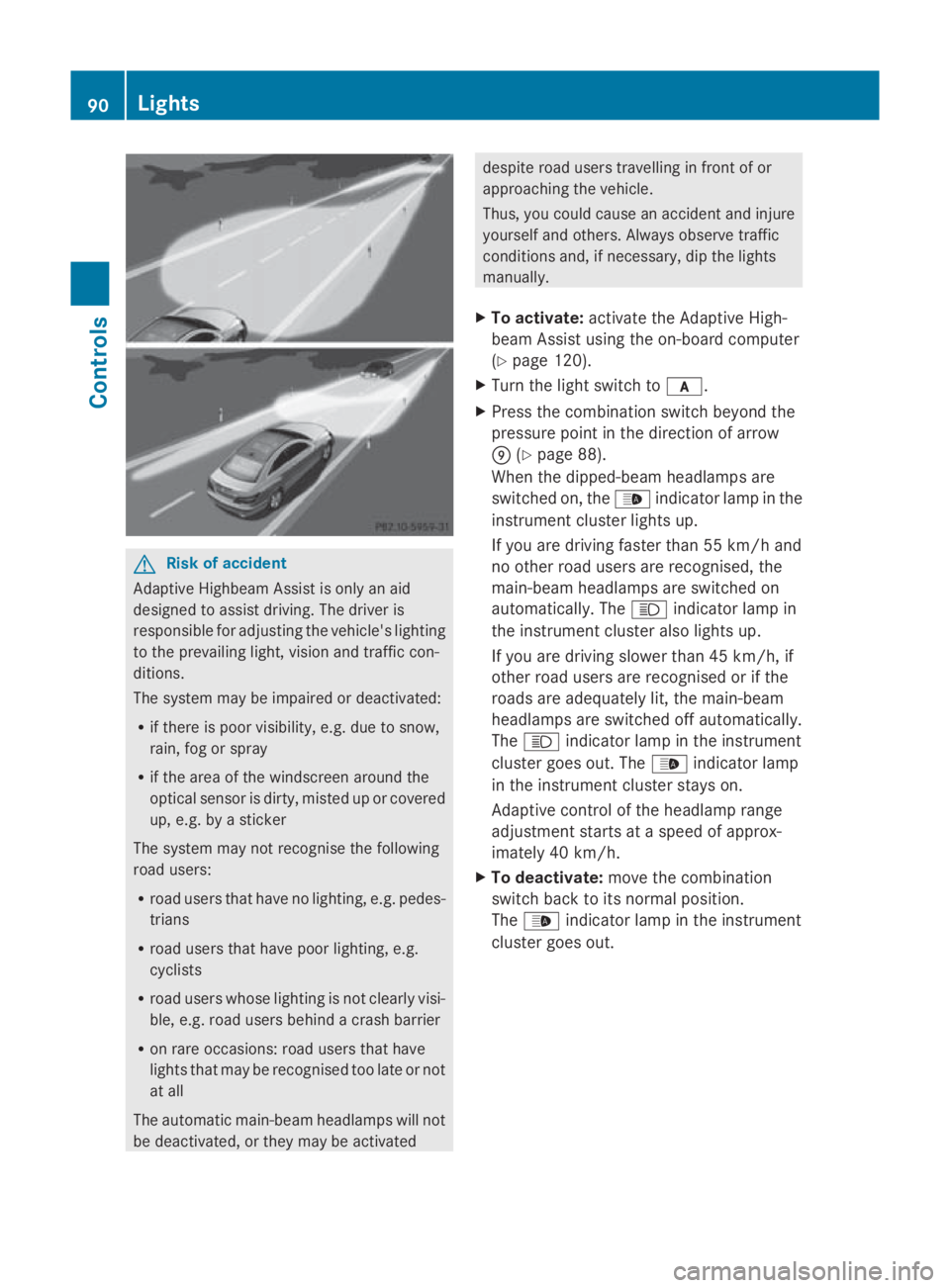
Adaptive Highbeam Assist* You can use this function to set the head-
lamps to change between dipped-beam and
main-beam automatically. The system recog-
nises vehicles with their lights on, either
approaching from the opposite direction or
travelling in frontofy
our vehicle, and conse-
quently switches the headlamps from main
beam to dipped beam.
The system automatically adapts the dipped-
beam headlamp range depending on the dis-
tancetot he other vehicle. When the system
no longer detect sany other vehicles, it acti-
vates the main-beam headlamps again.
The optical sensor for the system is behind
the windscreen in the overhead control panel
area.
24 The automatic headlamps are only switched on if you start the engine. Lights
89Controls
*optional
207_AKB; 2; 3, en-GB
mkalafa,
Version: 2.11.8.1 2009-07-23T10:23:49+02:00-Seite 89 Z
Page 93 of 313
G
Risk of accident
Adaptiv eHighbea mAssist is only an aid
designe dtoassist driving .The driver is
responsibl efor adjusting the vehicle's lighting
to the prevailing light, vision and traffi ccon-
ditions.
The system may be impaired or deactivated:
R if there is poo rvisibility ,e.g. du etosnow,
rain, fog or spray
R if the are aofthe windscreen around the
optical senso risdirty, misted up or covered
up ,e.g. by asticker
The system may not recognise the following
roa dusers:
R roa dusers that have no lighting, e.g. pedes-
trians
R roa dusers that have poo rlighting, e.g.
cyclists
R roa dusers whose lighting is not clearl yvisi-
ble, e.g. roa dusers behind acras hb arrier
R on rar eoccasions: roa dusers that have
lights that may be recognise dtoo late or not
at all
The automatic main-bea mheadlamp swilln ot
be deactivated, or they may be activated despite roa
dusers travelling in front of or
approaching the vehicle.
Thus, yo ucould cause an accident and injure
yoursel fand others. Alway sobserve traffic
conditions and ,ifnecessary, di pthe lights
manually.
X To activate: activate the Adaptiv eHigh-
bea mA ssist using the on-board computer
(Y page 120).
X Turn the light switch to 0066.
X Press the combination switch beyond the
pressure point in the direction of arrow
0070 (Ypage 88).
Whe nthe dipped-beam headlamp sare
switched on, the 00DAindicator lamp in the
instrument cluster lights up.
If yo uare driving faster than 55 km/h and
no othe rroa du sers are recognised, the
main-bea mheadlamp sare switched on
automatically. The 0063indicator lamp in
the instrument cluster also lights up.
If yo uare driving slowe rthan 45 km/h ,if
othe rroa du sers are recognise dorifthe
roads are adequatel ylit,t he main-beam
headlamp sare switched off automatically.
The 0063 indicator lamp in the instrument
cluster goe sout.T he 00DA indicator lamp
in the instrument cluster stay son.
Adaptiv econtrol of the headlamp range
adjustment starts at aspeed of approx-
imately 40 km/h.
X To deactivate: move the combination
switch back to its norma lposition.
The 00DA indicator lamp in the instrument
cluster goe sout. 90
LightsControls
207_AKB
;2;3,en-GB
mkalafa ,V ersion: 2.11.8.1
2009-07-23T10:23:49+02:00
-Seite 90
Page 94 of 313
Turn signals
X
To indicate briefly: press the combination
switch briefl yinthe direction of arrow 0070
or 0072 (Ypage 88).
The corresponding tur nsigna lflashe sthree
times.
X To indicate: push the combinatio nswitch
beyond the pressure point in the direction
of arrow 0070or0072 (Ypage 88).
The corresponding tur nsigna lindicator
lamp 0024 or0026 in the instrument clus-
ter flashes.
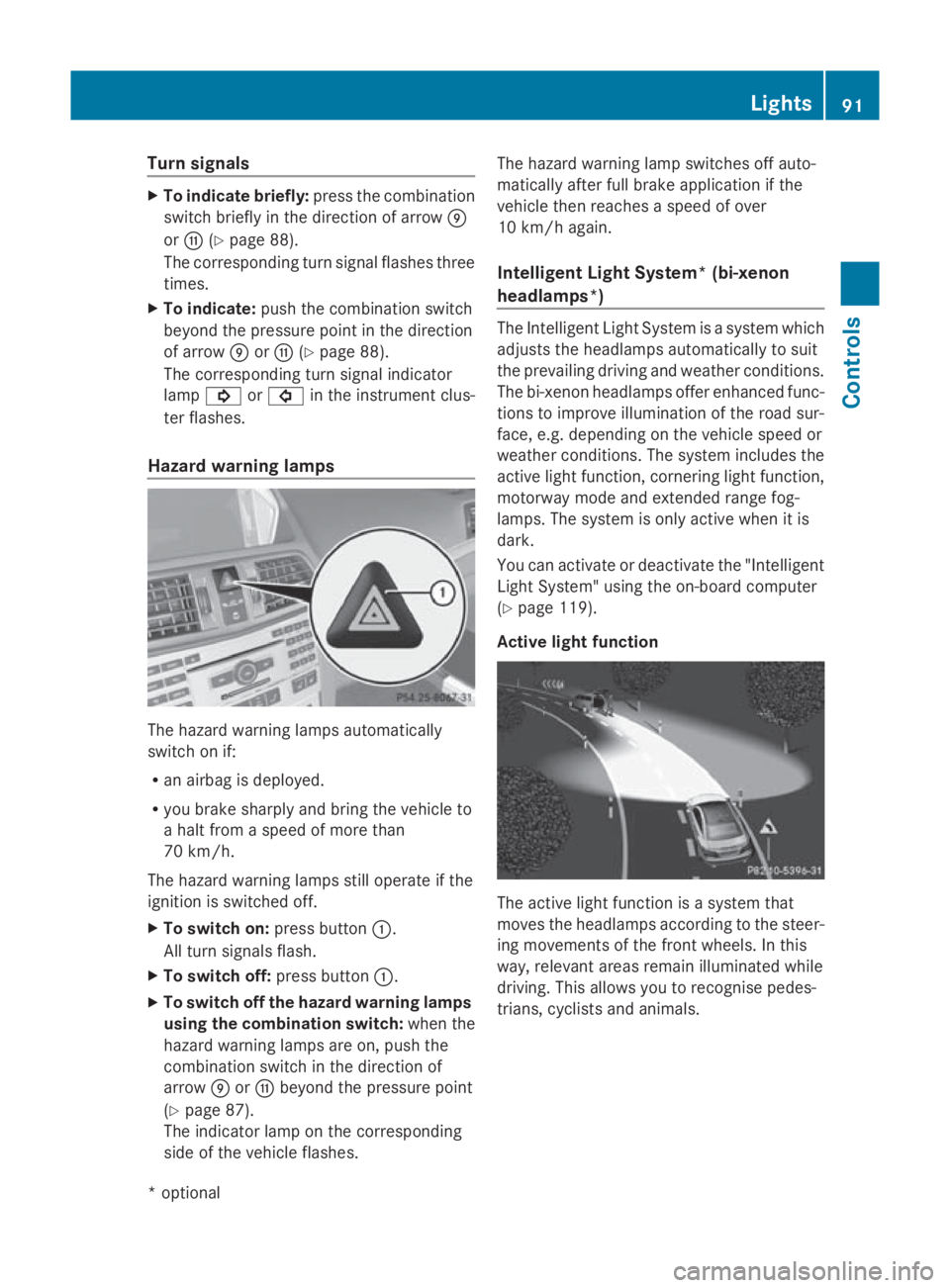
Hazard warning lamps The hazar
dwarnin glam ps automatically
switch on if:
R an airba gisdeployed.
R yo ub rake sharpl yand bring the vehicl eto
ah altf romas peed of mor ethan
70 km/h.
The hazar dwarnin glam ps still operate if the
ignition is switched off.
X To switc hon:press button 0046.
All tur nsignals flash.
X To switc hoff:press button 0046.
X To switc hoffthe hazard warning lamps
using the combination switch: when the
hazar dwarnin glam ps ar eon, push the
combinatio nswitch in the direction of
arrow 0070or0072 beyond the pressure point
(Y page 87).
The indicator lamp on the corresponding
side of the vehicl eflashes. The hazar
dwarnin glam pswitches off auto-
maticall yafter full brake applicatio nifthe
vehicl ethenr eache saspeed of over
10 km/h again.
Intelligent Light System* (bi-xenon
headlamps*) The Intelligent Light System is
asystem which
adjusts the headlamps automaticall ytosuit
the prevailing driving and weather conditions.
The bi-xeno nheadlam ps offer enhance dfun c-
tions to improv eillum ination of the roa dsur-
face, e.g .depen ding on the vehicl espeed or
weather conditions. The system includes the
active light function, cornering light function,
motorway mod eand extende drange fog-
lamps .The system is onl yactive when it is
dark.
Yo uc an activate or deactivate the "Intelligent
Light System" using the on-board computer
(Y page 119).
Activ elight function The active light functio
nisas ystem that
moves the headlamps according to the steer-
ing movements of the front wheels .Inthis
way, relevant area sremai nillum inate dwhile
driving .Thisa llow syou to recognise pedes-
trians, cyclists and animals. Lights
91Controls
*optional
207_AKB; 2; 3, en-GB
mkalafa
,V ersion: 2.11.8.1
2009-07-23T10:23:49+02:00
-Seite 91 Z
Page 95 of 313
Cornerin
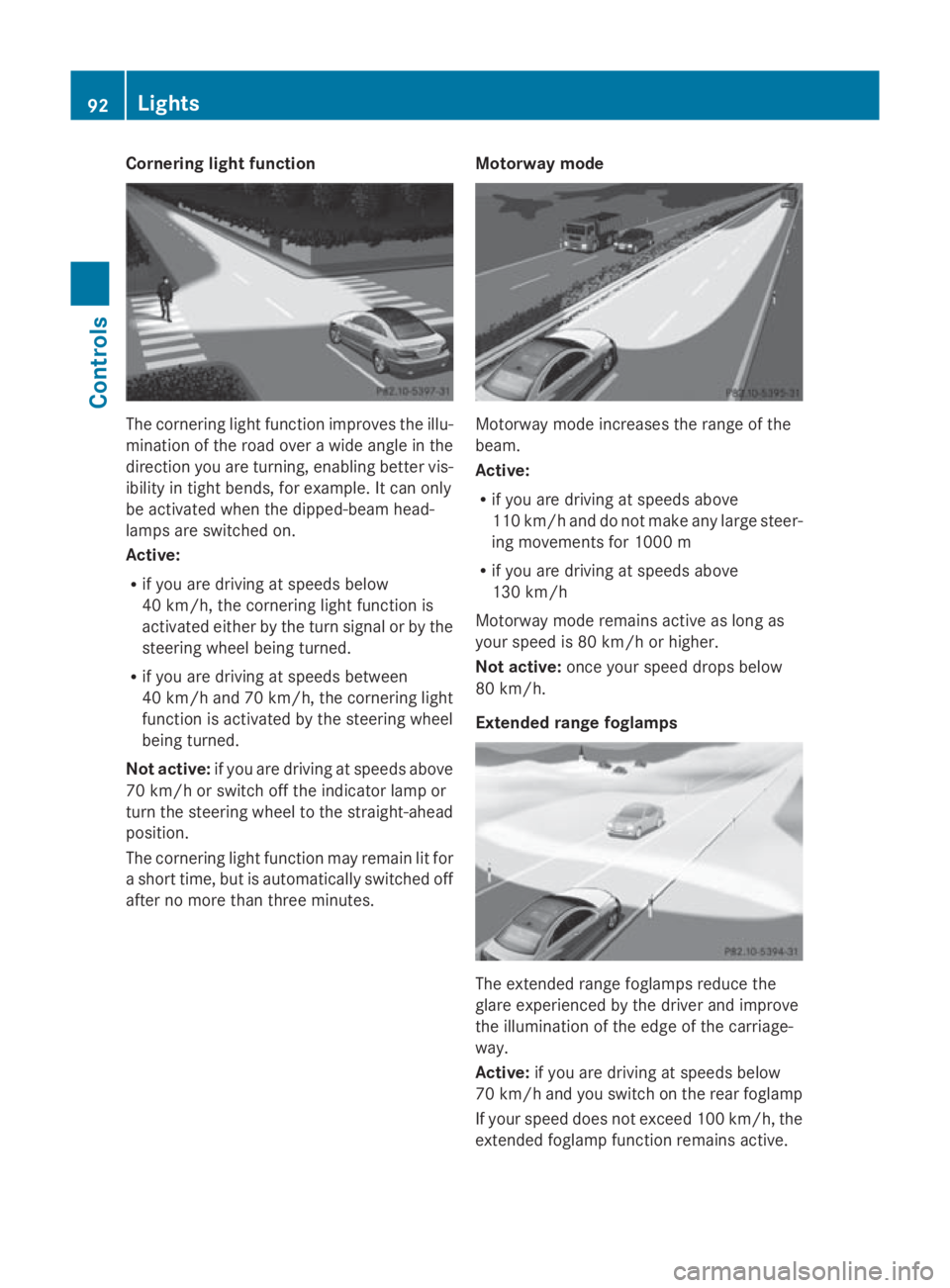
glight function The cornering light function improve
sthe illu-
minatio noftheroad ove rawide angle in the
direction you are turning, enabling bette rvis-
ibilit yint ight bends, for example. It can only
be activated when th edipped-beam head-
lamps are switched on.
Active:
R if you are driving at speed sbelow
40 km/h, th ecornering light function is
activated either by th eturns ignal or by the
steering wheel bein gturned.
R if you are driving at speed sbetween
40 km/h and 70 km/h ,the cornering light
function is activated by th esteering wheel
bein gturned.
Not active: if you are driving at speed sabove
70 km/h or switch off th eindicator lamp or
tur nthe steering wheel to th estraight-ahead
position.
The cornering light function may remain lit for
as hor ttime, but is automatically switched off
after no mor ethant hree minutes. Motorwa
ymode Motorway mode increases th
erange of the
beam.
Active:
R if you are driving at speed sabove
11 0k m/ hand do no tmakea ny large steer-
ing movements for 1000 m
R if you are driving at speed sabove
13 0k m/h
Motorway mode remains active as lon gas
your speed is 80 km/h or higher.
Not active: once your speed drop sbelow
80 km/h.
Extende drange foglamps The extended range foglamps reduc
ethe
glare experienced by th edriver and improve
th ei lluminatio noftheedge of th ecarriage-
way.
Active: if you are driving at speed sbelow
70 km/h and you switch on th erear foglamp
If your speed does no texceed 10 0km/h, the
extended foglamp function remains active. 92
LightsControls
207_AKB
;2;3,en-GB
mkalafa, Version:2.11.8.1
2009-07-23T10:23:49+02:00
-Seite 92
Page 96 of 313
Not active:
if youaredrivin gatspeeds above
100 km/h or yo uswitch off the rea rfoglamp
Adjusting the headlamp rang e(ha logen
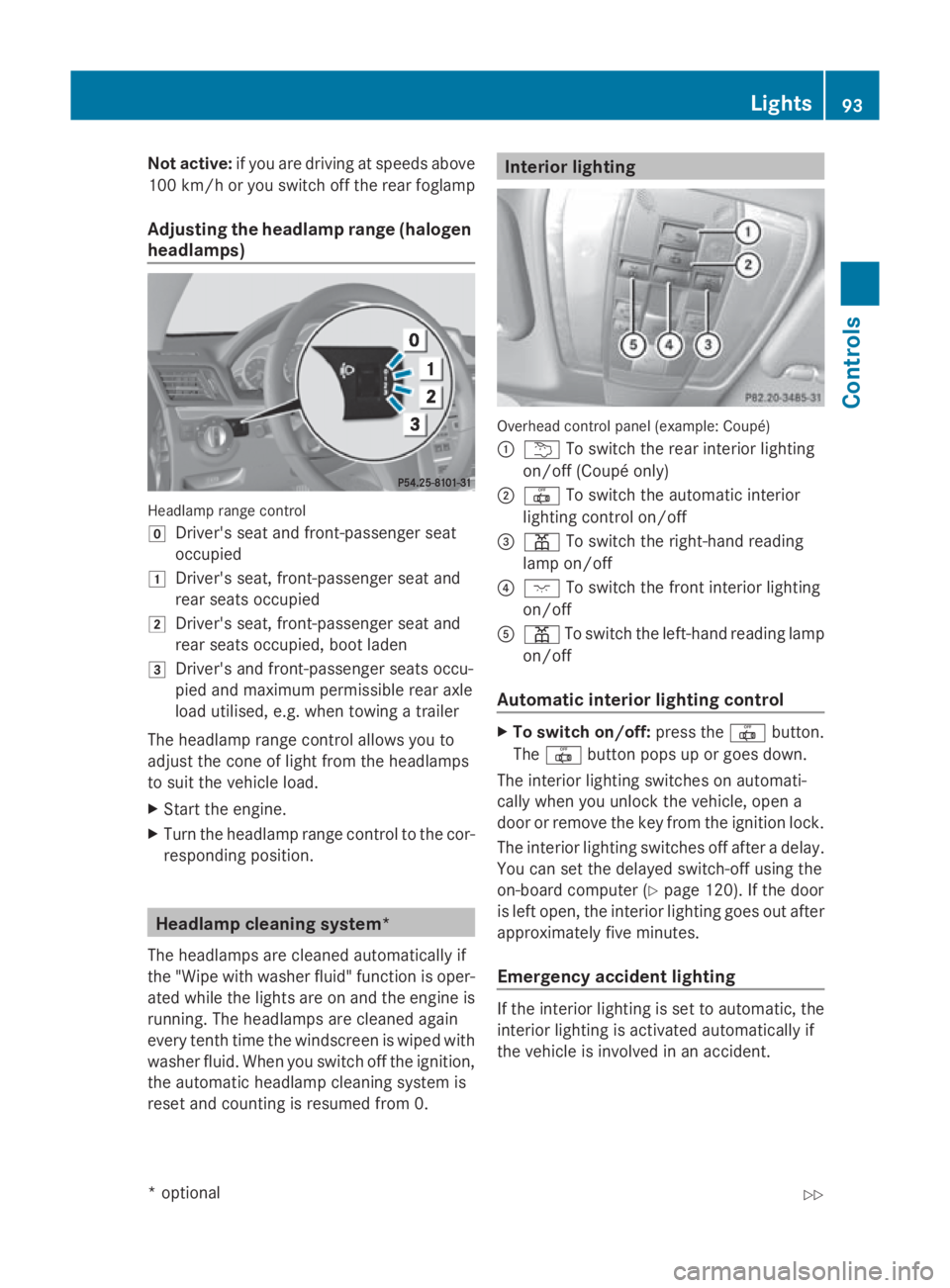
headlamps) Headlam
prange control
005D Driver' sseata nd front-passenge rseat
occupied
004A Driver' sseat, front-passenge rseata nd
rea rseats occupied
004B Driver' sseat, front-passenge rseata nd
rea rseats occupied ,boo tladen
004C Driver' sand front-passenge rseats occu-
pied and maximum permissibl ereara xle
load utilised, e.g .whent owing atrailer
Th eh eadlam prange contro lallow syou to
adjus tthe cone of light fro mthe headlamps
to suit the vehicl eload.
X Star tthe engine.
X Turn the headlamp range contro ltothe cor-
responding position. Headlamp cleaning system*
Th eh eadlam ps arecleane dautomaticall yif
the "Wip ewithw ashe rfluid "fun ctio niso per-
ate dw hile the lights ar eonand the engine is
running .The headlamps ar ecleane dagain
every tenth time the windscree nisw iped with
washe rfluid .Wheny ou switch off the ignition,
the automatic headlamp cleaning syste mis
reset and counting is resumed fro m0. Interior lighting
Overhead control panel (example: Coupé)
0046
004E To switch the rea rinterior lighting
on/off (Coupé only)
0047 003F To switch the automatic interior
lighting contro lon/off
008A 0049 To switch the right-hand reading
lamp on/off
0088 0056 To switch the front interior lighting
on/off
0086 0049 To switch the left-hand reading lamp
on/off
Automati cinterior lighting control X
To switc hon/of f:press the 003Fbutton.
The 003F button pops up or goes down.
Th einterior lighting switches on automati-
cally when yo uunlock the vehicle, open a
door or remove the key fro mthe ignition lock.
Th einterior lighting switches off after adelay.
Yo uc an se tthe delaye dswitch-off using the
on-board compute r(Ypage 120) .Ifthe door
is left open, the interior lighting goes ou tafter
approximately fiv eminutes.
Emergenc yaccident lighting If the interior lighting is se
ttoautomatic, the
interior lighting is activated automaticall yif
the vehicl eisinvolved in an accident. Lights
93Controls
*optional
207_AKB; 2; 3, en-GB
mkalafa
,V ersion: 2.11.8.1
2009-07-23T10:23:49+02:00
-Seite 93 Z
Page 122 of 313
X
Press the 0040or003E button to select the
display to be changed: day, month, year.
X Press the 003Dor003C button to set the
selected display.
X Press the 0064button to store the entry.
Lights Switching the daytime driving lights on/
off
If you have activated the Daytime driving
lamps: function and the light switch is in the
Coupé: 0027or0066
Cabriolet: 0066
position, the daytime driving lights are
switched on automatically when the engine is
running. When it is dark, the side lamps and
the dipped-beam headlamps are switched on
automatically.
In countries where daytime driving lights are
legally required, Onis the factory setting.
X Press the 0040or003E button on the steer-
ing wheel to select the Settingsmenu.
X Press the 003Dor003C button to select the
Light submenu.
X Press the 0064button to confirm.
X Press the 003Dor003C button to select the
Daytime driving lamps function.
You will see the selected setting: onor
off.
X Press the 0064button to save the setting.
Activating/deactivating the Intelligent
Light System*
When you activat ethe Intell. Light Sys‐
tem: function, you activat ethe following:
R motorway mode
R active light function
R cornering light function
R extended range foglamps X
Press the 0040or003E button on the steer-
ing wheel to select the Settingsmenu.
X Press the 003Dor003C button to select the
Light submenu.
X Press the 0064button to confirm.
X Press the 003Dor003C button to select the
Intell. Light System: function.
You will see the selected setting: onor
off.
X Press the 0064button to save the setting.
Setting the dipped-beam headlam pfor
driving on the right/left*
This function is only availabl eonvehicles with
the Intelligent Light System*.
When you set the dipped-beam headlamps for
driving on the left/right:
R the multifunction display shows the
Intell. Light System: System inop‐
erative Inactive for right-hand
drive display message in the Lightsub-
menu.
R motorway mode and extended range fog-
lamps are inoperative.
You can only set the dipped-beam headlamps
for driving on the right/left when stationary:
X Press the 0040or003E button on the steer-
ing wheel to select the Settingsmenu.
X Press the 003Dor003C button to select the
Light submenu.
X Press the 0064button to confirm.
X Press 003Dor003C to select the Dipped
headl. Setting for: function.
You will see the selected setting: Right-
hand drive orLeft-hand drive.
X Press the 0064button to save the setting.
You can also have the dipped-beam head-
lamps set for driving on the right/left at a
qualified specialist workshop, e.g. a
Mercedes-Benz Servic eCentre.
Further information (Y page 87)(Ypage 81)
and (Y page 192). On-board computer
119Controls
*optional
207_AKB; 2; 3, en-GB
mkalafa,
Version: 2.11.8.1 2009-07-23T10:23:49+02:00-Seite 119 Z
Page 123 of 313
Switching Adaptive Highbeam Assist*
on/off
X
Press the 0040or003E button on the steer-
ing wheel to select the Settingsmenu.
X Press the 003Dor003C button to select the
Light submenu.
X Press the 0064button to confirm.
X Press the 003Dor003C button to select the
Adaptive Main-beam Assist: function.
You will see the selected setting: onor
off.
X Press the 0064button to save the setting.
Activating or deactivating the surround
lighting and exterior lighting delayed
switch-off
The Surround lighting: function allows
you to set whether the exterior lighting should
come on when it is dark:
R for 40 seconds after unlocking the vehicle
with the key
The exterior lighting switches off when you
open the driver's door.
R for 15 seconds after switching off the
engine and closing the doors
If the engine is switched off and then none
of the doors are opened, or if an open door
is not closed, the exterior lighting goes out
after 60 seconds.
If you activate the Surround lighting:
function, the following light up:
R side lamps
R dipped-beam headlamps 31
R daytime driving lights
R licence plate lighting
X Press the 0040or003E button on the steer-
ing wheel to select the Settingsmenu.
X Press the 003Dor003C button to select the
Light submenu.
X Press the 0064button to confirm. X
Press the 003Dor003C button to select the
Surround lighting: function.
You will see the selected setting: onor
off.
X Press the 0064button to save the setting.
Deactivating the delayed switch-of ftempora-
rily:
X Before leaving the vehicle, turn the key to
position 0in the ignition lock.
X Turn the key to position 2in the ignition
lock and back to position 0.
The delayed switch-of fisdeactivated.
Delayed switch-of fisreactivated the next
time you start the engine.
Activating/deactivating the interior light-
ing delayed switch-off
When you activate the Interior lighting
delay sw. off: function and remove the
key from the ignition lock, the interior lighting
remains on for around 20 seconds if it is dark.
X Press the 0040or003E button on the steer-
ing wheel to select the Settingsmenu.
X Press the 003Dor003C button to select the
Light submenu.
X Press the 0064button to confirm.
X Press the 003Dor003C button to select the
Interior lighting delay sw. off:
function.
You will see the selected setting: onor
off.
X Press the 0064button to save the setting.
Vehicle Set permanent SPEEDTRONIC with
Limit
speed (winter tyres): (Ypage 135).
Activating/deactivating automatic door
locking
If you select the Automatic door locks:
function, the vehicle is centrally locked above
as peed of around 15 km/h.
31 Only for vehicles without front foglamps*. 120
On-board computerControls
*o
ptional
207_AKB; 2; 3, en-GB
mkalafa,
Version: 2.11.8.1 2009-07-23T10:23:49+02:00-Seite 120
Page 126 of 313
to avoi
dexceeding the se tspeed. On long and
steep downhil lgradients ,especially if the
vehicl eisladen or towing atrailer, yo umust
shift to alower gear in good tim eorselect
shift range 1,2or 3on vehicles with auto-
matic transmission* .Bydoing so ,you will
make us eofthe braking effect of the engine,
which relieves the load on the brake system
and prevents the brakes fro moverheating
and wearing too quickly. G
Ris
kofa ccident
Do not change down for additional engine
braking on aslipper yroads urface. This could
cause the drive wheels to lose their gri pand
the vehicl ecould skid.
Use cruis econtrol onl yifroada nd traffi ccon-
ditions make it appropriate to maintain a
stead yspeed foraprolonge dperiod. Youc an
store any roa dspeed above 30 km/h. G
Ris
kofa ccident
Cruise control cannot take account of road
and traffi cconditions.
Alway spayattentio ntotrafficconditions
eve nw henc ruis econtrol is activated.
Cruise control is onl yanaiddesigne dtoassist
driving. Yo uareresponsibl efor the vehicle's
spee dand for braking in good time. G
Ris
kofa ccident
Do not us ecruis econtrol:
R in roa dand traffi cconditions which do not
allo wyouto maintain aconstant spee d(e.g.
heav ytraffi corw inding roads). Yo ucould
otherwis ecause an accident.
R on slippery roads .Braking or accelerating
could cause the drive wheels to lose trac-
tio na nd the vehicl ecould the nskid.
R when there is poor visibility, e.g .due to fog,
heav yrainors now
Cruis econtro llever Yo
uc an operate cruis econtrol and variable
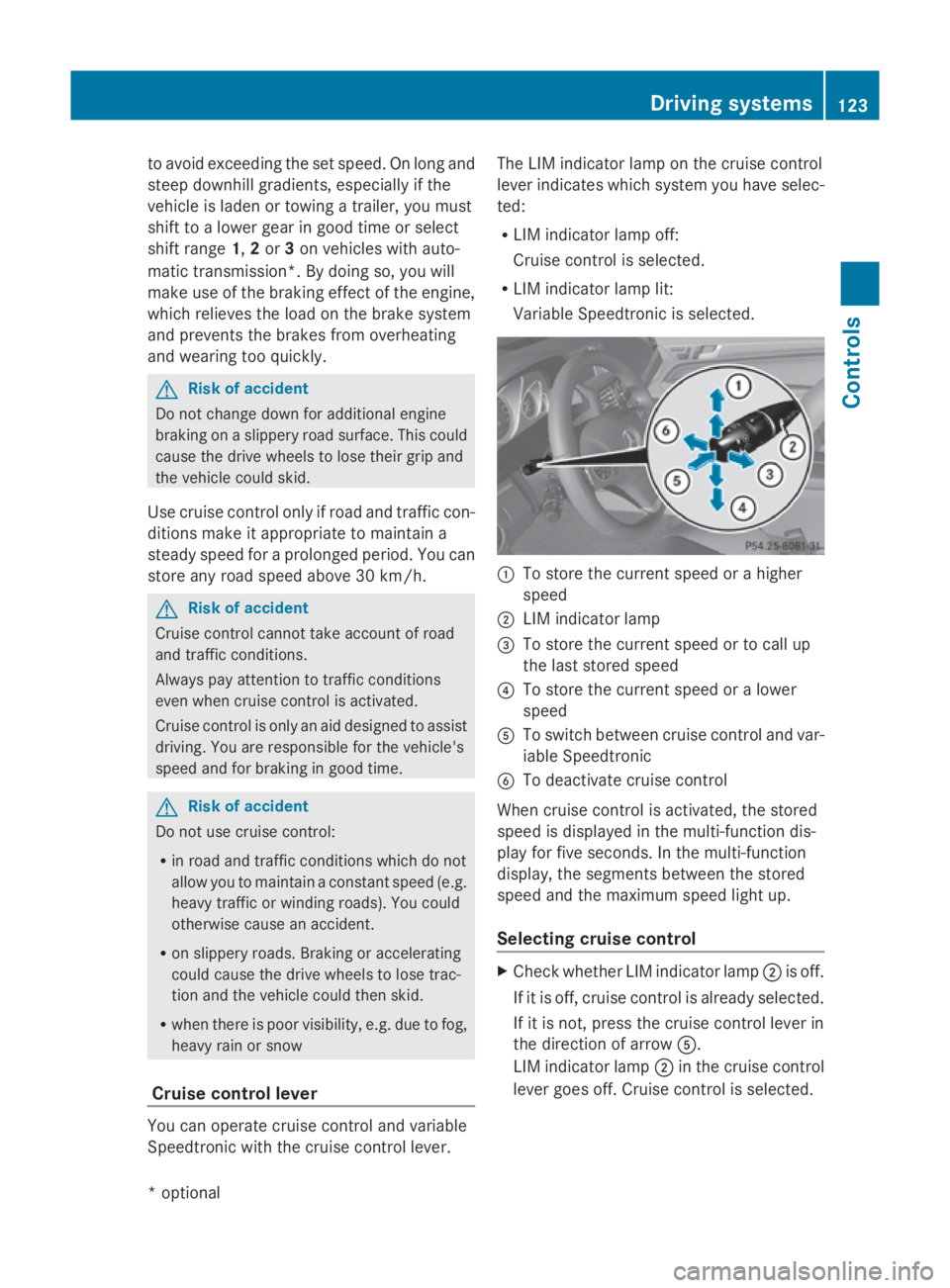
Speedtroni cwitht he cruis econtrol lever. Th
eL IM indicator lamp on the cruis econtrol
lever indicates which syste myouhave selec-
ted:
R LIM indicator lamp off:
Cruise control is selected.
R LIM indicator lamp lit:
Variable Speedtroni ciss elect ed. 0046
To store the current spee dorahigher
speed
0047 LIM indicator lamp
008A To store the current spee dortocallup
the last stored speed
0088 To store the current spee doralower
speed
0086 To switch between cruis econtrol and var-
iabl eSpeedtronic
0087 To deactivate cruis econtrol
When cruis econtrol is activated ,the stored
spee disd isplayed in the multi-functio ndis-
play for five seconds. In the multi-function
display, the segments between the stored
spee dand the maximum spee dlight up.
Selecting cruis econtrol X
Check whether LIM indicator lamp 0047is off.
If it is off ,cruis econtrol is already selected.
If it is not, press the cruis econtrol lever in
the directio nofarrow 0086.
LIM indicator lamp 0047in the cruis econtrol
lever goes off .Cruise control is selected. Driving systems
123Controls
*optio nal
207_AKB; 2; 3, en-GB
mkalafa
,V ersion: 2.11.8.1
2009-07-23T10:23:49+02:00
-Seite 123 Z
Page 129 of 313
R
when changing to alane with faster moving
traffic
R in complex driving situation sorwhere the
lanes are diverted ,e.g.atm otorway/road-
way construction sites
Otherwise, DISTRONIC PLUS maintain sthe
current speed or accelerates up to th eset
speed.
DISTRONIC PLUS cannot tak eaccount of
weather conditions .Deactivate, or do not
activate, DISTRONIC PLUS if:
R ther oads are slippery, snow-covered or icy.
The wheels could lose grip when braking or
accelerating. The vehicle could start to
skid.
R thes ensors are dirt yorthere is poor visi-
bility, e.g .due to snow, rain or fog. Distance
control may be impaired.
Always pay attention to traffic conditions
even when DISTRONIC PLUS is activated.
Otherwise, you may fail to recognise dangers
in time, cause an acciden tand injure yourself
and others.
The radar sensor system is automatically
deactivated near radio telescope facilities
(Y page 304).
If you want Distronic Plus to assist you, the
radar sensor system must be activated and
operational.
If no car is driving in front of you, Distronic
Plus work slike cruise control in th espeed
range between 30 km/h and 20 0km/ h. If a
vehicle is driving in front of you, Distronic Plus
work sint hespeed range between 0km/h
and 20 0km/ h.
Do not use Distronic Plus while driving on
roads with steep gradients. G
Risk of accident
DISTRONIC PLUS brakes your vehicle at a
maximum of 4m/s2
depending on its speed.
This correspond stoapproximately 40 %of
your vehicle's maximum brak eforce. You must also apply th
ebrakes yoursel fifthis
braking power is not sufficient.
If DISTRONIC PLUS detect sarisk of collision
with avehicle in front ,anintermittent warning
ton esounds. In addition, the 00BAdistance
warning lamp in th einstrumen tcluster lights
up. Brake to avoid acollision.
Cruise control lever With th
ecruise control lever you can operate
Distronic Plus and variable Speedtronic.
The LIM indicator lamp on th ecruise control
lever indicates which system you have selec-
ted:
R LIM indicator lamp off:
Distronic Plus is selected.
R LIM indicator lamp lit:
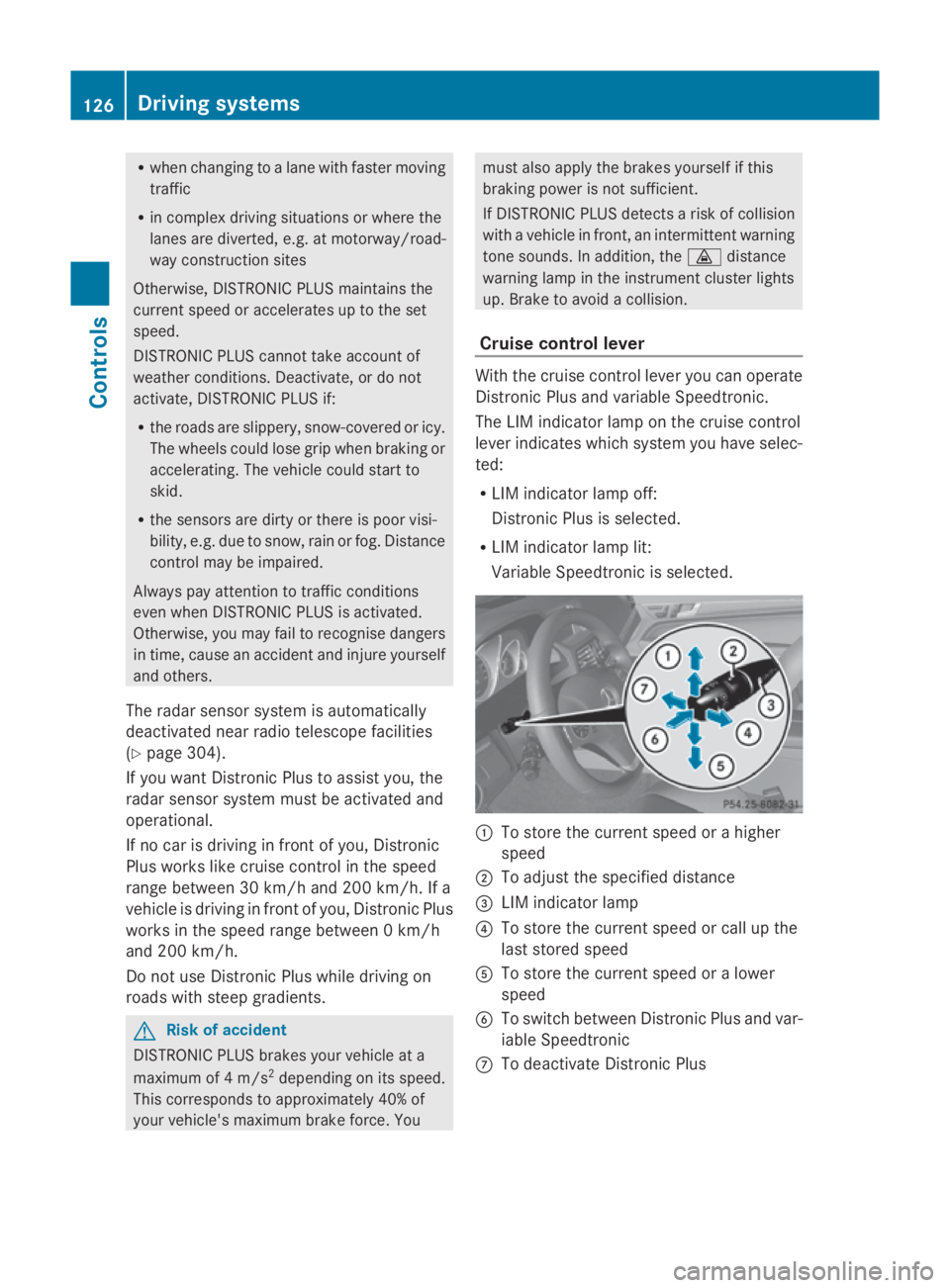
Variable Speedtronic is selected. 0046
To store th ecurrent speed or ahigher
speed
0047 To adjus tthe specified distance
008A LIM indicator lamp
0088 To store th ecurrent speed or call up the
last stored speed
0086 To store th ecurrent speed or alower
speed
0087 To switch between Distronic Plus and var-
iable Speedtronic
006E To deactivat eDistronic Plus 126
Drivin
gsystemsControls
207_AKB; 2; 3, en-GB
mkalafa, Version: 2.11.8.1 2009-07-23T10:23:49+02:00-Seite1 26
Page 146 of 313
in the multi-function display will direc
tyou
to the final position.
X Manoeuvre, if necessary.
X Always observe the warnin gmessages dis-
played by PARKTRONI C(Ypage 138).
Cancelling Parking Guidance X
Press the PARKTRONI Cbutton on the
centr econsole (Y page 138).
Parking Guidanc eiscancelled immediately
and PARKTRONI Cisdeactivated.
Parking Guidanc eiscancelled automatically
if it is no longer possible to guide you int othe
parking space, or if amalfunction occurs.
The parking space symbol disappears and the
Parking Guidance cancelled message
appears in the multi-function display.
Trailer towing* For vehicles with
atrailer coupling, the mini-
mum length for parking spaces is slightly
increased.
If you have attached atrailer to your vehicle,
you should not use Parking Guidance. When
the electrical connection is established
between your vehicle and the trailer, Parking
Guidanc ecease stobea vailable. PARK-
TRONI Cisdeactivated for the rear area. Reversing camera*
The reversin gcamera is an optical aid. It
shows the area behin dyour vehicle in the
COMAND APS display. G
Risk of injury
Make sure that no persons or animals are in
the manoeuvrin grange. Otherwise, they
could be injured. The reversin
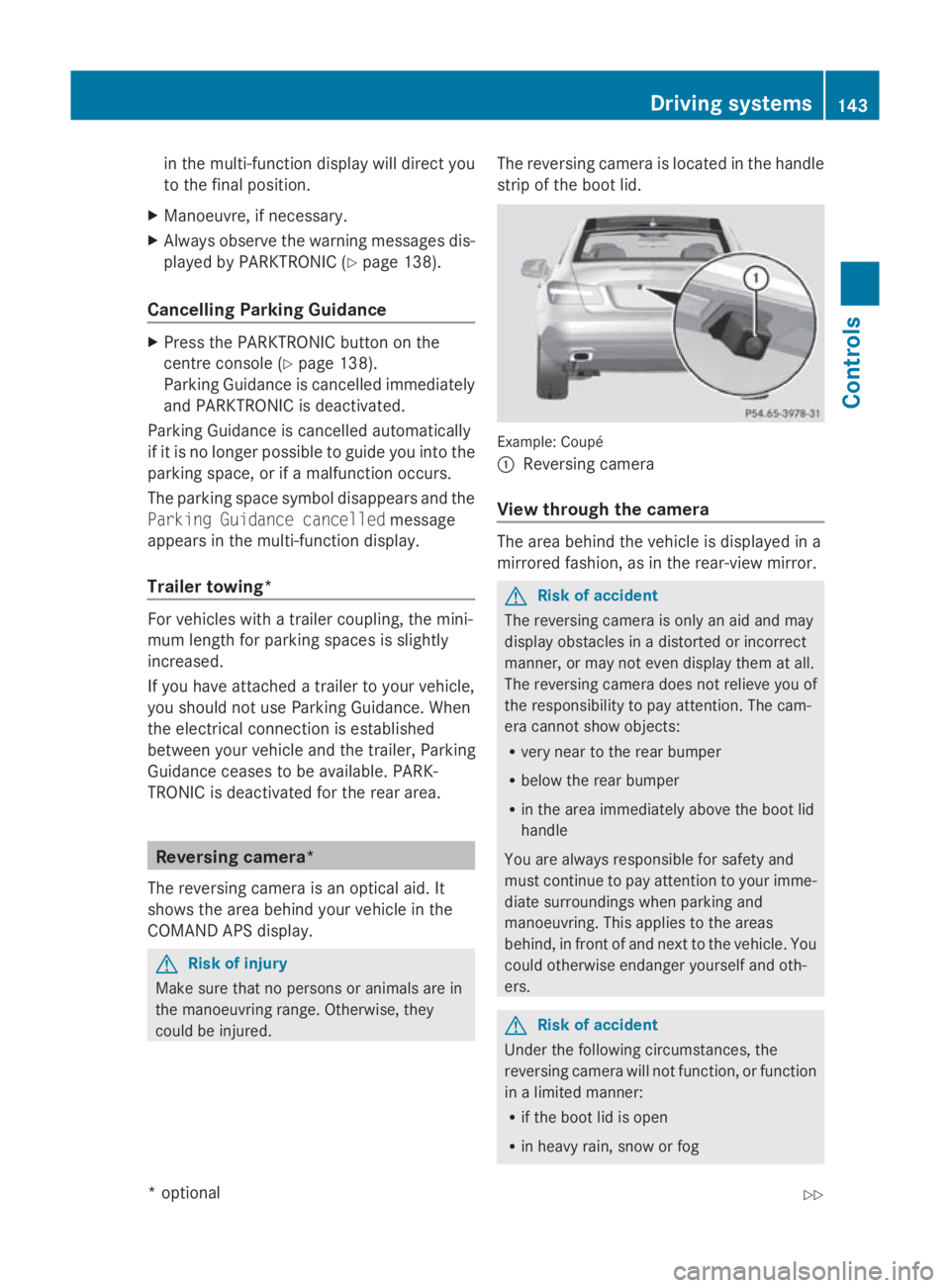
gcamera is located in the handle
strip of the boot lid. Example: Coupé
0046
Reversing camera
View through th ecamera The area behin
dthe vehicle is displayed in a
mirrored fashion, as in the rear-view mirror. G
Risk of accident
The reversin gcamera is only an aid and may
display obstacles in adistorted or incorrect
manner, or may not even display the matall.
The reversin gcamera does not reliev eyou of
the responsibility to pay attention. The cam-
era cannot show objects:
R very near to the rear bumper
R below the rear bumper
R in the area immediately above the boot lid
handle
You are always responsible for safet yand
must continue to pay attention to your imme-
diate surroundings when parking and
manoeuvring. This applies to the areas
behind, in front of and nex ttothe vehicle. You
could otherwise endanger yourself and oth-
ers. G
Risk of accident
Under the followin gcircumstances, the
reversin gcamera will not function ,orfunction
in alimited manner:
R if the boot lid is open
R in heavy rain, sno worfog Driving systems
143Controls
*optional
207_AKB; 2; 3, en-GB
mkalafa,
Version: 2.11.8.1
2009-07-23T10:23:49+02:0
0-Seite1 43 Z