instrument cluster MERCEDES-BENZ E-CLASS COUPE 2009 Owner's Manual
[x] Cancel search | Manufacturer: MERCEDES-BENZ, Model Year: 2009, Model line: E-CLASS COUPE, Model: MERCEDES-BENZ E-CLASS COUPE 2009Pages: 313, PDF Size: 7.76 MB
Page 120 of 313
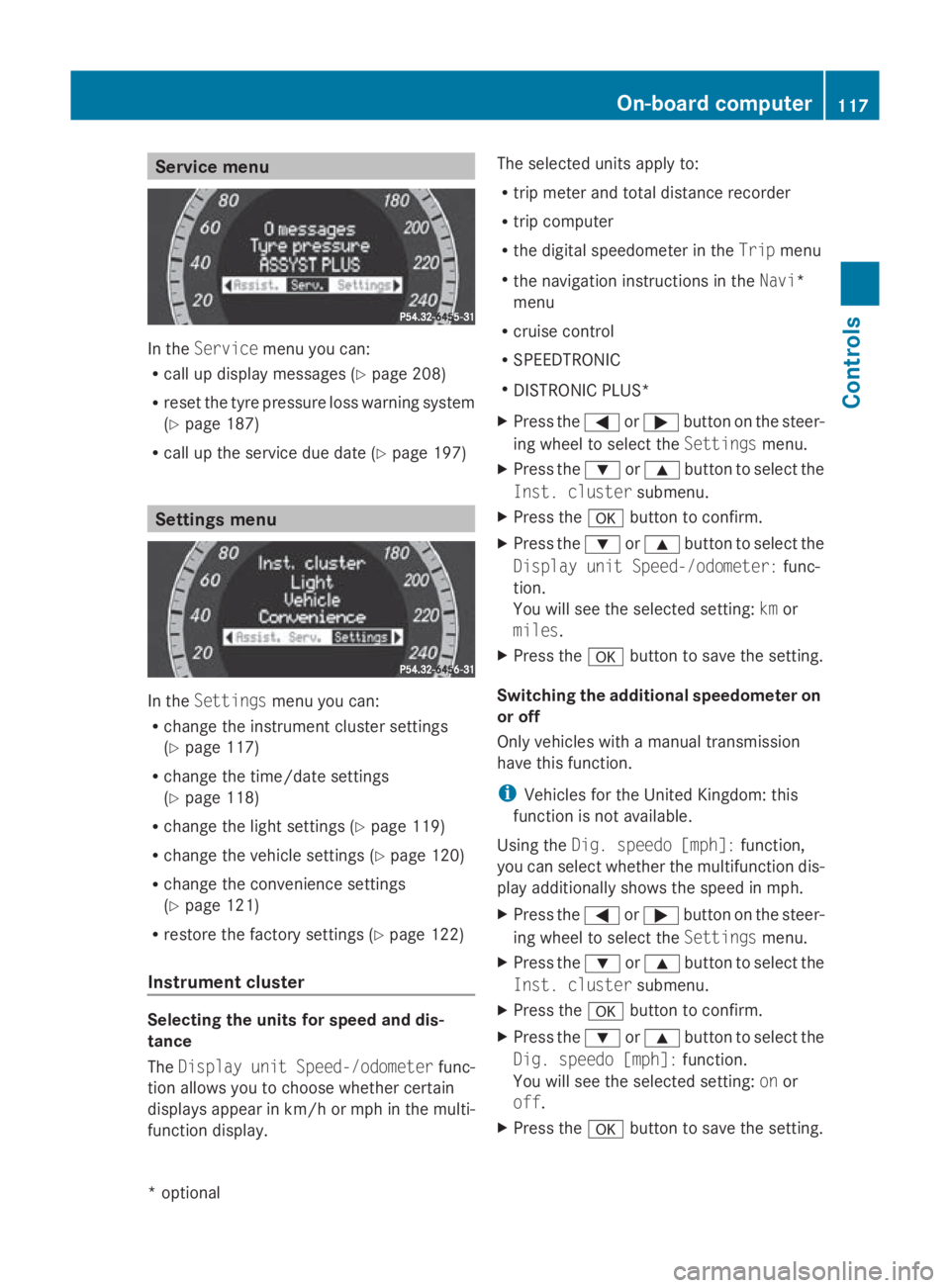
Service menu
In the
Service menu you can:
R call up display messages (Y page 208)
R reset the tyre pressure loss warning system
(Y page 187)
R call up the service due date (Y page 197)Settings menu
In the
Settings menu you can:
R change the instrumen tcluster settings
(Y page 117)
R change the time/date settings
(Y page 118)
R change the light settings (Y page 119)
R change the vehicle settings (Y page 120)
R change the convenience settings
(Y page 121)
R restore the factory settings (Y page 122)
Instrument cluster Selecting the units for speed and dis-
tance
The Display unit Speed-/odometer func-
tion allowsy ou to choose whether certain
displaysa ppearinkm/ horm ph in the multi-
function display. The selected units apply to:
R
trip meter and total distance recorder
R trip computer
R the digital speedometer in the Tripmenu
R the navigation instructions in the Navi*
menu
R cruise control
R SPEEDTRONIC
R DISTRONIC PLUS*
X Press the 0040or003E button on the steer-
ing wheel to select the Settingsmenu.
X Press the 003Dor003C button to select the
Inst. cluster submenu.
X Press the 0064button to confirm.
X Press the 003Dor003C button to select the
Display unit Speed-/odometer: func-
tion.
You will see the selected setting: kmor
miles.
X Press the 0064button to save the setting.
Switching the additional speedometer on
or off
Only vehicles with amanual transmission
have this function.
i Vehicles for the United Kingdom: this
function is not available.
Using the Dig. speedo [mph]: function,
you can select whether the multifunction dis-
play additionally shows the speed in mph.
X Press the 0040or003E button on the steer-
ing wheel to select the Settingsmenu.
X Press the 003Dor003C button to select the
Inst. cluster submenu.
X Press the 0064button to confirm.
X Press the 003Dor003C button to select the
Dig. speedo [mph]: function.
You will see the selected setting: onor
off.
X Press the 0064button to save the setting. On-board computer
117Controls
*optional
207_AKB; 2; 3, en-GB
mkalafa,
Version: 2.11.8.1 2009-07-23T10:23:49+02:00-Seite 117 Z
Page 130 of 313
Selecting Distronic Plus
X
Check whether LIM indicator lamp 008Ais off.
If it is off, Distronic Plus is already selected.
If it is not, press the cruise control lever in
the direction of arrow 0087.
LIM indicator lamp 008Ain the cruise control
lever goes off. Distronic Plus is selected.
Switching on Distronic, storing the cur-
rent speed and maintaining it G
Risk of accident
The vehicle can be braked when DISTRONIC
PLUS is activated. For this reason, deactivate
DISTRONIC PLUS if the vehicle is to be set in
motion by other means (e.g. in acar wash or
by towing).
You can activate Distronic Plus in the follow-
ing circumstances:
R after the engine has been running for about
two minutes
R if the parking brake is not applied
R if ESP ®
is activated
R if the automatic transmission* is in position
D
R if the bonnet is closed
R if the driver's door is closed and you switch
from Pto Dor your seat belt is fastened.
R if the front-passenger door is closed
Activating while driving
When driving at speeds below 30 km/h, you
can only activate Distronic Plus if the vehicle
in front has been detected and is shown in the
multi-function display.Ift he vehicle in front is
not shown in the multi-function display and is
no longer being detected, because it has
changed lanes, for example, Distronic Plus is
deactivated and atone sounds. X
Briefly pull the cruise control lever towards
you 0088or press it up 0046or down 0086to the
pressure point.
Distronic Plus is selected.
X Keep the cruise control lever pressed
up 0046 or down 0086until the desired speed
is set.
X Remove your foot from the accelerator
pedal.
Your vehicle adapts its speed to that of the
vehicle in front,b ut only up to the stored
speed.
i If you do not fully release the accelerator
pedal, the DISTRONIC PLUS suspended
message appears in the multi-function dis-
play.T he set distance to aslower-moving
vehicle in front will then not be maintained.
You will be driving at the speed you deter-
mine by the position of the accelerator
pedal.
Activating when driving towards asta-
tionary vehicle
If the vehicle in front of you is stationary, you
can only activate Distronic Plus once your
vehicle is stationary as well.
X Briefly pull the cruise control lever towards
you 0088.
Distronic Plus is selected.
i Distronic Plus can only be activated at
under 30 km/hi favehicle in front has been
detected. Therefore, the Distronic Plu sdis-
tance displayint he instrument cluster
should be activated.
X Keep the cruis econtrol leve rpressed
up 0046 or down 0086until the desired speed
is set.
i You can use the cruis econtrol leve rtoset
the stored spee dand the thumbwheel on
the cruis econtrol leve rtoset the specified
minimu mdistance (Y page129). Driving systems
127Controls
*optional
207_AKB; 2; 3, en-GB
mkalafa,
Version: 2.11.8.1 2009-07-23T10:23:49+02:00-Seite 127 Z
Page 144 of 313
G
Risk of injury
Make sure that no persons or animal sare in
the manoeuvring range. Otherwise, they
could be injured.
Whe nPARKTRONIC is deactivated, Parking
Guidance is also unavailable.
Use Parking Guidance for parking spaces:
R that are paralle ltothe direction of travel
R that are on straigh troads, not bends
R that are on the same level as the road, i.e.
not on the pavement
Parking tips:
R On narro wroads, drive as clos etothe park-
ing space as possible.
R Parking spaces which are littered ,over-
grow norp artiall yoccupied by traile rdraw-
bars might be identified incorrectl yornot
at all.
R Snowfal lorheavy rai nmay lead to aparking
space being measured inaccurately.
R Pa ya ttention to the PARKTRONIC warning
messages during the parking procedure
(Y page 138).
R Whe ntransporting aloa dw hich protrudes
from your vehicle ,you mus tnot us eParking
Guidance.
R Neve ruse Parking Guidance with snow
chains or an emergency spare wheel *fit-
ted.
R The wa yyourv ehicle is positioned in the
parking space afte rparking is dependent
on variou sfactors. These includ ethe posi-
tion and shape of the vehicle sparked in
front and behind it and the conditions of the
location. In some cases, Parking Guidance
may guid eyou too far or not far enough into
ap arking space. In some cases, it may also
lead yo uacross or onto the kerb. If neces-
sary, cance lthe parking procedure with
Parking Guidance. !
If unavoidable, yo ushoul ddrive over
obstacles such as kerbs slowl yand not at
as harp angle. Otherwise, yo umay damage
the wheel sortyres.
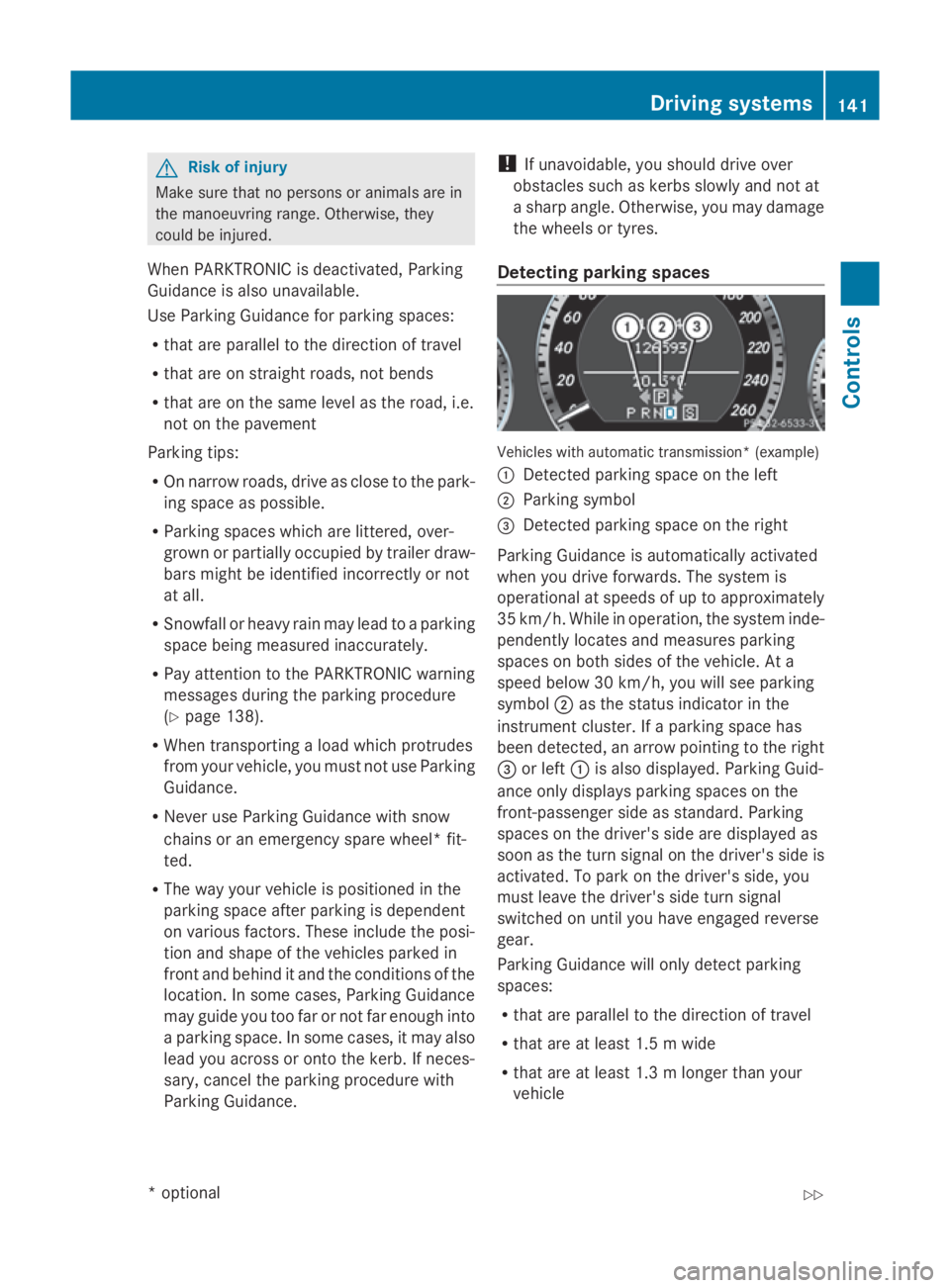
Detecting parkin gspaces Vehicles with automatic transmission* (example)
0046
Detected parking space on the left
0047 Parking symbol
008A Detected parking space on the right
Parking Guidance is automaticall yactivated
whe nyou drive forwards. The system is
operational at speeds of up to approximately
35 km/h .While in operation, the system inde-
pendently locates and measures parking
spaces on both sides of the vehicle .Ata
speed below 30 km/h ,you will see parking
symbol 0047as the statu sindicator in the
instrument cluster. If aparking space has
bee ndetected, an arrow pointing to the right
008A or left 0046is also displayed. Parking Guid-
ance only display sparking spaces on the
front-passenger sid easstandard .Parking
spaces on the driver' ssidea re displayed as
soo nasthe turn signal on the driver' ssideis
activated. To park on the driver' sside, you
mus tlea ve the driver' ssidet urn signal
switched on unti lyou have engaged reverse
gear.
Parking Guidance will only detect parking
spaces:
R that are paralle ltothe direction of travel
R that are at leas t1.5mw ide
R that are at leas t1.3ml onger than your
vehicle Drivin
gsystems
141Controls
*optional
207_AKB
;2;3,en-GB
mkalafa ,V ersion: 2.11.8.1
2009-07-23T10:23:49+02:00
-Seite 141 Z
Page 145 of 313
Ap
arking space is displaye dwhile youa re
driving past it, and unti lyou area pprox-
imatel y15m away from it.
Parking G
Ris
kofa ccident
PARKTRONI Cand Parking Guidance are
merel yparking aids and ma ynot detect all
obstacles. The ydonot relieve yo uofthe
responsibility of paying attention.
Yo ua realways responsibl efor safety and
must continue to pa yattentio ntoyourimme-
diate surrounding swhenp arking and
manoeuvring .You could otherwis eendanger
yoursel fand others.
X Stop the vehicl ewhent he parking space
symbo lshows the desired parking space in
the instrument cluster.
X Vehicles with manua ltransmission: shift to
revers egear.
Vehicles with automatic transmission*:
mov ethe selecto rlev er to R.
The multi-functio ndisplay shows the
Check vehicl esurroundings Con‐
fir mwithOK message.
X Press 0064on the multi-functio nsteering
whee ltoconfirm.
The multi-functio ndisplay switches to
Parking Guidance.
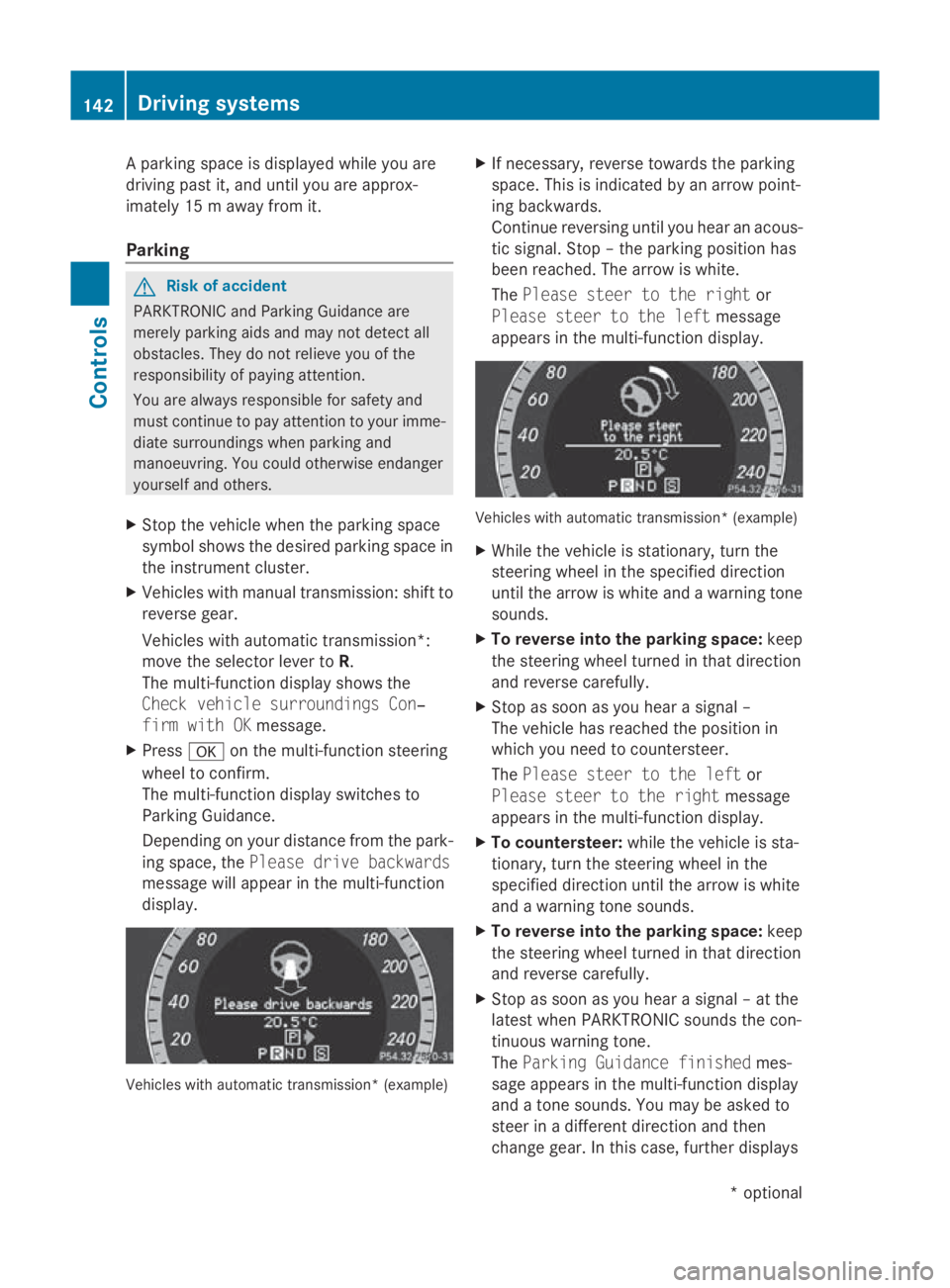
Depending on your distance fro mthe park-
ing space ,the Please drive backwards
message will appear in the multi-function
display. Vehicles with automatic transmission* (example) X
If necessary ,revers etowards the parking
space .Thisisi ndicated by an arrow point-
ing backwards.
Continu ereversing unti lyou hear an acous-
tic signal. Stop –the parking positio nhas
been reached. The arrow is white.
The Please steer to the right or
Please steer to the left message
appear sinthe multi-functio ndisplay. Vehicles with automatic transmission* (example)
X
Whil ethe vehicl eisstationary, tur nthe
steering whee linthe specifie ddirection
unti lthe arrow is white and awarning tone
sounds.
X To revers eintot he parking space: keep
the steering whee lturned in tha tdirection
and revers ecarefully.
X Stop as soo nasyou hear asigna l–
The vehicl ehasreache dthe positio nin
which yo uneedtoc ountersteer.
The Please steer to the left or
Please steer to the right message
appear sinthe multi-functio ndisplay.
X To countersteer: whilethe vehicl eissta-
tionary, tur nthe steering whee linthe
specifie ddirection unti lthe arrow is white
and awarning tone sounds.
X To revers eintot he parking space: keep
the steering whee lturned in tha tdirection
and revers ecarefully.
X Stop as soo nasyou hear asigna l–att he
latest when PARKTRONI Csounds the con-
tinuou swarning tone.
The Parkin gGuidance finished mes-
sage appear sinthe multi-functio ndisplay
and atone sounds .You maybea sked to
stee rinad ifferent direction and then
change gear .Inthisc ase, furthe rdisplays 142
Driving systemsControls
*o
ptional
207_AKB; 2; 3, en-GB
mkalafa,
Version: 2.11.8.1 2009-07-23T10:23:49+02:00-Seite 142
Page 181 of 313
Running-i
nnotes The firs
t1,50 0km G
Ris
kofa ccident
New brake pads/linings only have optimal
braking performance afte rsevera lhun dred
kilometres. Until then, compensate for this by
applying greate rforce to the brake pedal .This
also applie swhenb rake pads/linings or
brake discs have bee nchanged.
If yo utrea tthe engine with sufficient care
from the very start, yo uwillber ewarded with
excellent performance for the remainder of
the engine's life.
R Therefore, yo ushoul ddrive at varying road
and engine speeds for the firs t1,500 km.
R Avoi dheavy loads, e.g. driving at ful lthrot-
tle, during this time .Donot exceed 2
/ 3 of
the maximum permissible engine speed for
each gear.
R Chang egearing oodt ime.
R Do not shift dow nagearm anually in order
to brake.
Vehicles with automatic transmission*:
R try to avoid depressing the accelerator
pedal beyond the pressure point (kick-
down).
R only us eranges 3,2or 1for slo wdriving,
e.g. in mountainou sterrain.
After 1,500 km ,you may gradually bring the
vehicl euptof ullr oa da nd engine speeds.
i These running-in instructions mus talso
be observe difyouhave the engine, the dif-
ferenia lgea rort he front axl edifferentia lof
your vehicl ereplaced. Refuelling
Refuelling
G
Ris
kofe xplosion
Fue lish ighly flammable. Fire ,nake dflames
and smoking are therefore prohibited when
handling fuels.
Switch off the engine before refuelling. G
Ris
kofi njury
Avoi dany contact with fuels.
Yo uc an damag eyourh ealth if your skin
come sinto direct contact with fue lorifyou
inhale fue lvapours. G
Ris
koff ire
Do not us epetrol to refuel vehicles with adie-
sel engine. Neve rmix diese lwithp etrol .This
causes damag etothe fue lsys tem and engine
and could resul tinthe vehicl ecatching fire.
! Do not us epetrol to refuel vehicles with a
diese lengine. Do not us ediese ltor efuel
vehicles with apetrol engine. Even small
amounts of the wrong fue lwillc ause dam-
ag etot he fue lsys tem and engine. Damage
resulting from adding the wrong fue lisnot
covered by the implied warranty.
! Do not star tthe engine if yo uaccidentally
refuel with the wrong fuel. Otherwise, the
fue lcould enter the fue llin es. Thi swould
require draining of the fue ltank and fuel
lines. Notify aquali fied specialist workshop
and have the fue ltank and fue llin es
draine dcompletely.
Whe nyou ope norc lose the vehicl ewitht he
key or KEYLESS GO*, the fue lfille rflapis
automaticall yunlocked or locked.
The position of the fue lfille rcap is to the rear
on the right. The position of the fue lfille rcap
is displayed in the instrument cluster 00B8.178
RefuellingOperation
*o
ptional
207_AKB; 2; 3, en-GB
mkalafa
,V ersion: 2.11.8.1
2009-07-23T10:23:49+02:00
-Seite 178
Page 184 of 313
G
Risk of injury
The radiator fan between the radiator and the
engine can star tautomatically, eve nifthe key
ha sb eenr emoved from the ignition lock. For
this reason, yo umustn ot reach into the fan
rotation area. Otherwise, yo ucould be
injured.
Vehicles with apetro lengine:
The electroni cignition system uses hig hvolt-
age. For this reason, yo umustn ever touch
ignition system components (ignition coil,
ignition cable ,spark plug connector or test
socket) while:
R the engine is running.
R the engine is being started.
R the ignition is switched on and the engine
is being cranke dbyhand.
You could otherwise suffer an electri cshock
and be seriously or eve nfatall yinjured.
Vehicles with adiese lengine:
The electroni cinjection control uses hig hvolt-
age. For this reason, yo umustn ever touch
injection system components while:
R the engine is running.
R the engine is being started.
R the ignition is switched on.
You could otherwise suffer an electri cshock
and be seriously or eve nfatall yinjured.
X Make sure that the windscreen wiper sare
switched off. G
Risk of injury
The windscreen wiper sand wiper linkage
could be set in motion.
Whe nthe bonne tiso pen, yo uorothers could
be injured by the wiper linkage.
Make sure that the windscreen wiper is
switched off. Remove the key or make sure
that no ignition level ha sbeens elected on
KEYLESS-GO* .Inthe instrument cluster, all
of the indicator lamps mus tbeo ut. The bonne
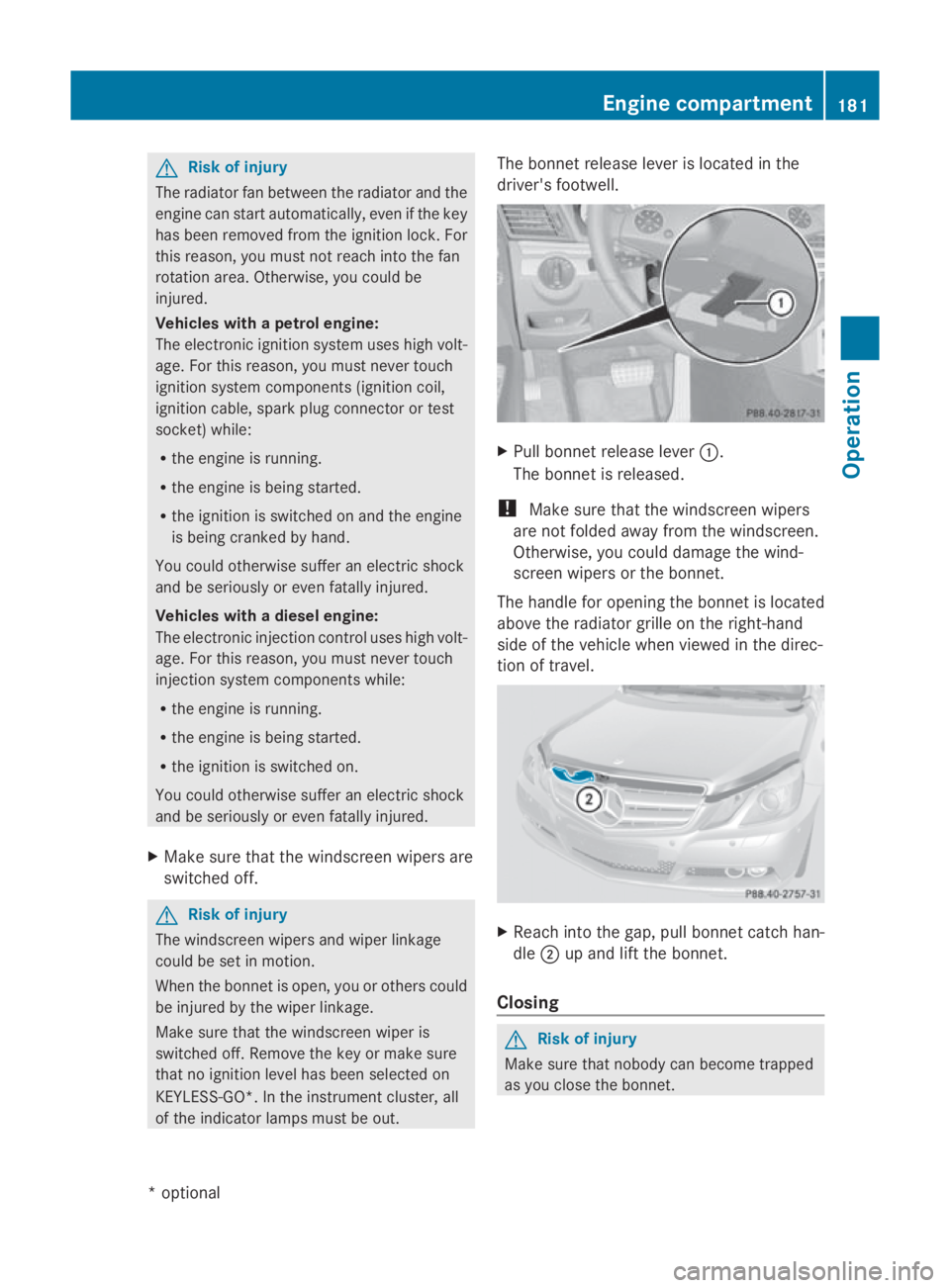
trelease lever is located in the
driver' sfootwell. X
Pull bonne trelease lever 0046.
The bonne tisr eleased.
! Make sure that the windscreen wipers
are not folded away from the windscreen.
Otherwise, yo ucould damag ethe wind-
scree nwiper sort he bonnet.
The handle for opening the bonne tisl ocated
above the radiator grill eonthe right-hand
sid eoft he vehicle whe nviewe dint he direc-
tion of travel. X
Reach into the gap, pull bonne tcatch han-
dle 0047up and lift the bonnet.
Closing G
Risk of injury
Make sure that nobody can become trapped
as yo uclosethe bonnet. Engine compartment
181Operation
*optional
207_AKB
;2;3,en-GB
mkalafa ,V ersion: 2.11.8.1
2009-07-23T10:23:49+02:00
-Seite 181 Z
Page 211 of 313
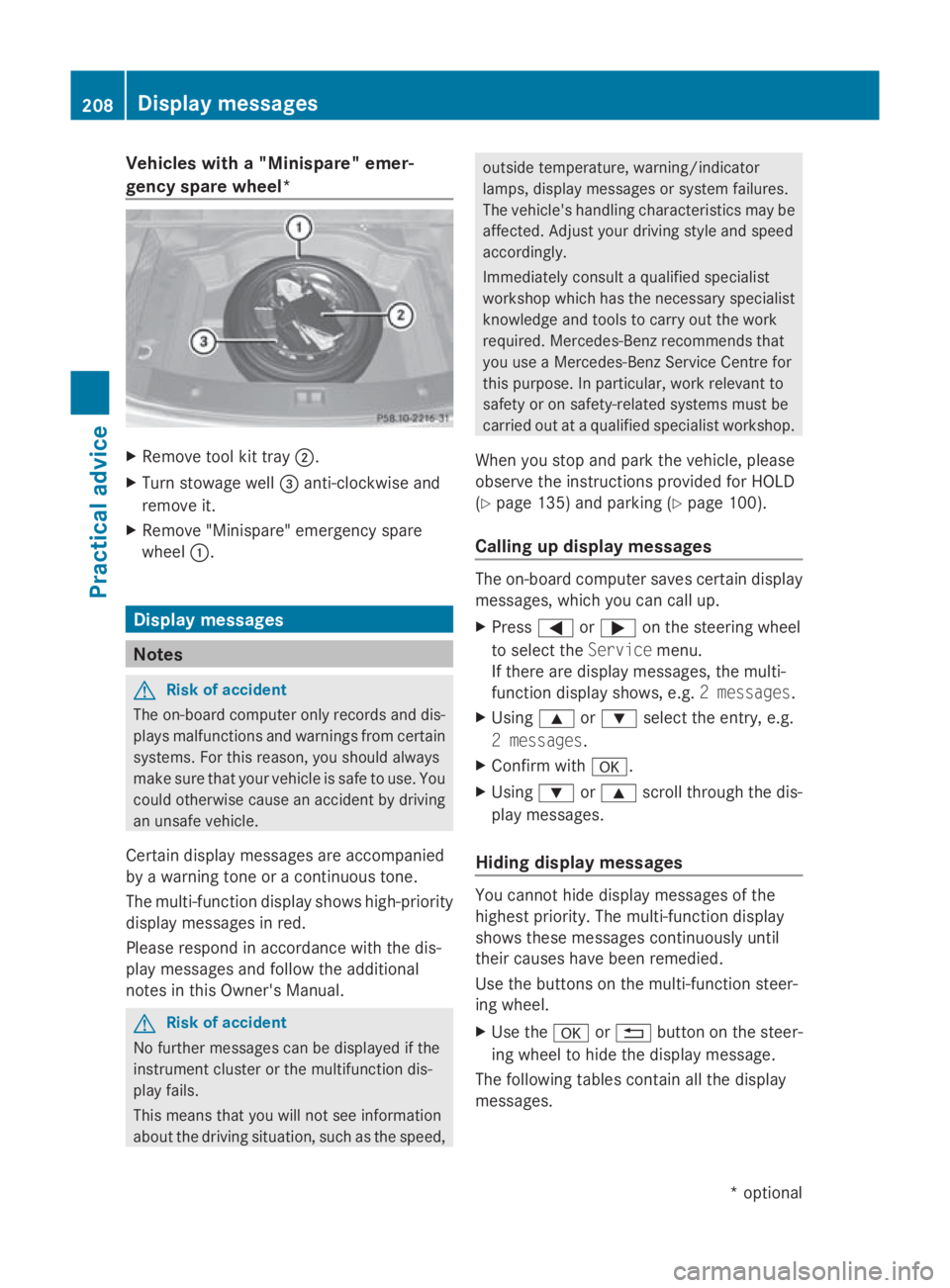
Vehicles with
a"Minispare "emer-
genc yspare wheel* X
Remove tool kit tray 0047.
X Turn stowag ewell008A anti-clockwise and
remove it.
X Remove "Minispare" emergency spare
wheel 0046. Display messages
Notes
G
Ris
kofa ccident
The on-board compute ronlyr ecords and dis-
play smalfunctions and warning sfrom certain
systems. For thi sreason, yo ushoul dalways
make sure tha tyou rvehicl eiss afetou se.Y ou
could otherwise cause an accident by driving
an unsafe vehicle.
Certai ndisplay messages ar eaccompanied
by aw arning tone or acontinuous tone.
The multi-functio ndisplay shows high-priority
display messages in red.
Please respond in accordance with the dis-
play messages and follo wthe additional
notes in this Owner' sManual. G
Ris
kofa ccident
No further messages can be displayed if the
instrument cluster or the multifunctio ndis-
play fails.
Thi sm eans tha tyou will not see information
abou tthe driving situation, such as the speed, outsid
etemperature ,warning/indicator
lamps ,display messages or system failures.
The vehicle's handling characteristic smaybe
affected. Adjust your driving style and speed
accordingly.
Immediately consult aquali fied specialist
workshop which ha sthe necessary specialist
knowledge and tool stocarry ou tthe work
required .Mercedes-Benz recommends that
yo uu seaM ercedes-Benz Service Centre for
thi sp urpose. In particular, work relevant to
safety or on safety-relate dsystem smustbe
carrie doutataq uali fied specialist workshop.
Whe nyou stop and park the vehicle, please
observe the instructions provided for HOLD
(Y page 135) and parking (Y page 100).
Calling up display messages The on-boar
dcompute rsaves certain display
messages ,which yo ucan cal lup.
X Press 0040or003E on the steering wheel
to select the Servicemenu.
If ther earedisplay messages ,the multi-
functio ndisplay shows ,e.g. 2m essages.
X Using 003Cor003D select the entry ,e.g.
2m essages.
X Confir mwith0064 .
X Using 003Dor003C scroll throug hthe dis-
play messages.
Hiding display messages Yo
uc anno thided isplay messages of the
highest priority. The multi-functio ndisplay
shows thes emessages continuously until
thei rcauses have been remedied.
Use the buttons on the multi-functio nsteer-
ing wheel.
X Use the 0064or0041 button on the steer-
ing whee ltohidet he display message.
The following table scontain al lthe display
messages. 208
Display messagesPractical advice
*o
ptional
207_AKB; 2; 3, en-GB
mkalafa,
Version: 2.11.8.1 2009-07-23T10:23:49+02:00-Seite 208
Page 220 of 313
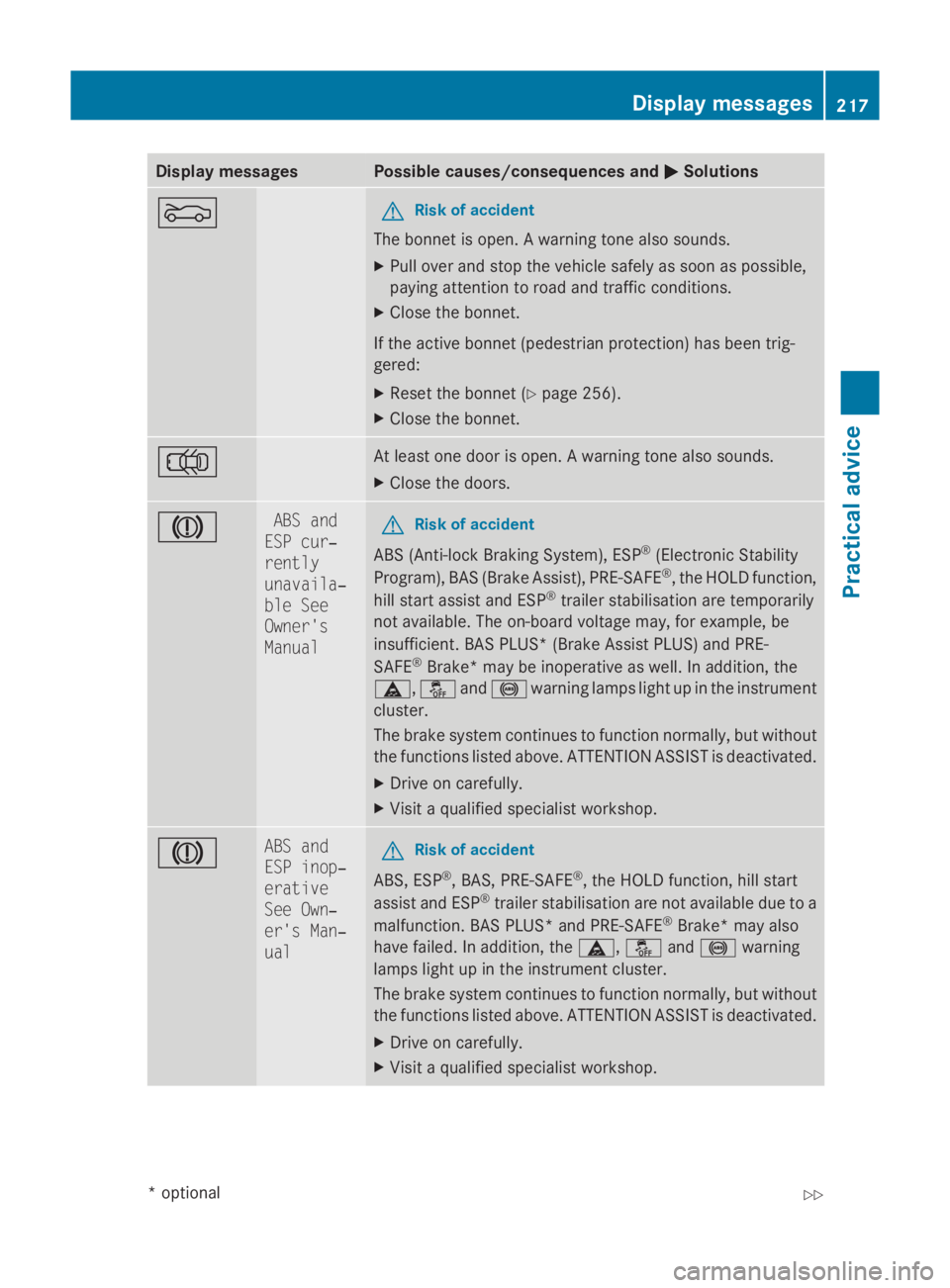
Display messages Possible causes/consequences and
0050
0050 Solutions 0083 G
Risk of accident
The bonne tisopen.Aw arnin gtonea lso sounds.
X Pull ove rand stop th evehicl esafely as soo naspossible,
payin gattention to roa dand traffic conditions.
X Clos ethe bonnet.
If th eactive bonne t(pedestrian protection )has been trig-
gered:
X Rese tthe bonne t(Ypage 256).
X Clos ethe bonnet. 0048 At leas
tone doo riso pen.Aw arnin gtonea lso sounds.
X Clos ethe doors. 004D ABS and
ESP cur‐
rently
unavaila‐
ble See
Owner's
Manual G
Risk of accident
AB S(Anti-l ockB raking System), ESP ®
(Electronic Stability
Program), BA S(Brak eA ssist) ,PRE-SAFE ®
,t he HOLD function,
hill start assist and ESP ®
trailer stabilisation are temporarily
no ta vailable. The on-boar dvoltag emay, fo rexample, be
insufficient. BA SPLUS* (Brak eAssistP LUS) and PRE-
SAFE ®
Brake *may be inoperative as well. In addition ,the
00C6 ,00C7 and0031 warnin glamp sligh tupint heinstrument
cluster.
The brak esystem continues to function normally, but without
th ef unction slisted above. ATTENTION ASSIST is deactivated.
X Drive on carefully.
X Visit aqualified specialist workshop. 004D ABS and
ESP inop‐
erative
See Own‐
er'
sM an‐
ual G
Risk of accident
ABS, ESP ®
,B AS ,PRE-SAFE ®
,t he HOLD function ,hill start
assist and ESP ®
trailer stabilisation are no tavailable due to a
malfunction .BAS PLUS* and PRE-SAFE ®
Brake *may also
hav efailed. In addition ,the 00C6 ,00C7 and0031 warning
lamp sligh tupint heinstrumen tcluster.
The brak esystem continues to function normally, but without
th ef unction slisted above. ATTENTION ASSIST is deactivated.
X Drive on carefully.
X Visit aqualified specialist workshop. Display
messages
217Practical advice
*optional
207_AKB; 2; 3, en-GB
mkalafa
,V ersion: 2.11.8.1
2009-07-23T10:23:49+02:00
-Seite 217 Z
Page 221 of 313
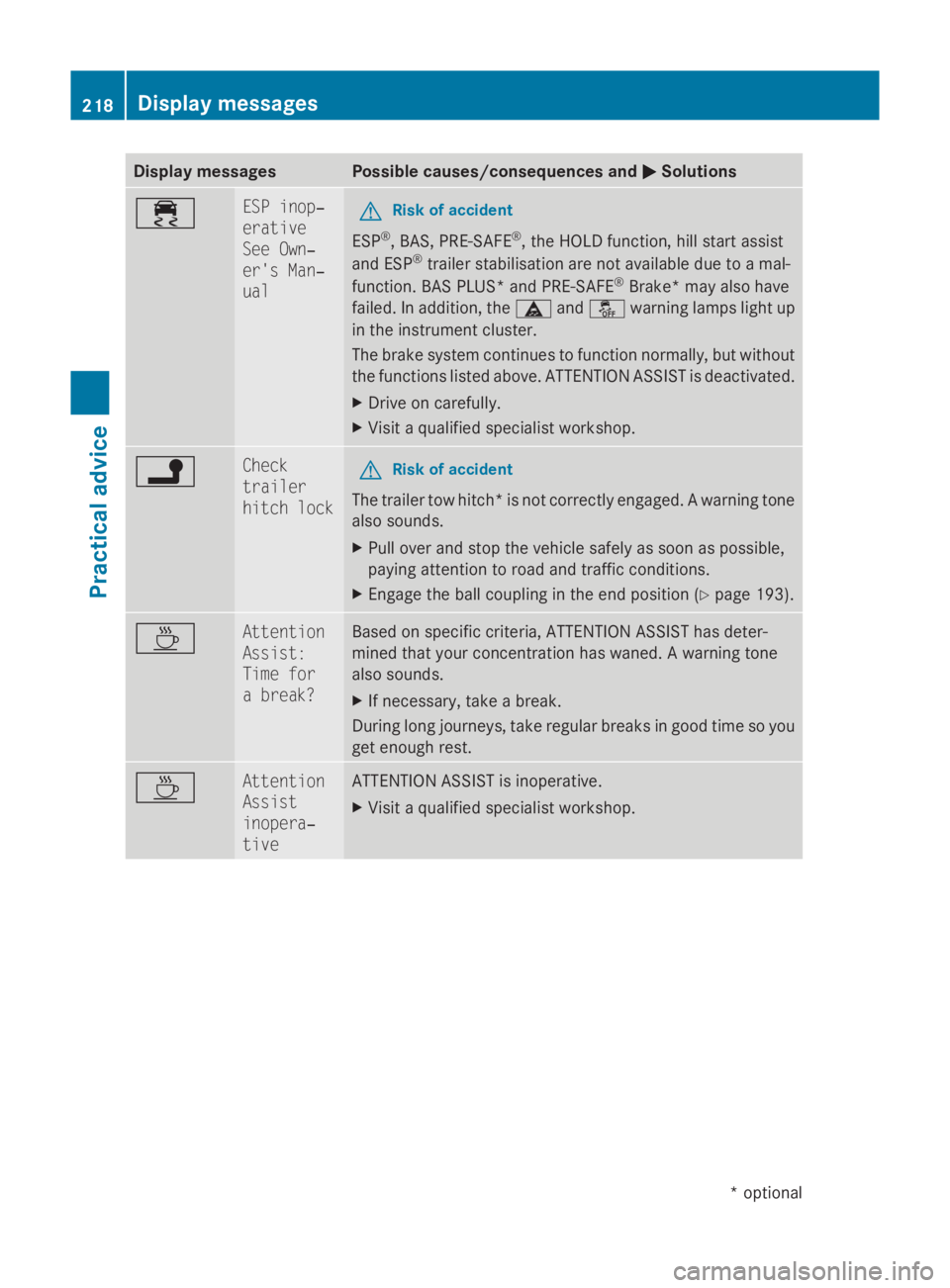
Display messages Possible causes/consequences and
0050
0050Solutions 00F2 ESP inop‐
erative
See Own‐
er'
sM an‐
ual G
Risk of accident
ESP ®
,B AS ,PRE-SAFE ®
,t he HOLD function ,hill start assist
and ESP ®
trailer stabilisation are no tavailable due to amal-
function .BAS PLUS* and PRE-SAFE ®
Brake *may also have
failed. In addition ,the 00C6 and00C7 warnin glamp sligh tup
in th einstrument cluster.
The brak esystem continues to function normally, but without
th ef unction slisted above. ATTENTION ASSIST is deactivated.
X Drive on carefully.
X Visit aqualified specialist workshop. 0078 Check
trailer
hitch lock
G
Risk of accident
The trailer to whitch *isn otcorrectl yengaged. Awarnin gtone
also sounds.
X Pull ove rand stop th evehicl esafely as soo naspossible,
payin gattention to roa dand traffic conditions.
X Engage th eball couplin gintheendp osition (Y page 193). 00AF Attention
Assist:
Tim
ef or
ab reak? Based on specific criteria, ATTENTION ASSIST has deter-
mined that your concentration has waned. Awarnin gtone
also sounds.
X If necessary, tak eabreak.
Durin glon gjou rneys, tak eregular breaks in goo dtimesoy ou
get enough rest. 00AF Attention
Assist
inopera‐
tive ATTENTION ASSIST is inoperative.
X
Visit aqualified specialist workshop. 218
Display
messagesPractical advice
*optional
207_AKB; 2; 3, en-GB
mkalafa
,V ersion: 2.11.8.1
2009-07-23T10:23:49+02:00
-Seite 218
Page 222 of 313
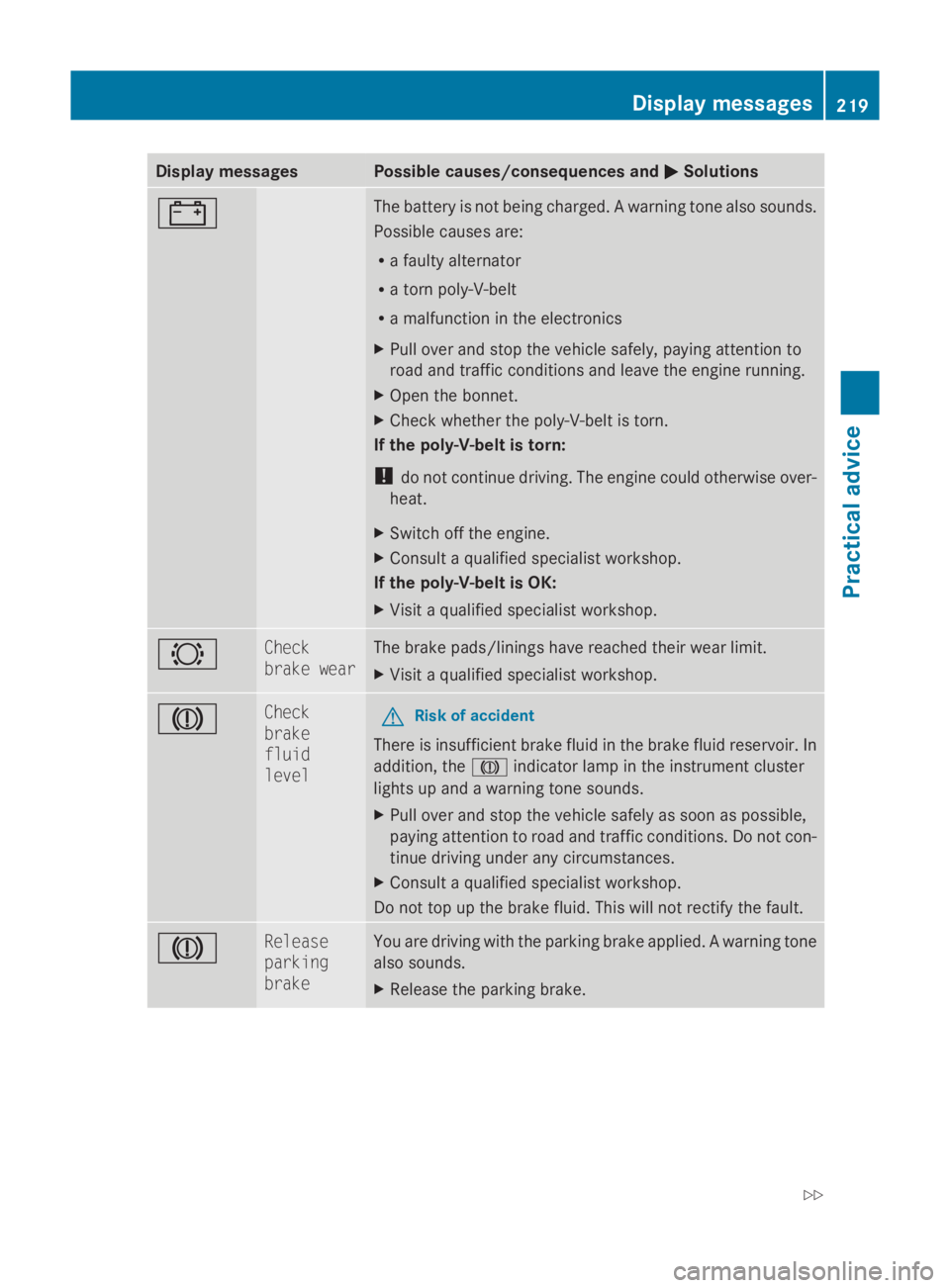
Display messages Possible causes/consequences and
0050
0050 Solutions 003F The battery is no
tbein gcharged. Awarnin gton ea lso sounds.
Possibl ecauses are:
R af ault yalternator
R at ornp oly-V-belt
R am alfunction in th eelectronics
X Pull ove rand stop th evehicl esafely, payin gattention to
roa dand traffic condition sand leav ethe engin erunning.
X Ope nthe bonnet.
X Chec kwhether th epoly-V-belt is torn.
If th epoly-V-belt is torn:
! do no tcontinu edriving. The engin ecould otherwise over-
heat.
X Switc hoffthee ngine.
X Consult aqualified specialist workshop.
If th epoly-V-belt is OK:
X Visit aqualified specialist workshop. 0026 Check
brake wear The brak
epads/lining shaver eached their wear limit.
X Visit aqualified specialist workshop. 004D Check
brake
fluid
level
G
Risk of accident
There is insufficien tbrak efluidint hebrak efluidr eservoir .In
addition ,the 004D indicato rlamp in th einstrument cluster
lights up and awarnin gtones ounds.
X Pull ove rand stop th evehicl esafely as soo naspossible,
payin gattention to roa dand traffic conditions. Do no tcon-
tinue drivin gunder any circumstances.
X Consult aqualified specialist workshop.
Do no ttop up th ebrak efluid. This will no trectify th efault. 004D Release
parking
brake You are drivin
gwitht he parkin gbrak eapplied. Awarnin gtone
also sounds.
X Releas ethe parkin gbrake. Display
messages
219Practical advice
207_AKB; 2; 3, en-GB
mkalafa,V ersion: 2.11.8.1
2009-07-23T10:23:49+02:00
-Seite 219 Z