camera MERCEDES-BENZ E-Class COUPE 2011 C207 Comand Manual
[x] Cancel search | Manufacturer: MERCEDES-BENZ, Model Year: 2011, Model line: E-Class COUPE, Model: MERCEDES-BENZ E-Class COUPE 2011 C207Pages: 194, PDF Size: 6.42 MB
Page 21 of 194
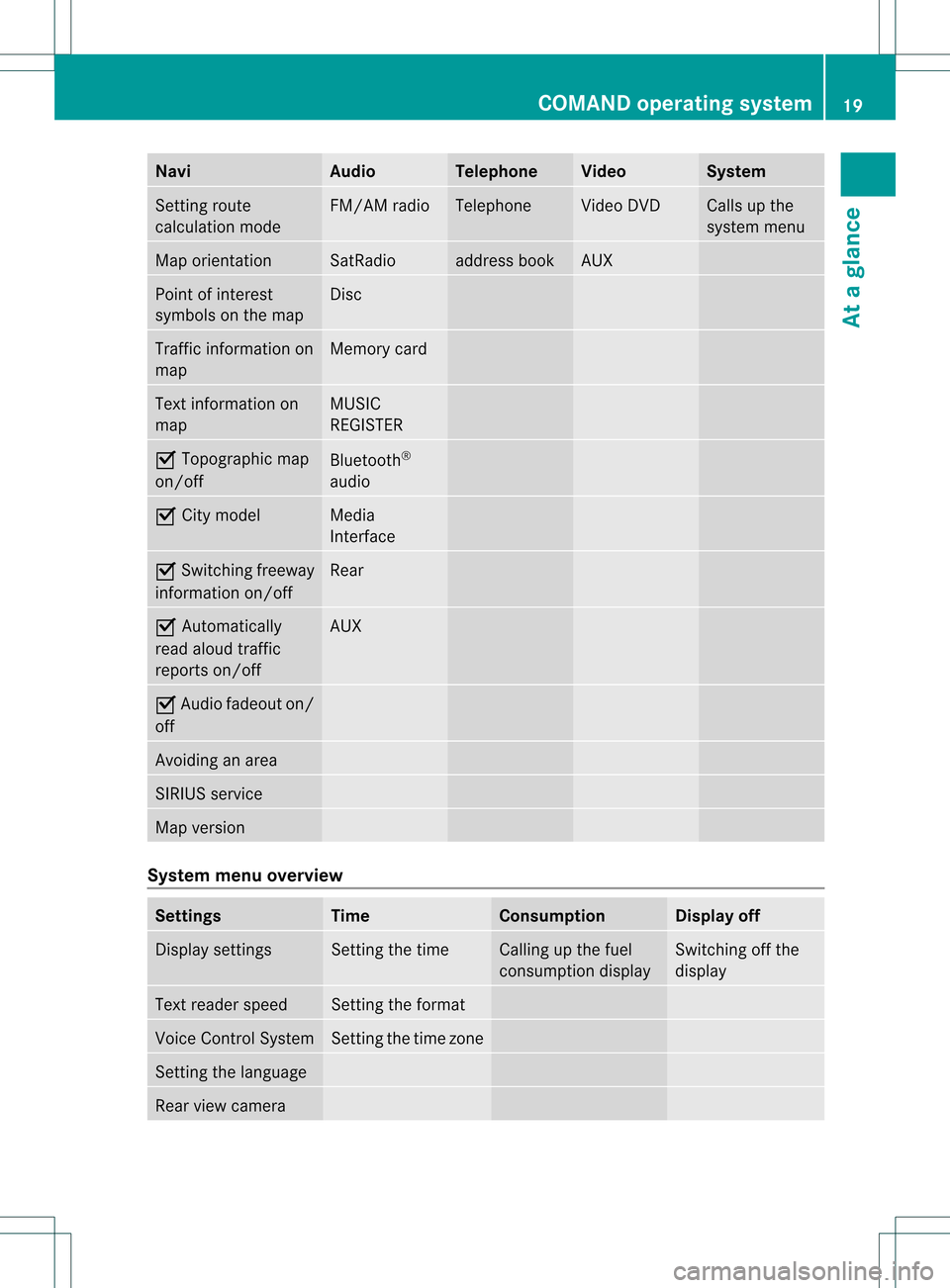
Navi Au
dio Tel
eph one Vide
o Sys
tem Setti
ngrou te
cal cul ation mod e FM/AM
radio Te
leph one Vi
de oDVD Ca
lls up the
sy ste mm enu Map
orient ation SatRadio address
book AUX
Point
ofinterest
symbols onthe map Disc
Traffic
information on
map Memory
card Text
information on
map MUSIC
REGISTE R O
Topographic map
on/ off Bluetoot
h®
audio O
City model Media
Int erface O
Switc hingfreeway
infor mation on/off Rear
O
Autom atically
read aloud traffic
report son/ off AUX
O
Audio fadeout on/
off Avoidin
gan area SIRIUS
service Map
version System
menuoverview Sett
ings Tim
e Consump
tion Display
off Display
settings Set
tingthe time Calling
upthe fuel
con sumption display Switc
hingoffthe
display Text
reader speed Set
tingthe format Voice
ControlSystem Set
tingthe time zone Sett
ingthe language Rear
viewcamera COMAND
operatingsystem
19Ataglance
Page 22 of 194
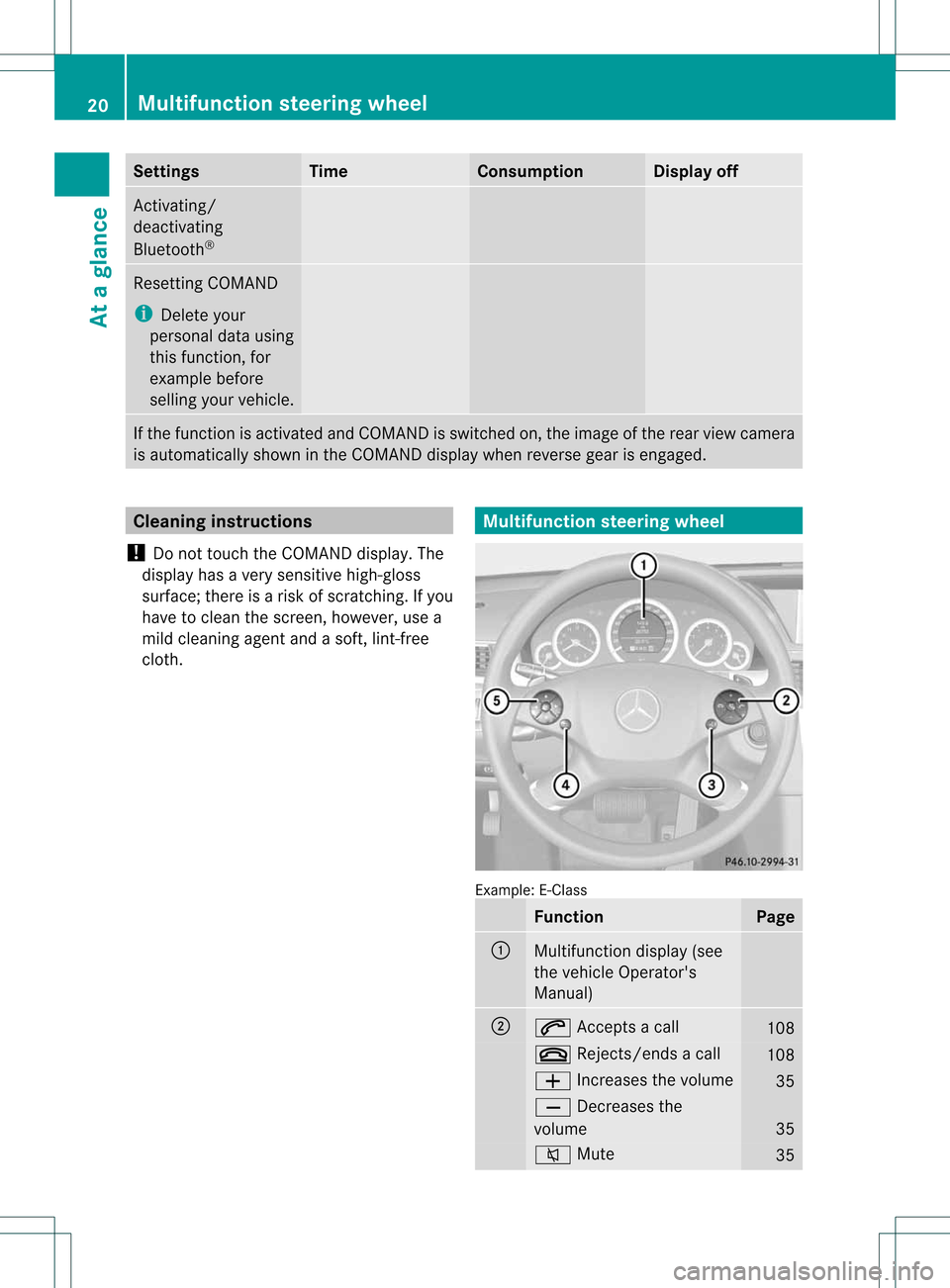
Settings Time Consumption Display
off Act
ivating/
deactivating
Bluetooth ® Resetting
COMAND
i Delete your
personal datausing
this funct ion,for
example before
selling yourvehicle. If
the funct ionisactivated andCOMAND isswitched on,the image ofthe rear view camera
is automatically showninthe COMAND displaywhenreverse gearisengaged. Cleaning
instructions
! Donot touch theCOMAND display.The
displa yhas avery sensitive high-gloss
surface; thereisarisk ofscratc hing.Ifyou
have toclean thescreen, however, usea
mild cleaning agentandasoft, lint-free
cloth. Multifunction
steeringwheel Example:
E-Class Function Page
:
Multifunction
display(see
the vehicle Operator's
Manual) ;
6
Accepts acall 108
~
Rejects/ endsacall 108
W
Increases thevolume 35
X
Decreases the
volume 35
8
Mute 3520
Multifunction
steeringwheelAtaglance
Page 40 of 194
X
Sel ect Logic7 ®
On or
Log ic7 ®
Off by
turni ngcVd theCOMAND controllerand
pre ssW toconfi rm.
Depe nding on your sel ecti on, surrou nd
sou ndissw itche don oroff and themenu
is exi ted.
X To exitthe men uwi thout saving:pre ss
the k back button orslide XVY the
CO MAND controller.
i Plea se note thefollowi ng: forthe
opti mum audio expe rience forall
pa sse nger swh en LOG IC7®
is sw itche don,
the balance and fadersetti ngsshould be
set tothe center ofthe vehicleinter ior.
Yo uwi llach ieve the best sou ndresults by
pl ay ing high-q uality audio and video DVDs.
MP3 tracks shouldha ve ab itrat eof at least
128 kbit/s.
Surr ound soundplayback doesnot
func tion formon osign alsourc es,such as
the medium waverange(MW) inradio
mode.
Surr ound- soundplayback doesnot
func tion formon osign alsourc es,such as
AM radio mode.
If radio receptio nispoor, e.g.inatunnel,
you should switchoffLogic 7®
,as itmay
otherwise switchbetween stereoand
mono andcause temporary sound
distortions.
On some stereo recordings, thesound
characteristics maydiffer from
conven tionalstereo playback. Climate
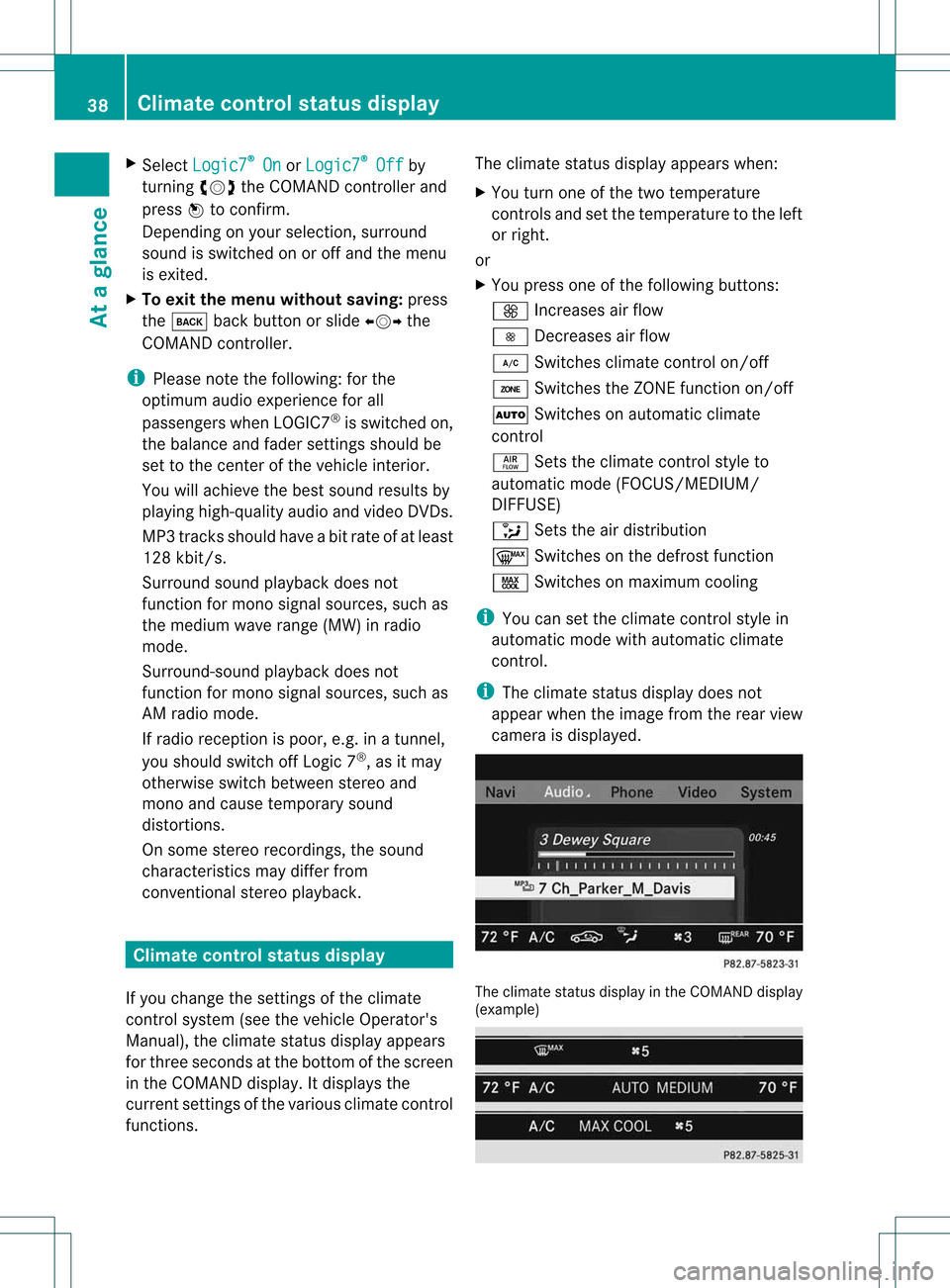
controlstatusdisplay
If you change thesettings ofthe climate
cont rolsystem (seethevehicle Operator's
Manual ),the climate statusdisplayappea rs
for three seconds atthe bottom ofthe screen
in the COMAND display.Itdispla ysthe
current settings ofthe various climate control
function s. The
climate statusdisplayappea rswhen:
X You turn oneofthe two temperature
cont rolsandsetthe temperature tothe left
or right.
or
X You press oneofthe followi ngbuttons:
K Increases airflow
I Decreases airflow
¿ Switches climatecontrolon/off
á Switches theZONE function on/off
à Switches onautomatic climate
cont rol
ñ Setstheclimate controlstyle to
automatic mode(FOCUS/MED IUM/
DIFF USE)
_ Setstheairdistribution
¬ Switches onthe defrost function
Ù Switches onmaximum cooling
i You cansetthe climate controlstyle in
automatic modewithautomatic climate
cont rol.
i The climate statusdisplaydoes not
appea rwhen theimage fromtherear view
camera isdispla yed. The
climate statusdisplay inthe COMAND display
(example) 38
Climate
controlstatusdisplayAt aglance
Page 41 of 194
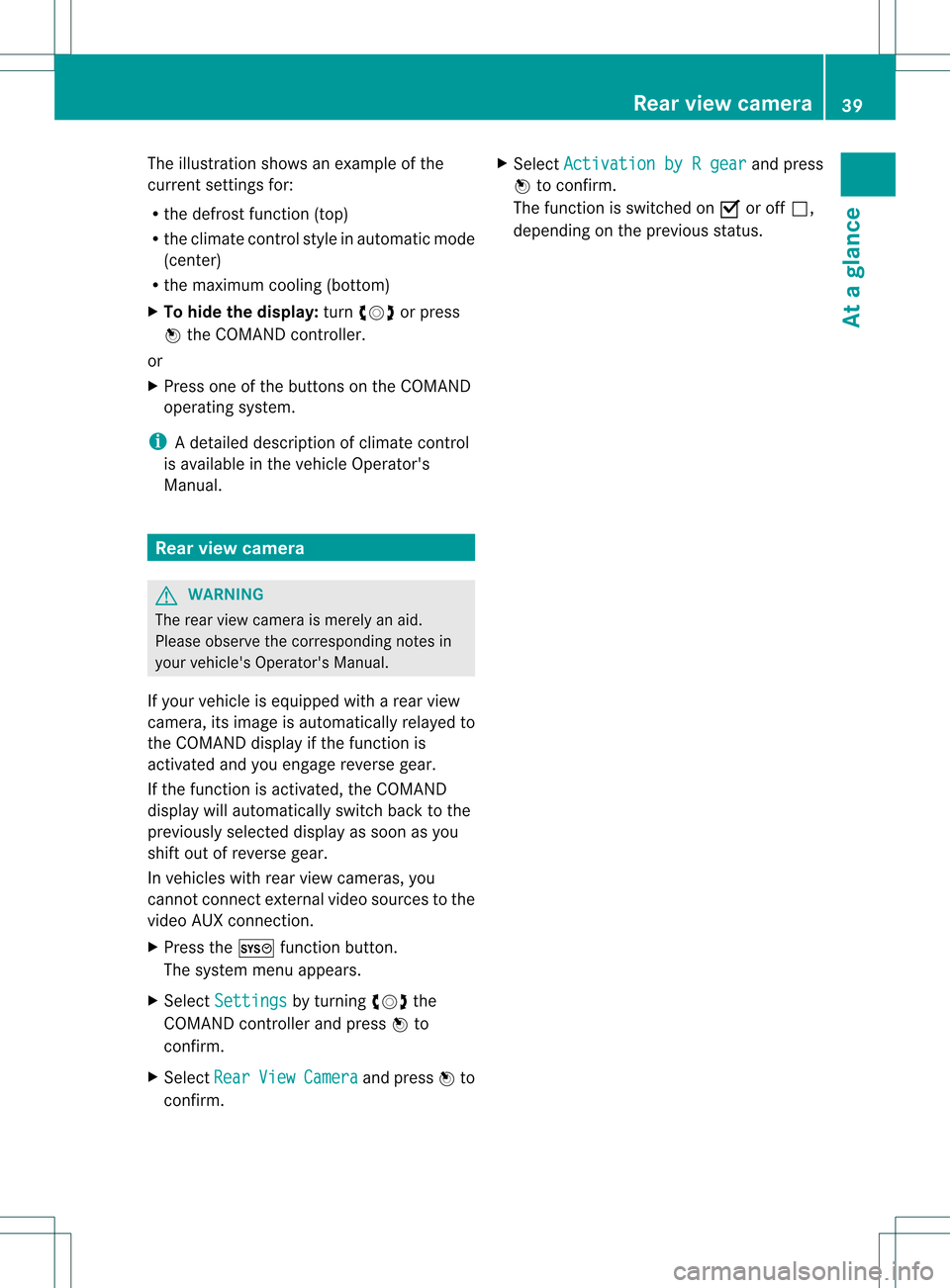
The
illustration showsanexample ofthe
curren tsett ings for:
R the defrost function(top)
R the climate controlstyle inautomatic mode
(cent er)
R the maximum cooling(bottom )
X To hide thedisplay: turncVd orpress
W the COMAND controller.
or
X Press oneofthe button son the COMAND
operating system.
i Adetailed descript ionofclimate control
is available inthe vehicle Operator 's
Manual. Rear
view camer a G
WARN
ING
The rear view camera ismerely anaid.
Please observe thecorr espondin gnotes in
your vehicle's Operator's Manual.
If your vehicle isequipped witharear view
camera, itsimage isautomatically relayedto
the COMAND displayifthe funct ionis
activated andyouengage reverse gear.
If the funct ionisactivated, theCOMAND
display willautomatically switchbacktothe
previously selecteddisplayassoon asyou
shift outofreverse gear.
In vehicles withrearview cameras, you
cann otconn ectexter nalvideo sources tothe
video AUXconnection .
X Press theW functionbutton .
The system menuappears.
X Select Settings by
turnin gcVd the
COMAND controller andpress Wto
conf irm.
X Select Rear View Camera and
press Wto
conf irm. X
Select Activation byRgear and
press
W toconf irm.
The funct ionisswitched onO oroff ª,
depending onthe previous status. Rear
view camera
39Ataglance Z
Page 170 of 194

Subtitles
andcamera angle
These functionsarenot availa bleonallDVD s.
The number ofsubtitle languages andcamera
angles availabledepends onthe cont entof
the DVD .Iti spossible thatthesettings may
also beaccessed inthe DVD menu
(Y page 166).
X Press Wthe COMAND controller toshow
the menu.
X Select DVD-Video in
the menu byturning
cVd theCOMAND controller andpress
W toconfirm.
X Select DVDFunctions and
press Wto
confirm.
X Select Subtitles or
Camera Angle and
press Wtoconfirm.
In both cases, amenu appears.The #dot
in front ofan entry indicates thecurrent
setting.
X Select asetting byturning cVdthe
COMAND controller andpress Wto
confirm.
X To exit themenu: slideXVY theCOMAND
cont roller. Interactive
content
DVDs cancont aininteract ivecont ent(e.g. a
video game). Inavideo game, forexample,
you may beable toinfluence eventsby
selecting andtriggering actions.Thetype and
number ofactions depend onthe DVD.
X Select anaction bysliding ZVÆorXVY the
COMAND controller andpress Wto
execute it.
A menu appearsand thefirst entry,
Select ,
is highlig hted.
X Press Wthe COMAND controller. Video
AUXmode AUX
jacks
An extern alvideo source (videoAUX)canbe
conn ected withCOMAND viaMedia Interface
(Y page 152)using the1/8 inch audio/video
conn ections inthe glove box.
i Invehicles witharear view camera, the
video AUXjackcannot beused forextern al
video sources. Switching
tovideo AUXmode
X Select Video in
the main function barby
sliding ZVandturning cVdtheCOMAND
cont roller andpress Wtoconfirm.
If video AUXmode wasthelast mode
selected, itwill now beactive.
If another videosource isswitched on,you
can now switch tovideo AUXmode inthe
video menu.
X Select Video and
press Wtoconfirm.
X Select Aux and
press Wtoconfirm.
The video AUXmenu appea rs.You willhear
and seethecont entofthe extern alvideo
source ifit is conn ected andswitched to
play back. Video
AUXmode
For details onhow tooperate theextern al
video source, seetherespective device's
operating instructions. 168
Video
AUXmodeVideo
Page 179 of 194
X
Setting usingCOMAND: press,for
example, the$ functionbutton to
switch onanaudi omode.
X Select Audio by
sliding ZVtheCOMAND
cont roller andpress Wtoconf irm.
The Audio menuappears.
X Select Rear by
turnin gcVd theCOMAND
cont roller andpress Wtoconf irm.
i The headphones' volumesettingdoes not
affect themain loudspeakers. Adjust
ingthe sound settings
You canselect thesound settings inthe audio
CD/D VD/MP3, video DVDandAUX modes.
X Switch onanoperating mode(e.g.audio
CD mode) (Ypage 180).
X Select Treble or
Bass using
the :=; buttonson the remote
cont roland press the9button toconf irm.
An adjustmen tscal eap pea rs.
X Sel ect asetti ngusing the 9:
bu ttons andpressthe 9button toconfi rm. Multi
pleusers
Simul taneoususeofthe rear-
co mpartment discdrive The
two rear-comp artmentscree nscan be
ope rate dalmost entirelyind epe ndentl yfrom
one another. However,there canbeaconfl ict
in some menusif the two scree nsare used
sim ultaneo usly.
If the rear-comp artmentdisc drive isbei ng
us ed for both scree nssim ultaneo usly,
sel ecting certainmenu sor setti ngsonone of
the scree nsalso affe ctsthe othe rscree n.
The followi ng functi onsaffectboth scree ns:
R cha nging play ba ck opti ons
R sel ecting atrack (fromatra cklist or folder)
R us ing the play ,pa useand stopfu nctio ns
R fast for wa rd/ rew ind orscro lling R
cal ling up the DVD menu andnavigati ng
wi thi nit
R setting thelangua ge,subtitles andcamera
angle
R calling upinteract iveDVD content
The followi ngfunction saffect onlyone
screen:
R audi oand video function sas well aspicture
settings
R switching betweenfullscreen andthe
menu
Switching betweenoperating modes When
youexit anoperating mode(e.g.audio
CD mode), thecurrent settingissaved. Ifyou
call upthis operating modeagainlate r,th ere
are two poss ibilities:
R theoper atingmod ehas been chang edon
th eot her scree n.
R theoper atingmod ehas notb een changed.
In the first case, theoperatin gmode appears
as itis on the other screen .
In the secon dcase, thesett ingappears onthe
screen asitwas when youlast exitedthe
operatin gmode. Pictur
esettings
Overview You
canselect thesesettings invideo DVD
and AUX mode. Instruct ions forAUX mode
are detailed later(Y page 188).
Adju sting thebright ness,contra stand
color X
Switc hon video DVDmode (Ypage 184).
X To show themenu: pressthe9button
on the remot econ trol.
or
X Select Menu while
thenavigation menu
(Y page 164)is shown andpress the9
button tocon firm. Ba
sic functions
177RearEntert ainment System Z
Page 190 of 194

X
Sel ect AudioLanguage and
pressthe 9
bu tton toconfi rm.
Am enu appears afterashort while. The
# dot infron tof an ent ryindicat esthe
curren tlyselect edlanguage.
X Select alanguage usingthe9:
button sand press the9button tocon firm.
X To exit themenu: pressthe=
or ; button . Subtit
lesand camer aangle
These functionsare not available onallDVD s.
The number ofsubtitle languages andcamera
angles available dependsonthe contentof
the DVD. Itis po ssi ble tha tthe settin gsmay
also beaccessed fromtheDVD menu.
X Press the9button onthe remote control
and show themenu.
X Select DVD-Video and
press the9button
on the remote controltoconfirm .
X Select DVDFunctions and
press the9
button toconfirm .
X Select Subtitles or
Camera Angle and
press the9button toconfirm .
In both cases, amenu appearsafter afew
seconds. The#dot infront ofan entr y
indicates thecurrent setting.
X Select asettin gusing the9:
buttons andpress the9button toconfirm .
X To exit themenu: pressthe=
or ; button. Interactive
content
DVD scan also containinteract ivecont ent
(e.g. avideo game). Inavideo game, youmay
be able toinfluence eventsbyselecting and
triggering actions.Thetype andnumber of
actions depend onthe DVD .
X Select anaction usingthe
9;:= buttonsonthe remote
controland press the9button to
execute it.
A menu appearsand thefirst entry,
Select ,
is highlighted.
X Press the9button. AUX
mode Introduction
You canconn ectone extern alvideo source to
each ofthe displa ysofthe Rear Seat
Ent ertainment System(AUXdispla y)and also
one extern alvideo source tothe rear-seat
CD/DV Ddrive (AUX drive) withasound and
video signal.
Please seethecorresponding operating
instruct ionsforinformation onhow to
operate theextern alvideo source. Conne
ctingAUXequipment
AUX drive The
AUX drive jacks arelocated onthe CD/
DVD drive nexttothe CD/DV Deject button
(Y page 173).
Displaying AUX The
AUX displa yjacks areonthe side ofthe
screen (Ypage 173).
Audio andvideo conne ction X
Insert theaudi oplugs forthe left and right
signals intothecorresponding Land R
jacks.
X Insert thevideo plugintotheVjack. 188
AUX
modeRear Enterta inment System