computer MERCEDES-BENZ E-Class COUPE 2011 C207 User Guide
[x] Cancel search | Manufacturer: MERCEDES-BENZ, Model Year: 2011, Model line: E-Class COUPE, Model: MERCEDES-BENZ E-Class COUPE 2011 C207Pages: 344, PDF Size: 14.06 MB
Page 15 of 344
ReportingMalfunctions relevant to safety ........ 21
Reserve fuel
Display message ............................ 229
Warning lamp ................................. 245
Residual heat
Switching on/off ........................... 144
Restraint systems
see SRS
Reversing lamp (display message) .. 225
Roadside Assistance (breakdown) .... 19
Roll bar Display message ............................ 215
Operation ......................................... 50
Roller blind
see Roller sunblind
Roller sunblind
Opening/closing ............................ 102
Panorama roof with power tilt/
sliding panel .................................. 102
Rear window .................................. 256
Roof
see Soft top
Roof carrier ................................ 254, 255
Roof lining and carpets (cleaning
guidelines) ......................................... 284
Route see Route guidance (on-board
computer)
Route guidance (on-board
computer) .......................................... 203
S
Safety Children in the vehicle .....................58
Child restraint systems ....................59
Occupant Classification System
(OCS) ............................................... 42
Overview of occupant safety
systems ........................................... 34
Safety systems
see Driving safety systems
Seat belts
Adjusting the driver's and front-
passenger seat belt .........................56
Automatic comfort-fit feature ..........58
Belt force limiters ............................ 57
Cleaning ......................................... 284
Correct usage .................................. 53
Emergency Tensioning Devices ........ 57
Fastening ......................................... 54
Important safety guidelines .............53
Releasing ......................................... 56
Safety guidelines ............................. 35
Special seat belt retractor ...............61
Switching belt adjustment on/off
(on-board computer) ......................211
Warning lamp ................................. 241
Warning lamp (function) ................... 56
Seat heating
Indicator lamp (Malfunction) ..........112
Seats
Adjusting (electrically) ...................108
Adjusting the 4-way lumbar
support .......................................... 111
Adjusting the head restraint ..........108
Cleaning the cover .........................283
Correct driver's seat position ........106
Important safety notes ..................107
Multicontour seat .......................... 110
Storing settings (memory
function) ........................................ 116
Switching AIRSCARF on/off ..........112
Switching seat heating on/off .......111
Switching the seat ventilation on/
off .................................................. 112
Seat ventilation
Indicator lamp (Malfunction) ..........112
Sensors (cleaning instructions) ....... 282
Service indicator see Service interval display
Service interval display .................... 276
Displaying a service message (on-
board computer) ............................ 277
Service menu (on-board computer) . 208
Service products Brake fluid ..................................... 338
Capacities ...................................... 335
Coolant (engine) ............................ 338
Engine oil ....................................... 337
Fuel ................................................ 335
Important safety notes ..................334
Notes ............................................. 334Index13BA 207 USA, CA Edition B 2011; 1; 3, en-USd2sboikeVersion: 3.0.3.62010-05-20T10:38:09+02:00 - Seite 13
Page 16 of 344
Refrigerant (air-conditioning
system) .......................................... 337
Washer fluid ................................... 339
Settings
Factory (on-board computer) .........212
On-board computer .......................208
Shift ranges ....................................... 160
Showing the distance display (on-
board computer) ............................... 206
Side impact air bag ............................. 39
Side marker lamp (display
message) ............................................ 225
Side windows Convenience closing feature ............87
Convenience opening feature ..........87
Important safety information ...........85
Opening/closing .............................. 86
Resetting ......................................... 88
Troubleshooting ............................... 89
Side windows (Cabriolet)
Opening/closing all .........................87
Sliding sunroof
Important safety information .........101
Troubleshooting ............................. 103
see Panorama roof with power
tilt/sliding panel
SmartKey
Changing the battery .......................78
Changing the programming .............77
Checking the battery .................74, 78
Convenience closing feature ............87
Convenience opening feature ..........87
Display message ............................ 238
Important safety notes ....................74
Malfunction ...................................... 79
Starting the engine ........................153
Snow chains ...................................... 170
Socket ................................................ 258
Dashboard ..................................... 259
Rear compartment .........................259
Soft top
AIRCAP ............................................ 97
Cleaning ......................................... 279
Closing manually in an emergency ... 91
Display message ............................ 238
Important safety information ...........89
Installing/removing the AIRCAP
wind screen ..................................... 98Opening/closing (with key) .............. 91
Opening/closing (with soft-top
switch) ............................................. 90
Relocking ......................................... 95
Troubleshooting ............................. 100
Wind screen ..................................... 96
Soft-top switch .................................... 90
SOS see mbrace
Spare wheel
Notes/data .................................... 329
Storage location ............................ 288
see Emergency spare wheel
Speedometer
Additional speedometer (on-
board computer) ............................ 202
Segments ...................................... 199
Setting the unit (on-board
computer) ...................................... 208
SRS (Supplemental Restraint
System) Display message ............................ 216
Introduction ..................................... 34
Warning lamp ................................. 244
Warning lamp (function) ................... 34
Standard display (on-board
computer) .......................................... 202
Starting the engine Important safety notes ..................152
Station
see Radio
Steering (display message) .............. 237
Steering wheel Adjusting (electrically) ...................113
Buttons (on-board computer) ......... 199
Cleaning ......................................... 283
Important safety notes ..................113
Memory function (storing
settings) ......................................... 113
Storing settings (memory
function) ........................................ 116
Steering wheel paddle shifters ........ 159
Stowage compartments Armrest (under) ............................. 251
Glove box ....................................... 250
Stowage space
Cup holders ................................... 255
Important safety information .........25014IndexBA 207 USA, CA Edition B 2011; 1; 3, en-USd2sboikeVersion: 3.0.3.62010-05-20T10:38:09+02:00 - Seite 14
Page 17 of 344
Stowage wellTrunk floor (under) .........................254
Submenu (on-board computer)
Convenience .................................. 211
Factory setting ............................... 212
Instrument cluster .........................208
Lights ............................................. 209
Standard display ............................ 202
Vehicle ........................................... 210
Summer opening
see Convenience opening feature
Sun visor ............................................ 256
Supplemental Restraint System see SRS
Surround lighting (on-board
computer) .......................................... 209
Switching off the alarm (ATA) ............ 71
T
Tachometer ........................................ 199
Tail lamps (Display message) ........... 224
Tank content Fuel gauge ....................................... 26
Technical data ................................... 332
E 350 ............................................. 339
E 550 ............................................. 340
Tires/wheels ................................. 327
TELEAID
Call priority .................................... 263
Display message ............................ 214
Downloading destinations
(COMAND) ..................................... 263
Emergency call .............................. 260
Important safety notes ..................259
Locating a stolen vehicle ...............264
MB info call button ........................262
Remote vehicle locking ..................264
Roadside Assistance button ..........262
Self-test ......................................... 260
System .......................................... 260
Vehicle remote unlocking ..............264
Telephone
Accepting a call ............................. 206
Display message ............................ 237
Menu (on-board computer) ............205
Number from the phone book ........ 206
Redialing ........................................ 206
Rejecting/ending a call .................206
Telephone compartment .................. 251
Temperature Coolant .......................................... 198
Outside temperature ...................... 199
Setting ........................................... 141
Theft deterrent locking system
Immobilizer ...................................... 70
Through-loading ................................ 252
Through-loading feature ................... 252
Tiredness assistant see ATTENTION ASSIST
Tire pressure
Calling up (on-board computer) .....311
Checking manually ........................309
Display message ............................ 233
Maximum ....................................... 313
Notes ............................................. 307
Pressure loss warning ....................309
Recommended ............................... 306
Tire pressure monitoring system
Function/notes ............................. 311
Restarting ...................................... 313
Warning lamp ................................. 247
Tires
Aspect ratio (definition) .................326
Average weight of the vehicle
occupants (definition) ....................324
Bar (definition) ............................... 324
Characteristics .............................. 324
Checking ........................................ 305
Cleaning ......................................... 306
Definition of terms .........................324
Direction of rotation ......................318
Distribution of the vehicle
occupants (definition) ....................326
DOT, Tire Identification Number
(TIN) ............................................... 323
DOT (Department of
Transportation) (definition) ............324
Flat tire .......................................... 288
GAWR (Gross Axle Weight Rating)
(definition) ..................................... 325
Guidelines to be observed .............305
GVW (Gross Vehicle Weight)
(definition) ..................................... 325Index15BA 207 USA, CA Edition B 2011; 1; 3, en-USd2sboikeVersion: 3.0.3.62010-05-20T10:38:09+02:00 - Seite 15
Page 18 of 344
GVWR (Gross Vehicle Weight
Rating) (definition) .........................325
Increased vehicle weight due to
optional equipment (definition) ......324
Kilopascal (kPa) (definition) ...........325
Labeling (overview) ........................320
Load bearing index (definition) ......326
Load index ..................................... 323
Load index (definition) ...................325
Maximum loaded vehicle weight
(definition) ..................................... 325
Maximum load on a tire
(definition) ..................................... 325
Maximum permissible tire
pressure (definition) ....................... 325
Maximum tire load .........................318
Maximum tire load (definition) .......325
Optional equipment weight
(definition) ..................................... 326
PSI (pounds per square inch)
(definition) ..................................... 326
Replacing ....................................... 320
Service life ..................................... 305
Sidewall (definition) .......................326
Speed index (definition) .................325
Storing ........................................... 306
Structure and characteristics
(definition) ..................................... 324
Temperature .................................. 319
TIN (Tire Identification Number)
(definition) ..................................... 326
Tire bead (definition) ......................326
Tire pressure (definition) ................326
Tire pressures (recommended) ......324
Tire size (data) ............................... 327
Tire size designation, load-bearing
capacity, speed index ....................321
Tire tread ....................................... 305
Tire tread (definition) .....................326
Total load limit (definition) .............326
Traction ......................................... 319
Traction (definition) .......................326
Tread wear ..................................... 319
Uniform Tire Quality Grading
Standards ...................................... 318
Uniform Tire Quality Grading
Standards (definition) ....................324
Unladen weight (definition) ............325Wear indicator (definition) .............326
Wheel rim (definition) ....................325
Tires and wheels (important safety
information) ....................................... 304
Top Tether ............................................ 62
Towing Important safety guidelines ...........298
Installing the towing eye ................298
Removing the towing eye ...............299
Transmission position display ......... 157
Transmission positions .................... 157
Trip computer (on-board
computer) .......................................... 202
Trip odometer Calling up ....................................... 202
Resetting (on-board computer) ......203
Trunk
Automatic opening ........................... 84
Emergency release ..........................85
Important safety guidelines .............82
Locking separately ...........................84
Trunk lid
Display message ............................ 236
Trunk partition
Display message ............................ 237
General notes .................................. 96
Opening/closing .............................. 96
Turn signal (display message) ......... 223
Turn signals ....................................... 122
Type plate see Vehicle identification plate
U
Unlocking Emergency unlocking .......................82
From inside the vehicle (central
unlocking button) ............................. 81
V
Vanity mirror Sun visor ........................................ 256
Vehicle
Data acquisition ............................... 22
Emergency unlocking .......................82
Equipment ....................................... 18
Exterior view .................................... 24
16IndexBA 207 USA, CA Edition B 2011; 1; 3, en-USd2sboikeVersion: 3.0.3.62010-05-20T10:38:09+02:00 - Seite 16
Page 19 of 344
Individual settings (on-board
computer) ...................................... 208
Loading .......................................... 314
Lowering ........................................ 292
Maintenance .................................... 19
Parking up ..................................... 166
Raising ........................................... 290
Reporting problems .........................21
Towing away .................................. 298
Tow-starting ................................... 298
Transporting .................................. 299
Vehicle data
see Technical data
Vehicle identification number
see VIN
Vehicle identification plate .............. 333
Vehicle tool kit .................................. 287
Video (DVD) ........................................ 205
Video DVD (on-board computer) ...... 205
VIN ...................................................... 333
W
Warning and indicator lamps ABS ................................................ 243
Brakes ........................................... 240
Check Engine ................................. 245
Coolant .......................................... 246
ESP ®
.............................................. 243
ESP ®
OFF ....................................... 244
Fuel tank ........................................ 245
Overview .......................................... 27
PASSENGER AIRBAG OFF
indicator lamp (only Canada) ...........47
PASSENGER AIRBAG OFF
indicator lamp (only USA) ................42
Reserve fuel ................................... 245
Seat belt ........................................ 241
SRS ................................................ 244
Tire pressure monitor ....................247
Warranty ............................................ 332
Wheel bolt tightening torque ........... 292
Wheel chock ...................................... 289
Wheels Changing/replacing .......................320
Changing a wheel .......................... 289
Checking ........................................ 305
Cleaning ......................................... 279
Guidelines to be observed .............305
Mounting a wheel .......................... 292
Removing a wheel ..........................291
Tightening torque ........................... 292
Wheel size/tire size .......................327
Wind deflector
see AIRCAP
Wind deflector (cleaning
instructions) ...................................... 280
Window curtain air bag Display message ............................ 216
Operation ......................................... 41
Windows
see Side windows
Windows (cleaning instructions) ..... 281
Wind screen ......................................... 96
Wind screen (cleaning
instructions) ...................................... 280
Windshield Defrosting ...................................... 142
Windshield washer fluid (display
message) ............................................ 238
Windshield washer system Adding washer fluid .......................275
Notes ............................................. 339
Windshield wipers
Important safety notes ..................129
Replacing the wiper blades ............130
Switching on/off ........................... 129
Troubleshooting ............................. 130
Winter operation ............................... 171
Winter tires M+S tires ....................................... 170
Wiper blades
Cleaning ......................................... 281Index17BA 207 USA, CA Edition B 2011; 1; 3, en-USd2sboikeVersion: 3.0.3.62010-05-20T10:38:09+02:00 - Seite 17
Page 58 of 344
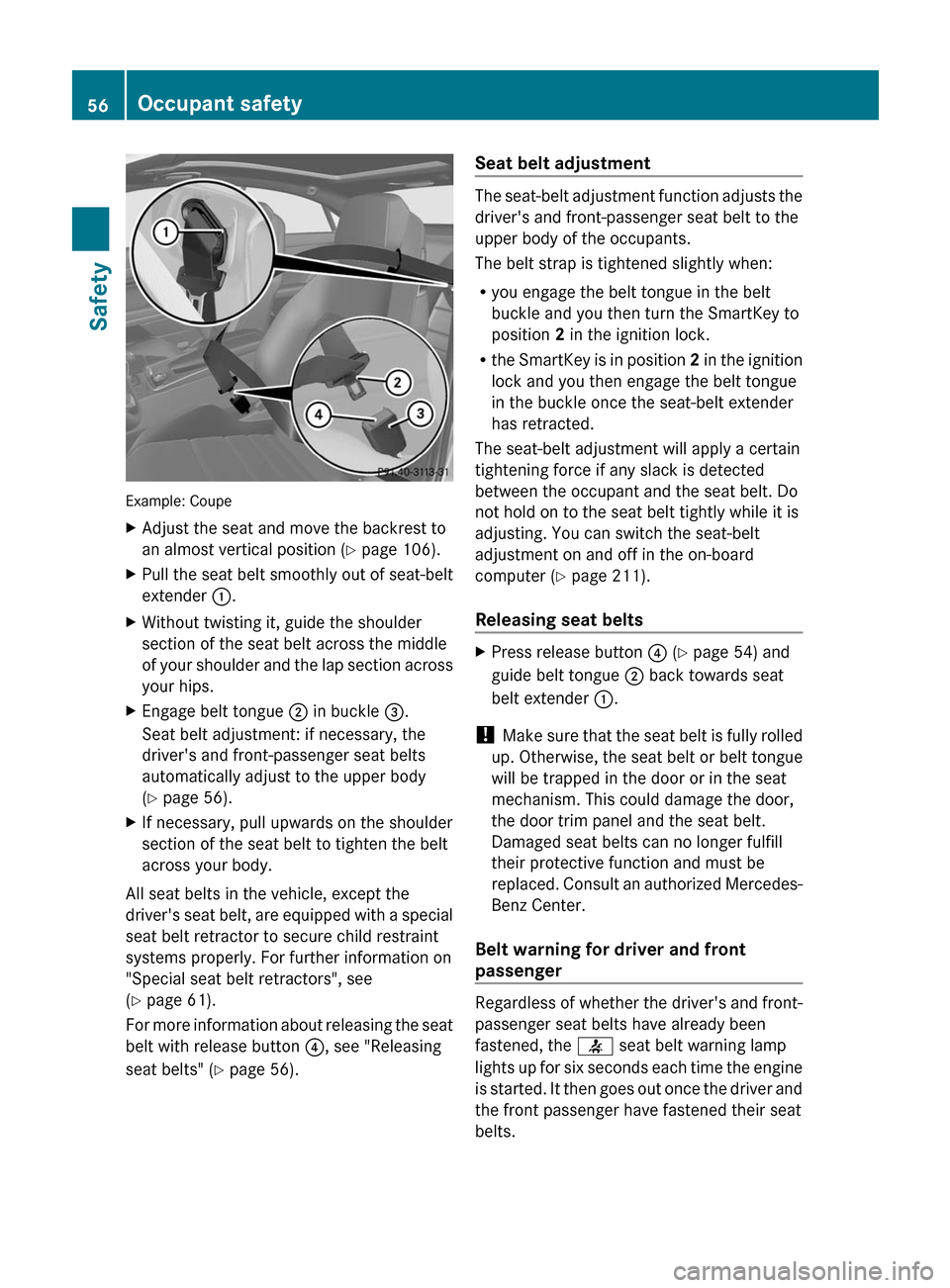
Example: Coupe
XAdjust the seat and move the backrest to
an almost vertical position (Y page 106).
XPull the seat belt smoothly out of seat-belt
extender :.
XWithout twisting it, guide the shoulder
section of the seat belt across the middle
of your shoulder and the lap section across
your hips.
XEngage belt tongue ; in buckle =.
Seat belt adjustment: if necessary, the
driver's and front-passenger seat belts
automatically adjust to the upper body
(Y page 56).
XIf necessary, pull upwards on the shoulder
section of the seat belt to tighten the belt
across your body.
All seat belts in the vehicle, except the
driver's seat belt, are equipped with a special
seat belt retractor to secure child restraint
systems properly. For further information on
"Special seat belt retractors", see
(Y page 61).
For more information about releasing the seat
belt with release button ?, see "Releasing
seat belts" (Y page 56).
Seat belt adjustment
The seat-belt adjustment function adjusts the
driver's and front-passenger seat belt to the
upper body of the occupants.
The belt strap is tightened slightly when:
Ryou engage the belt tongue in the belt
buckle and you then turn the SmartKey to
position 2 in the ignition lock.
Rthe SmartKey is in position 2 in the ignition
lock and you then engage the belt tongue
in the buckle once the seat-belt extender
has retracted.
The seat-belt adjustment will apply a certain
tightening force if any slack is detected
between the occupant and the seat belt. Do
not hold on to the seat belt tightly while it is
adjusting. You can switch the seat-belt
adjustment on and off in the on-board
computer (Y page 211).
Releasing seat belts
XPress release button ? (Y page 54) and
guide belt tongue ; back towards seat
belt extender :.
! Make sure that the seat belt is fully rolled
up. Otherwise, the seat belt or belt tongue
will be trapped in the door or in the seat
mechanism. This could damage the door,
the door trim panel and the seat belt.
Damaged seat belts can no longer fulfill
their protective function and must be
replaced. Consult an authorized Mercedes-
Benz Center.
Belt warning for driver and front
passenger
Regardless of whether the driver's and front-
passenger seat belts have already been
fastened, the 7 seat belt warning lamp
lights up for six seconds each time the engine
is started. It then goes out once the driver and
the front passenger have fastened their seat
belts.
56Occupant safetySafety
BA 207 USA, CA Edition B 2011; 1; 3, en-USd2sboikeVersion: 3.0.3.62010-05-20T10:38:09+02:00 - Seite 56
Page 68 of 344
could cause an accident. Personal or fatal
injury to you or others may be the result.
i This equipment has been approved by the
FCC as a "Vehicular Radar System". The
radar sensor system is intended for use in
an automotive radar system only. Removal,
tampering, or altering of the device will void
any warranties, and is not permitted by the
FCC. Do not tamper with the device in any
way.
Any unauthorized modification to this
device could void the user's authority to
operate the equipment.
BAS PLUS can detect obstacles that are in the
path of your vehicle for an extended period of
time. Should you approach a detected
obstacle quickly, BAS PLUS calculates the
braking force necessary to avoid a rear-end
collision. Should you additionally apply the
brakes, BAS PLUS will automatically increase
the braking force to a level suitable for the
traffic conditions.
If BAS PLUS demands particularly high
braking force, PRE-SAFE ®
is activated
simultaneously.XKeep the brake pedal depressed until the
emergency braking situation is over.
ABS prevents the wheels from locking.
The brakes will work normally again when:
R you release the brake pedal
R no obstacle is detected in front of your
vehicle
R there is no longer any danger of a rear-end
collision
BAS PLUS is then deactivated.
At speeds up to approximately
40 mph (70 km/h), BAS PLUS can also detect
stationary obstacles, for example, stopped or
parked vehicles.
For BAS PLUS to assist you when driving, the
radar sensor system must be switched on and
operational. You can check this by activating
DISTRONIC PLUS ( Y page 174) or via the
"radar sensor" function in the on-board
computer( Y page 211).GWarning!
BAS PLUS will only respond with brake
assistance if it has clearly detected an object.
Detection can be impeded by
R dirty or covered sensors
R snowfall or heavy rain
R disturbance from other radar sources
R strong radar reflection such as in parking
garages
BAS PLUS uses radar signals that are not
reflected well by narrow objects and
absorptive materials. For this reason BAS
PLUS will not react to persons, animals, and
approaching traffic or cross-traffic.
BAS PLUS may not detect narrow vehicles
driving in front of you, such as motorcycles
and vehicles driving offset from your vehicle
center.
Following a collision or accident-related
damage to the front end of the vehicle, have
the configuration and operation of the radar
sensors checked at an authorized Mercedes-
Benz Center.
If BAS PLUS is not available due to a
malfunction in the radar sensor system, the
brake system remains available with full
brake boosting effect and BAS.
ESP ®
(Electronic Stability Program)
Important safety notes
GWarning
Observe "Important safety notes"
( Y page 64).
If ESP ®
detects that the vehicle is deviating
from the direction desired by the driver, one
or more wheels are braked to stabilize the
vehicle. If necessary, the engine output is also
modified to keep the vehicle on the desired
course within physical limits. ESP ®
assists
66Driving safety systemsSafety
BA 207 USA, CA Edition B 2011; 1; 3, en-USd2sboikeVersion: 3.0.3.62010-05-20T10:38:09+02:00 - Seite 66
Page 72 of 344
GWarning
Depending on the vehicle speed, PRE-SAFE®
Brake brakes your vehicle with a maximum of
13 ft/s 2
(4 m/s 2
) before a possible hard stop.
This corresponds to about 40 % of the
maximum deceleration ability of your vehicle.
The driver must apply the brakes additionally
in order to prevent a collision. The self-acting
hard stop will be initiated when the imminent
danger of a collision exists, e.g. when an
evasive maneuver cannot avoid an accident.
In order to maintain the appropriate distance
to the vehicle in front and thus prevent a
collision, you must apply the brakes yourself.
At speeds up to approximately
40 mph (70 km/h), PRE-SAFE ®
Brake can
also detect stationary obstacles, for example
stopped or parked vehicles.
GWarning!
If you do not receive visual or acoustic
warning signals, the PRE-SAFE ®
Brake may
R not have recognized the collision risk
R have been deactivated
R be malfunctioning
Apply the brakes yourself to avoid a collision.
XTo activate: activate PRE-SAFE ®
Brake in
the on-board computer ( Y page 207).
The Ä symbol appears in the lower
multifunction display, as long as the HOLD
function is not activated ( Y page 184).
On vehicles with parking guidance, the P
gear must be engaged for the icon to be
displayed.
For PRE-SAFE ®
Brake to assist you when
driving, the radar sensor system must be
switched on and operational.
PRE-SAFE ®
Brake does not always detect
complex traffic situations properly. You can
terminate the braking action of PRE-SAFE ®
Brake in a non-critical driving situation at any
time if:
R an acoustic and visual warning occurs
R the vehicle brakes
To end this, you can either depress the
accelerator pedal further, activate kickdown
or release the brake pedal.
The braking action of PRE-SAFE ®
Brake is
ended automatically if:
R you maneuver to avoid the obstacle
R you drive slower than approximately
9 mph (15 km/h)
R there is no longer an obstacle detected in
front of your vehicle
R there is no longer any danger of a collision
Following a collision or accident-related
damage to the front end of the vehicle, have
the configuration and operation of the radar
sensors checked. Choose a qualified
specialist workshop for this which has the
necessary specialist knowledge and tools for
the work required. Mercedes-Benz
recommends that you use an authorized
Mercedes-Benz Center for this purpose.
Anti-theft systems
Immobilizer
The immobilizer prevents your vehicle from
being started without the correct key.
When leaving the vehicle, always take the
SmartKey with you and lock the vehicle. The
engine can be started by anyone with a valid
key that is left inside the vehicle.
XTo activate with the SmartKey: remove
the SmartKey from the ignition lock.XTo activate with KEYLESS-GO: switch the
ignition off and open the driver's door.XTo deactivate: switch on the ignition.70Anti-theft systemsSafety
BA 207 USA, CA Edition B 2011; 1; 3, en-USd2sboikeVersion: 3.0.3.62010-05-20T10:38:09+02:00 - Seite 70
Page 77 of 344
deactivated using the on-board computer
( Y page 210).
i Only for USA:
This equipment complies with Part 15 of
the FCC regulations. Operation is subject
to the following conditions:
R this equipment must not emit harmful,
electromagnetic radiation.
R this equipment may be affected by
electromagnetic radiation, including
radiation which can trigger unwanted
functions.
Any unauthorized change to this equipment
can lead to the user's operating license
being withdrawn.
i Only for Canada:
This equipment complies with the RSS-210
regulations of Industry Canada. Operation
is subject to the following conditions:
R this equipment must not emit harmful,
electromagnetic radiation.
R this equipment receives electromagnetic
radiation, including radiation which can
trigger unwanted functions.
Any unauthorized change to this equipment
can lead to the user's operating license
being withdrawn.XTo unlock centrally: press the %
button.
If you do not open a door or the trunk lid within
approximately 40 seconds of unlocking the
vehicle:
R the vehicle is locked again.
R the theft deterrent locking system is
activated again.
XTo lock centrally: press the & button.
KEYLESS-GO
General notes
i Only for USA:
This equipment complies with Part 15 of
the FCC regulations. Operation is subject
to the following conditions:
R this equipment must not emit harmful,
electromagnetic radiation.
R this equipment may be affected by
electromagnetic radiation, including
radiation which can trigger unwanted
functions.
Any unauthorized change to this equipment
can lead to the user's operating license
being withdrawn.
i Only for Canada:
This equipment has been released in
accordance with RSS - 210 of Industry
Canada. Operation is subject to the
following conditions:
R this equipment must not emit harmful,
electromagnetic radiation.
R this equipment receives electromagnetic
radiation, including radiation which can
trigger unwanted functions.
Any unauthorized change to this equipment
can lead to the user's operating license
being withdrawn.
Important information for using
KEYLESS-GO
R You can use the KEYLESS-GO key as a
conventional key.
R You can combine KEYLESS-GO functions
with those of a conventional key (e.g. open
with KEYLESS-GO and close with the
& button).
R Always carry your KEYLESS-GO key on your
person.
R Never keep the KEYLESS-GO key with:
- electronic equipment, such as your
mobile phone or another key
- metal objects, such as coins or metal foil
This may impair the functioning of KEYLESS-
GO.
SmartKey75Opening and closingBA 207 USA, CA Edition B 2011; 1; 3, en-USd2sboikeVersion: 3.0.3.62010-05-20T10:38:09+02:00 - Seite 75Z
Page 84 of 344
iWhen you push either of the two buttons
and an audible warning signal does not
sound, the relevant setting has already
been selected.
You can switch the automatic locking
function on and off using the on-board
computer (Y page 210).
Unlocking the driver's door
(mechanical key)
If the vehicle can no longer be unlocked
centrally with the SmartKey or KEYLESS-GO:
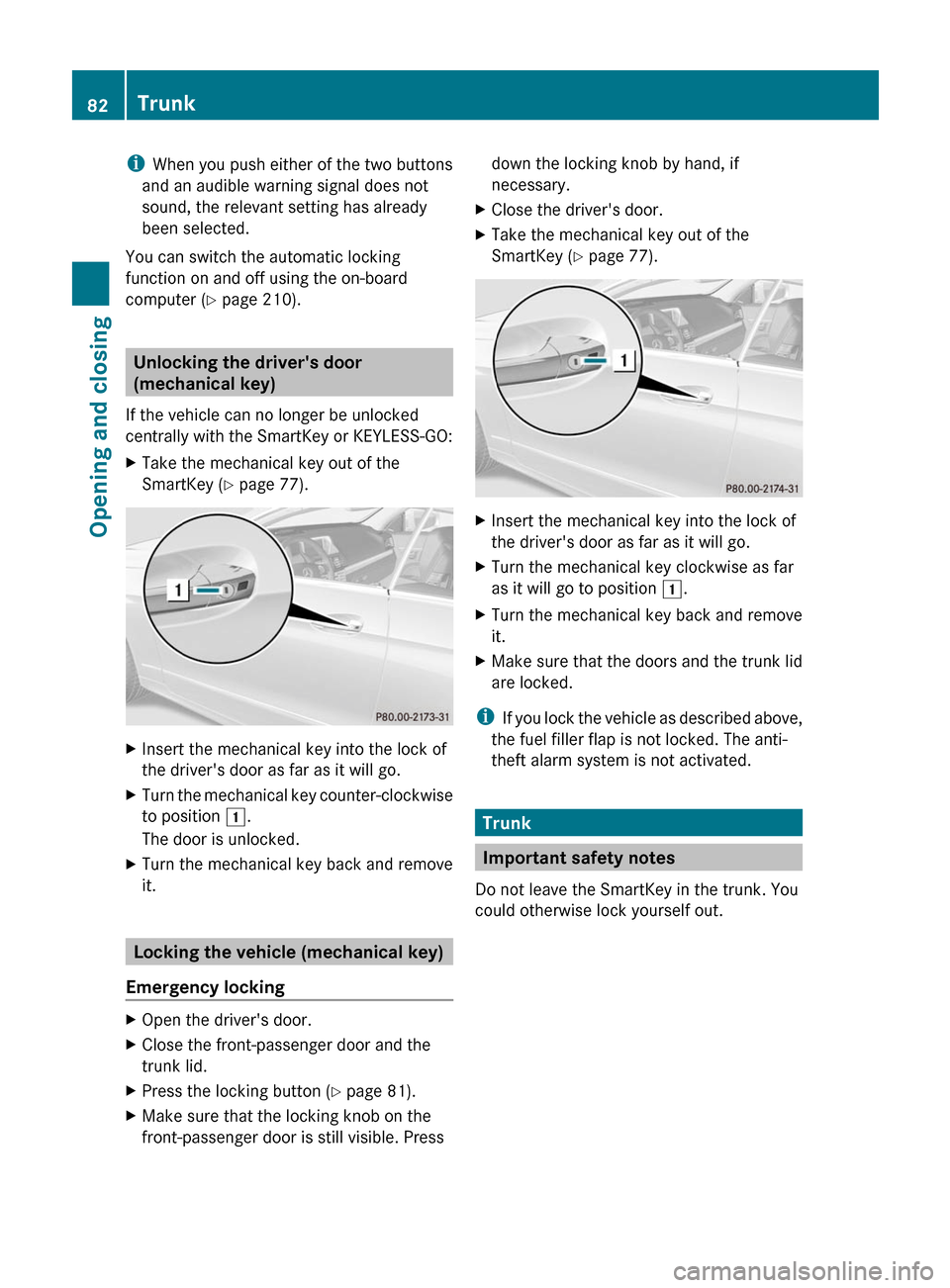
XTake the mechanical key out of the
SmartKey (Y page 77).
XInsert the mechanical key into the lock of
the driver's door as far as it will go.
XTurn the mechanical key counter-clockwise
to position 1.
The door is unlocked.
XTurn the mechanical key back and remove
it.
Locking the vehicle (mechanical key)
Emergency locking
XOpen the driver's door.XClose the front-passenger door and the
trunk lid.
XPress the locking button (Y page 81).XMake sure that the locking knob on the
front-passenger door is still visible. Press
down the locking knob by hand, if
necessary.
XClose the driver's door.XTake the mechanical key out of the
SmartKey (Y page 77).
XInsert the mechanical key into the lock of
the driver's door as far as it will go.
XTurn the mechanical key clockwise as far
as it will go to position 1.
XTurn the mechanical key back and remove
it.
XMake sure that the doors and the trunk lid
are locked.
iIf you lock the vehicle as described above,
the fuel filler flap is not locked. The anti-
theft alarm system is not activated.
Trunk
Important safety notes
Do not leave the SmartKey in the trunk. You
could otherwise lock yourself out.
82TrunkOpening and closing
BA 207 USA, CA Edition B 2011; 1; 3, en-USd2sboikeVersion: 3.0.3.62010-05-20T10:38:09+02:00 - Seite 82