phone MERCEDES-BENZ E-Class COUPE 2011 C207 Owner's Manual
[x] Cancel search | Manufacturer: MERCEDES-BENZ, Model Year: 2011, Model line: E-Class COUPE, Model: MERCEDES-BENZ E-Class COUPE 2011 C207Pages: 344, PDF Size: 14.06 MB
Page 13 of 344
Memory card (on-board computer) . 205
Memory function ............................... 116
Menu (on-board computer) Assistance ..................................... 206
Audio ............................................. 204
DISTRONIC PLUS ........................... 180
DVD ............................................... 205
Navigation ..................................... 203
Overview of menus ........................201
Service ........................................... 208
Settings ......................................... 208
Telephone ...................................... 205
Trip ................................................ 202
Message memory (on-board
computer) .......................................... 213
Messages see Display messages
Mirrors
Sun visor ........................................ 256
see Exterior mirrors or Rear-view mirror
MP3
Operating (on-board computer) .....205
see separate operating instructions
Multicontour seat .............................. 110
Multifunction display ........................ 200
Multifunction steering wheel Operating the on-board computer . 199
Overview .......................................... 28
N
Navigation On-board computer .......................203
see separate operating instructions
Neck level heating
see AIRSCARF
NECK-PRO head restraints
Operation ......................................... 51
Resetting after being triggered ........52
Notes on breaking-in a new
vehicle ................................................ 150
O
Occupant Classification System
(OCS) Faults ............................................... 46
Operation ......................................... 42
System self-test ............................... 45
Occupant safety
Children in the vehicle .....................58
System overview .............................. 34
Octane number (fuel) ........................ 336
Odometer ........................................... 202
Oil see Engine oil
On-board computer
Assistance menu ........................... 206
Audio menu ................................... 204
Convenience submenu ..................211
Display messages ..........................213
Factory settings ............................. 212
Important safety notes ..................198
Instrument cluster submenu ..........208
Lighting submenu .......................... 209
Message memory .......................... 213
Navigation menu ............................ 203
Operating video DVD .....................205
Operation ....................................... 199
Overview of menus ........................201
Service menu ................................. 208
Settings menu ............................... 208
Standard display submenu ............202
Telephone menu ............................ 205
Trip menu ...................................... 202
Vehicle submenu ........................... 210
Operating system
see On-board computer
Outside temperature
Display ........................................... 199
Overhead control panel
Overview .......................................... 31
Override feature
Rear side windows ...........................63
P
Paint code number ............................ 333
Paintwork (cleaning instructions) ... 279
Panic alarm .......................................... 63
Index11BA 207 USA, CA Edition B 2011; 1; 3, en-USd2sboikeVersion: 3.0.3.62010-05-20T10:38:09+02:00 - Seite 11
Page 17 of 344
Stowage wellTrunk floor (under) .........................254
Submenu (on-board computer)
Convenience .................................. 211
Factory setting ............................... 212
Instrument cluster .........................208
Lights ............................................. 209
Standard display ............................ 202
Vehicle ........................................... 210
Summer opening
see Convenience opening feature
Sun visor ............................................ 256
Supplemental Restraint System see SRS
Surround lighting (on-board
computer) .......................................... 209
Switching off the alarm (ATA) ............ 71
T
Tachometer ........................................ 199
Tail lamps (Display message) ........... 224
Tank content Fuel gauge ....................................... 26
Technical data ................................... 332
E 350 ............................................. 339
E 550 ............................................. 340
Tires/wheels ................................. 327
TELEAID
Call priority .................................... 263
Display message ............................ 214
Downloading destinations
(COMAND) ..................................... 263
Emergency call .............................. 260
Important safety notes ..................259
Locating a stolen vehicle ...............264
MB info call button ........................262
Remote vehicle locking ..................264
Roadside Assistance button ..........262
Self-test ......................................... 260
System .......................................... 260
Vehicle remote unlocking ..............264
Telephone
Accepting a call ............................. 206
Display message ............................ 237
Menu (on-board computer) ............205
Number from the phone book ........ 206
Redialing ........................................ 206
Rejecting/ending a call .................206
Telephone compartment .................. 251
Temperature Coolant .......................................... 198
Outside temperature ...................... 199
Setting ........................................... 141
Theft deterrent locking system
Immobilizer ...................................... 70
Through-loading ................................ 252
Through-loading feature ................... 252
Tiredness assistant see ATTENTION ASSIST
Tire pressure
Calling up (on-board computer) .....311
Checking manually ........................309
Display message ............................ 233
Maximum ....................................... 313
Notes ............................................. 307
Pressure loss warning ....................309
Recommended ............................... 306
Tire pressure monitoring system
Function/notes ............................. 311
Restarting ...................................... 313
Warning lamp ................................. 247
Tires
Aspect ratio (definition) .................326
Average weight of the vehicle
occupants (definition) ....................324
Bar (definition) ............................... 324
Characteristics .............................. 324
Checking ........................................ 305
Cleaning ......................................... 306
Definition of terms .........................324
Direction of rotation ......................318
Distribution of the vehicle
occupants (definition) ....................326
DOT, Tire Identification Number
(TIN) ............................................... 323
DOT (Department of
Transportation) (definition) ............324
Flat tire .......................................... 288
GAWR (Gross Axle Weight Rating)
(definition) ..................................... 325
Guidelines to be observed .............305
GVW (Gross Vehicle Weight)
(definition) ..................................... 325Index15BA 207 USA, CA Edition B 2011; 1; 3, en-USd2sboikeVersion: 3.0.3.62010-05-20T10:38:09+02:00 - Seite 15
Page 33 of 344
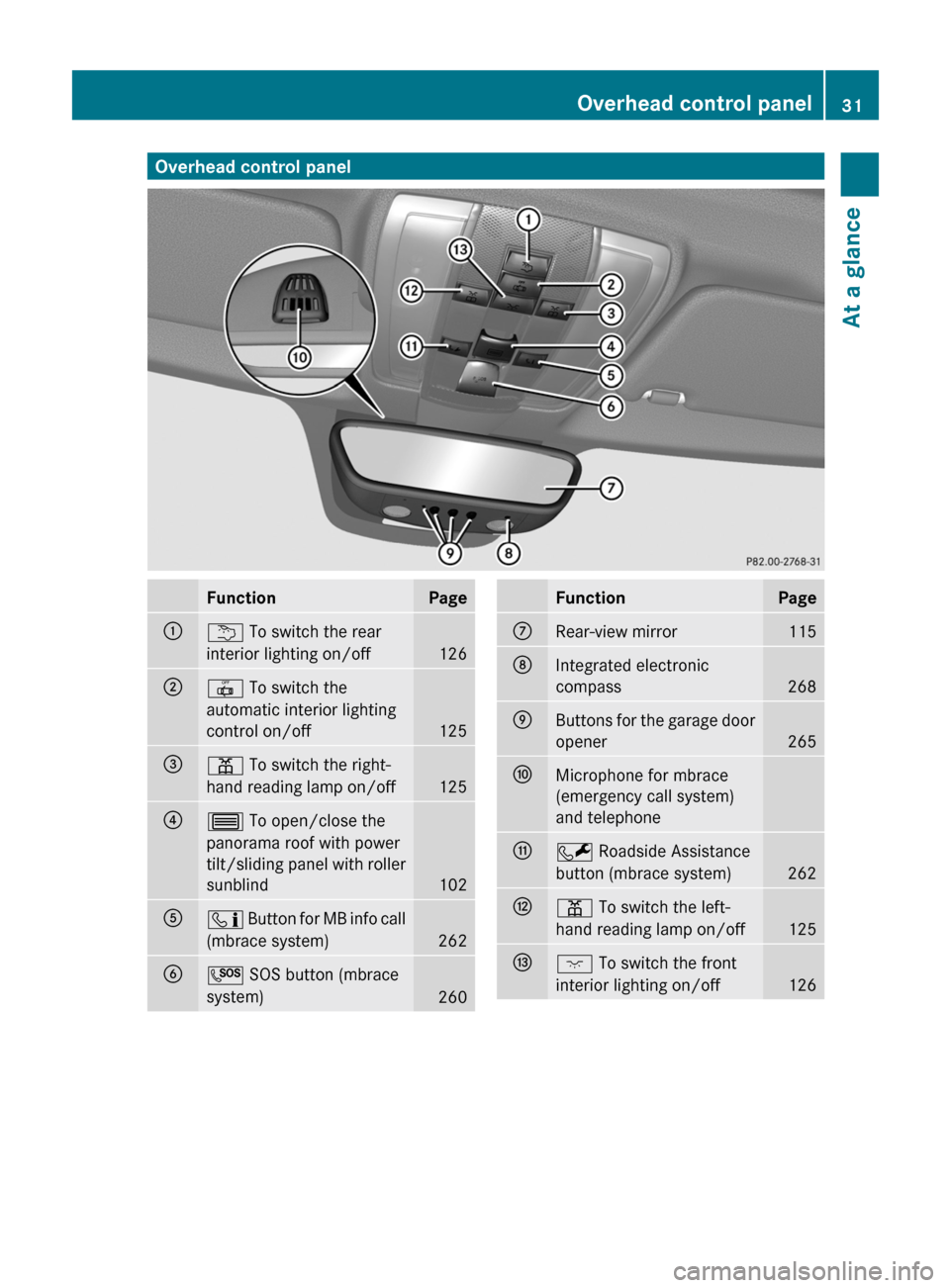
Overhead control panelFunctionPage:u To switch the rear
interior lighting on/off
126
;| To switch the
automatic interior lighting
control on/off
125
=p To switch the right-
hand reading lamp on/off
125
?3 To open/close the
panorama roof with power
tilt/sliding panel with roller
sunblind
102
Aï Button for MB info call
(mbrace system)
262
BG SOS button (mbrace
system)
260
FunctionPageCRear-view mirror115DIntegrated electronic
compass
268
EButtons for the garage door
opener
265
FMicrophone for mbrace
(emergency call system)
and telephoneGF Roadside Assistance
button (mbrace system)
262
Hp To switch the left-
hand reading lamp on/off
125
Ic To switch the front
interior lighting on/off
126
Overhead control panel31At a glanceBA 207 USA, CA Edition B 2011; 1; 3, en-USd2sboikeVersion: 3.0.3.62010-05-20T10:38:09+02:00 - Seite 31
Page 51 of 344
System self-test
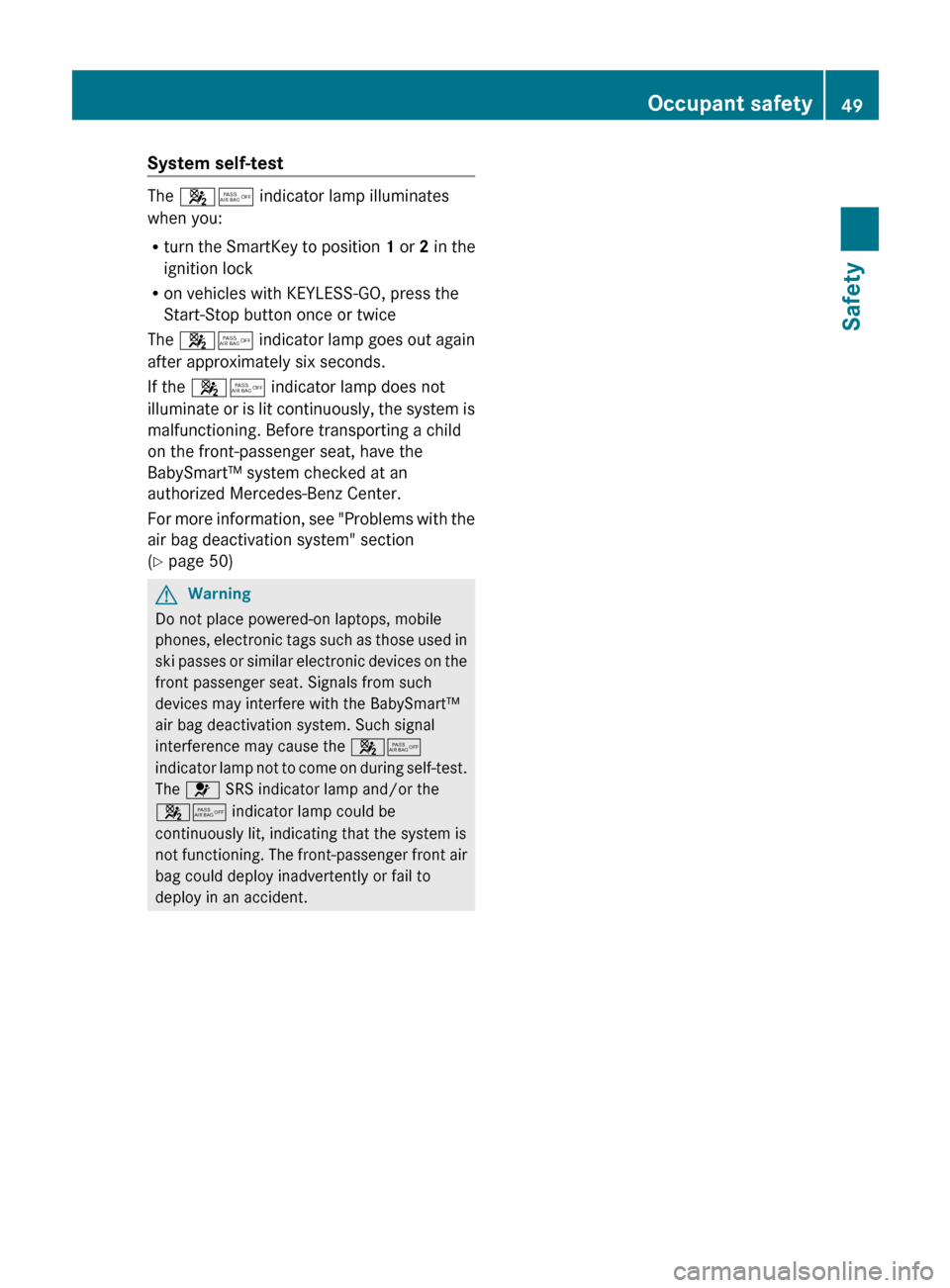
The 45 indicator lamp illuminates
when you:
R turn the SmartKey to position 1 or 2 in the
ignition lock
R on vehicles with KEYLESS-GO, press the
Start-Stop button once or twice
The 45 indicator lamp goes out again
after approximately six seconds.
If the 45 indicator lamp does not
illuminate or is lit continuously, the system is
malfunctioning. Before transporting a child
on the front-passenger seat, have the
BabySmart™ system checked at an
authorized Mercedes-Benz Center.
For more information, see "Problems with the
air bag deactivation system" section
( Y page 50)
GWarning
Do not place powered-on laptops, mobile
phones, electronic tags such as those used in
ski passes or similar electronic devices on the
front passenger seat. Signals from such
devices may interfere with the BabySmart™
air bag deactivation system. Such signal
interference may cause the 45
indicator lamp not to come on during self-test.
The 6 SRS indicator lamp and/or the
45 indicator lamp could be
continuously lit, indicating that the system is
not functioning. The front-passenger front air
bag could deploy inadvertently or fail to
deploy in an accident.
Occupant safety49SafetyBA 207 USA, CA Edition B 2011; 1; 3, en-USd2sboikeVersion: 3.0.3.62010-05-20T10:38:09+02:00 - Seite 49Z
Page 73 of 344
iThe immobilizer is always deactivated
when you start the engine.
In the event that the engine cannot be
started when the starter battery is fully
charged, the immobilizer may be faulty.
Contact an authorized Mercedes-Benz
Center or call 1-800-FOR-MERCedes (in
USA) or 1-800-387-0100 (in Canada).
ATA (Anti-Theft Alarm system)
A visual and audible alarm is triggered if the
alarm system is armed and you open:
Ra door
Rthe vehicle with the mechanical key
Rthe trunk lid
Rthe hood
The alarm is not switched off, even if you
close the open door that has triggered it, for
example.
iIf the alarm stays on for more than 30
seconds, the emergency call system
mbrace (USA only) or TELEAID (Canada
only) initiates a call to the Customer
Assistance Center automatically. The
emergency call system initiates the call
provided that:
Ryou have subscribed to the mbrace/
TELEAID service.
Rthe mbrace/TELEAID service has been
activated properly.
Rthe required mobile phone, power supply
and GPS are available.
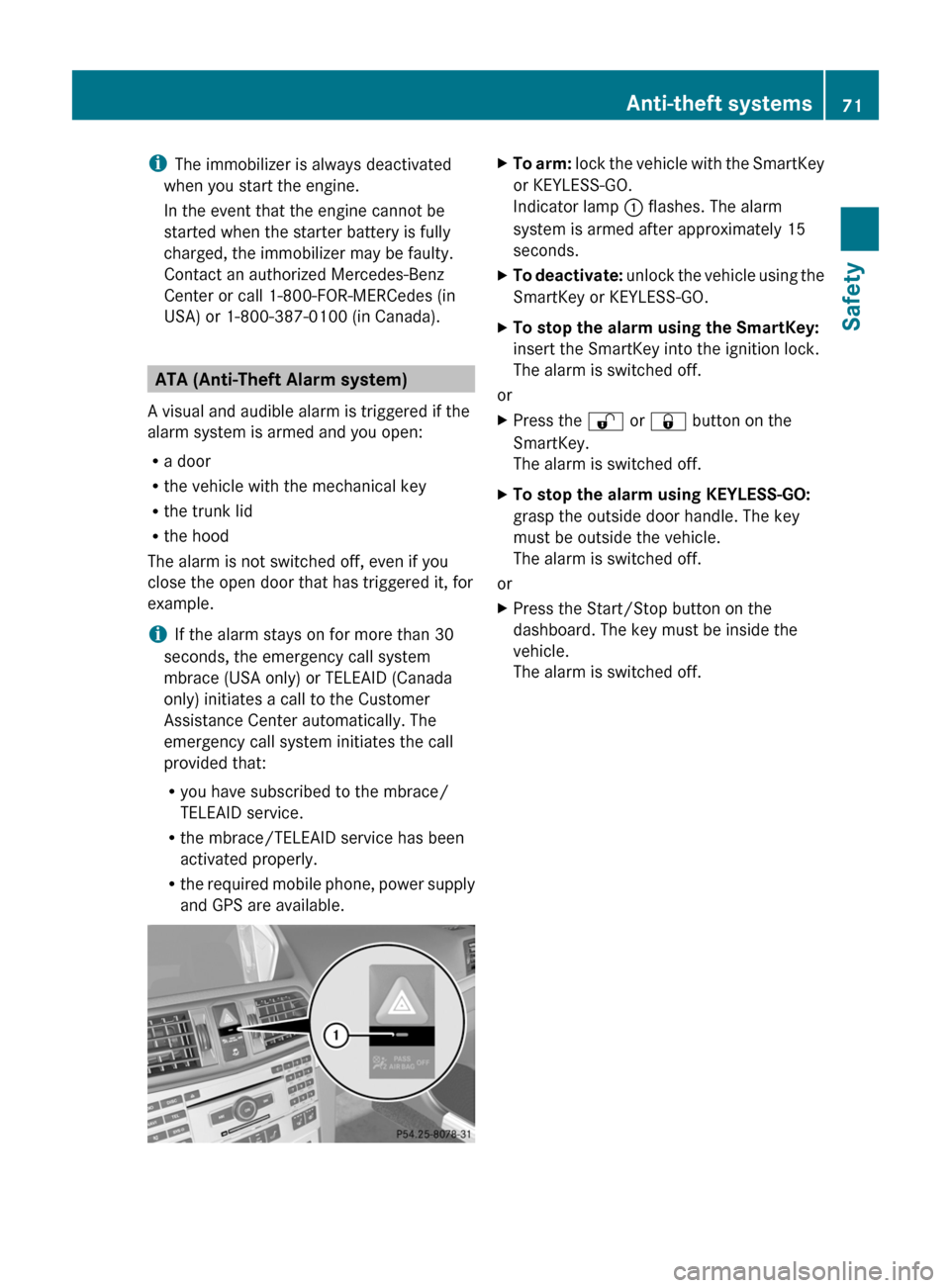
XTo arm: lock the vehicle with the SmartKey
or KEYLESS-GO.
Indicator lamp : flashes. The alarm
system is armed after approximately 15
seconds.
XTo deactivate: unlock the vehicle using the
SmartKey or KEYLESS-GO.
XTo stop the alarm using the SmartKey:
insert the SmartKey into the ignition lock.
The alarm is switched off.
or
XPress the % or & button on the
SmartKey.
The alarm is switched off.
XTo stop the alarm using KEYLESS-GO:
grasp the outside door handle. The key
must be outside the vehicle.
The alarm is switched off.
or
XPress the Start/Stop button on the
dashboard. The key must be inside the
vehicle.
The alarm is switched off.
Anti-theft systems71SafetyBA 207 USA, CA Edition B 2011; 1; 3, en-USd2sboikeVersion: 3.0.3.62010-05-20T10:38:09+02:00 - Seite 71Z
Page 77 of 344
deactivated using the on-board computer
( Y page 210).
i Only for USA:
This equipment complies with Part 15 of
the FCC regulations. Operation is subject
to the following conditions:
R this equipment must not emit harmful,
electromagnetic radiation.
R this equipment may be affected by
electromagnetic radiation, including
radiation which can trigger unwanted
functions.
Any unauthorized change to this equipment
can lead to the user's operating license
being withdrawn.
i Only for Canada:
This equipment complies with the RSS-210
regulations of Industry Canada. Operation
is subject to the following conditions:
R this equipment must not emit harmful,
electromagnetic radiation.
R this equipment receives electromagnetic
radiation, including radiation which can
trigger unwanted functions.
Any unauthorized change to this equipment
can lead to the user's operating license
being withdrawn.XTo unlock centrally: press the %
button.
If you do not open a door or the trunk lid within
approximately 40 seconds of unlocking the
vehicle:
R the vehicle is locked again.
R the theft deterrent locking system is
activated again.
XTo lock centrally: press the & button.
KEYLESS-GO
General notes
i Only for USA:
This equipment complies with Part 15 of
the FCC regulations. Operation is subject
to the following conditions:
R this equipment must not emit harmful,
electromagnetic radiation.
R this equipment may be affected by
electromagnetic radiation, including
radiation which can trigger unwanted
functions.
Any unauthorized change to this equipment
can lead to the user's operating license
being withdrawn.
i Only for Canada:
This equipment has been released in
accordance with RSS - 210 of Industry
Canada. Operation is subject to the
following conditions:
R this equipment must not emit harmful,
electromagnetic radiation.
R this equipment receives electromagnetic
radiation, including radiation which can
trigger unwanted functions.
Any unauthorized change to this equipment
can lead to the user's operating license
being withdrawn.
Important information for using
KEYLESS-GO
R You can use the KEYLESS-GO key as a
conventional key.
R You can combine KEYLESS-GO functions
with those of a conventional key (e.g. open
with KEYLESS-GO and close with the
& button).
R Always carry your KEYLESS-GO key on your
person.
R Never keep the KEYLESS-GO key with:
- electronic equipment, such as your
mobile phone or another key
- metal objects, such as coins or metal foil
This may impair the functioning of KEYLESS-
GO.
SmartKey75Opening and closingBA 207 USA, CA Edition B 2011; 1; 3, en-USd2sboikeVersion: 3.0.3.62010-05-20T10:38:09+02:00 - Seite 75Z
Page 169 of 344
Driving tips
General driving tips
Important safety notes
GWarning
Please do not forget that your primary
responsibility is to drive the vehicle. A driver's
attention to the road must always be his/her
primary focus when driving. For your safety
and the safety of others, we recommend that
you pull over to a safe location and stop
before placing or taking a telephone call.
If you use the telephone 15
while driving,
please use the hands-free device and only use
the telephone when road, weather and traffic
conditions permit. Some jurisdictions prohibit
the driver from using a mobile telephone while
driving a vehicle.
Only operate the audio system or
COMAND 15
(Cockpit Management and Data
System) if road, weather and traffic
conditions permit. Otherwise, you may not be
able to observe traffic conditions and could
endanger yourself and others.
Bear in mind that at a speed of just 30 mph
(approximately 50 km/h), your vehicle is
covering a distance of 44 feet (approximately
14 m) every second.
Drive sensibly – save fuel
To save fuel, observe the following notes:
XKeep tires at the recommended inflation
pressures.XRemove unnecessary cargo.XRemove the roof rack when not in use.XMaintain a low engine speed until the
engine is warm.XAvoid frequent acceleration and
deceleration.XHave all maintenance work performed at
the service intervals specified in theService Booklet or indicated by the service
interval indicator.
Fuel consumption is also increased by driving
in cold weather, in stop-and-go traffic, on
short trips and in mountainous areas.
Drinking and driving
GWarning
Drinking and driving and/or taking drugs and
driving are very dangerous combinations.
Even a small amount of alcohol or drugs can
affect your reflexes, perceptions and
judgment.
The possibility of a serious or even fatal
accident are greatly increased when you drink
or take drugs and drive.
Do not drink or take drugs and drive or allow
anyone to drive who has been drinking or
taking drugs.
Pedals
GWarning
Make sure absolutely no objects are
obstructing the pedals' range of movement.
Keep the driver's footwell clear of all
obstacles. If there are any floormats or
carpets in the footwell, make sure that the
pedals still have sufficient clearance.
During sudden driving or braking maneuvers,
the objects could get caught between the
pedals. You could then no longer brake or
accelerate. This could lead to accidents and
injury.
Coasting with the engine switched off
GWarning!
There is no power assistance for the steering
and the brake when the engine is not running.
Steering and braking requires significantly
more effort and you could lose control of the
vehicle and cause an accident as a result.
15 Observe all legal requirements.Driving tips167Driving and parkingBA 207 USA, CA Edition B 2011; 1; 3, en-USd2sboikeVersion: 3.0.3.62010-05-20T10:38:09+02:00 - Seite 167Z
Page 173 of 344
ROnly use snow chains when driving on an
area completely covered by snow. Do not
exceed the maximum permissible speed of
30 mph (50 km/h). Remove the snow
chains as soon as possible when you are no
longer driving on snow-covered roads.
R Local regulations may restrict the use of
snow chains. Applicable regulations must
be observed if you wish to mount snow
chains.
R Snow chains must not be mounted on
emergency spare wheels.
If you intend to mount snow chains, please
bear the following points in mind:
R you may not attach snow chains to all
wheel-tire combinations; see the "Tires and
wheels" section in the "Technical data"
chapter.
R mount snow chains only in pairs and only
on the rear wheels. Observe the
manufacturer's installation instructions.
! If snow chains are mounted on the front
wheels, the snow chains could grind
against the bodywork or components of the
chassis. This could result in damage to the
vehicle or the tires.
! Vehicles with steel wheels
If you wish to mount snow chains to steel
wheels, make sure that you remove the
respective wheels' hubcaps first. The
hubcaps may otherwise be damaged.
i You may wish to deactivate
ESP ®
(Y page 66) when pulling away with
snow chains installed. This way you can
allow the wheels to spin in a controlled
manner, achieving an increased driving
force (cutting action).
Slippery road surfacesGWarning
If the vehicle becomes stuck in snow, make
sure snow is kept clear of the exhaust pipe
and from around the vehicle with the engine
running. Otherwise, deadly carbon monoxide
(CO) gases may enter vehicle interior
resulting in unconsciousness and death.
To assure sufficient fresh air ventilation, open
a window slightly on the side of the vehicle
not facing the wind.GWarning!
The outside temperature indicator is not
designed to serve as an ice-warning device
and is therefore unsuitable for that purpose.
Indicated temperatures just above the
freezing point do not guarantee that the road
surface is free of ice. The road may still be icy,
especially in wooded areas or on bridges.
GWarning
On slippery road surfaces, never downshift in
order to obtain braking action. This could
result in drive wheel slip and reduced vehicle
control. Your vehicle's ABS will not prevent
this type of loss of control.
You should drive particularly carefully on
slippery road surfaces. Avoid sudden
acceleration, steering and braking
maneuvers. Do not use cruise control or
DISTRONIC PLUS.
If the vehicle threatens to skid or cannot be
stopped when moving at low speed:
XShift the transmission to position N.
i
For more information on driving with
snow chains, see ( Y page 170).
GWarning
Make sure that you do not endanger other
road users when you apply the brakes.
Driving abroad
An extensive Mercedes-Benz Service network
is also available in other countries. The
Service Hotline's current telephone numbers
for use when you are abroad are to be found
in the "Service24h" section of the Service
Booklet.
Driving tips171Driving and parkingBA 207 USA, CA Edition B 2011; 1; 3, en-USd2sboikeVersion: 3.0.3.62010-05-20T10:38:09+02:00 - Seite 171Z
Page 196 of 344
between 50 mph (80 km/h) and 112 mph
(180 km/h).
If ATTENTION ASSIST detects fatigue or
increasing lapses in concentration on the part
of the driver, it suggests taking a break.GWarning!
The ATTENTION ASSIST is only an aid to the
driver. It might not recognize fatigue or
increasing inattentiveness in time or fail to
recognize them at all. The system cannot
substitute a rested and attentive driver.
Fatigue can cause you to recognize dangers
too late, to misjudge potential dangers, or to
react slower. Therefore, make sure to be
rested before and during your trip. Take rests
early enough and regularly, especially during
long trips. Failure to do so could cause you to
recognize dangers too late which could result
in an accident and serious injury to you and/
or others.
ATTENTION ASSIST assesses your level of
fatigue or lapses in concentration by taking
the following criteria into account:
R your personal driving style, e.g. steering
characteristics
R journey details, e.g. time of day and length
of journey
The functionality of ATTENTION ASSIST is
restricted and warnings may be delayed or
not occur at all:
R if the road condition is poor, e.g. if the
surface is uneven or if there are potholes
R if there is a strong side wind
R if you have adopted a sporty driving style
with high cornering speeds or high rates of
acceleration
R if you predominantly drive at speeds under
50 mph (80 km/h) or over 112 mph
(180 km/h)
R if you are currently using COMAND or
making a telephone call with it
R if the time has been set incorrectly
R in active driving situations, such as when
you change lanes or change your speed
Warning and display messages in the
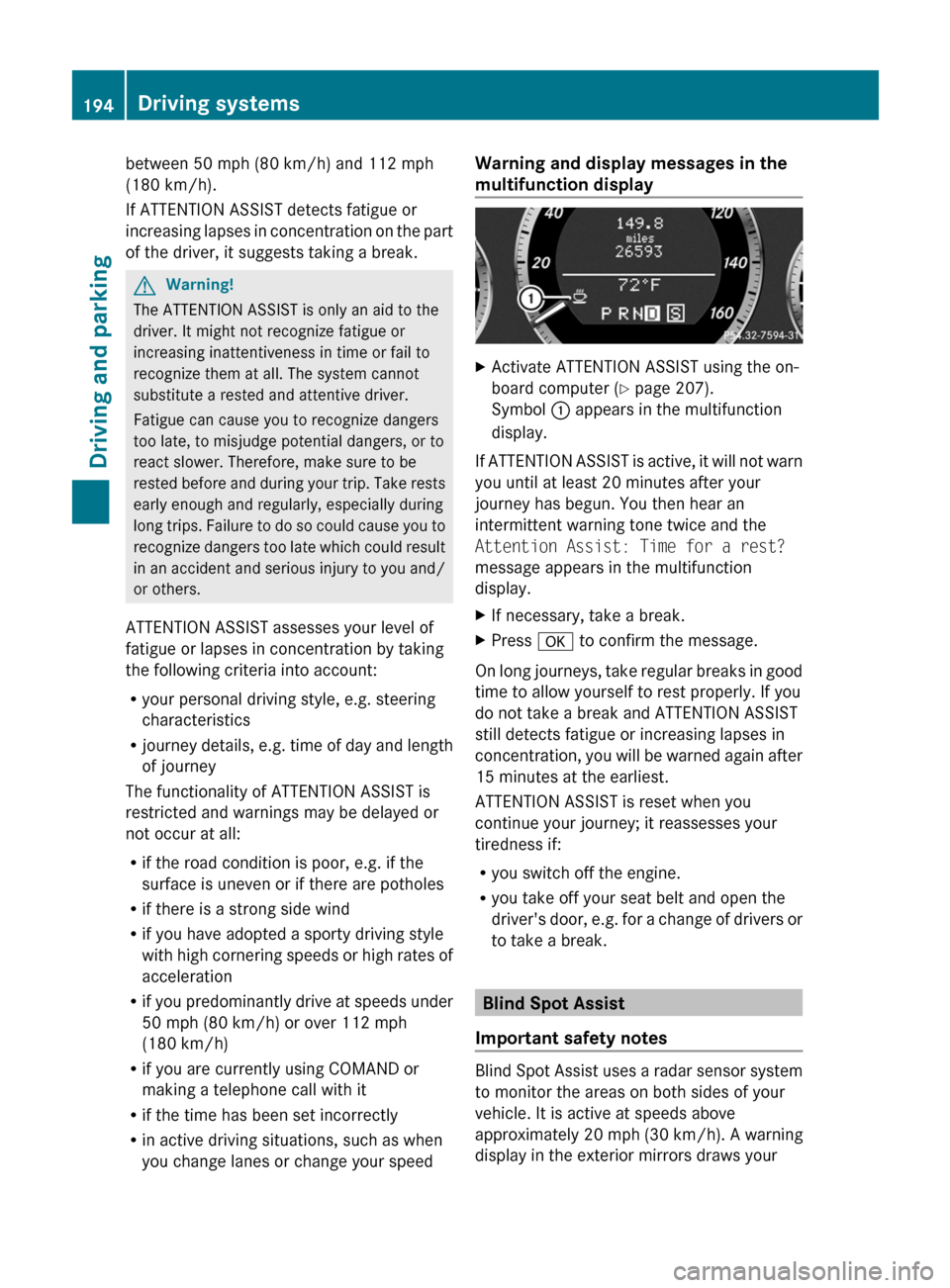
multifunction displayXActivate ATTENTION ASSIST using the on-
board computer ( Y page 207).
Symbol : appears in the multifunction
display.
If ATTENTION ASSIST is active, it will not warn
you until at least 20 minutes after your
journey has begun. You then hear an
intermittent warning tone twice and the
Attention Assist: Time for a rest?
message appears in the multifunction
display.
XIf necessary, take a break.XPress a to confirm the message.
On long journeys, take regular breaks in good
time to allow yourself to rest properly. If you
do not take a break and ATTENTION ASSIST
still detects fatigue or increasing lapses in
concentration, you will be warned again after
15 minutes at the earliest.
ATTENTION ASSIST is reset when you
continue your journey; it reassesses your
tiredness if:
R you switch off the engine.
R you take off your seat belt and open the
driver's door, e.g. for a change of drivers or
to take a break.
Blind Spot Assist
Important safety notes
Blind Spot Assist uses a radar sensor system
to monitor the areas on both sides of your
vehicle. It is active at speeds above
approximately 20 mph (30 km/h). A warning
display in the exterior mirrors draws your
194Driving systemsDriving and parking
BA 207 USA, CA Edition B 2011; 1; 3, en-USd2sboikeVersion: 3.0.3.62010-05-20T10:38:09+02:00 - Seite 194
Page 202 of 344
A=;
Calls up the menu and menu bar9: Press briefly:
Selects the submenu or scrolls
through lists
In the Audio menu: selects a stored
station, an audio track or a video
scene
In the Tel (telephone) menu:
switches to the phone book and
selects a name or telephone number9: Press and hold:
In the Audio menu: selects the
previous/next station or selects an
audio track or a video scene using
rapid scrolling
In the Tel (telephone) menu: starts
rapid scrolling through the phone
booka
Confirms selections and hides
display messages
In the Tel (telephone) menu:
switches to the phone book and
starts dialing
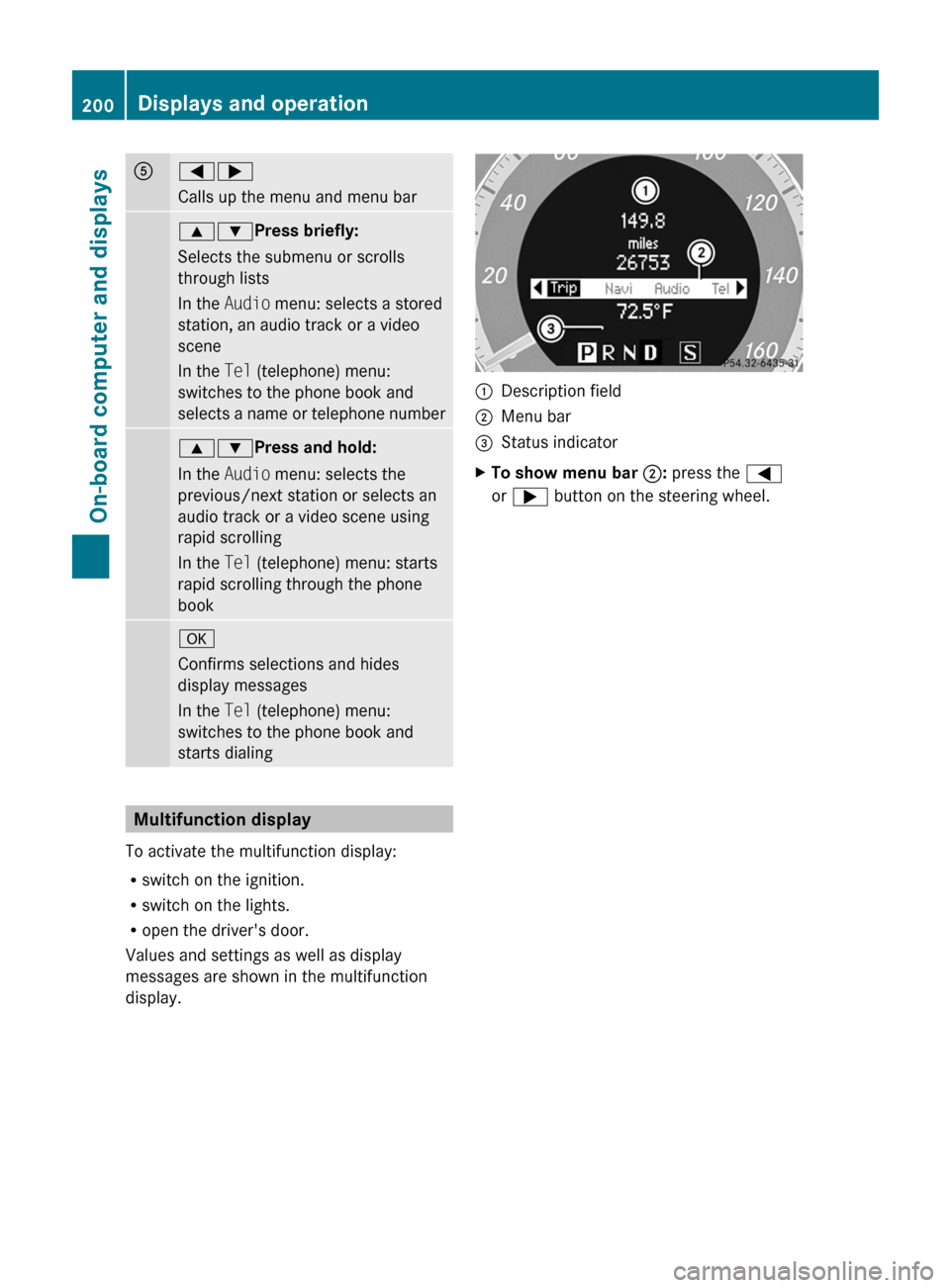
Multifunction display
To activate the multifunction display:
R switch on the ignition.
R switch on the lights.
R open the driver's door.
Values and settings as well as display
messages are shown in the multifunction
display.
:Description field;Menu bar=Status indicatorXTo show menu bar ;: press the =
or ; button on the steering wheel.200Displays and operationOn-board computer and displays
BA 207 USA, CA Edition B 2011; 1; 3, en-USd2sboikeVersion: 3.0.3.62010-05-20T10:38:09+02:00 - Seite 200