change time MERCEDES-BENZ E-CLASS COUPE 2011 User Guide
[x] Cancel search | Manufacturer: MERCEDES-BENZ, Model Year: 2011, Model line: E-CLASS COUPE, Model: MERCEDES-BENZ E-CLASS COUPE 2011Pages: 353, PDF Size: 8.42 MB
Page 160 of 353
X
Press program selector button :repeat-
edly until the letter for the desired gearshift
program appears in the multifunction dis-
play.
i The automatic transmission switches to
automatic drive program Eeach time the
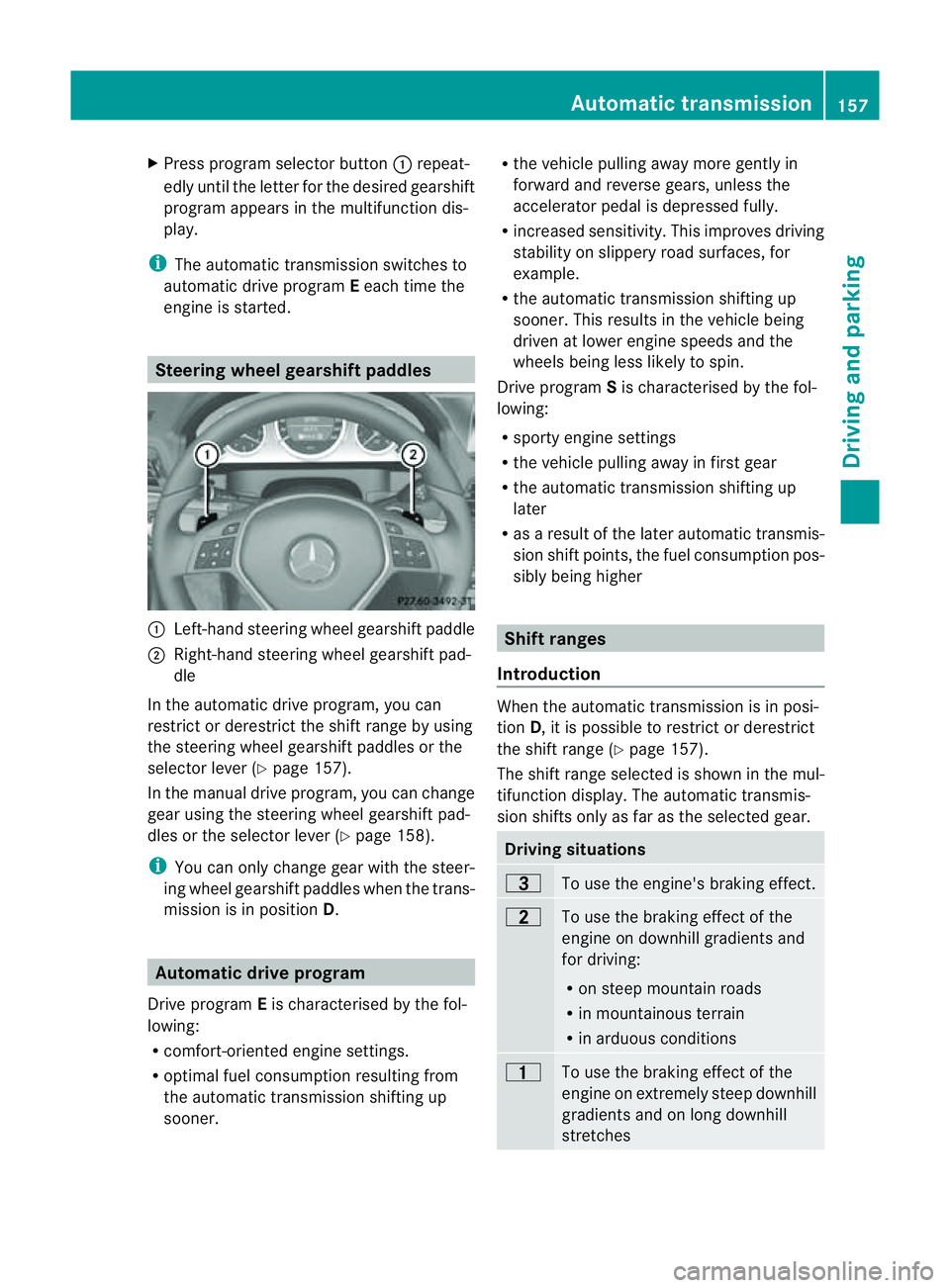
engine is started. Steering wheel gearshift paddles
:
Left-hand steerin gwheel gearshift paddle
; Right-hand steerin gwheel gearshift pad-
dle
In the automatic drive program, you can
restrict or derestrict the shift range by using
the steerin gwheel gearshift paddles or the
selector lever (Y page 157).
In the manual drive program, you can change
gear using the steerin gwheel gearshift pad-
dles or the selector lever (Y page 158).
i You can only change gear with the steer-
ing wheel gearshift paddles when the trans-
mission is in position D.Automatic drive program
Drive program Eis characterised by the fol-
lowing:
R comfort-oriented engine settings.
R optimal fuel consumption resulting from
the automatic transmission shiftin gup
sooner. R
the vehicle pulling away more gently in
forward and reverse gears, unless the
accelerator pedal is depressed fully.
R increased sensitivity. This improves driving
stability on slippery road surfaces, for
example.
R the automatic transmission shiftin gup
sooner. This results in the vehicle being
driven at lower engine speeds and the
wheels being less likely to spin.
Drive program Sis characterised by the fol-
lowing:
R sporty engine settings
R the vehicle pulling away in first gear
R the automatic transmission shiftin gup
later
R as aresult of the later automatic transmis-
sion shift points, the fuel consumption pos-
sibly being higher Shift ranges
Introduction When the automatic transmission is in posi-
tion
D,itisp ossible to restrict or derestrict
the shift range (Y page 157).
The shift range selected is shown in the mul-
tifunction display. The automatic transmis-
sion shifts only as far as the selected gear. Driving situations
=
To use the engine's braking effect.
5
To use the braking effect of the
engine on downhill gradients and
for driving:
R
on steep mountain roads
R in mountainous terrain
R in arduous conditions 4
To use the braking effect of the
engine on extremely steep downhill
gradients and on long downhill
stretches Automatic transmission
157Driving and parking Z
Page 165 of 353
Diesel (EN 590)
Fuel grade !
Whe nrefuelling, only use diesel fuel that
conforms to the European standard EN 590
or is of equivalent quality. You can other-
wise impair engin eoutput or damage the
engine.
! Vehicles with diesel particle filters: in
countries outside the EU, only use low sul-
phur Euro diesel with asulphur contentof
under 50 ppm .Otherwise, the emission
control syste mcould be damaged.
! Vehicles without adiesel particle fil-
ter: in countries where only diesel fuels
with ahigher sulphur conten tare available,
the vehicle's oil change interval sare
shorter. More information about intervals
for changing the oil can be obtained from
any Mercedes-Benz Service Centre.
! Only use fuel that complies with the EN
590 European standard .Fuel that does not
comply wit hEN590can lead to increased
wear, engin edamag eand damag etothe
exhaust system.
Do not use the following:
R marine diesel
R heating oil
R bio-diesel
R vegetable oil
R petrol
R paraffin
R kerosene
Do not mix these fuels with diesel fuels and
do not use any special additives. Other-
wise, this can lead to damage to the engine.
This excludes flow improver; see "Low out-
side temperatures".
! Use afilter when adding fuel from afuel
can. Otherwise, the fuel lines and/or the
diesel injection system could be blocked by
particles from the fuel can. For further information on "Fuel", see
(Y
page 334).
Low outside temperatures Diesel fuel with improved cold flow qualities
is available during the winter months. In
Europe, various climate-dependent low-tem-
perature classes are defined in EN 590. Refu-
elling with diesel fuel which complies with the
climatic specification sofstandard EN 590
can help to prevent operating problems. At
exceptionally low temperatures, it is possible
that the flow properties of the fuel may be
inadequate. This also applies to fuel that has
not been adapted to suit the climatic condi-
tions, e.g. diesel fuel from warmer regions.
i Further information about country-spe-
cific fuel properties can be obtained from
oil companies, e.g. at filling stations.
Flow improver Flow improvers can be added to improve the
cold resistanc
eofdiesel fuel. The effective-
ness of aflow improver is not guaranteed with
every fuel.
Correct dosage and thorough mixing are deci-
sive factor sinensuring improvement in low-
temperature resistance. Under certain cir-
cumstances, an excessive dosage may
actually decrease low-temperature resist-
ance and should therefor ebeavoided. Follow
the manufacturer's dosing instructions.
Mix the additive with the diesel in good time,
before the flow properties of the diesel
become inadequate. Malfunction scan other-
wise only be rectified by heating the entire
fuel system, e.g. by parking the vehicle in a
heated garage.
Observe the information provided by the man-
ufacturer when using aflow improver. Only
use flow improvers that have been tested and
approved by Mercedes-Benz. You can obtain
further information from any Mercedes-Benz
Servic eCentre. 162
RefuellingDriving and parking
Page 170 of 353
Engine oil
! Vehicles with adiesel particle filter:
If the vehicle is mostly driven for short dis-
tances, it is possible that malfunctions may
occur during the automatic cleaning of the
diesel particle filter. This can lead to engine
damage. Therefore, if you frequently drive
short distances, make sure to drive on
motorways or countr yroads for 20 minutes
at least every 500 km. Brakes
Important safet ynotes G
WARNING
Do not change down for additional engine
brakin gonas lippery road surface. This could
cause the drive wheels to lose their grip and
the vehicle could skid. G
WARNING
Make sure that other road users are not
endangered by your braking.
Downhill gradients On long and steep downhill gradients, espe-
cially if the vehicle is laden or towin gatrailer,
you must shift to alower gear in good tim eor,
on vehicles with automatic transmission,
select shift range 1,2or 3.
i This also applies if you have activated
cruise control, SPEEDTRONIC or DIS-
TRONIC PLUS.
This will use the brakin geffect of the engine,
so less brakin gwill be required to maintain
the speed. This relieves the load on the brake
syste mand prevent sthe brake sfrom over-
heatin gand wearing too quickly. Heavy and light loads G
WARNING
Never depress the brake pedal continuously
while the vehicle is in motion, e.g. never cause
the brake storub by applying constan tslight
pedal pressure. This causes the brak esystem
to overheat, increases the braking distance
and can lead to the brakes failing completely.
If the brakes have been subjected to aheavy
load, do not sto pthe vehicle immediately, but
drive on for ashor twhile. This allowst he air-
flow to cool the brakes more quickly.
If the brakes have been used only moderately,
you should occasionally test their effective-
ness. To do this, brake more firmly from a
higher speed. This improves the grip of the
brakes.
Wet road surface If driving in heavy rain for
aprolonged period
of time without braking, there may be a
delayed reaction from the brakes when brak-
ing for the first time. This may also occur after
the vehicle has been washed.
You have to depress the brake pedal more
firmly. Maintain agreater distance from the
vehicle in front.
After driving on awet road or having the vehi-
cle washed, brake firmly while paying atten-
tion to the traffic conditions. This will warm
up the brake discs, thereby drying them more
quickly and protecting them against corro-
sion.
Limited braking performance on salt
treated roads G
WARNING
The layerofs alt on thebrake discs and the
brake pads/linings may caus eadelay in the
brakin geffect, resultin ginasignificantly lon-
ger brakin gdistance, which could lead to an
accident.
To avoid this danger, you should: Driving tips
167Driving and parking
Z
Page 172 of 353
sonous carbon monoxide (CO) may enter the
vehicle, resulting in loss of consciousness and
even death.
To assure sufficient fresh air ventilation, open
aw indow slightly on the side of the vehicle
not facing the wind.
At the onset of winter, have your vehicle win-
terproofed at aqualified specialist workshop,
e.g. at aMercedes-Benz Service Centre.
Observe the notes in the "Winter operation"
section (Y page 319).
Driving with summer tyres Observe the notes in the "Winter operation"
section (Y
page 319).
Slippery road surfaces G
WARNING
Do not shift down for additional engine brak-
ing on aslippery road surface. This could
cause the drive wheels to lose their grip and
the vehicle could skid.
You should drive particularlyc arefully on slip-
pery road surfaces. Avoid sudden accelera-
tion, steering and braking manoeuvres.
If the vehicle threatens to skid or cannot be
stopped when moving at low speed:
X Vehicles with manual transmission: engage
neutral.
X Vehicles with automatic transmission: shift
the transmission to position N.
X Try to bring the vehicle under control by
using corrective steering.
i For more information on driving with
snow chains, see (Y page 320). Driving systems
Cruise control
Important safety notes Cruise control maintains
aconstant road
speed for you. It brakes automaticallyino rder
to avoid exceeding the set speed. On long and
steep downhill gradients, especially if the
vehicle is laden or towing atrailer, you must
shift to alower gear in good time or select
shift range 1,2or 3on vehicles with auto-
matic transmission. By doing so, you will
make use of the braking effect of the engine,
which relieves the load on the brake system
and prevents the brakes from overheating
and wearing too quickly. G
WARNING
Do not change down for additional engine
braking on aslippery road surface. This could
cause the drive wheels to lose their grip and
the vehicle could skid.
Use cruise control only if road and traffic con-
ditions make it appropriate to maintain a
steady speed for aprolonged period. You can
store any road speed above 30 km/h. G
WARNING
Cruise control cannot take account of road
and traffic conditions.
Always pay attention to traffic conditions
even when cruise control is activated.
Cruise control is only an aid designed to assist
driving. You are responsible for the vehicle's
speed and for braking in good time. G
WARNING
Do not use cruise control
R in traffic conditions that do not allow you to
drive at aconstant speed (e.g. heavy traffic Driving systems
169Driving and parking
Z
Page 173 of 353
or winding roads). You may otherwise
cause an accident.
R on slippery roads. The drive wheels may
lose their grip when braking or accelerating
and the vehicle may skid.
R when there is low visibility, e.g. due to fog,
heavy rain or snow.
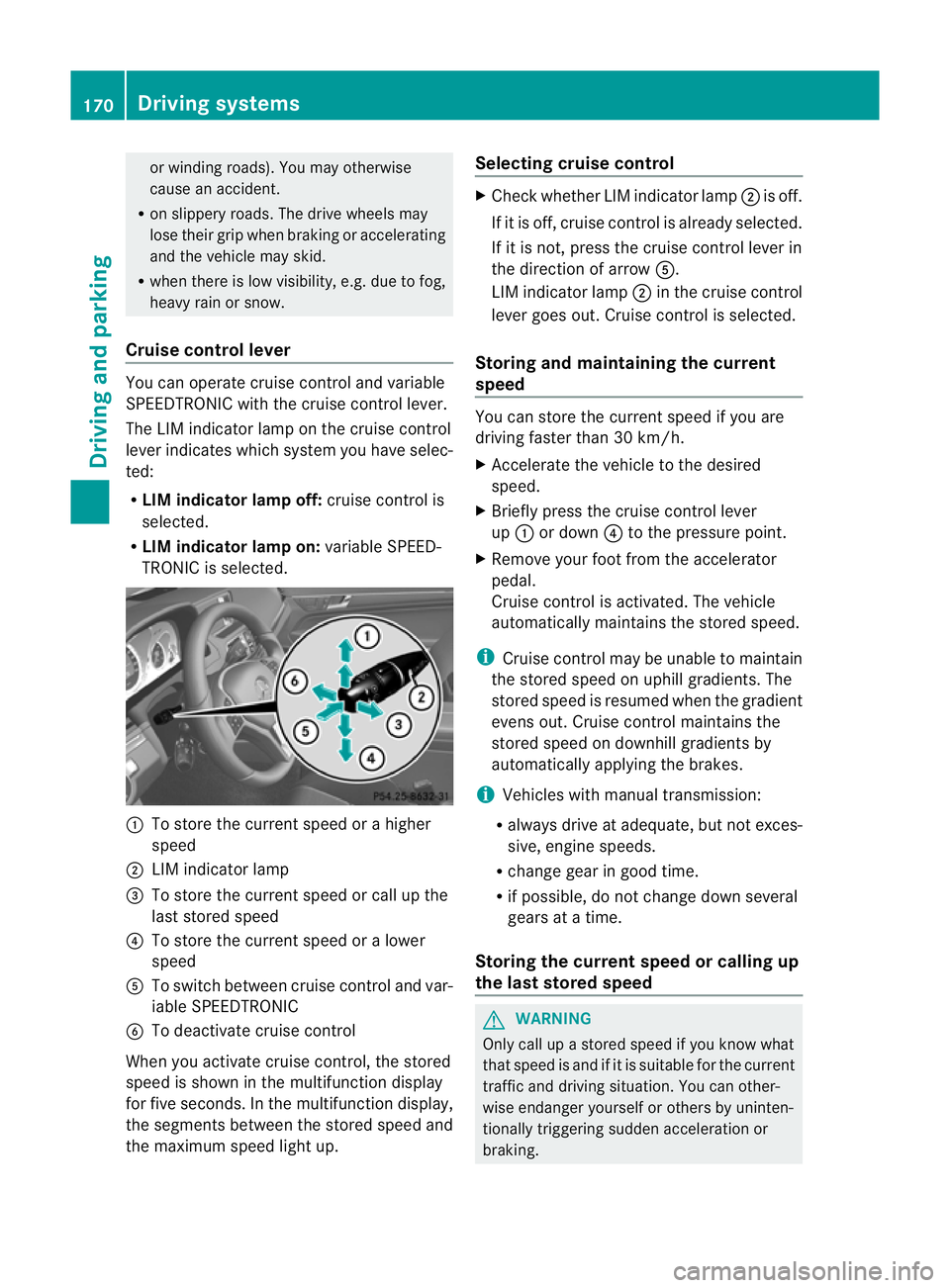
Cruise control lever You can operate cruise control and variable
SPEEDTRONIC with the cruise control lever.
The LIM indicator lamp on the cruise control
lever indicates which system you have selec-
ted:
R LIM indicator lamp off: cruise control is
selected.
R LIM indicator lamp on: variable SPEED-
TRONIC is selected. :
To store the current speed or ahigher
speed
; LIM indicator lamp
= To store the current speed or call up the
last stored speed
? To store the current speed or alower
speed
A To switch between cruise control and var-
iable SPEEDTRONIC
B To deactivate cruise control
When you activate cruise control, the stored
speed is shown in the multifunction display
for five seconds. In the multifunction display,
the segment sbetween the stored speed and
the maximum speed light up. Selecting cruise control X
Check whether LIM indicator lamp ;is off.
If it is off, cruise control is already selected.
If it is not,p ress the cruise control lever in
the direction of arrow A.
LIM indicator lamp ;in the cruise control
lever goes out. Cruise control is selected.
Storing and maintaining the current
speed You can store the current speed if you are
driving faster than 30 km/h.
X
Accelerate the vehicle to the desired
speed.
X Briefly press the cruise control lever
up : or down ?to the pressure point.
X Remove your foot from the accelerator
pedal.
Cruise control is activated. The vehicle
automatically maintains the stored speed.
i Cruise control may be unable to maintain
the stored speed on uphill gradients. The
stored speed is resumed when the gradient
evens out. Cruise control maintains the
stored speed on downhill gradients by
automatically applying the brakes.
i Vehicles with manual transmission:
R always drive at adequate, but not exces-
sive, engine speeds.
R change gear in good time.
R if possible, do not change down several
gears at atime.
Storing the current speed or calling up
the last stored speed G
WARNING
Only call up astored speed if you know what
that speed is and if it is suitable for the current
traffic and driving situation. You can other-
wise endanger yourself or others by uninten-
tionally triggerin gsudden acceleration or
braking. 170
Driving systemsDriving and parking
Page 175 of 353
On long and steep downhill gradients, espe-
cially if the vehicle is laden or towing atrailer,
you must select shift range 1,2or 3in good
time. By doing so, you will make use of the
braking effect of the engine, which relieves
the load on the brake system and prevents
the brakes from overheating and wearing too
quickly.
If as lower-moving vehicle is detected in front,
DISTRONIC PLUS causes your vehicle to
brake and maintain apreset distance to the
vehicle in front. G
WARNING
Do not change down for additional engine
braking on aslippery road surface. This could
cause the drive wheels to lose their grip and
the vehicle could skid. G
WARNING
DISTRONIC PLUS is only an aid designed to
assist driving. The driver remains fully respon-
sible for the vehicle's distance from other
vehicles, the vehicle's speed and for braking
in good time.
DISTRONIC PLUS does not react in particular
to:
R pedestrians
R stationary obstacles on the road, e.g. stop-
ped or parked vehicles
R oncoming and crossing traffic
DISTRONIC PLUS may not detect narrow vehi-
cles driving in front,e .g. motorcycles, or vehi-
cle sd riving on adifferent line. Therefore,
always pa yattention to traffic conditions even
when DISTRONIC PLU Sisactivated. Other-
wise, yo umay fai ltorecognis edanger sin
time ,cause an accident and injure yourself
and others. G
WARNING
DISTRONIC PLU Scanno ttake account of road
and traffic conditions .IfDISTRONIC doe snot
recognise or no longer recognises the vehicle
in front,don ot activate DISTRONIC or, if it is
already active, deactivate it. This is especially
the case:
R before corners
R on filter lanes
R when changing to alane with faster moving
traffic
R in complex driving situations or where lanes
are diverted, e.g. at roadworks on amotor-
way
DISTRONIC PLUS otherwise maintains the
current speed set by you or accelerates up to
the set speed.
DISTRONIC PLUS cannot take account of
weather conditions. Deactivate, or do not
activate, DISTRONIC PLUS:
R if the roads are slippery, snow-covered or
icy. The wheels could lose their grip when
braking or accelerating. The vehicle could
start to skid.
R if the sensors are dirty or there is poor vis-
ibility, e.g. due to snow, rain or fog. Dis-
tancec ontrol may be impaired.
Always pay attention to traffic conditions
even when DISTRONIC PLUS is activated.
Otherwise, you may fail to recognise dangers
in time, cause an accident and injure yourself
and others.
! You must deactivate the radar sensor sys-
tem in certain countries and near radio
telescope facilities. You will find further
information under "Radar sensor system"
in the index.
The radar sensor system is automatically
deactivated near radio telescope facilities
(Y page 345).
If you want DISTRONIC PLUS to assist you,
the radar sensor system must be activated
(Y page 229) and operational. 172
Driving systemsDriving and parking
Page 178 of 353
G
WARNING
If you depress the brake, DISTRONIC PLUS is
deactivated unless yourv ehicle is stationary.
DISTRONIC PLUS then no longer brakes your
vehicle. In such cases, control the distance
from vehicles travellin ginfrontwith the brake
alone. You could otherwise cause an accident
and thereby injure yourself and others. The
drive rremains fully responsible for the vehi-
cle's distanc efrom other vehicles, the speed
being driven and for braking in good time.
Changing lanes
If you wish to change to the passing lane (in
countries where traffic drives on the right, the
passing lane is the left-hand lane), DIS-
TRONIC PLUS supports you if:
R you are driving faster than 60 km/h.
R DISTRONIC PLUS is maintaining the dis-
tanc etoav ehicle in front.
R you switch on the appropriate turn signals.
R DISTRONIC PLUS does not detec tadanger
of collision.
If these condition sare met, your vehicle is
accelerated. Acceleration will be interrupted
if changing lanes takes too long or if the dis-
tanc ebetween your vehicle and the vehicle in
fron tbecomes too small. G
WARNING
DISTRONIC PLUS and Active Blind Spot Assist
are only an aid designed to assist driving.
They do not relieve you of the responsibility
of paying attention .The driver remains fully
responsible for the vehicle's distance from
other vehicles, the vehicle's speed and for
braking in good time. Always pay attention to
traffic conditions and your surroundings. Oth-
erwise, you may fail to recognise dangers in
time, cause an accident and injure yourself
and others.
Vehicles with COMAND APS/
Audio 50 APS
i The following function is not operational
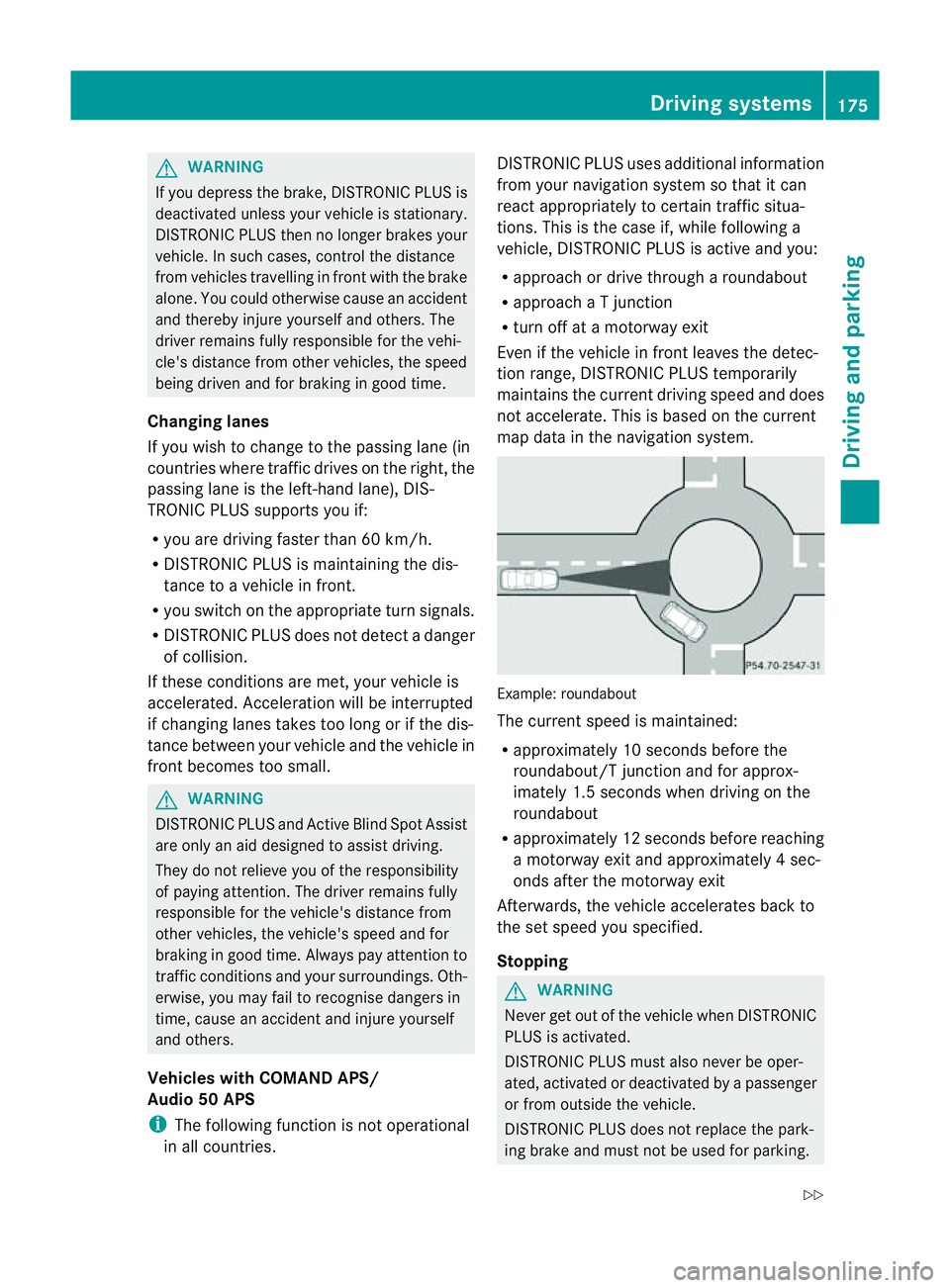
in all countries. DISTRONIC PLUS uses additional information
from your navigation system so that it can
react appropriately to certain traffic situa-
tions. This is the case if, while following a
vehicle, DISTRONIC PLUS is active and you:
R
approach or drive through aroundabout
R approach aTjunction
R turn off at amotorway exit
Even if the vehicle in front leaves the detec-
tion range, DISTRONIC PLUS temporarily
maintains the current driving speed and does
not accelerate. This is based on the current
map data in the navigation system. Example: roundabout
The current speed is maintained:
R
approximately 10 seconds before the
roundabout/T junction and for approx-
imately 1.5 seconds when driving on the
roundabout
R approximately 12 seconds before reaching
am otorway exit and approximately 4sec-
onds after the motorway exit
Afterwards, the vehicle accelerates back to
the set speed you specified.
Stopping G
WARNING
Never get out of the vehicle when DISTRONIC
PLUS is activated.
DISTRONIC PLUS must also never be oper-
ated, activated or deactivated by apassenger
or from outside the vehicle.
DISTRONIC PLUS does not replace the park-
ing brake and must not be used for parking. Driving systems
175Driving and parking
Z
Page 184 of 353
G
WARNING
Do not change downf or additional engine
braking on aslippery road surface. This could
cause the drive wheels to lose their grip and
the vehicle could skid.
You can set avariable or permanent limit
speed:
R variable for speed limits, e.g. in built-up
areas
R permanent for long-term speed restric-
tions, e.g. when driving with winter tyres
fitted (Y page 183) G
WARNING
Speedtronic is only an aid designed to assist
driving. You are responsible for the vehicle's
speed and for braking in good time.
i The speed indicated in the speedometer
may differ slightly from the limit speed
stored.
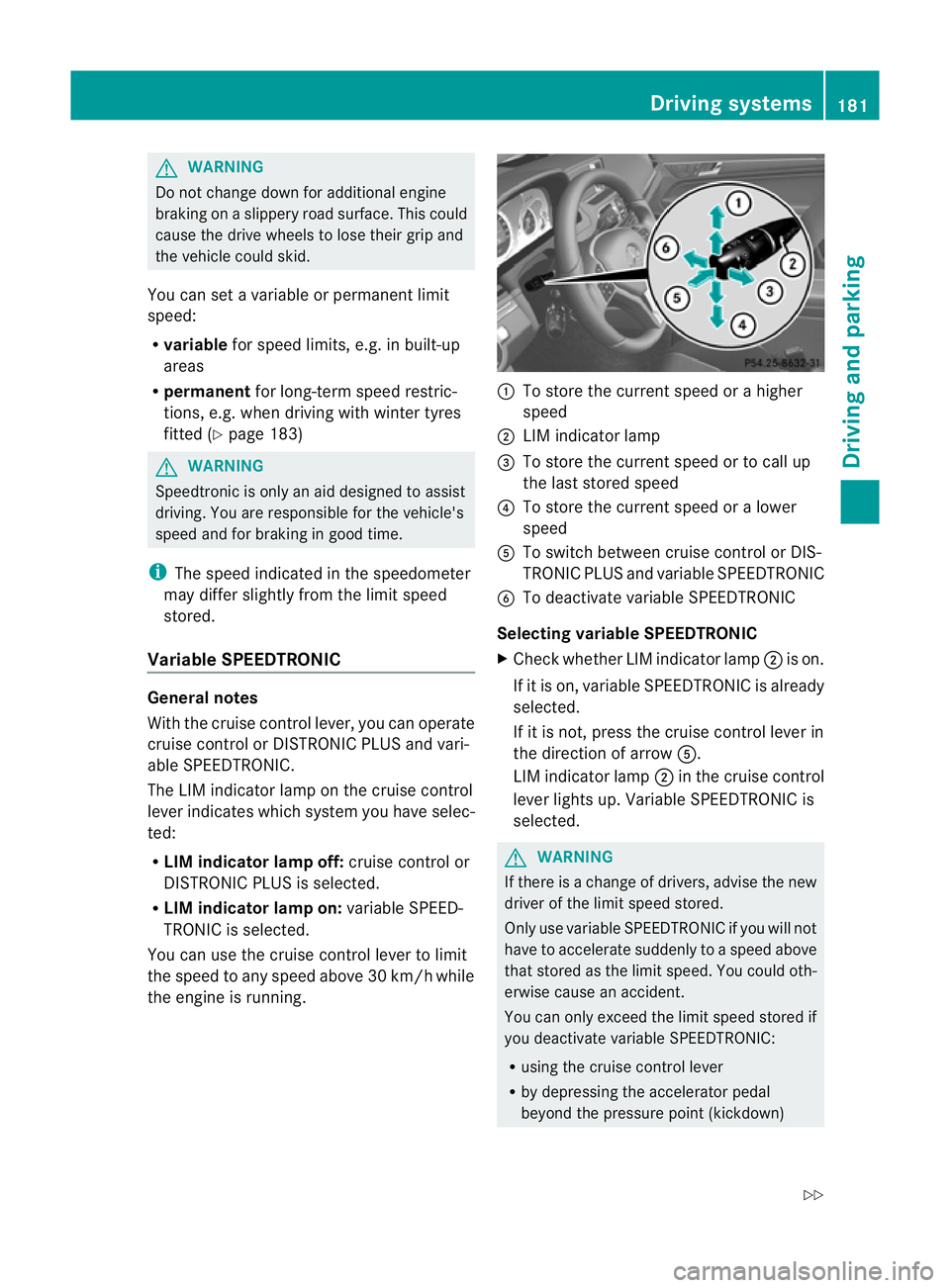
Variable SPEEDTRONIC General notes
With the cruise control lever, you can operate
cruise control or DISTRONIC PLUS and vari-
able SPEEDTRONIC.
The LIM indicator lamp on the cruise control
lever indicates which system you have selec-
ted:
R LIM indicator lamp off: cruise control or
DISTRONIC PLUS is selected.
R LIM indicator lamp on: variable SPEED-
TRONIC is selected.
You can use the cruise control lever to limit
the speed to any speed above 30 km/hw hile
the engine is running. :
To store the current speed or ahigher
speed
; LIM indicator lamp
= To store the current speed or to call up
the last stored speed
? To store the current speed or alower
speed
A To switch between cruise control or DIS-
TRONIC PLUS and variable SPEEDTRONIC
B To deactivate variable SPEEDTRONIC
Selecting variable SPEEDTRONIC
X Check whether LIM indicator lamp ;is on.
If it is on, variable SPEEDTRONIC is already
selected.
If it is not, press the cruise control lever in
the direction of arrow A.
LIM indicator lamp ;in the cruise control
lever lights up. VariableS PEEDTRONIC is
selected. G
WARNING
If there is achange of drivers, advise the new
driver of the limit speed stored.
Only use variable SPEEDTRONIC if you will not
have to accelerate suddenly to aspeed above
that stored as the limit speed. You could oth-
erwise cause an accident.
You can only exceed the limit speed stored if
you deactivate variable SPEEDTRONIC:
R using the cruise control lever
R by depressing the accelerator pedal
beyond the pressure point (kickdown) Driving systems
181Driving and parking
Z
Page 197 of 353
1.0
mand red guid eline =indicates adis-
tance of approximatel y0.25 m. The distances
onl yapply to objects tha tare at ground level.
Blue guide lines :depict the width required
for the vehicle. They are usedtoa lign the
vehicl ewith the edge of the carriageway, e.g.
the kerb. ATTENTION ASSIST
Important safety notes ATTENTION ASSIST help
syou during long,
monotonous journey ssuch as on motorways
and trunk roads. It is active in the 80 km/h
to 180 km/h range.
If ATTENTION ASSIST detects typical indica-
tors of fatigu eorincreasing lapses in con-
centration on the part of the driver, it sug-
gests taking abreak. G
WARNING
ATTENTION ASSIST is only an aid and may
detect yourt iredness or lapses in concentra-
tion too late or not at all. It is not asubstitute
for aw ell reste dand attentiv edriver.
Fatigue may caus eyou to recognise hazard-
ous situations to olate ,misjudge asituation
or reac tslower. For this reason ,makes ure
you fee lreste dbefore you begin driving and
durin gyour journey. Always tak ebreaks in
good tim eand regularly, especiall yduring
lon gjou rneys. Otherwise, you may fail to rec-
ognise danger sintime, caus eanacciden tand
injure yoursel fand others.
ATTENTIO NASSIST assesses your level of
fatigu eorlapsesinc oncentration by taking
the following criteria into account:
R your persona ldriving style ,e.g. steering
characteristics
R driving conditions ,e.g. time ,driving time The functionality of ATTENTIO
NASSIST is
restricte dand warning smay be delaye dor
not occu ratall:
R if the roa dcondition is poor, e.g. if the sur-
face is uneven or if there are potholes
R if there is astrong sid ewind
R if you have adopted asport ydrivin gstyle
with high cornering speeds or high rates of
acceleration
R if you are predominantly drivin gslower
than 80 km/h or faster than 180 km/h
R if you are currently using COMAND APS or
making atelephon ecall with it
R if the tim ehas been set incorrectly
R in active drivin gsituations, such as when
you change lanes or change your speed
Warning and display messages in the
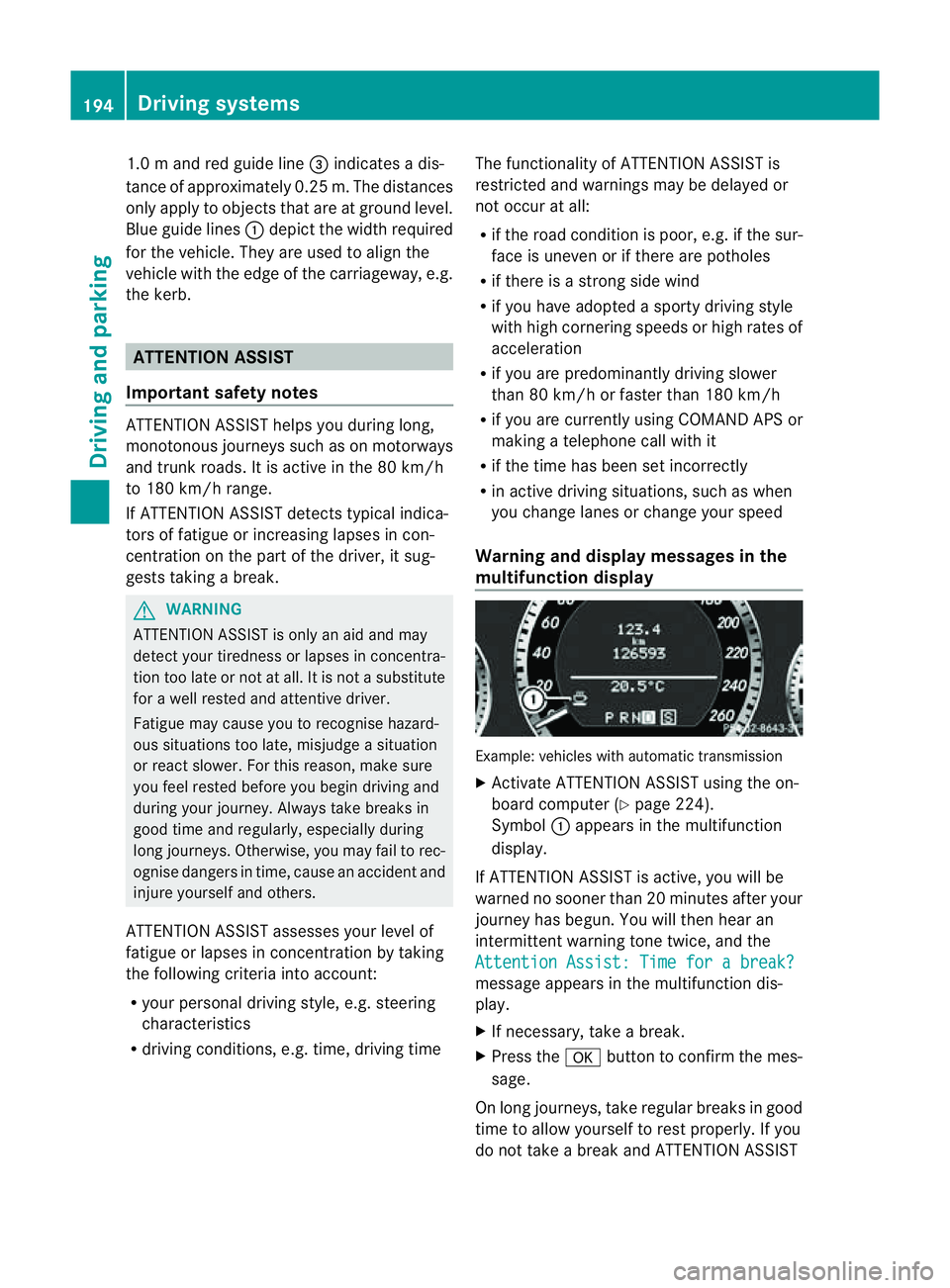
multifunction display Example: vehicles with automatic transmission
X
Activate ATTENTION ASSIS Tusing the on-
board computer (Y page 224).
Symbol :appears in the multifunction
display.
If ATTENTION ASSIS Tisactive, you will be
warne dnosooner than 20 minutes after your
journey has begun. You will the nhear an
intermittentw arning tonetwice, and the
Attention Assist :Timef orab reak? message appears in th
emultifunction dis-
play.
X If necessary, tak eabreak.
X Pres sthe a button to confir mthe mes-
sage.
On long journeys, take regula rbreaks in good
time to allow yourself to rest properly. If you
do not take abreak and ATTENTION ASSIST 194
Driving systemsDriving and parking
Page 198 of 353
still detects typical indicators of fatigue or
increasing lapses in concentration, you will be
warned againa fter 15 minutes at the earliest.
ATTENTION ASSIST is reset whe nyou con-
tinue you rjourney and it startsa ssessing your
tiredness again if:
R you switch off the engine.
R you take off your seat belt and open the
driver's door, e.g. for achange of drivers or
to take abreak. Speed Limit Assist
Important safety notes i
Speed Limit Assist is not operational in all
countries.
Speed Limit Assist shows you detected speed
limits in the multifunction display .Data from
th en avigation system is also used for this
purpose. The display appear sifatraffic sign
indicating aspee dlimit or th eend ofas peed
limit is detected. If Speed Limit Assist does
no td etec tany traffic signs, the speed limit
from the digital roa dmap is take nand shown
in the display.
Speed Limit Assist detects the traffic signs
with acamera at the top of the windscreen. :
Speed Limit Assist camera G
WARNING
Speed Limit Assist is only an aid and may
detect speed limit signs incorrectly or not at
all. The system may be impaired or may not func-
tion if:
R
there is poor visibility, e.g. due to snow,
rain, fog or spray.
R there is glare, e.g. from the sun or from
oncoming traffic.
R the windscreen is dirty, misted up or cov-
ered, for instance by asticker, in the vicinity
of the camera.
R the traffic signs are covered, for instance
by dirt, snow or trees.
R the traffic signs are poorly illuminated.
R there are ambiguous traffic signs, for
instance near roadworks or on multi-lane
roads.
Traffic signs always have priority over the
Speed Limit Assist display. Speed Limit Assist
cannot detect road and traffic conditions. It is
not asubstitute for attentive driving.
Always pay attention to traffic conditions and
your surroundings. Otherwise, you may fail to
recognise dangers in time, cause an accident
and injure yourselfa nd others.
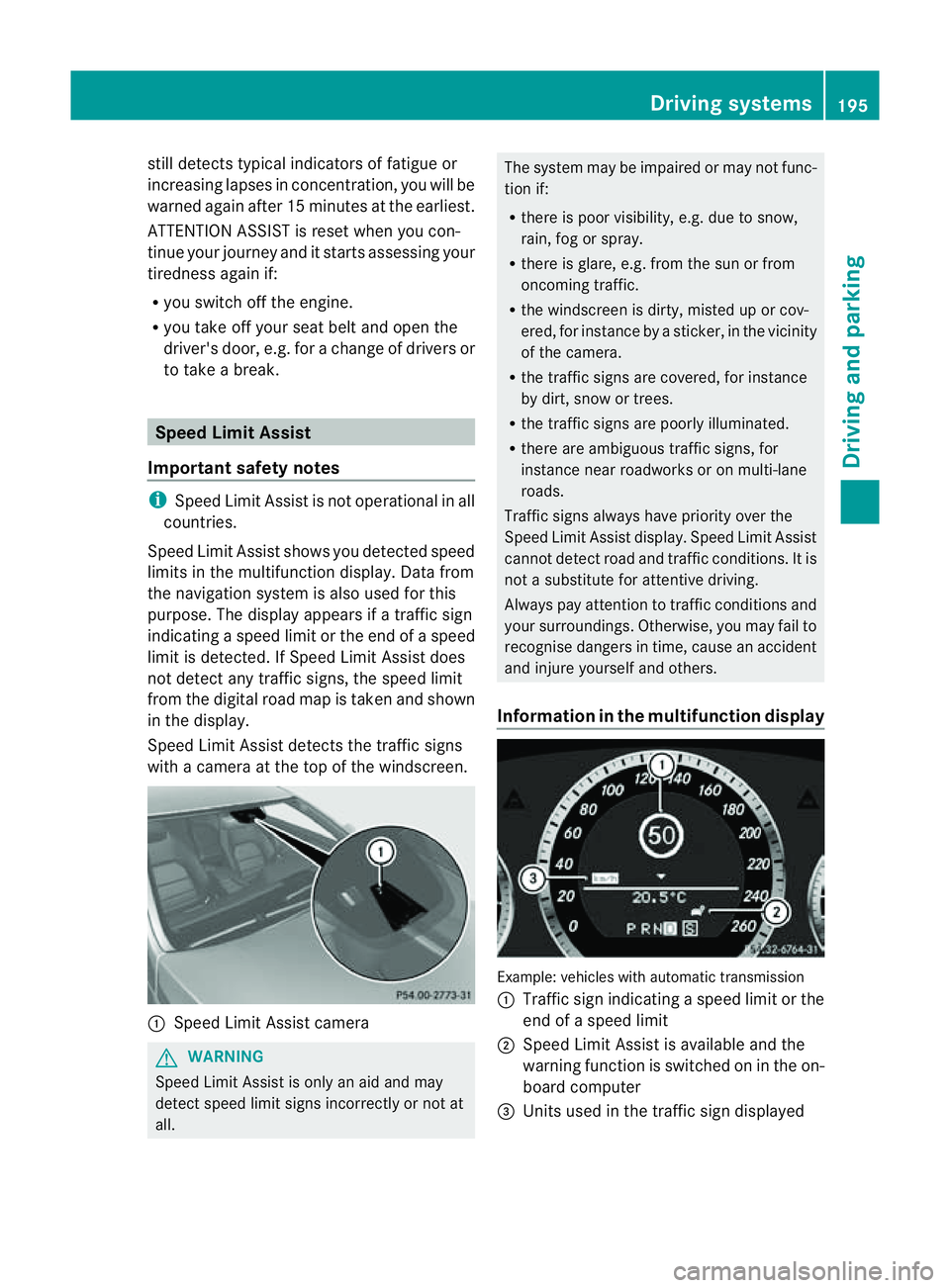
Information in the multifunctio ndisplay Example
:vehicles with automatic transmission
: Traffic sign indicatin gaspeed limit or the
end of aspeed limit
; Speed Limit Assist is available and the
warning function is switched on in the on-
board computer
= Unit sused in the traffic sign displayed Driving systems
195Driving and parking Z