202 MERCEDES-BENZ E-Class COUPE 2012 C207 Owner's Manual
[x] Cancel search | Manufacturer: MERCEDES-BENZ, Model Year: 2012, Model line: E-Class COUPE, Model: MERCEDES-BENZ E-Class COUPE 2012 C207Pages: 352, PDF Size: 14.48 MB
Page 14 of 352
Locking centrallysee Central locking
Locking verification signal (on-
board computer) ............................... 210
Low-beam headlamps Changing bulbs .............................. 124
Display message ............................ 222
Setting for driving abroad
(symmetrical) ................................. 116
Switching on/off ........................... 117
Luggage cover
see Trunk partition
Lumbar support
Adjusting the 4-way lumbar
support .......................................... 107
M
M+S tires ............................................ 310
Maintenance see ASSYST PLUS service interval
display
Malfunction message
see Display messages
Malfunctions relevant to safety
Reporting ......................................... 23
Matte finish (cleaning
instructions) ...................................... 282
mbrace Call priority .................................... 265
Display message ............................ 217
Downloading destinations
(COMAND) ..................................... 265
Emergency call .............................. 262
Important safety notes ..................261
Locating a stolen vehicle ...............267
MB info call button ........................264
Remote vehicle locking ..................267
Roadside Assistance button ..........264
Search & Send ............................... 266
Self-test ......................................... 262
System .......................................... 262
Vehicle remote unlocking ..............266
Mechanical key
Function/notes ................................ 73
Locking vehicle ................................ 79
Unlocking the driver's door ..............79
Memory card (audio) ......................... 204
Memory function ............................... 113
Message memory (on-board
computer) .......................................... 213
Messages see Display messages
Mirrors
see Exterior mirrors
see Rear-view mirror
see Vanity mirror
Mobile phone
Menu (on-board computer) ............204
Modifying the programming
(SmartKey) ........................................... 73
MOExtended run-flat system ........... 295
MP3 Operating ....................................... 204
see separate operating instructions
Multicontour seat .............................. 107
Multifunction display Function/notes ............................. 198
Permanent display .........................208
Multifunction steering wheel
Operating the on-board computer . 197
Overview .......................................... 29
N
Navigation Menu (on-board computer) ............202
On-board computer .......................202
see separate operating instructions
Neck level heating
see AIRSCARF
NECK-PRO head restraints
Operation ......................................... 49
Resetting after being triggered ........49
Notes on breaking-in a new
vehicle ................................................ 144
12Index
Page 15 of 352
O
Occupant Classification System
(OCS) Faults ............................................... 47
Operation ......................................... 43
System self-test ............................... 46
Occupant safety
Children in the vehicle .....................55
System overview .............................. 36
Octane number (fuel) ........................ 343
Odometer ........................................... 201
see Trip odometer
Oil
see Engine oil
On-board computer
Assistance menu ........................... 206
Audio menu ................................... 203
Convenience submenu ..................211
Displaying a service message ........279
Display messages ..........................213
DISTRONIC PLUS ........................... 172
Factory settings submenu .............212
Important safety notes ..................196
Instrument cluster submenu ..........208
Lighting submenu .......................... 209
Menu overview .............................. 200
Message memory .......................... 213
Navigation menu ............................ 202
Operating video DVD .....................204
Operation ....................................... 197
Service menu ................................. 208
Settings menu ............................... 208
Standard display ............................ 201
Telephone menu ............................ 204
Trip menu ...................................... 201
Vehicle submenu ........................... 210
Operating system
see On-board computer
Outside temperature display ........... 197
Overhead control panel ...................... 32
Override feature Rear side windows ...........................59
P
Paint code number ............................ 339
Paintwork (cleaning instructions) ... 281
Panic alarm .......................................... 60
Panorama roof with power tilt/
sliding panel Opening/closing .............................. 98
Opening/closing the roller
sunblind ........................................... 99
Problem (malfunction) .....................99
Resetting ......................................... 99
Panorama sliding sunroof
Important safety notes ....................97
Parcel net ........................................... 253
Parking ............................................... 158
Important safety notes ..................158
Parking brake ................................ 159
Position of exterior mirror, front-
passenger side ............................... 112
Rear view camera .......................... 184
see PARKTRONIC
Parking aid
Parking Guidance ........................... 181
see Exterior mirrors
see PARKTRONIC
Parking brake
Display message ............................ 215
Notes/function .............................. 159
Parking Guidance
Display message ............................ 230
Important safety notes ..................181
Parking lamps (changing bulbs) ...... 125
PARKTRONIC Deactivating/activating .................180
Driving system ............................... 178
Function/notes ............................. 178
Problem (malfunction) ...................181
Range of the sensors .....................178
Warning display ............................. 179
PASSENGER AIRBAG OFF indicator
lamp ...................................................... 43
Pedals ................................................. 160
Plastic trim (cleaning instructions) . 285
Power washers .................................. 281
Power windows see Side windows
PRE-SAFE ®
(Preventive occupant
safety system) Display message ............................ 217
Operation ......................................... 48Index13
Page 16 of 352
PRE-SAFE®
Brake (vehicles with
DISTRONIC PLUS) Display message ............................ 217
Function/notes ................................ 65
Switching on/off ........................... 207
Warning lamp ................................. 248
Preventive occupant safety
system
see PRE-SAFE ®
(Preventive
occupant safety system)
Product information ............................ 20
Program selector button .................. 151
Pulling away Automatic transmission .................147
Q
Qualified specialist workshop ........... 23
R
Radar sensor system Activating/deactivating .................210
Display message ............................ 229
Radio
Selecting a station .........................203
see separate operating instructions
Reading lamp ..................................... 122
Rear compartment Setting the air vents ......................141
Setting the temperature ................136
Rear fog lamp
Display message ............................ 223
Switching on/off ........................... 118
Rear seat
Display message ............................ 237
Rear view camera
Cleaning instructions .....................285
Function/notes ............................. 184
Rear-view mirror
Anti-glare (manual) ........................110
Dipping (automatic) .......................112
Rear window blind ............................ 259
Rear window defroster Problem (malfunction) ...................139
Rear window heating
Switching on/off ........................... 138
Refueling
Fuel gauge ....................................... 27
Important safety notes ..................155
Refueling process ..........................156
see Fuel
Releasing the parking lock
manually (automatic
transmission) ..................................... 155
Remote control Garage door opener .......................267
Reporting
Malfunctions relevant to safety ........ 23
Reserve (fuel tank)
see Fuel
Reserve fuel
Display message ............................ 228
Warning lamp ................................. 245
see Fuel
Residual heat (climate control) ........ 139
Restraint system see SRS (Supplemental Restraint
System)
Reverse gear
Engaging (automatic
transmission) ................................. 149
Reversing lamps (display
message) ............................................ 224
Roadside Assistance (breakdown) .... 21
Roll bar Display message ............................ 218
Operation ......................................... 48
Roller blind
see Roller sunblind
Roller sunblind
Panorama roof with power tilt/
sliding panel ..................................... 98
Rear window .................................. 259
Roof
see Soft top
Roof lining and carpets (cleaning
guidelines) ......................................... 287
Roof load (maximum) ........................ 346
Route see Route guidance (navigation)
Route guidance (navigation) ............ 20214Index
Page 20 of 352
Structure and characteristics
(definition) ..................................... 329
Temperature .................................. 325
TIN (Tire Identification Number)
(definition) ..................................... 331
Tire bead (definition) ......................331
Tire pressure (definition) ................331
Tire pressures (recommended) ......329
Tire size (data) ............................... 333
Tire size designation, load-bearing
capacity, speed rating .................... 326
Tire tread ....................................... 309
Tire tread (definition) .....................331
Total load limit (definition) .............332
Traction ......................................... 324
Traction (definition) .......................332
Tread wear ..................................... 324
Uniform Tire Quality Grading
Standards ...................................... 324
Uniform Tire Quality Grading
Standards (definition) ....................329
Unladen weight (definition) ............330
Wear indicator (definition) .............332
Wheel rim (definition) ....................330
see Flat tire
Top Tether ............................................ 58
Towing Important safety guidelines ...........301
Installing the towing eye ................301
Removing the towing eye ...............302
With the rear axle raised ................302
Towing away
With both axles on the ground .......302
Tow-starting
Emergency engine starting ............303
Important safety notes ..................301
Transmission
see Automatic transmission
Transporting the vehicle .................. 302
Trim pieces (cleaning instructions) . 286
Trip computer (on-board
computer) .......................................... 201
Trip meter see Trip odometer
Trip odometer
Calling up ....................................... 201
Resetting (on-board computer) ......202Trunk
Emergency release ..........................82
Important safety guidelines .............80
Locking separately ...........................82
Opening (automatically from
inside) .............................................. 81
Opening (automatically from
outside) ............................................ 81
Trunk lid
Display message ............................ 236
Opening/closing .............................. 80
Trunk partition
Display message ............................ 237
General notes .................................. 93
Opening/closing .............................. 93
Turn signals
Changing bulbs (front) ...................125
Display message ............................ 222
Switching on/off ........................... 119
Type identification plate
see Vehicle identification plate
U
Unlocking Emergency unlocking .......................79
From inside the vehicle (central
unlocking button) ............................. 78
V
Vanity mirror (in sun visor) .............. 258
Vehicle Correct use ...................................... 23
Data acquisition ............................... 24
Display message ............................ 236
Equipment ....................................... 20
Individual settings ..........................208
Limited Warranty ............................. 24
Loading .......................................... 319
Locking (in an emergency) ...............79
Locking (SmartKey) .......................... 71
Lowering ........................................ 295
Maintenance .................................... 21
Parking for a long period ................ 159
Pulling away ................................... 147
Raising ........................................... 292
Reporting problems .........................23
18Index
Page 76 of 352
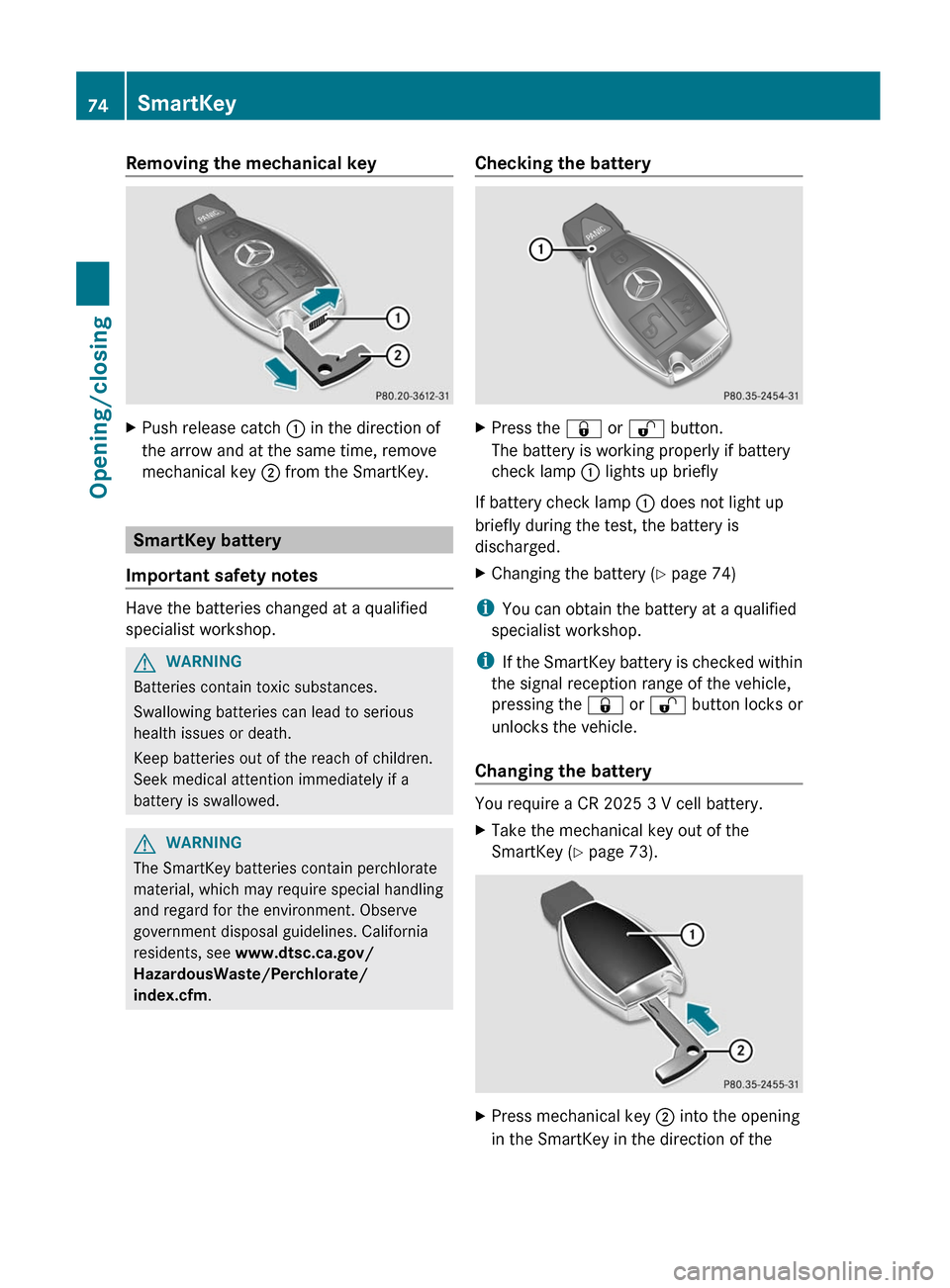
Removing the mechanical keyXPush release catch : in the direction of
the arrow and at the same time, remove
mechanical key ; from the SmartKey.
SmartKey battery
Important safety notes
Have the batteries changed at a qualified
specialist workshop.
GWARNING
Batteries contain toxic substances.
Swallowing batteries can lead to serious
health issues or death.
Keep batteries out of the reach of children.
Seek medical attention immediately if a
battery is swallowed.
GWARNING
The SmartKey batteries contain perchlorate
material, which may require special handling
and regard for the environment. Observe
government disposal guidelines. California
residents, see www.dtsc.ca.gov/
HazardousWaste/Perchlorate/
index.cfm .
Checking the batteryXPress the & or % button.
The battery is working properly if battery
check lamp : lights up briefly
If battery check lamp : does not light up
briefly during the test, the battery is
discharged.
XChanging the battery ( Y page 74)
i
You can obtain the battery at a qualified
specialist workshop.
i If the SmartKey battery is checked within
the signal reception range of the vehicle,
pressing the & or % button locks or
unlocks the vehicle.
Changing the battery
You require a CR 2025 3 V cell battery.
XTake the mechanical key out of the
SmartKey ( Y page 73).XPress mechanical key ; into the opening
in the SmartKey in the direction of the74SmartKeyOpening/closing
Page 202 of 352
Menus and submenus
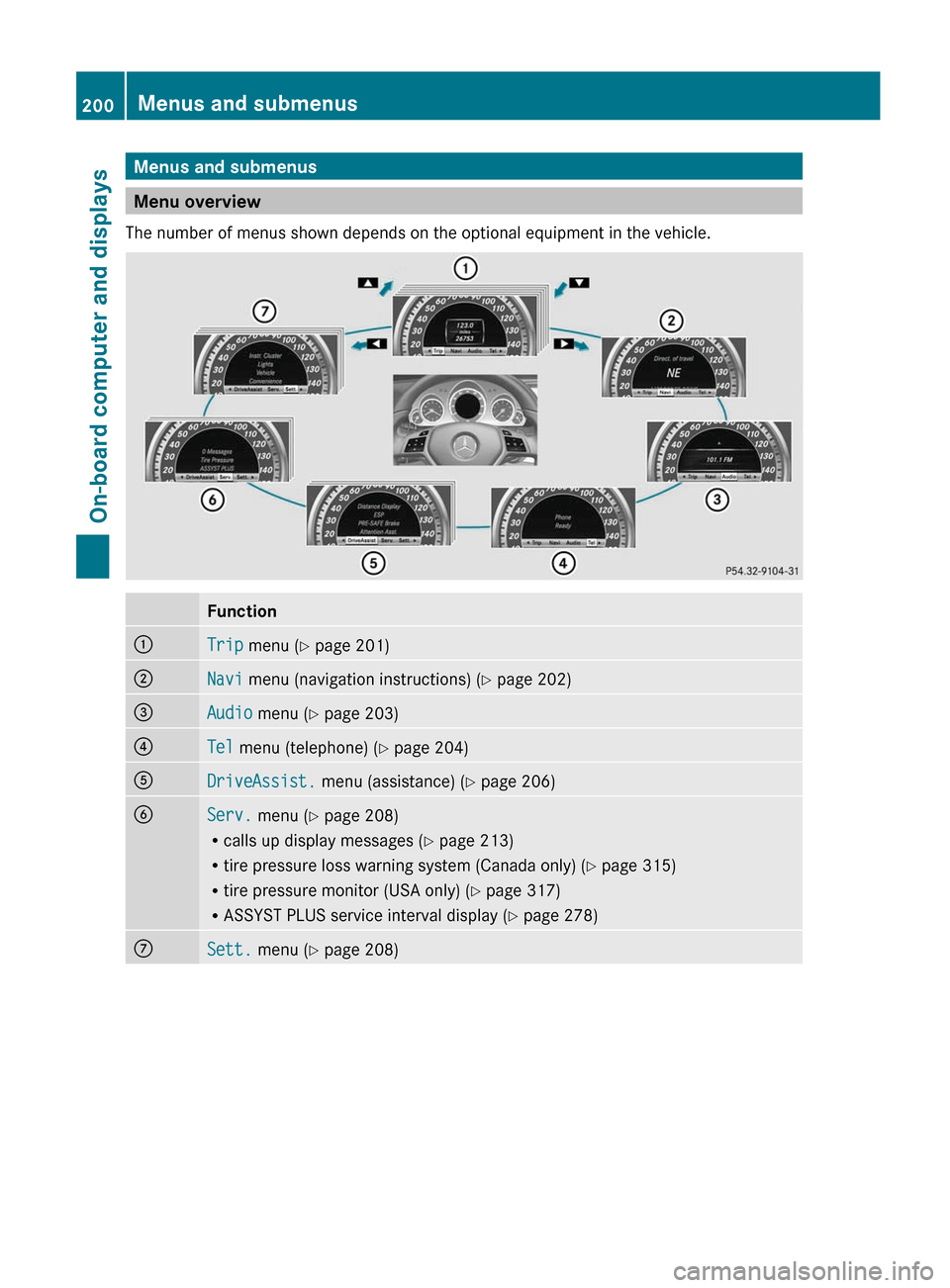
Menu overview
The number of menus shown depends on the optional equipment in the vehicle.
Function:Trip menu ( Y page 201);Navi menu (navigation instructions) ( Y page 202)=Audio menu ( Y page 203)?Tel menu (telephone) ( Y page 204)ADriveAssist. menu (assistance) ( Y page 206)BServ. menu ( Y page 208)
R calls up display messages ( Y page 213)
R tire pressure loss warning system (Canada only) ( Y page 315)
R tire pressure monitor (USA only) ( Y page 317)
R ASSYST PLUS service interval display ( Y page 278)CSett. menu ( Y page 208)200Menus and submenusOn-board computer and displays
Page 203 of 352
Trip menu
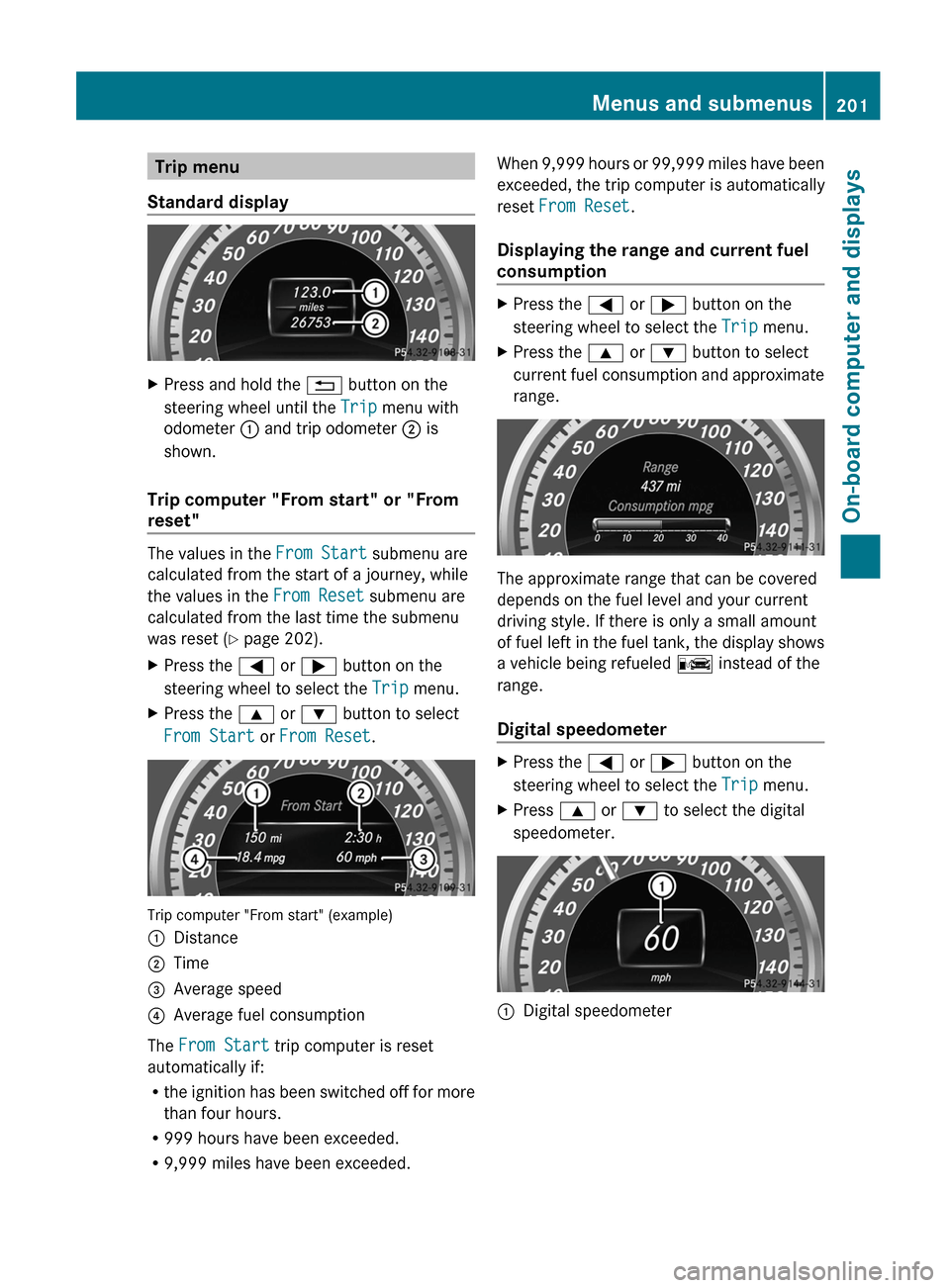
Standard displayXPress and hold the % button on the
steering wheel until the Trip menu with
odometer : and trip odometer ; is
shown.
Trip computer "From start" or "From
reset"
The values in the From Start submenu are
calculated from the start of a journey, while
the values in the From Reset submenu are
calculated from the last time the submenu
was reset ( Y page 202).
XPress the = or ; button on the
steering wheel to select the Trip menu.XPress the 9 or : button to select
From Start or From Reset .
Trip computer "From start" (example)
:Distance;Time=Average speed?Average fuel consumption
The From Start trip computer is reset
automatically if:
R the ignition has been switched off for more
than four hours.
R 999 hours have been exceeded.
R 9,999 miles have been exceeded.
When 9,999 hours or 99,999 miles have been
exceeded, the trip computer is automatically
reset From Reset .
Displaying the range and current fuel
consumptionXPress the = or ; button on the
steering wheel to select the Trip menu.XPress the 9 or : button to select
current fuel consumption and approximate
range.
The approximate range that can be covered
depends on the fuel level and your current
driving style. If there is only a small amount
of fuel left in the fuel tank, the display shows
a vehicle being refueled C instead of the
range.
Digital speedometer
XPress the = or ; button on the
steering wheel to select the Trip menu.XPress 9 or : to select the digital
speedometer.:Digital speedometerMenus and submenus201On-board computer and displaysZ
Page 204 of 352
Resetting values
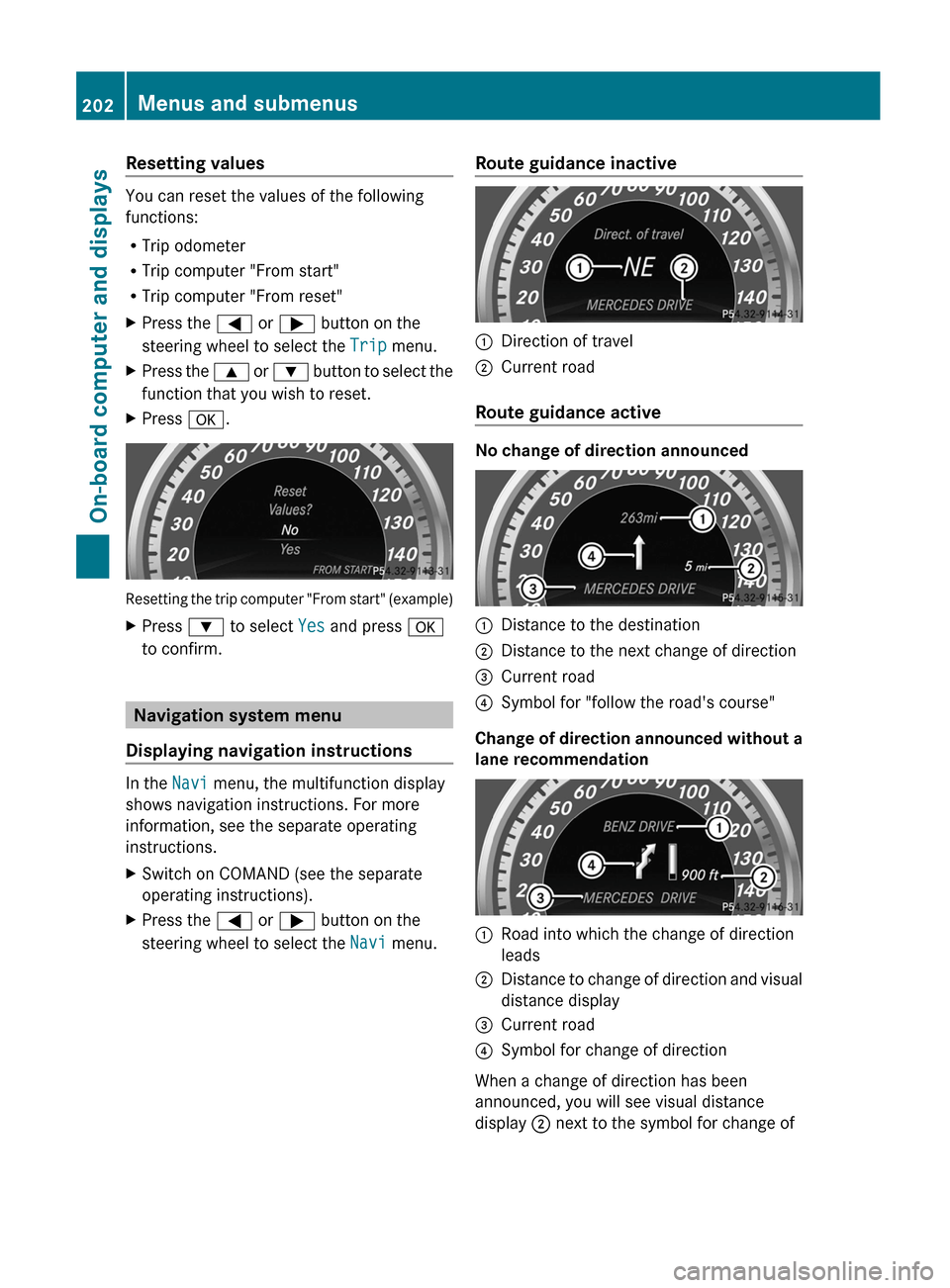
You can reset the values of the following
functions:
R Trip odometer
R Trip computer "From start"
R Trip computer "From reset"
XPress the = or ; button on the
steering wheel to select the Trip menu.XPress the 9 or : button to select the
function that you wish to reset.XPress a.
Resetting the trip computer "From start" (example)
XPress : to select Yes and press a
to confirm.
Navigation system menu
Displaying navigation instructions
In the Navi menu, the multifunction display
shows navigation instructions. For more
information, see the separate operating
instructions.
XSwitch on COMAND (see the separate
operating instructions).XPress the = or ; button on the
steering wheel to select the Navi menu.Route guidance inactive:Direction of travel;Current road
Route guidance active
No change of direction announced
:Distance to the destination;Distance to the next change of direction=Current road?Symbol for "follow the road's course"
Change of direction announced without a
lane recommendation
:Road into which the change of direction
leads;Distance to change of direction and visual
distance display=Current road?Symbol for change of direction
When a change of direction has been
announced, you will see visual distance
display ; next to the symbol for change of
202Menus and submenusOn-board computer and displays
Page 348 of 352
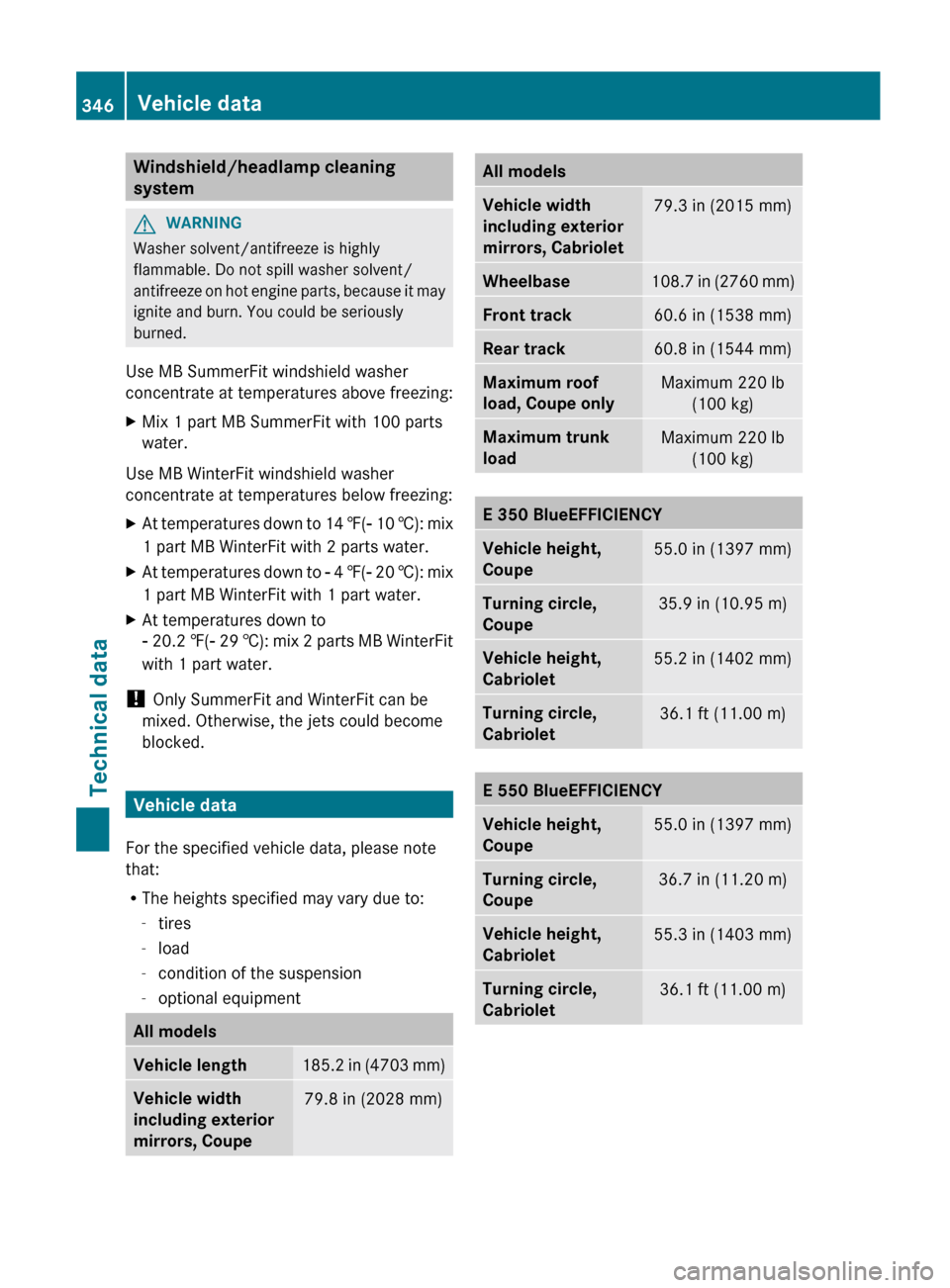
Windshield/headlamp cleaning
systemGWARNING
Washer solvent/antifreeze is highly
flammable. Do not spill washer solvent/
antifreeze on hot engine parts, because it may
ignite and burn. You could be seriously
burned.
Use MB SummerFit windshield washer
concentrate at temperatures above freezing:
XMix 1 part MB SummerFit with 100 parts
water.
Use MB WinterFit windshield washer
concentrate at temperatures below freezing:
XAt temperatures down to 14 ‡(Ò 10 †): mix
1 part MB WinterFit with 2 parts water.XAt temperatures down to Ò 4 ‡( Ò 20 †): mix
1 part MB WinterFit with 1 part water.XAt temperatures down to
Ò 20.2 ‡(Ò 29 †): mix 2 parts MB WinterFit
with 1 part water.
! Only SummerFit and WinterFit can be
mixed. Otherwise, the jets could become
blocked.
Vehicle data
For the specified vehicle data, please note
that:
R The heights specified may vary due to:
- tires
- load
- condition of the suspension
- optional equipment
All modelsVehicle length185.2 in (4703 mm)Vehicle width
including exterior
mirrors, Coupe79.8 in (2028 mm)All modelsVehicle width
including exterior
mirrors, Cabriolet79.3 in (2015 mm)Wheelbase108.7 in (2760 mm)Front track60.6 in (1538 mm)Rear track60.8 in (1544 mm)Maximum roof
load, Coupe onlyMaximum 220 lb (100 kg)Maximum trunk
loadMaximum 220 lb (100 kg)E 350 BlueEFFICIENCYVehicle height,
Coupe55.0 in (1397 mm)Turning circle,
Coupe35.9 in (10.95 m)Vehicle height,
Cabriolet55.2 in (1402 mm)Turning circle,
Cabriolet36.1 ft (11.00 m)E 550 BlueEFFICIENCYVehicle height,
Coupe55.0 in (1397 mm)Turning circle,
Coupe36.7 in (11.20 m)Vehicle height,
Cabriolet55.3 in (1403 mm)Turning circle,
Cabriolet36.1 ft (11.00 m)346Vehicle dataTechnical data