switch MERCEDES-BENZ E-Class COUPE 2013 C207 Owner's Manual
[x] Cancel search | Manufacturer: MERCEDES-BENZ, Model Year: 2013, Model line: E-Class COUPE, Model: MERCEDES-BENZ E-Class COUPE 2013 C207Pages: 372, PDF Size: 12.69 MB
Page 229 of 372
Switching the belt adjustment on/off
X
Press the = or ; button on the
steering wheel to select the Sett. menu.
X Press the : or 9 button to select the
Convenience submenu.
X Press a to confirm.
X Press the :
or 9 button to select the
Belt Adjustment function.
When the Belt Adjustment function is
activated, the vehicle seat belt is displayed
in red in the multifunction display.
X Press the a button to save the setting.
For further information on belt adjustment,
see ( Y page 56).
Switching the fold-in mirrors when
locking feature on/off
This
function is only available on vehicles with
the memory function ( Y page 117).
When you activate the Auto. Mirror
Folding function, the exterior mirrors are
folded in when the vehicle is locked. If you
unlock the vehicle and then open a door, the
exterior mirrors fold out again.
X Press the = or ; button on the
steering wheel to select the Sett. menu.
X Press the :
or 9 button to select the
Convenience submenu.
X Press a to confirm.
X Press : or 9 to select the Auto.
Mirror Folding function.
If the Auto. Mirror Folding function is
activated, the vehicle's exterior mirror is
displayed in red in the multifunction
display.
X Press the a button to save the setting. :
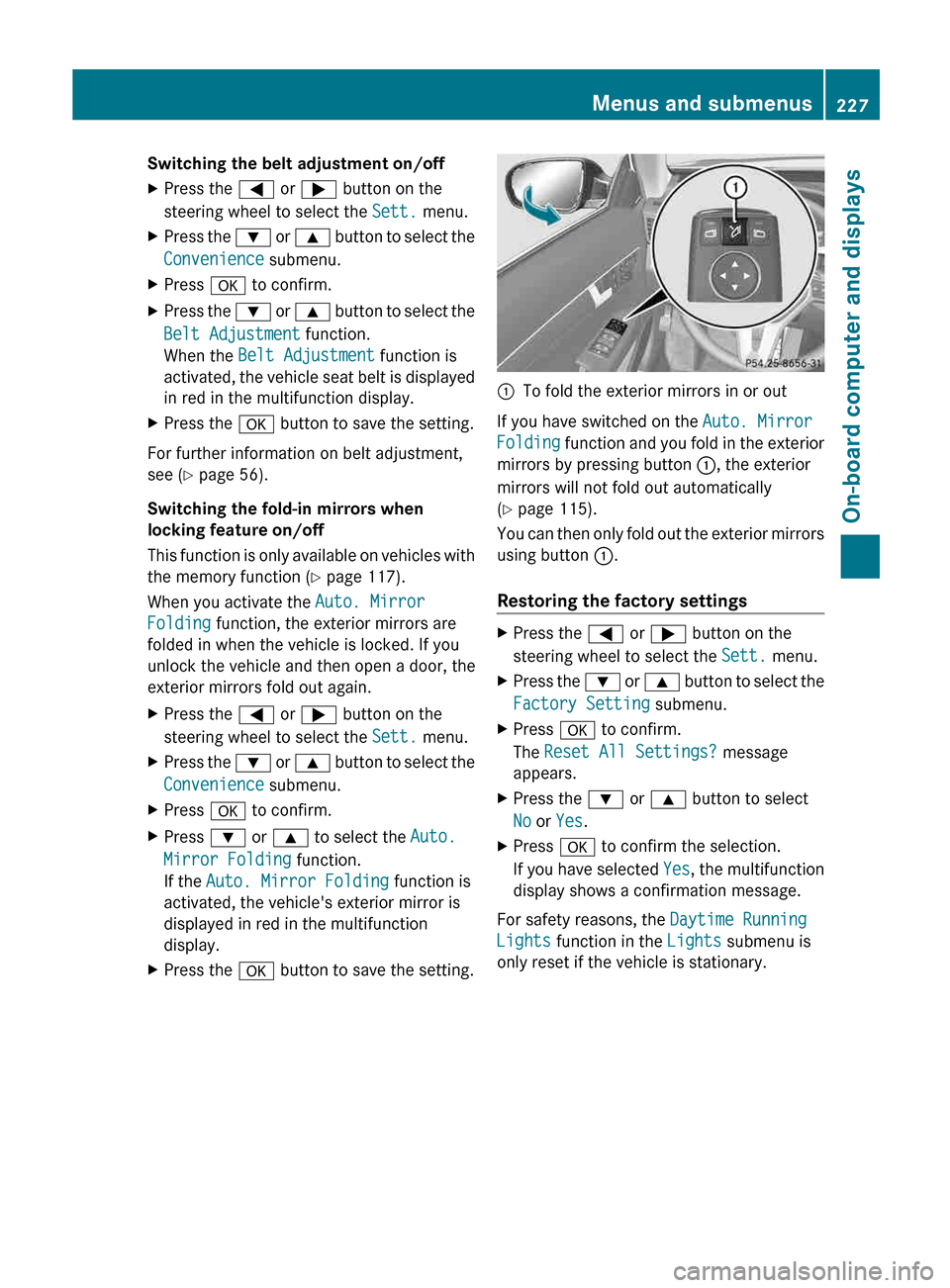
To fold the exterior mirrors in or out
If you have switched on the Auto. Mirror
Folding
function and you fold in the exterior
mirrors by pressing button :, the exterior
mirrors will not fold out automatically
(Y page 115).
You can then only fold out the exterior mirrors
using button :.
Restoring the factory settings X
Press the = or ; button on the
steering wheel to select the Sett. menu.
X Press the :
or 9 button to select the
Factory Setting submenu.
X Press a to confirm.
The Reset All Settings? message
appears.
X Press the : or 9 button to select
No or Yes.
X Press a to confirm the selection.
If
you have selected Yes, the multifunction
display shows a confirmation message.
For safety reasons, the Daytime Running
Lights function in the Lights submenu is
only reset if the vehicle is stationary. Menus and submenus
227
On-board computer and displays Z
Page 230 of 372
Display messages
Introduction
General notes Display messages appear in the multifunction display.
Display messages with graphic displays may be shown in simplified form in the Operator's
Manual and may differ from the messages shown in the multifunction display.
Please respond in accordance with the display messages and follow the additional notes in
this Operator's Manual.
Certain
display messages are accompanied by an audible warning tone or a continuous tone.
When the ignition is switched off, all display messages are deleted, apart from some high-
priority display messages. Once the causes of the high-priority display messages have been
rectified, the corresponding display messages are also deleted.
When you stop and park the vehicle, please observe the notes on:
R HOLD function ( Y page 189)
R Parking (Y page 167)
Hiding display messages X
Press the a or % button on the steering wheel to hide the display message.
The display message is cleared.
The multifunction display shows high-priority display messages in red. Some high-priority
display messages cannot be hidden.
The multifunction display shows these messages continuously until the causes for the
messages have been remedied.
Message memory The on-board computer saves certain display messages in the
message memory. You can
call up the display messages:
X Press the = or ; button on the steering wheel to select the Serv. menu.
If there are display messages, the multifunction display shows 2 Messages, for example.
X Press the 9 or : button to select the entry, e.g. 2 Messages.
X Press a to confirm.
X Press the 9 or : button to scroll through the display messages.228
Display messages
On-board computer and displays
Page 236 of 372
Display messages Possible causes/consequences and
M SolutionsFront Passenger
Airbag Enabled
See Operator's
Manual The front-passenger air bag is enabled during the journey, even
though:
R
a child, a small adult or an object weighing less than the
system's weight threshold is located on the front-passenger
seat.
or
R the front-passenger seat is unoccupied.
The system may detect objects or forces applying additional
weight on the seat.
G WARNING
The air bag may deploy unintentionally.
There is an increased risk of injury.
X Pull over and stop the vehicle safely as soon as possible, paying
attention to road and traffic conditions.
X Secure the vehicle against rolling away ( Y page 167).
X Switch the ignition off.
X Open the front-passenger door.
X Remove the child and the child restraint system from the front-
passenger seat.
X Make sure that there are no objects on the seat adding to the
weight.
The system may otherwise detect the additional weight and
interpret the seat occupant's weight as greater than it actually
is.
X Keep the seat unoccupied, close the front-passenger door and
switch on the ignition.
X Observe the ^a indicator lamp in the center console and
the multifunction display and check the following:
Seat unoccupied and ignition switched on:
R the 45
indicator lamp must light up and remain lit. When
the indicator lamp is on, OCS (Occupant Classification System)
has deactivated the front-passenger air bag ( Y page 46).
R the Front Passenger Airbag Enabled See Operator's
Manual or Front Passenger Airbag Disabled See
Operator's Manual display messages must not be shown in
the multifunction display.
X Wait for a period of at least 60 seconds until the necessary
system checks have been completed.
X Make sure that the display messages do not appear in the
multifunction display.234
Display messages
On-board computer and displays
Page 237 of 372
Display messages Possible causes/consequences and
M SolutionsIf these conditions are fulfilled, the front-passenger seat can be
occupied
again. Whether the 45 indicator lamp remains lit
or goes out depends on how OCS classifies the occupant.
If the conditions are not fulfilled, the system is not operating
correctly.
X Visit a qualified specialist workshop immediately.
For further information about the Occupant Classification System,
see ( Y page 46). Front Passenger
Airbag Disabled
See Operator's
Manual The front-passenger air bag is disabled during the journey, even
though:
R
an adult
or
R a person larger than a certain size is occupying the front-
passenger seat.
If additional forces are applied to the seat, the system may
interpret the occupant's weight as lower than it actually is.
G WARNING
The front-passenger air bag does not deploy during an accident.
There is an increased risk of injury.
X Pull over and stop the vehicle safely as soon as possible, paying
attention to road and traffic conditions.
X Secure the vehicle against rolling away ( Y page 167).
X Switch the ignition off.
X Have the occupant get out of the vehicle.
X Keep the seat unoccupied, close the front-passenger door and
switch on the ignition.
X Observe the 45
indicator lamp in the center console and
the multifunction display and check the following:
Seat unoccupied and ignition switched on:
R the 45
indicator lamp must light up and remain lit. When
the indicator lamp is on, OCS has deactivated the front-
passenger air bag ( Y page 46).
R the Front Passenger Airbag Enabled See Operator's
Manual or Front Passenger Airbag Disabled See
Operator's Manual display messages must not be shown in
the multifunction display.
X Wait for a period of at least 60 seconds until the necessary
system checks have been completed.
X Make sure that the display messages do not appear in the
multifunction display. Display messages
235
On-board computer and displays Z
Page 241 of 372
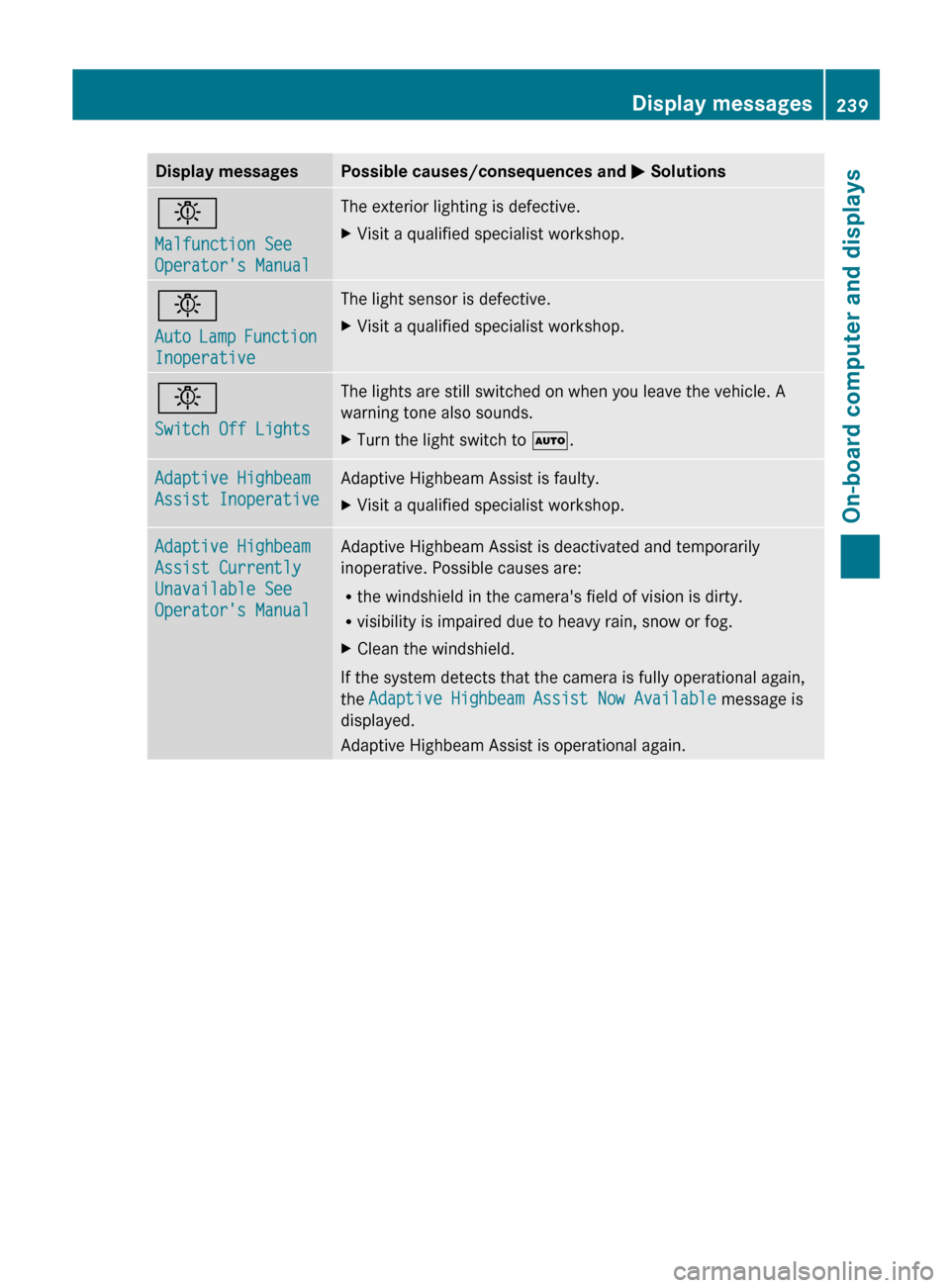
Display messages Possible causes/consequences and
M Solutionsb
Malfunction See
Operator's Manual The exterior lighting is defective.
X
Visit a qualified specialist workshop. b
Auto
Lamp Function
Inoperative The light sensor is defective.
X
Visit a qualified specialist workshop. b
Switch Off Lights The lights are still switched on when you leave the vehicle. A
warning tone also sounds.
X
Turn the light switch to Ã.Adaptive Highbeam
Assist Inoperative Adaptive Highbeam Assist is faulty.
X
Visit a qualified specialist workshop. Adaptive Highbeam
Assist Currently
Unavailable See
Operator's Manual Adaptive Highbeam Assist is deactivated and temporarily
inoperative. Possible causes are:
R
the windshield in the camera's field of vision is dirty.
R visibility is impaired due to heavy rain, snow or fog.
X Clean the windshield.
If the system detects that the camera is fully operational again,
the Adaptive Highbeam Assist Now Available message is
displayed.
Adaptive Highbeam Assist is operational again. Display messages
239
On-board computer and displays Z
Page 242 of 372
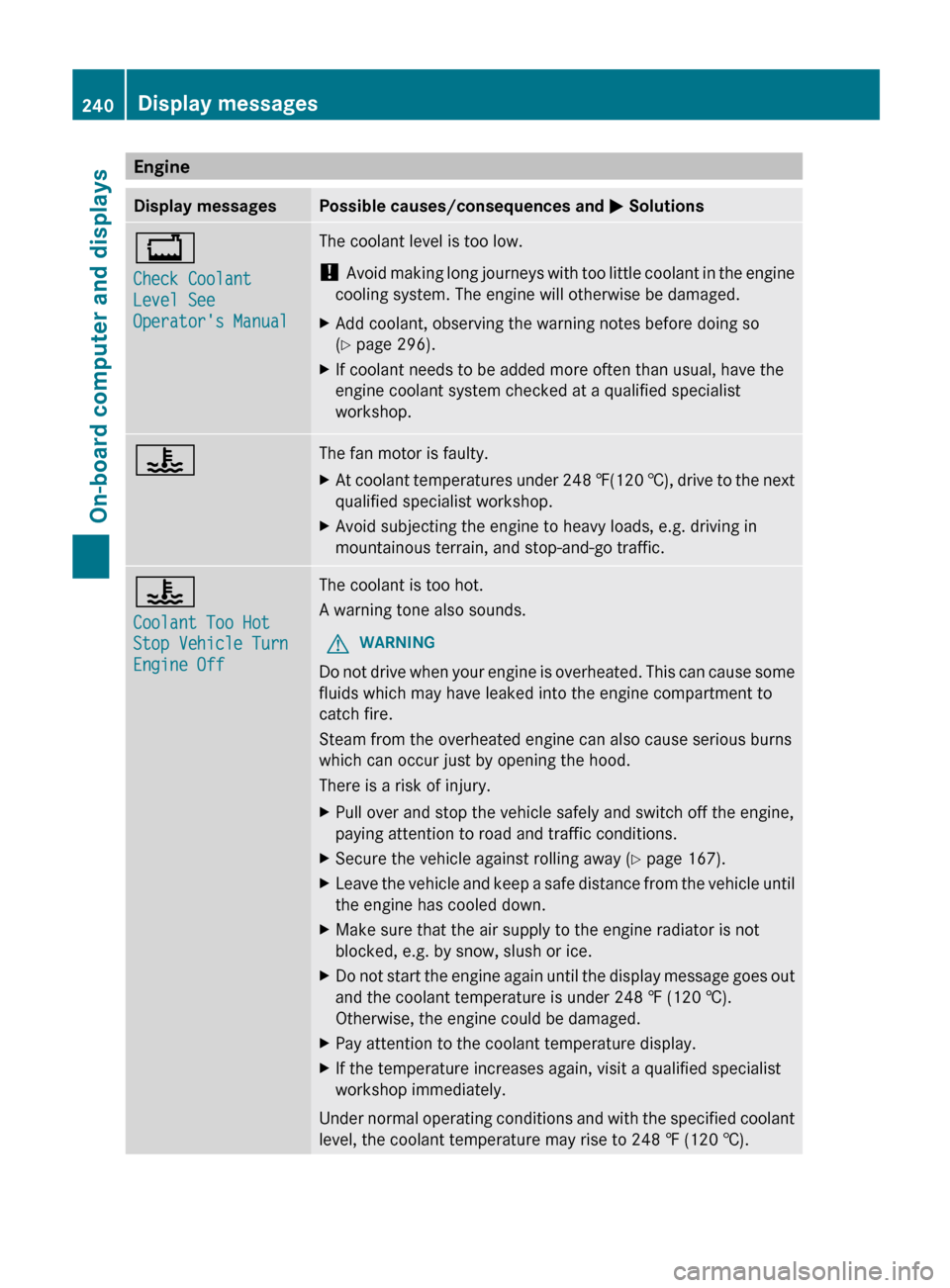
Engine
Display messages Possible causes/consequences and
M Solutions+
Check Coolant
Level See
Operator's Manual The coolant level is too low.
!
Avoid
making long journeys with too little coolant in the engine
cooling system. The engine will otherwise be damaged.
X Add coolant, observing the warning notes before doing so
(Y page 296).
X If coolant needs to be added more often than usual, have the
engine coolant system checked at a qualified specialist
workshop. ? The fan motor is faulty.
X
At coolant temperatures under 248 ‡(120 †),
drive to the next
qualified specialist workshop.
X Avoid subjecting the engine to heavy loads, e.g. driving in
mountainous terrain, and stop-and-go traffic. ?
Coolant Too Hot
Stop Vehicle Turn
Engine Off The coolant is too hot.
A warning tone also sounds.
G WARNING
Do not drive when your engine is overheated. This can cause some
fluids which may have leaked into the engine compartment to
catch fire.
Steam from the overheated engine can also cause serious burns
which can occur just by opening the hood.
There is a risk of injury.
X Pull over and stop the vehicle safely and switch off the engine,
paying attention to road and traffic conditions.
X Secure the vehicle against rolling away ( Y page 167).
X Leave the vehicle and keep a safe distance from the vehicle until
the engine has cooled down.
X Make sure that the air supply to the engine radiator is not
blocked, e.g. by snow, slush or ice.
X Do not start the engine again until the display message goes out
and the coolant temperature is under 248 ‡ (120
†).
Otherwise, the engine could be damaged.
X Pay attention to the coolant temperature display.
X If the temperature increases again, visit a qualified specialist
workshop immediately.
Under normal operating conditions and with the specified coolant
level, the coolant temperature may rise to
248 ‡ (120 †).240
Display messages
On-board computer and displays
Page 243 of 372
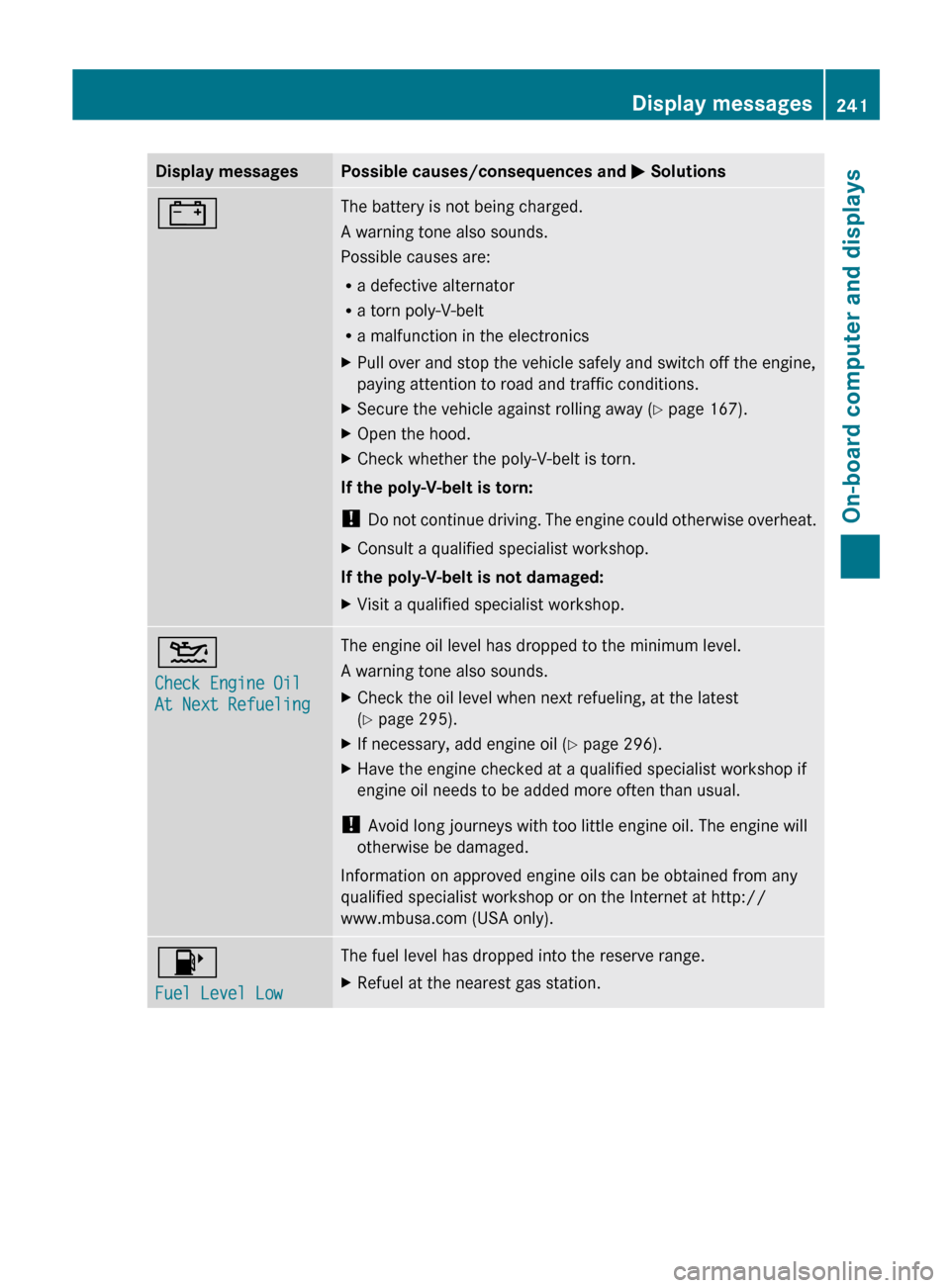
Display messages Possible causes/consequences and
M Solutions# The battery is not being charged.
A warning tone also sounds.
Possible causes are:
R
a defective alternator
R a torn poly-V-belt
R a malfunction in the electronics
X Pull over and stop the vehicle safely and switch off the engine,
paying attention to road and traffic conditions.
X Secure the vehicle against rolling away ( Y page 167).
X Open the hood.
X Check whether the poly-V-belt is torn.
If the poly-V-belt is torn:
! Do
not continue driving. The engine could otherwise overheat.
X Consult a qualified specialist workshop.
If the poly-V-belt is not damaged:
X Visit a qualified specialist workshop. 4
Check Engine Oil
At Next Refueling The engine oil level has dropped to the minimum level.
A warning tone also sounds.
X
Check the oil level when next refueling, at the latest
(Y page 295).
X If necessary, add engine oil ( Y page 296).
X Have the engine checked at a qualified specialist workshop if
engine oil needs to be added more often than usual.
! Avoid long journeys with too little engine oil. The engine will
otherwise be damaged.
Information on approved engine oils can be obtained from any
qualified specialist workshop or on the Internet at http://
www.mbusa.com (USA only). 8
Fuel Level Low The fuel level has dropped into the reserve range.
X
Refuel at the nearest gas station. Display messages
241
On-board computer and displays Z
Page 244 of 372
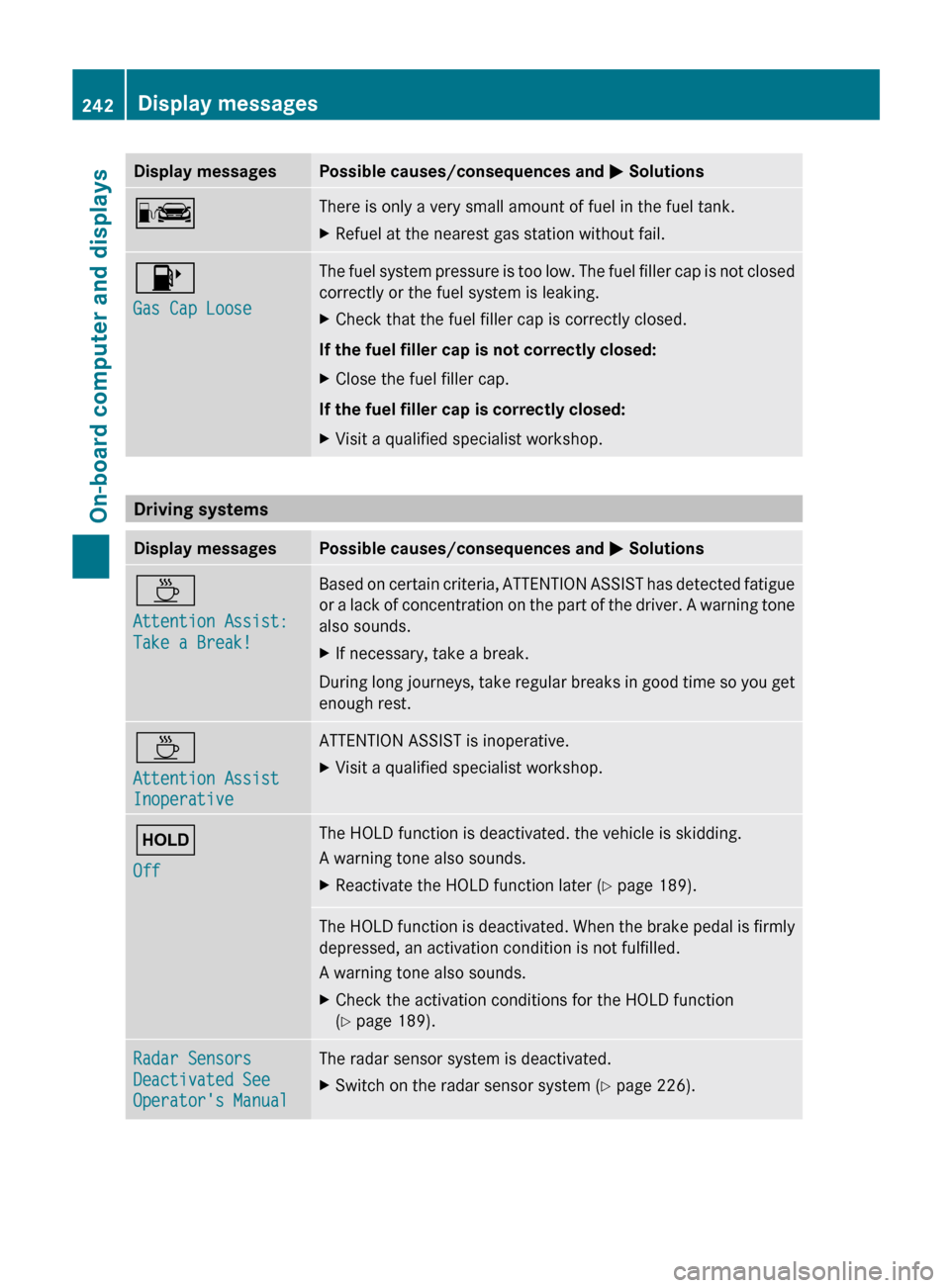
Display messages Possible causes/consequences and
M SolutionsC There is only a very small amount of fuel in the fuel tank.
X
Refuel at the nearest gas station without fail. 8
Gas Cap Loose The fuel system pressure is too low. The fuel filler cap is not closed
correctly or the fuel system is leaking.
X
Check that the fuel filler cap is correctly closed.
If the fuel filler cap is not correctly closed:
X Close the fuel filler cap.
If the fuel filler cap is correctly closed:
X Visit a qualified specialist workshop. Driving systems
Display messages Possible causes/consequences and
M SolutionsÀ
Attention Assist:
Take a Break! Based on certain criteria, ATTENTION ASSIST has detected fatigue
or
a lack of concentration on the part of the driver. A warning tone
also sounds.
X If necessary, take a break.
During long journeys, take regular breaks in good time so you get
enough rest. À
Attention Assist
Inoperative ATTENTION ASSIST is inoperative.
X
Visit a qualified specialist workshop. ë
Off The HOLD function is deactivated. the vehicle is skidding.
A warning tone also sounds.
X
Reactivate the HOLD function later (Y page 189). The HOLD function is deactivated. When the brake pedal is firmly
depressed, an activation condition is not fulfilled.
A warning tone also sounds.
X
Check the activation conditions for the HOLD function
(Y page 189). Radar Sensors
Deactivated See
Operator's Manual The radar sensor system is deactivated.
X
Switch on the radar sensor system (Y page 226).242
Display messages
On-board computer and displays
Page 254 of 372
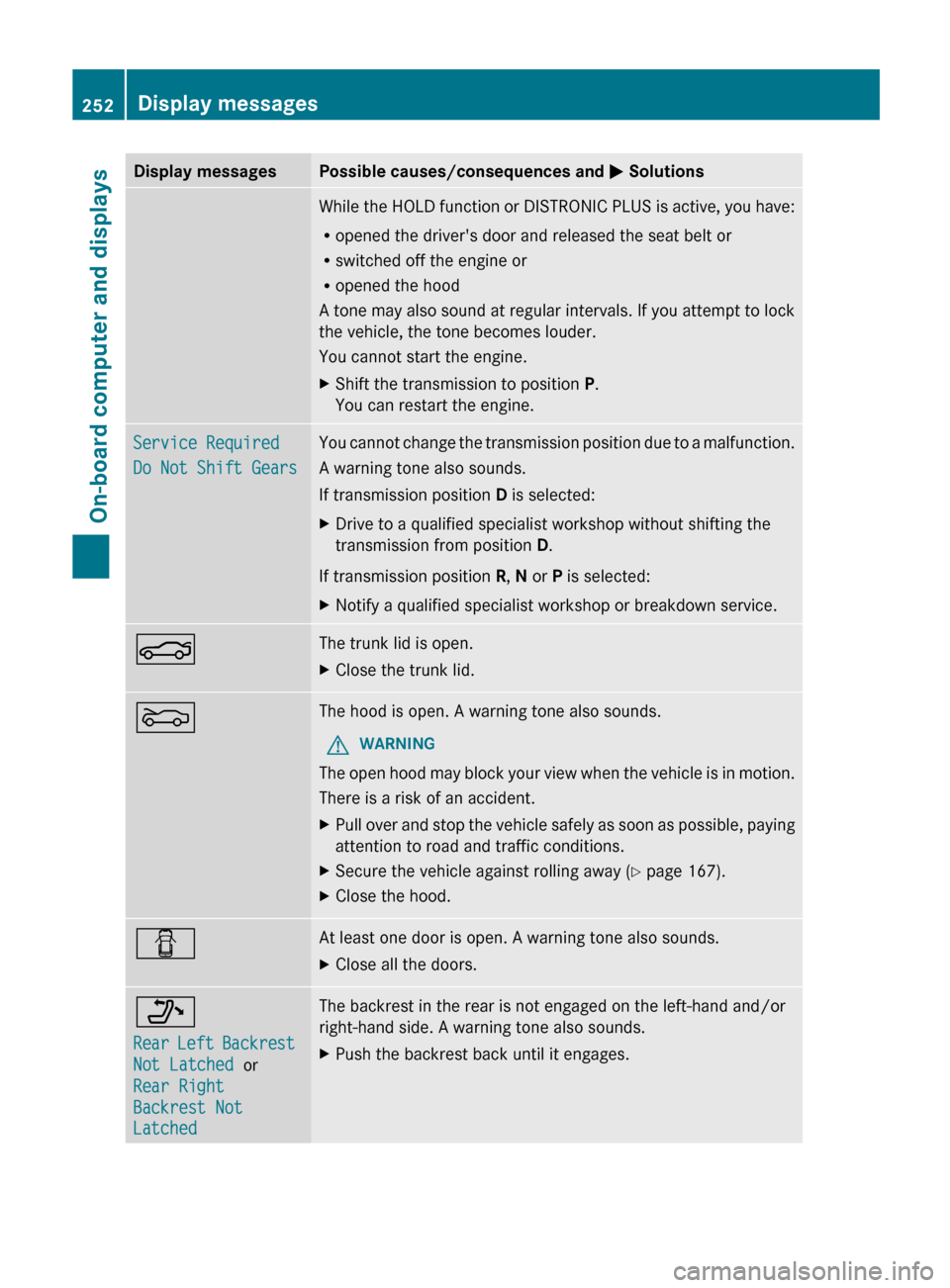
Display messages Possible causes/consequences and
M SolutionsWhile the HOLD function or DISTRONIC PLUS is active, you have:
R
opened the driver's door and released the seat belt or
R switched off the engine or
R opened the hood
A
tone may also sound at regular intervals. If you attempt to lock
the vehicle, the tone becomes louder.
You cannot start the engine.
X Shift the transmission to position P.
You can restart the engine. Service Required
Do Not Shift Gears You cannot change the transmission position due to a malfunction.
A warning tone also sounds.
If transmission position
D is selected:
X Drive to a qualified specialist workshop without shifting the
transmission from position D.
If transmission position R, N or P is selected:
X Notify a qualified specialist workshop or breakdown service. N The trunk lid is open.
X
Close the trunk lid. M The hood is open. A warning tone also sounds.
G WARNING
The open hood may block your view when the vehicle is in motion.
There is a risk of an accident.
X Pull over and stop the vehicle safely as soon as possible, paying
attention to road and traffic conditions.
X Secure the vehicle against rolling away ( Y page 167).
X Close the hood. C At least one door is open. A warning tone also sounds.
X
Close all the doors. _
Rear
Left Backrest
Not Latched or
Rear Right
Backrest Not
Latched The backrest in the rear is not engaged on the left-hand and/or
right-hand side. A warning tone also sounds.
X
Push the backrest back until it engages.252
Display messages
On-board computer and displays
Page 256 of 372
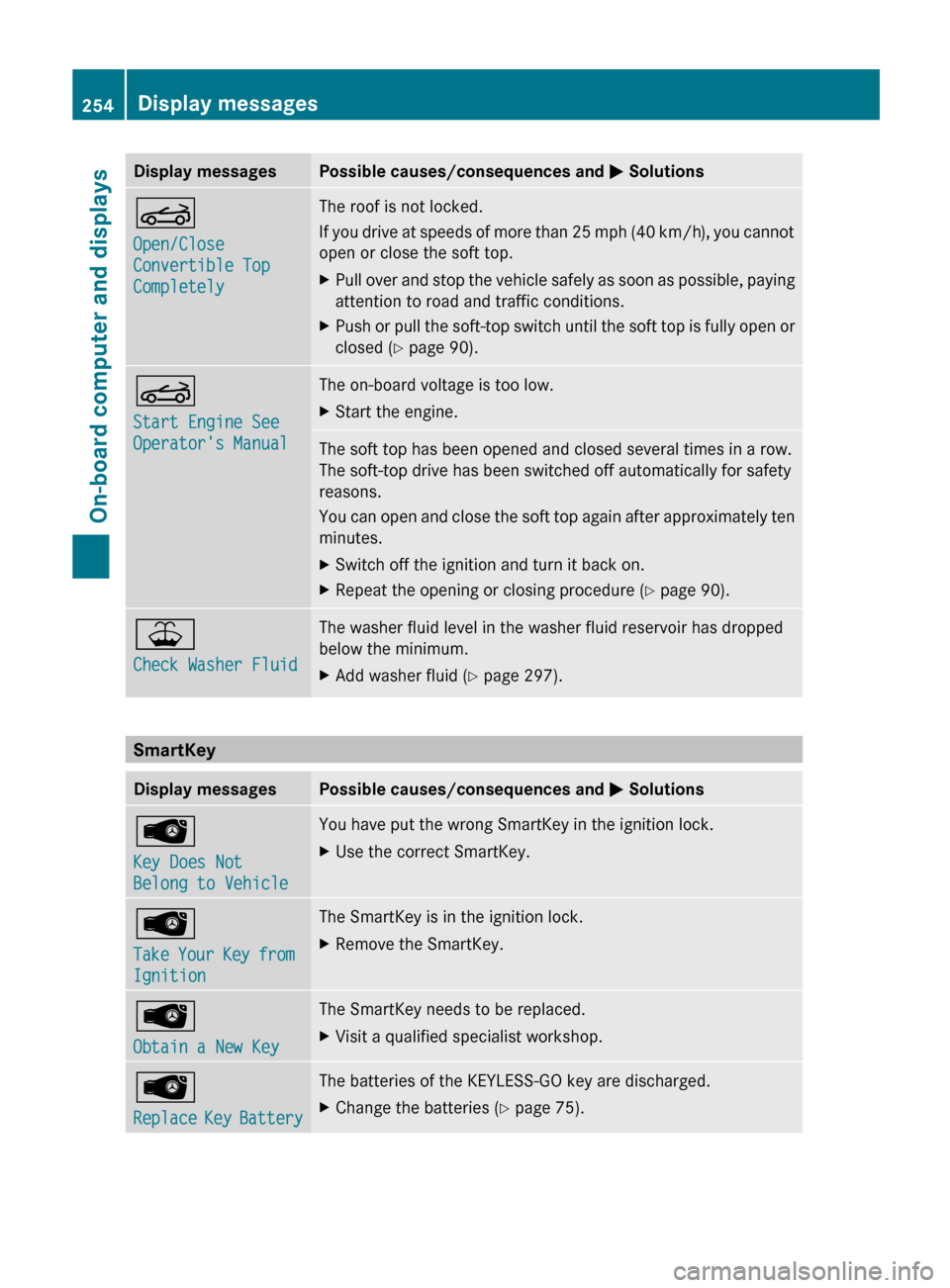
Display messages Possible causes/consequences and
M SolutionsK
Open/Close
Convertible Top
Completely The roof is not locked.
If
you drive at speeds of more than 25 mph (40 km/h), you cannot
open or close the soft top.
X Pull over and stop the vehicle safely as soon as possible, paying
attention to road and traffic conditions.
X Push or pull the soft-top switch until the soft top is fully open or
closed ( Y page 90). K
Start Engine See
Operator's Manual The on-board voltage is too low.
X
Start the engine. The soft top has been opened and closed several times in a row.
The soft-top drive has been switched off automatically for safety
reasons.
You
can open and close the soft top again after approximately ten
minutes.
X Switch off the ignition and turn it back on.
X Repeat the opening or closing procedure ( Y page 90).¥
Check Washer Fluid The washer fluid level in the washer fluid reservoir has dropped
below the minimum.
X
Add washer fluid ( Y page 297).SmartKey
Display messages Possible causes/consequences and
M SolutionsÂ
Key Does Not
Belong to Vehicle You have put the wrong SmartKey in the ignition lock.
X
Use the correct SmartKey. Â
Take
Your Key from
Ignition The SmartKey is in the ignition lock.
X
Remove the SmartKey. Â
Obtain a New Key The SmartKey needs to be replaced.
X
Visit a qualified specialist workshop. Â
Replace
Key Battery The batteries of the KEYLESS-GO key are discharged.
X
Change the batteries ( Y page 75).254
Display messages
On-board computer and displays