phone MERCEDES-BENZ E-CLASS COUPE 2015 Owners Manual
[x] Cancel search | Manufacturer: MERCEDES-BENZ, Model Year: 2015, Model line: E-CLASS COUPE, Model: MERCEDES-BENZ E-CLASS COUPE 2015Pages: 345, PDF Size: 11.42 MB
Page 4 of 345
Welcome to the world of Mercedes-Benz
Before you first drive off, read this Owner's Man- ual carefully and familiarise yourself with your
vehicle. For your own safety and a longer vehicle
life, follow the instructions and warning notices in this manual. Disregarding them may lead to
damage to the vehicle or personal injury.
The equipment or model designation of your
vehicle may vary according to:
R model
R order
R country variant
R availability
The illustrations in this manual show a left-hand-
drive vehicle. On right-hand-drive vehicles, the
layout of components and controls differs
accordingly.
Mercedes-Benz is constantly updating its vehi-
cles to the state of the art.
Mercedes-Benz therefore reserves the right to
introduce changes in the following areas:
R design
R equipment
R technical features
The equipment in your vehicle may therefore
differ from that shown in the descriptions and
illustrations.
The following are integral components of the
vehicle:
R Digital Owner's Manual
R Printed Owner's Manual
R Service Booklet
R Equipment-dependent Supplements
Keep these documents in the vehicle at all
times. If you sell the vehicle, always pass all of
the documents on to the new owner.
Your Owner's Manuals: Digital - in the vehicle
The Digital Owner's Manual provides com-
prehensive and specifically adapted infor-
mation on the equipment in your vehicle
and your multimedia system. You will find
informative animations, individual lan-
guage selection options and an intuitive
search function. Printed manual - in the vehicle
In addition to the vehicle Owner's Manual,
the full multimedia system Supplement is also available from your Mercedes-Benz
Service Centre. Digital - on the Internet
The online version of the Owner's Manual
provides convenient access to compre-
hensive information on your vehicle and
your multimedia system. It also provides
helpful animations, interesting back-
ground information and various search
options.
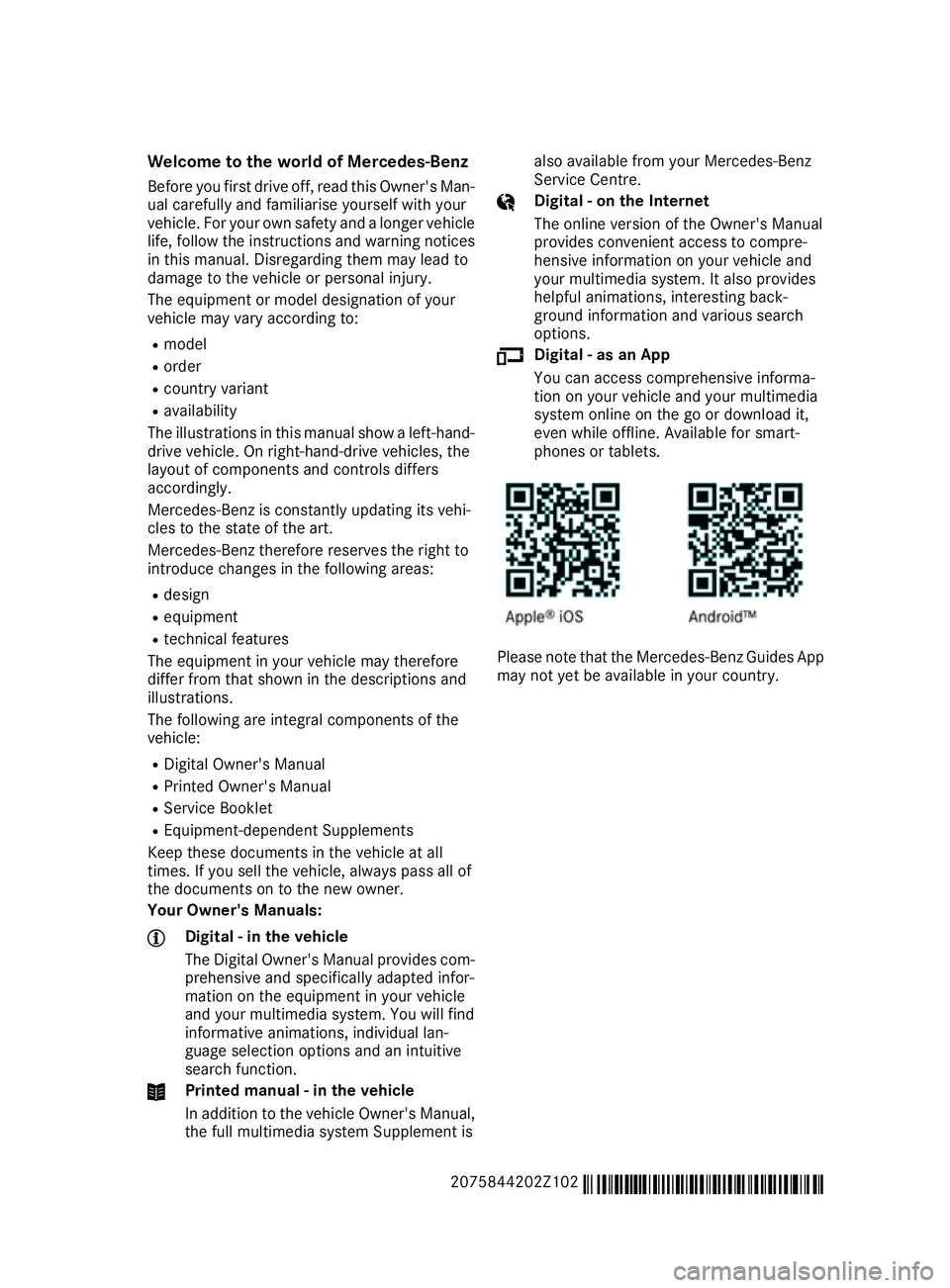
Digital - as an App
You can access comprehensive informa-
tion on your vehicle and your multimedia
system online on the go or download it,
even while offline. Available for smart-
phones or tablets.
Please note that the Mercedes-Benz Guides App
may not yet be available in your country.
2075844202Z102 É2075844202Z102xËÍ
Page 8 of 345
B
Back button ....................................... 257
Bag hook ............................................ 269
Ball coupling
Folding in ....................................... 203
Folding in/out ................................ 203
Folding out ..................................... 203
BAS (Brake Assist System) ................. 62
BAS PLUS (Brake Assist System
PLUS) with Cross-Traffic Assist
Function/note s................................ 62
BAS PLUS with Cross-Traffic Assist
(Brake Assist PLUS with Cross-
Traffic Assist)
Important safety notes .................... 63
Battery (key)
Checking .......................................... 77
Important safety notes .................... 77
Replacing ......................................... 77
Battery (vehicle)
Charging ........................................ 304
Display message ............................ 232
Important safety notes .................. 302
Jump starting ................................. 305
Belt
see Seat belts
Belt tensioner
Activation ......................................... 44
Blind Spot Assist
Activating/deactivating (on-
board computer) ............................ 215
Display message ............................ 235
Notes/function .............................. 193
Trailer towing ................................. 195
see Active Blind Spot Assist
BlueTEC (AdBlue ®
) ............................. 332
Bluetooth ®
Connecting another mobile
phone ............................................ 260
Searching for a mobile phone ........ 259
See also Digital Owner's Manua l... 256
Telephony ...................................... 259
Bonnet
Active bonnet (pedestrian protec-tion) ............................................... 283
Closing ........................................... 285
Display message ............................ 243 Important safety notes .................. 283
Opening ......................................... 284
Boot
Emergency release .......................... 84
Important safety notes .................... 82
Locking separately ........................... 83
Opening (automatically from
inside) .............................................. 83
Opening/closing (manually from
outside) ............................................ 83
Boot lid
Display message ............................ 243
Opening dimensions ...................... 335
Boot load (maximum) ........................ 335
Brake Assist
see BAS (Brake Assist System)
Brake fluid
Display message ............................ 225
Notes ............................................. 333
Brake force distribution
see EBD (electronic brake force
distribution)
Brake lamps
Adaptive ........................................... 66
Display message ............................ 229
Brakes
ABS .................................................. 62
Adaptive Brake Assist ...................... 66
BAS .................................................. 62
BAS PLUS with Cross-Traffic
Assist ............................................... 62
Brake fluid (notes) ......................... 333
Display message ............................ 223
Driving tips .................................... 153
HOLD function ............................... 170
Important safety notes .................. 153
Parking brake ................................ 152
Warning lamp ................................. 248
Breakdown
Where will I find...? ........................ 296
see Flat tyre
Brightness control (instrument
cluster lighting) ................................... 30
Bulbs
see Replacing bulbs Index
5
Page 10 of 345
Switching on/of
f........................... 117
Switching residual heat on/off ...... 124
Switching the rear window heat-
ing on/of f...................................... 122
Switching the ZONE function on/
off .................................................. 121
THERMATIC automatic climate
control (2-zone) ............................. 116
THERMOTRONIC (3-zone) auto-
matic climate control ..................... 116
Cockpit
Overview .......................................... 28
see Instrument cluster
COLLISION PREVENTION ASSIST
PLUS
Activating/deactivating ................. 214
Display message ............................ 225
Operation/note s.............................. 64
COMAND display
Cleaning ......................................... 294
COMAND Online
Switching on/of f........................... 256
Combination switch .......................... 108
Connecting a USB device
See also Digital Owner's Manua l... 256
Consumption statistics (on-board
computer) .......................................... 209
Controller ........................................... 257
Convenience closing feature .............. 86
Convenience opening feature ............ 86
Convenience opening/closing (air-
recirculation mode) ........................... 123
Coolant (engine)
Checking the level ......................... 286
Display message ............................ 231
Important safety notes .................. 334
Temperature gaug e........................ 206
Warning lamp ................................. 252
Cooling
see Climate control
Copyright ............................................. 27
Cornering light function
Display message ............................ 229
Function/note s............................. 109
Cruise control
Activation conditions ..................... 157
Cruise control lever ....................... 156 Deactivating ................................... 158
Display message ............................ 238
Driving system ............................... 156
Important safety notes .................. 156
LIM indicator lamp ......................... 156
Selecting ........................................ 156
Setting a speed .............................. 158
Storing and maintaining current
speed ............................................. 157
Cup holder
Centre console .............................. 271
Important safety notes .................. 270
Rear compartment ......................... 272 D
Dashboard see Instrument cluster
Data
see Technical data
Data carrier
Selecting ........................................ 211
Data modem mode
Telephone with Bluetooth ®
(SAP
profile) ........................................... 262
Daytime driving lights
Display message ............................ 229
Function/note s............................. 106
Switching on/off (on-board com-
puter) ............................................. 217
Dealership
see Qualified specialist workshop
Declarations of conformity ................. 25
Delayed switch-off
Exterior lighting (on-board com-
puter) ............................................. 218
Interior lighting .............................. 218
Diagnostics connection ...................... 25
Diesel .................................................. 331
Digital Owner's Manual
Help ................................................. 22
Introduction ..................................... 22
Digital speedometer ......................... 209
Dipped-beam headlamps
Display message ............................ 229
Setting for driving abroad (sym-
metrical) ........................................ 106 Index
7
Page 13 of 345
Warning lamp (engine diagnos-
tics) ............................................... 252
Engine electronics
Notes ............................................. 327
Problem (fault) ...............................1 38
Engine jump starting
see Jump starting (engine)
Engine oil
Additives ........................................ 333
Checking the oil level ..................... 285
Checking the oil level using the
dipstick .......................................... 285
Display message ............................ 232
Filling capacity ............................... 333
Notes about oil grades ................... 332
Notes on oil level/consumption .... 285
Topping up ..................................... 286
Entering an address
See also Digital Owner's Manual ... 256
Environmental protection
Returning an end-of-life vehicle ....... 23
ESP ®
(Electronic Stability Pro-
gram)
Characteristics ................................. 67
Deactivating/activating ................. 214
Deactivating/activating (notes) ....... 68
Display message ............................ 223
Function/notes ................................ 67
General notes .................................. 67
Important safety guidelines ............. 67
Trailer stabilisatio n.......................... 68
Warning lamp ................................. 249
ETS/4ETS (Electronic Traction Sys-
tem) ...................................................... 67
Exhaust pipe (cleaning instruc-
tions) .................................................. 293
Exterior lighting
Settings options ............................. 106
see Lights
Exterior mirrors
Adjusting ....................................... 102
Anti-dazzle mode (automatic) ........ 103
Folding in when locking (on-boardcomputer) ...................................... 220
Folding in/out (automatically )....... 103
Folding in/out (electrically) ........... 103
Out of position (troubleshooting) ... 103 Parking position ............................. 104
Resetting ....................................... 103
Storing settings (memory func-
tion) ............................................... 104 F
Fault message see Display messages
Favourites
Overview ........................................ 257
Filler cap
see Fuel filler flap
Fire extinguisher ............................... 296
First-aid kit ......................................... 296
Fitting a wheel
Fitting a wheel ............................... 324
Lowering the vehicle ...................... 324
Preparing the vehicle ..................... 321
Raising the vehicl e......................... 322
Removing a whee l.......................... 323
Securing the vehicle against roll-
ing away ........................................ 322
Flat tyre
MOExtended tyre s......................... 298
Preparing the vehicle ..................... 298
TIREFIT kit ...................................... 299
see Emergency spare wheel
Floormat ............................................. 281
Foglamps
Extended rang e.............................. 109
Frequencies
Garage door opener ....................... 279
Mobile phone ................................. 327
Two-way radio ................................ 327
Fuel
Additives ........................................ 331
Consumption statistics .................. 209
Displaying the current consump-
tion ................................................ 209
Displaying the range ...................... 209
Fuel gaug e....................................... 30
Grade (petrol) ................................ 330
Important safety notes .................. 330
Notes for E 200, E 250, E400 ........ 331
Problem (malfunction) ................... 150
Quality (diesel )............................... 331
Refuelling ....................................... 147 10
Index
Page 17 of 345
Mobile phone
Connecting (Bluetooth ®
inter-
face) ............................................. .259
Connecting another mobile
phone ............................................ 260
Connecting the telephone module
with Bluetooth ®
(SAP profile) ......... 262
Frequencies ................................... 327
Installation ..................................... 327
Menu (on-board computer) ............ 212
Notes/placing in the bracket ......... 275
Transmission output (maximum) .... 327
Mobile telephone
Pre-installed bracket ..................... .276
Modifying the programming (key) ..... 76
MOExtended tyres .............................298
Motorway mode ................................ 109
MP3
Operating ....................................... 211
See also Digital Owner's Manual ... 256
Multicontour seat
Adjusting (on the seat) ..................... 97
Multifunction display
Function/notes ............................ .208
Permanent display ......................... 216
Multifunction steering wheel
Operating the on-board computer .. 207
Overview .......................................... 31
Multimedia system
see Separate operating instructions
Music files
See also Digital Owner's Manual ... 256 N
Navigation Menu (on-board computer) ............ 210
See also Digital Owner's Manual ... 256
NECK-PRO head restraints
Important safety notes .................... 45
Operation ......................................... 45
Resetting triggered .......................... 46
Notes on running in a new vehicle .. 131O
Occupant safety Airbags ............................................ 41 Automatic measures after an acci-
dent ................................................. 47
Children in the vehicle ..................... 47
Important safety notes .................... 36
PASSENGER AIRBAG indicator
lamp ................................................. 37
Pets in the vehicle ........................... 61
PRE-SAFE ®
(anticipatory occu-
pant protection) ............................... 46
PRE-SAFE ®
PLUS (anticipatory
occupant protection PLUS) .............. 47
Restraint system introduction .......... 36
Restraint system warning lamp ....... .37
Odometer ...........................................2 08
Oil
see Engine oil
On-board computer
Assistance menu ........................... 213
Audio menu ................................... 211
Convenience submenu .................. 220
Display messages .......................... 222
Displaying a service message ....... .288
DISTRONIC PLUS ........................... 166
Factory setting submenu .............. .221
Heating submenu ........................... 219
Important safety notes .................. 206
Instrument cluster submenu .......... 216
Light submenu ............................... 216
Menu overview .............................. 208
Message memory .......................... 222
Navigation menu ............................ 210
Operating the TV ............................ 212
Operating video DVD ..................... 211
Operation ....................................... 207
Service menu ................................. 215
Settings menu ............................... 216
Standard display ............................ 208
Telephone menu ............................ 212
Trip menu ...................................... 208
Vehicle submenu ........................... 218
Operating instructions
Vehicle equipment ........................... 24
Operating safety
Declaration of conformity ................ 25
Important safety note ..................... .24
Operating system
see On-board computer 14
Index
Page 18 of 345
Operation
Digital Owner's Manual .................... 22
Outside temperature display ........... 206
Overhead control panel ......................34
Override feature
Rear side windows ........................... 61 P
Paint code .......................................... 328
Paintwork (cleaning instructions) ... 291
Panic alarm .......................................... 36
Panorama sliding sunroof
Important safety information ........... 88
Operating ......................................... 89
Operating the roller sunblinds for
the sliding sunroof ........................... 90
Problem (malfunction) ..................... 92
Rain closing feature .........................89
Reversing feature ............................ .89
Parking
Important safety notes .................. 150
Parking brake ................................ 152
Position of exterior mirror, front-
passenger side ...............................1 04
Reversing camera .......................... 181
see PARKTRONIC
Parking aid
Active Parking Assist ..................... 176
see Exterior mirrors
see PARKTRONIC
Parking assistance
see PARKTRONIC
Parking brake
Display message ............................ 225
Notes/function .............................. 152
Warning lamp ................................. 248
Parking lamps
Display message ............................ 229
Switching on/off ........................... 107
PARKTRONIC
Deactivating/activating ................. 174
Driving system ............................... 172
Function/notes ............................ .172
Important safety notes .................. 172
Problem (fault) ............................... 176
Sensor range ................................. 173
Trailer towing ................................. 174 Warning displa
y............................. 174
PASSENGER AIR BAG OFF
Indicator lamp .................................. 37
Problems (malfunctions) .................. 55
Petrol .................................................. 330
Pets in the vehicle ............................... 61
Phone book
See also Digital Owner's Manua l... 256
Plastic trim (cleaning instruc-
tions) .................................................. 294
Power windows
see Side windows
PRE-SAFE ®
(anticipatory occupant
protection)
Operation ......................................... 46
PRE-SAFE ®
(preventive occupant
safety system)
Display message ............................ 226
PRE-SAFE ®
Brake
Activating/deactivating ................. 214
Display message ............................ 226
Function/note s................................ 69
Important safety notes .................... 69
Warning lamp ................................. 254
PRE-SAFE ®
PLUS (anticipatory
occupant protection PLUS)
Display message ............................ 226
Operation ......................................... 47
Program selector button .................. 143
Protection against theft
ATA (Anti-Theft Alarm system )......... 71
Immobiliser ...................................... 71
Interior motion sensor ..................... 72
Tow-away protection ........................ 72
Protection of the environment
General notes .................................. 23
Pulling away
Automatic transmission ................. 134
General notes ................................ 134
Manual transmission ...................... 134 Q
QR code Mercedes-Benz Guide App ................. 1
Rescue card ..................................... 26
Qualified specialist workshop ........... 26 Index
15
Page 21 of 345
Sound
Switching on/off ........................... 257
Specialist workshop ............................26
Speed, controlling
see Cruise control
Speedometer
Activating/deactivating the addi-
tional speedometer ........................ 216
Digital ............................................ 209
In the Instrument cluster ................. 30
Segments ...................................... 206
Selecting a display unit .................. 216
SPEEDTRONIC
Deactivating variable ..................... 160
Display message ............................2 37
Function/notes ............................ .158
Important safety notes .................. 158
LIM indicator lamp ......................... 159
Permanent ..................................... 161
Selecting ........................................ 159
Storing the current spee d.............. 159
Variabl e......................................... 159
Start/stop function
see ECO start/stop function
Starting (engine) ................................ 133
STEER CONTROL .................................. 71
Steering
Display message ............................ 245
Steering Assist and Stop&Go Pilot
(DISTRONIC PLUS)
Activating/deactivating ................. 215
Display message ............................ 238
Steering assistant STEER CON-
TROL
see STEER CONTROL
Steering wheel
Adjusting (electrically) ................... 100
Adjusting (manually) ........................ 99
Button overview ............................... 31
Buttons (on-board computer) ......... 207
Cleaning ......................................... 295
Gearshift paddle s........................... 144
Important safety notes .................... 99
Steering wheel heating .................. 100
Storing settings (memory func-
tion) ............................................... 104
Steering wheel gearshift paddles .... 144Steering wheel heating
Problem (malfunction) ................... 101
Switching on/of f........................... 100
Stowage areas ................................... 265
Stowage compartments
Armrest (under) ............................. 267
Centre console .............................. 266
Cup holde r..................................... 270
Glove compartment ....................... 266
Important safety information ......... 265
Under driver's seat/front-
passenger sea t.............................. 267
Stowage net ....................................... 267
Stowage space
Stowage net ................................... 267
Stowage well beneath the boot
floor .................................................... 269
Summer tyres .................................... 315
Sun visor ............................................ 272
Surround lighting (on-board com-
puter) .................................................. 218
Switching on media mode
Via the device list .......................... 263 T
Tail lamps Display message ............................ 229
Tank
see Fuel tank
Technical data
Capacities ...................................... 329
Emergency spare wheel ................. 326
Information .................................... 327
Trailer load s................................... 336
Tyres/wheels ................................. 325
Vehicle data ................................... 335
Telephone
Accepting a call (multifunction
steering wheel) .............................. 212
Authorising a mobile phone (con-
necting) ......................................... 259
Connecting a Mobile phone (gen-
eral information) ............................ 259
Display message ............................ 244
Menu (on-board computer) ............ 212
Number from the phone book ........ 213
Redialling ....................................... 213 18
Index
Page 22 of 345
Rejecting/ending a call ................
.213
See also Digital Owner's Manual ... 256
Switching between mobile
phones .......................................... .260
Telephone compartment ................ 267
Telephone module with Bluetooth ®
(SAP profile) Activating and connecting the
module .......................................... .261
Charging a mobile phone .............. .263
Connecting the mobile phone ....... .262
Connecting the module using a
USB cable ...................................... 261
Data modem mode ........................ 262
Installing the module ..................... 261
Introduction ................................... 260
Saving/deleting the PIN for the
SIM card ........................................ 262
Settings ......................................... 262
SIM card mode .............................. 261
Text messages ............................... 263
Transferring the phone book .......... 262
Temperature
Coolant .......................................... 206
Outside temperature ..................... .206
Setting (climate control) ................ 120
TEMPOMAT
Function/notes ............................ .156
Text messages
Telephone module with Blue-
tooth ®
(SAP profile) ....................... 263
Through-loading feature ................... 268
TIREFIT kit .......................................... 299
Important safety notes .................. 299
Storage location ............................ 297
Tyre pressure not reached ............. 301
Tyre pressure reached ................... 301
Top Tether ............................................ 50
Total distance recorder .................... 208
Tow-away protection
Activating ......................................... 72
Deactivating ..................................... 72
Function .......................................... .72
Tow-starting
Emergency engine starting ............ 310
Important safety notes .................. 307 Towing
Important safety notes .................. 307
Transporting the vehicle ................ 309
With the rear axle raised ................ 309
Towing a trailer
Active Blind Spot Assist ................. 198
Active Lane Keeping Assist ............ 201
Active Parking Assist ..................... 180
Axle load, permissibl e.................... 336
ESP ®
(Electronic Stability Pro-
gram) ............................................... 68
Failure check for LEDs ................... 204
General notes ................................ 202
Trailer tow hitch display message .. 244
Towing away
Fitting the towing ey e.................... 308
Removing the towing eye ............... 309
With both axles on the ground ....... 309
Towing eye ......................................... 297
Traffic Sign Assist
Activating/deactivating the warn-ing function .................................... 214
Display message ............................ 234
Function/note s............................. 190
Important safety notes .................. 191
Instrument cluster display ............. 191
Trailer
Folding the ball coupling in/out ..... 203
Trailer coupling
see Towing a trailer
Trailer towing
7-pin connecto r............................. 205
Blind Spot Assist ............................ 195
Cleaning the trailer tow hitch ......... 294
Coupling up a traile r...................... 204
Decoupling a trailer ....................... 204
Driving tips .................................... 202
Folding in the ball coupling ............ 203
Folding out the ball coupling .......... 203
Important safety notes .................. 201
Lights display message .................. 229
Mounting dimensions .................... 335
Parktronic ...................................... 174
Power supply ................................. 204
Trailer load s................................... 336
Transmission
see Automatic transmission
see Manual transmission Index
19
Page 34 of 345
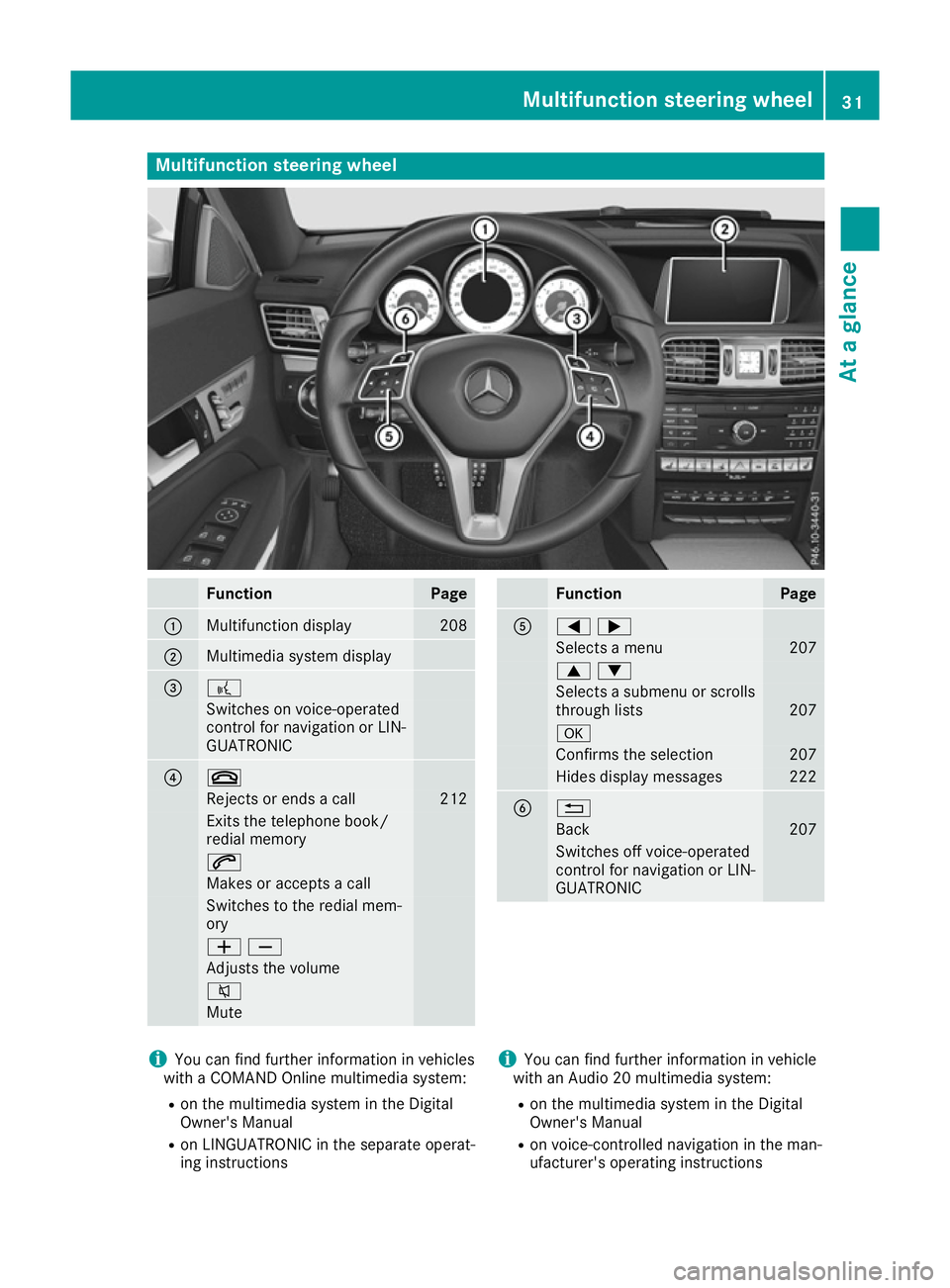
Multifunction steering wheel
Function Page
:
Multifunction display 208
;
Multimedia system display
= ?
Switches on voice-operated
control for navigation or LIN-
GUATRONIC ? ~
Rejects or ends a call 212
Exits the telephone book/
redial memory
6
Makes or accepts a call
Switches to the redial mem-
ory
WX
Adjusts the volume
8
Mute Function Page
A
=;
Selects a menu 207
9:
Selects a submenu or scrolls
through lists 207
a
Confirms the selection 207
Hides display messages 222
B %
Back 207
Switches off voice-operated
control for navigation or LIN-
GUATRONIC i
You can find further information in vehicles
with a COMAND Online multimedia system:
R on the multimedia system in the Digital
Owner's Manual
R on LINGUATRONIC in the separate operat-
ing instructions i
You can find further information in vehicle
with an Audio 20 multimedia system:
R on the multimedia system in the Digital
Owner's Manual
R on voice-controlled navigation in the man-
ufacturer's operating instructions Multifunction steering wheel
31At a glance
Page 55 of 345
wards from the retracted seat-belt extender.
If necessary, adjust the front-passenger seat
accordingly. Always observe the information
about suitable positioning of the child
restraint system in this Owner's Manual as
well as the child restraint system manufac-
turer's installation instructions.
i Ensure that your vehicle is equipped with
automatic child seat recognition for the front-
passenger seat (Y page 52). If this is not the
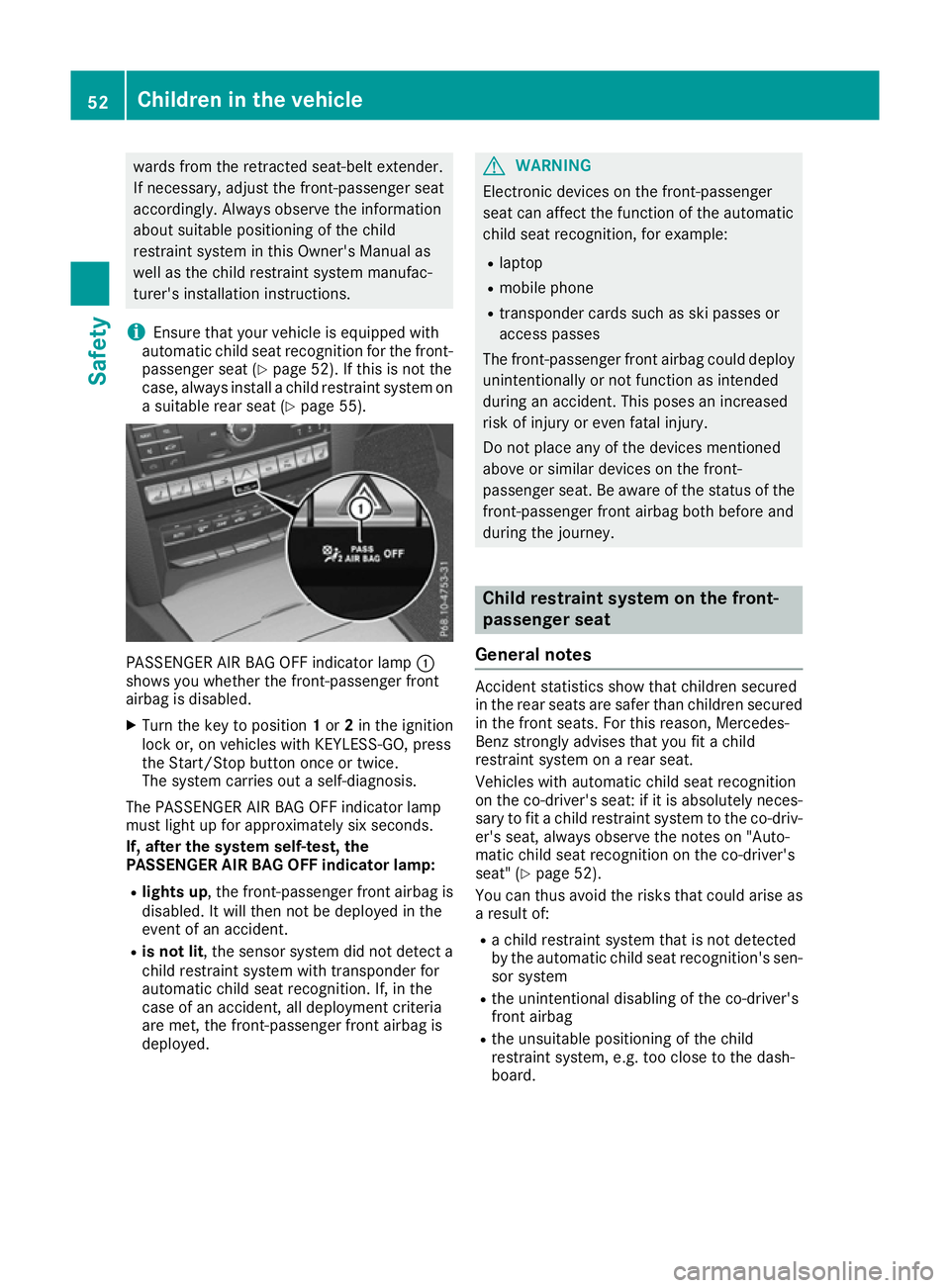
case, always install a child restraint system on a suitable rear seat (Y page 55).PASSENGER AIR BAG OFF indicator lamp
:
shows you whether the front-passenger front
airbag is disabled.
X Turn the key to position 1or 2in the ignition
lock or, on vehicles with KEYLESS-GO, press
the Start/Stop button once or twice.
The system carries out a self-diagnosis.
The PASSENGER AIR BAG OFF indicator lamp
must light up for approximately six seconds.
If, after the system self-test, the
PASSENGER AIR BAG OFF indicator lamp:
R lights up , the front-passenger front airbag is
disabled. It will then not be deployed in the
event of an accident.
R is not lit , the sensor system did not detect a
child restraint system with transponder for
automatic child seat recognition. If, in the
case of an accident, all deployment criteria
are met, the front-passenger front airbag is
deployed. G
WARNING
Electronic devices on the front-passenger
seat can affect the function of the automatic
child seat recognition, for example:
R laptop
R mobile phone
R transponder cards such as ski passes or
access passes
The front-passenger front airbag could deploy unintentionally or not function as intended
during an accident. This poses an increased
risk of injury or even fatal injury.
Do not place any of the devices mentioned
above or similar devices on the front-
passenger seat. Be aware of the status of the front-passenger front airbag both before and
during the journey. Child restraint system on the front-
passenger seat
General notes Accident statistics show that children secured
in the rear seats are safer than children secured
in the front seats. For this reason, Mercedes-
Benz strongly advises that you fit a child
restraint system on a rear seat.
Vehicles with automatic child seat recognition
on the co-driver's seat: if it is absolutely neces-
sary to fit a child restraint system to the co-driv- er's seat, always observe the notes on "Auto-
matic child seat recognition on the co-driver's
seat" (Y page 52).
You can thus avoid the risks that could arise as
a result of:
R a child restraint system that is not detected
by the automatic child seat recognition's sen-
sor system
R the unintentional disabling of the co-driver's
front airbag
R the unsuitable positioning of the child
restraint system, e.g. too close to the dash-
board. 52
Children in the vehicleSafety