check engine MERCEDES-BENZ E-Class COUPE 2016 C207 Owner's Manual
[x] Cancel search | Manufacturer: MERCEDES-BENZ, Model Year: 2016, Model line: E-Class COUPE, Model: MERCEDES-BENZ E-Class COUPE 2016 C207Pages: 318, PDF Size: 7.35 MB
Page 6 of 318
Assistance display (on-board com-
puter).................................................. 191
Assistance menu (on-board com-
puter) .................................................. 191
ASSYST PLUS
Displayin g a service message ........ 258
Hiding a service message .............. 258
Resetting the service interval dis-
play ................................................ 258
Se rvice message ............................ 257
Spe cial service requirements ........ .258
ATA (Anti-Theft Alarm system)
Activating/deactivating ................... 72
Function ...........................................7 2
Switching off the alarm .................... 72
ATTENTION ASSIST
Activating/deactivating ................. 192
Display message ............................ 209
Function/notes ............................. 172
Audio 20
Switching on/off ........................... 230
Audio system
see separate operating instructions
Authorized Mercedes-Benz Center
see Qualified specialist workshop
Authorized workshop
see Qualified specialist workshop
AUTO lights
Display message ............................ 206
see Lights
Automatic car wash (care) ............... 259
Automatic engine start (ECO start/
stop function) .................................... 125
Automatic engine switch-off (ECO
start/stop function) .......................... 125
Automatic headlamp mode .............. 103
Automatic transmission
Accelerator pedal position ............. 130
Automatic drive program ............... 132
C
hanging gear ............................... 130
DIRECT SELECT lever ..................... 128
Display message ............................ 215
Drive program display .................... 128
Driving tips .................................... 130
Emergency running mode .............. 135
Engaging drive position .................. 129
Engaging neutral ............................ 129 Engaging park position automati-
cally ............................................... 129
Engaging reverse gear ................... 129
Engaging the park position ............ 128
Kickdown ....................................... 131
Manual drive program .................... 132
Manual drive program (vehicles
with Sports package AMG) ............ 133
Overview ........................................ 128
Problem (malfunction) ................... 135
Program selector button ................ 131
Pulling away ................................... 124
Starting the engine ........................ 124
Steering wheel paddle shifters ...... 132
Transmission position display
(DIRECT SELECT lever) ................... 128
Transmission positions .................. 130
Automatic transmission emer-
gency mode ....................................... 135
B
Back button ....................................... 230
Bag hook ............................................ 238
BAS (Brake Assist System) ................. 63
BAS PLUS (Brake Assist System
PLUS) with Cross-Traffic Assist
Function/notes ................................ 63
BAS PLUS with Cross-Traffic Assist
(Brake Assist PLUS with Cross-
Traffic Assist)
Important safety notes .................... 63
Battery (SmartKey)
Checking .......................................... 76
Important safety notes .................... 75
Replacing ......................................... 76
Battery (vehicle)
Charging ........................................ 272
Display message ............................ 208
Important safety notes .................. 270
Jump starting ................................. 274
Belt
see Seat belts
Blind Spot Assist
Activating/deactivating (on-
board computer) ............................ 193
Display message ............................ 210
Notes/function .............................. 175
4Index
Page 8 of 318
On the front-passenger seat ............ 60
Rearward-facing restraint system ....60
Top Tether ....................................... 59
Child-proof locks
Important safety notes .................... 61
Children
Special seat belt retractor ............... 57
Cigarette lighter ................................ 242
Cleaning
Mirror turn signal ........................... 262
Climate control
Automatic climate control (3-
zone) ..............................................1 13
Controlling automatically ...............1 15
Cooling with air dehumidification .. 115
Defrosting the windows ................. 118
Defrosting the windshield .............. 117
Dual-zone automatic climate con-
trol ................................................. 112
General notes ................................ 111
Indicator lamp ................................ 115
Information about using auto-
matic climate control ..................... 114
Maximum cooling .......................... 117
Overview of systems ......................1 11
Problem with the rear window
defroster ........................................ 119
Problems with cooling with air
dehumidification ............................ 115
Rear control panel ......................... 113
Refrigerant ..................................... 313
Refrigerant filling capacity ............. 313
Setting the air distribution ............. 116
Setting the air vents ......................1 20
Setting the airflow ......................... 117
Setting the climate mode ...............1 16
Setting the temperature ................ 116
Setting the temperature with 3-
zone automatic climate control ..... 116
Setting the temperature with dual-
zone automatic climate control ..... 116
Switching air-recirculation mode
on/off ............................................ 119
Switching on/off ........................... 114
Switching residual heat on/off ...... 119
Sw
itching the rear window
defroster on/off ............................ 118 Switching the ZONE function on/
off ..................................................1
17
Cockpit
Overview .......................................... 32
see Instrument cluster
COLLISION PREVENTION ASSIST
PLUS
Activating/deactivating ................. 192
Display message ............................ 200
Operation/notes .............................. 65
COMAND
Switching on/off ........................... 230
COMAND display
Cleaning ......................................... 263
Combination switch .......................... 104
Connecting a USB device
see also Digital Operator's Man-
ual ..................................................2 29
Consumption statistics (on-board
computer) .......................................... 187
Controller ...........................................2 30
Convenience closing feature .............. 84
Convenience opening feature ............ 83
Coolant (engine)
Checking the level ......................... 256
Display message ............................ 207
Filling capacity ............................... 312
Important safety notes .................. 312
Temperature gauge ........................ 184
Warning lamp ................................. 225
Cooling
see Climate control
Copyright ............................................. 31
Cornering light function
Display message ............................ 206
Function/notes .............................1 05
Cruise control
Activation conditions ..................... 145
Cruise control lever ....................... 145
Deactivating ................................... 146
Display message ............................ 213
Driving system ............................... 145
Function/notes .............................1 45
Important safety notes .................. 145
Setting a speed .............................. 146
Storing and maintaining current
speed ............................................. 145
6Index
Page 10 of 318
EBD (electronic brake force distri-
bution) ............................................. 69
ESP
®(Electronic Stability Pro-
gram) ............................................... 67
Important safety information ........... 62
Overview .......................................... 62
PRE-SAFE
®Brake ............................. 69
STEER CONTROL ............................. 71
Driving systems
360°camera .................................. 169
Active Blind Spot Assist ................. 178
Active Driving Assistance pack-
age .................................................1 78
Active Lane Keeping Assist ............ 181
Active Parking Assist ..................... 161
ATTENTION ASSIST ........................ 172
Blind Spot Assist ............................ 175
Cruise control ................................ 145
Display message ............................ 209
DISTRONIC PLUS ........................... 147
DISTRONIC PLUS with Steering
Assist and Stop&Go Pilot ...............1 54
Dynamic handling package with
sports mode .................................. 157
HOLD function ............................... 156
Lane Keeping Assist ......................1 77
Lane Tracking package .................. 175
PARKTRONIC ................................. 158
Rear view camera .......................... 165
Traffic Sign Assist .......................... 174
Driving tips
Automatic transmission ................. 130
Brakes ...........................................1 42
Break-in period .............................. 121
Downhill gradient ........................... 142
Drinking and driving ....................... 141
Driving in winter .............................1 44
Driving on flooded roads ................ 144
Driving on wet roads ......................1 43
Exhaust check ............................... 141
Fuel ................................................ 140
General .......................................... 140
Hydroplaning ................................. 143
Icy road surfaces ........................... 144
Limited braking efficiency on sal-
ted roads ....................................... 143
Snow chains .................................. 283
Wet roa
d surface ........................... 142 DVD video
Operating (on-board computer) ..... 189
see also Digital Operator's Man-
ual ..................................................2 29
Dynamic handling package with
sports mode ....................................... 157
E
E10
see Fuel
EASY-ENTRY feature
Activating/deactivating ................. 195
Function/notes ................................ 98
EASY-EXIT feature
Crash-responsive .............................9 9
Function/notes ................................ 98
Switching on/off ........................... 195
EBD (electronic brake force distri-
bution)
Display message ............................ 199
Function/notes ................................ 69
ECO display
Function/notes ............................. 141
On-board computer ....................... 187
ECO start/stop function
Automatic engine start .................. 125
Automatic engine switch-off .......... 125
Deactivating/activating ................. 126
General information ....................... 125
Important safety notes .................. 125
Introduction ................................... 125
Electronic Stability Program
see ESP
®(Electronic Stability Program)
Emergency
Automatic measures after an acci-
dent ................................................. 56
Emergency release
Driver's door .................................... 80
Trunk ............................................... 82
Vehicle ............................................. 80
Emergency spare wheel
General notes ................................ 304
Important safety notes .................. 304
Removing ....................................... 305
Storage location ............................ 305
Stowing .......................................... 305
Technical data ............................... 304
8Index
Page 11 of 318
Emergency Tensioning DevicesActivation ........................................ .52
Emissions control
Service and warranty information .... 25
Engine
Check Engine warning lamp .......... .225
Display message ............................ 207
ECO start/stop function ................ 125
Engine number ............................... 308
Irregular running ............................ 127
Jump-starting ................................. 274
Starting problems .......................... 127
Starting the engine with the
SmartKey ....................................... 124
Starting with KEYLESS-GO ............. 124
Switching off .................................. 139
Tow-starting (vehicle) ..................... 278
Engine electronics
Problem (malfunction) ................... 127
Engine jump starting
see Jump starting (engine)
Engine oil
Adding ...........................................2 56
Additives ........................................ 311
Checking the oil level ..................... 255
Checking the oil level using the
dipstick .......................................... 255
Display message ............................ 208
Filling capacity ............................... 311
Notes about oil grades ................... 311
Notes on oil level/consumption .... 255
Entering an address
see also Digital Operator's Man-
ual ..................................................2 29
ESP
®(Electronic Stability Pro-
gram)
Characteristics ................................. 68
Deactivating/activating ................. 191
Deactivating/activating (notes) ....... 68
Display message ............................ 198
Function/notes ................................ 67
General notes .................................. 67
Important safety information ........... 67
Trailer stabilization ........................... 69
Warning lamp ................................. 222
ETS/4ETS (Electronic Traction Sys-
tem) ...................................................... 67 Exhaust check
................................... 141
Exhaus t pipe (
cleaning instruc-
tions) ..................................................2 63
Exterior lighting
Setting options .............................. 103
see Lights
Exterior mirrors
Adjusting ......................................... 99
Dipping (automatic) ....................... 100
Folding in when locking (on-board
computer) ...................................... 196
Folding in/out (automatically) ....... 100
Folding in/out (electrically) ........... 100
Out of position (troubleshooting) ... 100
Setting ........................................... 100
Storing settings (memory func-
tion) ............................................... 102
Storing the parking position .......... 101
F
FavoritesOverview ........................................ 231
Filler cap
see Refueling
Flat tire
MOExtended tires .......................... 266
Preparing the vehicle ..................... 266
TIREFIT kit ...................................... 267
see Emergency spare wheel
Floormats ........................................... 253
Frequencies
Mobile phone ................................. 306
Two-way radio ................................ 306
Fuel
Consumption statistics .................. 187
Displaying the current consump-
tion ................................................ 187
Displaying the range ...................... 187
Driving tips .................................... 140
Flexible fuel vehicles ...................... 310
Fuel gauge ....................................... 33
Grade (gasoline) ............................ 309
Important safety notes .................. 309
Problem (malfunction) ................... 138
Refueling ........................................ 135
Tank content/reserve fuel ............. 309
Index9
Page 18 of 318
Important safety guidelines .............42
Introduction .....................................4 1
Releasin g ......................................... 44
Switching belt adjustment on/off
(on-board computer) ...................... 196
Warning lamp ................................. 220
Warning lamp (function) ................... 45
Seats
Adjusting (electrically) ..................... 92
Adjusting the 4-way lumbar sup-
port .................................................. 94
Adjusting the head restraint ............ 93
Adjusting the multicontour seat ....... 94
Cleaning the cover ......................... 264
Correct driver's seat position ........... 91
Folding the backrests forward/
back ................................................. 93
Important safety notes .................... 91
Overview .......................................... 91
Seat backrest display message ..... 217
Seat heating .................................... 95
Seat heating problem ...................... 96
Storing settings (memory func-
tion) ............................................... 102
Switching seat heating on/off ......... 95
Switching seat ventilation on/
off .................................................... 95
Section
Trunk ............................................... 80
Securing cargo .................................. 238
Selector lever
Cleaning ......................................... 263
Sensors (cleaning instructions) ....... 262
Service menu (on-board com-
puter) .................................................. 193
Service message
see ASSYST PLUS
Service products
Brake fluid ..................................... 311
Coolant (engine) ............................ 312
Engine oil ....................................... 311
Fuel ................................................ 309
Important safety notes .................. 308
Refrigerant (air-conditioning sys-
tem) ............................................... 313
Washer fluid ................................... 312
Setting the air distribution ............... 116Setting the airflow
............................ 117
Setting the date/time format
see also Digital Operator's Man-
ual .................................................. 229
Setting the language
see also Digital Operator's Man-
ual .................................................. 229
Setting the time
see also Digital Ope rator's Ma
n-
ual .................................................. 229
Settings
Factory (on-board computer) ......... 196
On-board computer ....................... 193
Side impact air bag ............................. 47
Side marker lamp (display mes-
sage) ................................................... 206
Side windows
Cleaning ......................................... 261
Convenience closing feature ............ 84
Convenience opening feature .......... 83
Important safety information ........... 82
Opening/closing .............................. 83
Problem (malfunction) ..................... 86
Resetting ......................................... 85
Reversing feature ............................. 82
SIRIUS services
see also Digital Operator's Man-
ual .................................................. 229
Sliding sunroof
see Panorama roof with power
tilt/sliding panel
SmartKey
Changing the battery ....................... 76
Changing the programming ............. 74
Checking the battery ....................... 76
Convenience closing feature ............ 84
Convenience opening feature .......... 83
Display message ............................ 218
Door central locking/unlocking ....... 73
Important safety notes .................... 73
Loss ................................................. 77
Mechanical key ................................ 75
Overview .......................................... 73
Positions (ignition lock) ................. 122
Problem (malfunction) ..................... 77
Starting the engine ........................ 124
16Index
Page 22 of 318
Locking (in an emergency) ............... 80
Locking (SmartKey) .......................... 73
Lowering ........................................ 303
Maintenance .................................... 26
Parking for a long period ................ 140
Pulling away ................................... 124
Raising ........................................... 301
Reporting problems ......................... 28
Securing from rolling away ............ 300
Towing away .................................. 276
Transporting .................................. 278
Unlocking (in an emergency) ........... 80
Unlocking (SmartKey) ...................... 73
Vehicle data ................................... 313
Vehicle data ....................................... 313
Vehicle dimensions ........................... 313
Vehicle emergency locking ................ 80
Vehicle identification number
see VIN
Vehicle identification plate .............. 307
Vehicle tool kit .................................. 266
Video
Operating the DVD ......................... 189
see also Digital Operator's Man-
ual .................................................. 229
VIN
Seat ............................................... 308
Type plate ...................................... 307
Voice Control System
see Separate operating instructions
W
Warning and indicator lampsABS ................................................ 222
Brakes ........................................... 221
Check Engine ................................. 225
Coolant .......................................... 225
Distance warning ........................... 227
ESP
®.............................................. 222
ESP®OFF ....................................... 223
Fuel tank ........................................ 225
General notes ................................ 219
Overview .......................................... 33
PASSENGER AIR BAG OFF ............... 41
Reserve fuel ................................... 225
Restraint system ............................ 224
Seat belt ........................................ 220 Tire pressure monitor .................... 228
Warranty .............................................. 25
Washer fluid
Display message ............................ 218
Wheel and tire combinations
Tires ............................................... 303
Wheel bolt tightening torque ........... 303
Wheel chock ...................................... 300
Wheels
Changing a wheel .......................... 299
Checking ........................................ 281
Cleaning ......................................... 261
Emergency spare wheel ................. 304
Important safety notes .................. 281
Information on driving .................... 281
Interchanging/changing ................ 299
Mounting a new wheel ................... 302
Mounting a wheel .......................... 300
Removing a wheel .......................... 302
Storing ........................................... 300
Tightening torque ........................... 303
Wheel size/tire size ....................... 303
Window curtain air bag
Operation ......................................... 48
Windows
see Side windows
Windshield
Defrosting ...................................... 117
Windshield washer fluid
see Windshield washer system
Windshield washer system
Adding washer fluid ....................... 257
Important safety notes .................. 312
Windshield wipers
Problem (malfunction) ................... 110
Replacing the wiper blades ............ 109
Switching on/off ........................... 108
Winter driving
Important safety notes .................. 283
Slippery road surfaces ................... 144
Snow chains .................................. 283
Winter tires
M+S tires ....................................... 283
Wiper blades
Cleaning ......................................... 261
Important safety notes .................. 109
Replacing ....................................... 109
20Index
Page 43 of 318
regular intervals while the engine is running.
Therefore, malfunctions can be detected in
good time.
The6 restraint system warning lamp in the
instrument cluster lights up when the ignition is
switched on. It goes out no later than a few sec-
onds after the vehicle is started. The compo-
nents of the restraint system are in operational
readiness.
A malfunction has occurred if the 6restraint
system warning lamp:
Rdoes not light up after the ignition is switched
on
Rdoes not go out after a few seconds with the
engine running
Rlights up again while the engine is running
GWARNING
If restraint system is malfunctioning, restraint
system components may be triggered unin-
tentionally or might not be triggered at all in
the event of an accident with a high rate of
vehicle deceleration. This can affect the Emer- gency Tensioning Device or air bag, for exam-
ple. This poses an increased risk of injury or
even fatal injury.
Have the restraint system checked and
repaired in a qualified specialist workshop as
soon as possible.
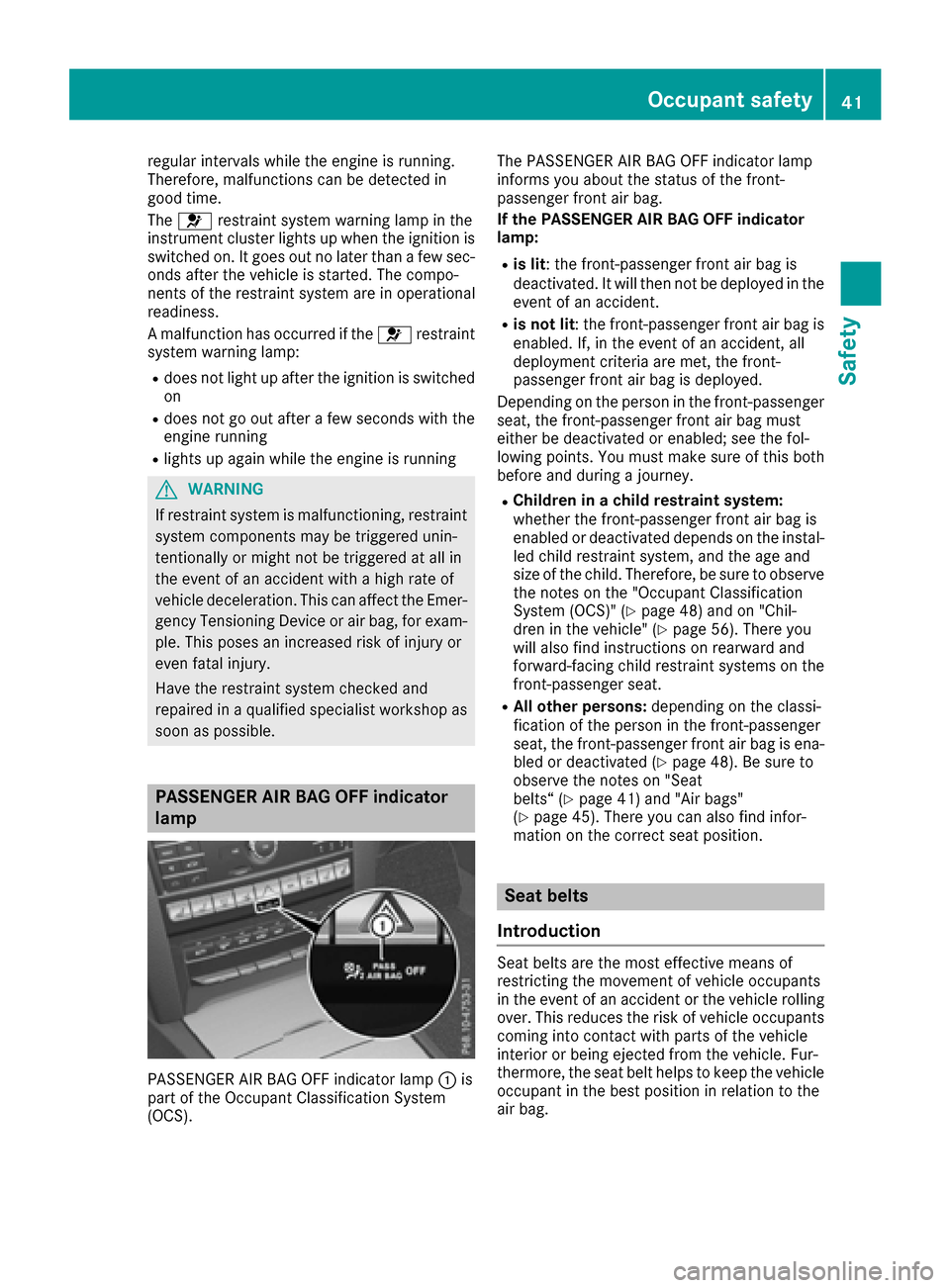
PASSENGER AIR BAG OFF indicator
lamp
PASSENGER AIR BAG OFF indicator lamp :is
part of the Occupant Classification System
(OCS). The PASSENGER AIR BAG OFF indicator lamp
informs you about the status of the front-
passenger front air bag.
If the PASSENGER AIR BAG OFF indicator
lamp:
Ris lit: the front-passenger front air bag is
deactivated. It will then not be deployed in the
event of an accident.
Ris not lit
: the front-passenger front air bag is
enabled. If, in the event of an accident, all
deployment criteria are met, the front-
passenger front air bag is deployed.
Depending on the person in the front-passenger
seat, the front-passenger front air bag must
either be deactivated or enabled; see the fol-
lowing points. You must make sure of this both
before and during a journey.
RChildren in a child restraint system:
whether the front-passenger front air bag is
enabled or deactivated depends on the instal-
led child restraint system, and the age and
size of the child. Therefore, be sure to observe the notes on the "Occupant Classification
System (OCS)" (
Ypage 48) and on "Chil-
dren in the vehicle" (Ypage 56). There you
will also find instructions on rearward and
forward-facing child restraint systems on the
front-passenger seat.
RAll other persons: depending on the classi-
fication of the person in the front-passenger
seat, the front-passenger front air bag is ena-
bled or deactivated (
Ypage 48). Be sure to
observe the notes on "Seat
belts“ (
Ypage 41) and "Air bags"
(Ypage 45). There you can also find infor-
mation on the correct seat position.
Seat belts
Introduction
Seat belts are the most effective means of
restricting the movement of vehicle occupants
in the event of an accident or the vehicle rolling
over. This reduces the risk of vehicle occupants coming into contact with parts of the vehicle
interior or being ejected from the vehicle. Fur-
thermore, the seat belt helps to keep the vehicle
occupant in the best position in relation to the
air bag.
Occupant safety41
Safety
Z
Page 64 of 318
Pets in the vehicle
GWARNING
If you leave animals unattended or unsecured
in the vehicle, they could press buttons or
switches, for example.
As a result, they could:
Ractivate vehicle equipment and become
trapped, for example
Ractivate or deactivate systems, thereby
endangering other road users
Unsecured animals could also be flung around
the vehicle in the event of an accident or sud-
den steering or braking, thereby injuring vehi-
cle occupants. There is a risk of an accident
and injury.
Never leave animals unattended in the vehi-
cle. Always secure animals properly during
the journey, e.g. use a suitable animal trans-
port box.
Driving safety systems
Overview of driving safety systems
In this section, you will find information about
the following driving safety systems:
RABS (Anti-lock BrakingSystem)
(Ypage 62)
RBAS ( Brake Assist System) (Ypage 63)
RBAS PLUS ( BrakeAssist System PLUS) with
Cross-Traffic Assist (Ypage 63)
RCOLLISION PREVENTION ASSIST PLUS
(Ypage 65)
RESP®(Electronic StabilityProgram)
(Ypage 67)
REBD ( Electronic Brake force Distribution)
(Ypage 69)
RADAPTIVE BRAKE (Ypage 69)
RPRE-SAFE®Brake (Ypage 69)
RSTEER CONTROL (Ypage 71)
Important safety notes
If you fail to adapt your driving style or if you are
inattentive, the driving safety systems can nei- ther reduce the risk of an accident nor override
the laws of physics. Driving safety systems are
merely aids designed to assist driving. You are
responsible for maintaining the distance to the
vehicle in front, for vehicle speed, for braking in
good time, and for staying in lane. Always adapt
your driving style to suit the prevailing road and weather conditions and maintain a safe distance
from the vehicle in front. Drive carefully.
The driving safety systems described only work as effectively as possible when there is ade-
quate contact between the tires and the road
surface. Please pay special attention to the
notes on tires, recommended minimum tire
tread depths, etc. (
Ypage 281).
In wintry driving conditions, always use winter
tires (M+S tires) and if necessary, snow chains.
Only in this way will the driving safety systems
described in this section work as effectively as
possible.
ABS (Anti-lock Braking System)
General information
ABS regulates brake pressure in such a way that
the wheels do not lock when you brake. This
allows you to continue steering the vehicle when
braking.
The ! ABS warning lamp in the instrument
cluster lights up when the ignition is switched
on. It goes out when the engine is running.
ABS works from a speed of about 5 mph
(8 km/h), regardless of road-surface conditions.
ABS works on slippery surfaces, even when you
only brake gently.
Important safety notes
iObserve the "Important safety notes" sec-
tion (Ypage 62).
GWARNING
If ABS is faulty, the wheels could lock when
braking. The steerability and braking charac-
teristics may be severely impaired. Addition-
ally, further driving safety systems are deac-
tivated. There is an increased danger of skid-
ding and accidents.
Drive on carefully. Have ABS checked imme-
diately at a qualified specialist workshop.
62Driving safety systems
Safety
Page 69 of 318
XKeep the brake pedal depressed until the
emergency braking situation is over.
ABS prevents the wheels from locking.
The brakes will work normally again if:
Ryou release the brake pedal.
Rthere is no longer any danger of a collision.
Rno obstacle is detected in front of your vehi-
cle.
Adaptive Brake Assist is then deactivated.
Important safety notes
iObserve the "Important safety notes" sec-
tion for driving safety systems (Ypage 62).
GWARNING
Adaptive Brake Assist cannot always clearly
identify objects and complex traffic situa-
tions.
In such cases, Adaptive Brake Assist can:
Rintervene unnecessarily
Rnot intervene
There is a risk of an accident.
Always pay careful attention to the traffic sit- uation and be ready to brake. Terminate the
intervention in a non-critical driving situation.
GWARNING
Adaptive Brake Assist does not react:
Rto people or animals
Rto oncoming vehicles
Rto crossing traffic
Rwhen cornering
As a result, the Adaptive Brake Assist may not
intervene in all critical conditions. There is a
risk of an accident.
Always pay careful attention to the traffic sit- uation and be ready to brake.
Due to the nature of the system, particularly
complicated but non-critical driving conditions
may also cause Brake Assist to intervene.
If adaptive Brake Assist is not available due to a
malfunction in the radar sensor system, the
brake system remains available with full brake
boosting effect and BAS.
ESP®(Electronic Stability Program)
General notes
iObserve the "Important safety notes" sec-
tion (Ypage 62).
ESP
®monitors driving stability and traction, i.e.
power transmission between the tires and the
road surface.
If ESP
®detects that the vehicle is deviating from
the direction desired by the driver, one or more
wheels are braked to stabilize the vehicle. The
engine output is also modified to keep the vehi-
cle on the desired course within physical limits.
ESP
®assists the driver when pulling away on
wet or slippery roads. ESP®can also stabilize
the vehicle during braking.
ETS/4ETS (Electronic Traction System)
ETS traction control is part of ESP®. On vehicles
with 4MATIC, 4ETS is part of ESP®.
Traction control brakes the drive wheels indi-
vidually if they spin. This enables you to pull
away and accelerate on slippery surfaces, for
example if the road surface is slippery on one
side. In addition, more drive torque is transfer-
red to the wheel or wheels with traction.
Traction control remains active, even if you
deactivate ESP
®.
Important safety notes
iObserve the "Important safety notes" sec-
tion (Ypage 62).
GWARNING
If ESP
®is malfunctioning, ESP®is unable to
stabilize the vehicle. Additionally, further driv-
ing safety systems are deactivated. This
increases the risk of skidding and an accident.
Drive on carefully. Have ESP
®checked at a
qualified specialist workshop.
!Vehicles with 4MATIC: function or perform-
ance tests may only be carried out on a 2-axle dynamometer. Before you operate the vehicle
on such a dynamometer, please consult a
qualified workshop. You could otherwise
damage the drive train or the brake system.
Driving safety systems67
Safety
Z
Page 71 of 318
RPRE-SAFE®is no longer available, nor is it
activated if you brake firmly and ESP®inter-
venes.
RPRE-SAFE®Brake is no longer available, it is
also not activated if you brake firmly and ESP®
intervenes.
RESP®still provides support when you brake
firmly.
ESP®trailer stabilization
General information
If your vehicle/trailer combination begins to
swerve, ESP®assists you in this situation. ESP®
slows the vehicle down by braking and limiting
the engine output until the vehicle/trailer com-
bination has stabilized.
Important safety notes
GWARNING
If road and weather conditions are poor,
trailer stabilization will not be able to prevent
the vehicle/trailer combination from swerv-
ing. Trailers with a high center of gravity can
tip over before ESP
®can detect this. There is
a risk of an accident.
Always adapt your driving style to the prevail-
ing road and weather conditions.
If your vehicle with trailer (vehicle/trailer com-
bination) begins to lurch, you can only stabilize
the vehicle/trailer combination by depressing
the brake firmly.
ESP
®trailer stabilization is active above speeds
of about 65 km/h.
ESP
®trailer stabilization does not work if ESP®
is deactivated or disabled because of a malfunc-
tion.
EBD (electronic brake force distribu-
tion)
General information
EBD monitors and controls the brake pressure
on the rear wheels to improve driving stability
while braking.
Important safety notes
iObserve the "Important safety notes" sec-
tion for driving safety systems (Ypage 62).
GWARNING
If EBD is malfunctioning, the rear wheels can
lock, e.g. under full braking. This increases the
risk of skidding and an accident.
You should therefore adapt your driving style
to the different handling characteristics. Have
the brake system checked at a qualified spe-
cialist workshop.
Observe information regarding indicator and
warning lamps (
Ypage 222) as well as display
messages (Ypage 199).
ADAPTIVE BRAKE
i
Observe the "Important safety notes" sec-
tion (Ypage 62).
ADAPTIVE BRAKE enhances braking safety and
offers increased braking comfort. In addition to
the braking function, ADAPTIVE BRAKE also has
the HOLD function (
Ypage 156) and hill start
assist (Ypage 124).
PRE-SAFE®Brake
General information
PRE-SAFE®Brake can help you to minimize the
risk of a collision with a vehicle ahead or a
pedestrian, and reduce the effects of such a
collision. If PRE-SAFE
®Brake has detected a risk
of collision, you will be warned visually and
acoustically as well as by automatic braking.
iPay attention to the important safety notes
in the "Driving safety systems" section
(
Ypage 62).
PRE ‑SAFE
®Brake is only available in vehicles
with the Driving Assistance Plus package.
For PRE-SAFE
®Brake to assist you when driving,
the radar sensor system and the camera system
must be switched on and be operational.
With the help of the radar sensor system and the
camera system, PRE-SAFE
®Brake can detect
obstacles that are in front of your vehicle for an extended period of time.
Driving safety systems69
Safety
Z